



Table of contents

Writing a blog post is a nine-step process: pick one job for the page, research the query, outline it, draft fast, add proof, edit in three passes, format for scanning, optimise the on-page basics, then publish and measure.
Below is that process with the real numbers behind it — how long a post takes, how long it should be, and the format decisions that decide whether anyone finishes reading.
Key Takeaways
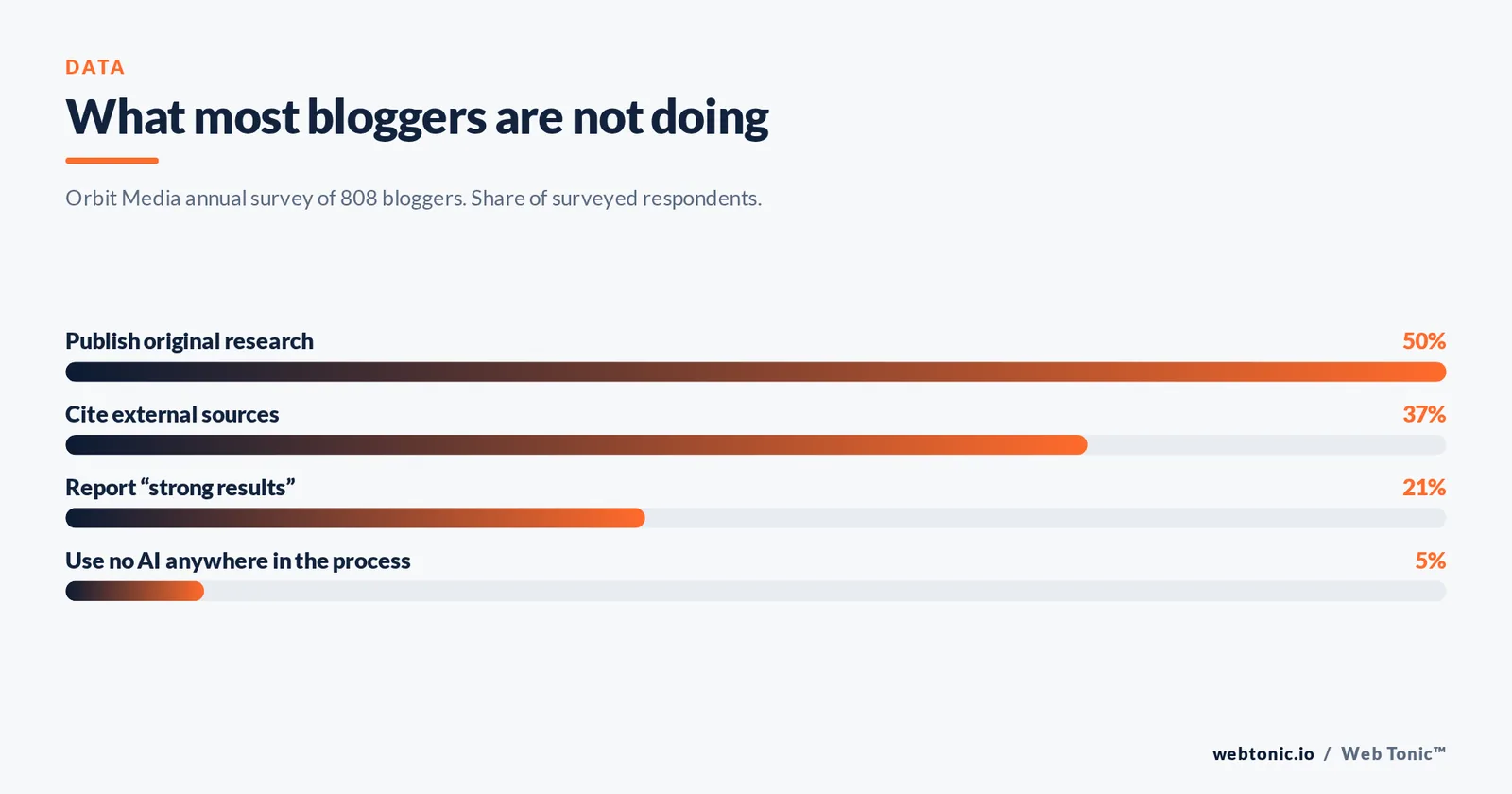
- The average blog post in 2025 runs 1,333 words and takes just under 3.5 hours to write, according to Orbit Media's annual survey of 808 bloggers.
- Only 21% of those bloggers report "strong results" — the gap is almost never writing talent, it is choosing posts nobody searches for.
- The share of marketers who use no AI in their process fell from 65% to 5% in 24 months, which makes original proof the only remaining differentiator.
- Just 37% of bloggers cite external sources, so linking to primary data is a cheap credibility advantage.
- Roughly half of content programmes now publish original research, and 25% of those report strong results — double the baseline.
- Organic clicks from search are down 10-20% year over year while LLM referrals contribute about 1% of net new traffic and leads: write for the answer, not just the ranking.
- Google still handles roughly 91% of global search, so its own documentation is the specification you write against.
- Readers scan in an F-shaped pattern and read a minority of words on a page — front-load every section.
- Budget 9 steps and three separate editing passes; one combined "edit" pass is where quality dies.
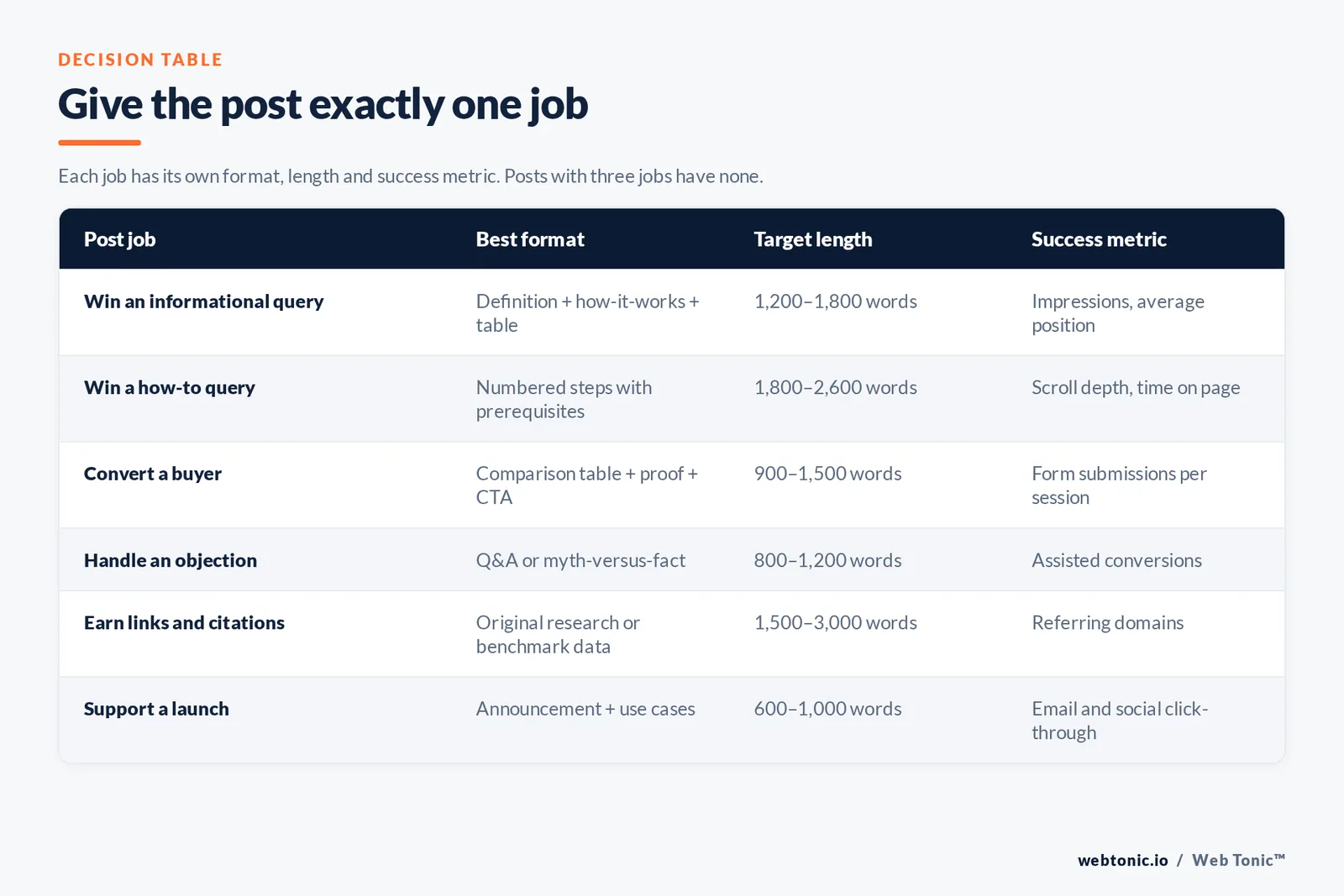
Step 1 — Give the post exactly one job
Before a word gets written, name the single thing the page must do: rank for one query, convert one segment, answer one objection, or support one campaign. Posts that try to do three of those become the shapeless "ultimate guide" nobody links to.
Write the job as one sentence at the top of your draft file and delete it before publishing. Google's own guidance on creating helpful, people-first content is blunt about this: content written for a specific reader with first-hand experience outperforms content written to fill a slot in a calendar.
| Post job | Best format | Target length | Primary success metric |
|---|---|---|---|
| Win an informational query | Definition + how-it-works + table | 1,200-1,800 words | Impressions and average position |
| Win a how-to query | Numbered steps with prerequisites | 1,800-2,600 words | Scroll depth and time on page |
| Convert a buyer | Comparison table + proof + CTA | 900-1,500 words | Form submissions per session |
| Handle an objection | Q&A or myth-versus-fact | 800-1,200 words | Assisted conversions |
| Earn links and citations | Original research or benchmark data | 1,500-3,000 words | Referring domains |
| Support a launch | Announcement + use cases | 600-1,000 words | Email and social click-through |
Step 2 — Research the query before the topic
A blog topic is what you want to say. A query is what someone typed. The second one pays. Start in a keyword tool to size demand, then read the top five results and note what all of them include — that shared set is the reader's minimum expectation, and anything missing from all five is your opening.
Three research artefacts are worth collecting for every post: the exact query and its variants, the questions people also ask, and two or three numbers you can cite. Moz's beginner's guide to SEO is still the cleanest free primer on how those signals fit together, and Ahrefs' own writing walkthrough shows the same competitive-gap habit applied to a live post.
If you have Search Console access to an existing blog, mine it first: queries where you rank positions 8-20 with real impressions are cheaper wins than any new topic. Google's Search Console help centre covers the performance report setup.
Step 3 — Outline the post as questions, then answer them
An outline made of statements produces essay prose. An outline made of questions produces headings that match how people search. Turn each H2 into the question a reader would ask at that point in the article, then answer it in the first two sentences under the heading.
Rule 1 — six to nine H2 sections is the working range for a 2,000-word post. Rule 2 — every section gets one job: define, compare, instruct, prove, or warn. Rule 3 — at least two sections should be a table rather than prose, because tables are the fastest way to answer a comparison question and the easiest thing to cite.
Step 4 — Draft fast, in one sitting
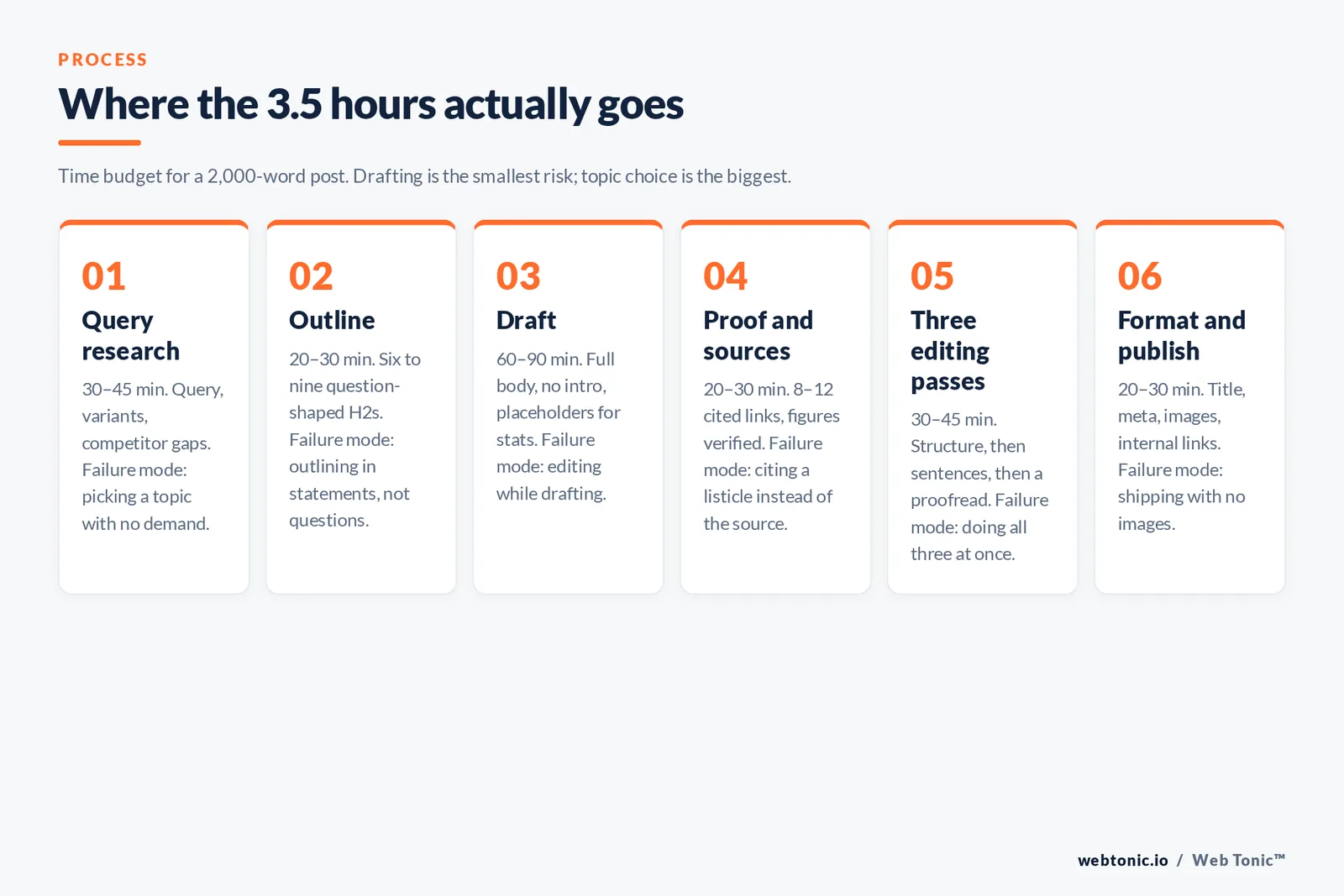
The survey average of just under 3.5 hours per post is not three and a half hours of typing — it is typically 60-90 minutes of drafting wrapped in research and editing. Drafting slowly is what turns a post into a two-week project that never ships.
Write the body first and the introduction last. Introductions written before the body always over-promise. Leave placeholder markers where you need a statistic rather than stopping to hunt for one; fill them all in a single research sweep afterwards.
| Stage | Time budget (2,000-word post) | Output | Most common failure |
|---|---|---|---|
| Query research | 30-45 minutes | Query, variants, competitor gaps | Picking a topic with no demand |
| Outline | 20-30 minutes | 6-9 question-shaped H2s | Outlining in statements, not questions |
| Draft | 60-90 minutes | Full body, no intro | Editing while drafting |
| Proof and sources | 20-30 minutes | 8-12 cited links, verified figures | Citing a listicle instead of the source |
| Three editing passes | 30-45 minutes | Structure, sentence, proofread | Doing all three at once |
| Format and publish | 20-30 minutes | Title, meta, images, internal links | Shipping with no images |
Step 5 — Add the proof only you have
When almost every writer has the same drafting assistant, the differentiator is evidence. With only 37% of bloggers citing external sources and around half of programmes publishing original research, a post with three cited primary figures and one internal data point already sits in the upper quartile.
Four kinds of proof, in ascending order of value: a cited third-party statistic, a named example with a result, a screenshot or chart from your own account, and original data from your own sample. Content Marketing Institute's article library is a reasonable model of how the last two are presented in practice, and it is what our own growth marketing team uses to decide whether a draft is publishable.
Step 6 — Edit in three separate passes
Pass one is structural: does each section answer its heading, and is anything in the wrong order? Pass two is sentence-level: cut hedges, split anything over 25 words, convert passive to active. Pass three is a proofread on a different device, ideally the next morning.
Limit 1: one idea per sentence. Limit 2: paragraphs of three sentences or fewer. Limit 3: aim for a Flesch Reading Ease of 60 or higher for general business audiences — the Flesch-Kincaid scale maps that to roughly an eighth-to-ninth grade reading level. Free tools such as Hemingway Editor flag the offending sentences in seconds.
| Editing pass | What you look for | What you change | Time on a 2,000-word draft |
|---|---|---|---|
| Pass 1: structure | Section order, missing answers, duplication | Move, merge or delete whole sections | 10-15 minutes |
| Pass 2: sentences | Long sentences, passive voice, hedging | Rewrite line by line, cut 10-15% of words | 15-20 minutes |
| Pass 3: proofread | Typos, broken links, wrong figures | Fix only; no rewriting allowed | 5-10 minutes |
Step 7 — Format for scanning, not for reading
Nielsen Norman Group's eye-tracking work found readers move through pages in an F-shaped pattern and, as their broader research on how users read on the web shows, they read a minority of the words on a typical page. Formatting is therefore not decoration; it is how the content gets consumed at all.
The working checklist: a descriptive H2 every 250-350 words, bolded key figures, bulleted lists for parallel items, tables for anything with two or more variables, an image every three to four sections, and no paragraph taller than a phone screen.
Step 8 — Do the on-page SEO basics, and stop there
Four things matter and they take ten minutes. Write a title that states the outcome, write a meta description that earns the click, use one H1 and a logical heading order, and give every image a descriptive alt attribute. Google documents how it generates title links and snippets, and its SEO starter guide covers the rest.
| Element | Practical target | Why it matters | Common mistake |
|---|---|---|---|
| Title tag | 50-60 characters, query near the front | Decides click-through from the results page | Clever headline with no query in it |
| Meta description | 120-155 characters, one benefit | Rewritten by Google if it is vague | Copying the first paragraph |
| URL slug | 3-5 words, hyphenated, no dates | Survives future updates to the post | Auto-generated slug with stop words |
| Headings | One H1, H2s as questions | Maps sections to search intent | Styling text bold instead of using H2s |
| Images | 4+ images, alt text over 25 characters | Accessibility plus image search | Empty or keyword-stuffed alt text |
| Internal links | 3-5 links to related pages | Distributes authority, keeps sessions alive | Linking only to the homepage |
| External links | 8-12 to primary sources | Evidence readers and reviewers can check | Citing aggregators, not the original data |
Step 9 — Publish, then treat the post as an asset
Publishing on a platform is the easy part; WordPress.com's setup documentation gets a blog live in under an hour, and any modern CMS handles the mechanics. What separates a blog that compounds from one that stalls is what happens in the 90 days afterwards.
Phase 1 (week 1): distribute to email and social, and add internal links from two or three older posts. Phase 2 (weeks 2-6): check impressions and average position weekly. Phase 3 (weeks 8-12): if the post is stuck between positions 8 and 20, expand the thinnest section, refresh the figures, and republish with an updated date.
With Google still handling around 91% of global search according to Statcounter, but organic clicks trending down 10-20%, the refresh loop matters more than raw publishing volume. Our data intelligence practice treats every post as a tracked asset with an owner and a review date, and the same discipline runs through the rest of the Web Tonic blog.
What makes a good blog post: the pre-publish checklist
Before a blog post goes live, run it against the twelve checks below. Each one takes seconds, and together they catch the problems readers notice first: a blog post that buries its answer, a post title that promises the wrong thing, or content that never says who it is for.
| Check | Pass condition | Why readers care |
|---|---|---|
| Answer position | The main answer appears in the first 2 sentences | Most readers decide to stay within seconds |
| Post title | Title states the outcome and contains the topic | The title is the only thing many people will read |
| Audience named | The intended reader is obvious by paragraph 3 | Content written for everyone helps no one |
| Scannability | A heading every 250-350 words, no wall of text | People scan blog posts before they read them |
| Proof | At least 3 cited figures with linked sources | Claims without evidence read as filler |
| Examples | Every abstract point has a concrete example | Examples are what people remember and share |
| Images | 4 or more images with descriptive alt text | Long blog posts without images lose mobile readers |
| Links | 3+ internal links, 8-12 external, all working | Broken links are the fastest trust killer |
| Call to action | One clear next step, not four competing ones | A post with no next step wastes the attention |
| Reading level | Short sentences, active voice, no jargon walls | Hard writing is skipped, not admired |
| Freshness | Every figure dated and current | Stale numbers make the whole blog look abandoned |
| Ownership | A named author and a review date | Anonymous content is harder to trust or update |
Two habits make the checklist cheap to run. First, keep it beside the draft while you write, so the blog post is built to pass rather than fixed afterwards. Second, hand the post to someone who is not you for the final read; a fresh reader finds the buried answer in under a minute, and that single step will do more for your writing than any tool.
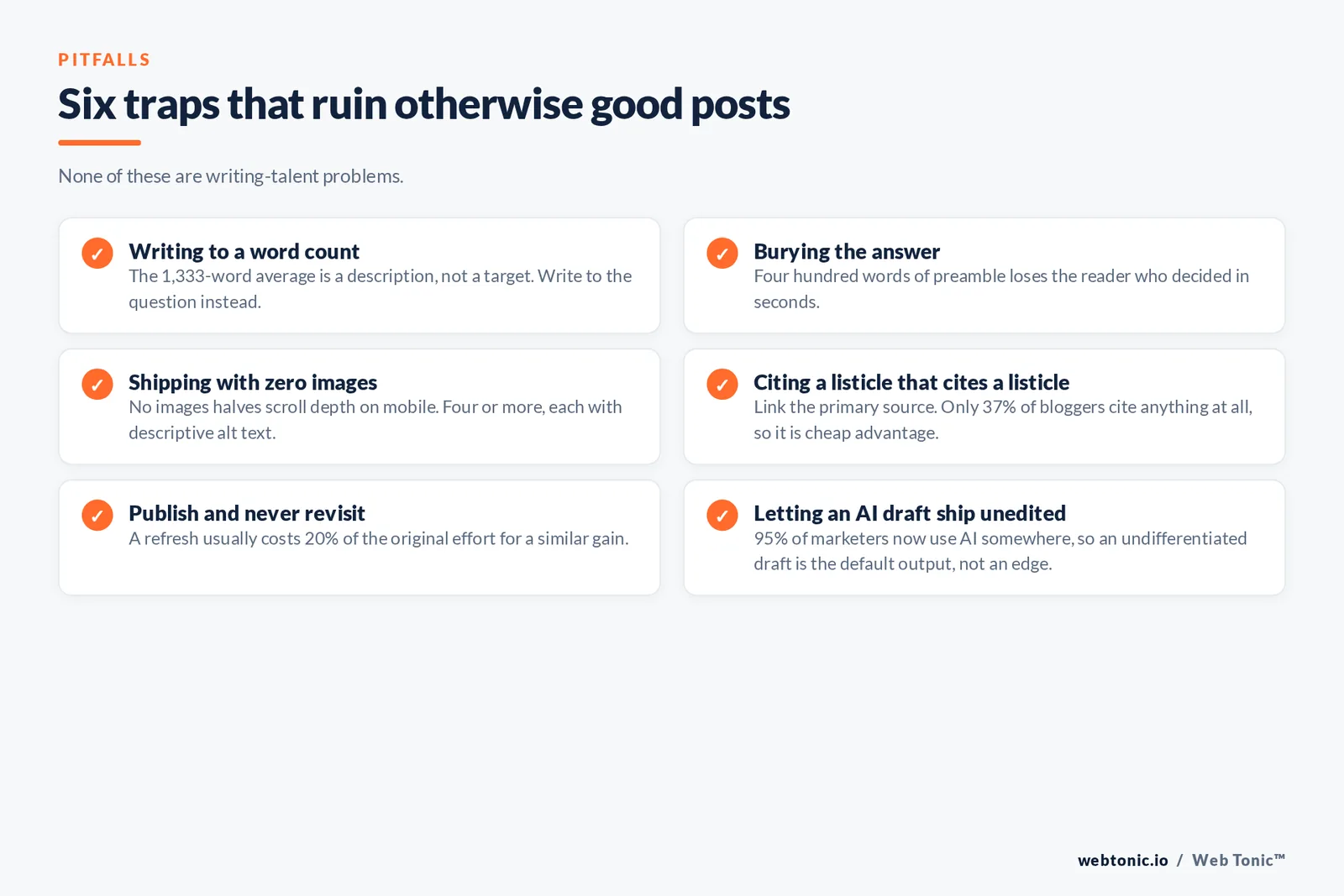
Six traps that ruin otherwise good posts
Trap 1 — writing to a word count instead of a question: the 1,333-word average is a description, not a target. Trap 2 — burying the answer below 400 words of preamble. Trap 3 — shipping with zero images, which halves scroll depth on mobile. Trap 4 — citing a listicle that cites a listicle. Trap 5 — publishing and never revisiting, when a refresh usually costs 20% of the original effort for a similar gain. Trap 6 — letting an AI draft ship unedited, now that 95% of marketers use AI somewhere in the process and undifferentiated drafts are the default output.
Where blog post ideas come from
Most writers stall at the blank page because they start with a blog topic instead of a reader. Good blog post ideas come from six repeatable sources, and each one tells you who the reader is before you write a word.
Work the list below every month and you will never start a blog post from nothing. Keep a running topic bank of at least 20 blog post ideas so the writing session begins with a decision already made.
| Source of blog post ideas | What you look for | Example blog post it produces | Reader it serves |
|---|---|---|---|
| Sales and support questions | Questions asked more than twice a month | "How much does X cost in 2026?" | Buyers close to a decision |
| Search data | Queries with volume and weak top results | A definitive how-to guide with a template | People starting their research |
| Your own analytics | Existing blog posts ranking 8-20 | An expanded, refreshed version of a live post | Readers who nearly found you |
| Competitor gaps | Topics every rival covers badly | A comparison post with a real decision table | Shortlisting buyers |
| Community threads | Recurring complaints on Reddit and forums | A myth-versus-fact or troubleshooting post | Frustrated practitioners |
| Your own data | Patterns in your accounts or client work | Original research with a chart per finding | Peers, press and link builders |
Seven blog post templates that keep working
A blog post template is not a fill-in-the-blanks gimmick; it is a proven shape for a specific question. Pick the template before you start writing and the outline mostly writes itself. Each shape below tells you the sections, the ideal blog post length, and how the title should read.
| Blog post template | Section shape | Post title pattern | Good blog post length |
|---|---|---|---|
| Step-by-step guide | Prerequisites, numbered steps, mistakes, FAQ | How to [outcome] in [N] steps | 1,800-2,600 words |
| Definition or glossary post | 40-60 word definition, how it works, examples | What is [term]? Definition and examples | 1,000-1,600 words |
| List post | Criteria, 10-25 named examples, why each works | [N] [things] worth copying in 2026 | 1,500-2,500 words |
| Comparison post | Decision table, per-criterion sections, verdict | [A] vs [B]: which should you use? | 1,200-2,000 words |
| Original research | Method, findings with charts, implications | We analysed [N] [things]. Here is what we found | 1,500-3,000 words |
| Case study | Context, problem, what we did, measured result | How [client] achieved [result] in [timeframe] | 900-1,500 words |
| Opinion or teardown | Claim, evidence, counter-argument, position | Why [common practice] is costing you [thing] | 800-1,400 words |
How to start a blog and publish the first post free
You do not need a budget to start writing. A free hosted blog gets a first post published the same day, and you can move to self-hosted software later without losing the content. What matters is that the blog has a home you control and a reader you can name.
The trade-off is ownership: free blogging platforms are fast to start and hard to customise, while self-hosted blogs cost a little and give you full control of design, data and monetisation options such as ad networks. If the blog is a business asset, pay for the domain from day one — everything else can wait.
| Way to start a blog | Cost to publish the first post | Best for | Main limitation |
|---|---|---|---|
| Free hosted blog | Free, with platform branding | Writers testing whether they will keep blogging | Limited design and no custom domain on free tiers |
| Self-hosted blog software | Domain plus hosting from a few dollars a month | Businesses treating blog posts as owned assets | You maintain updates, backups and security |
| Website builder blog module | Included in most paid builder plans | Small sites where the blog supports service pages | Fewer content and taxonomy controls |
| Newsletter-first platform | Free until you monetise | Writers building an audience by email | Weaker search visibility for older posts |
Related reading
- Blog Post Templates: 12 Fill-In Outlines by Search Intent
- How Long Should a Blog Post Be? Word Counts by Intent
- A Guide to Building Your Business Blog
- Content Marketing services at Web Tonic
FAQ
How long should a blog post be?
Long enough to answer the query completely and no longer. The 2025 average is 1,333 words, but the right length depends on intent: 800-1,200 words for an objection or definition, 1,800-2,600 for a how-to guide, and 1,500-3,000 for research-led posts meant to earn links.
How long does it take to write a blog post?
Just under three and a half hours on average across 808 surveyed bloggers, spread across research, outlining, drafting, sourcing, editing and formatting. Experienced writers working from a research brief can produce a solid 2,000-word post in about two hours.
What should the structure of a blog post be?
An answer-first introduction of one or two sentences, a key-takeaways block, six to nine question-shaped H2 sections including at least two tables, a short FAQ, and a sources block. Front-load the answer in every section.
Can I use AI to write blog posts?
Yes, for research, outlining and first drafts — only 5% of marketers now use no AI at all. But an unedited AI draft has no original proof, no first-hand experience and no distinctive voice, which is exactly what Google's helpful-content guidance rewards. Use it to get to a draft faster, then add the evidence only you have.
How often should I publish?
Consistency beats frequency. One well-researched post a week with a refresh cycle outperforms four thin posts, especially now that organic clicks are down 10-20% year over year and only 21% of bloggers report strong results.
Sources
Orbit Media Studios, Annual Blogging Survey 2025 (808 respondents) · Google Search Central documentation: creating helpful content, title links, snippets, SEO starter guide · Google Search Console Help · Nielsen Norman Group: F-shaped reading pattern; how users read on the web · Moz Beginner's Guide to SEO · Ahrefs blog · Content Marketing Institute · Readable, Flesch-Kincaid readability scales · Hemingway Editor · WordPress.com support documentation · Statcounter GlobalStats search engine market share, June 2026. Figures verified at time of publication.


