



Table of contents

A blog post template is a reusable outline — headings, element order and word budgets — that you fill in rather than invent. Twelve cover almost every post a marketing team will ever need.
Key Takeaways
- 12 fill-in templates below, each mapped to a search intent, a word range and the elements it must contain.
- Orbit Media's 12th annual blogger survey of 808 content marketers found only 21% report strong results — structure and depth separate them from the rest.
- About half of marketers now publish 2 to 4 posts a month; the ones reporting strong results either publish more often or go longer, rarely both.
- Only 37% of bloggers cite external sources and marketers who don't use AI fell from 65% to 5% in 24 months — sourcing is now the cheapest differentiator.
- Because 79% of readers scan rather than read, every template front-loads the answer within the first 2 paragraphs.
Why a template beats a blank page
Templates remove the two decisions that stall drafts: what order the sections go in, and how long each one should be. What they cannot do is supply an angle — that still comes from research and from having something to say. Google's own helpful content documentation is explicit that originality and demonstrated experience, not format, are what earn visibility.
The upside is speed and consistency. A team using a shared blog post template argues about substance in review instead of structure, and a writer with a filled outline drafts in a fraction of the time. The data backs the discipline: in Orbit Media's annual blogger survey, almost half of content programmes now publish original research and 25% of those report strong results — well above the 21% baseline across all 808 respondents.
The 12 blog post templates, and when to use each
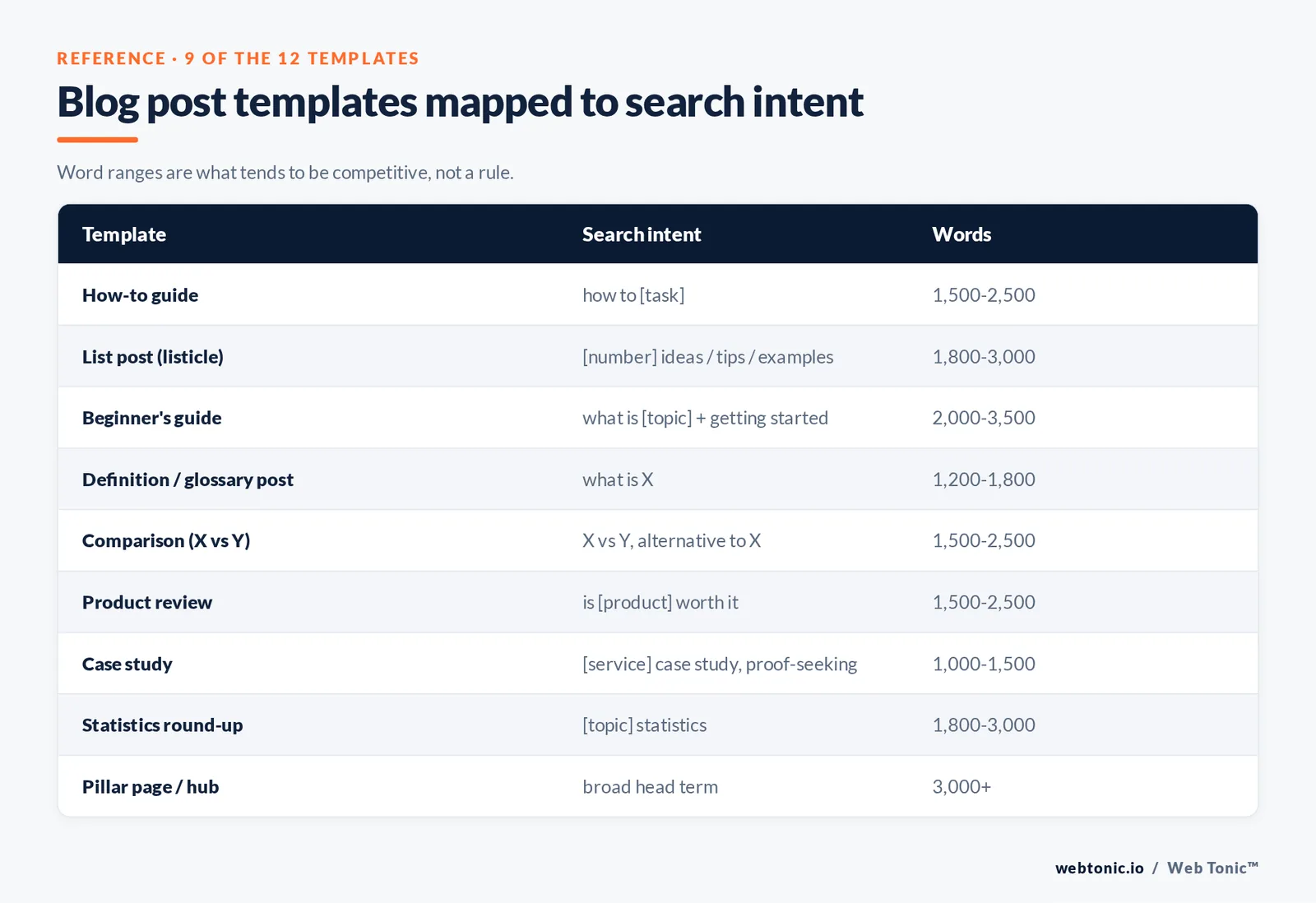
Pick by search intent first, then by what you have: data, examples, an opinion, or a process. Word ranges are what tends to be competitive, not a rule.
| # | Template | Search intent it serves | Skeleton | Words |
|---|---|---|---|---|
| 1 | How-to guide | "how to [task]" | Answer-first intro, prerequisites, numbered steps, mistakes, FAQ | 1,500–2,500 |
| 2 | List post (listicle) | "[number] ideas / tips / examples" | Intro, criteria, consistent item blocks, summary table | 1,800–3,000 |
| 3 | Beginner's guide | "what is [topic]" plus "getting started" | Definition, why it matters, core concepts, first 3 actions, glossary | 2,000–3,500 |
| 4 | Definition / glossary post | "what is X" | 40–60 word definition, how it works, examples table, related terms | 1,200–1,800 |
| 5 | Comparison (X vs Y) | "X vs Y", "alternative to X" | Decision table first, criterion-by-criterion sections, who should pick which | 1,500–2,500 |
| 6 | Product review | "is [product] worth it", "[product] review" | Verdict, testing method, pros and cons, pricing, alternatives | 1,500–2,500 |
| 7 | Case study | "[service] case study", proof-seeking | Result headline, background, problem baseline, method, results, quote | 1,000–1,500 |
| 8 | Statistics round-up | "[topic] statistics" | Headline figures, themed sections, source per stat, methodology note | 1,800–3,000 |
| 9 | Template / resource post | "[thing] template", "free [asset]" | What the template does, the asset itself, fill-in instructions, examples | 1,200–2,000 |
| 10 | Opinion or thought leadership | Brand and newsletter audience | Claim, why it's contrarian, evidence, objections, implication | 800–1,500 |
| 11 | Interview / expert round-up | "expert tips on [topic]" | Framing question, contributor blocks, patterns section, takeaways | 1,500–2,500 |
| 12 | Pillar page / hub | Broad head term | Scope, chaptered subsections, internal links to each deep-dive | 3,000+ |
Two notes on selection. First, match the format the results page already rewards: if the top 10 results are all lists, a 900-word opinion piece will not displace them. Second, one page should serve one intent — merging a comparison and a how-to usually loses both.
Three templates written out in full
These are the ones most teams need weekly. Copy the headings as-is and replace the bracketed prompts.
- Template 1 — How-to post. H1: How to [outcome] in [number] steps. Intro: 2 sentences answering the question directly. H2 Key takeaways: 4 bullets with a number in each. H2 What you need first: prerequisites table. H2 The [number] steps: one H3 per step, each with a why line, an action line and a done-when line. H2 Common mistakes: 5 bullets. H2 FAQ: 4 H3 questions. Close with one next step.
- Template 2 — List post. H1: [Number] [things] for [audience]. Intro naming the selection criteria in 1 sentence. H2 How we chose these. H2 The list, with an identical block per item: name, what it is, why it works, best for, one caveat. H2 Summary comparison table. H2 How to pick between them. H2 FAQ.
- Template 3 — Beginner's guide. H1: [Topic]: a beginner's guide. Intro with a 40 to 60 word definition. H2 Why [topic] matters, with 2 cited statistics. H2 The 5 concepts you need. H2 How it works end to end, with a diagram. H2 Your first 3 actions this week. H2 Tools and costs table. H2 Mistakes beginners make. H2 Glossary of 8 to 12 terms. H2 FAQ.
For sentence-level craft inside these outlines — headline patterns, transitions, paragraph length — Yoast's writing guide, Ahrefs' blog post walkthrough and Semrush's version are the three most practical references, and they broadly agree on structure while differing on research depth.
The elements every template shares
Whatever the format, the same components decide whether the post gets read and whether it gets found.
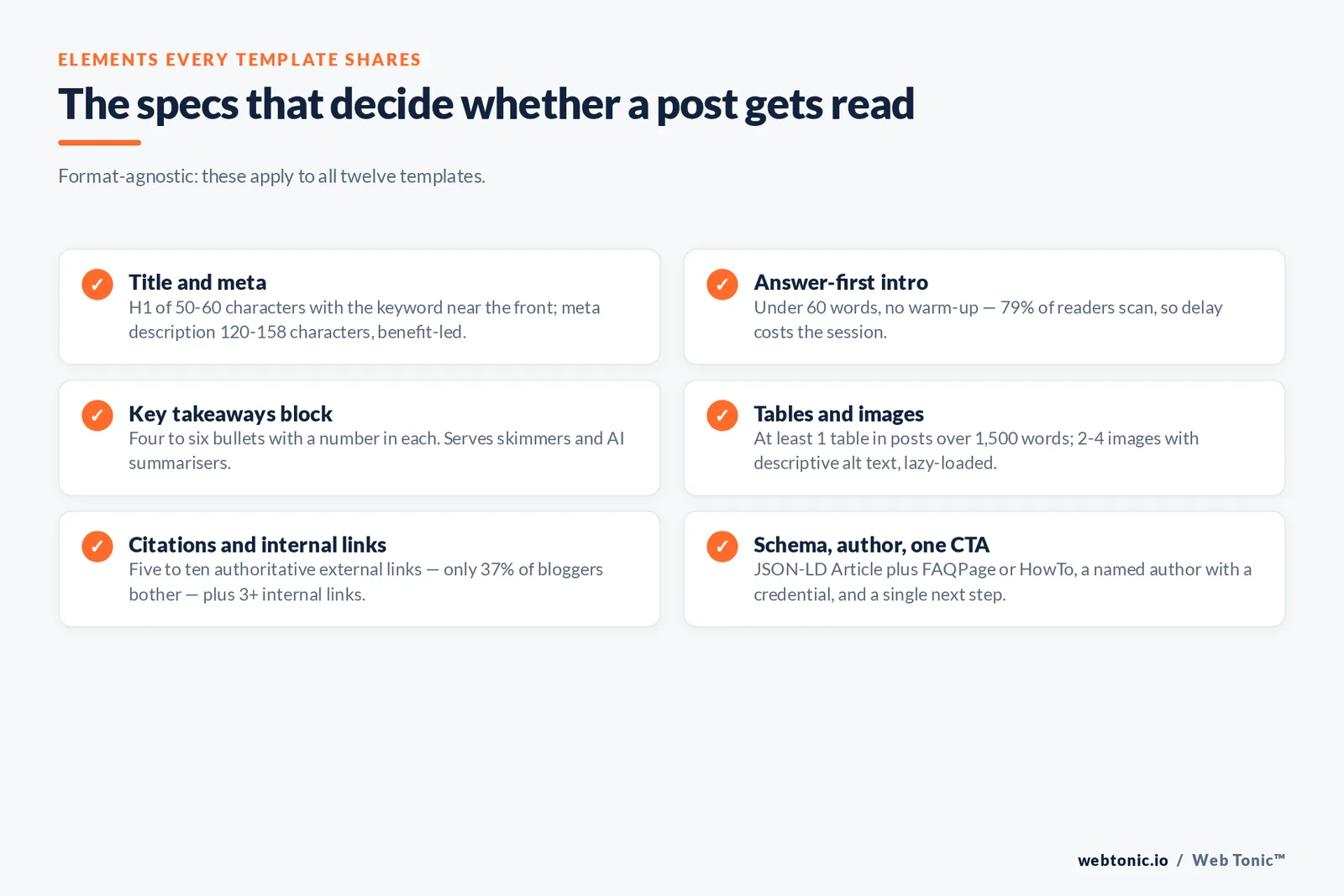
| Element | Spec | Why it matters |
|---|---|---|
| Title / H1 | 50–60 characters, keyword near the front | Sets the promise and the click decision |
| Meta description | 120–158 characters, benefit-led | Influences click-through even when rewritten |
| Answer-first intro | Under 60 words, no warm-up | 79% of readers scan; delay costs the session |
| Key takeaways block | 4–6 bullets, a number in each | Serves skimmers and AI summarisers |
| H2 / H3 hierarchy | One H1, descriptive H2s, no skipped levels | Navigation, accessibility and snippet eligibility |
| Tables or lists | At least 1 table in posts over 1,500 words | Compresses comparisons a paragraph cannot |
| Images | 2–4, descriptive alt text, lazy-loaded | Comprehension, accessibility and page weight |
| External citations | 5–10 authoritative links | Only 37% of bloggers do it — cheap credibility |
| Internal links | 3+ to related posts and service pages | Distributes authority and moves readers on |
| Article schema | JSON-LD Article, plus FAQPage or HowTo | Machine-readable author, date and Q&A data |
| Author bio | Name, role, credential, link | Experience signals for readers and reviewers |
| Single CTA | One next step matched to intent | Two CTAs usually convert worse than one |
The schema line is the most skipped and the easiest to fix: Google's Article structured data reference lists exactly which properties matter. On the reading-behaviour side, the specs above trace back to Nielsen Norman Group's finding that users scan web pages rather than read them, with concise, scannable rewrites measuring materially more usable in testing.
Where to build and store your templates
The template is only useful if it is one click from a new draft. These are the practical options, with the trade-off that matters.
| Tool | Free tier | Strength | Limitation |
|---|---|---|---|
| Google Docs | Yes | Comment-based review; a template gallery entry takes 2 minutes | No structured fields or status tracking |
| Microsoft Create / Word | Yes | Ready-made blog layouts you can adapt | Heavier formatting to strip before CMS import |
| Notion | Yes | Template button plus properties for status and owner | Pasting into a CMS can carry stray markup |
| Miro / whiteboard | Limited | Best for planning clusters and calendars visually | Not a drafting environment |
| CMS native (Webflow, WordPress) | Varies | Draft in the final rendering; no import step | Weaker collaborative editing |
| Plain Markdown in a repo | Yes | Version control and diffs on every edit | Non-technical contributors resist it |
Microsoft's blog template gallery is a fast starting point for layout, and Miro's content calendar template handles the planning layer that sits above individual posts. Whatever you choose, store 3 things with each template: the outline, a filled example, and the definition of done.
How to adapt a template to your niche
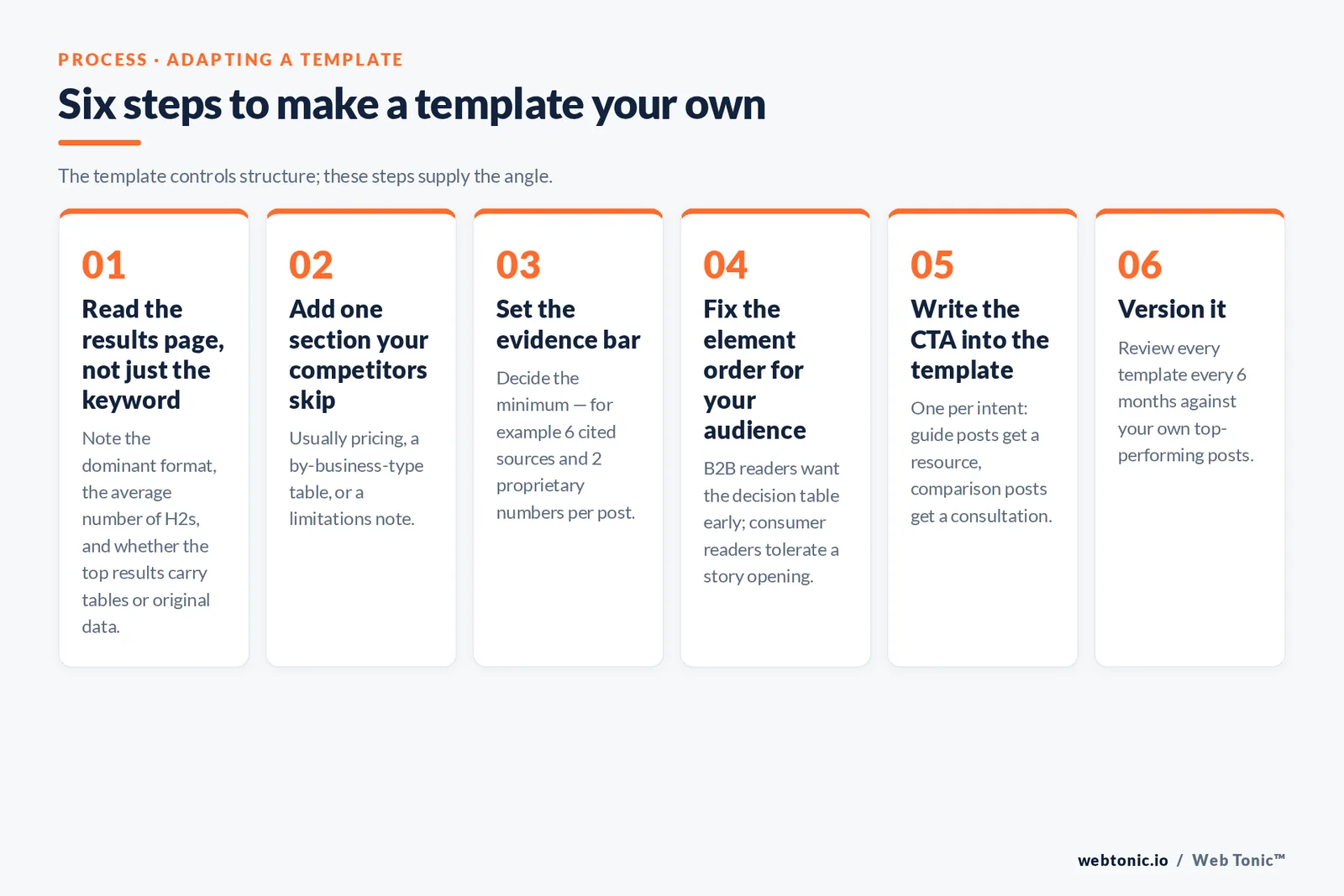
- Step 1 — Read the results page, not just the keyword. Note the dominant format, the average number of H2s and whether the top results include tables or original data.
- Step 2 — Add one section your competitors skip. Usually pricing, a by-business-type table, or a limitations note.
- Step 3 — Set the evidence bar. Decide the minimum: for example 6 cited sources and 2 proprietary numbers per post.
- Step 4 — Fix the element order for your audience. B2B readers want the decision table early; consumer readers tolerate a story opening.
- Step 5 — Write the CTA into the template. One per intent: guide posts get a resource, comparison posts get a consultation.
- Step 6 — Version it. Review each template every 6 months against your own top-performing posts and update the spec.
Topic selection sits upstream of all of it. HubSpot's guide to starting a blog covers the basics of pairing topics to audience stage, while Content Marketing Institute's article library is a good ongoing source for how programmes are structured. If you would rather have the whole content engine run for you, that is what our growth marketing team does, and the wider set of capabilities is on our services page.
Templates by business type
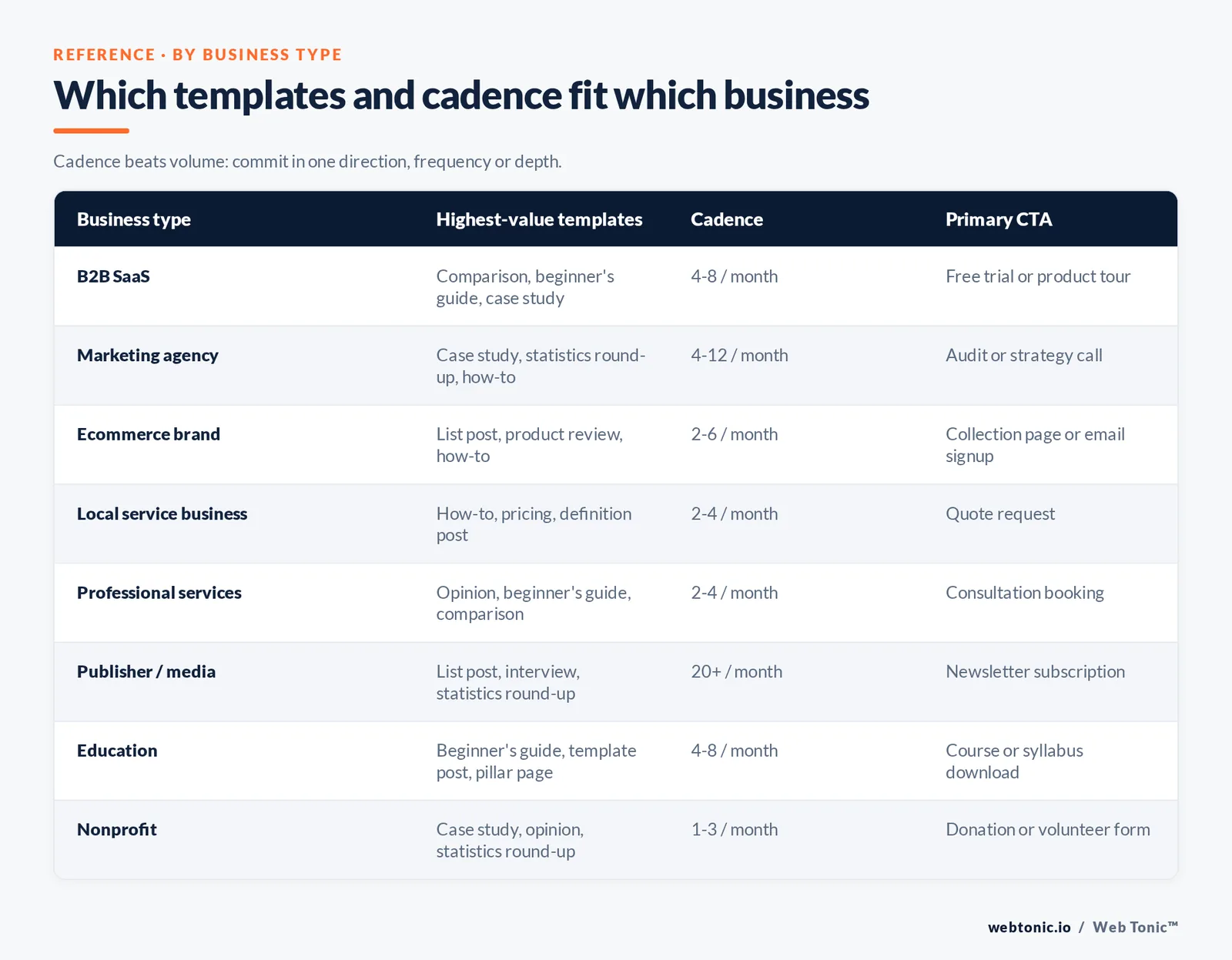
The same twelve templates get used in different proportions depending on what you sell. This is the mix we see work.
| Business type | Highest-value templates | Publishing cadence | Primary CTA |
|---|---|---|---|
| B2B SaaS | Comparison, beginner's guide, case study | 4–8 posts a month | Free trial or product tour |
| Marketing agency | Case study, statistics round-up, how-to | 4–12 posts a month | Audit or strategy call |
| Ecommerce brand | List post, product review, how-to | 2–6 posts a month | Collection page or email signup |
| Local service business | How-to, pricing, definition post | 2–4 posts a month | Quote request |
| Professional services | Opinion, beginner's guide, comparison | 2–4 posts a month | Consultation booking |
| Publisher / media | List post, interview, statistics round-up | 20+ posts a month | Newsletter subscription |
| Education | Beginner's guide, template post, pillar page | 4–8 posts a month | Course or syllabus download |
| Nonprofit | Case study, opinion, statistics round-up | 1–3 posts a month | Donation or volunteer form |
Cadence beats volume for most teams. Orbit Media's data shows roughly half of marketers settling at 2 to 4 posts a month, and that the ones reporting strong results commit in one direction — either more frequency or noticeably longer, more researched pieces. Choosing which of those two bets you are making is the actual strategy decision; the template just makes it repeatable. More worked examples of these formats are on the Web Tonic blog, and if you want a template set built around your own keyword map, get in touch.
Website design, SEO and promotion: what the template cannot do
A blog post template controls the words. Three things outside it decide how many people ever read them: the website design that renders the post, the SEO layer that helps search engines understand it, and the promotion that earns the first wave of attention.
On design, the template and the blog layout have to agree. If your website renders body text at 15 pixels with a narrow measure, the generous whitespace and short paragraphs the template assumes will still read as a wall. Check 4 things on the blog template itself: line length between 60 and 80 characters, a visible table of contents for posts over 2,000 words, styled tables that stay readable on a phone, and share buttons that do not float over the text on mobile. The point is to help the reader move, since readers give a new page seconds of attention, not minutes. Design work of this kind sits with our web development team.
On SEO, the template gives you the structure and the search intent match; the remaining work is the title tag, the internal link map that connects related posts into a cluster, and the schema. Google's documentation is the best source of truth here rather than second-hand SEO advice, and the practical test is simple: can a reader — or a language model summarising the page — extract the answer, the evidence and the author from the first screen? If yes, most of the on-page SEO problem is solved.
On promotion, the free ideas still work best. Share the post to the 2 or 3 communities where your audience already spends time, email it to the people you quoted or cited, and turn the best table into a standalone graphic for social. Only 37% of bloggers link out to external sources, so telling the 6 people you cited that you cited them is an unusually cheap way to earn traffic and the occasional link. Then watch what happens: if a post earns attention but no conversions, the problem is the call to action, not the writing; if it earns neither, the topic was the problem all along.
From filled template to published post: an 8-step checklist
A template ends at the outline. These eight steps are what turns a filled outline into a post that can compete, and they are where most content programmes leak quality.
- Check 1 — Validate the topic against real demand. Confirm the phrasing people actually use in Google Trends and your search console data before drafting; 1 wrong angle costs a whole post.
- Check 2 — Fill the evidence slots first. Drop in your 5 to 10 sources and any proprietary numbers before writing prose, so the argument is built on data rather than decorated with it.
- Check 3 — Write the takeaways block early. If you cannot state 4 concrete takeaways, the post has no thesis yet.
- Check 4 — Draft in one sitting per section. Section-level drafting keeps the word budgets honest and stops the introduction from sprawling.
- Check 5 — Edit for scannability, not elegance. Paragraphs under 4 lines, one idea per paragraph, subheads that make sense read on their own.
- Check 6 — Add the technical layer. Title tag, meta description, alt text on every image, JSON-LD schema, and 3 internal links minimum.
- Check 7 — Have someone else read the first screen. If they cannot say what the post promises after 10 seconds, the intro fails.
- Check 8 — Schedule the review date. Put a refresh date 12 months out on every post at publish time, with the metrics to judge it against.
Two habits raise the average more than any template change. First, keep a running file of the questions prospects ask on calls — it is the best topic list you will ever have, and it maps directly onto templates 1, 4 and 5. Second, measure at the template level rather than the post level: after 20 or so posts you will see that one or two formats produce most of the traffic and leads for your niche, and the correct response is to publish more of those and quietly retire the rest.
FAQ
What should a blog post template include?
At minimum: a title pattern, an answer-first intro under 60 words, a key takeaways block, a fixed H2 and H3 hierarchy, at least one table or structured list, image slots with alt-text prompts, a citation quota, three internal link slots, a schema note and a single call to action. Adding word budgets per section is what turns an outline into a usable template, because it stops the background section from swallowing the analysis.
How do I choose the right blog post template for a keyword?
Search the keyword and read the top ten results before choosing. If they are all lists, use the list template. If they are step-by-step guides, use the how-to. If the results mix formats, that usually signals mixed intent and an opportunity — a page that answers the definition and gives the process can serve both. Note the average length and the number of subheadings too, and treat those as a floor rather than a target.
Are free blog post templates good enough?
Yes, for structure. A free template from a document gallery gives you a sound skeleton, and the parts that actually decide performance — original data, real examples, cited sources, a distinctive angle — cannot come from any template. The practical approach is to take a free outline, add the two sections your competitors skip, and save that as your own house version.
How long should a blog post be?
It depends on the template. Opinion pieces work at 800 to 1,500 words, how-to guides at 1,500 to 2,500, list posts and statistics round-ups at 1,800 to 3,000, and pillar pages beyond 3,000. Match the depth the results page already rewards rather than chasing a universal number, and cut any section that does not answer a question the reader actually has.
How many blog posts should I publish per month?
About half of content marketers publish two to four posts a month, and that is a defensible baseline for a small team. What correlates with strong results is committing in one direction: either a higher frequency, or fewer but longer and more researched pieces including original research. Publishing eight thin posts a month tends to underperform three well-sourced ones.
Sources: Orbit Media 12th annual blogger survey; Google Search Central helpful content and Article structured data documentation; Nielsen Norman Group reading behaviour research; Yoast; Ahrefs; Semrush; HubSpot; Content Marketing Institute; Microsoft Create template gallery; Miro; Google Trends.


