



Table of contents
Google Analytics goals tell you whether your website is actually doing its job — turning visitors into leads, customers, and revenue. Below is a complete breakdown of goal types, the GA4 migration to key events, and step-by-step setup instructions backed by real conversion data.
Key Takeaways
- Google Analytics goals have been replaced by key events in GA4 — the 4 legacy goal types (Destination, Duration, Pages/Screens, Event) from Universal Analytics no longer exist as a standalone feature.
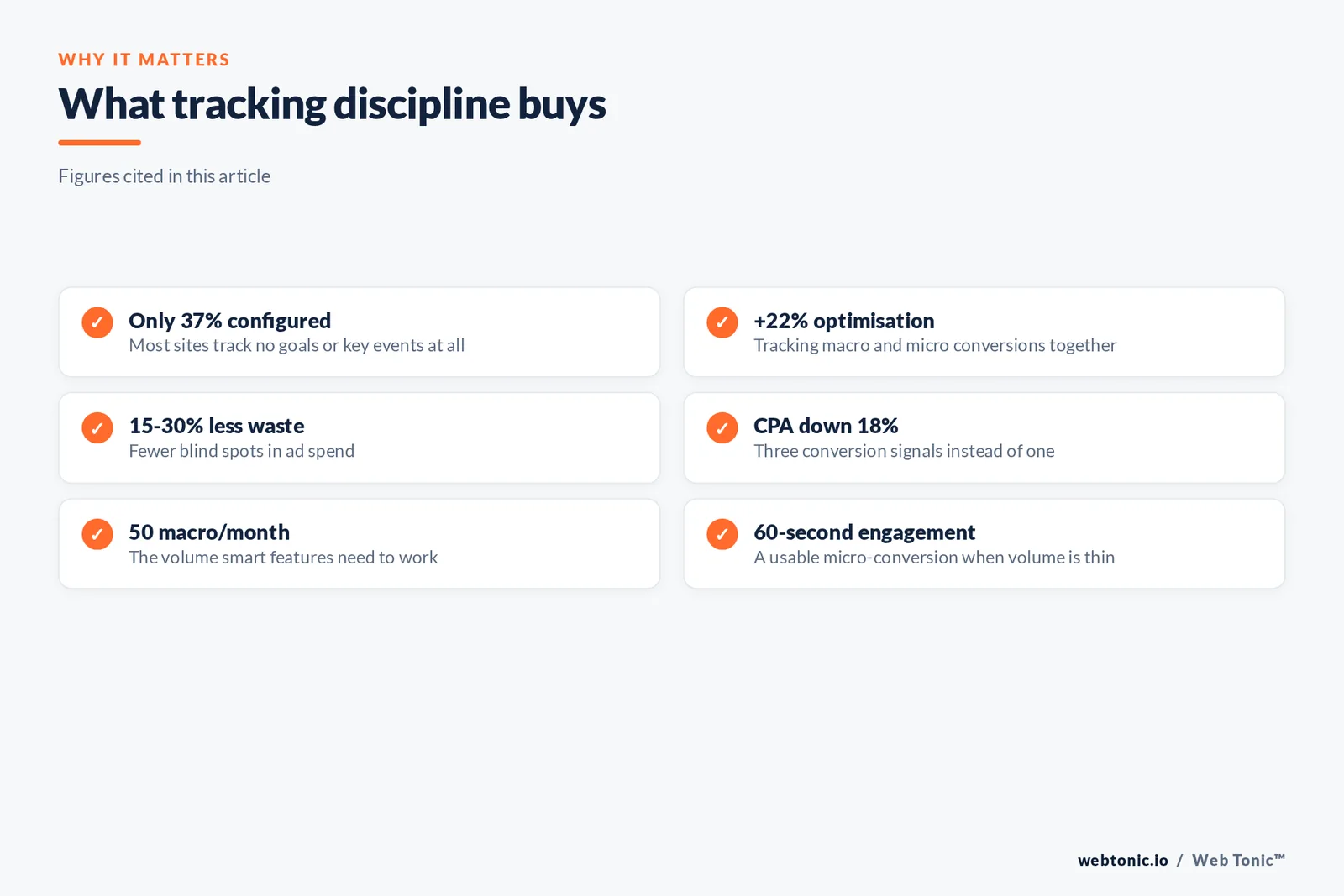
- Only 37% of websites have any goals or key events configured, according to a 2025 Databox survey, meaning most businesses are flying blind on conversion performance.
- Businesses that track macro and micro conversions see 22% better optimization results than those tracking only one type, because micro conversions reveal funnel friction before revenue drops.
- GA4 key events use an event-based model where any event can be toggled to a key event with one click — a major simplification over Universal Analytics goal setup.
- Smart Goals in Universal Analytics required at least 500 sessions per month and used machine learning to identify the most engaged sessions — GA4 has no direct equivalent but uses predictive audiences instead.
- E-commerce sites that configure purchase + begin_checkout + add_to_cart as key events capture the full funnel and reduce wasted ad spend by 15–30% through better bidding signals.
Goals in Google Analytics have always been the bridge between traffic data and business outcomes. Without them, you know how many visitors your website gets — but not whether those visitors do anything valuable. The transition from Universal Analytics to GA4 changed the mechanics of goal tracking, renaming "conversions" to "key events" in early 2024, but the strategic importance of measuring conversions has only grown. This guide covers both the legacy system (for teams still referencing UA data) and the current GA4 approach, with practical examples for e-commerce, lead generation, and content sites. For help implementing analytics tracking, explore Web Tonic's data intelligence services.
What Are Google Analytics Goals
A goal in Google Analytics is a completed activity — called a conversion — that contributes to your business success. In Universal Analytics, goals were configured manually in the Admin panel and fell into four types: Destination, Duration, Pages/Screens per Session, and Event goals. Each goal tracked a specific user behavior and assigned it a monetary value when triggered.
In GA4, the concept evolved significantly. There are no "goals" in the traditional sense. Instead, GA4 uses an event-based data model where every user interaction is tracked as an event. Any event can be marked as a key event (formerly called a "conversion" until Google renamed it in March 2024). This means goal tracking in GA4 is simultaneously simpler (toggle any event on or off) and more flexible (custom events can track virtually anything).
According to Google's official documentation, GA4 automatically flags the purchase event as a key event for new properties. Everything else — form submissions, button clicks, scroll depth, video plays — requires manual configuration or Google Tag Manager setup.
| Feature | Universal Analytics Goals | GA4 Key Events |
|---|---|---|
| Setup Method | Admin → Goals → New Goal wizard | Admin → Events → toggle "Mark as key event" |
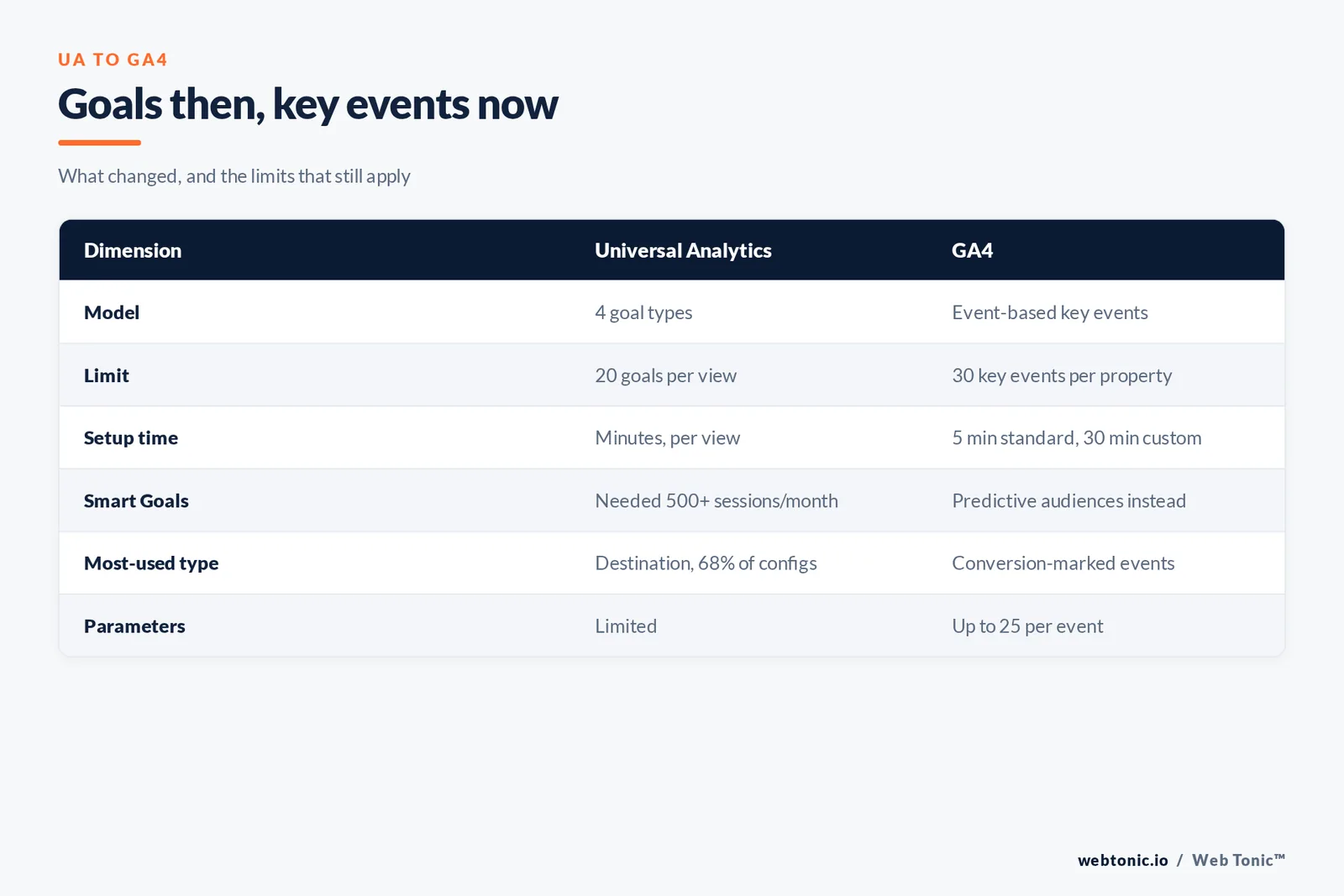
| Goal Limit | 20 goals per view | 30 key events per property |
| Data Model | Session-based (pageviews, sessions) | Event-based (every interaction is an event) |
| Goal Types | Destination, Duration, Pages/Session, Event | Any event can be a key event |
| E-commerce | Separate Enhanced E-commerce module | Built-in e-commerce events (purchase, add_to_cart, etc.) |
| Google Ads Integration | Import goals as conversions | Key events sync automatically; "conversions" label reserved for Ads |

The 4 Types of Goals in Universal Analytics
While Universal Analytics was sunset in July 2023, understanding the original 4 goal types remains important for teams migrating historical data, referencing legacy reports, or working with clients who still discuss analytics in UA terminology.
Destination Goals tracked when a user reached a specific URL, such as a thank-you page after a form submission (/thank-you) or an order confirmation page (/order-complete). These were the most common goal type, used by 68% of UA goal configurations according to Sugar Pixels. Destination goals supported funnel visualization, letting analysts see exactly where users dropped off in multi-step processes like checkout flows or registration forms.
Duration Goals measured whether a user's session lasted longer than a specified threshold. A session exceeding 3 minutes might indicate engaged reading behavior on a content site, though duration alone was a noisy signal — a user who left a tab open generated the same metric as one who read intently.
Pages/Screens per Session Goals tracked engagement depth. Setting a goal for 4+ pages per session captured users who explored multiple sections of a site, signaling purchase or research intent. This goal type was particularly useful for media sites and content-heavy platforms.
Event Goals tracked specific interactions like button clicks, video plays, file downloads, and scroll depth milestones. Events used the Category → Action → Label hierarchy, requiring Google Tag Manager or manual JavaScript tagging. Event goals were the most powerful but also the most complex to configure — only 23% of UA users had event-based goals properly set up.
How to Set Up Key Events in GA4
Setting up key events in GA4 is dramatically simpler than configuring goals in Universal Analytics. The process follows three steps: create or identify the event, mark it as a key event, and verify it fires correctly. As outlined by Analytics Mania, the entire flow is event-first — you define what to track, then elevate it to a key event. According to Google's conversion management guide, the entire setup can be completed in under 5 minutes for standard events and under 30 minutes for custom events using Google Tag Manager.
Step 1: Navigate to Events. In your GA4 property, go to Admin → Data display → Events. You will see a list of all events GA4 is currently collecting, including automatically collected events (page_view, session_start, first_visit) and any custom events you have configured.
Step 2: Mark as Key Event. Find the event you want to track as a conversion and toggle the "Mark as key event" switch. For example, toggling generate_lead to a key event means every form submission that fires this event will now appear in your key events reports and sync to Google Ads as a conversion signal.
Step 3: Create Custom Events (if needed). If the action you want to track is not already an event, create it in Admin → Data display → Events → Create event. Common custom events include contact_form_submit, pricing_page_view, demo_request, and phone_click. Each custom event can carry up to 25 parameters for detailed tracking.
For advanced setups, Google Tag Manager remains the preferred tool. GTM lets you fire events based on complex triggers — scroll depth exceeding 75%, time on page past 60 seconds, clicks on specific CSS selectors, or form submissions detected via the built-in Form Submission trigger. Visit the Web Tonic blog for more analytics guides.
Macro vs. Micro Conversions in Google Analytics
One of the most overlooked aspects of Google Analytics goal strategy is the distinction between macro conversions (primary business outcomes) and micro conversions (supporting actions that indicate intent). Businesses that track both types see 22% better optimization results because micro conversions reveal funnel friction before it impacts revenue.
| Conversion Type | Examples | Business Impact |
|---|---|---|
| Macro — E-commerce | Purchase, subscription start, renewal | Direct revenue — the primary KPI |
| Macro — Lead Gen | Form submit, demo request, phone call | Pipeline value — feeds CRM and sales |
| Micro — Engagement | Add to cart, pricing page view, PDF download | Intent signal — optimizes bidding algorithms |
| Micro — Content | Blog subscribe, 75% scroll, video 50% watched | Audience quality — builds retargeting pools |
The strategic value of micro conversions extends beyond analytics. In Google Ads, importing micro key events as secondary conversions gives Smart Bidding more data points to learn from, which is critical for accounts with fewer than 50 macro conversions per month. According to Scale Growth Digital, accounts that added micro conversion signals to their bidding strategy saw CPA decrease by 18% within 4 weeks.
Google Analytics Goals for E-commerce Sites
E-commerce sites benefit from the richest set of built-in events in GA4. The recommended e-commerce event chain captures the entire purchase funnel: view_item → add_to_cart → begin_checkout → add_payment_info → purchase. Marking purchase, begin_checkout, and add_to_cart as key events provides complete funnel visibility and feeds Google Ads 3 conversion signals instead of 1, dramatically improving Smart Bidding performance.
According to Google's measurement documentation, e-commerce sites that configure the full event chain see 15–30% reduction in wasted ad spend because the bidding algorithm can optimize for users who show purchase intent, not just those who complete a purchase. This is especially critical for high-consideration products with long conversion windows, where a single-event conversion signal misses 80%+ of the intent data available.

The key technical consideration for e-commerce tracking is data accuracy. GA4 e-commerce events require a structured items array containing product name, ID, price, and quantity. Missing or malformed item data leads to discrepancies between GA4 and your actual sales — a problem that affects 42% of e-commerce GA4 implementations, according to industry audits. Always validate your data layer with professional analytics implementation.
Smart Goals and Predictive Audiences
Smart Goals were a Universal Analytics feature designed for advertisers who did not have traditional conversion tracking. Using machine learning, Smart Goals analyzed engagement signals — session duration, pages per session, device type, location — to identify the top 5% most engaged sessions and count them as conversions. Smart Goals required at least 500 sessions per day flowing to the linked Google Ads account and worked best for businesses with no other goals configured.
GA4 does not offer a direct Smart Goals equivalent. Instead, it provides predictive audiences — machine learning models that identify users likely to purchase, churn, or spend above a certain threshold within the next 7 days. Predictive audiences require at least 1,000 positive and 1,000 negative examples per week to function, making them viable only for larger-traffic properties with active e-commerce tracking.
For small businesses that relied on Smart Goals, the recommended migration path is to set up basic key events (form submit, phone click, scroll depth) and import them into Google Ads as conversion actions. Even simple goals outperform Smart Goals in bidding accuracy because they track real business outcomes rather than engagement proxies. Learn more about Google Ads conversion tracking on our contact page.
Related reading
- Google Analytics Tips: Essential GA4 Strategies for Better Data
- Google Analytics Event Tracking: Complete GA4 Setup Guide
- Google Ads Counts Conversions Shopify Never Recorded
- Marketing Analytics services at Web Tonic
FAQ
How do I set up goals in Google Analytics 4?
In GA4, goals are called key events. Go to Admin → Data display → Events, find the event you want to track as a conversion, and toggle "Mark as key event." For custom actions like form submissions, create a new event first using Admin → Events → Create event or Google Tag Manager. The process takes under 5 minutes for standard events.
What are the 4 goal types in Universal Analytics?
Universal Analytics offered 4 goal types: Destination (user reaches a specific URL), Duration (session lasts longer than a threshold), Pages/Screens per Session (user views a minimum number of pages), and Event (user triggers a specific interaction like a button click or video play). These goal types do not exist in GA4, which uses event-based key events instead.
What is the difference between goals and key events in Google Analytics?
Goals were the Universal Analytics term for tracked conversions, limited to 20 per view and requiring a setup wizard. Key events are the GA4 equivalent, supporting up to 30 per property with a simple toggle on any event. In March 2024, Google renamed GA4 "conversions" to "key events" to distinguish them from Google Ads conversions.
How many goals can you set up in Google Analytics?
In Universal Analytics, you could create a maximum of 20 goals per view. In GA4, you can mark up to 30 events as key events per property. If you need to track more than 30 conversion actions, prioritize macro conversions as key events and use standard event reporting for micro conversions.
Do I need Google Tag Manager to set up goals?
No, but it helps. GA4 allows you to create custom events directly in the Admin panel for simple triggers. However, Google Tag Manager is recommended for advanced event tracking — form submissions, scroll depth, click tracking on specific elements, and cross-domain tracking. GTM gives you more control over when and how events fire, which improves data accuracy.
Sources
Google — Tutorial: Set Up a Key Event
Google — Creating and Managing Conversions
Google — How to Measure Key Events
Google — Conversions vs. Key Events in GA4
Google — About Goals (Universal Analytics Legacy)
Sugar Pixels — Mastering Goals in Google Analytics
Scale Growth Digital — GA4 Conversion Setup Guide
Delante — How to Set Up Goals in Google Analytics
Analytics Mania — GA4 Key Events
Loves Data — Google Analytics Goals Guide


