



Table of contents

Quick answer: The two numbers are measuring different things. Google Ads dates a conversion to the click and credits it inside an attribution window; Shopify dates an order to checkout. Align the date basis and window first, then look for duplicate firing and consent-blocked tags.
Last verified: 2026-08-21
Start by accepting the two systems disagree by design
Almost every reconciliation request starts from the wrong premise: that a correct setup produces identical numbers. It does not, and it never will. Shopify is a system of record for orders. Google Ads is an attribution system that answers a different question — how many conversions can be credited to advertising, and to which day. Google's own documentation on conversion measurement is explicit that conversions are reported against the date of the ad interaction, not the date of the sale.
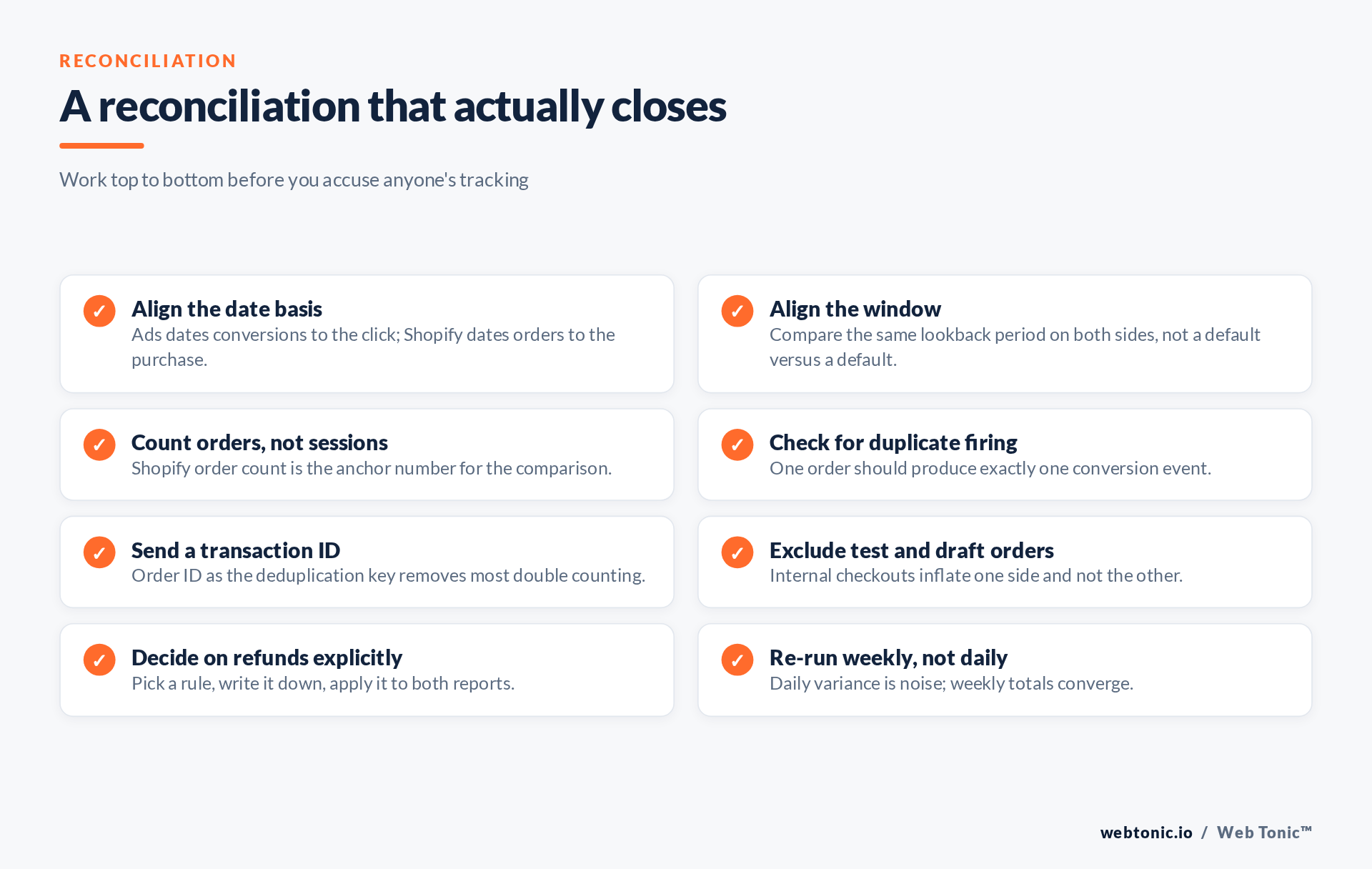
That single difference explains a large share of every mismatch we are asked to investigate. A customer clicks an ad on Monday, thinks about it, and buys on Thursday. Shopify records a Thursday order. Google Ads records a Monday conversion. Compare Thursday to Thursday and the two reports look broken; compare the same window on a consistent basis and most of the gap disappears.
So the diagnostic sequence matters. Rule out the expected differences first, and only then start hunting for a genuine tracking fault — otherwise you will spend a day rebuilding a tag that was working perfectly.
The expected differences
Attribution windows
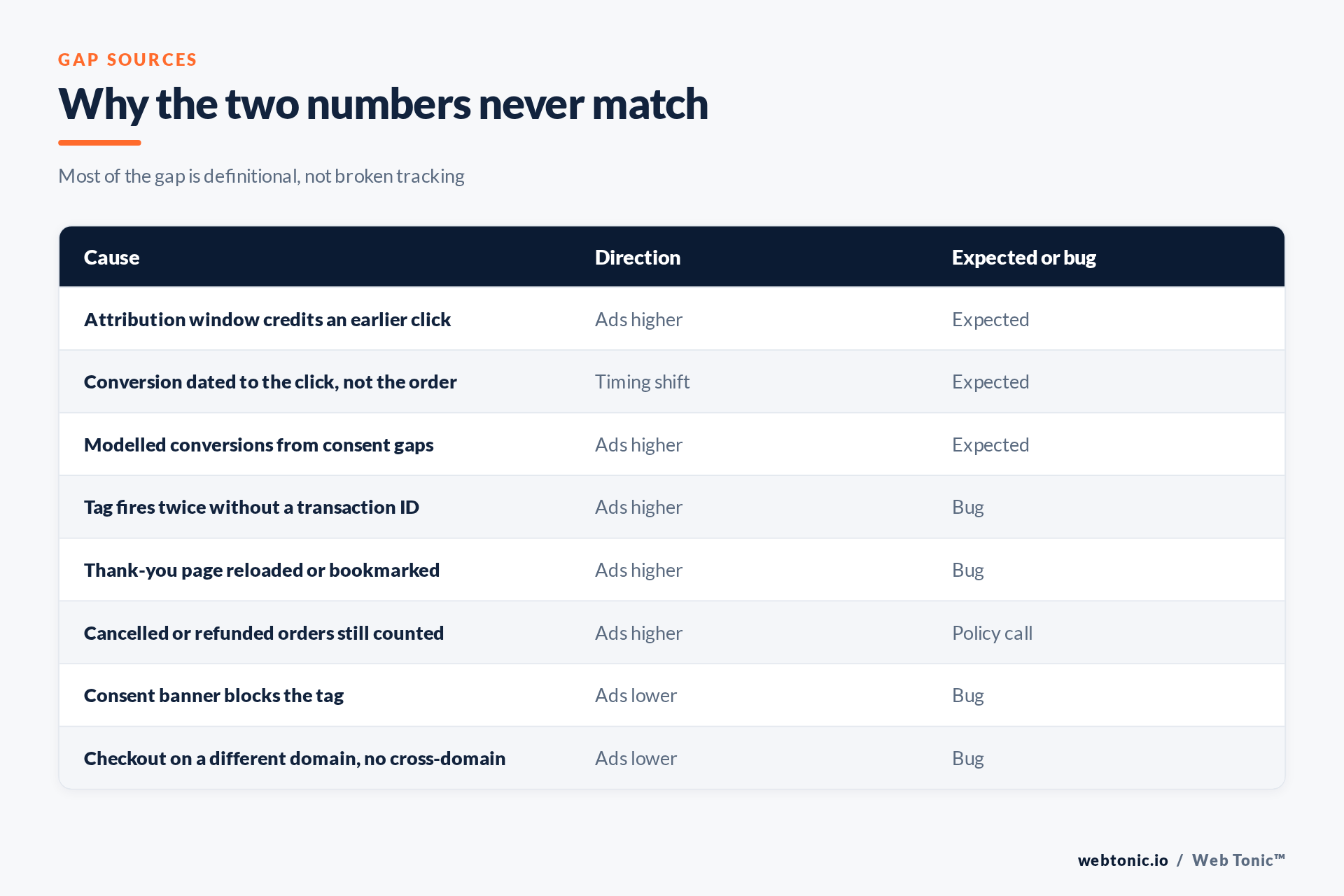
A conversion window defines how long after a click a sale can still be credited. Google documents the mechanics in about conversion windows, and the default is generous enough that a meaningful share of this week's reported conversions belong to last week's clicks. Shopify has no equivalent concept; an order simply happened. If you compare a 7-day Ads window against a 7-day Shopify calendar, you are comparing two different populations.
Date basis
Related but distinct: even inside one window, the conversions are shifted backwards in time relative to the orders. The longer your consideration cycle, the bigger the shift. For a high-consideration product this alone can look like a 20% discrepancy on any given day and near-zero across a month.
Modelled conversions
Where consent or browser restrictions prevent an observed measurement, Google may model the conversion instead of dropping it. That is a deliberate design decision documented alongside consent mode, and it means the Ads number can legitimately exceed the count of individually observable orders. Modelled conversions are an estimate. They are not a bug and they are not an invoice.
The differences that are actually bugs
Duplicate firing
The classic Shopify failure is a conversion tag on the thank-you page that fires again whenever the page is reloaded, bookmarked, or reached through the order status link in a confirmation email. The fix is not a smarter trigger; it is a transaction ID. Google's guidance on using a transaction ID to minimise duplicate conversions is the canonical answer: pass the Shopify order ID with every conversion and repeated fires collapse into one.
Consent banner blocking the tag
If the Ads number is lower than the order count, suspect the banner. A strict consent implementation that blocks tags until acceptance will silently lose conversions from everyone who ignores the dialogue. This shows up as a step change on the day the banner shipped, which makes it easy to identify and easy to date.
Cross-domain and checkout changes
Any change that moves checkout to a different hostname without correct cross-domain configuration breaks the link between the click and the sale. Migrations, headless builds and third-party checkout apps all trigger this, and it is worth re-testing after every theme deployment.
| Symptom | Most likely cause | First check |
|---|---|---|
| Ads slightly higher, stable ratio | Attribution window and date basis | Compare monthly totals |
| Ads much higher, round multiples | Duplicate tag firing | Is a transaction ID being sent |
| Ads lower since a fixed date | Consent banner or tag removal | Deployment log for that day |
| Ads lower only on mobile | Cross-domain or app checkout | Complete a live test purchase |
| Revenue matches, count does not | Every-conversion versus one-per-click | Conversion counting setting |
| Gap grows at month end | Refunds and cancellations | Agree a refund rule |
Running the reconciliation
Do it weekly, never daily. Daily variance in a small account is mostly noise and will send you chasing ghosts. Pull the Shopify order count for a full week, pull the Ads conversion count for the same week, and record the ratio. A stable ratio — even a ratio of 1.15 — is a healthy setup you can report against. A ratio that jumps is the signal worth investigating.
Second, agree the awkward policy questions before you need them. Do cancelled orders count? Refunds? Test checkouts placed by the client's own team? Google's guidance on understanding conversion tracking data explains what the platform records; deciding what the business wants counted is your job, not the platform's. Write the rule down and apply it to both reports.
Third, understand what Ads is technically doing before you argue with it. The mechanics in how Google Ads tracks website conversions and the broader theory in marketing attribution make it obvious why a single-source-of-truth demand is unrealistic. Shopify's own Customer Privacy API is where consent state lives on that side, and it is worth reading if the banner is in scope.
What to do once you have the number
Report the ratio, not the discrepancy. Clients hear "the numbers do not match" as "the tracking is broken" — they hear "Ads reports 1.12 orders for every Shopify order, consistently, because of the attribution window" as competence. This is a large part of what disciplined conversion tracking work buys you.
If the ratio is unstable, the durable fix is usually server-side. Sending conversions from the server with an order ID removes browser-side duplication and consent fragility in one move, which is why server-side tracking is our default recommendation for stores past a meaningful order volume. Building the reporting layer that keeps this visible week to week is the point of our analytics work, and the same discipline underpins every data intelligence engagement. Related reading on double counting: pixel and CAPI firing twice.
Frequently Asked Questions
What gap between Google Ads and Shopify is normal?
There is no universal figure, because it depends on your consideration cycle and attribution window. What matters is stability: a consistent ratio across weeks is healthy, a jumping ratio is not.
Should I trust Shopify or Google Ads?
Shopify for revenue and order counts. Google Ads for deciding where budget goes. Using either for the other's job is the actual mistake.
Will a transaction ID fix double counting retroactively?
No. Deduplication applies from the point it is implemented forward. Historical inflated data stays inflated, so annotate the date of the fix.
Do refunded orders get removed from Google Ads?
Not automatically. Unless you actively adjust conversions, refunds remain counted, which is why the refund rule must be agreed rather than assumed.
Does GA4 solve this?
No. GA4 introduces a third set of definitions and a third number. It is useful, but adding it does not make the reconciliation simpler.
Sources: Google Ads — about conversion measurement; conversion windows; transaction IDs; how conversions are tracked; consent mode overview; Shopify Customer Privacy API; attribution. Last verified 2026-08-21.


