



Table of contents

"Google Ads Library" is what most marketers call the Google Ads Transparency Center — the free, public database of creative running across Google Search, YouTube, Display and Shopping. It is Google's answer to Meta's equivalent archive.
This guide covers what it does show, what it hides, how to run a competitor teardown in 20 minutes, and where the separate in-account asset library fits.
Key Takeaways
- The public tool lives at adstransparency.google.com, is free, needs no login, and covers Search, YouTube, Display and Shopping formats.
- It shows the advertiser, verified identity, format, date range and region — not spend, impressions, CTR or targeting, except for political ads where more detail is required.
- Political and election creative carries extra disclosure, including spend ranges and audience-selection data, and are retained for 7 years.
- Google's advertiser verification programme means most ads are tied to a legally verified name — so one search reveals every brand a holding company runs.
- Two different things share the name: the public transparency archive and the asset library inside your own account. This page explains both.
- With Google at roughly 91% of worldwide search, this is the single highest-coverage creative research source in paid media.
What the Google Ads Library actually is
Google launched the Ads Transparency Center as a searchable archive of ads served by verified advertisers. You type in an advertiser name or a website, pick a region, and get the creative that brand has been running. There is no login, no quota and no cost — it is a compliance product that happens to be an excellent competitive research tool. Google's ads blog frames it as part of the same transparency push as advertiser verification, and the broader Google Transparency Report hosts the policy-side numbers.
Coverage follows verification. Because the platform requires each brand to prove identity before serving at scale, the archive attaches each ad to a verified legal entity and a country of origin. That single design choice is why the tool is useful for agencies: you can start from a domain and work outward to every sibling brand the same entity advertises.
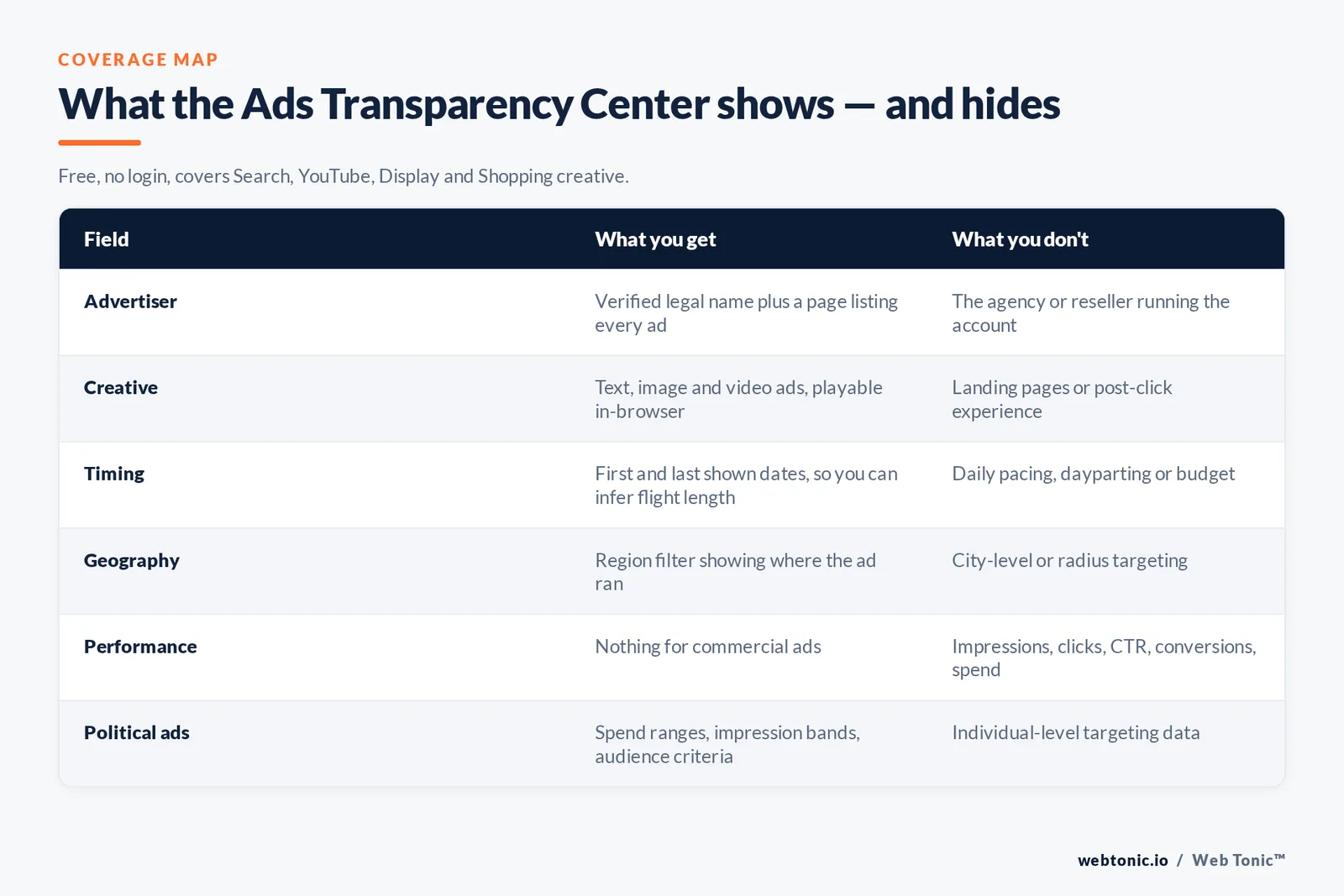
| Field | What you get | What you don't |
|---|---|---|
| Advertiser | Verified legal name plus advertiser page linking every ad | Agency or reseller managing the account |
| Creative | Text, image and video ads, playable in-browser | Landing page variants or post-click experience |
| Timing | First and last shown dates, so you can infer flight length | Daily pacing, dayparting or budget |
| Geography | Region filter showing where the ad ran | City-level or radius targeting |
| Format | Written, image and clip filters | Which campaign type or bid strategy served it |
| Performance | Nothing for commercial ads | Impressions, clicks, CTR, conversions, spend |
| Political ads | Spend ranges, impression bands, audience-selection criteria | Individual-level targeting data |
How to access and search it
Open the tool, then work through four filters in this order. It takes under a minute per competitor once you have the habit.
- Advertiser or domain. Type the brand name; if several verified entities appear, match on the country shown. Searching by domain is more reliable than by brand name for franchises.
- Region. Default is broad — set it to your market. A US-only view often looks completely different from a UAE or UK view for the same brand.
- Date range. Narrow to the last 30 days to see what is live now, then widen to spot seasonal flights and last year's Q4 push.
- Format. Toggle written, static and clip formats separately. Clips are where you learn the most, because YouTube creative reveals the full funnel story.
There is a second entry point most people miss: the "My Ad Center" style disclosures attached to live ads. Clicking the three dots on a Search listing or the info affordance on a YouTube spot opens the same advertiser page, which is the fastest route from "who is bidding on my brand term" to their whole creative set. Google documents the underlying ad-disclosure and verification mechanics across Google Ads Help and its business privacy hub.
Google's public archive vs the asset library in your account
These are unrelated tools with confusingly similar names. The public archive shows other brands' creative. The asset library inside Google Ads is your own storage for images, clips, logos and headlines, used to build Performance Max and Demand Gen creative and to share assets across campaigns. If a colleague says "upload it to the ads library", they almost always mean the second one. Google's account documentation covers the in-account workflow, and the Google Ads API exposes asset resources programmatically for teams managing creative at scale.
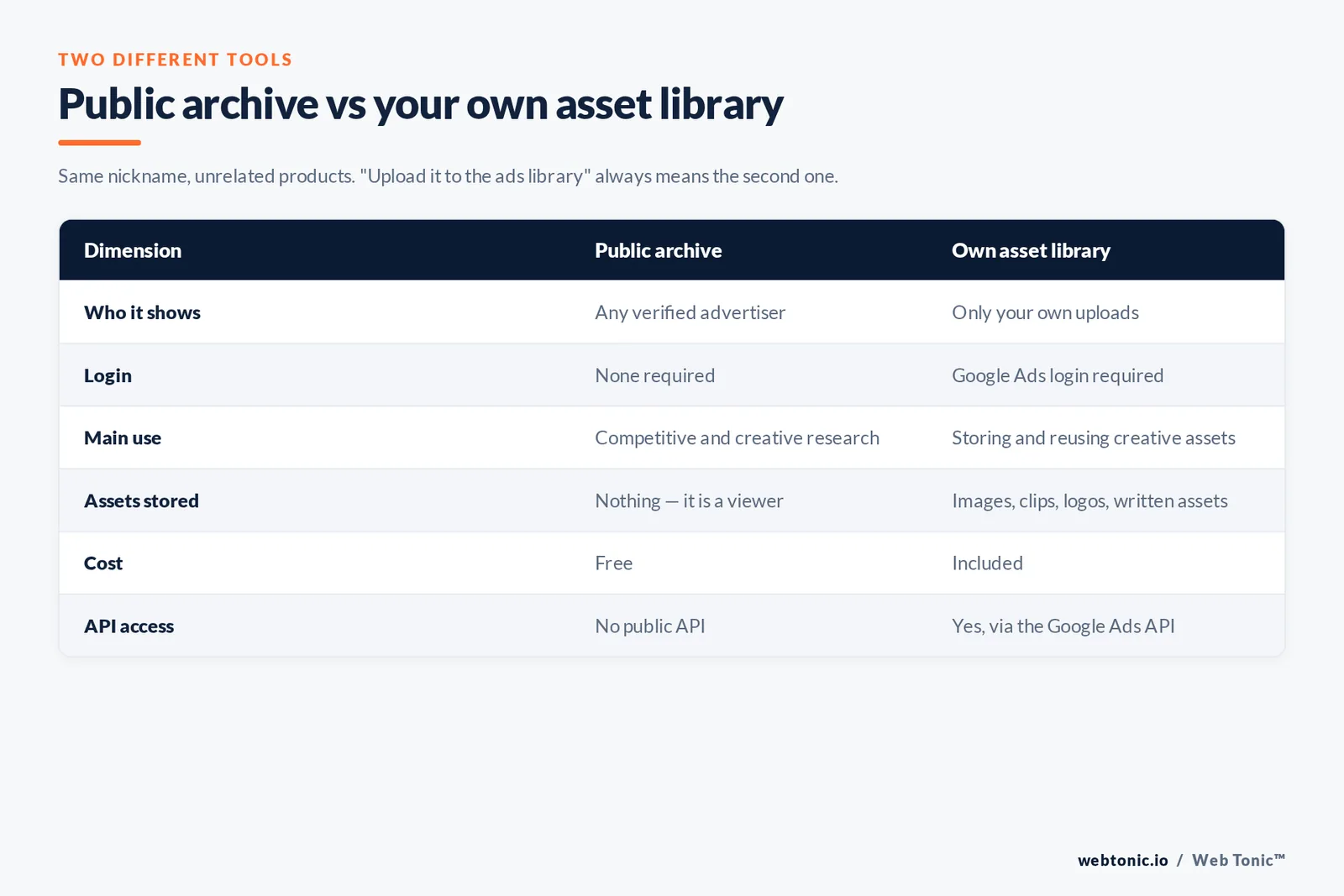
| Dimension | Public archive | Own asset library |
|---|---|---|
| Who it shows | Any verified advertiser | Only your own uploads |
| Login | None required | Login to your Google Ads required |
| Main use | Competitive and creative research | Storing and reusing creative assets |
| Assets stored | Nothing — it is a viewer | Images, clips, logos, written assets |
| Cost | Free | Included |
| API access | No public API | Yes, via the Google Ads API |
A 20-minute competitor teardown
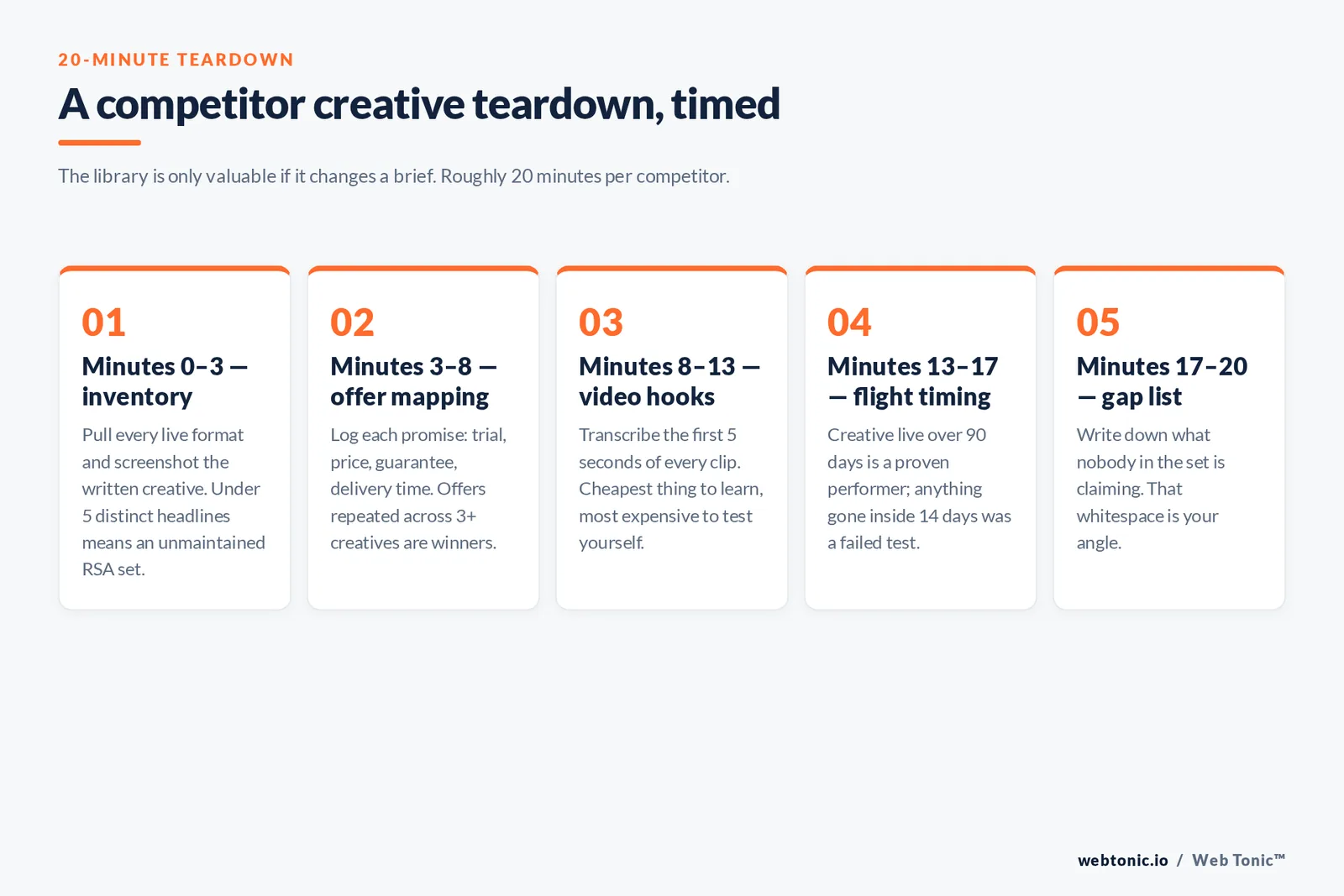
The library is only valuable if it changes a brief. Here is the process our performance creative team runs before writing new ads, timed at roughly 20 minutes per competitor.
- Minutes 0-3 — inventory. Pull every live format for the advertiser and screenshot the written creative. Count how many distinct headlines you see; fewer than 5 usually means an unmaintained Responsive Search Ad set.
- Minutes 3-8 — offer mapping. Log each promise: free trial, price point, guarantee, delivery time. Offers repeated across 3 or more creatives are almost certainly their winners.
- Minutes 8-13 — video hooks. Watch the first 5 seconds of every clip and transcribe the hook. Hooks are the cheapest thing to learn and the most expensive thing to test yourself.
- Minutes 13-17 — flight timing. Note first-seen and last-seen dates. Creatives live for over 90 days are proven performers; those that vanished in under 14 days were probably tests that failed.
- Minutes 17-20 — gap list. Write down what nobody in the set is claiming. That whitespace is your angle, and it is where growth marketing gains come from.
Cross-reference the creative story with search demand and keyword overlap tools — Semrush's competitor analysis framework and Google Trends are the two we pair with it most often. For the reporting side, our data intelligence team logs competitor creative changes monthly so shifts show up as a trend rather than a surprise.
What the library can't tell you (and the workarounds)
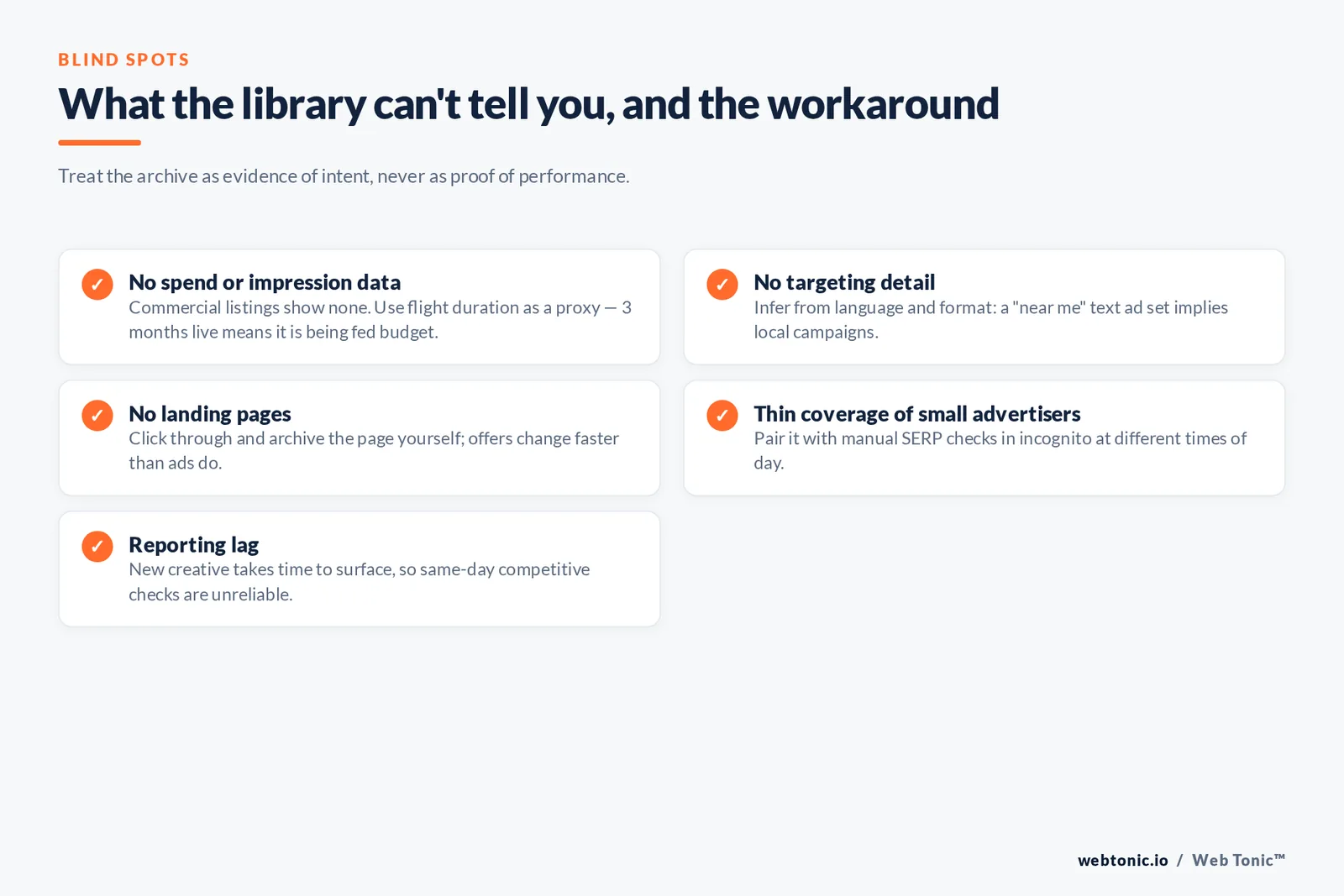
Treat the tool as evidence of intent, not proof of performance. Nothing in a commercial listing tells you whether an ad worked. Four blind spots matter most.
No spend or impression data for commercial listings. Workaround: use flight duration as a proxy — a creative running 3 months is being fed budget. No targeting detail. Workaround: infer from language and format; a "near me" text ad set implies local campaigns. No landing pages. Workaround: click through and archive the page yourself, since offers change faster than ads. Incomplete coverage of very small or unverified advertisers. Workaround: pair it with manual SERP checks in an incognito window at different times of day.
There is also a reporting-lag reality: newly launched creative can take time to surface, so a same-day competitive check is unreliable. Coverage and interface changes get tracked well by Search Engine Land's Google Ads library, Search Engine Journal and PPC Land, which are worth a monthly skim if competitive intel is part of your job.
How it compares to other ad libraries
Google's is the broadest by reach — StatCounter puts Google above 91% of worldwide search — but each platform's archive has a different disclosure philosophy. Meta's is the most generous on ad-level detail, TikTok's is aimed at creative inspiration, and Microsoft leans on policy documentation rather than a full creative archive, as its ads site and Microsoft guides show.
| Library | Coverage | Spend shown | Best for |
|---|---|---|---|
| Google Ads Transparency archive | Search, YouTube, Display, Shopping | Political only | Full-funnel creative and brand-term defence |
| Meta Ad Library | Facebook, Instagram, Messenger, Audience Network | Political and issue ads only | Ad-level detail and creative volume benchmarking |
| TikTok Creative Center | TikTok in-feed ads | No | Trending hooks, sounds and formats |
| LinkedIn Ads tab | Ads run from a company page | No | B2B messaging and ABM angles |
| Microsoft | No public creative archive | No | Policy and format documentation |
Using the archive inside a real marketing workflow
Most teams open the archive once, browse for ten minutes and never return. The teams that get value from it build the check into an existing routine — the monthly campaign review, the quarterly strategy session, or the brief template every creative receives.
A workable routine looks like this. Before each campaign brief, one strategist spends 30 minutes on the top 3 competitors, then adds a single slide to the brief: what the market is claiming, what nobody is claiming, and the one hook we will test first. During the monthly review, the same person checks whether any competitor's rotation changed materially. Over 6 months that habit produces a genuine timeline of the category rather than a series of disconnected screenshots.
Filters do the heavy lifting, so learn them properly. Filter by format to isolate clips, then select a single region to keep the comparison honest — a brand's creative in one country tells you very little about its strategy in another. Click into each creative rather than judging from the grid view; the detail page is where you find the date range that separates a proven performer from an abandoned test. If you manage many brands, keep a shared folder of screenshots named by advertiser and month, because the archive is a viewer, not your storage: nothing you find there is guaranteed to still be visible next quarter.
Two habits make the output more useful to media buyers. First, log the example creatives that map to each funnel stage separately — prospecting clips, mid-funnel demos, and hard-offer conversion creatives behave differently and should never be compared against each other. Second, pair every observation with a demand signal before acting: if a competitor's messaging shift has no matching change in demand, it may be a brand decision rather than a performance finding. That discipline turns a browsing session into a testing roadmap, and it is the difference between competitor awareness and competitor imitation.
Rules, disclosure and staying compliant
The transparency regime cuts both ways: if you advertise, your own work is public too. Three practical consequences. Price claims are permanently visible to competitors and regulators, so keep substantiation on file — the FTC's marketing guidance is the baseline for US advertisers. Political and election campaigns face stricter verification, spend disclosure and a 7-year retention window. And your verified legal name is shown, which means white-label and multi-brand structures are visible to anyone who looks.
For agencies, this is a client-communication issue as much as a compliance one. We tell clients upfront that any claim we run can be pulled up by a competitor within minutes, which tends to raise the quality of the claims. If you want a competitive creative audit built on this data, our services pages outline the engagement, or you can get in touch directly.
Turning library findings into a test plan
Research that never reaches an ad group is entertainment. The bridge is a one-page test plan built directly from the teardown, and the rule we use is simple: every competitive observation becomes either a test, a claim to substantiate, or a decision to ignore it deliberately.
Start with the hook backlog. Group the hooks you transcribed into buckets — price, speed, risk reversal, status, fear of missing out — and count how many competitors use each. Buckets used by 4 or more rivals are table stakes: match them, do not try to win there. Buckets used by a single rival are either an untapped angle or a tested failure, which is where flight duration earns its keep. A lone hook that has run for 6 months is a signal worth copying; a lone hook that lasted 10 days is a warning.
Then set a testing cadence you can actually sustain. For most accounts that means 2 new creative concepts per month against a stable control, each given 14 days and a minimum volume threshold before a verdict. Anything faster and you are reading noise; anything slower and the competitive picture has moved on.
Finally, write down what you will not copy. Competitors run ads for reasons invisible to you: legacy commitments, category-specific compliance wording, agency inertia, or a promotion tied to inventory you do not carry. Copying a competitor's structure without their constraints is one of the most reliable ways to waste a quarter of budget, and it is the single most common mistake we see in accounts that inherited a "competitor-inspired" build.
Related reading
- Google Ads in the Fintech Industry: 2026 Statistics Roundup
- Google Ads in the Food Service & Catering Industry: 2026 Statistics Roundup
- Google Ads for Health & Wellness: 26+ Statistics & Benchmarks (2026)
- Paid Search services at Web Tonic
FAQ
Is there an official Google ad library?
Yes, though the official name is the Google Ads Transparency Centre at adstransparency.google.com. It is free and requires no login, and archives creative from verified brands across Search, YouTube, Display and Shopping.
Can I see how much a competitor spends on Google Ads?
Not for commercial creative. Spend ranges are published only for political and election work. For everything else, use flight length as a proxy — creative running longer than 90 days is almost certainly getting budget.
How do I search for a specific advertiser?
Enter the brand name or the domain, then set the region and date range. Looking up the domain is more reliable for franchises and multi-brand groups, since one verified entity can run ads for several brands.
Can I view video and display ads in the library?
Yes. Filter by format to isolate written, static or clip creative, and play YouTube clips directly in the browser. Watching the first 5 seconds of each clip is the highest-value 3 minutes of any competitor teardown.
Is that public archive the same as the asset library in my account?
No. The public archive shows rival brands' live ads publicly; the asset library inside your Google Ads workspace stores your own images, clips, logos and written assets for building Performance Max and Demand Gen campaigns.
How current is the data?
It reflects ads that have served, but new creative can take time to appear, so avoid same-day conclusions. A weekly or monthly check gives a far more reliable read on a competitor's rotation than a single snapshot.
Sources: Google Ads Transparency Center · Google Ads Help · Google Transparency Report · Google blog (ads) · Google business privacy hub · Google Ads API documentation · Google Trends · Semrush · Search Engine Land · Search Engine Journal · PPC Land · StatCounter · Microsoft Advertising · FTC advertising guidance. Interface details verified at the time of writing; Google changes filters and coverage periodically.


