



Table of contents
Google Ads extensions are the extra pieces of information — sitelinks, callouts, images, phone numbers, prices — that attach to a search ad and make it bigger, more specific and more clickable. Google now calls them assets, and the naming change matters because it also changed where you manage them.
Key Takeaways
- Google recommends running 4 or more asset types on every search campaign.
- Advertisers who raise sitelinks to 6 per campaign see up to 3.5% more conversions at a similar cost per conversion, per Google internal data.
- Sitelink link text caps at 25 characters, with two optional description lines of 35 characters each.
- A search ad needs at least 2 sitelinks before any of them can show, and can display up to 6 on desktop.
- Structured snippets require 3 to 10 values per header; price assets need 3 to 8 offerings.
- Automated extensions are added by Google without your input — they can be disabled at account, campaign and ad group level.
What Google Ads extensions actually are
An extension is a modular piece of ad content stored separately from your headlines and descriptions. The ad and the extension are assembled at auction time, so the same asset library can serve thousands of different ad combinations. Google's assets documentation frames the whole system this way: a responsive search ad supplies up to 15 headlines and 4 descriptions, and assets add everything around them.
Two consequences follow. First, extensions are never guaranteed — Google shows the combination it predicts will perform best for each query. Second, coverage beats perfection: an asset that is eligible but rarely shown still costs nothing, while a missing asset type can never be tested. Rule 1 — add every asset type your business can honestly support, then let the auction pick.
| Layer | What it contains | Who controls it | Auction role |
|---|---|---|---|
| Responsive search ad | Headlines and descriptions | You | Core message |
| Manual extensions | Sitelinks, callouts, snippets, calls, images | You | Adds detail and surface area |
| Automated extensions | Dynamic sitelinks, dynamic snippets, seller ratings | Fills gaps from your site and account data | |
| Ad rank inputs | Bid, Quality Score, expected asset impact | Shared | Decides which assets render |
The full Google Ads extensions list, by type
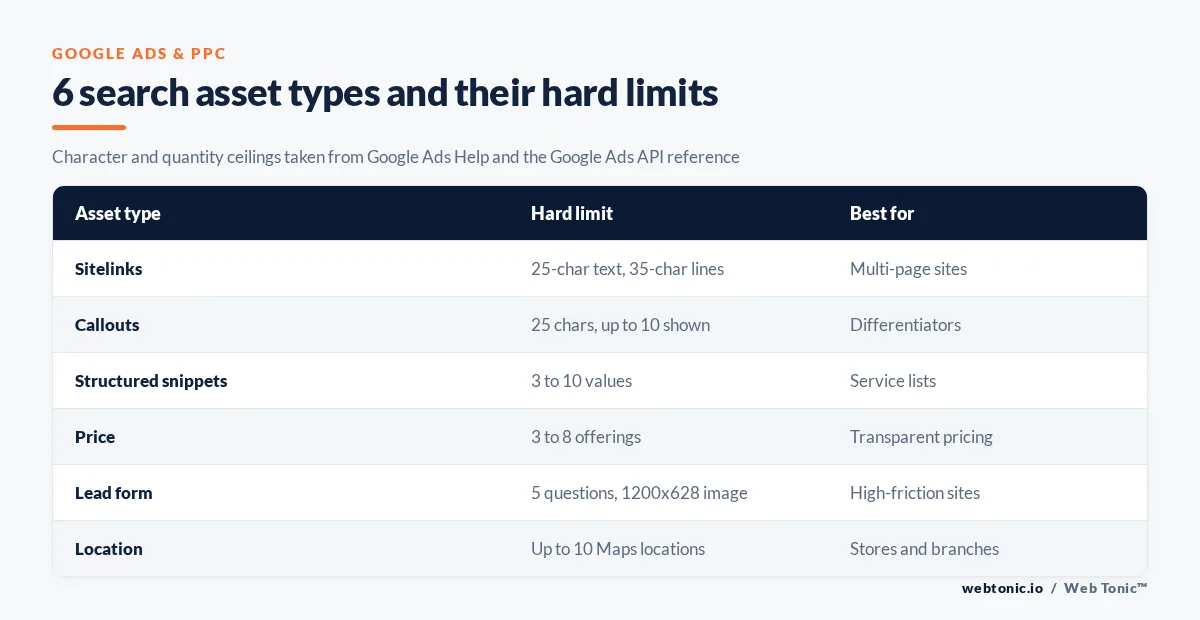
The Google Ads API's AssetType enum is the cleanest inventory of what exists, because it lists every asset the platform can store rather than only the ones surfaced in the current interface. The table below groups the search-relevant ones with their hard limits.
| Extension / asset | What it shows | Hard limit | Best for |
|---|---|---|---|
| Sitelink extensions | Up to 6 deep links under the ad | 25-char text, 35-char descriptions | Multi-page sites |
| Callout extensions | Short non-clickable trust phrases | 25 characters, up to 10 shown | Differentiators |
| Structured snippet extensions | Header plus a list of values | 3 to 10 values, 25 chars each | Catalogues, service lists |
| Call extensions | Tap-to-call phone number | One number per asset | Phone-led businesses |
| Location extensions | Address, distance, map pin | Up to 10 Maps locations | Stores and branches |
| Affiliate location extensions | Retail chains stocking your product | Retailer list chosen by you | Manufacturers |
| Lead form extensions | In-SERP form | 5 qualifying questions, 1200x628 image | High-friction sites |
| Image extensions | Square or landscape image beside the ad | Landscape and square variants | Visual products |
| Price extensions | Price cards under the ad | 3 to 8 offerings | Transparent pricing |
| Promotion extensions | Discount or offer tag | 6 schedules per day, 42 total | Seasonal sales |
| App extensions | Direct app download link | One app per asset | App installs |
Limit 2: structured snippets are rejected below 3 values, which is the single most common cause of a snippet asset sitting at "not eligible" in the interface. Limit 3: price assets need at least 3 offerings and cap at 8, per the PriceAsset reference.
Sitelink extensions: the specs that decide whether they show
Sitelinks carry the most documented performance evidence of any asset type. Google's own sitelink assets help page states that advertisers who increase sitelinks to 6 per campaign notice up to 3.5% more conversions at a similar cost per conversion, and that 6 or more sitelinks improves Ad Strength.
| Surface | Minimum to serve | Maximum shown | Format note |
|---|---|---|---|
| Desktop search | 2 sitelinks | 6 sitelinks | One or two lines, side by side or stacked |
| Mobile search | 2 sitelinks | Fewer, carousel style | Short text wins the slot |
| Video | 2 sitelinks | 4 sitelinks | Browsable during playback |
| Account-level fallback | 4 recommended | Inherited by all campaigns | Must be relevant to every campaign |
Rule 4 — write 25 characters or fewer per sitelink: shorter link text means more links fit on the line, so more of them can show at once. Duplicate or near-duplicate sitelink text is filtered, and only one of the pair serves. WordStream's sitelink dos and don'ts reports that the mere presence of sitelinks typically lifts CTR by 10% to 20%, rising to 20% to 50% on branded searches.
Callout, snippet and price extensions: character-limit table
Every text asset has its own ceiling, and Google truncates rather than warns at serve time. The callout assets page confirms callout text is limited to 25 characters in most languages and 12 in double-width languages like Chinese, Japanese and Korean.
| Asset | Field | Character limit | Double-width limit |
|---|---|---|---|
| Sitelink | Link text | 25 | 12 |
| Sitelink | Description line 1 and 2 | 35 each | Shortened |
| Callout | Callout text | 25 | 12 |
| Structured snippet | Each value | 25 | 12 |
| Price | Item header | 25 | 12 |
| Lead form | Description | 90 | Shortened |
Limit 5: callouts render up to 10 per ad, though character spacing, browser and device all cut that number in practice. Treat 4 well-written callouts as the working target and let the extras compete.
Automated extensions and when to disable automated extensions
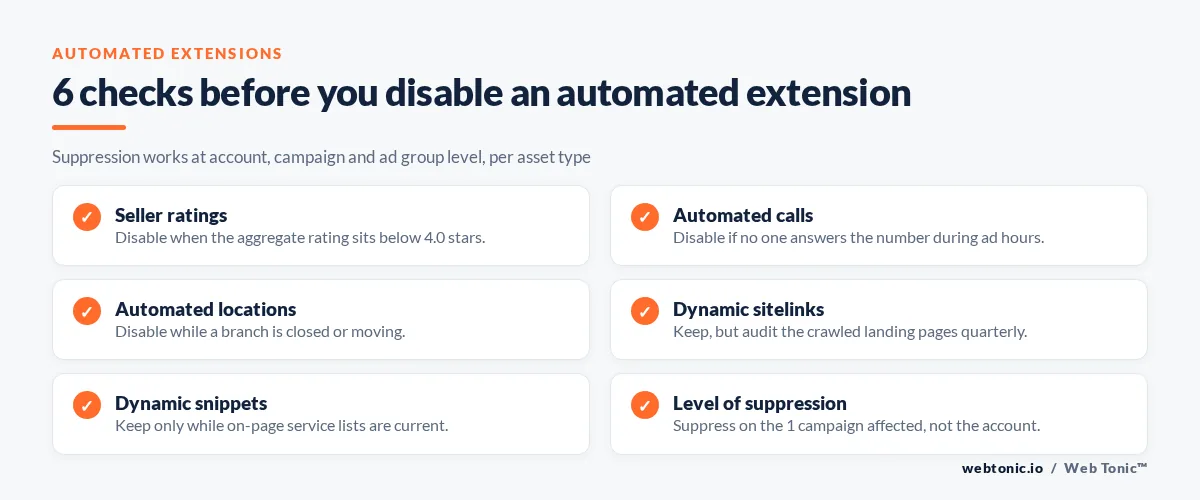
Automated extensions are generated by Google from your landing pages, account history and Merchant Center or Business Profile data. Dynamic sitelinks, dynamic structured snippets and seller and store ratings all fall in this group. They cost nothing to enable and require no build work, which is exactly why they get ignored until they cause a problem.
| Automated asset | Source Google pulls from | Typical risk | Keep or disable |
|---|---|---|---|
| Dynamic sitelinks | Crawled landing pages | Links to thin or stale pages | Keep, audit quarterly |
| Dynamic structured snippets | On-page lists and navigation | Outdated service lists | Keep if site is current |
| Seller ratings | Aggregated review sources | Low rating displayed publicly | Disable below 4.0 stars |
| Automated calls | Phone number on site | Routes to an unstaffed line | Disable if no phone cover |
| Automated locations | Business Profile | Shows a closed branch | Disable during closures |
Rule 6 — disable automated extensions per asset type, not wholesale. Suppression is available at account, campaign and ad group level, so a single campaign with a sensitive landing page does not force you to give up dynamic sitelinks everywhere.
Account, campaign and ad group level: where to add extensions
Every manual asset can live at three levels, and the most specific level wins. This is the mechanic most accounts get wrong: broad promises sit at account level, and specific claims sit at ad group level.
| Level | What belongs here | Example | Inheritance |
|---|---|---|---|
| Account level | Universally true statements | 24/7 phone support | Applies to every campaign |
| Campaign level | Product-line or market claims | Free UK delivery | Overrides account level |
| Ad group level | Keyword-tight detail | 20% off cameras | Overrides both |
Limit 7: an ad group asset fully replaces the campaign and account version of that type — it does not add to it. Adding one ad group sitelink therefore silently removes the other five you had at campaign level.
How to add extensions in Google Ads, step by step
The path changed with the assets rename, so older tutorials point at menus that no longer exist. The current sequence takes about four minutes per campaign.
- Step 1 — open Campaigns, then Assets in the left navigation.
- Step 2 — choose the asset type from the table above and click the plus button.
- Step 3 — set the level: account, campaign or ad group.
- Step 4 — write within the character limits, using unique text per asset.
- Step 5 — add a final URL per sitelink that matches the promise exactly.
- Step 6 — repeat until you have at least 6 sitelinks, 4 callouts and 1 snippet header.
- Step 7 — check Ad Strength, then review the asset report after 14 days of data.
| Prerequisite | Why it is needed | Where to check |
|---|---|---|
| Verified landing pages | Sitelink URLs must resolve | Site crawl |
| Business Profile link | Powers location assets | Linked accounts |
| Call tracking decision | Call assets need reporting | Conversion actions |
| Approved image library | Image assets need aspect ratios | Asset library |
Location extensions and affiliate location extensions
Location assets attach an address, distance and map pin to the ad. Google's location assets documentation describes two routes: link a Business Profile or chain feed, or — if neither fits — select up to 10 locations from Google Maps to link with the Ads account manually.
| Scenario | Asset to use | Data source | Watch out for |
|---|---|---|---|
| Single storefront | Location asset | Business Profile | Unverified profile blocks serving |
| Multi-branch service business | Location asset | Chain or Business Profile groups | Closed branches still serving |
| Manufacturer sold in retail | Affiliate location | Retailer chain list | Retailer stock accuracy |
| No physical premises | None | Skip location entirely | Do not fake an address |
Limit 8: the manual Maps route caps at 10 locations, and each pin must genuinely be yours or it risks disapproval.
Lead form, call and app extensions for conversion capture
These three assets move the conversion event closer to the SERP. Lead form assets are the most constrained: the LeadFormAsset reference limits you to 5 qualifying questions per form and requires a background image of exactly 1200x628 pixels. App assets send traffic straight to a store listing, and Google's Google Ads resource hub is the current entry point for setup walkthroughs.
| Asset | Conversion captured | Friction removed | Reporting caveat |
|---|---|---|---|
| Lead form | Form fill in SERP | No landing page load | Leads need CRM download or webhook |
| Call | Phone call | No navigation at all | Needs call conversion action |
| App | Store visit or install | No website step | Attribution via app events |
Rule 9 — never run a lead form asset without a lead-delivery webhook; leads sitting in the interface for 30 days expire and cannot be recovered.
Extension best practices by campaign objective
Extension best practices are objective-specific, not universal. The same callout that lifts an ecommerce ad drags on a lead-gen ad where the promise cannot be honoured.
| Objective | Priority assets | Secondary assets | Skip |
|---|---|---|---|
| Ecommerce sales | Sitelinks, price, promotion, image | Structured snippets | Lead form |
| Lead generation | Sitelinks, callouts, call, lead form | Location | Price |
| Local footfall | Location, call, callouts | Sitelinks | App |
| App installs | App, image | Callouts | Price, location |
| Brand defence | Sitelinks, callouts, snippets | Promotion | Lead form |
Limit 10: promotion assets can carry 6 schedules per day and 42 in total, which is enough to run a full seasonal calendar without touching the asset again. Expired offers are the most damaging extension error there is — a 4th of July discount showing on 5 July costs clicks and trust.
How extensions affect Quality Score, Ad Strength and CTR

Extensions do not appear as a Quality Score component, but expected click-through rate does, and Google's Quality Score guidance ties improvement work directly to ad relevance and expected CTR. Assets raise both by giving the auction more ways to match the query.
| Signal | Does the asset count directly | Indirect effect | How to verify |
|---|---|---|---|
| Expected CTR | No | More surface area lifts clicks | Asset performance report |
| Ad relevance | No | Snippets echo query language | Keyword-level diagnostics |
| Landing page experience | No | Sitelinks route deeper | Landing page report |
| Ad Strength | Yes | 6+ sitelinks raise the rating | Ad Strength column |
For context on what those clicks cost, the 2026 WordStream Google Ads benchmarks put the cross-industry average search CTR at 6.64% and average CPC at $5.42, with average conversion rate at 8.18% and cost per lead at $66.69. A 10% CTR gain on a $5.42 CPC is a materially cheaper funnel before you touch bids. Seasonal shifts in query mix are tracked on Think with Google.
Six extension mistakes that quietly cost clicks
| Mistake | Why it happens | Symptom | Fix |
|---|---|---|---|
| Only 2 sitelinks | Built once, never revisited | Ad Strength stuck at Average | Add to 6 minimum |
| Duplicate sitelink text | Copy-paste across campaigns | Only one serves | Rewrite each to 25 unique chars |
| Ad group asset overriding campaign | Level misunderstood | Sitelink count drops | Move asset up a level |
| Seller ratings left on | Automated, so invisible | Low star rating in ad | Disable below 4.0 |
| Expired promotions | No schedule set | Dead offer showing | Use the 42-schedule limit |
| Lead form with no webhook | Launched for a test | Leads expire unread | Connect CRM before launch |
Rule 11 — audit the asset report every 30 days and compare it against the 4-asset-type floor Google recommends. Most underperforming search accounts fail that single check.
A 30-day extension build plan
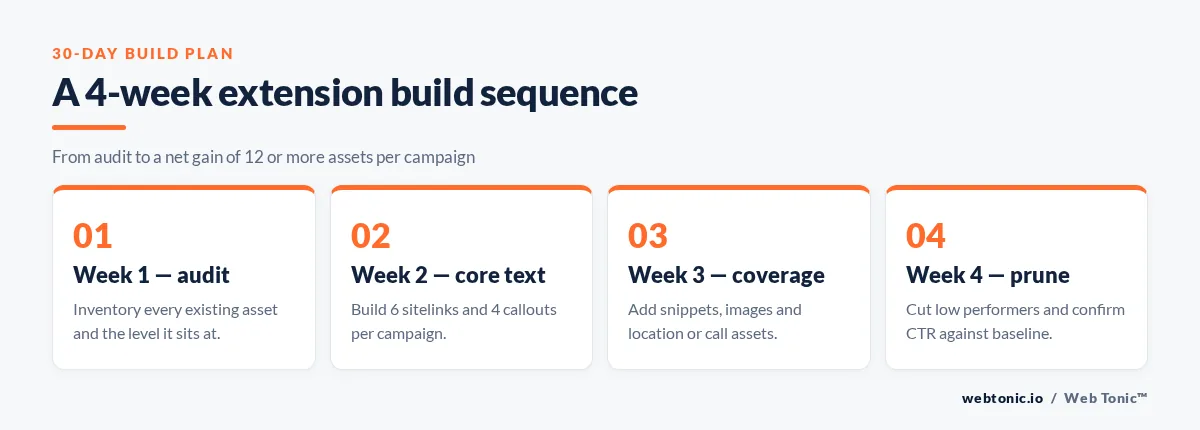
| Week | Work | Assets added | Success check |
|---|---|---|---|
| Week 1 | Audit current assets and levels | 0 | Full inventory documented |
| Week 2 | Build 6 sitelinks and 4 callouts per campaign | 10 | Ad Strength improves |
| Week 3 | Add snippets, images, location or call | 3 to 5 | All types eligible |
| Week 4 | Review asset report, cut low performers | Net 12+ | CTR up versus baseline |
If you would rather this ran as part of a managed programme, our growth marketing and data intelligence teams handle asset builds and reporting together. The full service list sits on our services page, and more paid-media breakdowns live on the blog.
Related reading
- Mortgage Google Ads Statistics: CPC, CPL & Conversion Benchmarks (2026)
- 2026 Google Ads Stats for Personal Injury Law: CPC, CPL & ROI Benchmarks
- Plumbing Google Ads Statistics (2026): CPC, CPL & ROI Benchmarks
- Paid Search services at Web Tonic
FAQ
Are Google Ads extensions the same as assets?
Yes. Google renamed extensions to assets and moved them into the Assets section of the interface. The mechanics, character limits and levels are unchanged, so older guides remain accurate on specs even when their menu paths are wrong.
How many sitelinks should I add?
At least 6 per campaign. Google reports up to 3.5% more conversions at a similar cost per conversion when advertisers move to 6 sitelinks, and 6 or more also improves Ad Strength. You need a minimum of 2 before any sitelink can show.
Should I disable automated extensions?
Only selectively. Disable seller ratings if your aggregate rating is below 4.0, automated calls if no one answers the phone, and automated locations during branch closures. Dynamic sitelinks and dynamic structured snippets are usually worth keeping if your site content is current.
Do extensions cost extra?
No. Clicks on sitelinks, call assets or images are charged at the same cost as a headline click, and only one click per impression is billable. There is no separate fee for creating or storing an asset.
Why are my extensions not showing?
The usual causes are too few assets of that type, duplicate text being filtered, an ad group asset overriding a fuller campaign set, low Ad Rank on that query, or a specification failure such as a structured snippet with fewer than 3 values.


