



Table of contents
Google display ad sizes determine where your banner ads can appear across the Google Display Network's 35 million websites and apps. Choosing the right display sizes directly impacts your campaign's reach, performance, and cost efficiency.
Key Takeaways
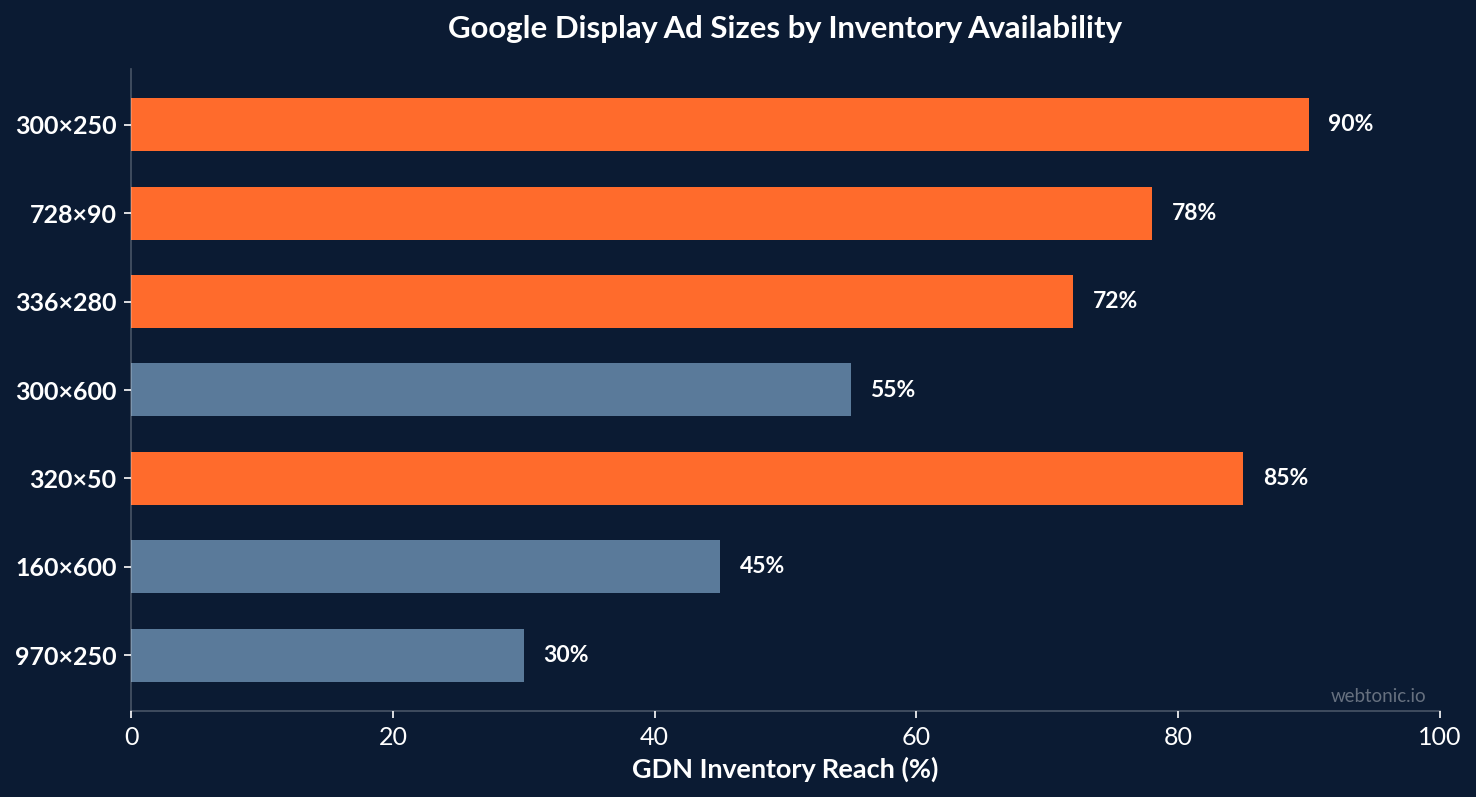
- The 300×250 medium rectangle is the single most widely available Google display ad size, appearing on over 90% of display-enabled inventory across desktop and mobile devices.
- Running just 5 core Google display sizes — 300×250, 728×90, 336×280, 300×600, and 320×50 — covers approximately 90% of all available GDN inventory and is sufficient for most advertisers spending under $25,000 per month.
- Responsive display ads now account for the majority of Google display ads served, automatically adjusting headlines, descriptions, and images to fit any ad space using Google machine learning.
- The maximum file size for uploaded static image ads is 150 KB, and Google accepts JPG, PNG, and GIF formats — keeping assets lightweight ensures faster load times and better viewability scores.
- Google's recommended image dimensions for responsive display ads are 1200×628 pixels (landscape 1.91:1) and 1200×1200 pixels (square 1:1), which serve across the widest range of placements including Performance Max campaigns.
Complete List of Google Display Ad Sizes
Google Ads supports over 20 standard display ad sizes for uploaded static image ads on the Google Display Network. These dimensions follow IAB (Interactive Advertising Bureau) standards and determine where your ads are eligible to appear. Here is the complete list of supported Google display sizes, organized by placement type:
| Ad Size (Pixels) | Name | Best For |
|---|---|---|
| 300 × 250 | Medium Rectangle | Universal — fits in-content, sidebar, and mobile placements |
| 336 × 280 | Large Rectangle | In-article placements on content-heavy sites |
| 728 × 90 | Leaderboard | Top-of-page banner on desktop sites |
| 300 × 600 | Half Page (Large Skyscraper) | Sidebar placements with high visual impact |
| 320 × 50 | Mobile Banner | Standard mobile banner — highest mobile volume |
| 320 × 100 | Large Mobile Banner | Mobile placements with 2× height for more creative space |
| 160 × 600 | Wide Skyscraper | Desktop sidebar placements on news and blog sites |
| 970 × 90 | Large Leaderboard | Premium top-of-page desktop inventory |
| 970 × 250 | Billboard | High-impact takeover placements on premium publishers |
| 468 × 60 | Banner | Legacy banner placement — declining availability |
| 250 × 250 | Square | Small-format placements on desktop and mobile |
| 200 × 200 | Small Square | Compact sidebar and widget placements |
Not every size carries equal weight. According to Display Ad Agency's 2026 analysis, the top 5 performing sizes account for the vast majority of available impressions. If you are building a display campaign from scratch, start with these five before expanding to niche sizes. For comprehensive guidance on running paid media campaigns across Google's ad ecosystem, the size selection is step one of the creative process.
Top Performing Google Display Sizes
Performance data across millions of display ad impressions consistently shows that a small group of Google display sizes delivers the best results in terms of reach, click-through rate, and conversion efficiency. Here are the top performing sizes every advertiser should prioritize:
300×250 Medium Rectangle
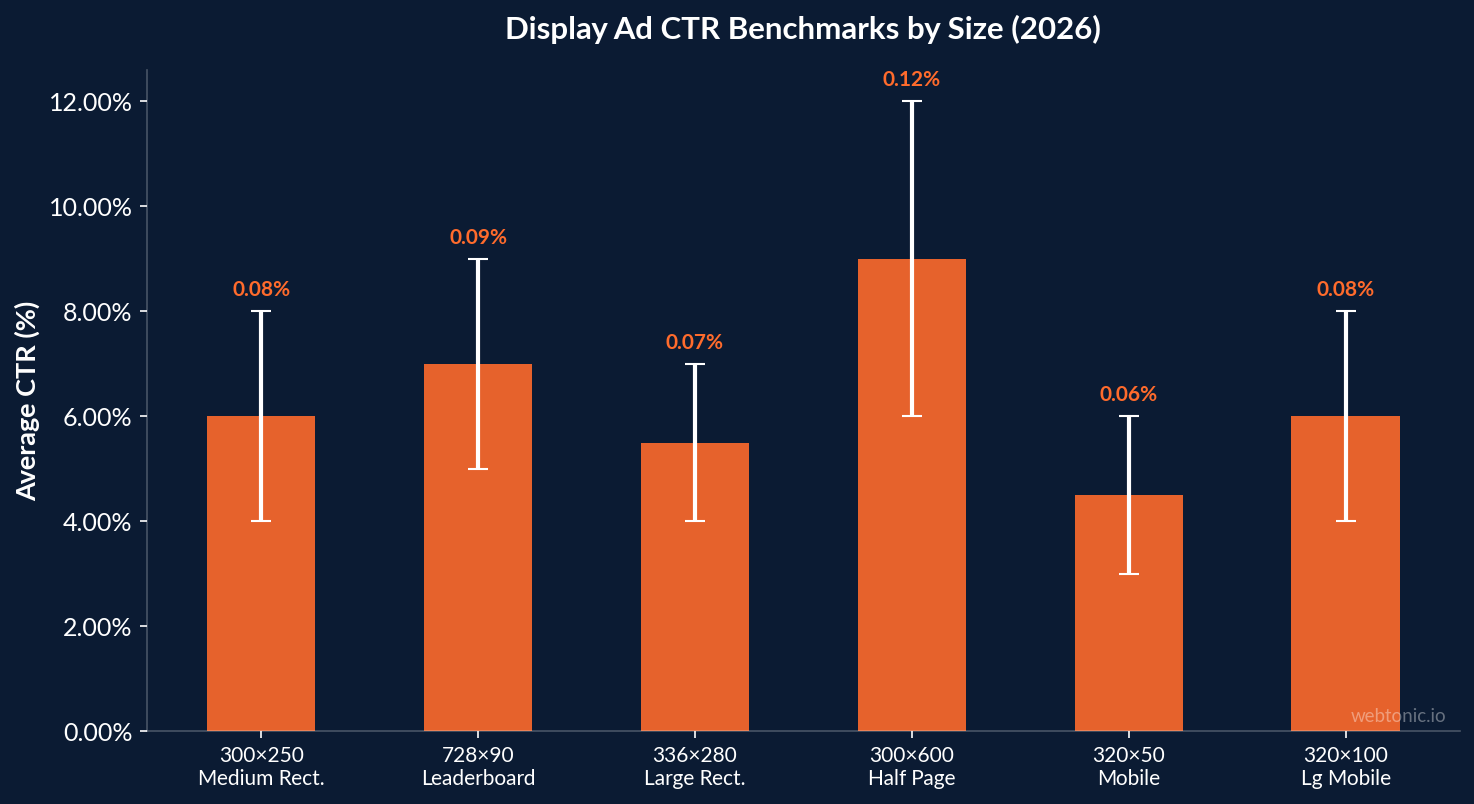
The 300×250 medium rectangle is the undisputed workhorse of Google display ads. It fits seamlessly into article content, sidebars, and mobile layouts — making it available on more publisher inventory than any other size. The medium rectangle consistently ranks as the top performing display ad size with average CTR benchmarks of 0.04–0.08% across industries. Every Google Ads display campaign should include this size.
728×90 Leaderboard
The 728×90 leaderboard dominates top-of-page placements on desktop websites. Its wide horizontal format captures attention during the critical first impression when a user lands on a page. Leaderboard ads typically achieve 0.05–0.09% CTR on desktop — slightly higher than medium rectangles — because of their prominent above-the-fold positioning.
336×280 Large Rectangle
A slightly larger variant of the medium rectangle, the 336×280 large rectangle offers more creative space without sacrificing placement availability. This size is particularly effective for in-article placements where the additional height allows for stronger visual impact and clearer call-to-action elements.
300×600 Half Page
The 300×600 half page (also called a large skyscraper) provides significant canvas for detailed creative, product showcases, or multi-element layouts. Half-page ads generate higher engagement rates than smaller formats — studies show up to 2× higher interaction rates compared to standard banner sizes — but they are available on fewer publisher sites. Use this size when visual storytelling is a priority.
320×50 and 320×100 Mobile Banners
The 320×50 mobile banner is the most widely served mobile display ad size on the Google Display Network. For advertisers targeting mobile devices, this is a mandatory inclusion. The 320×100 large mobile banner offers double the height, giving you more room for messaging and branding elements while remaining compatible with most mobile app and web inventory.

Responsive Display Ads vs. Static Image Ads
Google Ads offers two primary approaches to display advertising: responsive display ads and uploaded static image ads. Understanding when to use each format is essential for maximizing your Google display campaign performance.
| Feature | Responsive Display Ads | Uploaded Static Image Ads |
|---|---|---|
| Format | Google machine learning assembles ads from uploaded assets (headlines, descriptions, images, logos) | Pre-designed banners uploaded in specific pixel dimensions (JPG, PNG, GIF) |
| Size Coverage | Adapts automatically to any available ad space | Only serves in the exact dimensions uploaded |
| Creative Control | Limited — Google controls layout and asset combinations | Complete — pixel-perfect design control |
| Reach | Significantly higher — eligible for all inventory | Limited to placements matching uploaded sizes |
| Performance | Google machine learning optimizes asset combinations for conversions | Performance depends entirely on creative quality per size |
| Max File Size | 5 MB per image asset | 150 KB per banner (JPG PNG GIF) |
| Setup Time | Minutes — upload assets and Google builds ads | Hours — each size requires individual design |
Responsive display ads are now the default ad type for the Google Display Network. They automatically adjust their size, appearance, and format to fit virtually any available ad space — meaning a single responsive ad can serve across all display sizes listed above. Google's machine learning tests different combinations of your uploaded headlines, descriptions, and images to find the highest-performing variants.
However, static image ads still have a role. When brand consistency and pixel-perfect creative control matter — for example, during a product launch, seasonal campaign, or brand awareness push — uploaded display ads ensure your visual message appears exactly as designed. The best practice for most advertisers is to run both: responsive display ads for maximum reach and machine learning optimization, plus uploaded static image ads in the top 5 sizes for creative-critical campaigns.
Image Specifications and File Requirements
Getting the technical specifications right prevents ad disapprovals and ensures your Google display ads serve correctly across all placements. Here are the current requirements:
Responsive Display Ad Image Specs
- Landscape (1.91:1 aspect ratio): 1200×628 pixels recommended (minimum 600×314 pixels). Upload 1–15 images; Google recommends at least 5 for optimal performance.
- Square (1:1 aspect ratio): 1200×1200 pixels recommended (minimum 300×300 pixels). Upload 1–15 images.
- Logo (1:1): 1200×1200 pixels recommended (minimum 128×128 pixels). Upload 1–5 logos.
- Logo (4:1): 1200×300 pixels recommended (minimum 512×128 pixels). Optional but recommended.
- File formats: JPG, PNG (GIF not supported for responsive ads)
- Maximum file size: 5 MB per image asset
Uploaded Static Display Ad Specs
- File formats: JPG, PNG, and GIF (including animated GIF up to 30 seconds)
- Maximum file size: 150 KB per ad — this is the most common reason for upload rejections
- Aspect ratio: Must match the exact pixel dimensions of the target size (no scaling or cropping)
- Animation: GIF animations must not exceed 30 seconds, and the final frame must be a clear, readable representation of the ad
The 150 KB file size limit for static image ads is the specification that catches most advertisers. High-quality photographs and complex graphics often exceed this limit. Use image compression tools, reduce color palettes, and favor flat design over photographic backgrounds to stay within the requirement. For performance creative development, balancing visual impact against file size is a core design constraint.
Google Display Sizes for Performance Max Campaigns
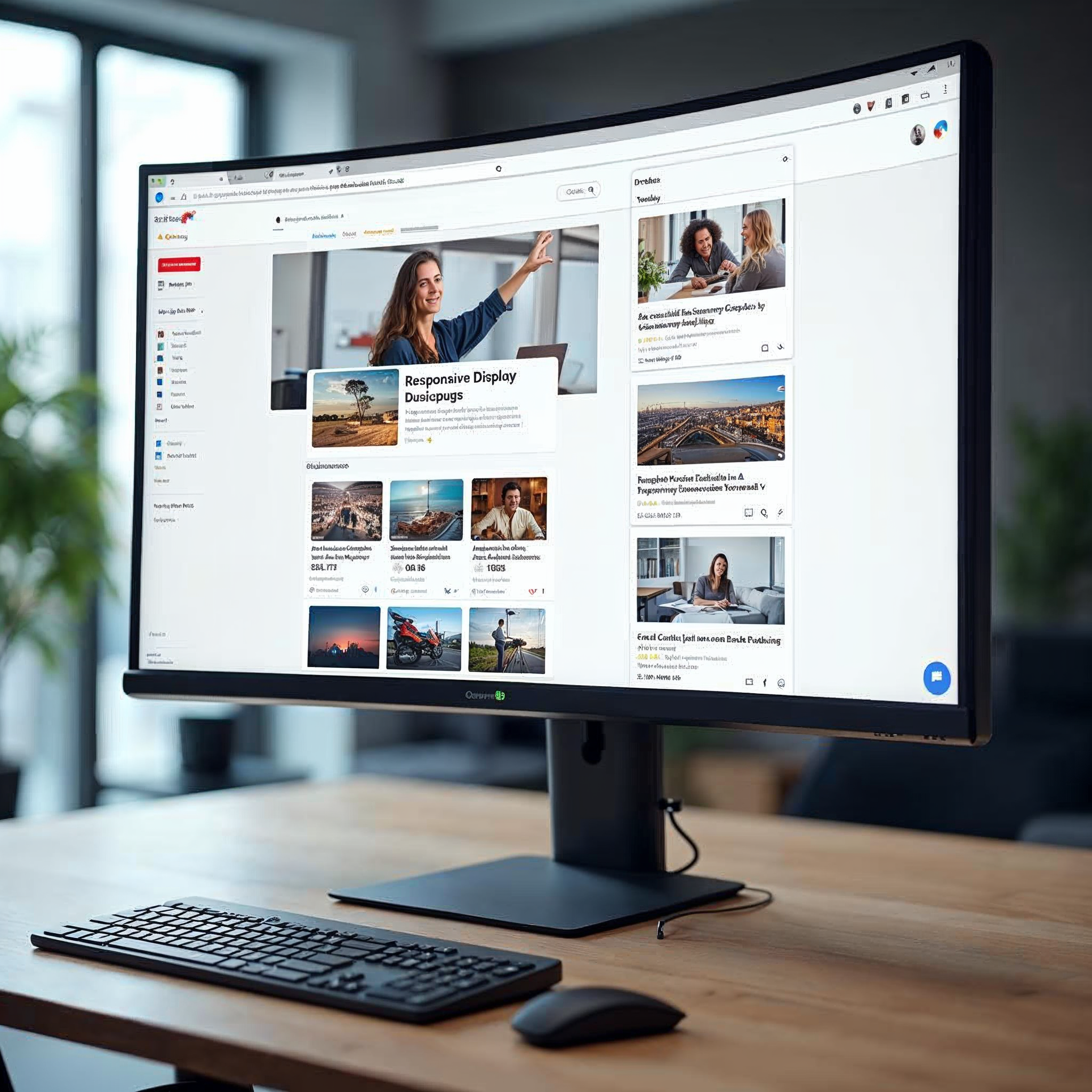
Performance Max campaigns, which serve ads across all Google properties (Search, Display, YouTube, Gmail, Discover, Maps), use responsive display ads exclusively. There are no uploaded static image ads in Performance Max — Google machine learning handles all sizing and placement decisions automatically.
The image assets you provide for Performance Max campaigns follow the same responsive display ad specifications:
- Landscape 1.91:1: 1200×628 pixels (minimum 600×314)
- Square 1:1: 1200×1200 pixels (minimum 300×300)
- Portrait 4:5: 960×1200 pixels (optional, available since 2024)
The critical difference with Performance Max campaigns is that your image assets serve not only as display ads but also as YouTube video thumbnails, Gmail promotional images, and Discover feed placements. This means every image must work across multiple contexts — a consideration that affects composition, text overlay, and focal point placement. Using clean, uncluttered images with strong focal subjects performs best across these varied placements.
For advertisers managing campaigns across both standard Display and Performance Max, maintaining a consistent image asset library simplifies creative management. Upload the same high-quality landscape and square images to both campaign types, and let Google machine learning optimize placement and sizing. For detailed guidance on optimizing Performance Max campaigns alongside standard display, explore Web Tonic's growth marketing services.
Best Practices for Google Display Ad Creative
Choosing the right Google display sizes is only half the equation. The creative quality within those sizes determines actual campaign performance. Here are proven best practices:
- Design for the smallest size first: Start with the 320×50 mobile banner. If your message, branding, and CTA work at this constrained size, they will scale effectively to larger formats. The reverse approach — designing a billboard first, then cramming it into a mobile banner — produces poor results.
- Use clear, legible typography: Body text must be readable at the actual display size, not just in your design tool. For mobile banner ad sizes (320×50, 320×100), limit text to a headline and CTA — no body copy.
- Include a strong CTA: Every display ad needs a visible call-to-action button. Ads with an explicit CTA button see 45% higher click-through rates than those without one.
- Maintain brand consistency: Use consistent colors, logos, and visual styles across all Google display sizes. Users encounter your ads across dozens of websites — brand recognition requires visual consistency.
- Test multiple creative variants: Upload at least 3–5 creative variants per ad size to enable meaningful performance testing. Google's machine learning in responsive display ads works best with diverse asset combinations.
- Optimize file size aggressively: For uploaded display ads, target under 100 KB even though the limit is 150 KB. Lighter files load faster, improving viewability scores and user experience — both of which affect campaign performance metrics.
Related reading
- Google Ad Terms: The Complete Glossary for Every Advertiser
- Single Keyword Ad Groups (SKAGs): When They Still Win in 2025
- Google RLSA: How Remarketing Lists for Search Ads Drive Higher Conversions
- Paid Search services at Web Tonic
FAQ
What are the most effective Google display ad sizes?
The five most effective Google display ad sizes based on reach and performance data are: 300×250 (medium rectangle), 728×90 (leaderboard), 336×280 (large rectangle), 300×600 (half page), and 320×50 (mobile banner). Running these five sizes covers approximately 90% of available Google Display Network inventory and is the recommended starting point for most advertisers.
Should I use responsive display ads or uploaded static image ads?
Use both. Responsive display ads should be your default — they adapt to any available ad space using Google machine learning, maximizing your reach across the Google Display Network. Add uploaded static image ads in the top 5 sizes when you need precise creative control, such as during brand campaigns or product launches. This hybrid approach combines the reach of responsive ads with the visual precision of custom-designed banners.
What is the maximum file size for Google display ads?
For uploaded static image ads (JPG PNG GIF), the maximum file size is 150 KB per banner. For responsive display ad image assets, the limit is 5 MB per image. The 150 KB limit for static ads is the most common cause of upload rejections — use image compression tools to stay within this requirement while maintaining visual quality.
What image sizes does Google recommend for responsive display ads?
Google recommends 1200×628 pixels (landscape 1.91:1 aspect ratio) and 1200×1200 pixels (square 1:1 aspect ratio) as the primary image dimensions for responsive display ads. These sizes ensure your assets can serve across the majority of the Google Display Network and all Google properties including YouTube, Gmail, and Discover placements.
Do Google display ad sizes matter for Performance Max campaigns?
Yes, but differently. Performance Max campaigns use responsive display ads exclusively — you do not upload static banners in specific pixel dimensions. Instead, you provide image assets in landscape (1200×628), square (1200×1200), and optionally portrait (960×1200) formats. Google machine learning then automatically sizes and places your ads across all Google properties including the Display Network, YouTube, Gmail, and Discover.
Sources
Google Ads Help — Uploaded Display Ads Specifications
Google Ads Help — Common Sizes for Responsive Display Ads
Google Ads Help — Responsive Display Ads Specs and Format Requirements
Google Ads Help — Ad Formats, Sizes, and Best Practices
Display Ad Agency — Google Display Ad Sizes Complete Specs Guide 2026
PixExact — Google Display Ad Size Guide 2026
Converting Digital — The Complete Guide to Google Display Ads 2025
Digital Applied — Display Advertising Benchmarks 2026: 150+ Data Points


