



Table of contents
The hard part of an email newsletter is not the design or the sending schedule. It is having something worth opening on week 14, when the launch news is gone and the product updates have run dry. This is a working bank of 68 newsletter ideas, sorted by the job each one does, plus the formats, cadence and numbers that decide whether an idea earns its send.
Key Takeaways
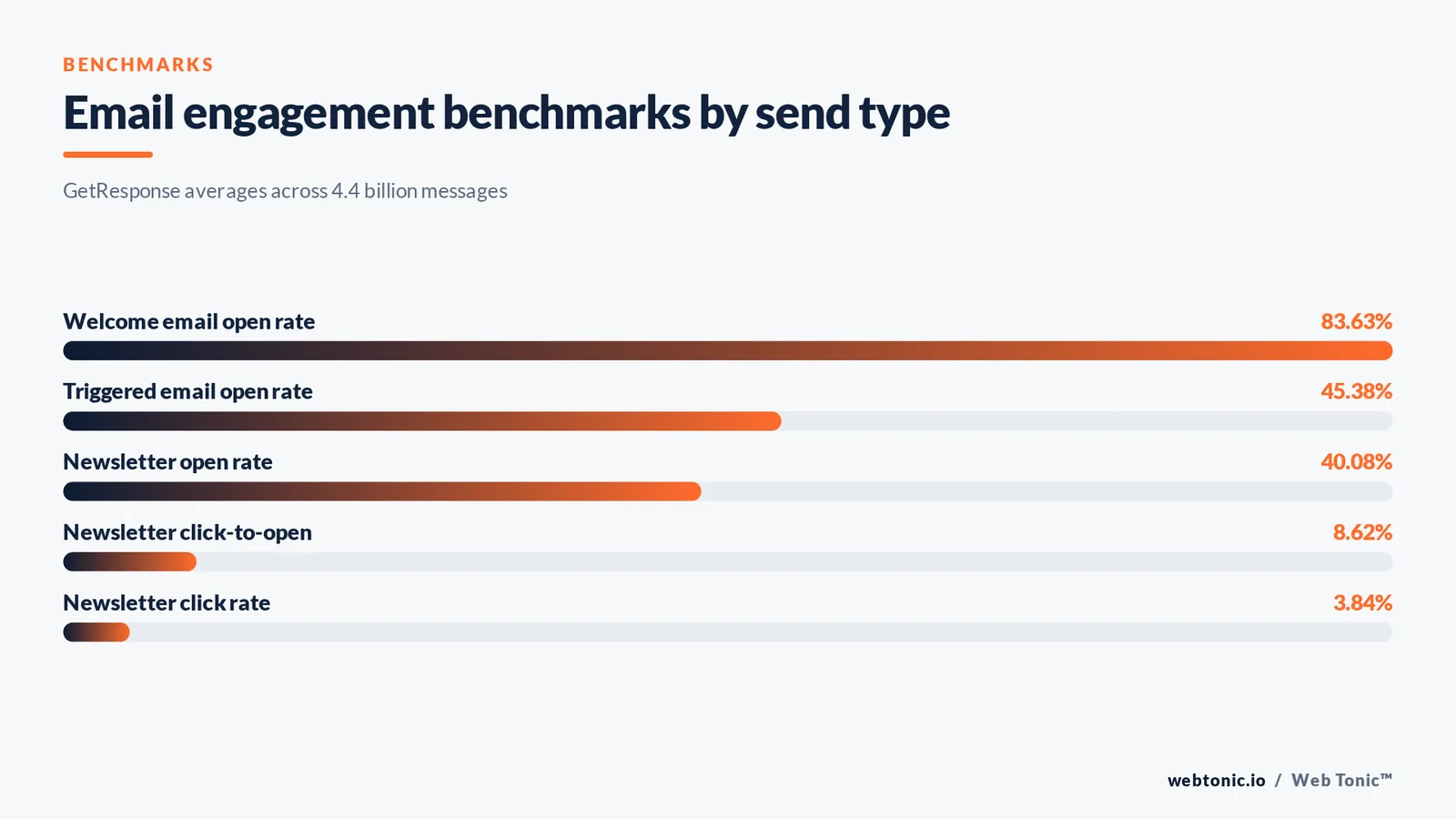
- Newsletter campaigns average a 40.08% open rate and 3.84% click rate across industries, well below the 45.38% that triggered emails earn.
- Welcome emails open at 83.63%, making the first send the single most valuable slot in the whole programme.
- Apple Mail (64.66%) and Gmail (24.11%) account for nearly 90% of opens, so newsletter design is really a two-client rendering problem.
- Apple's Mail Privacy Protection now affects roughly 55-60% of opens, which is why click and reply rates beat open rate as an idea-selection metric.
- Email marketing ROI commonly lands between 10:1 and 36:1, with the best programmes above 50:1.
- Only 13% of teams use advanced personalisation and 31% use AI-assisted optimisation, so segmented ideas are still a competitive edge.
Pick ideas by the job they do, not by the calendar
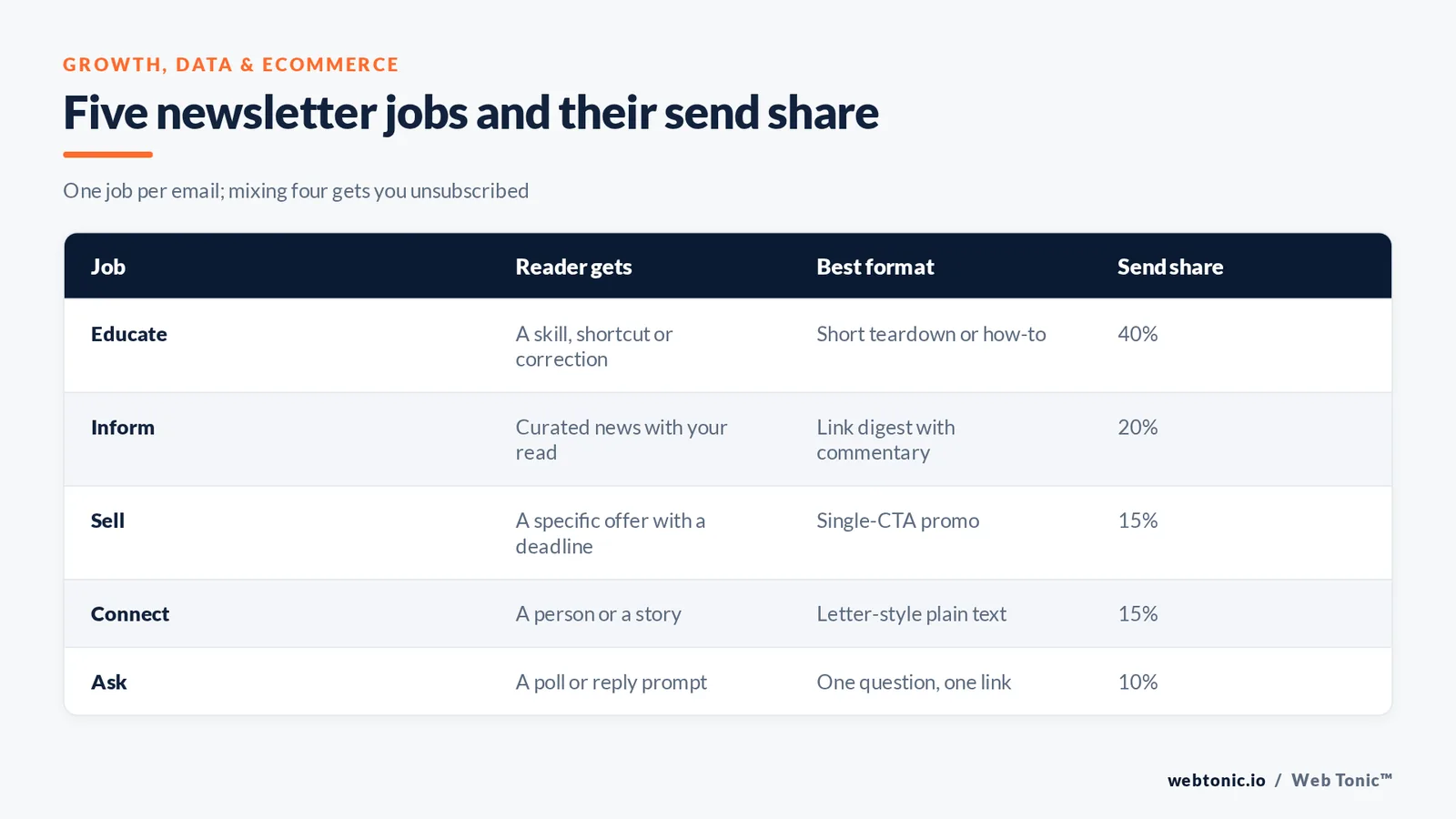
Every send should have one job. A newsletter that mixes four jobs in one email gets skimmed and unsubscribed. Campaign Monitor's email marketing guide frames this as a value exchange, and the practical version is a job column on your content calendar.
| Job | What the reader gets | Best format | Send share |
|---|---|---|---|
| Educate | A skill, a shortcut, a correction | Short teardown or how-to | 40% |
| Inform | Curated news with your read on it | Link digest with commentary | 20% |
| Sell | A specific offer with a deadline | Single-CTA promo | 15% |
| Connect | A person, a story, a behind-the-scenes look | Letter-style plain text | 15% |
| Ask | A poll, reply prompt or survey | One question, one link | 10% |
20 evergreen newsletter content ideas that never run dry
Evergreen means the idea regenerates itself every month without new company news. These are the backbone of a weekly or biweekly programme.
| # | Newsletter idea | Why it works | Prep time |
|---|---|---|---|
| 1 | One customer problem solved, start to finish | Concrete proof beats claims | 60 min |
| 2 | Three links plus your one-line verdict on each | Curation is a service; the verdict is the value | 25 min |
| 3 | A metric from your own data, explained | Original numbers get forwarded | 45 min |
| 4 | Teardown of a public example in your field | Specific and instantly useful | 50 min |
| 5 | A mistake you made and the fix | Highest reply rates of any format | 30 min |
| 6 | Q&A from a real subscriber question | Reader-sourced, so relevance is proven | 30 min |
| 7 | A checklist readers can run today | Saveable and shareable | 40 min |
| 8 | Tool of the month with setup notes | Practical, low-effort, high open | 25 min |
| 9 | Interview with one practitioner, five questions | Borrows their audience | 70 min |
| 10 | Before-and-after with the numbers | Visual proof of outcome | 55 min |
| 11 | A myth in your industry, corrected | Contrarian angles lift clicks | 35 min |
| 12 | Behind-the-scenes of one internal process | Builds trust cheaply | 40 min |
| 13 | Reader poll results from last month | Closes a loop and drives replies | 20 min |
| 14 | Glossary explainer for one confusing term | Serves beginners in your list | 25 min |
| 15 | A template or swipe file attachment | Direct utility, strong forwards | 60 min |
| 16 | This month's best question from support | Anticipates common friction | 20 min |
| 17 | Two options compared on one criterion | Decision help is a reliable click driver | 45 min |
| 18 | A short prediction with a stated reason | Invites replies and disagreement | 30 min |
| 19 | Roundup of your own best archive pieces | Recycles work for new subscribers | 20 min |
| 20 | One number that changed and what it means | Timely without being news-dependent | 30 min |
MailerLite's newsletter idea list covers similar ground for small lists; the addition worth making is the prep-time column, because an idea you cannot produce in the time you actually have is not an idea.
Ecommerce and retail newsletter ideas
Product emails fail when every send is a promotion. Shopify's email marketing guide makes the same point about earning attention between sales. Mix these with the evergreen list at roughly two to one.
| Idea | Trigger | Primary CTA | Typical use |
|---|---|---|---|
| New arrivals with a styling note | Weekly drop | Shop the edit | Fashion, home |
| Restock alert for a sold-out item | Inventory event | Buy now | Any catalogue |
| How three customers use one product | Monthly | Read the story | Considered purchases |
| Bundle logic explained | Seasonal | Build a bundle | AOV growth |
| Care and maintenance guide | Post-purchase day 14 | Save the guide | Durables |
| Size and fit data from returns | Quarterly | Check the fit guide | Apparel |
| Sourcing or manufacturing story | Quarterly | Meet the makers | Premium brands |
| Customer photo gallery (UGC) | Monthly | Submit yours | Social proof |
| Price-drop notice on a watched item | Behavioural | See the price | High-consideration |
| End-of-season sizing clearance | Seasonal | Shop remaining sizes | Retail |
B2B and service business newsletter ideas
B2B lists reward specificity and patience. Salesforce's State of Marketing reports that data-driven teams outperform, and the newsletter version of that is publishing the numbers your buyers cannot get anywhere else.
| Idea | Buying stage | Proof element | Follow-up |
|---|---|---|---|
| Benchmark report from your client base | Awareness | Aggregated data | Segment by industry |
| Anonymised account teardown | Consideration | Before/after metrics | Offer an audit |
| Regulatory or platform change explained | Awareness | Primary source link | Webinar invite |
| Pricing and cost breakdown for your category | Consideration | Market ranges | Quote request |
| Hiring and team growth note | Trust | Named people | Referral ask |
| Common RFP question answered | Decision | Direct answer | Sales handoff |
| Tool stack we actually run | Consideration | Screenshots | Consultation |
| Quarterly roadmap or focus letter | Retention | Commitments | Reply prompt |
| Post-mortem on a campaign that missed | Trust | Honest numbers | Reply prompt |
| Onboarding timeline explained week by week | Decision | Week numbers | Kickoff call |
Rule 1 — in B2B, one email with one number your reader can quote in a meeting beats five emails of general advice. Aim for at least 1 quotable figure per send.
18 employee and internal newsletter ideas
Internal newsletters have the opposite problem to marketing ones: the audience is captive but the content is usually announcements. the federal plain language guidelines are the fastest quality upgrade available — shorter sentences, active voice, one message per section.
| # | Internal newsletter idea | Section owner | Cadence |
|---|---|---|---|
| 1 | One team's current priorities in three bullets | Team lead | Weekly |
| 2 | New starter introductions with a fun question | People ops | Biweekly |
| 3 | Metric of the month with plain-language context | Finance or ops | Monthly |
| 4 | Customer quote of the week, good or bad | Support | Weekly |
| 5 | Process change with the before and after | Ops | As needed |
| 6 | Shout-outs sourced from a submission form | Anyone | Weekly |
| 7 | Tool tip that saves ten minutes | IT | Biweekly |
| 8 | Leadership answer to one submitted question | Exec | Monthly |
| 9 | Anniversary and milestone list | People ops | Monthly |
| 10 | Safety or compliance reminder in one screen | Compliance | Quarterly |
| 11 | Photos from an event or site visit | Anyone | As needed |
| 12 | What we shipped last sprint | Product | Biweekly |
| 13 | Benefits deadline countdown | People ops | Seasonal |
| 14 | Learning resource of the month | L&D | Monthly |
| 15 | Open roles and the referral bonus | Recruiting | Monthly |
| 16 | One decision explained and why | Exec | Monthly |
| 17 | Volunteering or community update | CSR | Quarterly |
| 18 | Two-question pulse survey | People ops | Monthly |
Limit 2: keep an internal newsletter under 400 words and 5 sections. Beyond that, read-through collapses and the announcements everyone needed get buried.
Seasonal and calendar newsletter ideas without the clichés
Seasonal sends work when the hook is genuinely relevant to the reader's year, not just to the retail calendar. Map your own operating year first, then borrow from the general calendar.
| Period | Idea that is not a generic sale | Angle |
|---|---|---|
| January | Last year's data, published honestly | Transparency |
| February | A customer appreciation feature with names | Recognition |
| March | Quarter-end checklist for your buyer's role | Utility |
| April | Spring clean of your own processes or site | Behind the scenes |
| May-June | Mid-year benchmark update | Original data |
| July-August | Archive best-of for new subscribers | Low-effort value |
| September | Planning template for the final quarter | Timely utility |
| October | Category cost and pricing update | Commercial |
| November | Buying guide with clear deadlines | Conversion |
| December | One reflection letter plus next year's focus | Connection |
Subject line and preview text patterns that fit each idea
The idea and the subject line are one decision. A curation email needs a different promise from a data email.
| Idea type | Subject line pattern | Preview text job | Watch out for |
|---|---|---|---|
| Data or benchmark | The number, stated flatly | Name the sample size | Vague superlatives |
| Teardown | Brand or example plus what broke | Tease the lesson | Naming clients without consent |
| Curation | Count plus the theme | List the best item | Sounding like an RSS feed |
| Mistake or lesson | First person, specific loss | Promise the fix | Fake vulnerability |
| Offer | Offer plus deadline | Restate the terms | Countdowns you do not honour |
| Question or poll | The question itself | One-line context | Asking more than 1 thing |
Fact 3 — with Mail Privacy Protection inflating and obscuring opens for 55-60% of recipients, judge subject lines on clicks and replies over a 4-send rolling window, not on open rate alone.
Design and layout rules that survive real inboxes
Litmus email client market share shows Apple Mail at 64.66% of opens, Gmail at 24.11%, Outlook desktop at 6.49% and Yahoo at 2.57%. Design for the first two, test the third, and accept the rest. W3C WAI tutorials cover the accessibility basics that also improve rendering.
| Element | Rule | Reason |
|---|---|---|
| Width | 600px single column | Renders in every major client |
| Font size | Body 16px, headings 22-28px | Mobile legibility |
| Image-to-text ratio | Keep text above 60% | Images blocked or slow to load |
| Alt text | Every image, descriptive | Blocked images still communicate |
| Dark mode | Test both; over 25% of users use it | Logos and shadows break |
| Tap targets | Minimum 44px high buttons | Thumb accuracy |
| Links | Underlined, not colour-only | Contrast and accessibility |
| Plain-text fallback | Always populated | Deliverability and screen readers |
Cadence, list health and the send calendar
Idea supply and cadence are the same constraint. DataReportal's global digital overview tracks how crowded the digital day already is; the honest question is what you can sustain at quality.
| Cadence | Ideas needed per quarter | Best for | Risk |
|---|---|---|---|
| Weekly | 13 | News-adjacent, community brands | Quality drop by week 6 |
| Biweekly | 6-7 | Most B2B programmes | Momentum loss |
| Monthly | 3 | Long sales cycles | Weak recall |
| Triggered plus monthly | 3 plus 4-6 flows | Ecommerce and SaaS | Setup effort |
Rule 4 — average unsubscribe rate sits near 0.15% and bounces near 2.33%. If a send crosses 0.5% unsubscribes, the idea missed the audience — change the idea before you change the design.
How to judge whether an idea earned its send
HubSpot's email marketing statistics puts typical email ROI between 10:1 and 36:1, and reports that teams using advanced analytics see up to 43% higher returns. A simple scorecard is enough to keep the good ideas and retire the rest.
| Metric | Benchmark | What a miss means | Action |
|---|---|---|---|
| Click rate | 3.84% newsletter average | Weak promise or wrong audience | Rework subject and CTA |
| Click-to-open | 8.62% average | The email under-delivered | Cut length, sharpen the one point |
| Reply rate | Track your own baseline | No reason to respond | Add one direct question |
| Unsubscribes | Under 0.15% | Relevance or frequency problem | Segment the send |
| Forwards and shares | Track your own baseline | Not quotable | Add original data |
| Revenue per send | Your own target | Offer mismatch | Match offer to job |
Statista's email marketing topic hub and Think with Google's email research are both useful for cross-checking category benchmarks before you set an internal target — averages vary widely by industry, and North American programmes report open rates around 45.30% against 28.04% in Asia.
Compliance and consent: the part no idea survives without
the FTC's CAN-SPAM compliance guide sets the baseline for US commercial email: accurate headers and subject lines, a visible physical address, a clear opt-out and processing of unsubscribes within 10 business days. Every idea in this article assumes those are already true.
| Requirement | Practical implementation | Where teams slip |
|---|---|---|
| Accurate from and reply-to | A monitored mailbox | No-reply addresses |
| Non-deceptive subject | Subject matches content | Fake urgency |
| Physical postal address | In every footer | Missing on plain-text sends |
| Clear opt-out | One-click, no login | Buried preference centres |
| Prompt processing | Within 10 business days | Manual list handling |
| Advertisement disclosure | Label promotional content | Ambiguous sponsored sections |
Build a 90-day newsletter idea bank in one afternoon
| Step | Task | Output | Time |
|---|---|---|---|
| 1 | List every job your newsletter must do | Job list of 4-5 | 15 min |
| 2 | Pull questions from sales and support | 20+ real questions | 30 min |
| 3 | Mine your own data for two publishable numbers | 2 data ideas | 40 min |
| 4 | Assign ideas to jobs and cadence slots | Filled calendar | 30 min |
| 5 | Draft subject lines for the first six sends | 6 subject lines | 25 min |
| 6 | Set the scorecard and review date | Metric targets | 15 min |
If you would rather have this built and run for you, our growth marketing and data intelligence teams handle the calendar, the segmentation and the reporting. Our comparison of the best email marketing companies covers platform choice, and email signature examples handles the smaller details. More playbooks live on the Web Tonic blog, or get in touch.

10 great email newsletter examples and the idea to steal from each
The fastest way to build a template is to study newsletters readers actually keep. These are well-known publications and brand newsletters; what matters is the repeatable mechanic in the last column, not the brand name.
| Newsletter | Company or publisher | What readers get | Idea to copy |
|---|---|---|---|
| Morning Brew | Morning Brew | Business news in a conversational voice | A fixed section order readers can skim in 3 minutes |
| The Hustle | HubSpot Media | Tech and business stories with one deep dive | One long story plus 4 short links |
| TLDR | TLDR | Engineering and startup links, radically short | Hard cap of 1 sentence per link |
| Stratechery | Stratechery | Analysis of platform strategy | One argument, no filler, paid archive |
| Dense Discovery | Dense Discovery | Design tools, books and apps curated weekly | Recurring categories that force variety |
| Really Good Emails | Really Good Emails | Curated email design examples | A gallery format built from reader submissions |
| Duolingo | Duolingo | Streak reminders with brand character | Behavioural triggers written in one voice |
| Glossier | Glossier | Product stories and customer-led content | Customer photos as the hero image |
| Airbnb | Airbnb | Destination inspiration tied to your searches | Personalised products blocks from first-party data |
| Nike | Nike | Training tips alongside product drops | Useful content that earns the promotional block |
Fact 5 — the shared trait across all ten is a repeatable structure. Readers learn where to look, which is why a fixed template lifts click-to-open more than a redesign of any single send.
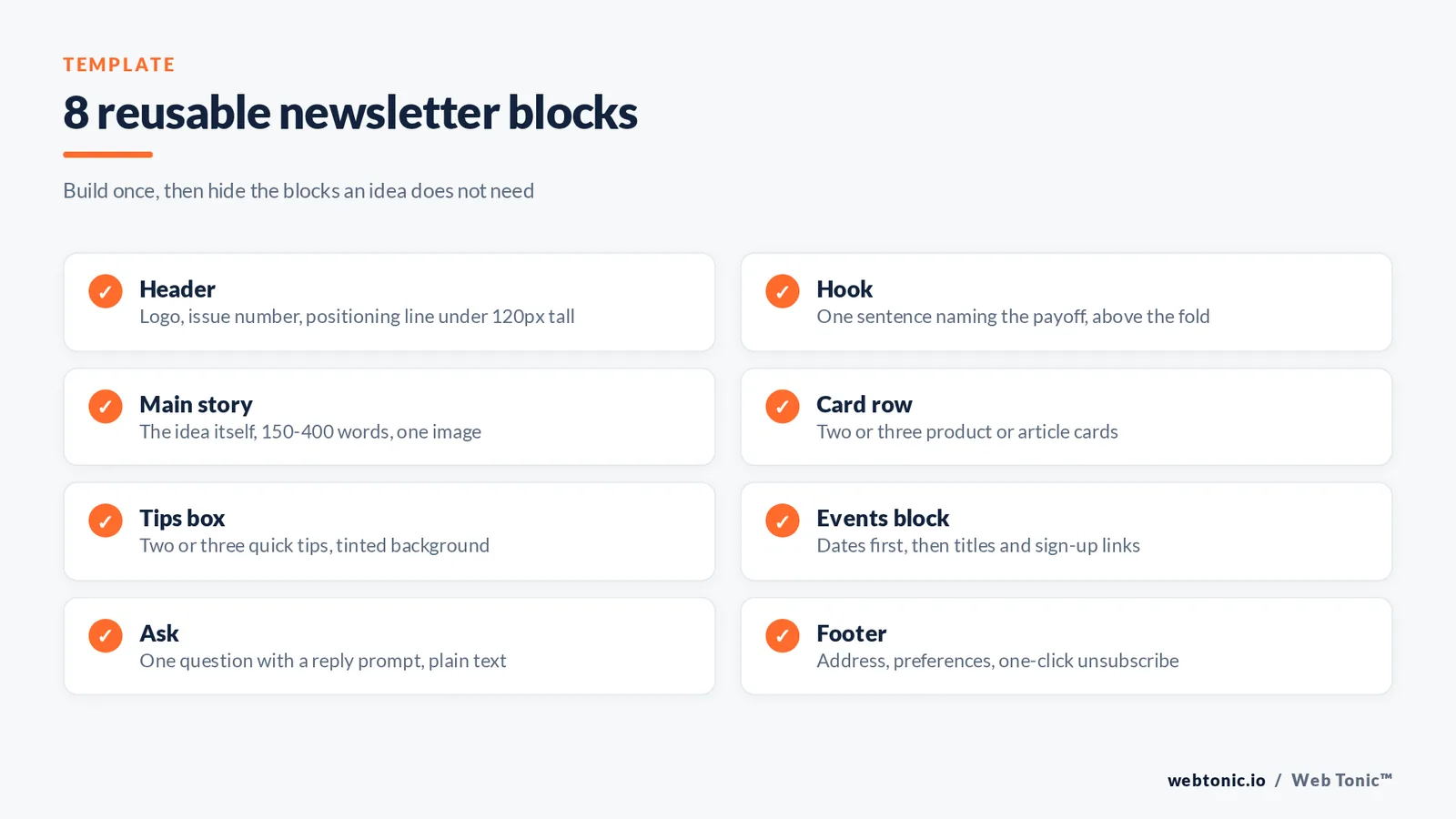
Newsletter anatomy: header, blocks and card layouts
An idea only reads well inside a structure. Build one template with these blocks, then let each idea use the blocks it needs and hide the rest.
| Block | What to include | Design note | Reuse |
|---|---|---|---|
| Header | Logo, issue number, one-line positioning | Keep the header under 120px tall | Every send |
| Hook | One sentence naming the payoff | Above the fold on a 375px screen | Every send |
| Main story | The idea itself, 150-400 words | One image maximum | Every send |
| Card row | Two or three product or article cards | Card image 1:1 or 3:2, title, one line | Ecommerce and digest sends |
| Tips box | Two or three quick tips readers can apply | Tinted background, no image | Educational sends |
| Events block | Upcoming webinars or events with dates | Date first, then title | Monthly sends |
| Ask | One question with a reply prompt | Plain text, no button | Every fourth send |
| Footer | Address, preferences, unsubscribe | Same in every template | Every send |
Rule 6 — a single reusable template with 8 optional blocks removes most production time. Teams that rebuild the layout per send average far fewer ideas shipped per quarter.
Event, product and community newsletter ideas that grow subscribers
These ideas do double duty: they give regular readers something to act on and they give new subscribers a reason to join in the first place.
| Idea | Who it helps | How it grows the list | Frequency |
|---|---|---|---|
| Webinar or live AMA invitation | Prospects and customers | Registration page captures new subscribers | Monthly |
| Event recap with slides and recording | People who missed it | Shareable asset earns forwards | After each event |
| Product update with the reason behind it | Existing customers | Customers forward to colleagues | Per release |
| Community spotlight on one reader or customer | The whole list | The featured person shares it | Monthly |
| Referral prompt with a stated benefit | Loyal readers | Direct subscriber growth | Quarterly |
| Gated template or checklist | New readers | Signup form on a high-traffic blog post | Quarterly |
| Annual survey with published results | The industry | Results page attracts links and signups | Annually |
| Local or in-person meetup invite | Regional segment | Attendees join the list | Twice a year |
| Partner co-send with a complementary brand | Both audiences | Cross-exposure to new subscribers | Twice a year |
| Best-of digest of your blog archive | New subscribers | Welcome-flow content that keeps them | Quarterly |
Limit 7: keep events and product news to a maximum of 2 blocks per send. Beyond that the email reads as a company bulletin and click rates fall toward the 0.15% unsubscribe threshold that signals a relevance problem.
Newsletter examples by industry: what to include for each audience
The same idea needs different products, proof and tips depending on who reads it. Use this as a shortcut when a client or company operates outside your usual market.
| Industry | Newsletter example | What to include | Why it helps |
|---|---|---|---|
| SaaS | Regular product release notes with the reason behind each change | One header image, 3 changes, a short tips box | Customers adopt features faster |
| Ecommerce | New products card row plus one customer story | Card images, price, 1 clear button | Great for repeat purchase rates |
| Agency | Monthly benchmark example from client data | A chart, 2 takeaways, an offer | Proves expertise to prospects |
| Healthcare | Seasonal health tips reviewed by a clinician | Plain language, no jargon, 1 source | Builds trust with patients |
| Nonprofit | Impact update with the number of people helped | One photo, one number, one ask | Donors see where money went |
| Education | Course and events calendar for the term | Dates first, 5 events maximum | Students plan ahead |
| Real estate | New listings by neighbourhood with price bands | Card layout, 6 listings | Regular readers watch for their area |
| Professional services | One regulatory change explained in 200 words | Header, summary, next step | Clients share it internally |
| Restaurants and hospitality | Menu changes plus one behind-the-scenes note | Two photos, booking link | Drives midweek bookings |
| Manufacturing | Spec and lead-time update for key products | A table, no images | Buyers plan procurement |
Fact 8 — the top-performing sends in every industry above share one habit: a fixed header, one dominant idea and a maximum of 2 asks. Everything else is a variable you can test.
An employee newsletter example, section by section
Here is a complete internal newsletter template you can copy this week. Each header stays identical every month so employees learn where to look, and each section names the tips or products the company needs people to notice.
| Section | Header text example | What to include | Length |
|---|---|---|---|
| Opening | This month at [company] | Two sentences from a named leader | 40 words |
| Priorities | What we are focused on | Three bullets, one owner each | 60 words |
| Numbers | The one number that matters | A metric plus plain-language context | 50 words |
| People | New starters and milestones | Names, roles, one fun fact | 60 words |
| Customers | What customers told us | One quote, good or critical | 40 words |
| Tips | Tools and tips that save time | Two practical tips with links | 50 words |
| Events | Coming up | Dates, titles, sign-up links | 40 words |
| Ask | Tell us one thing | One question, a reply prompt | 20 words |
Rule 9 — keep the employee newsletter to 8 sections and roughly 360 words. A regular short email is read; a great long one is saved for later and forgotten.
Repurpose every newsletter into blog and social content
One good idea should not stop at the inbox. Each send can help three other channels with almost no extra work, and readers who share it bring new subscribers back to the list.
| Output | How to adapt the newsletter | Effort | Where it helps |
|---|---|---|---|
| Blog post | Expand the main story, add examples and a header image | 30 min | Search traffic and signups |
| Social carousel | Turn the tips box into 5 slides | 20 min | Reach and shares |
| Short video | Read the one number and explain it in 45 seconds | 25 min | New audiences |
| Sales enablement note | Send the benchmark example to prospects | 10 min | Pipeline |
| Web archive page | Publish past newsletters with a signup form | 15 min | Compounding subscribers |
| Internal digest | Share top customer quotes with the company | 10 min | Employee alignment |
Limit 10: repurpose the top 3 sends per quarter, not all of them. Ideas that already beat the 3.84% click benchmark are the only ones worth a second production pass.
FAQ
What should I put in an email newsletter?
Give each send one job — educate, inform, sell, connect or ask — and build the content around it. The most reliable evergreen ideas are one customer problem solved, a curated set of links with your verdict, one number from your own data, and a teardown of a public example in your field.
How often should I send a newsletter?
Send at the highest frequency you can sustain at quality. Weekly needs about 13 ideas per quarter, biweekly 6 to 7, monthly 3. If unsubscribes climb past 0.5% on a send, the frequency or the relevance is wrong.
What is a good open rate for a newsletter?
Newsletter campaigns average roughly 40% opens and 3.84% clicks across industries, with regional spreads from about 45% in North America to 28% in Asia. Because Apple's Mail Privacy Protection affects 55-60% of opens, use click rate, click-to-open and replies as your primary judgement.
What are good employee newsletter ideas?
Rotate short recurring sections: team priorities in three bullets, new starter introductions, a metric of the month in plain language, a customer quote, shout-outs from a submission form, and one leadership answer to a submitted question. Keep the whole email under 400 words and five sections.
How do I know whether a newsletter idea worked?
Score every send on click rate against the 3.84% benchmark, click-to-open against roughly 8.62%, replies, unsubscribes under 0.15% and revenue per send. Retire any recurring idea that misses on clicks twice in a row rather than redesigning it.


