



Table of contents
A bid in Google Ads is the maximum amount you are willing to pay for one ad interaction — usually a click. It is not what you pay, and since Smart Bidding took over most accounts, it is often a target you set rather than a number Google obeys.
Key Takeaways
- A maximum CPC bid of $2 means you will never pay more than $2 for a click; the actual cost is almost always lower.
- Google Ads offers 5 Smart Bidding strategies plus manual and visibility options, and each one asks you for a different number.
- Target ROAS bidding needs at least 15 conversions in the past 30 days on Search and Shopping, 30 on Video action campaigns and 50 per week on Hotel campaigns.
- Bid adjustments run from -100% to +900% on device and -90% to +900% on schedule, location and audience, and combined increases are capped at 900%.
- Your spend is capped at 30.4 times your average daily budget per month, even though a single day can spend up to 2 times it.
- The 2026 Search average is a $5.42 CPC at a 6.64% CTR, so a bid set far from that range is usually a symptom, not a strategy.
What a bid in Google Ads actually is
Bidding sits inside a wider system of budgets, targeting and creative, and Google’s own advertiser resource hub frames it that way too: the bid decides what an auction win is worth to you, not whether the campaign deserves to win.
A bid is the ceiling price you attach to an ad interaction so the Google Ads auction knows how much your click is worth to you. On a manual CPC bidding setup you type that ceiling per keyword or ad group. On an automated bidding strategy you type a business outcome instead — a cost per conversion, a return on ad spend, or an impression share — and Google Ads sets thousands of individual bids in real time to chase it.
Rule 1 — the bid is a limit, not a price. Google confirms a $2 max CPC bid never charges more than $2 per click, and its own definition of maximum CPC frames it as the most you are willing to pay.
| Auction currency | What one unit buys | Where it is used | Who sets the number |
|---|---|---|---|
| Maximum cost per click | One click | Search, Display, Shopping | You, per keyword or ad group |
| Viewable CPM | 1,000 viewable impressions | Display Network | You, per ad group |
| Cost per view | One video view or interaction | Video campaigns | You, per ad group |
| Target CPA | One conversion, on average | Search, Display, App, Video | You set the target, Google sets bids |
| Target ROAS | Revenue per dollar of spend | Search, Shopping, Display, Video | You set the target, Google sets bids |
| Target impression share | A share of eligible auctions | Search only | You set share and max CPC limit |
Google’s bidding basics guide calls vCPM bidding “cost-per-thousand viewable impressions,” which is a useful reminder that a bid is priced against whatever the campaign counts as the interaction — not always a click.
How the Google Ads auction turns a bid into a position
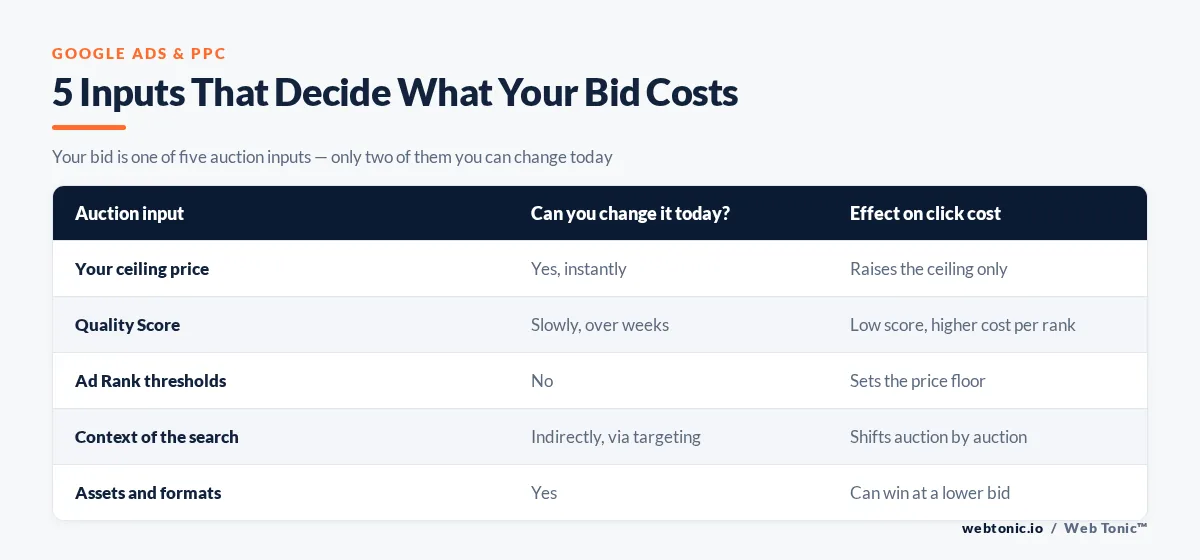
Every search runs a fresh auction. Your bid is one input among several, which is why raising a bid does not reliably buy a better position and why a low bid can still win.
| Auction input | What it measures | Can you change it today? | Effect on click cost |
|---|---|---|---|
| Your ceiling price | Willingness to pay per click | Yes, instantly | Raises the ceiling only |
| Quality Score | Expected CTR, ad relevance, landing page experience | Slowly, over weeks | Lower score means higher cost for the same rank |
| Ad Rank thresholds | Minimum quality to show at all | No | Sets the floor price you can pay |
| Context of the search | Device, location, time, intent | Indirectly, via targeting | Shifts competitiveness auction by auction |
| Assets and formats | Expected impact of sitelinks, images, ratings | Yes | Better assets can win at a lower bid |
Limit 2: Quality Score has exactly 3 components — expected clickthrough rate, ad relevance and landing page experience — and improving them is the only lever that lowers what a winning bid costs you.
Manual CPC bidding versus automated bidding
Manual CPC bidding still exists and still has a job. Google’s own example is an ad group with 15 keywords where you want a higher bid on one term only — something no automated bidding strategy lets you express directly.
| Dimension | Manual CPC bidding | Automated bidding |
|---|---|---|
| What you set | A cash bid per keyword | A goal or target |
| Bids per day | One, until you change it | Millions, recalculated per auction |
| Signals used | Whatever you can read in reports | Device, location, time, audience, query, browser, app |
| Minimum data needed | None | Conversion tracking, then conversion volume |
| Best use today | New accounts, tiny budgets, single-keyword tests | Any campaign with steady conversion volume |
| Biggest risk | You under-bid and never learn | You set a target the account cannot reach |
Rule 3 — automated bidding is not autopilot. The system optimises to the target you type. A target CPA 60% below your historical CPA quietly throttles delivery instead of finding cheaper conversions.
The 5 Smart Bidding strategies, and what each one asks you for
Smart Bidding is the subset of automated bidding that uses conversion or conversion-value data at auction time. Google lists 5 Smart Bidding strategies alongside the non-conversion options.
| Approach | You provide | Google optimises for | When it fits |
|---|---|---|---|
| Target CPA | A cost per action | Conversion volume at that average cost | Lead gen with a known acceptable CPA |
| Target ROAS | A revenue-to-spend ratio | Conversion value at that ratio | Ecommerce with reliable revenue values |
| Maximize conversions | Nothing but a budget (optional target CPA) | Most conversions inside the budget | Launches and budget-limited growth |
| Maximize conversion value | Nothing but a budget (optional target ROAS) | Highest total value inside the budget | Mixed basket sizes |
| Maximize clicks | A budget and an optional max CPC limit | Most clicks inside the budget | Traffic goals and pre-conversion accounts |
| Target impression share | A share plus a max CPC limit | Appearing in that share of auctions | Brand defence and competitive coverage |
Maximize conversions bidding removes most manual bid adjustments, with one exception Google spells out: you can still set a device adjustment of -100% to opt a device out entirely. Maximize clicks is applied from the Bid strategies screen in the Tools menu, then attached to a campaign.
Conversion volume requirements before a target-based bid strategy works
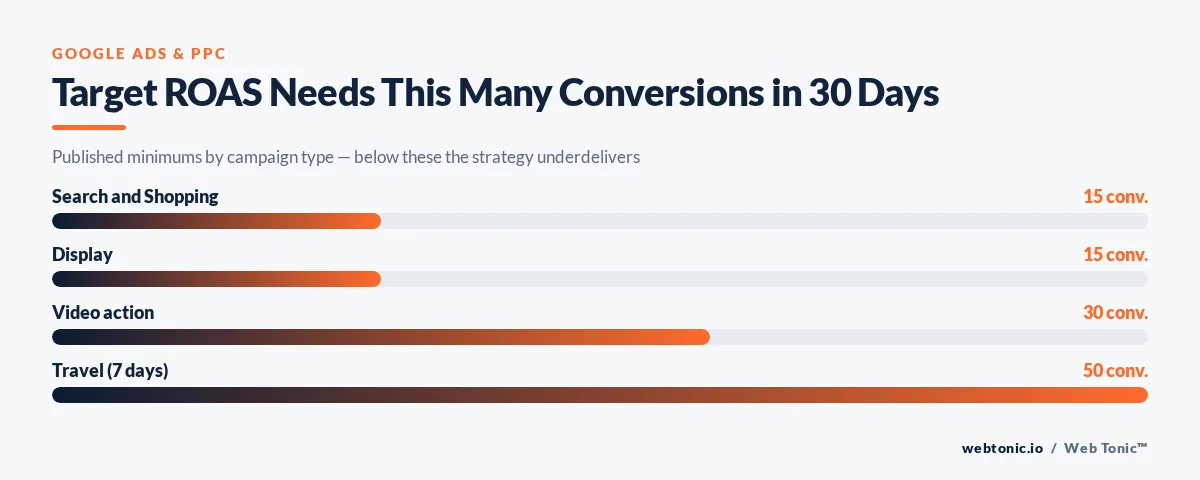
Target-based bid strategies have published minimums. Below them the strategy is legal to apply and still a bad idea.
| Campaign type | Target ROAS minimum | Measurement window | Note |
|---|---|---|---|
| Search and Shopping | 15 conversions | Past 30 days | At the conversion tracking level |
| Display | 15 conversions with values | Past 30 days | Counted across all campaigns combined |
| App | 10 conversions per day | Or 300 in 30 days | Daily volume matters more than the total |
| Video action | 30 conversions | Past 30 days | Value tracking must be live |
| Hotel | 50 conversions per week | Campaign level | Weekly, not monthly |
| Travel | 50 conversions | Past 7 days | Campaign level |
Limit 4: Google notes conversions must carry a value greater than 0 to count toward Target ROAS eligibility, so a $0 lead conversion never gets you closer to the threshold. For evaluating a target CPA campaign, Google recommends a window containing at least 30 conversions before you judge it.
Adjustment modifiers: the ranges you are allowed to use
Bid adjustments multiply a manual bid by a percentage in a given context. A $1 bid with a +20% mobile adjustment becomes $1.20; -20% makes it $0.80.
| Modifier | Range | Levels available | Behaviour with Smart Bidding |
|---|---|---|---|
| Device | -100% to +900% | Campaign and ad group | Ignored, except -100% to exclude |
| Ad schedule | -90% to +900% | Campaign | Percentages ignored, schedule respected |
| Location | -90% to +900% | Campaign | Ignored as a percentage |
| Your data segments | -90% to +900% | Campaign and ad group | Used as a signal instead |
| Call interactions | -90% to +900% | Campaign | Ignored as a percentage |
Rule 5 — stacked adjustments cap out. Google states combined bid adjustments cannot exceed a 900% increase: a $1 bid with a 900% device increase and a 900% location increase resolves to $10, not $100. A campaign-level -100% device adjustment also overrides any ad group adjustment for that device.
What you actually pay, and what your budget lets a bid spend
The gap between bid and cost is where most confusion lives. Two published mechanics settle it.
| Mechanic | Published rule | Practical consequence |
|---|---|---|
| Max CPC ceiling | Never charged more than the bid | Average CPC sits below your bid |
| Daily overdelivery | A day can spend up to 2x the average daily budget | Single-day spikes are expected, not billing errors |
| Monthly charging limit | No more than 30.4x the average daily budget | A $50 daily budget caps around $1,520 per month |
| Target-based strategies | Google advises comfort with 2x daily spend | Set targets against a monthly, not daily, view |
| Recommended target CPA | Based on the trailing 30-day average CPA | A recommendation is a mirror, not a goal |
Google’s overdelivery documentation is explicit that a month ends at no more than 30.4 times the average daily budget. WordStream’s 2026 Google Ads benchmarks put the cross-industry Search average at a $5.42 CPC, an 8.18% conversion rate and a $66.69 cost per lead — the sanity check for any bid or target you type.
How to price your first click in a new campaign
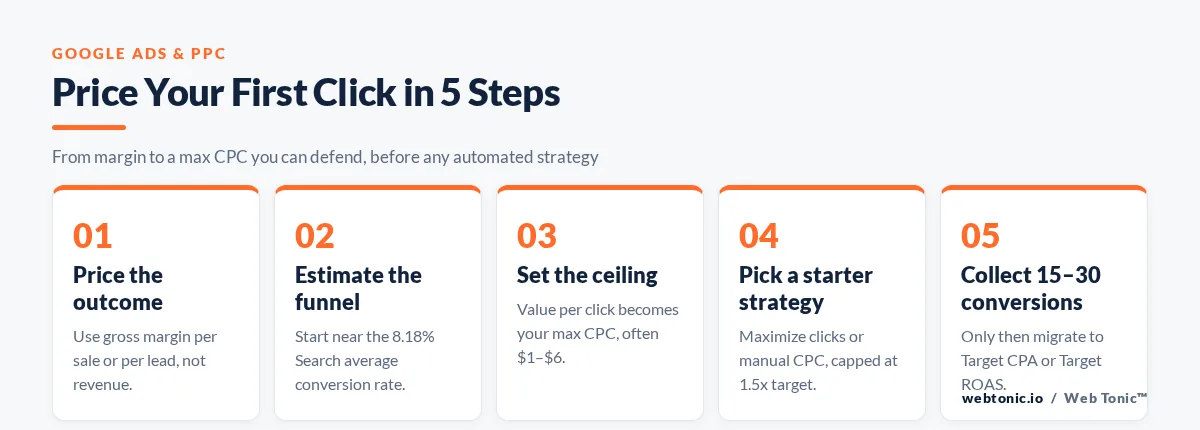
A repeatable sequence beats an intuition. This is the order that avoids both the under-bidding trap and the runaway-target trap.
| Step | Action | Number to use | Common mistake |
|---|---|---|---|
| 1. Price the outcome | Decide what one conversion is worth | Gross margin per sale or per lead | Using revenue instead of margin |
| 2. Estimate the funnel | Multiply value by expected conversion rate | Start near the 8.18% Search average | Assuming a landing page converts at 20% |
| 3. Set the first bid | Use the value-per-click figure as max CPC | Often $1–$6 outside legal and finance | Bidding $0.50 in a $9 CPC vertical |
| 4. Choose a starter strategy | Maximize clicks or manual CPC with a limit | Cap max CPC at 1.5x your target | Starting on Target ROAS with 2 conversions |
| 5. Collect data | Wait for volume, not for a feeling | 15–30 conversions | Editing bids daily during the learning period |
| 6. Migrate | Move to Target CPA or Target ROAS | Use the trailing 30-day CPA | Setting the target 50% tighter on day one |
| 7. Review monthly | Adjust the target by 10–15% at a time | One change per strategy per month | Changing target and budget together |
Limit 6: change one variable at a time. If you move a target CPA and a daily budget in the same week, no report will tell you which move caused what.
Diagnosing auction problems from the symptom backwards
| Symptom | Likely pricing cause | Where to check | Fix |
|---|---|---|---|
| No impressions at all | Bid below the first-page range | Keyword status column | Raise max CPC or improve Quality Score |
| Impressions, almost no clicks | Bid buys only low positions | Top impression share | Raise bid or strengthen assets |
| High CPC, weak conversion rate | Bidding for traffic, not outcomes | Search terms report | Move to a conversion-based strategy |
| Spend collapses after a change | Target set below achievable CPA | Bid strategy status | Loosen the target by 15–20% |
| Volume caps out early each day | Budget-limited, not bid-limited | Budget status label | Raise budget before touching bids |
| Erratic daily cost | Overdelivery inside the monthly cap | Daily spend chart | Judge over 30.4 days, not one day |
| Brand terms getting expensive | Competitor conquesting | Auction insights | Use target impression share on brand only |
The Target Impression Share definition in the Google Ads API shows the three levers stored on that strategy — the location on the page, the share to target, and a CPC ceiling — which is why it is the safest visibility play for brand defence. The full BiddingStrategyType enumeration is the authoritative list of what the platform will actually accept.

Where bids fit into a real account strategy
Think with Google’s search strategy research and the Google Ads & Commerce product blog both track the same direction of travel: fewer manual levers, more value-based targets, and more weight on the inputs a bid cannot buy.
Bidding is the last 10% of Google Ads performance and the first thing people fix. Offer, keyword selection, negative lists and landing page quality decide what the bid can achieve. WordStream’s bidding resources make the same point from agency data: accounts that plateau on bid tinkering are usually short of conversion volume or landing on a weak page.
If you want that order of operations run for you, our growth marketing team pairs bid strategy work with the measurement setup that makes Smart Bidding viable, and our performance creative team handles the asset side that lowers what a winning bid costs. More breakdowns live on the Web Tonic blog, and you can talk to us if you want the audit first.
Related reading
- Franchise Google Ads Statistics: CPC, CPL & Campaign ROI Benchmarks
- HVAC Google Ads Statistics: CPC, CPL & Conversion Benchmarks (2026)
- Google Ads for Med Spas: 35+ Cost & Performance Statistics (2026)
- Paid Search services at Web Tonic
FAQ
What is a bid in Google Ads in simple terms?
It is the maximum you agree to pay for one ad interaction, usually a click. Google Ads uses it as a ceiling in each auction, and you are typically charged less than the full amount.
Does a higher bid mean a higher ad position?
Not on its own. Ad Rank combines your bid with Quality Score, ad rank thresholds, the context of the search and the expected impact of your assets, so a lower bid with strong relevance can outrank a higher one.
What is the difference between a bid and a bid strategy?
A bid is a single number for one interaction. A bid strategy is the rule set that decides those numbers, which is either your manual entry or an automated strategy such as Target CPA, Target ROAS or Maximize conversions.
How much should I bid when I start a new campaign?
Work backwards from margin: value per conversion multiplied by an expected conversion rate gives a value per click. Cross-check it against the cross-industry Search average of $5.42 and the higher averages in legal and finance before committing.
Do bid adjustments still work with Smart Bidding?
Mostly no. Smart Bidding ignores manual percentage adjustments for device, location and schedule, though it respects ad schedule settings and still honours a device adjustment of -100% used to exclude a device.


