



Table of contents
A Snapchat filter is a flat visual overlay — colour grade, frame, timestamp, temperature, location badge — that you swipe onto a photo or video after capture. A Lens is an augmented reality effect that changes your face, body or environment live in the camera. Snapchat's own help centre keeps the two features in separate documentation for exactly that reason.
This guide covers both: every filter and Lens type, how to apply them, how to build your own for free, and what they are worth to a brand.
Key Takeaways
- Filters are flat overlays applied after you shoot; Lenses are real-time augmented reality effects that track your face or surroundings while you shoot.
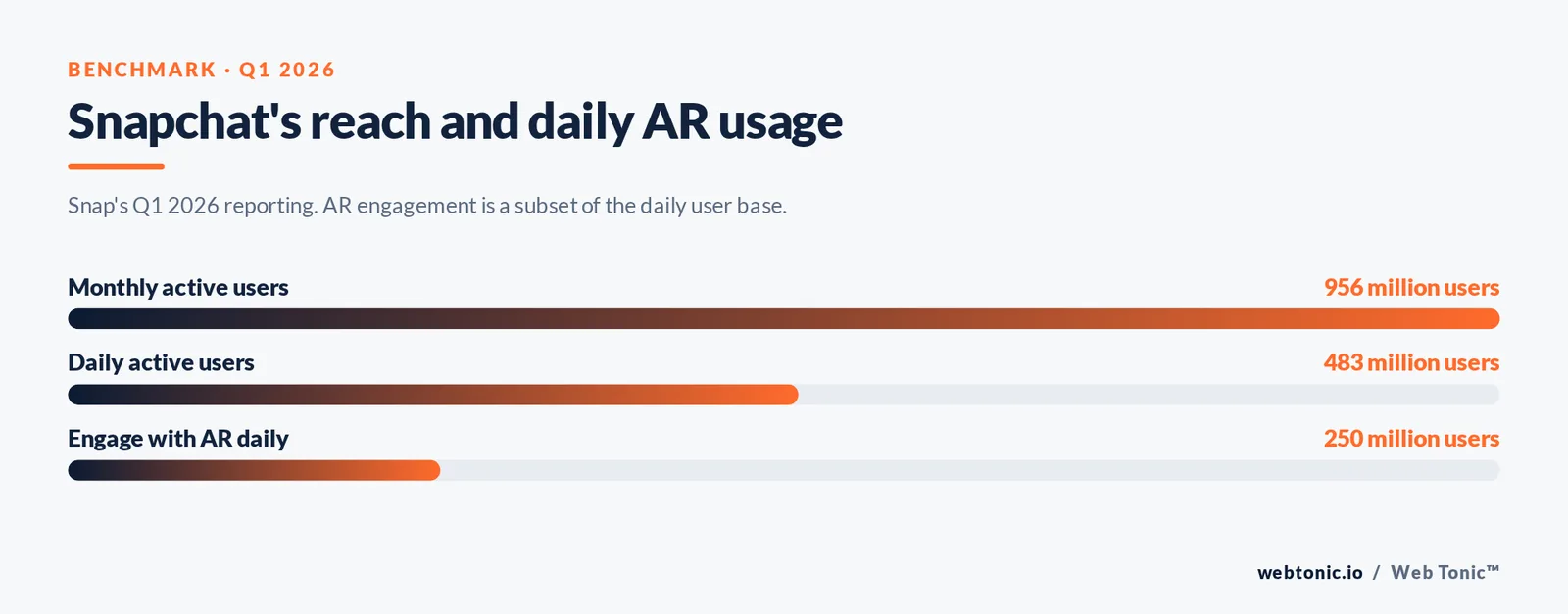
- Snap reported 483 million daily active users and 956 million monthly actives in Q1 2026, and the company says more than 250 million people engage with its AR every day.
- Lens Studio is free on Mac and Windows, and a published Community Lens can be live in 1 to 3 business days after review.
- Snapchat's in-app Create Your Own tool builds a 2D filter in under 10 minutes with no design software.
- Paid AR: Snapchat advertising starts at a $5 per day minimum, with a median CPC near $0.84 and CPMs around $8.
- 55% of US teens use Snapchat and 46% use it daily, which is why filters remain a teen-and-young-adult format first.
Filters vs Lenses: the distinction most guides get wrong
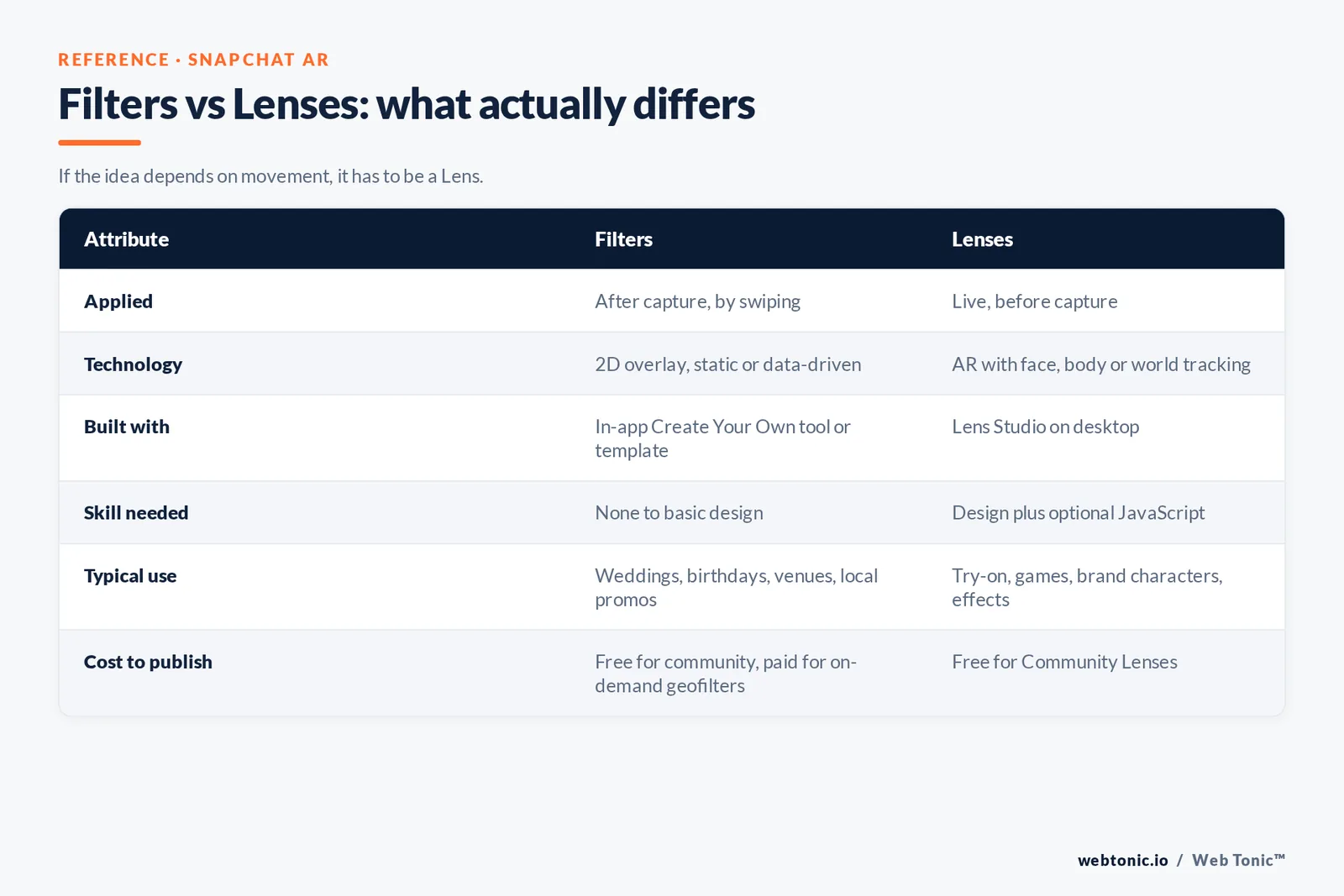
People use "Snapchat filters" as an umbrella term for everything creative in the camera. Inside Snap, the split is technical and it changes what you can build. Filters are rendered on top of a finished frame. Lenses run a real-time computer-vision pipeline that has to hit the phone's frame budget, which is why Snap ships a dedicated authoring tool for them.
| Attribute | Filters | Lenses |
|---|---|---|
| Applied | After capture, by swiping | Live, before capture |
| Technology | 2D overlay, static or data-driven | Augmented reality with face, body or world tracking |
| Built with | In-app Create Your Own tool or an image template | Lens Studio on desktop |
| Skill needed | None to basic design | Design plus optional JavaScript scripting |
| Typical use | Weddings, birthdays, venues, local promos | Try-on, games, brand characters, effects |
| Cost to publish | Free for community filters, paid for on-demand geofilters | Free for Community Lenses |
One practical consequence: if the creative idea depends on movement — a mask that follows a face, a product that sits on a table, a mini game — it has to be a Lens. If the idea is a badge, a frame or a look, a filter is faster and cheaper. That single decision saves days of production time on social campaigns.
Every filter and Lens type available today
Snapchat ships several distinct effect families, and they behave differently in the app. Knowing which is which explains why some effects appear only in certain places or at certain times.
| Type | What it does | Who can make it |
|---|---|---|
| Colour and look filters | Swipeable colour grades and black-and-white treatments | Snap only |
| Smart filters | Overlay live data: time, temperature, speed, battery | Snap only |
| Community geofilters | Free location badge for a park, campus or landmark | Anyone, via submission and review |
| On-demand geofilters | Paid filter fenced to an address and a time window | Anyone with a card |
| Face Lenses | Track and modify the face: masks, makeup, distortions | Anyone, in Lens Studio |
| World Lenses | Place 3D objects into the scene behind the camera | Anyone, in Lens Studio |
| Sponsored AR Lenses | Paid, promoted Lenses in the carousel | Advertisers, via Snapchat's ad formats |
| Third-party camera effects | Snap AR effects running inside other apps | Developers, via Camera Kit |
How to add a filter to your snap
The flow has been stable for years, and it is worth writing down because filters and Lenses are applied at opposite ends of it.
- Open the camera and, before shooting, tap the smiley icon next to the shutter to browse the Lens carousel. Anything you pick here is a Lens and it renders live.
- Take the snap. Tap for a photo, press and hold for video.
- Swipe left or right on the finished snap. Each swipe cycles through filters available for that moment and place, including colour looks, temperature and any active geofilter.
- Stack a second filter. Hold one filter in place with a finger, then swipe with another finger to layer a second on top — the single most under-used trick in the app.
- Check location permissions. Geofilters only appear when location services and Filters are both enabled in settings, which is the usual reason a venue filter fails to show.
Lenses are unlocked the same way every time: tap the smiley, then use search or Explore to find effects by name or theme. Snapchat's Lens documentation covers scanning Snapcodes to unlock a specific effect, which is how brands distribute a Lens off-platform.

How to create custom Snapchat filters
Two routes, two very different levels of effort.
Route one — the in-app tool. Snapchat's Create Your Own filter builder lets you pick a template, add text and art, draw a geofence on a map and submit. There is no design software involved and most people finish in under 10 minutes. Community filters are free but cannot include logos, URLs, phone numbers or photos of people; on-demand geofilters allow branding and are priced by the size of the fence and the length of the run, so a small venue for a single afternoon can cost only a few dollars while a stadium for a week runs into the hundreds.
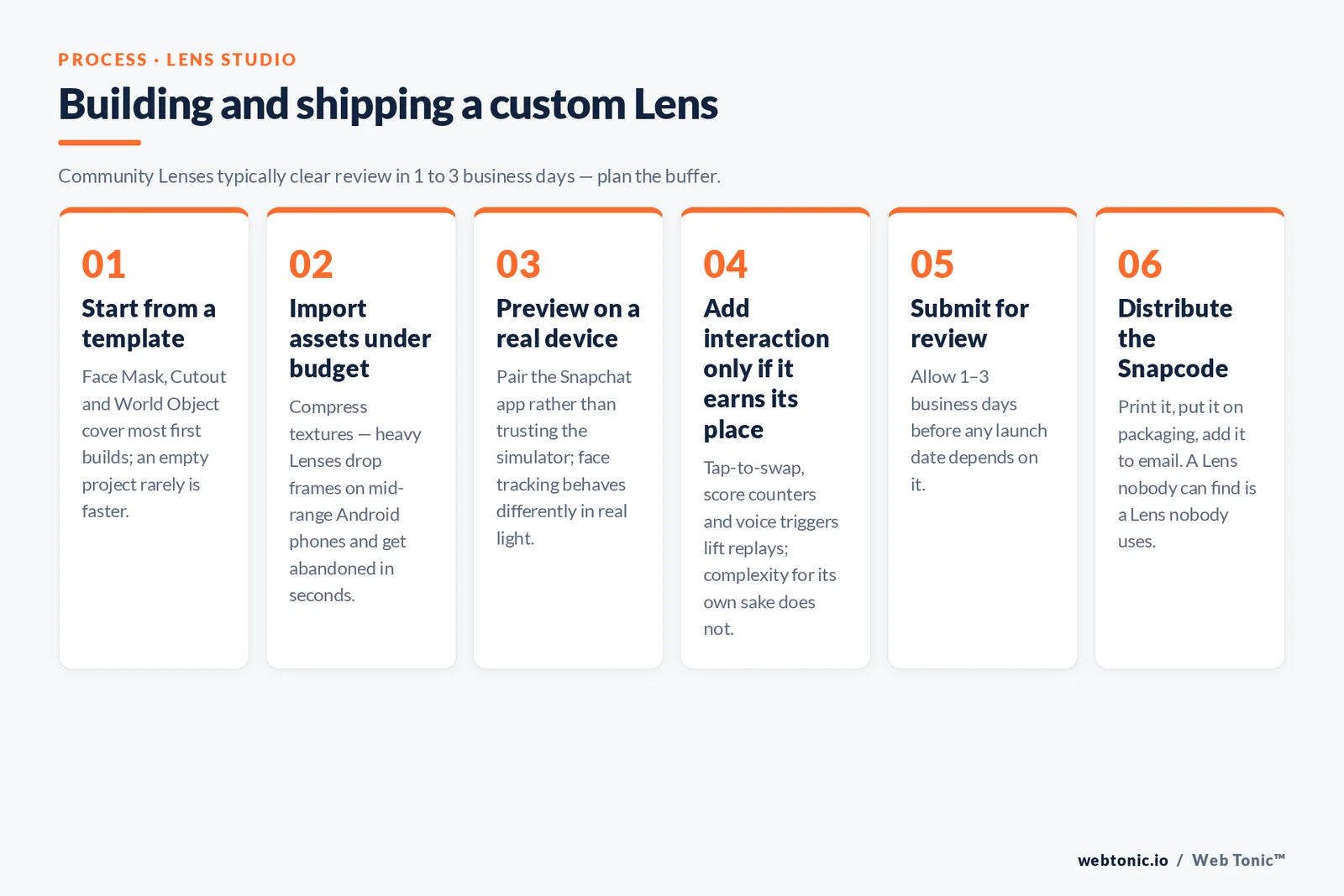
Route two — Lens Studio. The desktop app is a free download for Mac and Windows and ships with templates covering face masks, try-on, world objects, hand tracking and simple games. The official guides walk through the template-to-publish path, and the practical sequence looks like this:
- Start from a template rather than an empty project. Face Mask, Cutout and World Object cover most first builds.
- Import assets under the size budget. Compress textures and keep the Lens light — heavy Lenses drop frames on mid-range Android phones and get abandoned in seconds.
- Preview on a real device by pairing the Snapchat app, not just in the simulator. Face tracking behaves differently in real light.
- Add interaction if it earns its place. Tap-to-swap, score counters and voice triggers lift replays; complexity for its own sake does not.
- Submit for review. Community Lenses typically clear review in 1 to 3 business days, so plan launches with that buffer.
- Distribute the Snapcode. Print it, put it on packaging, add it to an email. A Lens nobody can find is a Lens nobody uses.
Teams that want the same effect inside their own app or website use Camera Kit, which embeds Snap's AR engine outside Snapchat — the route most retailers take for virtual try-on.
Free online Snapchat filters: what is real and what is not
Searches for "free online Snapchat filters" mostly land on two things. The first is legitimate: Snapchat's own free Community geofilter submissions and the thousands of Community Lenses in the carousel, plus Lens Studio itself, which costs nothing. The second is a long tail of third-party sites promising Snapchat effects in a browser. Those are usually generic photo editors reusing the Snapchat name, and some ask for account credentials. Snapchat effects run in the Snapchat camera or in apps that licence Camera Kit — never through a web page that wants your login. Snap's privacy centre is the reference point for what the camera does with facial data: Lenses process the image on the device to place the effect, they are not identity recognition.
Why filters still matter commercially
Snapchat is a smaller network than Meta's, but its audience concentration is unusual. Pew Research finds that 55% of US teens use Snapchat and 46% use it daily, while roughly 58% of US adults aged 18 to 29 are on the platform — see the social media fact sheet. Snap's Q1 2026 results put revenue at $1.529 billion, up 12% year on year, on an ARPU of $3.17. Audience forecasts from eMarketer show the same pattern: a young, hard-to-reach cohort that other channels miss.
Effects are the native ad language of that audience. A sponsored Lens is not an interruption, it is a thing to play with, and the play is the impression. Benchmarks published by Sprout Social and cross-platform data from Socialinsider put Snapchat CTRs around 1% with CPMs near $8 — competitive rates for video-first reach, and campaigns can start at the $5 per day minimum. Product announcements and case studies land on Snap's newsroom first.
If AR is going to carry a campaign, the creative needs to be built for it rather than adapted to it. That is the work our performance creative team does alongside growth marketing, and the measurement side sits with data intelligence.
Ten filter and Lens ideas that actually get used
Fun is the point, but repeat use is the metric. These formats reliably earn shares because the person sending the snap looks good, not the brand.
- Venue badge. A clean geofilter for a café, gym or coworking space. Cheapest possible local awareness.
- Event countdown. A filter live only for the 48 hours around a launch or a conference.
- Try-on Lens. Sunglasses, lipstick, hats — the single highest-intent AR format in retail.
- Product-in-room World Lens. Furniture and appliances placed at true scale.
- Mini game. A tap-or-tilt game with a score screen; scores drive replays.
- Mascot Face Lens. Turn the user into the brand character rather than showing the logo.
- Before-and-after reveal. A tap that swaps the scene, ideal for services.
- Team or fan filter. School colours, club crests, tour dates.
- Family milestone frame. Birthdays, graduations, new arrivals — evergreen and easy.
- Packaging Snapcode. Print the code on the box so the unboxing becomes the Lens trigger.
Across all ten, keep the design legible at arm's length on a phone: high contrast, no small type, nothing important near the edges where the interface sits. More formats and channel breakdowns are on our blog.
Filter mistakes that waste the budget
Four failure patterns account for most disappointing AR campaigns. The first is a geofence drawn too tightly, so the filter never triggers for people walking past. The second is a logo-heavy design that people refuse to send to friends. The third is publishing a Lens with no distribution plan, which leaves it invisible in a carousel of thousands. The fourth is measuring only impressions when Snap reports shares, saves and play time — the numbers that tell you whether the effect was actually enjoyed. Fix those and a $300 filter can out-perform a display buy ten times its size.
Related reading
- Snapchat Ads: Formats, Costs and Campaign Setup
- Locksmith Snapchat Ads Statistics: What the 2026 Data Shows
- Snapchat Ads for Manufacturing: 25+ Statistics & Benchmarks (2026)
- Paid Social services at Web Tonic
FAQ
What is the difference between a Snapchat filter and a Snapchat Lens?
A filter is a flat overlay you swipe onto a snap after taking it, such as a colour grade, a timestamp or a location badge. A Lens is an augmented reality effect that runs live in the camera and tracks your face, hands or surroundings before you shoot. Filters are made in the app or from a template; Lenses are made in Lens Studio.
How do I add a filter to my snap?
Take the photo or video first, then swipe left or right on the preview to cycle through the filters available for your time and location. To layer two filters, hold the first in place with one finger and swipe with another. Lenses work the other way round: tap the smiley icon next to the shutter before you shoot.
Can I create my own Snapchat filter for free?
Yes. Community geofilters are free to submit through Snapchat's in-app Create Your Own tool, provided the design has no logos, URLs, phone numbers or photos of people. Lens Studio is also a free download, and publishing a Community Lens costs nothing. Only on-demand geofilters and sponsored Lenses are paid.
Where can I find free online Snapchat filters?
Inside Snapchat itself: the Lens carousel and Explore tab hold hundreds of thousands of free Community Lenses, searchable by name or theme. Third-party websites offering "Snapchat filters online" are generally unrelated photo editors, and any site asking for your Snapchat login should be avoided.
How long does Snapchat take to approve a filter or Lens?
Review usually completes within one to three business days for both community filters and Community Lenses, and rejections normally come down to logos, contact details or images of people in a free community submission. Build that window into any launch date.
Sources: Snapchat Support (filters and Lenses documentation) · Lens Studio official guides · Snap AR Camera Kit · Snap Developer documentation · Snapchat for Business ad formats · Snap Inc. Q1 2026 quarterly results · Snap Newsroom · Snap Privacy Centre · Pew Research Center social media fact sheet · eMarketer Snapchat users · Sprout Social Snapchat advertising benchmarks · Socialinsider social media benchmarks.


