



Table of contents
Quick answer: Use partner access for an agency and employee access for your own staff. Partner access shares named assets with the agency's Business Portfolio; employee access puts an individual person inside yours, and leaves you cleaning up when they change jobs.
Last verified: 2026-08-21
Meta Business Manager has two permission layers, not one
Nearly every access problem in Meta Business Manager (now surfaced as Meta Business Suite and the Business Portfolio settings) comes from treating permissions as a single dial. There are two independent layers, and someone can hold a high setting on one while being blocked by the other.
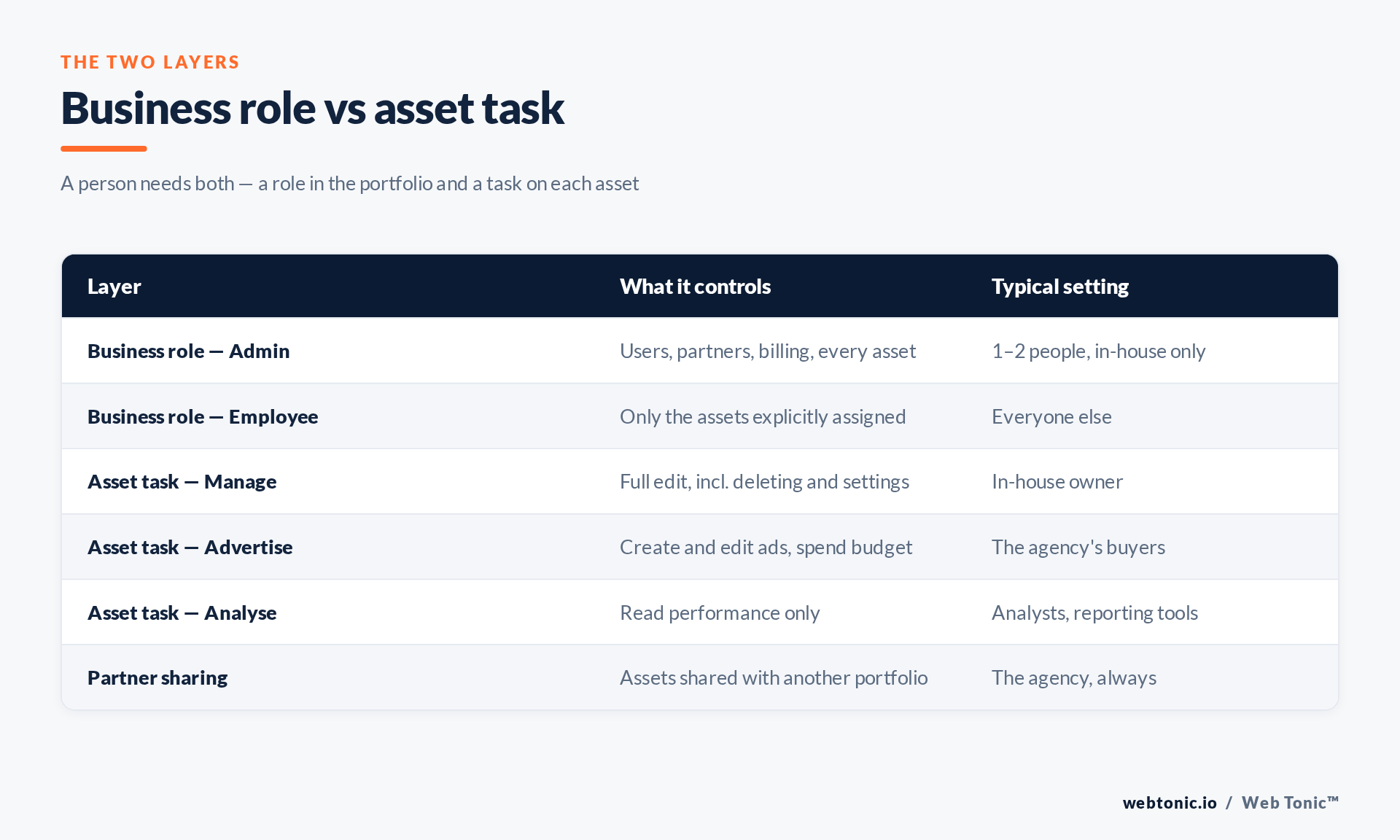
- The business role. Either Admin — who can add users, add partners, change billing and reach every asset — or Employee, who can reach only the assets explicitly assigned to them. There are also finance-specific and developer roles, which most businesses never need.
- The asset task. On each individual asset (a Page, an Instagram account, an ad account, a dataset, a catalogue) a person or partner is given tasks: typically Manage, Advertise or Analyse, plus asset-specific extras like moderating messages on a Page.
An Employee with no asset assignment sees an empty portfolio and assumes the invitation failed. An Admin sees everything whether you meant it or not. Both are the same misunderstanding.
Partner access vs employee access
Employee access adds a specific human being to your Business Portfolio using their work email. That person's access is administered by you. If they leave the agency you hired, nobody tells you — the account keeps working until you notice.
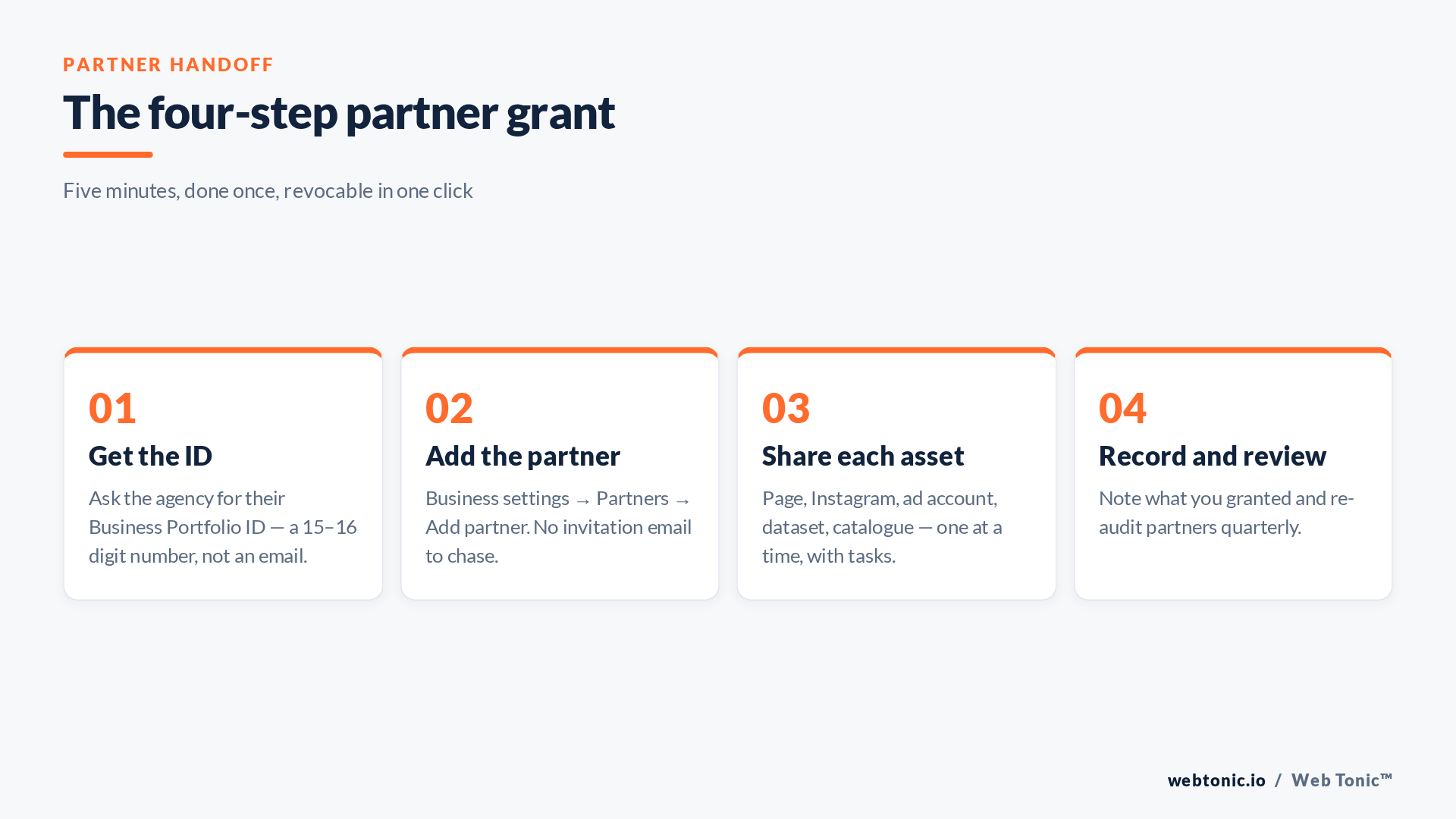
Partner access shares selected assets with another company's Business Portfolio, identified by its Business Portfolio ID. The agency then decides which of its own staff work on your account, using its own security policies and its own offboarding. You keep control of which assets are shared and can withdraw the whole relationship in one action.
For any agency, contractor team or in-house group that already runs its own portfolio, partner access is the correct answer. The full sequence for a multi-platform handoff — Meta plus Google Ads, GA4 and Business Profile — is in our guide to giving an agency access to your ad accounts.
| Situation | Use | Why |
|---|---|---|
| Hiring an agency | Partner access | They manage their own staff turnover; you revoke one relationship, not five people. |
| A freelancer with no portfolio | Employee access, limited tasks | No Business Portfolio ID exists to share with. Assign only the assets they touch. |
| Your own marketing hire | Employee + Advertise | Keeps Admin scarce while letting them run and edit campaigns. |
| Reporting tool or analyst | Analyse task only | Read-only access cannot spend money or change targeting. |
| Second agency on one account | Two partner grants | Each sees only its assigned assets; neither can remove the other. |
What actually breaks
1. The agency creates the ad account. If the ad account is born inside the agency's portfolio, it belongs to the agency. When you part ways you get an offer of a transfer, not a right to one — and the learning history, custom audiences and saved conversion setup often stay behind. Create your ad account in your own portfolio, then share it.
2. The dataset (pixel) is shared the wrong way round. This is the expensive one. If the agency owns the dataset and shares it with you, your entire conversion history sits in their asset. Own the dataset yourself. Own the dataset in your own portfolio and share it out; the server-side considerations are in our Conversions API work, and the tracking setup itself in conversion tracking.
3. Two-factor enforcement locks out the partner. A portfolio can require two-factor authentication for everyone who accesses it. That is the right setting — but it is enforced against the individuals at the agency, and a buyer without it configured will see access silently fail rather than a helpful error. The case for enforcing MFA everywhere is not in dispute; just tell the agency it is on.
4. Page access granted through the Page, not the portfolio. A Page can be administered from its own settings or from a Business Portfolio, and the two lists do not mirror each other. Grant through the portfolio so there is a single place to audit and revoke.
5. Everyone is an Admin. Portfolios drift toward universal Admin because it makes today's problem disappear. Least privilege exists precisely because the cost shows up later — an ex-contractor who can still add users, or a compromised personal account with full control of your ad spend.
A ten-minute quarterly audit
Open Business settings and read four lists out loud: People, Partners, Ad accounts and Datasets. For each entry ask whether that person or company still works with you and still needs that task. Remove anything you hesitate on — restoring access takes thirty seconds, and stale access is the thing that turns a small incident into a large one.
Document the outcome. A short access register is the same discipline the FTC recommends for any business holding customer data, and if you process EU personal data through custom audiences, the accountability principle in the GDPR expects you to know who can reach it. Handling of the underlying customer lists sits alongside your wider analytics governance.
One more habit: when an agency engagement ends, revoke the partner first and the individual users second. Removing people while leaving the partner relationship live is how accounts stay quietly accessible for months. The same principle applies on Google's side, where the equivalent decision is the manager-account link. More of how we run paid social is in our Meta Ads work.
Frequently Asked Questions
Where do I find my Business Portfolio ID?
In Business settings, under Business info. It is a 15–16 digit number. Agencies should send you theirs before the kickoff call; if they ask for your password instead, that is a red flag.
Does partner access let the agency see my other brands?
No. Partners see only the specific assets you share with them. Adding a second brand's ad account is a deliberate, separate action.
What is the difference between Manage and Advertise on an ad account?
Advertise allows creating and editing campaigns and spending the budget. Manage adds account-level control including settings and user management. Media buyers need Advertise.
Can I limit an agency to reporting only?
Yes — grant the Analyse task alone. It is the right level for an auditor, a consultant reviewing an account, or a dashboard integration.
We lost Admin access to our own portfolio. What now?
If any Admin remains, they can promote you. If nobody does, you are into Meta's support recovery flow, which requires proof of business ownership and takes days — which is the argument for always keeping two in-house Admins.
Sources: Meta Business Help Centre — business roles, asset tasks and partner sharing (verify in your own portfolio settings); NIST — least privilege; CISA — multi-factor authentication; FTC — protecting personal information; GDPR overview. Last verified 2026-08-21.


