



Table of contents
Quick answer: Give an agency partner or manager-level access to each platform separately — Meta Business partner access, a Google Ads manager (MCC) link, GA4 property Editor, and Google Business Profile Manager. Never share a personal login, and never transfer ownership of any asset.
Last verified: 2026-08-21
Why sharing a login is the expensive option
Handing over a username and password feels faster on day one and costs you on every day after it. A shared login breaks two-factor authentication, makes the change history in each platform useless (every edit reads as you), and means offboarding requires a password reset that locks out everyone at once. Worse, if the agency builds assets while logged in as you, the ownership question stays unresolved until the relationship ends badly.
Every platform below has a purpose-built delegation model. Each one takes under five minutes and each one can be revoked in a single click without touching anything else.
Step 1 — Meta: partner access, not employee access
In Meta Business Manager there are two different things people call "access", and choosing the wrong one is the single most common mistake in an agency handoff.
- Adding a person puts an individual into your Business Portfolio. If that person leaves the agency, you are the one who has to clean up.
- Adding a partner shares specific assets with the agency's own Business Portfolio, using their Business ID. The agency manages its own staff; you manage which assets they see.
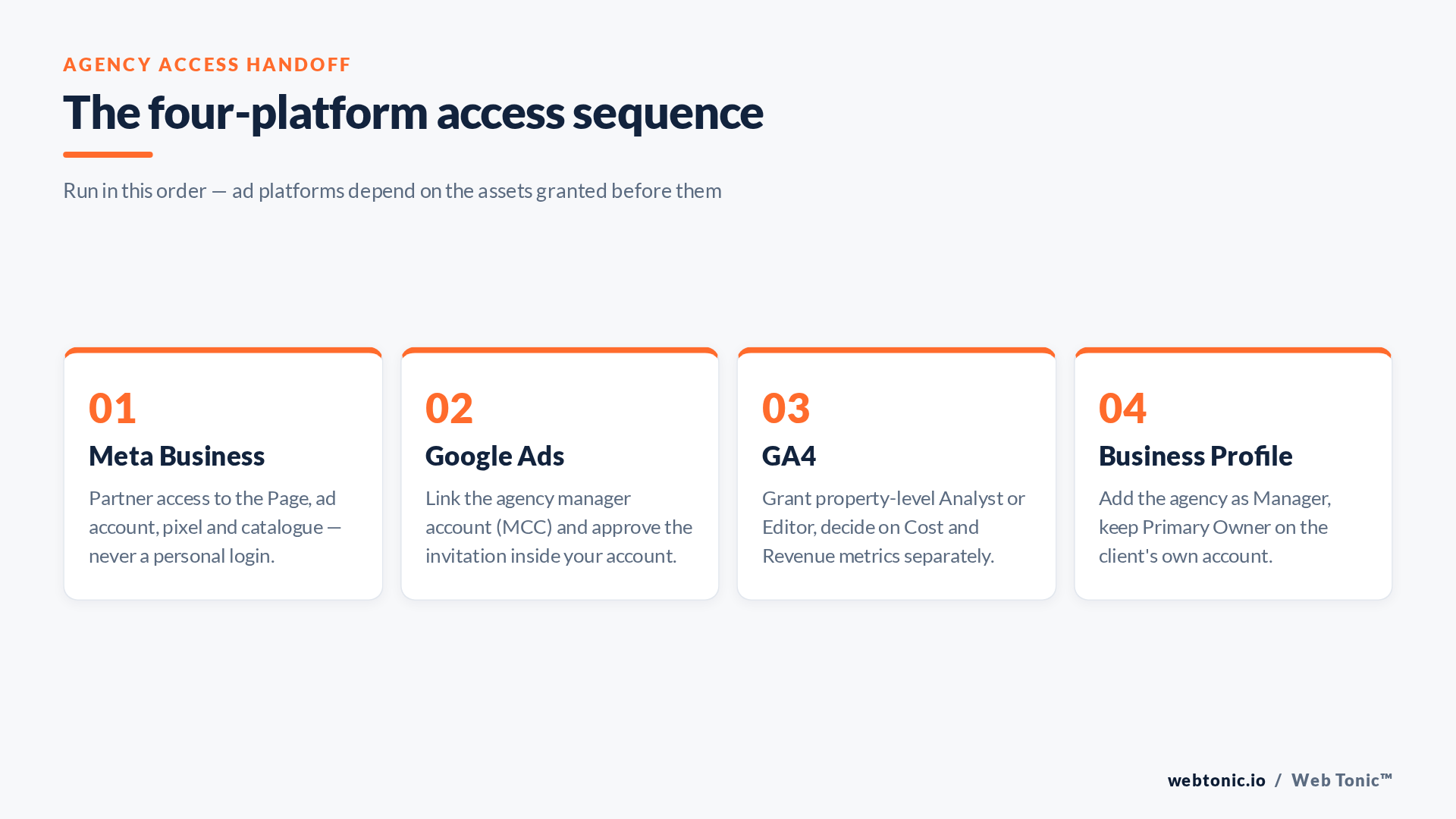
Use partner access. You will need the agency's Business Portfolio ID (a 15–16 digit number they can read off their own settings page). Share each asset individually: the Facebook Page, the Instagram account, the ad account, the pixel or dataset, and the catalogue if you run one. Assign Advertise and Analyse tasks; withhold Manage unless the agency is genuinely running your Page.
The pixel deserves its own thought. If the agency shares the dataset back to you rather than the other way round, your conversion history lives in their portfolio and does not come with you when you leave. Details on that trap are in our Conversions API work, and Meta documents the partner model in its Business Help Centre under "Add partners to your Business Portfolio".
Step 2 — Google Ads: link the manager account
Google Ads uses manager accounts (formerly MCC). The agency sends a link request from their manager account to your ten-digit customer ID; you approve it under Admin → Access and security → Managers. Do not create a new Google Ads account for the agency to own — if they own the account, your entire performance history, conversion data and Smart Bidding models belong to them.
Grant Standard access, which allows campaign changes but not billing changes or user administration. Reserve Admin for someone inside your business. Google documents the manager account model at Google Ads Help, and the access levels themselves at this page.
One nuance most handoffs miss: linking a manager account does not transfer billing. Your payment profile stays yours, which is what you want. If an agency asks to move billing to their account so they can "manage spend", understand that you are also handing them your invoices and your ability to pause spending unilaterally.
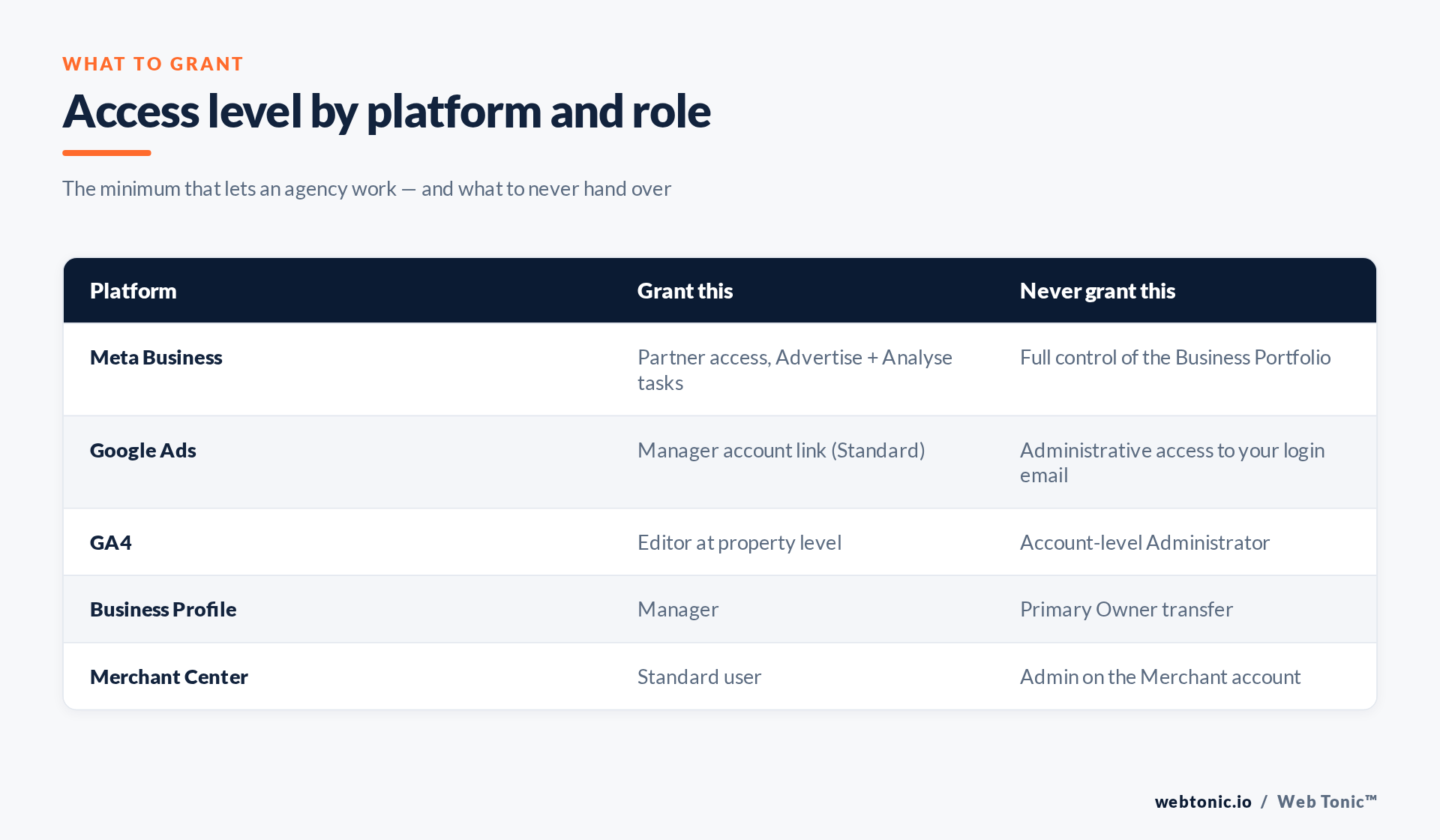
| Platform | Access to grant | Where to revoke it | Time to set up |
|---|---|---|---|
| Meta Business | Partner access, Advertise + Analyse tasks | Business settings → Partners | 5 min |
| Google Ads | Manager account link, Standard | Admin → Access and security → Managers | 2 min |
| GA4 | Property-level Editor | Admin → Property access management | 2 min |
| Business Profile | Manager | Business Profile → Users | 3 min |
| Merchant Center | Standard user | Settings → People and access | 2 min |
Step 3 — GA4: property access, and the revenue toggle
GA4 splits permissions into roles (what someone can do) and data restrictions (what someone can see). Grant the agency Editor at property level — not account level, which would expose every other property under the same account, including properties for businesses you may have sold or spun off.
The part that catches people out is the pair of data restrictions: No Cost Metrics and No Revenue Metrics. These exist precisely so you can let an agency optimise traffic without showing them your margins. If you are working with a paid-media agency, they need both; if you are working with a content or PR agency, they usually need neither. Google's reference for roles is at Analytics Help, with the restriction detail at this page.
Step 4 — Google Business Profile: Manager, never Owner
Google Business Profile has three levels: Primary Owner, Owner and Manager. Agencies need Manager, which allows posts, photos, review replies and edits to business information. It does not allow removing other users or deleting the profile — which is exactly the point.
The Primary Owner should always be an email address controlled by your business, ideally not a single employee's personal account. Google's user roles are documented at Business Profile Help. If your profile was originally verified by a previous agency and you cannot get it back, that is a different and much more annoying process — and one we cover in our local SEO work.
Step 5 — Merchant Center and the ones people forget
If you sell products, the agency also needs Standard user access on Google Merchant Center, and the Merchant Center must be linked to Google Ads — a link approved on both sides. Google's guide is at Merchant Center Help.
Beyond the big four, run through this list before your kickoff call: Google Tag Manager (Publish permission on the container, not the account), Google Search Console (Full user, not Owner), your CMS (an editor seat, not admin), and your email platform. Tag Manager splits container permissions from account permissions (Tag Manager Help, with the container model itself explained in Google's tag platform documentation), Search Console distinguishes Full users from Owners (Search Console Help), and the underlying principle — least privilege, individual identities, no shared credentials — is the same one the FTC recommends to any business handling customer data. Missing one of these is the most common reason a "we start Monday" engagement actually starts a fortnight later. If tracking is part of the scope, see how we approach conversion tracking before anyone touches a tag.
Before you send the invitations
Two habits save a great deal of pain later. First, write down what you granted and when — a five-line note in your own documentation beats reconstructing it from memory during an offboarding. Second, put the access list in the contract, including the sentence that all accounts, assets and data remain the client's property. Reputable agencies will sign that without blinking. The reaction to that clause tells you a lot.
When the relationship ends, revoke in the same order you granted: partners and managers first, then individual users, then any tags or scripts pointing at the agency's own containers. And check the pixel — the asset most often left behind is the one collecting your conversion data.
Frequently Asked Questions
Can an agency run Meta ads without partner access?
Only by using your personal login, which breaks two-factor authentication and your audit trail. Partner access exists specifically to avoid this and takes about five minutes to set up.
Should the agency create the Google Ads account or should we?
You should. An account created and owned by the agency means the performance history and Smart Bidding models stay with them when you leave. Create the account yourself, then link their manager account.
What is the difference between GA4 account access and property access?
Account access covers every property beneath it; property access covers one. Always grant at property level so an agency working on one brand cannot see data for another.
Can we hide revenue figures from an agency in GA4?
Yes. The No Revenue Metrics and No Cost Metrics restrictions let someone analyse behaviour and traffic without seeing monetary values. Paid-media agencies normally need both metrics; other partners often do not.
How quickly can we remove access if the relationship ends?
Immediately, on every platform listed here, and without resetting any passwords — which is the whole argument against sharing a login in the first place.
Sources: Google Ads Help — manager accounts; Analytics Help — access management; Business Profile Help — user roles; Merchant Center Help; Tag Manager Help; FTC — protecting personal information. Last verified 2026-08-21.


