



Table of contents
Quick answer: Duplicate conversions almost always mean the browser event and the server event are not carrying the same event ID and event name. Pull one real order, compare both payloads, and make the ID identical and generated once at the source — not once per integration.
Last verified: 2026-08-21
First, confirm you actually have duplicates
Reported conversions that look inflated are not proof of duplication. Attribution windows, view-through credit and multi-platform reporting all inflate totals for reasons that have nothing to do with double-firing. The only reliable test is a count comparison against the system that creates the order.
Take a clean seven-day window and put three numbers next to each other: orders in your commerce database, conversions reported by the ads platform, and events received by the dataset. Real duplication shows up as a near-exact doubling of received events against real orders. A 15% gap is attribution noise. A 96% gap is a plumbing fault.
If the ratio sits somewhere in between, check one order end to end before changing anything. Find its order ID, then look at the events the dataset received for it. Two events for one order with different identifiers is your answer in ten minutes, and it beats a week of dashboard archaeology.
How deduplication is supposed to work
When the same conversion is reported twice — once from the browser and once from your server — the platform keeps one and discards the other, but only if it can tell they are the same conversion. It does that by comparing a pair of values: the event name and a unique event ID. Both must match. Meta's Conversions API documentation and Business Help Center describe the mechanism in detail, and we cite them by name here because those domains refuse automated verification and this page promises every link works.
The idea is simply idempotence: sending the same event twice should have the same effect as sending it once. That property only holds if the identifier is stable. Generate it independently in the browser and again on the server and you have created two different events that happen to describe the same purchase.
Google's stack has the same shape even though the vocabulary differs. Enhanced conversions relies on the same discipline of one normalised identifier reaching the platform through whichever path, and the consent APIs add a second reason for events to appear or disappear unexpectedly.
The six causes, in the order to check them
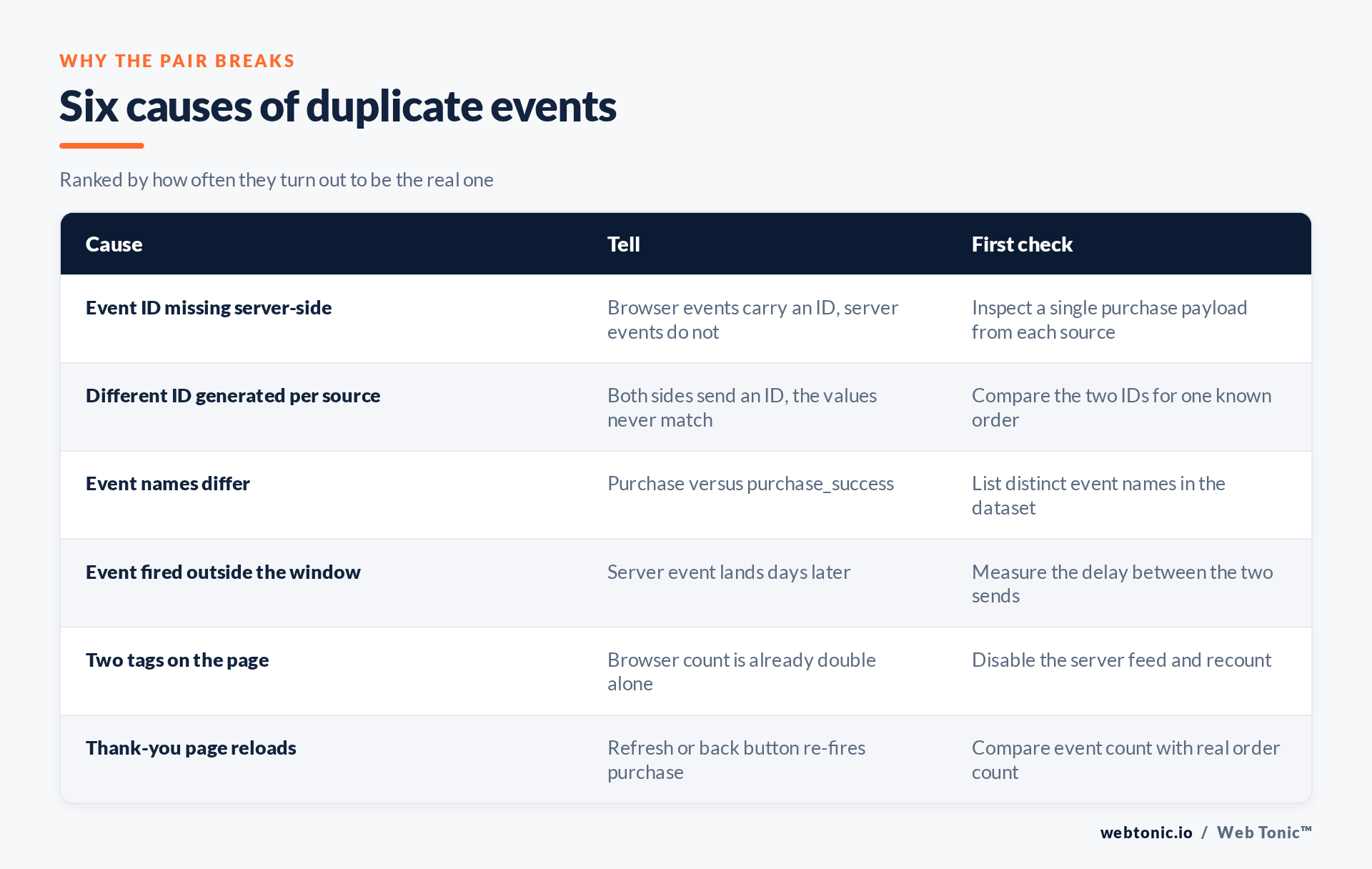
1. The server event has no event ID at all
By far the most common. The browser tag generates an ID because the default template does, and the server integration — written later, by someone else — omits it. Nothing errors. Both events are accepted. Both are counted. Check: inspect one server payload for the ID field. Fix: add it.
2. Each side generates its own ID
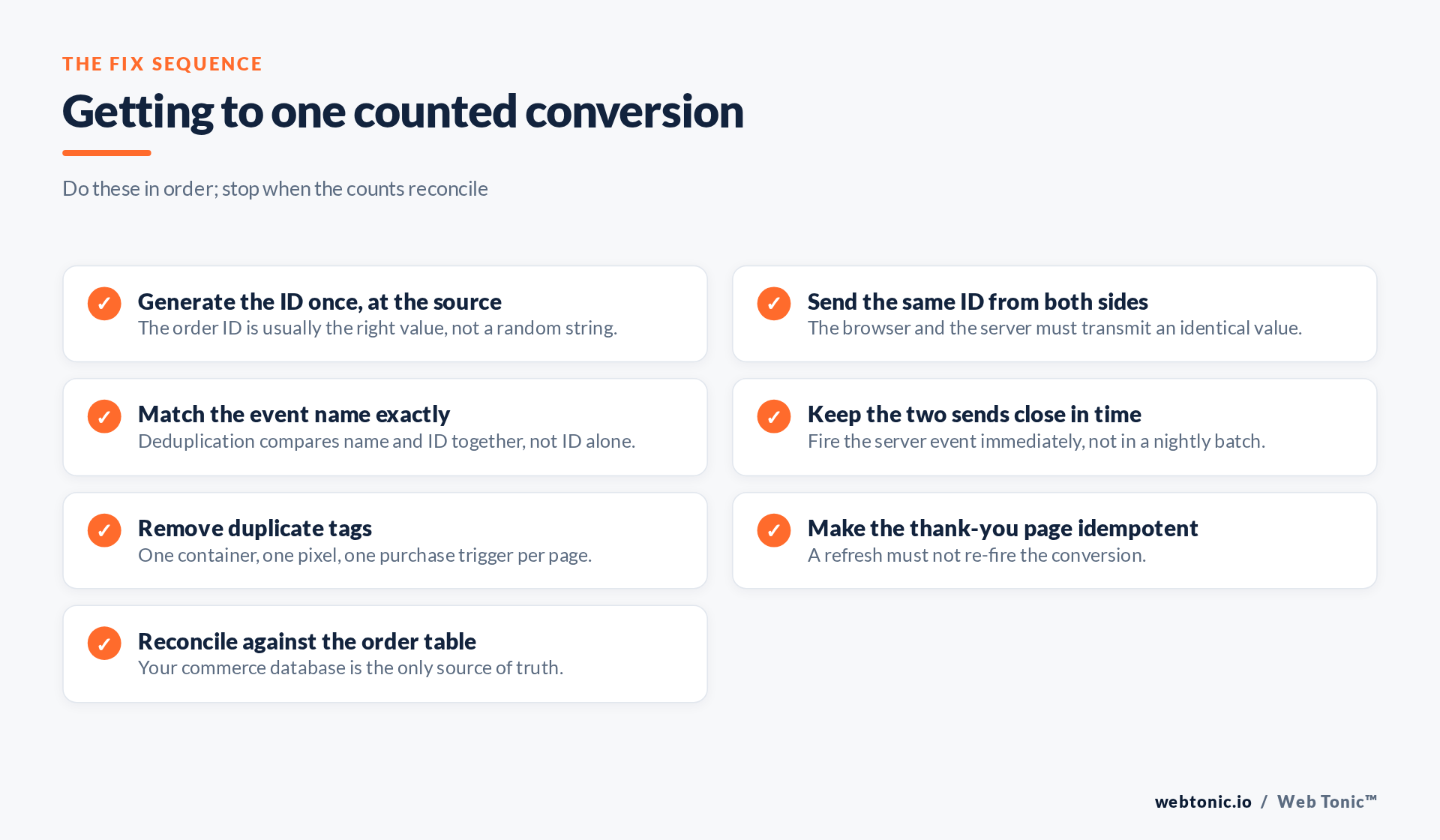
Two random values, two events. The fix is architectural rather than technical: decide on one value that both sides can read. The order ID from your commerce platform is almost always the right choice, because it exists before either event fires, it is unique, and it lets you reconcile against the order table afterwards.
3. The event names differ
Deduplication compares name and ID as a pair. A browser event called Purchase and a server event called purchase_complete will never deduplicate, however perfect the ID is. Standard names, spelled identically, on both sides.
| Symptom | Likely cause | Fix |
|---|---|---|
| Events are exactly 2x orders | No ID or mismatched IDs | Send the order ID from both sources |
| Events are 2x with the server off | Two tags on the page | Remove the duplicate container or tag |
| Slightly above 1x, creeping up | Thank-you page refreshes | Fire once per order, guarded by state |
| Duplicates only on some orders | Batch delay past the window | Send server events in near real time |
| Counts fine, values doubled | Currency or value sent twice | Audit the value and currency fields |
| Server events barely arrive | Token or endpoint failure | Check response codes, not just volume |
4. The server event arrives too late
Deduplication windows are finite. A server event batched overnight, or held in a queue that backs up during peak hours, can arrive after the browser event has already been committed as a distinct conversion. Send server-side events immediately after the transaction, and treat queue latency as a tracking metric worth monitoring.
5. Two tags are on the page
A migration that left the old hard-coded snippet in the template alongside the new tag manager container will double the browser count on its own, before the server feed is even considered. Turn the server feed off for an hour and recount: if the browser alone is double, the server integration was never the problem.
6. The confirmation page re-fires
A customer refreshing the thank-you page, or returning to it from their email, fires the conversion again. Guard the event behind a per-order flag stored server-side. A well-behaved confirmation endpoint should follow the same safety rule as any other repeatable request described in RFC 9110: repeating it must not change the outcome.
Verifying the fix without fooling yourself
Deploy the change, then wait a full day and repeat the three-number comparison. Do not judge it on the ads dashboard in the first hours: reported figures settle over time, and attribution windows will keep showing pre-fix conversions for days afterwards. Reconcile against orders, every time.
Expect reported conversions to fall. That is the point, and it is worth saying out loud to whoever reads the report, because a halving of conversions looks like a catastrophe if nobody was warned. Cost per acquisition will roughly double on paper while the real economics are unchanged — and will then improve, because bidding was previously learning from a corrupted signal.
Build the reconciliation into a monthly routine rather than a one-off. This is standard practice in our conversion tracking and server-side tracking engagements, and it pairs with the Conversions API work that usually introduces the second event path in the first place. If the numbers still refuse to reconcile, our analytics team treats it as a data engineering problem rather than a media one.
Frequently Asked Questions
Should I just turn off the browser pixel and keep the server events?
Usually no. The browser captures identifiers and browsing context the server does not see. Running both with correct deduplication gives better coverage than either alone.
What should I use as the event ID?
The order or transaction ID from your commerce platform. It is unique, it exists before both events fire, and it lets you reconcile received events against real orders later.
How long does deduplication look back?
Windows are finite and platform-specific, so treat near-real-time sending as the requirement. Nightly batches are the classic way to land outside the window.
Will fixing duplication hurt my campaign performance?
Reported conversions fall and reported cost per acquisition rises, while real performance is unchanged. Actual performance typically improves once bidding learns from a clean signal.
Can consent settings cause the same symptoms?
Consent changes cause events to disappear rather than double, but they can mask a duplication fix by moving volume at the same time. Change one thing at a time.
Sources: Meta Conversions API developer documentation and Business Help Center (deduplication), cited by name because those domains block automated link verification; idempotence; RFC 9110; Google enhanced conversions; Google consent guides; Analytics consent settings. Last verified 2026-08-21.


