



Table of contents
Gmail ads are the sponsored entries that appear at the top of the Promotions and Social tabs of an inbox. You can still buy them, but not on their own: it is now one surface inside a Demand Gen campaign, alongside YouTube, Discover, Maps and the Display Network.
Key Takeaways
- Standalone Gmail campaigns are gone. this is a placement inside Demand Gen, which the platform says reaches up to 3 billion monthly active users across its visual surfaces.
- You cannot buy it alone, but channel controls let you emphasise it — and Rule 1 of running it well is treating it as a discovery surface, not a mailbox.
- The creative that wins in the inbox is a single clear offer with a legible brand name, because the ad first renders as a collapsed one-line teaser.
- Expect discovery-level intent: plan for 2 to 4 touches before conversion and measure assisted conversions, not last click only.
- Display Ads campaigns are also moving into the same campaign type, with a voluntary migration tool opening in June 2026.
What these inbox units actually are, and where they render
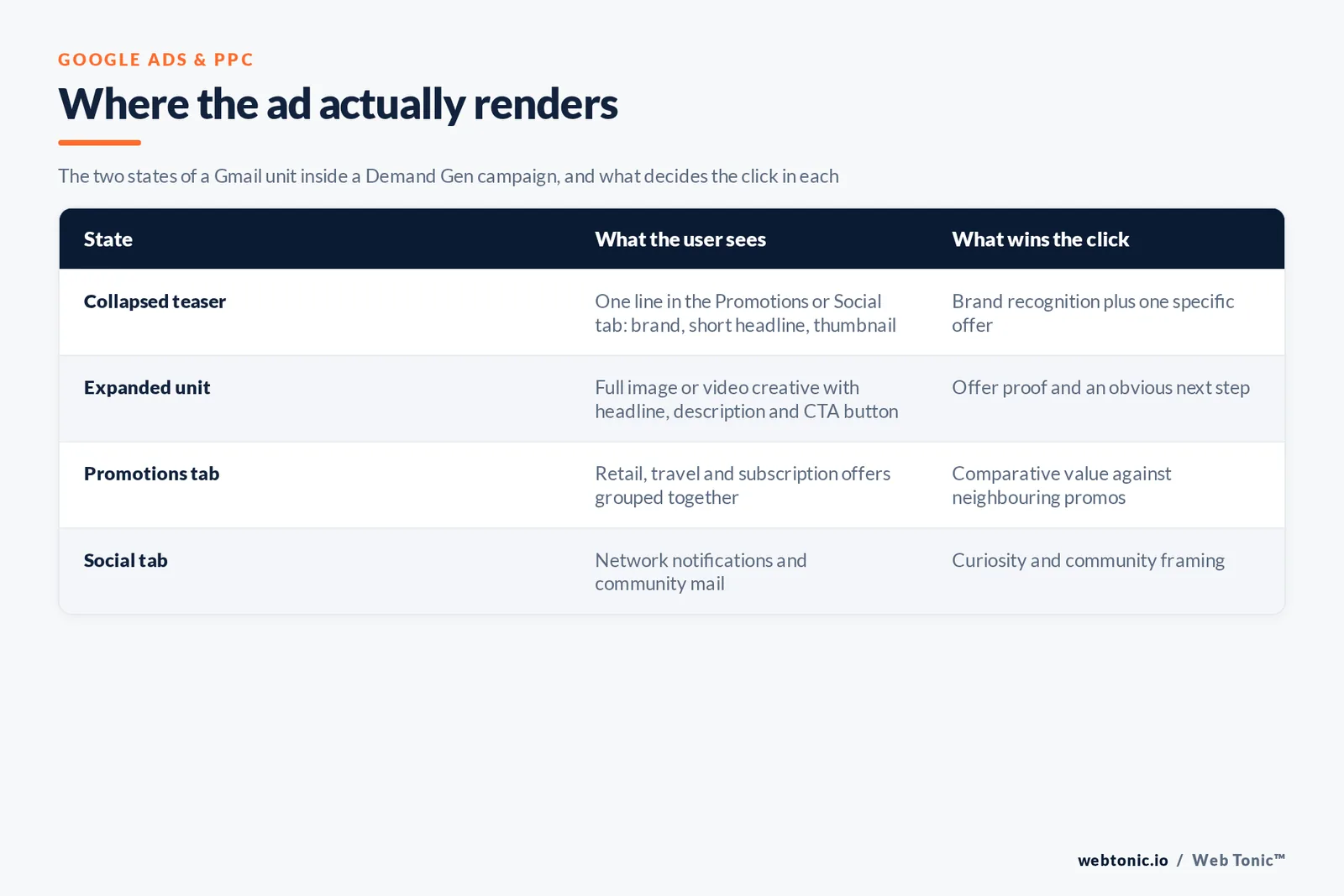
Such an ad is served in the message list, styled like a mail item, marked as an ad, and it expands into a full creative unit when tapped. In practice 2 of the 4 states below decide whether you ever get that expansion. The platform's own explainer on how Gmail ads work is explicit that selection is fully automated and based on signed-in activity rather than the content of a user's messages, and that users can opt out of personalisation. That matters for planning: you are not buying mail contents, you are buying an audience that happens to be in an inbox. Rule 3 — write for the 1-line teaser first, because the expanded unit is only ever seen by users the teaser already won over.
The unit has two states, and most weak campaigns fail in the first one.
| State | What the user sees | What decides the click | Most common mistake |
|---|---|---|---|
| Collapsed teaser | One line in the Promotions or Social tab of Gmail: brand name, short headline, small thumbnail | Brand recognition plus one specific offer | Headline written for a landing page, not for a one-line list |
| Expanded unit | Full image or video creative with headline, description and a call-to-action button | Offer proof and an obvious next step | Three competing CTAs and no price or timeframe |
| Promotions tab | Retail, travel and subscription offers grouped together | Comparative value against neighbouring promos | Generic brand copy sitting next to hard offers |
| Social tab | Network notifications and community mail | Curiosity and community framing | Reusing the retail promo creative unchanged |
Email client share data explains the reach: Gmail sits at the top of the client market alongside Apple Mail in Litmus's ongoing email client tracking, which is why this placement behaves like a mass-reach channel rather than a niche one. Reach on the campaign side is quoted at up to 3 billion monthly active users, with more than 50 billion daily views on Shorts alone.
Why "Gmail campaigns" no longer exist in the campaign picker
If you are searching for a Gmail campaign type and cannot find it, nothing is broken. the standalone inbox campaign was folded into Discovery, and Discovery was upgraded into Demand Gen, and is now moving Display into the same home too. Google's About Demand Gen campaigns documentation lists it explicitly among the surfaces served and notes that Display Ads campaigns get a migration tool from June 2026, after which new campaigns can only be created inside Demand Gen. That makes 4 distinct eras of buying the inbox, and only the last one still exists.
| Era | How you bought it | Control you had | What it means for a 2026 plan |
|---|---|---|---|
| Gmail Sponsored Promotions | Dedicated mailbox-only buy | Full: mailbox-only targeting and formats | Historic benchmarks from this era are not comparable |
| Standalone Gmail campaigns | Own campaign type in Google Ads | High: separate budgets and bids | Old tutorials describing this flow are obsolete |
| Discovery campaigns | Gmail bundled with Discover and YouTube feeds | Medium: one budget across surfaces | Where the "no inbox-only bidding" limit began |
| Demand Gen | Gmail as one channel among YouTube, Discover, Maps, Display | Channel controls and creative controls, not isolated bidding | The only current way to serve the inbox |
The Google Ads API documentation for Demand Gen describes the same surface list from the automation side, and coverage of the successive feature waves at Search Engine Journal tracks how much creative control has been handed back to advertisers since the migration. Step 1 of any audit is therefore confirming which era your reference material was written in.
The campaign type versus the alternatives: pick the right container
Before you build for it, be sure this surface is the right ask. This campaign type buys attention on visual surfaces; Search buys existing intent; Performance Max buys everything at once and decides for you.
| Container | What it is good at | Inbox exposure | Choose it when |
|---|---|---|---|
| Search | Harvesting stated intent | None | Demand already exists and you are missing impression share |
| Demand Gen | Creating consideration on visual surfaces | Direct, via channel controls | You have strong creative and a defined audience to warm up |
| Performance Max | Whole-funnel automation across every surface | Indirect and unreportable at inbox level | Conversion volume is healthy and you want reach, not control |
| Video (YouTube) | Reach and view-based objectives | None | The KPI is reach, frequency or brand lift |
| Display (legacy) | Cheap remarketing inventory | Migrating into Demand Gen | Only for existing campaigns until the migration completes |
Rule 2 — never test this placement from inside Performance Max. You will not be able to attribute anything to it. Google's own Think with Google material on Demand Gen positions it as a social-style demand-creation buy, and that is how it should be budgeted: as a consideration line item, not as a bottom-funnel one. We plan it at 10% to 20% of paid budget for accounts whose search impression share is already above 70%.
The asset pack to prepare before you open the campaign builder
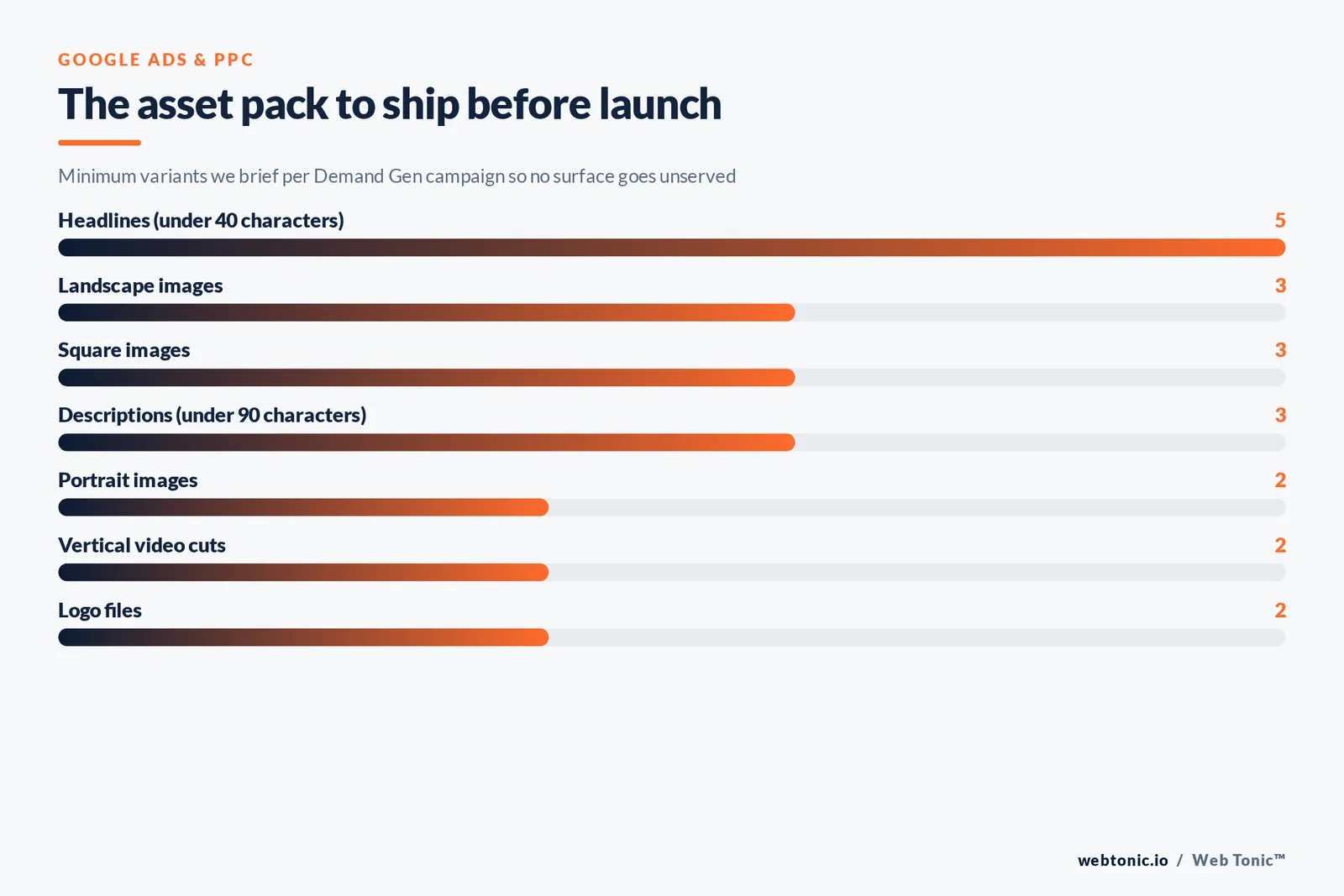
These ads are assembled from assets, so the quality ceiling is set before launch. This is the pack our performance creative team ships for a mailbox-heavy campaign; the character targets are our own guardrails to avoid truncation on small screens, not platform maximums. The full pack is 8 images, 2 video cuts, 5 headlines and 3 descriptions.
| Asset | How many to ship | Our guardrail | Why it matters in the inbox |
|---|---|---|---|
| Landscape image | 3 variants | Product or face occupying 60% of the frame | Default expanded render on desktop |
| Square image | 3 variants | Legible at thumbnail size, tested at 48 pixels wide | Becomes the collapsed teaser image |
| Portrait image | 2 variants | Text-free top third | Feeds mobile and Discover surfaces |
| Vertical video | 1 to 2 cuts | Hook inside 2 seconds, subtitles burned in | Carries the same creative into Shorts |
| Headlines | 5 minimum | Under 40 characters, one number in at least 2 of them | The only differentiator in the collapsed state |
| Descriptions | 3 minimum | Under 90 characters, no clause stacking | Read as a second line, often truncated |
| Logo | Square plus landscape | Transparent background, no tagline baked in | Brand name is the trust cue in a message list |
| Product feed | Optional but preferred | Top 50 SKUs by margin, not by volume | Turns the unit into a shoppable promo |
Trap 1 — shipping only 1 image ratio. The system needs alternatives to fill the mail, Discover and Shorts slots, and a missing ratio quietly removes you from inventory. Accounts that ship all 3 ratios get served across more surfaces at the same budget.
Targeting: what still works when you cannot target the surface itself
You never target "everyone with an inbox". You target audience segments, and the system decides which surface serves them. The signal quality you feed it is the whole game, and 5 signal types cover almost every case, and the segment types are documented in the platform's reference on audience segments.
| Signal | Best use in a mailbox-heavy campaign | Volume needed | Warning |
|---|---|---|---|
| Customer Match | Winback and cross-sell offers to known buyers | Large lists match best; expect partial match rates | Consent and list hygiene are your legal exposure |
| Lookalike segments | Prospecting from your best 5% of customers | A healthy seed list, refreshed monthly | A stale seed produces a stale audience |
| Website visitors | Cart and pricing-page abandoners | Needs consistent tagging across the site | Broken consent mode collapses list size silently |
| Custom segments | Competitor and category interest by search behaviour | 10 to 15 tight terms beats 100 loose ones | Competitor brand terms in creative breach trademark policy |
| In-market segments | Scaling once creative has proven itself | Broad by design | Cheap clicks, weakest intent of the five |
On that last warning: naming a rival in ad copy is governed by the Google Ads trademark policy, and you can see exactly what your competitors are running — including their inbox creative — in the Google Ads Transparency Center before you write a single line.
Bidding and budget: how to keep this surface from eating the campaign
The campaign type offers clicks-based, conversion-based and value-based bidding. Inbox inventory is cheap, which sounds good and often is not: cheap clicks pull budget away from the surfaces that convert instead.
| Strategy | Use it for | Effect on the inbox | Guardrail |
|---|---|---|---|
| Maximize clicks | Creative learning in week 1 and 2 | Skews hard toward the cheapest of this inventory | Cap at 20% of the channel budget and exit fast |
| Maximize conversions | Lead gen with 30 or more monthly conversions | Balances it against Discover and Shorts | Do not touch targets for the first 14 days |
| Target CPA | Stable accounts with a known cost per lead | Suppresses reach here if the target is too tight | Set 20% above your Search CPA, then tighten |
| Maximize conversion value | Ecommerce with a product feed | Turns the unit into a promo for hero SKUs | Feed only margin-positive SKUs |
| Target ROAS | Mature accounts with clean value tracking | Prunes this spend aggressively | Needs value data our data intelligence team would sign off on |
Limit 3 — do not run it under about $50 per day for 30 days. Spread across five surfaces, a smaller budget produces too little data on any single one to judge the inbox at all. And for reference on what a click should be worth to you, the long-running paid search benchmark work published by WordStream still frames the search-side costs that your consideration channel has to feed.
Measurement: the three numbers that tell you it is working
Inbox clicks are curiosity clicks, and 3 of the 5 metrics below are the ones that actually change decisions. Judged on last-click conversions alone they will always lose, so change what you look at.
| Metric | What good looks like | What it tells you | Action when it fails |
|---|---|---|---|
| Expansion rate (clicks on the teaser) | Stable or rising week over week | Teaser headline and brand cue are landing | Rewrite the 5 headlines, keep the images |
| Post-expansion engagement | Rising session depth on the landing page | The offer survives contact with the site | Fix the landing page match, not the ad |
| Assisted conversions | Visible in a 30-day data-driven model | It is warming users who convert elsewhere | Switch reporting model before cutting budget |
| Branded search volume | Lifts 2 to 6 weeks after launch | Demand creation is actually working | Creative is forgettable; change the concept |
| New customer share | Above your account average | You are prospecting, not re-buying buyers | Exclude existing customer lists |
Context for the budget conversation with a finance team: Alphabet's advertising revenue, disclosed each quarter in Alphabet's investor filings, is overwhelmingly performance-driven, which is precisely why upper-funnel surfaces like this one need their own success criteria inside the same account. Give the test 30 days and a written keep-or-kill decision at day 30.
Which businesses should test it
| Business type | Worth testing | Best angle | Primary KPI |
|---|---|---|---|
| Ecommerce, considered purchase | Yes, high value | Time-boxed offer on 3 hero SKUs | Conversion value and new customer share |
| Subscription and SaaS | Yes, for trial starts | One problem, one screenshot, one number | Qualified trial starts |
| Local services | Rarely | Seasonal reminder in a tight radius | Calls and form fills |
| B2B, long cycle | Yes, for content offers | Benchmark report gated behind 1 field | Cost per marketing qualified lead |
| Events and ticketing | Strong | Date, city, price, deadline in the headline | Cost per ticket sold |
| Regulated finance and health | Handle with care | Educational, claim-free creative | Approval rate and lead quality |
Policy and privacy checkpoints before launch
Two categories of rejection cost the most time: promotional claims that cannot be substantiated, and audience lists collected without a lawful basis. Clear both before creative production, not after a disapproval.
| Checkpoint | What reviewers look for | Who owns it | Evidence to keep on file |
|---|---|---|---|
| Offer substantiation | Any percentage, price or guarantee stated in the creative | Marketing lead | Dated screenshot of the offer page plus its terms |
| Rival brand mentions | Trademarks used in headline or description text | Legal reviewer | Written sign-off per phrase, refreshed each quarter |
| Consent for uploaded lists | Lawful basis and an unsubscribe path for every record | CRM owner | Source, date and consent text per import batch |
| Sensitive category rules | Health, finance, employment or housing framing | Compliance | Approved claim library the writers must work from |
| Destination quality | A landing page that delivers exactly what the ad promised | Web owner | Load-speed report and a mobile screenshot per URL |
Trap 9 — writing creative first and clearing claims second. Rework at that stage typically costs a week of live spend on a 30-day test window, which is a third of the read you were trying to get.
Reporting scaffolding you should build in the first week
The single biggest reason teams abandon this channel is that nobody wired the reporting to show its contribution. Four small pieces of plumbing prevent that argument entirely.
| Piece of plumbing | How to build it | Question it answers | Time to set up |
|---|---|---|---|
| Consistent naming | One convention covering objective, audience type and creative concept | Which concept, not which line item, is winning | 1 hour |
| Tagged destination URLs | Campaign parameters generated from a shared sheet, never by hand | What on-site behaviour follows a visit from this channel | 2 hours |
| Concept-level creative log | A row per concept with launch date, thumbnail and retirement date | Whether performance drops are fatigue or auction change | 30 minutes weekly |
| Two-model reporting view | Same period shown on last click and on a data-driven model side by side | How much upper-funnel value last click is hiding | 3 hours once |
| Weekly one-page readout | Five numbers, one chart, one decision, sent every Monday | Keep, fix or kill, before someone asks in a board meeting | 20 minutes weekly |
Half of that scaffolding is web work rather than media work, which is why we build it alongside the landing pages in the same sprint as part of a web development workstream. Step 2 is agreeing, in writing, which 5 numbers appear on the Monday readout, because a channel judged by a different metric every week never survives its second month.
Seven traps that kill performance here
| Trap | How it shows up in the data | Fix |
|---|---|---|
| Trap 2: newsletter creative reused as ad creative | High impressions, expansion rate under 1% | Rebuild for a single-line list, not a scroll |
| Trap 3: 1 headline doing all the work | Asset report shows a single "best" and 4 "low" | Ship 5 genuinely different angles |
| Trap 4: no customer exclusion list | Strong ROAS, flat new customer share | Exclude buyers from prospecting campaigns |
| Trap 5: judging week 1 numbers | Panic edits every 2 days | Freeze the campaign for 14 days after launch |
| Trap 6: landing page mismatch | Clicks up, bounce rate above 70% | Mirror the ad's exact offer above the fold |
| Trap 7: mixing prospecting and remarketing | Cheap conversions, no growth | Split into 2 campaigns with separate budgets |
| Trap 8: chasing cheap CPCs | CPC falling, conversions flat | Move to a conversion-based strategy |
A 30-day launch plan
| Phase | Days | What you do | Exit condition |
|---|---|---|---|
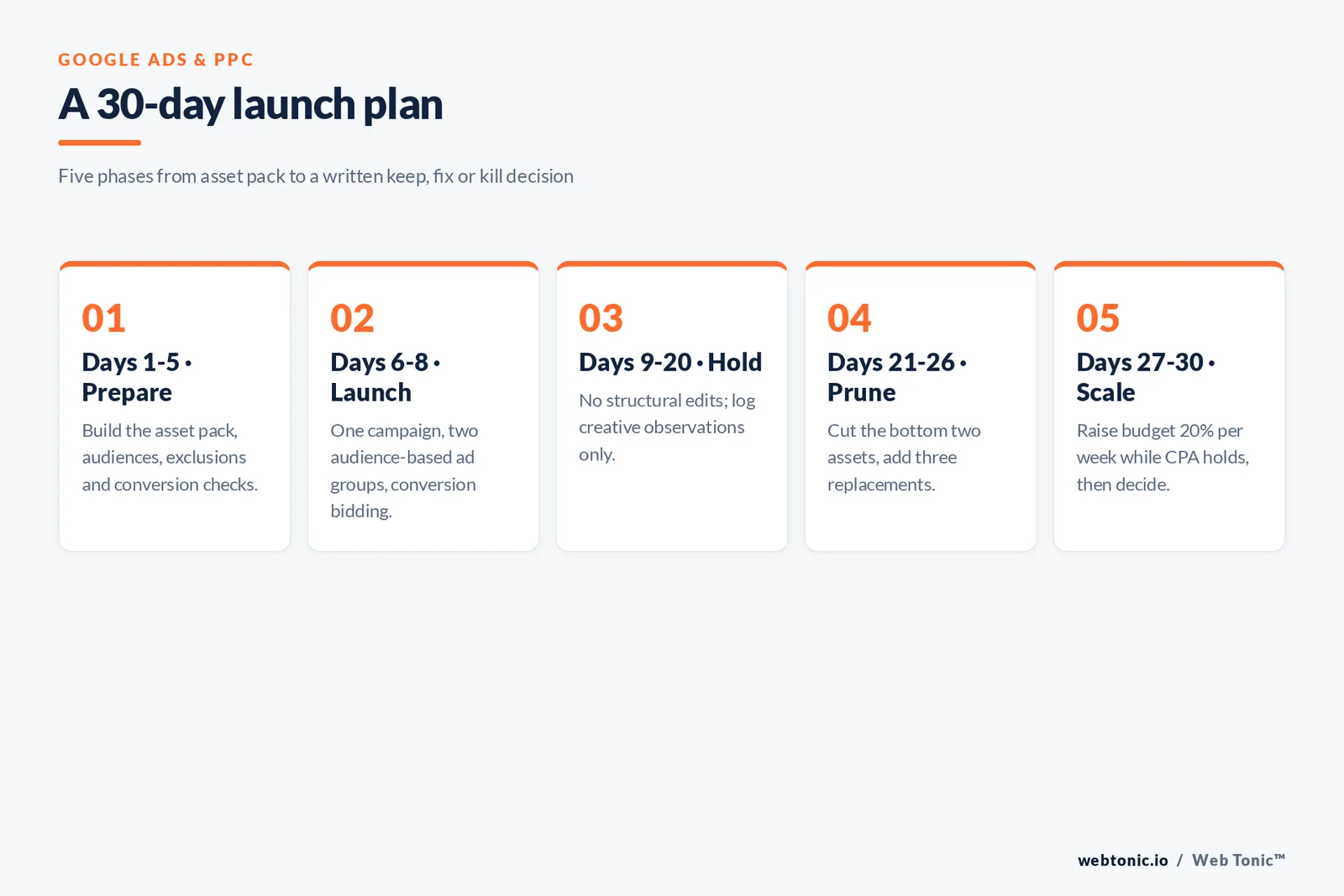
| Phase 1: prepare | Days 1 to 5 | Build the asset pack, audiences, exclusions and conversion checks | 8 images, 2 videos, 5 headlines, 3 descriptions approved |
| Phase 2: launch | Days 6 to 8 | One campaign, 2 audience-based ad groups, conversion bidding | Serving on at least 3 surfaces including Gmail |
| Phase 3: hold | Days 9 to 20 | No structural edits; log creative observations only | 30 or more conversions, or 2 weeks elapsed |
| Phase 4: prune | Days 21 to 26 | Cut the bottom 2 assets, add 3 replacements | Expansion rate improving on the new set |
| Phase 5: scale | Days 27 to 30 | Raise budget 20% per week while CPA holds | A decided keep, fix or kill call, in writing |
How this layer fits the rest of the mix
Treated alone, this channel looks expensive. Treated as the consideration layer between reach and harvest, it is usually the cheapest way to grow the pool of people who later search your brand. That is how we sequence it inside a growth marketing plan.
| Layer | Channel | Job | Handoff to the next layer |
|---|---|---|---|
| Reach | YouTube video, paid social | Make the category and brand familiar | Video viewers become a remarketing audience |
| Consideration | Demand Gen and its visual surfaces | Turn familiarity into specific offer interest | Engagers feed remarketing and lookalike seeds |
| Harvest | Search, Shopping, Performance Max | Capture the demand you created | Converters feed exclusion and winback lists |
| Retention | Owned email and CRM | Repeat purchase without media cost | Best buyers become the lookalike seed |
| Measurement | Analytics and lift studies | Prove the middle layer earns its budget | Findings reset next quarter's split |

Related reading
- Wealth Management Google Ads Statistics: CPC, CTR & Conversion Benchmarks (2026)
- 43+ Allergy & Immunology Google Ads Statistics Every Marketer Should Know
- The State of Google Ads in Automotive: 2026 Stats & Trends
- Paid Search services at Web Tonic
FAQ
Can I still run a Gmail-only campaign?
No. Standalone Gmail campaigns were retired when they were folded into Discovery, and Discovery became Demand Gen. It is now one of the surfaces that campaign type can serve, alongside YouTube, Discover, Maps and the Display Network. You can emphasise channels, but you cannot buy the inbox in isolation or bid on it separately.
How much does this placement cost?
There is no separate rate card for it. You pay the auction price for the audience you asked for, and message-list inventory is usually among the cheapest in the campaign. Budget the campaign, not the placement: below roughly $50 per day for 30 days you will not gather enough data per surface to judge whether this surface contributed anything.
Are these ads based on the content of my emails?
No. The platform states that ads shown in the inbox are selected automatically from signed-in activity and that message content is not scanned to target them. Users can also turn off ad personalisation, which shrinks the addressable pool but does not remove ads from Gmail entirely.
How do I stop seeing these ads as a user?
Turn off ad personalisation in your Google account settings, which stops activity-based targeting, and use the Promotions tab controls to manage what reaches your primary tab. Ads themselves remain part of the free product, so opting out changes relevance rather than removing the placement.
Is this placement worth testing in 2026?
Yes, if you have real creative and a defined audience, and no if you only have search intent to harvest. With Display campaigns migrating into the same campaign type from June 2026, the placement is becoming part of the default visual buy rather than an exotic add-on, so most advertisers will end up serving it whether they planned for it or not. Test it deliberately instead. More playbooks are on our blog.
Sources: Google Ads Help — About Demand Gen campaigns; Gmail Help — How Gmail ads work; Google Ads Help — About audience segments; Google Advertising Policies — Trademarks; Google Ads API documentation — Demand Gen; Think with Google — Demand Gen campaigns; Search Engine Journal — Google Demand Gen campaign updates; Litmus — Email client market share; Alphabet Investor Relations quarterly disclosures; WordStream — Google Ads industry benchmarks; Google Ads Transparency Center. All sources checked August 2026.


