



Table of contents

The Meta Ad Library is a free, public database that shows every active advertisement running across Facebook and Instagram. It lets marketers research competitor creative, track political ad spending, and find proven messaging angles — without spending a dollar.
Key Takeaways
- The Meta Ad Library catalogs every active promotion on Facebook and Instagram in real time, making it the largest publicly accessible paid media archive.
- Over 15 million active promotions appear in the database at any given time, spanning every industry, format, and geographic market.
- Political, electoral, and social-issue advertisements remain archived for 7 years as part of the company's public accountability commitments.
- The tool is 100% free — no account or login required to browse, filter, and analyze competitor campaigns.
- Marketers who research competitor creative before launching campaigns see 30% lower cost per acquisition, because they enter auctions with validated messaging rather than untested assumptions.
- The Ad Library API provides programmatic access to ad data, letting researchers and agencies build automated competitive intelligence workflows.
What Is the Meta Ad Library?
The Meta Ad Library (formerly the Facebook Ad Library) is a publicly searchable archive of advertisements running on Meta's platforms — primarily Facebook and Instagram. Launched in 2019 following concerns about political advertising and misinformation during election cycles, it has become an essential competitive intelligence resource. Today it serves a broader purpose: any person can view any active campaign without logging in, including the assets, copy text, landing page links, launch dates, and placement data.
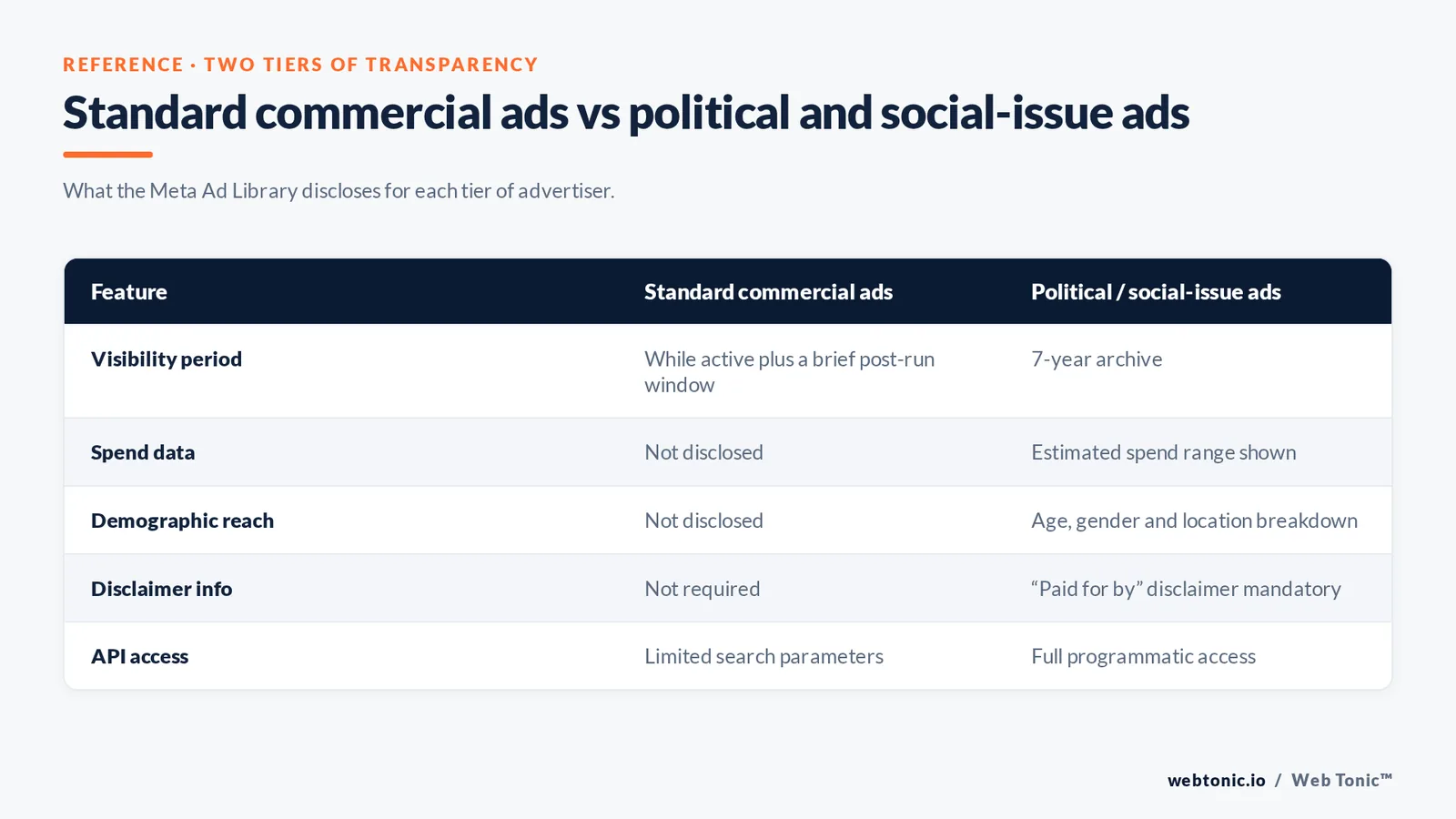
The system categorizes entries into two tiers. Standard commercial campaigns remain visible while active and for a short period after they stop. Ads about social issues, elections, or politics receive extended treatment — they stay in the system for 7 years and include additional transparency data such as estimated audience size, spend ranges, and demographic reach breakdowns. Hootsuite's research confirms this dual-tier structure makes the resource valuable for both competitive intelligence and regulatory oversight.
| Feature | Standard Commercial Ads | Political / Social Issue Ads |
|---|---|---|
| Visibility Period | While active + brief post-run window | 7-year archive |
| Spend Data | Not disclosed | Estimated spend range shown |
| Demographic Reach | Not disclosed | Age, gender, and location breakdown |
| Disclaimer Info | Not required | "Paid for by" disclaimer mandatory |
| API Access | Limited search parameters | Full programmatic access available |
How to Search and Navigate the Platform
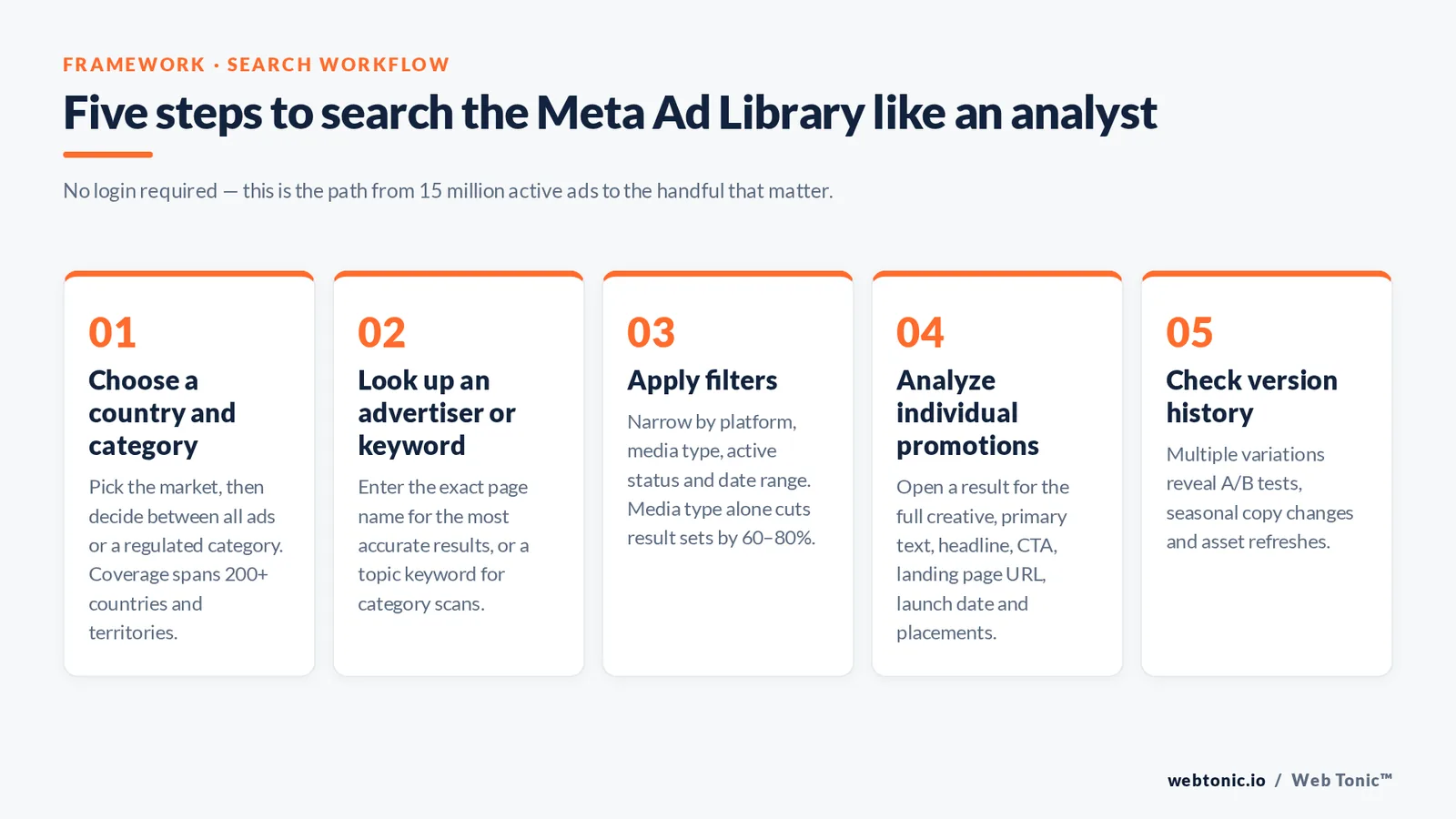
Accessing the tool requires no login — visit the public URL and start searching. The interface offers several filtering options that narrow results from millions of records to the exact campaigns you need.
Step 1 — Choose a country and category. Select the geographic market and decide whether to search "All ads" or filter to a specific regulated category (housing, employment, credit, or politics). The tool covers 200+ countries and territories, making it useful for international competitive research.
Step 2 — Look up an advertiser name or keyword. Type a brand name, competitor, or topic keyword into the input field. The system returns every matching active promotion. Search Engine Journal recommends entering the exact page name for the most accurate results.
Step 3 — Apply filters. Narrow results by platform (Feed, Stories, Messenger, Audience Network), media type (image, video, carousel, or collection), active status, and date range. Filtering by media type alone reduces result sets by 60–80%, helping you focus on the format that matters for your campaign.
Step 4 — Analyze individual promotions. Click any result to see the full creative, primary text, headline, description, call-to-action button, landing page URL, launch date, and running platforms. For political content, you also get the funding entity and estimated audience reach.
Step 5 — Check version history. Some advertisers launch multiple variations of the same campaign. The tool shows each version separately — look for A/B test patterns, seasonal copy changes, and asset refreshes to understand what the advertiser is optimizing toward.
5 Ways Marketers Use the Platform for Competitive Intelligence
The resource is far more than a transparency initiative. Smart media buyers, art directors, and strategists mine it systematically for actionable insights that inform their own performance creative strategy.
| Use Case | What to Search | What to Extract | How It Helps |
|---|---|---|---|
| Competitor Audit | Direct competitor brand names | Formats, visual styles, offer types, CTA language | Identifies proven messaging angles and gaps you can exploit |
| Launch Timing Intelligence | Competitor names, filter by date | Campaign start dates and active periods | Reveals promotional calendars and seasonal spending patterns |
| Offer and Pricing Research | Industry keywords + "discount," "free," "trial" | Discount levels, trial lengths, bundle structures | Benchmarks your pricing against live competitor offers |
| Format Trending | Top spenders in your vertical | Ratio of video vs. static vs. carousel across advertisers | Shows which format the market is investing in — and which might be under-saturated |
| New Market Entry | Category leaders in the target country | Localized messaging, translated copy, regional offer structures | Reduces localization guesswork with real examples from established players |
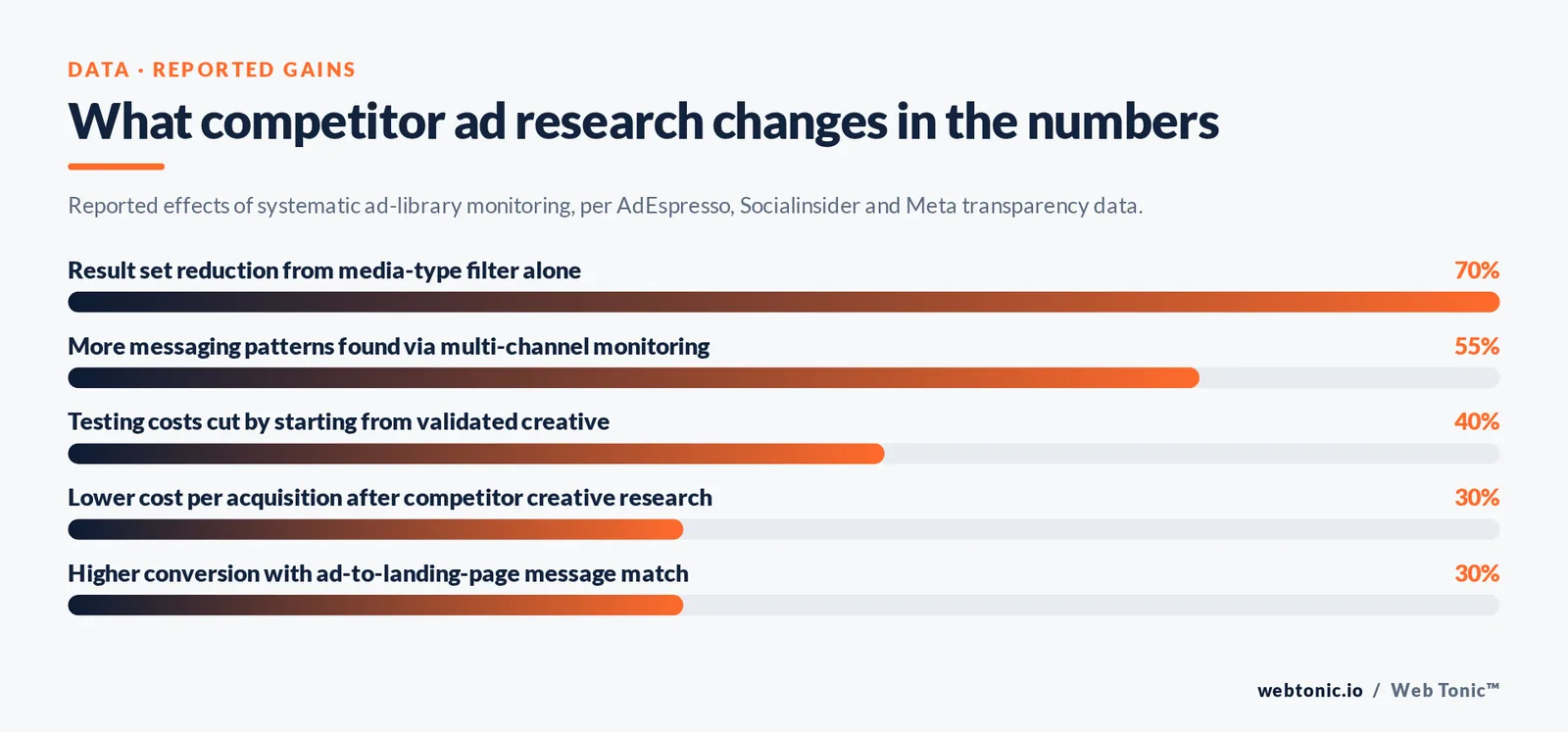
Agencies that build competitive tracking into their monthly workflow use this resource to fill briefs with evidence-backed direction. Instead of guessing which hook, format, or offer angle to test first, they start with validated patterns from brands spending millions in the same auction. AdEspresso notes that this single habit can cut testing costs by up to 40% because fewer concepts fail outright.
Using the API for Advanced Research
Manual searches work for ad-hoc research, but agencies and data teams need programmatic access. The programmatic interface lets developers query the database at scale, filter by multiple parameters, and export structured data for dashboards and reports.
Access requirements: You need a confirmed account, a registered app with the correct permissions, and approval through identity verification. Political content requires an additional verification tier. Rate limits cap queries at 200 per hour per app, which is sufficient for daily competitive scans but requires pagination logic for large exports.
Common use cases include automated weekly competitor reports, competitor databases, spend-trend dashboards for political monitoring, and data intelligence pipelines that feed insights into broader market analysis. Buffer's walkthrough covers the authentication flow in detail.
| API Parameter | What It Filters | Example Value |
|---|---|---|
| search_terms | Keyword match in ad text or page name | "running shoes" |
| ad_reached_countries | Target countries | ["US", "CA", "GB"] |
| ad_active_status | Active, inactive, or all | ACTIVE |
| ad_type | Political vs. all | POLITICAL_AND_ISSUE_ADS |
| publisher_platforms | Platform distribution | ["facebook", "instagram"] |
| ad_delivery_date_min | Earliest start date | 2026-01-01 |
Limitations and Workarounds
The archive is powerful, but it has blind spots. Spend data for commercial campaigns is not disclosed — only political ads show estimated budget ranges. Workaround: track how long a promotion runs and how many variations an advertiser launches simultaneously. Longer run times and more active versions typically signal higher budgets.
Audience targeting details are hidden for all ad types. You cannot see which interests, lookalike audiences, or custom segments a competitor targets. Workaround: infer targeting from the creative and copy — a promotion mentioning "small business owners in Austin" reveals geographic and firmographic targeting parameters without seeing the actual audience settings.
Performance metrics are completely absent. No click-through rates, no conversion data, no engagement counts. Workaround: judge performance by longevity — campaigns active for 60+ days without changes are almost certainly meeting the advertiser's return thresholds. Oberlo's guide suggests that any creative surviving more than 30 days in a competitive vertical is likely a proven winner.
Historical data for commercial campaigns is limited. Once a standard promotion stops running, it disappears from the database within weeks. Agorapulse recommends scheduling weekly checks and saving screenshots of competitor promotions to build your own historical reference. Automated API queries stored in a database solve this at scale.
Best Practices for Regular Monitoring
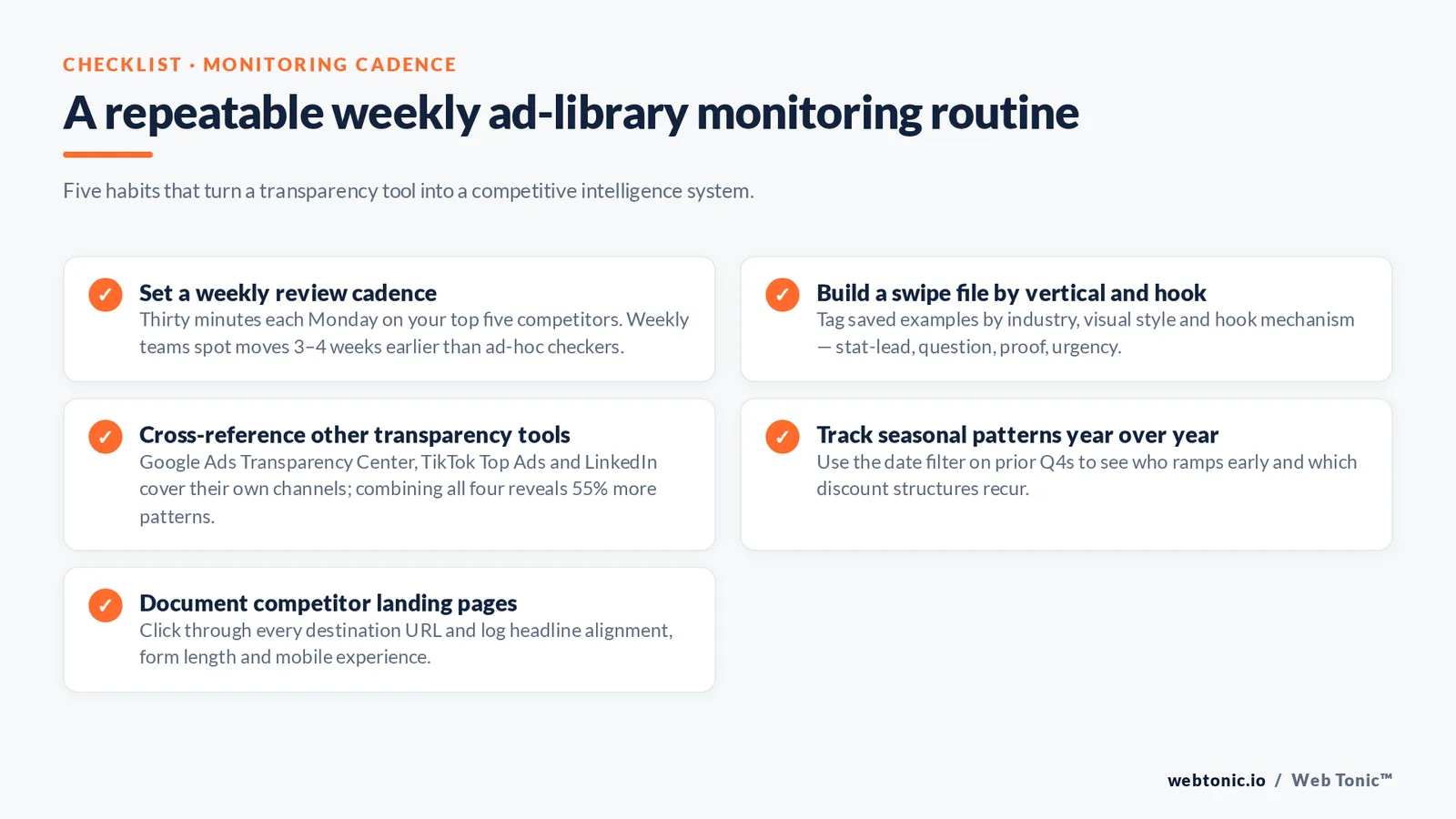
Set a weekly review cadence. Block 30 minutes each Monday to check your top 5 competitors. Note new campaigns launched, formats changed, offers adjusted, and messaging pivots. Teams with weekly review rhythms detect competitor moves 3–4 weeks earlier than those who check ad-hoc.
Build a swipe file organized by vertical, format, and hook type. Save the best examples into a structured reference — tag each by industry, visual style (lifestyle, UGC, product shot, testimonial), and the hook mechanism (stat-lead, question, proof, urgency). This becomes your team's first stop when briefing new campaigns. Pair it with your broader growth marketing approach.
Cross-reference with other tools. Google Ads Transparency Center, TikTok Top Ads, and LinkedIn's equivalent each cover their own channels. Combining data from all four gives a 360-degree view of competitor paid strategy — multi-channel monitoring reveals 55% more messaging patterns than single-channel tracking alone.
Track seasonal patterns year-over-year. Use the date filter to compare Q4 promotional campaigns from prior years. Note which brands ramp up earlier, which discount structures recur, and which creative formats dominate during peak periods. This intelligence feeds directly into your own content and campaign calendar.
Document competitor landing page structures. Every promotion in the archive links to a destination URL. Clicking through reveals the advertiser's post-click experience — headline alignment, form length, offer placement, and mobile optimization. Brands with consistent message matching between ad copy and landing pages achieve 25–35% higher conversion rates than those with generic destination pages. Feed these observations into your own web development priorities.
Frequently Asked Questions
Is the Meta Ad Library really free to use?
Yes. The web-based search tool requires no account, no login, and no payment. Anyone can visit the public URL and search for active promotions across all of Meta's platforms. The API requires a registered Meta developer account with verified identity, but the API itself carries no usage fees — only the standard rate limits (200 queries per hour) apply.
Can I see promotions from Instagram in the archive?
Absolutely. The archive indexes promotions from all of Meta's platforms, including Messenger and the Audience Network. Use the filter to isolate specific placements. You can see Stories, Reels, feed, and Explore content. Neal Schaffer's guide walks through format-specific searches step by step.
How far back does the Ad Library go for regular commercial ads?
Commercial (non-political) promotions stay visible only while they are actively running and for a brief period afterward — typically a few weeks. There is no permanent archive for standard commercial campaigns. Political, electoral, and social issue advertisements remain in the archive for 7 years with full transparency data.
Can competitors see my promotions in the archive?
Yes — every active promotion you run appears in the database. This is by design and cannot be disabled. This applies equally to all advertisers, regardless of size or spend level. Use this knowledge defensively: assume competitors monitor your activity the same way you monitor theirs, and plan refreshes accordingly.
Does the Ad Library show how much a competitor spends?
Only for political, electoral, and social-issue campaigns. Standard commercial promotions do not include spend data. However, you can estimate relative budget levels by tracking the number of simultaneous active assets, duration, and geographic reach. Socialinsider's benchmarking data shows that advertisers running 20+ simultaneous active promotions typically invest $10,000+/month on the platform.
Sources: Hootsuite · Search Engine Journal · Buffer · Socialinsider · AdEspresso · Oberlo · Agorapulse · Neal Schaffer

