



Table of contents


Search a redirect status codes question and you will find dozens of articles repeating the same claim: 301 redirects pass link equity, 302 redirects do not, choose carefully or lose your rankings. Most of that advice is outdated. Google settled this question back in 2016, and the actual answer changes what you should be worrying about when you pick a redirect. Whether you're consolidating a brand under one domain or protecting keyword rankings during a migration, the underlying mechanics are the same.
This guide walks through what a 301 and 302 redirect actually do, what Google's John Mueller and Gary Illyes have said on the record about link equity, where these two redirect types genuinely differ, and a practical framework for choosing the right one. Content marketing teams publishing frequently, and technical SEOs managing large migrations, both run into this decision constantly.
Key Takeaways
- Since 2016, Google has confirmed that any 3xx redirect, including a 301 or a 302, passes full PageRank. The old belief that only a permanent redirect preserves link equity is a myth that predates that confirmation.
- The real difference between a 301 and a 302 redirect is indexing behavior and browser caching, not how much SEO value transfers.
- A 301 redirect tells search engines the change is permanent and gets cached indefinitely by browsers. A 302 redirect signals a temporary move and is not cached by default.
- Leaving a 302 redirect in place for months can eventually cause Google to treat it like a permanent change anyway, which creates unpredictable delay rather than lost value.
- Redirect chains, where one URL redirects to another which redirects again, add latency and crawl cost regardless of which status codes are used.
- 307 and 308 behave like 302 and 301 respectively, but also preserve the original HTTP request method, which matters for API endpoints and form submissions.
What is a redirect, and why does the type matter?
A redirect is an instruction a web server gives a browser or a search engine crawler: the content requested at this URL now lives somewhere else, go there instead. The instruction comes in the form of an HTTP status code, a three-digit number the server returns before the browser ever sees the destination page. Google's own documentation on redirects recommends a server-side redirect as the setup Google is most likely to interpret correctly, over meta-refresh alternatives.
301 and 302 are the two redirect status codes that come up constantly in SEO, but they signal different things. A 301 redirect means Moved Permanently and tells search engines the move is final. A 302 redirect means Found. In practice, that signals a temporary move. Either way, the destination URL will return its own status (ideally a clean 200), and the redirect itself is what will redirect users there before that page ever loads. Once implemented correctly, the URL will change in the address bar and in what search engines index, just on different timelines depending on which type you chose.
The link equity myth, and what Google actually confirmed
For years, the accepted wisdom was that only 301 redirects passed link equity, sometimes called PageRank, while 302 redirects passed none at all, since a 302 signals the original URL is still authoritative. That belief is outdated.

In July 2016, Google's Gary Illyes tweeted, "30x redirects don't lose PageRank anymore." Google's John Mueller confirmed to a reporter the same week that this wasn't new information, that Google's systems had worked this way for some time already. Independent coverage since then confirms Google has kept the same position: redirect type does not determine how much ranking signal passes through. A 301 redirect passes link equity, and so does a 302; both pass essentially the same amount to their destination.
What still differs is intent signaling. A 301 tells search engines to update their index and drop the old URL in favor of the new one. A 302 tells search engines the original URL is still the one that should stay indexed, and the destination is a temporary stand-in. If you use a 302 for something that is actually permanent, search engines may keep showing the old URL in results for longer than you would like, even though the ranking signal is passing through the redirect the whole time.
301 vs 302: what actually differs
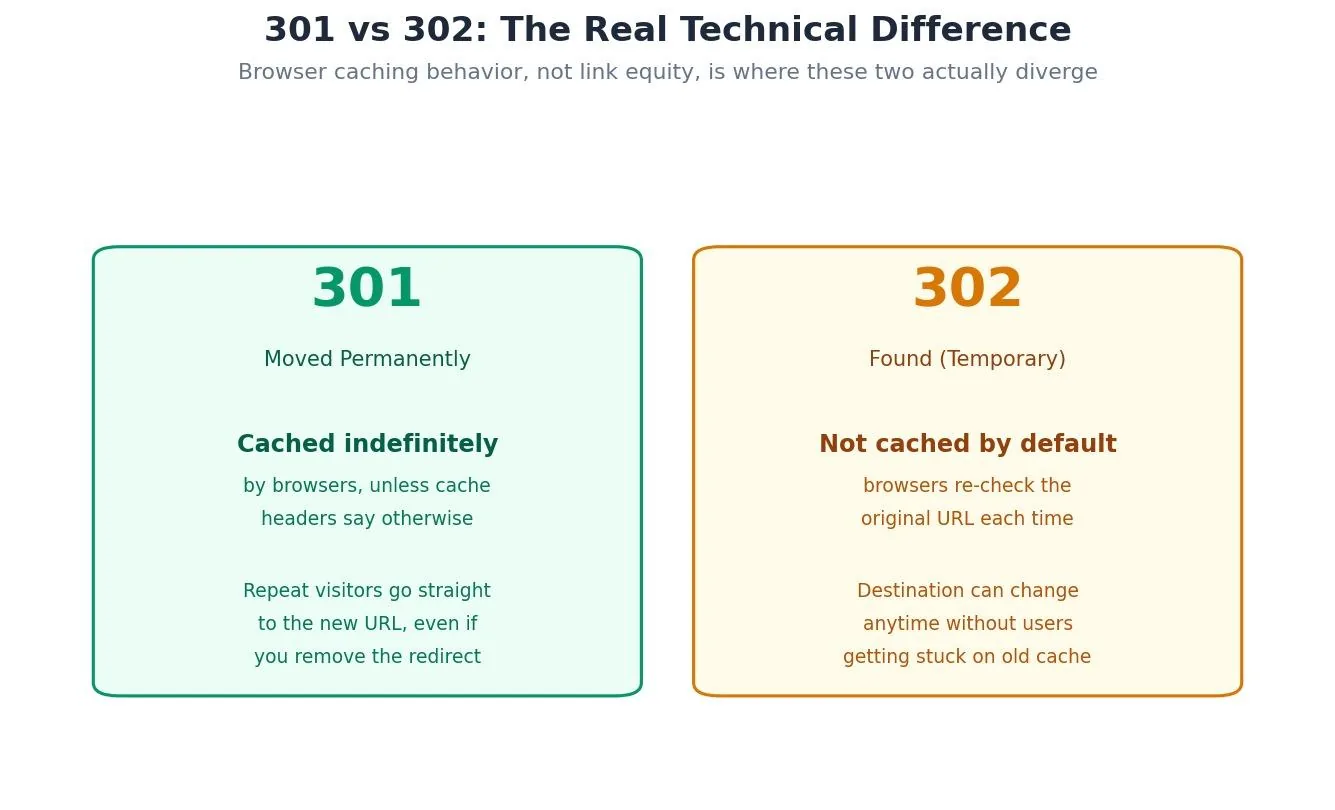
Browser caching is the clearest practical difference between these two redirect types. A 301 redirect gets cached indefinitely by browsers unless cache control headers say otherwise, so repeat visitors go straight to the new URL, sometimes even after you have removed the redirect entirely. A 302 redirect is not cached by default, so the browser checks in with the original URL every time. That's exactly why 302s remain the right choice for URL shorteners, A/B tests, and anything where the destination might change.
Google's own site-move documentation puts the core point plainly: "301 and other permanent redirects don't cause a loss in PageRank." There is a second, subtler difference, though. Leave a 302 in place long enough, and Google will eventually start treating it as though it were permanent, updating its index accordingly. Multiple SEO tools and case studies have documented this pattern, though the exact timeline is not fixed or officially published. The safer approach is simple: if a temporary redirect turns out to be permanent, change the status code to a 301 as soon as you know that, rather than leaving a 302 in place indefinitely and hoping Google eventually sorts it out.
HTTP status code comparison

301 and 302 are the two codes that cover the overwhelming majority of real-world redirect decisions, but three more status codes show up often enough to be worth knowing. 303 (See Other) forces the follow-up request to use GET regardless of the original method. That matters after form submissions. 307 (Temporary Redirect) behaves like a 302 but explicitly preserves the original request method. 308 (Permanent Redirect) behaves like a 301 with the same method-preservation guarantee. For most content moves and site migrations, 301 and 302 remain the only two codes most teams ever need to choose between.
| Status code | Permanence signal | HTTP method | Typical use case |
|---|---|---|---|
| 301 | Permanent | May change | Site migrations, URL restructuring, HTTPS moves |
| 302 | Temporary | May change | A/B tests, maintenance windows, geo-redirects |
| 303 | Temporary | Forces GET | Post-form-submission redirects |
| 307 | Temporary | Preserved | Temporary API redirects |
| 308 | Permanent | Preserved | Permanent API or POST-sensitive redirects |
Try it: which redirect should you use?
Answer two quick questions to get a recommended status code for your specific situation.
Technical SEO tool
Which redirect should you use?
Answer two questions about the specific redirect you're implementing.
Recommended status code
When to use a 301 vs a 302
Use a 301 for anything genuinely permanent: a full domain migration, a URL structure change, consolidating duplicate content into one canonical page, or moving from HTTP to HTTPS. Permanent redirects like these should stay in place indefinitely once implemented — Google's own Change of Address documentation recommends maintaining them for at least 180 days during a domain move, and longer if any traffic is still arriving through them. Use a 302 for anything you expect to reverse: a maintenance window, an A/B test variant, a seasonal promotion page, or a geo-based redirect that only applies to certain visitors at certain times. Temporary redirects are the right call whenever there's a real chance you'll point the URL somewhere else again, or back to the original, before long.
The mistake to avoid in both directions is letting the redirect type drift from reality. A 302 that quietly becomes permanent because nobody updated the status code creates the exact confusion Google's indexing systems are trying to avoid. A 301 applied to something that was actually meant to be temporary can lock in a change you did not intend to make final.
Redirect chains and crawl budget
A redirect chain happens when URL A redirects to URL B, and B redirects again to URL C, rather than A pointing directly to the final destination. Google's own guidance notes that Googlebot can follow up to 10 hops in a chain, but recommends keeping chains well short of that, ideally no more than 3 to 5. Every hop adds latency for users and consumes additional crawl budget for search engines, regardless of whether the redirects involved are 301s or 302s. The fix is straightforward: flatten chains so the original URL points directly to the final destination in a single hop, and audit for chains periodically as a site's redirect map grows over time.
Common redirect mistakes to avoid
Using a 302 for a change that is actually permanent is the most common mistake, and it does not cost you link equity the way older advice claims, but it can delay how quickly search engines update their index to the new URL.
Redirecting everything to the homepage during a site migration, instead of mapping each old URL to its true equivalent, throws away URL-level relevance. Search engines are more likely to treat a generic homepage redirect as a signal that the original page is simply gone.
Leaving redirect chains unresolved after a migration adds unnecessary latency and crawl cost that compounds as a site grows.
Forgetting to update internal links after implementing a redirect means every internal click still passes through an unnecessary hop, even after the redirect itself is technically correct.
Tools for auditing redirects
A full-site crawler such as Screaming Frog can surface every redirect on a site in one pass, along with chains, loops, and destinations that return an error instead of a working page; a common audit routine is flagging any 302 that has been live for more than 90 days as a candidate for review. Google Search Console's Coverage report flags pages Google sees as redirects and can help confirm whether a migration is being processed the way you expect. For domain-level moves specifically, Search Console's Change of Address tool validates that redirects are correctly in place before you formally notify Google of the move.
Frequently asked questions
Does a 302 redirect really pass link equity?
Yes. Google's Gary Illyes and John Mueller both confirmed in 2016 that any 3xx redirect, 301 or 302 included, passes full PageRank. The type of redirect signals permanence to search engines, not how much ranking value transfers.
When should I use a 301 instead of a 302?
Use a 301 for any change you intend to be permanent: site migrations, URL restructuring, domain changes, or consolidating duplicate pages. The 301 tells search engines to update their index and drop the old URL.
Can a 302 redirect hurt my SEO?
Indirectly, yes, if it is used for something that is actually permanent. Search engines may keep the old URL indexed longer than you would like, and browsers will not cache the redirect, so every visit re-checks the original URL.
What is the difference between a 307 and a 302 redirect?
Both signal a temporary move. A 307 additionally guarantees the original HTTP request method is preserved. That matters for API calls and form submissions where changing the method could break functionality.
How long can a temporary 302 redirect stay in place?
There is no official limit, but leaving a 302 in place for months risks Google eventually treating the destination as the authoritative page anyway. If a move becomes permanent, updating the status code to a 301 sooner rather than later avoids that ambiguity.
Choosing the right redirect for the job
The 301 versus 302 decision was never really about protecting link equity, even though that is how most advice on the topic still frames it. Both pass full ranking signal, per Google's own confirmation. The decision is about accurately signaling permanence, so search engines index the right URL at the right time, and about browser caching behavior. That affects how quickly real users land on the destination you actually intend. Pick based on whether the change is permanent or temporary, keep redirect chains short, and update status codes when a temporary change turns out to be permanent.
Ready to clean up your site's redirects?
Auditing redirect chains, status codes, and crawl budget across an entire site is exactly the kind of technical work that quietly costs rankings when it is ignored. Web Tonic's growth marketing team folds this kind of technical SEO into a broader strategy that also covers content and paid acquisition, so redirect health becomes part of an ongoing system rather than a one-time fix.
More from Web Tonic: growth marketing services, data & analytics.
Sources: developers.google.com · searchengineland.com · mangools.com · hikeseo.co · support.google.com · kerkarmedia.com · searchenginejournal.com


