



Table of contents
WordPress is SEO-friendly out of the box, but only in the sense that it publishes crawlable HTML. Everything that decides whether your site ranks — titles, meta descriptions, internal linking, schema, speed, indexing — is configuration you have to do.
This is the practical setup, in the order that produces results fastest.
Key Takeaways
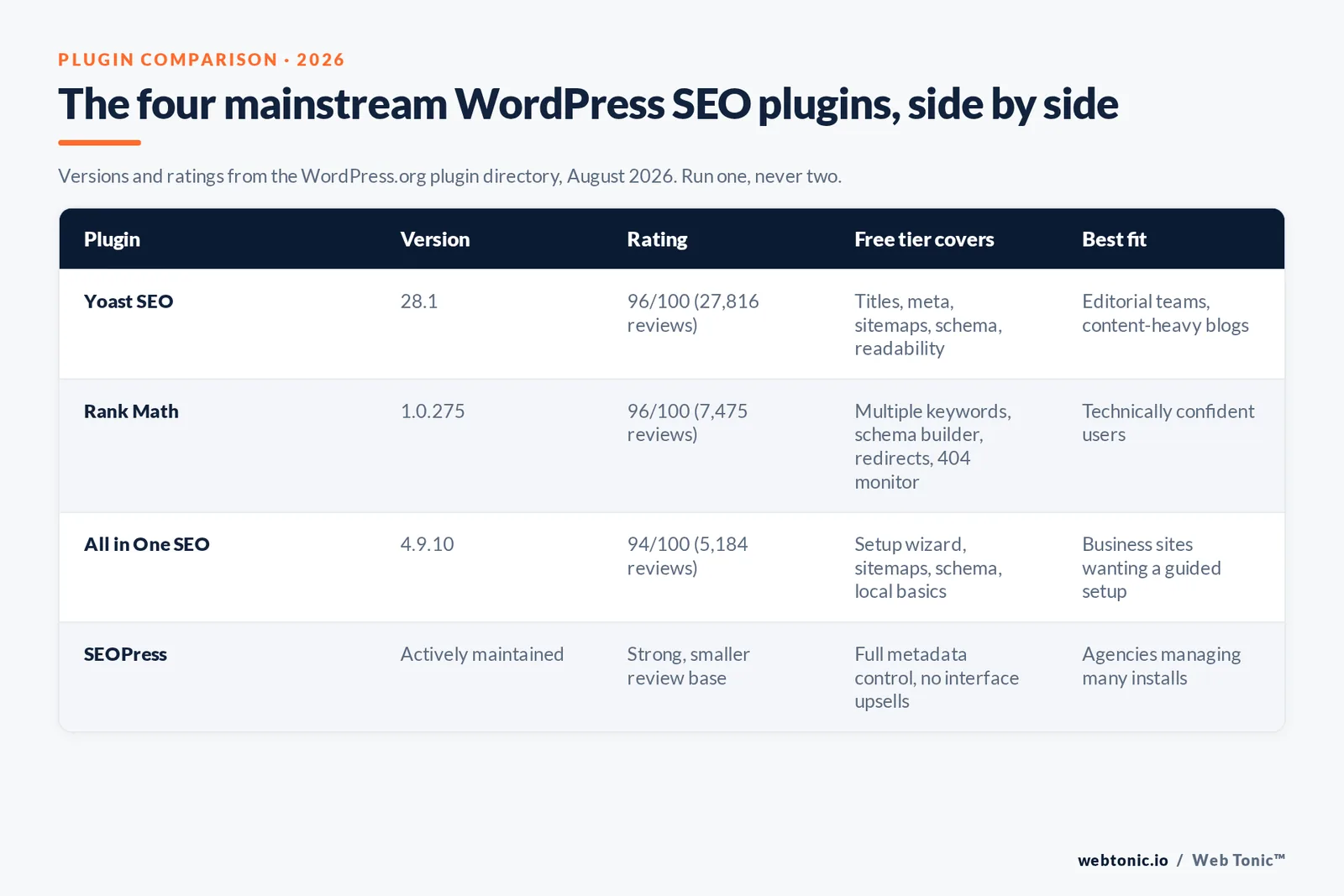
- WordPress powers 41.2% of all websites and 59.1% of every site running a known content management system (W3Techs, 1 August 2026).
- Google handles roughly 91% of global search, so WordPress SEO is effectively Google SEO with Bing as a bonus (Statcounter).
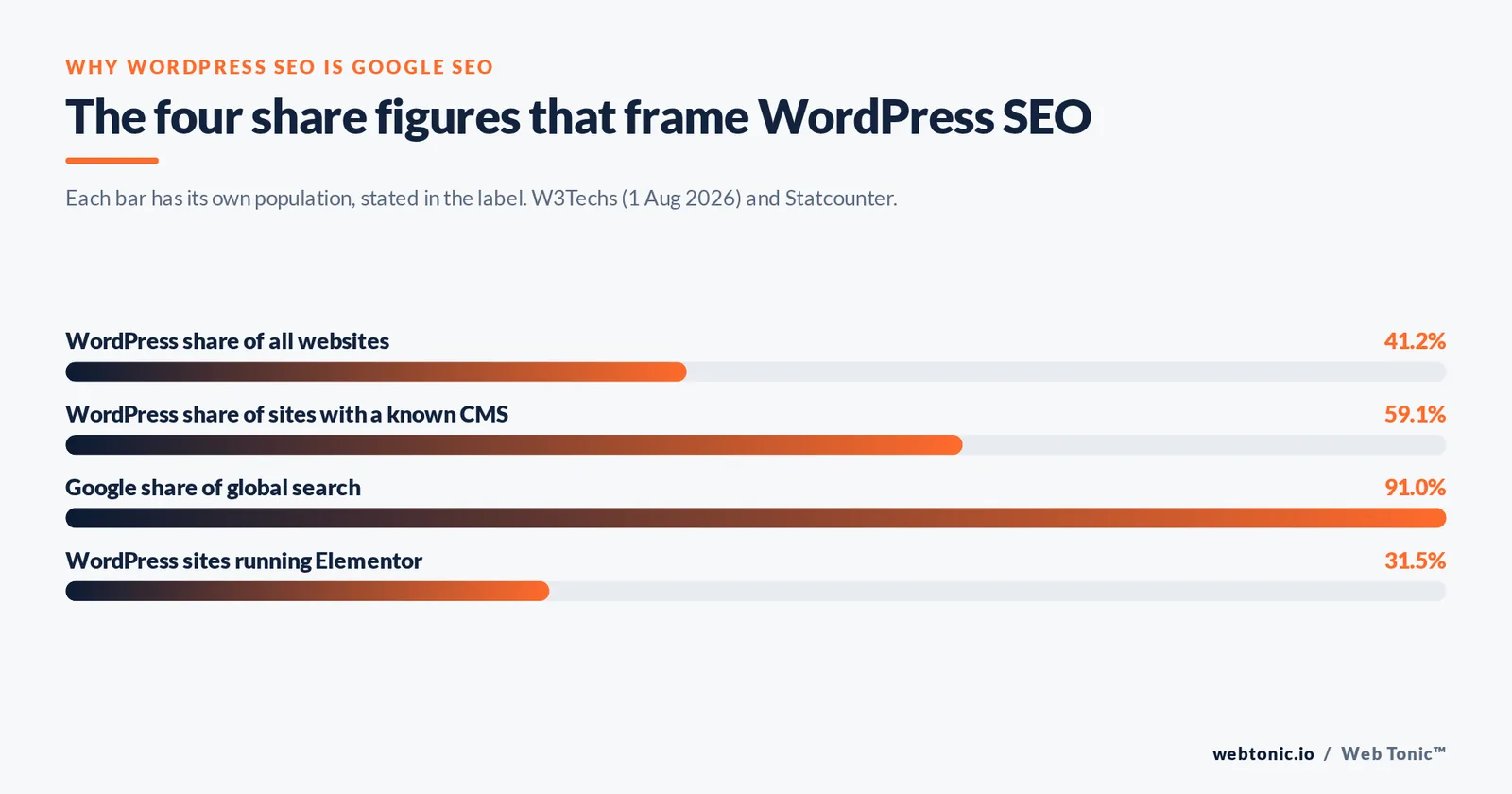
- Install one SEO plugin, never two. Yoast SEO ships at version 28.1 with a 96/100 rating across 27,816 reviews; Rank Math sits at 1.0.275 and All in One SEO at 4.9.10.
- Search engines rewrite what you write: Google generates title links and snippets per query from page content, so your tags are inputs rather than guarantees (Google Search Central).
- Core Web Vitals thresholds are concrete: LCP under 2.5 seconds, INP under 200 milliseconds, CLS under 0.1 (web.dev).
- The 4 settings most WordPress sites get wrong: permalinks, search-engine visibility, category/tag archive bloat and attachment pages.
- Structured data is what earns rich results, and every eligible type is documented in Google's search gallery.
- You can reach a genuinely strong baseline with 0 paid plugins — free tiers plus Search Console cover the fundamentals.
Is WordPress SEO-friendly out of the box?
Partly. A default WordPress install gives you clean semantic HTML, a real <title> element, automatic heading structure in the block editor, an XML sitemap since WordPress 5.5, responsive core themes and human-readable URLs once you change one setting. Those are meaningful advantages over a hand-built site.
What WordPress does not do for you: write titles and meta descriptions, control which archives get indexed, output schema beyond the basics, compress images, cache pages, fix duplicate content across categories and tags, or tell you which pages earn impressions. Every one of those is either a setting, a plugin or an editorial habit — which is why two sites on the identical theme can perform completely differently in search engines. WordPress's own SEO documentation is candid about this split.
One structural caveat: the platform's flexibility is also its main SEO risk. Themes and plugins inject scripts, and stacked page builders inflate the DOM — Elementor alone runs on 31.5% of WordPress sites — so speed problems on WordPress are usually self-inflicted rather than inherent.
Prerequisites before you touch a single setting
Fix the foundations first. Optimising content on a site with a broken indexing setup wastes the work.
| Prerequisite | Where to check | Target state | Why it matters for SEO |
|---|---|---|---|
| HTTPS active | Settings → General | Site and WordPress address both https | Mixed protocols create duplicate URLs |
| Search engine visibility | Settings → Reading | "Discourage search engines" unchecked | One checkbox can deindex the whole site |
| Permalink structure | Settings → Permalinks | Post name (or a shallow custom base) | Readable, keyword-bearing, stable URLs |
| One canonical domain | Hosting / DNS | www or non-www, 301 the other | Consolidates link signals to one host |
| Current PHP version | Tools → Site Health | PHP 8.1+ (plugins require 7.2–7.4 minimum) | Faster responses, fewer fatal errors |
| Search Console access | Google Search Console | Domain property verified | Only source of real query and index data |
| Analytics installed | Site header / tag manager | One measurement tag, no duplicates | Connects rankings to revenue |
| Backup and staging | Host control panel | Daily backups, working staging clone | SEO changes are safe to test |
Step-by-step WordPress SEO setup
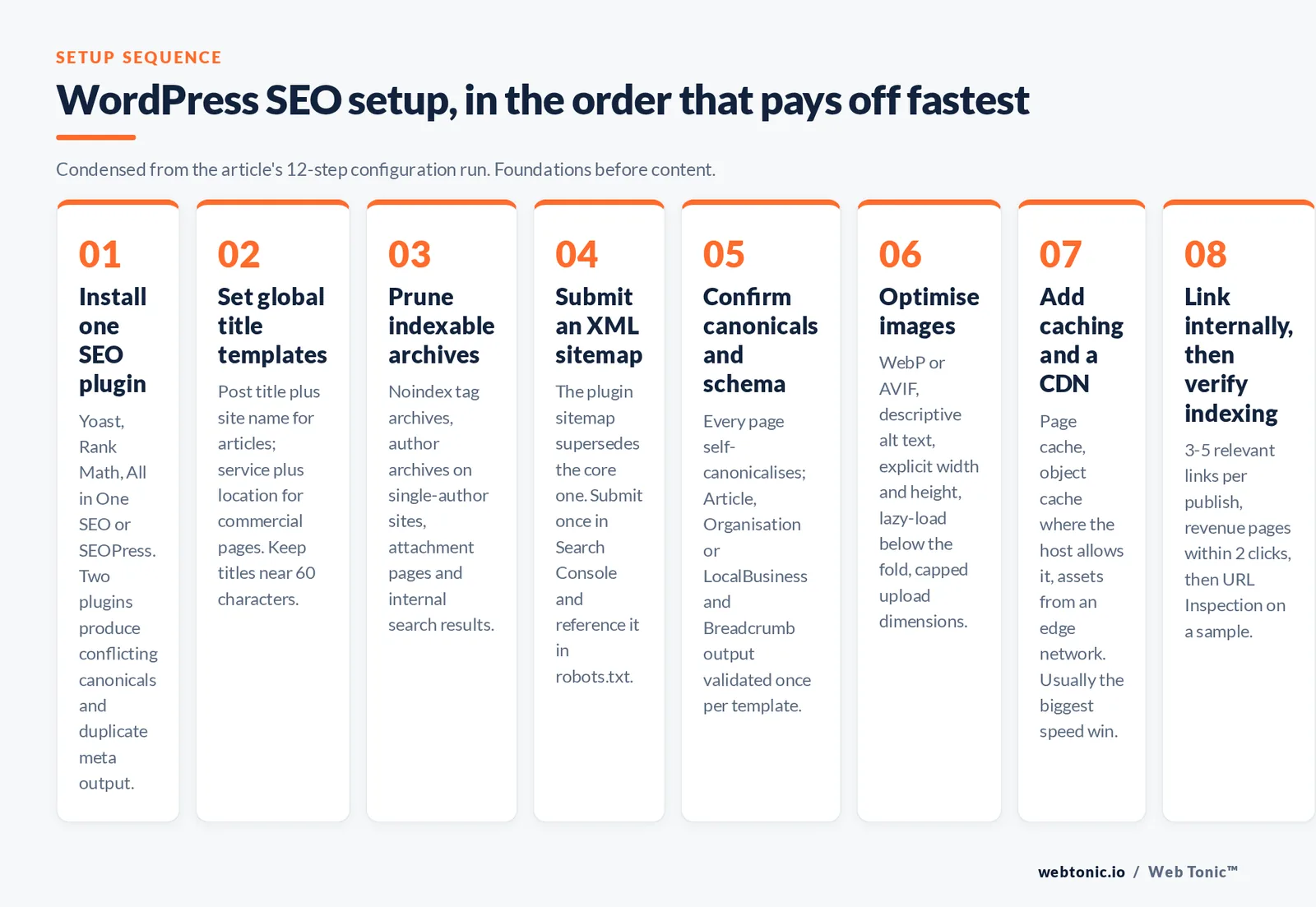
- Install one SEO plugin. Yoast SEO, Rank Math, All in One SEO or SEOPress. Running two produces conflicting canonical tags and duplicate meta output. Pick one, complete its configuration wizard, and delete the others.
- Set global title templates. Post title plus site name for articles, service name plus location for commercial pages. Keep titles under roughly 60 characters so they survive truncation.
- Write meta descriptions manually for money pages. Aim for 120–158 characters. Google may replace them per query — treat them as your best-case pitch, not a ranking lever (snippet documentation).
- Prune indexable archives. Noindex tag archives, author archives on single-author sites, attachment pages, internal search results and paginated duplicates. Keep category archives if they have real intent behind them.
- Submit an XML sitemap. Your plugin's sitemap supersedes the core one. Submit it once in Search Console and reference it in robots.txt (sitemap guidelines).
- Confirm canonical URLs. Every page should self-canonicalise; variants with tracking parameters or trailing-slash differences should point to the primary URL (canonicalisation guide).
- Turn on schema output. Article for posts, Organisation or LocalBusiness for the site, Product for shop items, FAQPage where you genuinely answer questions, Breadcrumb sitewide. Validate every template once.
- Optimise images. Serve WebP or AVIF, add descriptive alt text, define width and height, lazy-load below the fold, and cap upload dimensions so a 4,000px photo never ships to a 600px slot.
- Add caching and a CDN. Page caching, object caching where the host supports it, and asset delivery from an edge network. This is usually the single biggest speed win on WordPress.
- Build internal links deliberately. Every new post should link to 3–5 existing relevant pages with descriptive anchors, and your best pages should be reachable in 2 clicks from the homepage.
- Fix crawl waste. Redirect broken URLs, remove redirect chains, and block faceted or filtered parameter URLs from being crawled at scale (Google's SEO starter guide).
- Verify indexing. Use the URL Inspection tool on a sample of important pages, then watch Search Console's page indexing report weekly for new exclusions.
Choosing an SEO plugin for WordPress
All four mainstream plugins handle the same core jobs: titles, meta descriptions, canonicals, robots directives, XML sitemaps, schema and basic content analysis in real time. Differences are workflow and pricing, not capability. Yoast's own WordPress SEO guide is worth reading regardless of which plugin you choose, because it doubles as a checklist.
| SEO plugin | Current version | User rating | Free tier covers | Premium adds | Best fit |
|---|---|---|---|---|---|
| Yoast SEO | 28.1 | 96/100 (27,816 reviews) | Titles, meta, sitemaps, schema, readability | Internal linking suggestions, redirects, multiple keyphrases | Editorial teams and content-heavy blogs |
| Rank Math | 1.0.275 | 96/100 (7,475 reviews) | Multiple keywords, schema builder, redirects, 404 monitor | Advanced schema, keyword tracking, WooCommerce depth | Technically confident users who want more free features |
| All in One SEO | 4.9.10 | 94/100 (5,184 reviews) | Setup wizard, sitemaps, schema, local SEO basics | Link assistant, index status, revenue attribution add-ons | Business sites wanting a guided setup |
| SEOPress | Actively maintained | Strong, smaller review base | No upsells in the interface, full metadata control | Flat annual pricing, unlimited sites | Agencies managing many client installs |
Two rules override any comparison. First, migrate metadata when you switch plugins — all four offer importers, and skipping the import wipes your titles. Second, do not judge a page by the plugin's green light. The content analysis score measures adherence to generic rules, not whether you answered the query better than the pages currently ranking.
Content optimisation that moves rankings
Technical setup gets you eligible. Content decides where you land. On WordPress specifically, the highest-leverage habits are these:
- One primary intent per URL. If two posts target the same query, merge them and 301 the weaker one. Cannibalisation is the most common self-inflicted WordPress problem on sites with more than 100 posts.
- Answer in the first 60 words. Lead with the direct answer, then expand. This also improves your odds of being quoted in featured snippets and AI answers.
- Use real heading hierarchy. One H1 (the post title), descriptive H2s that mirror how people phrase the question, H3s for sub-points. Never style text bold in place of a heading.
- Add original data, tables or screenshots. Anything that cannot be paraphrased from competitors is what makes a page linkable.
- Refresh on a schedule. Review commercial pages every 90 days and evergreen guides every 6 months; update the modified date only when the content genuinely changes.
- Write alt text for humans. Describe the image; the keyword fits naturally or not at all.
If you want a second opinion on how a specific page is positioned, our growth marketing team runs content-gap reviews, and our web development team handles the theme-level fixes most plugins cannot reach.
Technical WordPress SEO: speed, crawling and structure
Performance is where WordPress sites usually lose. Every plugin adds requests, every builder adds markup, and shared hosting adds latency before a byte is rendered. Measure against the three Core Web Vitals thresholds rather than a vanity score, then attack in this order: hosting quality, caching, image weight, render-blocking CSS and JavaScript, then font loading.
Site structure is the other half. A flat, category-driven architecture where related posts link to each other and to a pillar page distributes authority far better than a chronological feed. Keep the click depth of any revenue page at 2 or fewer, and make sure breadcrumbs are enabled — they clarify hierarchy for crawlers and appear in results.
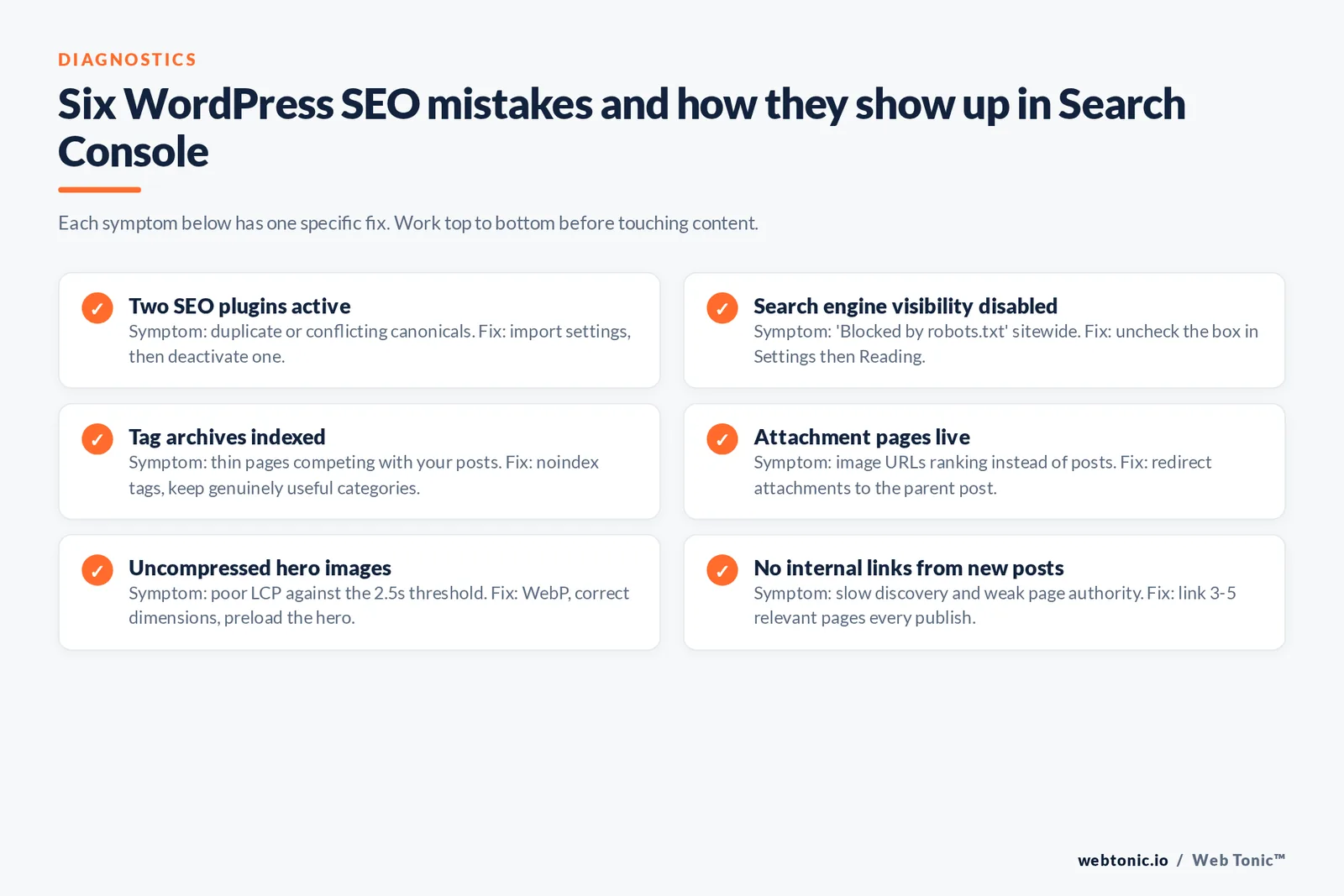
| Common WordPress SEO mistake | Symptom in Search Console | Fix |
|---|---|---|
| Two SEO plugins active | Duplicate or conflicting canonicals | Deactivate one after importing settings |
| Search engine visibility disabled | "Blocked by robots.txt" sitewide | Uncheck in Settings → Reading |
| Tag archives indexed | Thin pages competing with posts | Noindex tags, keep useful categories |
| Attachment pages live | Image URLs ranking instead of posts | Redirect attachments to the parent post |
| Uncompressed hero images | Poor LCP in Core Web Vitals | WebP, correct dimensions, preload the hero |
| Date-based permalinks | Evergreen pages look stale | Move to post name with redirects mapped |
| No internal links from new posts | Slow discovery, weak page authority | Link 3–5 relevant pages per publish |
| Orphaned WooCommerce variations | Crawl budget spent on parameters | Canonical to the parent product, block filters |
Free and premium WordPress SEO tools worth adding
Your SEO plugin covers on-page metadata; everything else needs a companion tool. The good news is that the free tier of each tool below is enough to learn on, and premium plans only become necessary once you manage several WordPress sites or need historical data and priority support.
| Tool | Job on a WordPress site | Free or premium | What you learn from it |
|---|---|---|---|
| Google Search Console | Indexing, queries, sitemaps, enhancements | Free | Whether your WordPress site is indexed and for which searches |
| Bing Webmaster Tools | Index coverage for Bing and Copilot surfaces | Free | Coverage across search engines beyond Google |
| PageSpeed Insights | Field and lab Core Web Vitals | Free | Which theme, plugins or images slow the site |
| Rich Results Test | Validates schema output per template | Free | Whether your plugin's structured data is eligible |
| Screaming Frog | Full site crawl, titles, meta descriptions, redirects | Free to 500 URLs, then premium | Duplicate titles, orphan pages, broken internal links |
| Ahrefs or Semrush | Keyword research, rank tracking, backlinks | Premium (limited free tools) | What content to build and who links to competitors |
| Google Business Profile | Local visibility and Google Maps presence | Free | How local searchers find a service business |
| Caching plugin or host cache | Page, browser and object caching | Both | How much of your load time is server-side |
Two integration notes. First, if you run a local service business, connect a Google Business Profile and mirror its name, address and phone number on the WordPress site exactly — inconsistency is the most common reason a site underperforms in Google Maps results. Second, plugins that offer real time content analysis, internal linking suggestions and image alt text prompts inside the editor are useful precisely because they nudge the writer at the moment of writing; that is where premium tiers of Yoast and Rank Math earn their fee for teams who publish weekly.
Getting a WordPress site indexed in Google and Bing
Indexing is not automatic and it is not a ranking. Search engines have to discover the URL, crawl it, decide it is worth storing, and only then can it appear. On WordPress the fastest path is: publish, confirm the URL is in your XML sitemap, submit the sitemap once in each webmaster tool, then request indexing for genuinely important new pages. Everything after that is patience plus internal links from pages that already get crawled often.
When a page will not index, work through the usual WordPress suspects in order: a stray noindex from the SEO plugin's template settings, a robots.txt rule inherited from a staging environment, a canonical tag pointing elsewhere, thin content duplicating an existing post, or simply no internal links pointing at it. Free themes and plugins occasionally reintroduce a noindex after an update, so re-check the setting whenever you change themes.
How to track WordPress SEO results
Pick a small set of metrics and review them on a fixed cadence. Impressions and average position in Search Console show whether visibility is expanding. Clicks and click-through rate show whether your titles and snippets deserve the visibility. Indexed-page count shows whether your pruning worked. Core Web Vitals show whether speed work held. Finally, assisted conversions show whether any of it earns money — which is the only number a client cares about.
A workable rhythm for most sites: Search Console weekly, a technical crawl monthly, a content refresh pass quarterly, and a full audit twice a year. Our data intelligence team builds that reporting layer, you can browse more SEO breakdowns on the blog, see the full service list, or get in touch for a WordPress-specific audit.
FAQ
Is WordPress good for SEO compared with other platforms?
Yes. It outputs crawlable HTML, gives you full control over URLs, metadata and schema through plugins, and generates an XML sitemap by default. The platform is not a ranking advantage in itself, but it removes almost every technical ceiling — which is why it runs 41.2% of the web.
Which SEO plugin is best for WordPress?
Yoast SEO is the safest default for editorial teams, Rank Math offers the most in its free tier, All in One SEO has the friendliest setup wizard, and SEOPress suits agencies managing many sites. Any one of them is sufficient. Running two at once causes duplicate metadata and conflicting canonical tags.
Can I do WordPress SEO without paid plugins?
Yes. Free plugin tiers cover titles, meta descriptions, canonicals, robots directives, sitemaps and schema. Add Google Search Console for query and indexing data plus PageSpeed Insights for performance, and you have the fundamentals with zero licence cost.
How long does WordPress SEO take to work?
Technical fixes such as unblocking indexing or repairing canonicals can show up within days. Content and internal-linking work typically needs three to six months to compound, and competitive commercial keywords often take longer. Track impressions first — they move before rankings do.
What are the most important WordPress SEO settings?
Permalinks set to post name, search-engine visibility enabled, one canonical domain on HTTPS, a single SEO plugin with title templates configured, thin archives set to noindex, an XML sitemap submitted to Search Console, and caching plus image compression in place.
Sources: Google Search Central (SEO starter guide, title links, snippets, sitemaps, canonicalisation, structured data search gallery) · Google Search Console · web.dev Core Web Vitals · WordPress.org SEO documentation and plugin API (versions and ratings) · W3Techs CMS usage statistics, 1 August 2026 · Statcounter search engine market share · Yoast. All figures accessed August 2026.


