



Table of contents
UX design shapes how people interact with every digital product they touch — from mobile banking apps to enterprise SaaS dashboards. Done well, it turns confused visitors into loyal customers and drives measurable business outcomes.
Key Takeaways
- Every $1 invested in UX design yields a return of $100, producing an ROI of 9,900% according to Forrester Research.
- Companies in the top quartile of the McKinsey Design Index achieved 32 percentage points higher revenue growth and 56 percentage points higher shareholder returns over five years.
- 88% of online consumers are less likely to return to a website after a poor user experience, making first impressions critical for retention.
- The average UX designer salary in the United States ranges from $89,000 to $149,000 per year, with senior roles in San Francisco exceeding $187,000.
- Organizations that invest in continuous UX testing can improve revenue retention by up to 10.8% over three years, according to Forrester's Total Economic Impact study.
Whether you are launching a new product, redesigning a legacy interface, or building a website from scratch, understanding UX design principles across your products and services gives your team a framework to make decisions that serve both users and business goals. This guide covers the UX design process, core principles, essential tools, career paths, and the data proving why organizations that prioritize user experience design consistently outperform those that do not.
What Is UX Design
User experience design — often shortened to UX design — is the discipline of shaping how a person feels when interacting with a product, system, or service. Rooted in human computer interaction research and cognitive psychology, UX design focuses on the end-to-end user experience rather than a single interface. The term was coined by Don Norman at Apple in the mid-1990s, and it encompasses every touchpoint between a user and a company — what the U.S. Digital Service defines as the full spectrum of user interactions — from the first marketing email to the checkout confirmation screen.
UX design is not the same as user interface (UI) design, though the two are closely related. UI design focuses on the visual layer — colors, typography, button styles, and layout grids. UX design operates one level deeper, addressing information architecture, user flows, interaction patterns, accessibility, and the overall structure of an experience. A product can have a beautiful UI and still fail the user if the underlying experience is confusing, slow, or illogical.
According to the Interaction Design Foundation, UX designers rely on the design thinking process — a structured, human-centered approach — to build interfaces that are intuitive and easy to use. The goal is to reduce friction at every step so users achieve their objectives with minimal effort.
The UX Design Process: 5 Core Phases
Every UX project follows a variation of the same five-phase cycle. Teams cycle through these phases iteratively, refining the product with each pass based on real user feedback.
Phase 1 — Empathize
The first phase involves understanding who the users are, what they need, and where their pain points lie. UX researchers conduct interviews, field studies, and contextual inquiries to gather qualitative insights. The output typically includes user personas, empathy maps, and journey maps that document the current experience. Without empathy research, teams build based on assumptions — and assumptions are the leading cause of product failure.
Phase 2 — Define
Researchers synthesize their findings into a clear problem statement that frames the design challenge. A well-crafted problem statement answers three questions: who is the user, what do they need, and why does it matter? This phase produces affinity diagrams, user stories, and a prioritized list of pain points that guide the rest of the project.
Phase 3 — Ideate
With the problem defined, the team generates as many potential solutions as possible. Common ideation techniques include brainstorming, mind mapping, crazy eights, and "How Might We" questions. The goal is volume — quantity of ideas matters more than quality at this stage because the best solutions often emerge from unexpected combinations.
Phase 4 — Prototype
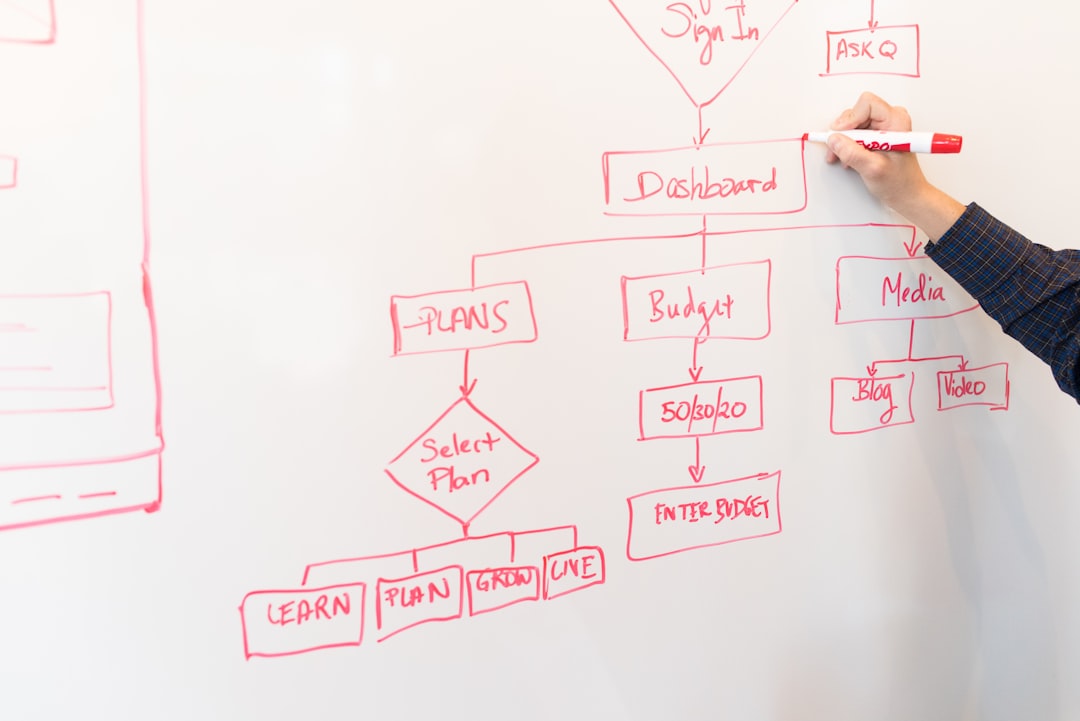
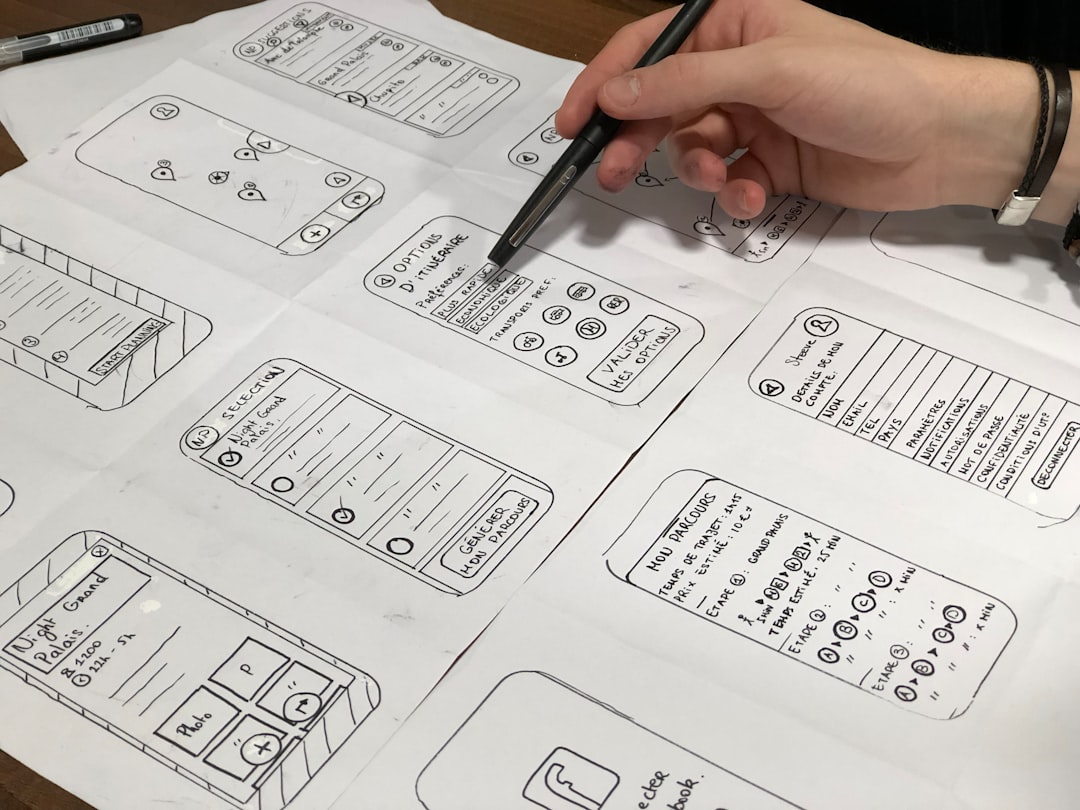
Designers turn the strongest ideas into tangible representations. Low-fidelity prototypes (paper sketches, wireframes) test structure and flow. High-fidelity prototypes (clickable mockups in Figma or Adobe XD) test visual design and micro-interactions. Embedding prototyping into the product development process saves enormous time and money — fixing a usability issue during prototyping costs roughly 1/10th of fixing it after development.
Phase 5 — Test
Users interact with the prototype while researchers observe and record pain points, confusion, and task completion rates. Usability testing typically involves 5–8 participants per round (Usability pioneer Jakob Nielsen's research shows 5 users uncover approximately 85% of usability problems). The insights feed back into the define or ideate phases, and the cycle repeats until the product meets its usability benchmarks.
| Phase | Activities | Key Deliverables |
|---|---|---|
| Empathize | User interviews, field studies, surveys, contextual inquiry | Personas, empathy maps, journey maps |
| Define | Affinity diagrams, problem framing, priority mapping | Problem statement, user stories, needs hierarchy |
| Ideate | Brainstorming, sketching, crazy eights, How Might We | Concept boards, feature prioritization matrix |
| Prototype | Wireframing, high-fidelity mockups, interaction design | Clickable prototypes, design specs |
| Test | Usability testing, A/B tests, heuristic evaluation | Usability reports, iteration backlogs |
Core UX Design Principles
Great UX design is guided by a set of principles that have been validated through decades of research and real-world testing. Here are the seven principles that experienced UX designers apply to every project.
1. User-Centered Design. User centered design puts the user at the heart of every decision. Before choosing a layout, color palette, or interaction pattern, ask: does this serve the person using it? Steve Krug's influential book Don't Make Me Think argues that good design requires zero explanation — the best interfaces need no manual — users should know what to do instinctively.
2. Consistency. Users should not have to wonder whether different words, icons, or actions mean the same thing. Consistent patterns reduce cognitive load and build trust. Google's Material Design and Apple's Human Interface Guidelines exist specifically to enforce consistency across millions of apps.
3. Accessibility. Accessible design is not optional. Over 1.3 billion people globally live with some form of disability, and products that exclude them lose revenue and risk legal consequences under the ADA, the Web Content Accessibility Guidelines (WCAG 2.2), and the European Accessibility Act (EAA). Accessible design practices — sufficient color contrast, keyboard navigation, screen reader compatibility — benefit all users, not just those with disabilities.
4. Visual Hierarchy. The arrangement of elements should guide the eye from most important to least important. Size, contrast, spacing, and position all signal what matters. A clear visual hierarchy reduces decision fatigue and increases task completion rates.
5. Feedback. Users need confirmation that their actions had an effect. A button click should produce a visible state change. A form submission should display a success message. Microinteractions — subtle animations, progress indicators, hover states — provide continuous feedback without interrupting the flow.
6. Simplicity. Remove everything that does not help the user accomplish their goal. Each additional field, button, or step introduces friction. Hick's Law demonstrates that decision time increases logarithmically with the number of choices — fewer options lead to faster decisions and higher conversion rates.
7. Error Prevention. Design the system to prevent errors before they happen rather than relying on error messages after the fact. Inline validation, smart defaults, and confirmation dialogs for destructive actions all reduce user frustration.
Essential UX Design Tools
The UX toolkit has evolved rapidly, with cloud-based, collaborative platforms — led by Figma, Sketch, and Adobe XD — replacing the desktop-only tools of a decade ago. Here is what professional UX designers rely on in their daily workflow.
| Tool | Primary Use | Best For |
|---|---|---|
| Figma | UI/UX design, prototyping, design systems | Real-time collaboration, component libraries, developer handoff |
| Adobe XD | Wireframing, prototyping, voice UI | Teams already in the Adobe Creative Cloud ecosystem |
| Sketch | Interface design, symbol libraries | macOS-only teams with established plugin workflows |
| Maze | Unmoderated usability testing, prototype validation | Rapid remote testing at scale with quantitative metrics |
| Miro | Collaborative whiteboarding, journey mapping | Remote workshops, stakeholder alignment, ideation sessions |
| Hotjar | Heatmaps, session recordings, user feedback | Identifying usability issues on live production sites |
Figma has become the industry standard for collaborative design work, with the platform reporting over 4 million monthly active users as of its most recent disclosures. Its real-time multiplayer editing, component-based design system, and free-tier accessibility make it the default choice for startups, agencies, and enterprises alike. UX designers and user interface designers use Figma alongside Sketch and Adobe XD to move from wireframe to high-fidelity prototype within a single design environment. Teams building on modern web platforms often pair Figma with developer handoff tools like Zeplin or Figma's native Dev Mode to streamline the design-to-code workflow.
The Business Impact of UX Design
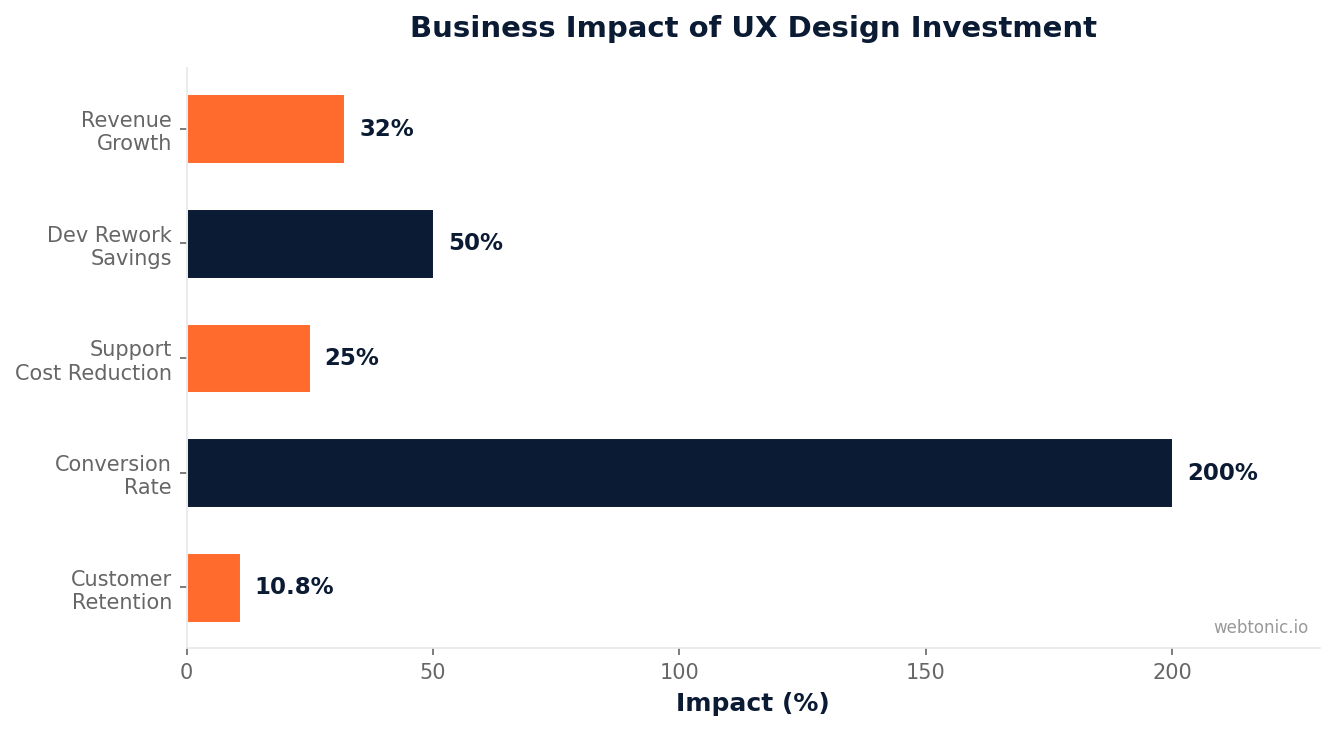
Investing in user experience design is not a cost center — it is a growth driver backed by hard data. Forrester Research found that every dollar invested in UX returns $100, representing a 9,900% ROI. That return manifests through higher conversion rates, lower support ticket volumes, reduced development rework, and stronger customer retention.
The McKinsey Design Index tracked 300 publicly listed companies over five years and found that design-led organizations achieved 32 percentage points higher revenue growth than their peers. The study measured design commitment across four dimensions: analytical leadership, cross-functional talent, continuous iteration, and user experience as a strategic pillar.
Organizations that prioritize continuous UX research see compounding gains. A Forrester Total Economic Impact study showed that companies adopting systematic UX testing improved revenue retention by 3.6% in year one, 7.2% in year two, and 10.8% in year three. The effect compounds because each round of usability testing and user experience research identifies new optimization opportunities that the previous round missed.
On the cost side, poor UX design creates measurable waste. 50% of engineering time is spent reworking projects due to poor initial UX decisions, according to IEEE research. Fixing a UX problem after development is 10 times more expensive than fixing it during the design phase, and 100 times more expensive if the product has already shipped.
UX Designer Career Path and Salary Data
Demand for UX professionals — including user experience designer, user experience researcher, and user experience architect roles — continues to grow as companies recognize the competitive advantage of well-designed products. The career path typically progresses through three stages, with specialization options at each level.
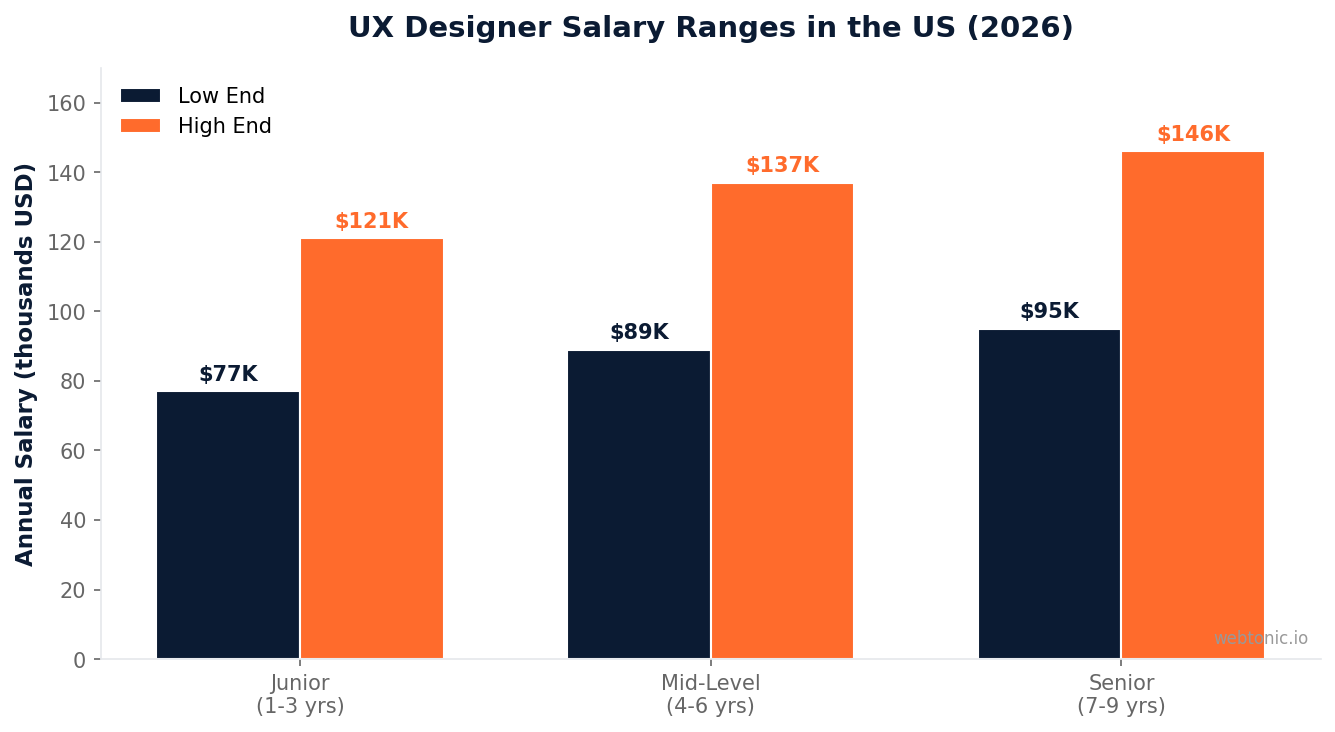
According to UX Design Institute salary data for 2026, UX designers in the United States earn between $89,000 and $149,000 annually, depending on experience level and location. San Francisco leads with senior salaries reaching $125,000 to $187,000, followed by Boston ($118,000 to $173,000) and Austin ($108,000 to $162,000).
| Experience Level | Salary Range (US Average) | Typical Titles |
|---|---|---|
| Junior (1–3 years) | $77,000 – $121,000 | UX Designer, UI Designer, Product Designer |
| Mid-Level (4–6 years) | $89,000 – $137,000 | Senior UX Designer, UX Lead, Interaction Designer |
| Senior (7–9 years) | $95,000 – $146,000 | Principal Designer, UX Manager, Head of Design |
Compared to related roles, UX designers consistently outearn front-end developers ($57,000–$95,000 average), full-stack developers ($75,000–$125,000), and web designers ($44,000–$81,000). The premium reflects the strategic nature of UX work: designers who shape the product experience have a direct line to revenue outcomes. Companies investing in performance-driven creative increasingly staff dedicated UX teams to close the gap between design intent and conversion reality.
UX Design vs. UI Design: Understanding the Difference
The distinction between UX design and UI design confuses even experienced professionals, partly because the two disciplines overlap in daily practice. However, their responsibilities, deliverables, and skill sets are fundamentally different.
UX design determines what a product does and how it works. UX designers map user flows, define information architecture, write content strategy, and validate decisions through research. Their output includes wireframes, user journey maps, personas, and usability test reports.
UI design — or user interface design — determines how a product looks and feels. UI designers handle visual design responsibilities: selecting color palettes, defining typography scales, designing component libraries, creating icon sets, and establishing visual style guides. Interaction design sits between the two disciplines, defining how elements respond to user input. Their output includes high-fidelity mockups, design tokens, and motion specifications.
In practice, many professionals — especially at smaller companies and agencies — handle both roles simultaneously. The title "Product Designer" has emerged as a catch-all for professionals who work across both UX and UI. However, at larger organizations like Google and Apple, the two roles remain distinct with separate career paths for user experience designers and user interface designers with specialized career ladders.
Common UX Design Mistakes to Avoid
Even experienced user experience design teams fall into patterns that undermine the overall user experience of a product or service. Here are five of the most damaging UX mistakes and how to prevent them.
Skipping user research. Designing based on stakeholder opinions rather than user data produces products that serve internal priorities, not user needs. 70% of digital products fail because they do not address a real user need, and skipping the empathy phase is the primary reason. Even a lightweight round of five user interviews provides more actionable insight than months of internal debate.
Overloading navigation. Cramming every feature into the primary navigation creates analysis paralysis. Miller's Law suggests that users can hold 7 ± 2 items in working memory — menus with 12 or more top-level items overwhelm rather than guide. Prioritize the three to five actions that matter most and move everything else into secondary navigation.
Ignoring mobile-first design. Mobile devices account for over 60% of global web traffic, yet many teams still design desktop-first and then retrofit for smaller screens. Mobile-first design forces prioritization: when screen space is scarce, only the most important content and actions survive.
Neglecting performance. Page load speed is a UX issue, not just a technical one. Google research shows that 53% of mobile visitors abandon a page that takes longer than 3 seconds to load. Designers should collaborate with developers to ensure that high-fidelity designs do not require assets that bloat page weight.
Treating accessibility as an afterthought. Retrofitting accessibility after launch is expensive and rarely comprehensive. Designing with accessibility from the start — proper heading hierarchy, alt text, focus indicators, and sufficient contrast ratios — creates a better experience for every user and avoids costly rework.
Frequently Asked Questions
What does a UX designer do on a daily basis?
A UX designer's daily work varies by project phase. As a user experience designer, the role bridges user research with interaction design. During research phases, they conduct user interviews, synthesize findings, and build personas. During design phases, they create wireframes and prototypes in tools like Figma. During testing phases, they run usability studies and document findings. Throughout, they collaborate with product managers, developers, and stakeholders to align design decisions with business objectives and technical constraints.
How long does it take to become a UX designer?
Most professionals transition into UX design within 3 to 12 months of focused study, depending on their starting background. Designers, developers, and marketers who want to become a user experience designer often have transferable skills that accelerate the transition. A portfolio with 3 to 5 strong case studies — demonstrating the design thinking process from research through testing — matters more than formal credentials. Bootcamps typically run 3 to 6 months, while self-directed learning through platforms like the Interaction Design Foundation can take 6 to 12 months.
Is UX design a good career in 2026?
Yes. UX design remains one of the highest-growth disciplines in user experience design, with salaries averaging $89,000 to $149,000 in the US and strong demand across technology, finance, healthcare, and e-commerce sectors. The Bureau of Labor Statistics projects web developer and digital designer employment to grow 16% through 2032, well above the national average. Companies increasingly treat UX as a strategic function rather than a support role, expanding career paths into leadership positions like VP of Design and Chief Design Officer.
What is the difference between UX design and product design?
Product design is a broader discipline that encompasses UX design, user interface design, visual design, and aspects of product strategy. A product designer typically owns the end-to-end design process — from understanding business requirements and user needs to shipping polished interfaces — while a user experience designer may focus more narrowly on UX research, information architecture, and interaction design within the design process. In practice, the two titles are often used interchangeably at companies with fewer than 200 employees.
Do you need to know how to code to be a UX designer?
No, coding is not a requirement, but understanding basic HTML, CSS, and front-end development concepts gives user experience designers a significant advantage in the product development process. Knowing what is technically feasible helps designers propose solutions that are practical to build, improves communication with development teams, and enables faster prototyping. Many UX designers learn enough code to build basic interactive prototypes without relying on engineering resources.
Sources
maze.co/blog/ux-statistics
nngroup.com/articles/definition-user-experience
interaction-design.org/ux-design-process-guide
uxdesigninstitute.com/ux-designer-salaries-2026
lawsofux.com
usability.gov/user-experience
Web Tonic works across SEO and paid search, and you can book a consultation to talk through your own plan.


