



Table of contents

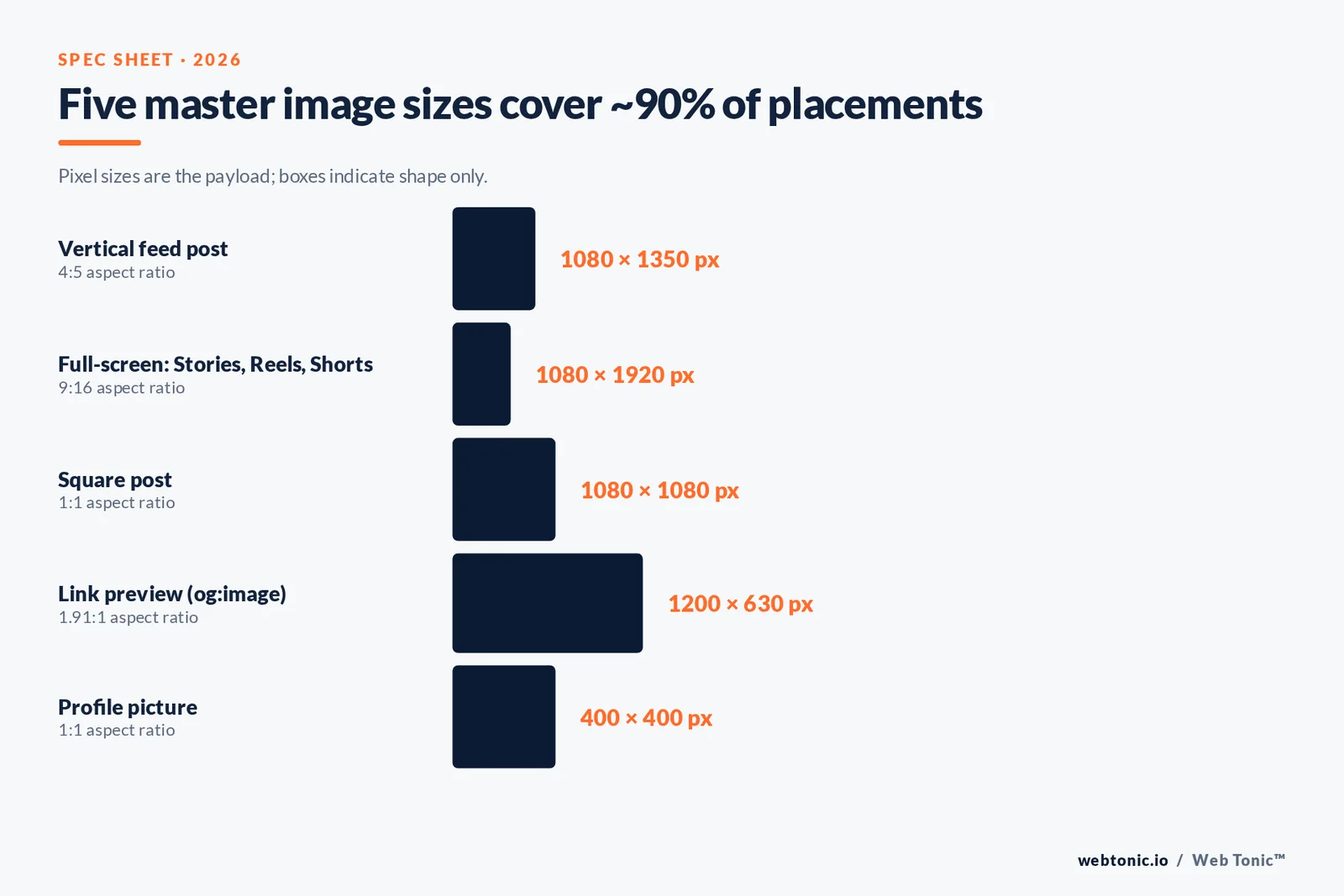
The safest set of social media image sizes for 2026 is short: 1080 x 1350 for vertical feed posts, 1080 x 1920 for anything full-screen, 1080 x 1080 for square, 1200 x 630 for link previews, 400 x 400 for profile pictures.
Everything below is the detail behind those five numbers: per-platform specs, file limits, safe zones, and the export workflow that stops you resizing the same asset eleven times.
Key Takeaways
- Five master sizes cover roughly 90% of placements: 1080 x 1350 (4:5), 1080 x 1920 (9:16), 1080 x 1080 (1:1), 1200 x 630 (1.91:1) and 400 x 400 (profile).
- LinkedIn now recommends a Page cover image of 4200 x 700 pixels — not the 1128 x 191 figure most cheat sheets still publish.
- YouTube's own guidance now asks for thumbnails at 3840 x 2160 with a minimum width of 640 px, under 2 MB on mobile and 50 MB on desktop.
- Google Business Profile photos must sit between 10 KB and 5 MB, recommended 720 x 720, minimum 250 x 250.
- Pinterest's recommended Pin is 1000 x 1500 (2:3); anything taller than 2:3 risks being cropped in feed.
- Upload at 2x the displayed size, never below. Facebook still renders a profile photo at about 196 x 196 px on desktop, but a 320 x 320 upload is what keeps it sharp.
- Only 8.86% of the world's screens are 1920 x 1080; the next four most common resolutions are all phone-sized, which is why vertical wins.
- Oversized images are a page-speed problem too: images are the most common cause of a slow Largest Contentful Paint, the metric Google wants under 2.5 seconds.
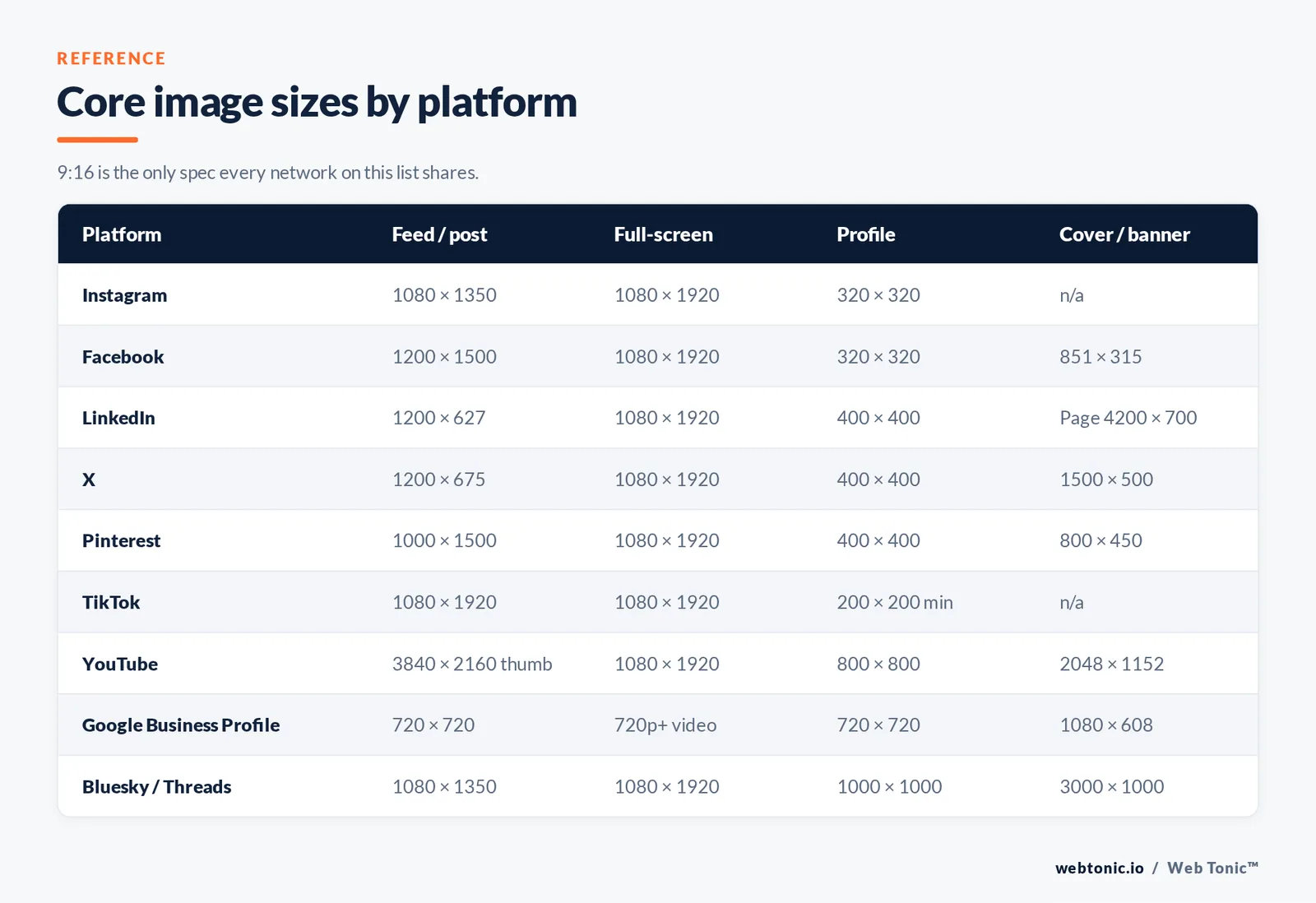
The master table: core sizes by platform
Start here. If you only produce one asset per platform, produce this one.
| Platform | Feed / post image | Full-screen (Stories, Reels, Shorts) | Profile picture | Cover / banner |
|---|---|---|---|---|
| 1080 x 1350 (4:5) | 1080 x 1920 (9:16) | 320 x 320 | n/a | |
| 1200 x 1500 or 1080 x 1080 | 1080 x 1920 (9:16) | 320 x 320 | 851 x 315 desktop, 640 x 360 mobile | |
| 1200 x 627 (1.91:1) | 1080 x 1920 (9:16) | 400 x 400 | Page 4200 x 700; personal 1584 x 396 | |
| X | 1200 x 675 (16:9) | 1080 x 1920 (9:16) | 400 x 400 | 1500 x 500 (3:1) |
| 1000 x 1500 (2:3) | 1080 x 1920 (9:16) | 165 x 165 min, 400 x 400 ideal | 800 x 450 (16:9) | |
| TikTok | 1080 x 1920 (9:16) | 1080 x 1920 (9:16) | 200 x 200 min | n/a |
| YouTube | Thumbnail 3840 x 2160 (16:9) | Shorts 1080 x 1920 (9:16) | 800 x 800 | 2048 x 1152, safe area 1235 x 338 |
| Google Business Profile | 720 x 720 recommended | Video up to 30 s, 720p+ | 720 x 720 | 1080 x 608 (16:9) |
| Bluesky / Threads | 1080 x 1350 (4:5) | 1080 x 1920 (9:16) | 1000 x 1000 | Bluesky banner 3000 x 1000 |
Two things to notice. First, the recommended image size is climbing on every platform that owns a large-screen surface — YouTube and LinkedIn both moved up, because 4K TVs and retina desktops punish small uploads. Second, the vertical 9:16 frame is now the only spec shared by every network on the list, which is why creative production should default to shooting vertical and cropping outward.
Facebook image sizes in detail
Facebook is the platform where displayed size and upload size diverge the most, and where a single cover image gets cropped three different ways.
| Placement | Upload at | Displayed at | Note |
|---|---|---|---|
| Profile photo | 320 x 320 | ~196 x 196 desktop, ~128 x 128 mobile | Rendered as a circle — keep the subject centred |
| Page cover photo | 851 x 315 | ~820 x 312 desktop, 640 x 360 mobile | Mobile re-crops the desktop file; keep text in the middle third |
| Square feed post | 1080 x 1080, 1200 x 1200 ideal | Variable by device | Safe default for mixed-format carousels |
| Vertical feed post | 1200 x 1500 (4:5) | Cropped to 4:5 maximum | Taller than 4:5 gets trimmed |
| Link share image | 1200 x 630 (1.91:1) | Full width in feed | Comes from your page's Open Graph tag, not the upload box |
| Stories and Reels | 1080 x 1920 (9:16) | Full screen | Leave ~250 px clear top and bottom for UI |
Rule 1 — the link preview is a website job, not a social job. The 1200 x 630 image Facebook and LinkedIn pull for a shared URL comes from the og:image tag on the page. If it looks wrong, fix the template, not the post. Metricool's spec round-up tracks the display-versus-upload gaps across placements, and Meta's own recommendation is to upload at least 2048 px on the long edge for best quality.
Instagram image sizes in detail
Instagram accepts a narrow band of ratios and hard-crops the rest. The 2026 addition worth knowing is the 3:4 option at 1080 x 1440, which sits between the old 4:5 portrait and full-screen 9:16.
| Placement | Pixels | Ratio | Use it when |
|---|---|---|---|
| Portrait feed post | 1080 x 1350 | 4:5 | Default — takes the most vertical space allowed in feed |
| Extended portrait | 1080 x 1440 | 3:4 | Newer option; more height without a Reel |
| Square post | 1080 x 1080 | 1:1 | Grid consistency matters more than feed size |
| Landscape post | 1080 x 566 | 1.91:1 | Repurposing a wide graphic or screenshot |
| Stories and Reels | 1080 x 1920 | 9:16 | Anything full-screen |
| Highlight cover | 640 x 640 | 1:1 | Rendered as a small circle — icon, not photograph |
| Profile picture | 320 x 320 | 1:1 | Circle crop; logo marks need padding |
Limit 2: a carousel locks every slide to the ratio of the first slide. Mixing a 1:1 chart with a 4:5 photo means the chart gets letterboxed or the photo gets cut. Decide the ratio before you design slide one. Format choice also has a measurable performance cost — Socialinsider's 35-million-post benchmark study puts carousel engagement at 0.55% against 0.37% for single images, so the ratio decision is a reach decision.
LinkedIn, X and Pinterest
These three change specs quietly, and LinkedIn's Page cover is the single most commonly outdated number on the internet.
| Platform / placement | Minimum | Recommended | Limits |
|---|---|---|---|
| LinkedIn Page logo | 268 x 268 | 400 x 400 | PNG or JPEG, max 3 MB |
| LinkedIn Page cover | 4200 x 700 | 4200 x 700 | Crops hard on mobile |
| LinkedIn Life main image | 1128 x 376 | 1128 x 376 | Life tab only |
| LinkedIn post image | 200 px wide | 1200 x 627 (1.91:1) | Under 200 px wide renders as a side thumbnail |
| X profile / header | 400 x 400 / 1500 x 500 | 400 x 400 / 1500 x 500 | JPG, PNG, GIF; animated GIF headers unsupported |
| X in-stream image | 600 x 335 | 1200 x 675 (16:9) | Square 1200 x 1200 also renders cleanly |
| Pinterest standard Pin | 600 x 900 | 1000 x 1500 (2:3) | Max 20 MB desktop, 32 MB in-app |
| Pinterest full-bleed / video Pin | 720 x 1280 | 1080 x 1920 (9:16) | Video 3–60 s recommended |
LinkedIn documents both the minimum and recommended sizes for every Page module in its Page image specifications, and Pinterest publishes ratio and file-size caps per ad and Pin format in its product specs, including the warning that Pins taller than 2:3 may be cut off in feed. TikTok maintains equivalent tables for paid placements in its ad specifications.
YouTube and Google surfaces
Google's two big visual surfaces have the strictest published rules, and both were revised upward.
| Asset | Spec | File limit | Gotcha |
|---|---|---|---|
| YouTube video thumbnail | 3840 x 2160, 16:9, min width 640 px | 2 MB mobile, 50 MB desktop | Podcast playlist thumbnails are 1:1, not 16:9 |
| YouTube channel banner | 2048 x 1152 (16:9) | 6 MB | Only 1235 x 338 is guaranteed visible on every device |
| YouTube channel icon | 800 x 800 | 4 MB | Displays at roughly 98 x 98 px as a circle |
| Google Business Profile photo | 720 x 720 recommended, 250 x 250 minimum | 10 KB to 5 MB | JPG or PNG only; heavily compressed files get rejected for quality |
| Google Business Profile video | 720p or higher | 75 MB, up to 30 seconds | Longer clips fail silently on upload |
Both sets of numbers come straight from the source: YouTube's custom thumbnail guidance and Google's photo and video requirements for Business Profiles. If local visibility matters to you, the Business Profile numbers are the ones to get right first — they are the images that appear in Maps and the local pack, not just on a profile page. That work belongs with your local growth programme, not with the social calendar.
File types, compression and weight
Dimensions are half the spec. The other half is what the file weighs when it lands.
| Format | Best for | Avoid for | Practical note |
|---|---|---|---|
| JPEG | Photographs, gradients | Flat logos, screenshots with text | Export at quality 80–85; the gain above that is invisible |
| PNG | Logos, transparency, text-heavy graphics | Full-frame photos | Preferred for profile marks so edges stay crisp |
| WebP | Your own website and landing pages | Direct social uploads | Typically 25–34% smaller than comparable JPEG |
| GIF | Short looping motion on X and Pinterest | Profile headers on X | Nearly always heavier than a short MP4 |
| MP4 / MOV | Everything full-screen | Static covers | H.264 uploads the most reliably across platforms |
Every network recompresses what you upload, which is exactly why you should not pre-compress aggressively: you would be stacking two lossy passes. Upload the largest file within the platform's cap and let the platform do its one pass. Google's WebP documentation quantifies the format's size advantage, and the MDN image format guide is the clearest reference for choosing between them.
Safe zones: the crop rules nobody documents well
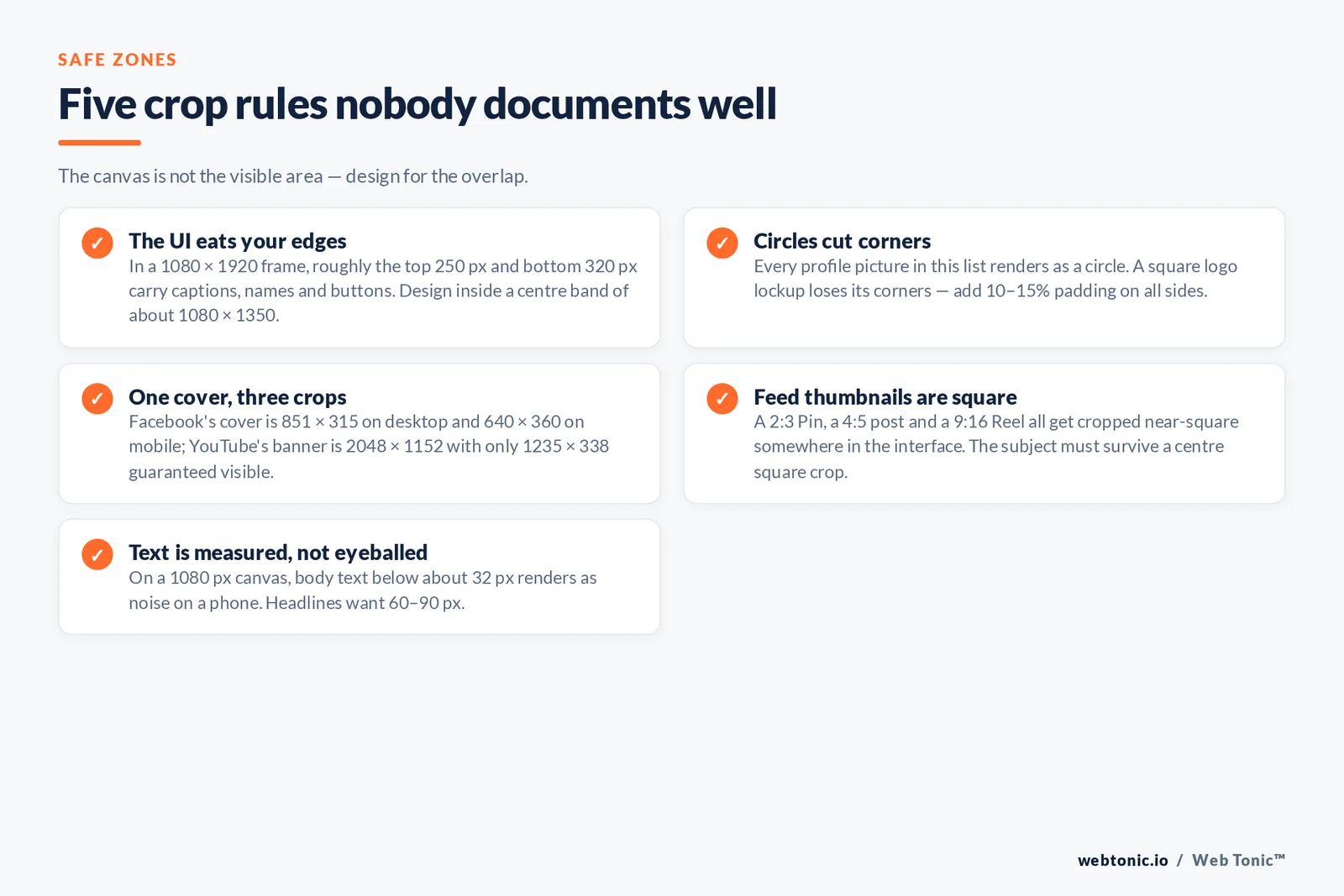
Trap 1 — the UI eats your edges. A 9:16 frame is 1920 px tall, but roughly the top 250 px and bottom 320 px carry captions, profile names, buttons and progress bars depending on the app. Design for a centre band of about 1080 x 1350 inside the 1080 x 1920 canvas.
Trap 2 — circles cut corners. Every profile picture on this list renders as a circle. A square logo lockup loses its corners; add 10–15% padding on all sides.
Trap 3 — one cover, three crops. Facebook's cover is 851 x 315 on desktop and 640 x 360 on mobile. YouTube's banner is 2048 x 1152 with a 1235 x 338 guaranteed-visible area. Anything meaningful goes in the overlap.
Trap 4 — feed thumbnails are square. A 2:3 Pin, a 4:5 Instagram post and a 9:16 Reel all get cropped to a square or near-square thumbnail somewhere in the interface. The subject must survive a centre square crop.
Trap 5 — text is measured, not eyeballed. On a 1080-px-wide canvas, body text below roughly 32 px renders as noise on a phone. Headlines want 60–90 px.
Sizes by goal, not by platform
Most teams over-produce. Working from the goal instead of the platform list cuts the export count sharply.
| Goal | Produce | Skip | Why |
|---|---|---|---|
| Organic reach on one platform | 1080 x 1350 and 1080 x 1920 | Landscape variants | Vertical takes more screen on the device that matters |
| Paid social testing | 1080 x 1080, 1080 x 1350, 1080 x 1920 | 1.91:1 static | Placement optimisation needs all three ratios in the ad set |
| Brand launch / profile refresh | 400 x 400, 1500 x 500, 4200 x 700, 2048 x 1152 | Post assets until profiles are done | Profile assets are seen by every visitor, permanently |
| Content distribution from a blog | 1200 x 630 Open Graph plus 1080 x 1350 | Per-network resizes of the same graphic | The link preview does most of the work |
| Local visibility | 720 x 720 and 1080 x 608 | Story formats | Business Profile imagery drives Maps and local-pack impressions |
| Video-first programme | 1080 x 1920 master plus 3840 x 2160 thumbnails | Static feed graphics | One vertical master crops down to every short-video surface |
Step 1 — shoot or design one 9:16 master at 1080 x 1920 or larger. Step 2 — crop outward to 1080 x 1350, then 1080 x 1080, then 1200 x 630, keeping the subject inside the centre square. Step 3 — export profile assets once per brand refresh, not per campaign. Step 4 — keep a single naming convention so the right file reaches the right scheduler field. Four exports, not fourteen. If you are auditing an existing library, the Web Tonic blog covers the creative-testing side of this in more depth.
Paid social ad image sizes
Ads use a different set of recommended image sizes from organic posts, and every ads manager enforces its own maximum file size. These are the specs to build to.
| Platform and placement | Recommended image size (pixels) | Aspect ratio | File type and maximum file size |
|---|---|---|---|
| Facebook and Instagram feed ads | 1080 x 1080 or 1200 x 628 | 1:1 or 1.91:1 | JPG or PNG, 30 MB maximum file size |
| Instagram Stories and Reels ads | 1080 x 1920, minimum 500 px wide | 9:16 | JPG or PNG, 30 MB |
| Instagram carousel ads | 1080 x 1080 per card | 1:1 across every card | JPG or PNG, 30 MB per card |
| Facebook vertical feed ads | 1080 x 1350 | 4:5 | JPG or PNG |
| LinkedIn single-image ads | 1200 x 627 | 1.91:1 | JPG or PNG, 5 MB |
| Pinterest promoted Pins | 1000 x 1500 recommended | 2:3 | PNG or JPEG, 20 MB desktop / 32 MB in-app |
| Pinterest collection ads | 1000 x 1500 hero creative | 1:1 or 2:3, matched across secondary creative | PNG or JPEG, 10 MB hero |
| TikTok in-feed ads | 1080 x 1920 | 9:16 | JPG or PNG cover image, video MP4 |
| X promoted image posts | 1200 x 675 or 1200 x 1200 | 16:9 or 1:1 | JPG or PNG, 5 MB |
| YouTube companion thumbnail | 3840 x 2160, minimum width 640 px | 16:9 | JPG or PNG, 2 MB mobile / 50 MB desktop |
Rule 2 — build one 1080 x 1920 vertical master and one 1080 x 1080 square per concept, and let placement optimisation choose. Every major ads platform now prefers a vertical asset plus a square fallback, and supplying both is what keeps a placement from being skipped for a missing recommended image size. The recommended aspect ratio matters more than the exact pixels: a 1350 x 1350 square upload is fine, a 1350 x 700 crop of the same artwork is not.
Profile photo and cover image quick reference
Profile assets are permanent, so the minimum image size matters more here than anywhere else. Every profile picture on this list is displayed as a circle.
| Platform | Profile photo size (pixels) | Cover image size (pixels) | Minimum and file type |
|---|---|---|---|
| Facebook Page | 320 x 320 profile picture | 851 x 315 cover photo | Minimum 400 x 150 cover, PNG recommended for logos |
| 320 x 320 profile photo | 640 x 640 highlight cover | JPG or PNG; 110 x 110 display size | |
| LinkedIn Page | 400 x 400 logo image | 4200 x 700 cover image | Minimum 268 x 268 logo, PNG or JPEG, 3 MB |
| LinkedIn personal profile | 400 x 400 profile picture | 1584 x 396 banner | Maximum file size 8 MB |
| X | 400 x 400 profile photo | 1500 x 500 header | JPG, PNG or GIF; animated GIF headers unsupported |
| 400 x 400 profile picture | 800 x 450 profile cover image | Minimum 165 x 165, JPG or PNG | |
| TikTok | 200 x 200 minimum profile photo | 1080 x 1920 video cover | JPG or PNG, 5 MB |
| YouTube | 800 x 800 channel icon | 2048 x 1152 banner | Icon 4 MB, banner 6 MB, JPG or PNG |
| Google Business Profile | 720 x 720 recommended logo | 1080 x 608 cover photo | Minimum 250 x 250, JPG or PNG, 10 KB to 5 MB |
| Threads and Bluesky | 1000 x 1000 profile picture | Bluesky banner 3000 x 1000 | JPG or PNG; Bluesky compresses images near 1 MB |
Threads inherits Instagram's profile photo, so a 320 x 320 upload there covers both, and its feed image sizes follow Instagram's ratios — 1080 x 1350 vertical, 1080 x 1080 square. Bluesky is the outlier worth noting: a 3000 x 1000 banner and a 1000 x 1000 profile picture, with images compressed client-side near a one-megabyte ceiling, so a text-heavy graphic loses more detail there than on any other platform in this list.
Why the numbers keep drifting toward vertical
Screen data explains the whole trend. Statcounter's resolution tracking shows 1920 x 1080 at just 8.86% of worldwide screens in the first half of 2026, with 414 x 896 (6.27%) and 360 x 800 (5.85%) close behind and a long tail of phone sizes making up 40.61% of the rest. Mobile share of web traffic sits above 51%.
Audience size compounds it: Sprout Social's aggregated statistics put social users at 5.66 billion spending about 2 hours 40 minutes a day on these apps, almost all of it on a phone held upright.
There is a page-speed consequence too, and it is the reason not to simply upload your largest file to your own site. Images are the most frequent cause of a slow Largest Contentful Paint, which web.dev defines as needing to land under 2.5 seconds. Serving a 4200-px cover to a phone is a measurable revenue problem; the fix is responsive markup, documented in the MDN img reference and its srcset attribute. Newer networks such as Bluesky compress uploads client-side to roughly a megabyte, and their limits are published in the Bluesky developer docs.
A maintenance routine that keeps specs current
Specs move once or twice a year per platform. A quarterly, 30-minute check beats a rewrite.
| Check | Frequency | Source of truth | Trigger to act |
|---|---|---|---|
| Profile and cover assets | Quarterly | Each platform's own help centre | Any recommended size increases by more than 20% |
| Feed ratios | Quarterly | Platform help centre plus a live test post | A new ratio appears in the composer |
| Ad placement specs | Monthly | Ads manager spec tables | A placement starts reporting low delivery |
| Open Graph images | On template change | Your CMS template | Shared links show a cropped or missing preview |
| Thumbnail library | Twice a year | YouTube Studio warnings | Upload rejected for file size or width |
Test posts beat cheat sheets. Publish one asset per new ratio to a low-traffic account, screenshot it on a phone and a desktop, and keep the screenshots in your brand file. That is how you catch changes such as LinkedIn's move to 4200 x 700 before a client does. If you want that audit run for you, talk to our team.
FAQ
What is the best all-purpose social media image size?
1080 x 1350 pixels (4:5). It is the tallest ratio Instagram and Facebook allow in feed, it crops cleanly to square and to 9:16, and it holds up on LinkedIn and Pinterest. If you can only produce one static asset, produce that one.
Does uploading a larger image improve quality?
Up to the platform cap, yes. Every network recompresses uploads, so starting with more pixels leaves more detail after compression. Meta suggests at least 2048 px on the long edge, and YouTube now recommends 3840 x 2160 thumbnails with a 2 MB mobile file cap. Beyond the published cap, uploads are rejected or downscaled with no benefit.
What aspect ratio should vertical video use?
9:16 at 1080 x 1920 for Reels, Stories, Shorts, TikTok and vertical Pins. Keep captions and logos inside the middle 1080 x 1350 of that frame so the app's interface does not cover them.
Why does my Facebook cover photo look cropped on mobile?
Because Facebook serves a different crop per device: roughly 851 x 315 on desktop and 640 x 360 on mobile, taken from the same file. Anything essential has to sit in the area both crops share, which is the middle third of the image.
How often do social media image sizes change?
Expect one or two meaningful changes per platform per year, usually an increase in the recommended upload size rather than a change of ratio. LinkedIn's Page cover recommendation and YouTube's thumbnail recommendation both moved recently, which is why quarterly verification against the platform's own help centre is worth the 30 minutes.
Sources: Google Business Profile photo and video requirements (support.google.com) · YouTube custom thumbnail guidance (support.google.com) · LinkedIn Page image specifications (linkedin.com/help) · Pinterest product specs (help.pinterest.com) · TikTok ad specifications (ads.tiktok.com) · Google WebP documentation (developers.google.com) · MDN image file types and img element references (developer.mozilla.org) · web.dev Largest Contentful Paint · Statcounter screen resolution statistics · Socialinsider Instagram benchmarks · Sprout Social social media statistics · Metricool social media image sizes · Bluesky developer docs.


