



Table of contents
Smart Bidding uses machine learning to optimize bids in real time across every auction — and accounts that deploy it correctly see 26–34% lower CPA compared to well-managed manual campaigns. Here is a complete guide to how each strategy works, when to use it, and how to avoid the mistakes that prevent the algorithm from delivering results.
Key Takeaways
- Smart Bidding refers to four Google Ads bid strategies that use auction-time AI: Target CPA, Target ROAS, Maximize Conversions, and Maximize Conversion Value. Each one optimizes bids based on real-time signals like device, location, time of day, and remarketing list membership (Google Ads Help, 2026).
- Target CPA campaigns reduce cost per acquisition by 26–34% compared to well-managed manual campaigns across a benchmark study of 41 accounts spanning fintech, ecommerce, SaaS, and real estate — the strongest gains appear in fintech and edtech (ClicksBazaar, 2026).
- Enhanced CPC (ECPC) was officially deprecated for Search and Display campaigns on March 31, 2025 — any remaining ECPC campaigns now function as Manual CPC. Advertisers who haven't migrated to a full smart bidding strategy are running on legacy settings (Google, 2025).
- The learning phase requires up to 50 conversion events or 3 full conversion cycles, and every major change — budget shifts above 20%, new conversion actions, audience changes — restarts the clock entirely (AdZeta, 2026).
- Portfolio bid strategies pool conversion data across multiple campaigns, accelerating exit from the learning phase and improving optimization accuracy — recommended for accounts where individual campaigns lack sufficient conversion volume on their own.
- The average conversion rate across Google Ads search campaigns is 8.18% in 2026, and properly configured smart bidding typically matches or exceeds industry benchmarks because it factors in more auction signals than manual management can process (WordStream, 2026).
What Is Smart Bidding and How Does It Work?
Smart Bidding is a subset of automated bidding in Google Ads that uses machine learning to optimize for conversions or conversion value in every single auction. According to Google's official documentation, the key differentiator is auction-time bidding — the algorithm sets a unique bid for every individual query based on real-time contextual signals rather than applying a flat bid adjustment across the board.
Independent 2026 data is more cautious than vendor claims: a review of 303 campaigns across 23 advertisers found a third of Target CPA campaigns missing their target by 20% or more, while B2B SaaS bid-strategy benchmarks put the typical lift at 22-38% better CPA with 25-55% higher volume, but only above 50 conversions a month per campaign.
The signals the algorithm processes in real time include device type, geographic location, time of day, day of week, remarketing list membership, browser, operating system, language, and query context. No human team can process this combination of variables for every auction — this is where the machine learning advantage becomes measurable. The system trains on conversion data from your account (and anonymized data from millions of other accounts) to predict how likely each individual impression is to result in a conversion.
Starting in June 2026, Google updated how these strategies are labeled in the interface. "Maximize Conversions with a Target CPA" is now simply called "Target CPA," and "Maximize Conversion Value with a Target ROAS" is now "Target ROAS." The underlying behavior remains exactly the same — only the naming convention changed. This relabeling acknowledges what practitioners already knew: the target-constrained versions are functionally different strategies from the unconstrained maximize variants.
The Four Smart Bidding Strategies Explained
Target CPA (Cost Per Acquisition)
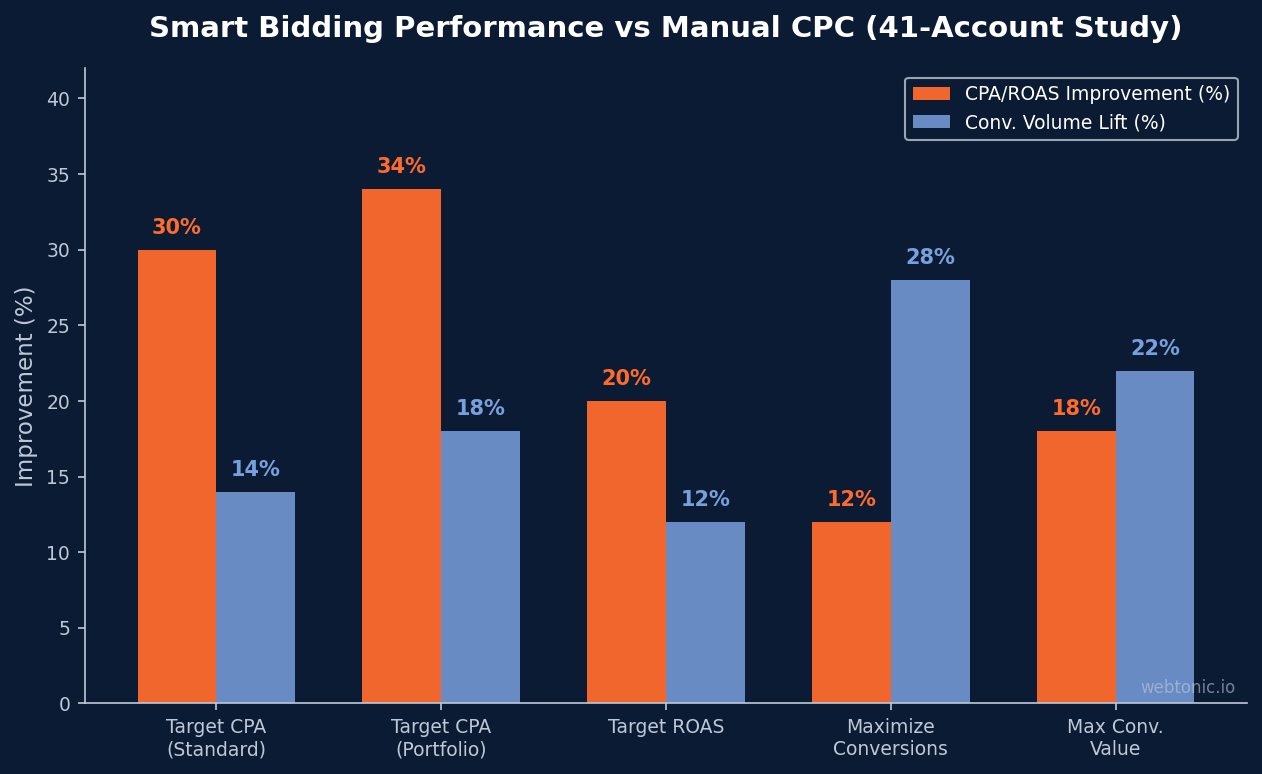
Target CPA sets bids to get as many conversions as possible at or below a cost-per-acquisition target you define. According to ClicksBazaar's benchmark study, Target CPA campaigns delivered 26–34% CPA improvement over manual management across 41 accounts, with the strongest gains in fintech and edtech verticals. The algorithm will sometimes bid aggressively to capture high-probability conversions and conservatively on lower-probability auctions — individual auction CPAs vary, but the average over time converges on your target.
When to use it: Accounts with at least 30 conversions in the last 30 days per campaign, clear conversion tracking, and a known CPA target based on unit economics. Not ideal for campaigns with very low conversion volume or highly variable conversion values.
Target ROAS (Return on Ad Spend)
Target ROAS optimizes bids to maximize conversion value while maintaining a specific return-on-ad-spend ratio. If you set a 400% target ROAS, the algorithm aims to generate $4 in revenue for every $1 spent. According to the ClicksBazaar benchmark data, Target ROAS campaigns delivered 17–24% ROAS improvement with an 8–16% conversion volume lift — strongest in mid-market ecommerce and weakest in high-SKU fashion.
When to use it: Ecommerce accounts with value-differentiated products where conversion values vary significantly. Requires conversion value tracking (not just conversion counting) and at least 15 conversions in the last 30 days with value data. If all your conversions have the same value, Target CPA is more appropriate.
Maximize Conversions
Maximize Conversions spends your entire daily budget to get the most conversions possible with no CPA constraint. This is the most aggressive option — it will spend every dollar available and prioritize volume over efficiency. It works well for accounts in the early data-collection phase or campaigns where the goal is pure lead volume without profitability constraints.
When to use it: New campaigns building conversion history before graduating to Target CPA. Campaigns with a fixed budget ceiling where volume matters more than efficiency. Short-term promotional pushes where you need maximum reach in a compressed timeframe.
Maximize Conversion Value
Maximize Conversion Value spends your full budget to generate the highest total conversion value — again with no ROAS floor. Unlike Maximize Conversions (which treats all conversions equally), this variant prioritizes high-value actions. An ecommerce campaign using this will favor $500 orders over $20 orders, even if the $20 orders are easier to get.
When to use it: Ecommerce accounts building value data before graduating to Target ROAS. Accounts where maximizing total revenue is the primary goal and profitability is managed at the portfolio level rather than per-campaign.
| Strategy | Optimizes For | Has a Target? | Min. Conversions (30d) | Best For |
|---|---|---|---|---|
| Target CPA | Conversion volume at target cost | Yes — CPA cap | 30+ | Lead gen, SaaS, services |
| Target ROAS | Conversion value at target return | Yes — ROAS floor | 15+ (with values) | Ecommerce, revenue-focused |
| Maximize Conversions | Maximum conversion volume | No — spends full budget | None | New campaigns, data collection |
| Maximize Conv. Value | Maximum total conversion value | No — spends full budget | None | Ecommerce data collection |
Smart Bidding vs Manual CPC: When Each Makes Sense
According to Google's automated bidding documentation, the primary advantage of automation is processing more auction signals than any human team can manage. But there are legitimate scenarios where Manual CPC still outperforms algorithmic approaches — particularly in accounts with thin conversion data.
Manual CPC works best for brand campaigns with extremely predictable CPC and conversion rates, new accounts with fewer than 15 conversions per month where the algorithm lacks sufficient training data, and campaigns where you need granular keyword-level bid control for strategic reasons (e.g., conquesting competitor terms with hard profitability constraints). Manual CPC also remains the baseline for testing whether automation actually improves your specific account — without a clean Manual CPC baseline, you cannot measure the incremental value of switching.

Enhanced CPC (ECPC), which once served as the bridge between manual and automated approaches, was deprecated for Search and Display campaigns on March 31, 2025. According to Google's ECPC deprecation notice, campaigns that weren't proactively migrated now function as Manual CPC. If you're still seeing ECPC in your account settings, it's legacy labeling — the behavior is straight Manual CPC. At Web Tonic, we migrate every client to a full strategy within 60 days of onboarding because running on legacy settings leaves measurable performance on the table.
Portfolio Bid Strategies: Pooling Data Across Campaigns
Portfolio bid strategies let you apply a single automated approach across multiple campaigns simultaneously — and this pooling mechanism is one of the most underused features in the platform. According to Google's portfolio setup guide, the algorithm trains on conversion data from all campaigns in the portfolio, which accelerates learning and improves prediction accuracy.
The practical benefit is significant for accounts with campaigns that individually generate fewer than 30 conversions per month. A single campaign with 12 monthly conversions struggles in the learning phase. But five campaigns with 12 conversions each, pooled into a portfolio, give the algorithm 60 monthly conversion signals — well above the threshold for stable optimization. Portfolio strategies also smooth out performance volatility: a bad week in one campaign is offset by stronger data from others in the pool.
Portfolio approaches work best when the campaigns share similar conversion types and value ranges. Combining a lead gen campaign (CPA target: $50) with an ecommerce campaign (ROAS target: 400%) in the same portfolio defeats the purpose because the algorithm optimizes toward a blended target that doesn't match either goal. Group campaigns by business objective, conversion type, and acceptable cost range.
The Learning Phase: What It Is and How to Survive It
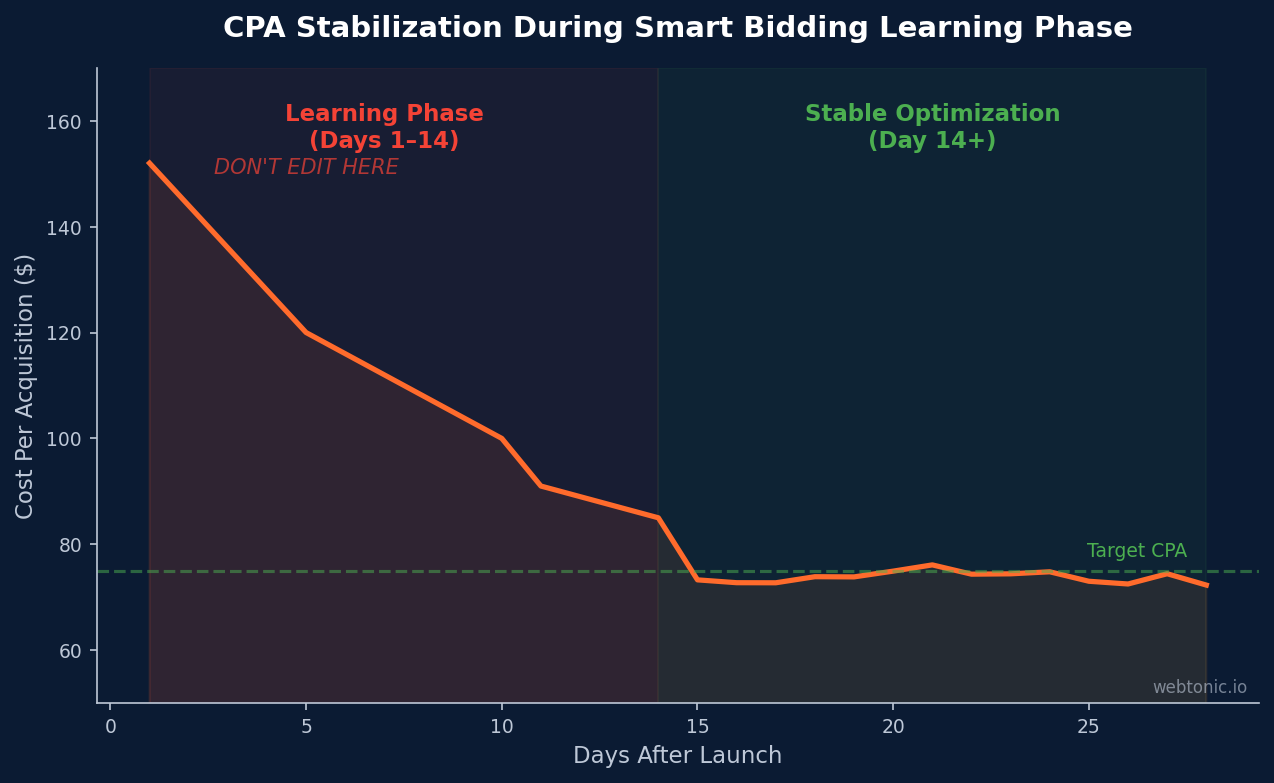
The learning phase is the period when the algorithm collects enough data to reliably predict auction outcomes for your specific account. According to AdZeta's learning period analysis, it requires up to 50 conversion events or 3 full conversion cycles — and every major change restarts the clock entirely.
The most common mistake during this phase: interpreting early volatility as failure and reverting changes before the algorithm finishes learning. When weekly ROAS reports show a 15% decline during the first 7 days, the instinct is to lower the target or switch strategies. But conversion delay means recent data systematically understates results — clicks from week 1 are still converting in week 3, and those late conversions attribute back to the original click date in the reports.

Changes that reset the learning phase include budget adjustments above 20%, changing conversion actions, adding or removing audiences, modifying bid targets by more than 15–20%, and pausing then restarting campaigns. The safest approach: batch all planned changes into a single editing session rather than making multiple small adjustments over several days. Each individual edit triggers a separate learning reset.
| Action | Resets Learning? | Safe Alternative |
|---|---|---|
| Budget change >20% | Yes | Increase in 15–20% increments every 48–72 hours |
| Changing conversion actions | Yes | Set up new actions 2 weeks before switching |
| Modifying CPA/ROAS target | Yes (if change >15–20%) | Adjust in 10% increments maximum |
| Adding/removing audiences | Yes | Use observation mode first, then target |
| Pausing & restarting | Yes — full reset | Lower budget instead of pausing |
| Adding new ad copy | Partial (ad-level only) | Add creative during low-traffic hours |
Common Mistakes That Kill Performance
Even with the right strategy selected, implementation errors prevent the algorithm from delivering its potential. These are the most frequent mistakes we see across client accounts:
Setting unrealistic targets. If your historical CPA is $80, setting a $30 CPA target doesn't make the algorithm work three times harder — it makes the system severely restrict delivery because it can't find enough auctions that meet an impossible constraint. Start with a target 10–15% better than your historical average and tighten gradually as performance improves.
Insufficient conversion data. The algorithm needs training data. Campaigns generating fewer than 15 conversions per month rarely provide enough signal for stable optimization. If your account lacks volume, consider optimizing for a higher-funnel event (Add to Cart instead of Purchase) or use portfolio approaches to pool data across campaigns.
Broken or inaccurate conversion tracking. The algorithm is only as good as the data it receives. If conversion tracking overcounts (duplicate tags), undercounts (missing CAPI integration), or tracks the wrong actions (counting page views as conversions), every bid the system makes will be miscalibrated. Audit conversion tracking quarterly — this single step fixes more performance issues than any strategy change. Check our blog for detailed conversion tracking audit guides.
Not using bid adjustments correctly. With automated approaches, manual bid adjustments for device, location, and demographics are largely overridden by the algorithm — setting a -50% mobile bid adjustment on a Target CPA campaign has minimal effect because the system already factors device into its auction-time calculations. The exception is -100% device exclusions, which are absolute and fully honored.
Switching strategies too frequently. Changing from Target CPA to Maximize Conversions to Target ROAS within a single quarter means your account never exits the learning phase. Commit to a strategy for at least 4–6 weeks before evaluating whether to change. Use the platform's reports with a comparison window of at least 2 full conversion cycles to measure accurately. At Web Tonic, we build 90-day transition roadmaps so clients don't oscillate between strategies and waste optimization data.
FAQ
What is smart bidding in Google Ads?
Smart bidding refers to four automated bid strategies in Google Ads that use machine learning to optimize for conversions or conversion value at auction time. The four strategies are Target CPA, Target ROAS, Maximize Conversions, and Maximize Conversion Value. Unlike manual approaches, the algorithm evaluates real-time signals — device, location, time, audience lists, and query context — for every individual auction to set the optimal bid amount.
How many conversions do I need for smart bidding to work?
Google recommends a minimum of 30 conversions in the last 30 days for Target CPA and 15 conversions with value data for Target ROAS. Maximize Conversions and Maximize Conversion Value have no minimum threshold but perform better with more data. Campaigns below these thresholds can use portfolio approaches to pool conversion data from multiple campaigns, accelerating the algorithm's learning process.
Is manual CPC better than smart bidding?
Manual CPC outperforms automation in specific scenarios: brand campaigns with predictable metrics, new accounts with fewer than 15 monthly conversions, and campaigns requiring granular keyword-level bid control. For most accounts with sufficient conversion volume, properly configured smart bidding delivers 20–35% better CPA or ROAS than manual management because it processes more auction signals in real time than any human team can evaluate.
How long does the smart bidding learning phase take?
The learning phase typically requires 7–14 days and needs approximately 50 conversion events or 3 full conversion cycles to complete. During this period, performance is volatile and CPA/ROAS may fluctuate significantly. Any major changes — budget shifts above 20%, targeting updates, conversion action changes — restart the learning clock. The most effective approach is batching all planned edits into a single session and then not touching the campaign for at least two weeks.
What happened to Enhanced CPC?
Enhanced CPC (ECPC) was deprecated for Search and Display campaigns on March 31, 2025. Campaigns that weren't proactively migrated to another bid strategy now function as Manual CPC. If ECPC still appears in your account interface, it's a legacy label — the actual behavior is Manual CPC without any automated adjustment. Google recommends migrating to one of the four smart bidding strategies based on your conversion volume and business goals.
Sources
Google Ads Help — About Smart Bidding
Google Ads Help — About Automated Bidding
Google Ads Help — Set Up Smart Bidding
Google Ads Help — About Enhanced CPC
ClicksBazaar — AI Bid Optimization 2026 Benchmarks
AdZeta — Understanding the Smart Bidding Learning Period
WordStream — Google Ads Benchmarks 2026
Google Ads — Smart Bidding Overview


