



Table of contents
Productivity tools help teams manage tasks, track time, and collaborate without scattered spreadsheets and overflowing inboxes. The right tool can boost engagement by 23% according to Gallup.
Below is a curated comparison of the best productivity tools in 2026 — organized by category with pricing, features, and free plan details.
Key Takeaways
- 77% of high-performing teams use at least one dedicated project management tool to centralize tasks and deadlines (Asana Anatomy of Work).
- AI-powered productivity tools can reduce routine administrative work by up to 40%, freeing teams for strategic tasks (Accenture Technology Trends).
- Task management apps with a free plan — like Todoist, Trello, and ClickUp — cover the basics for solo users, but paid plans starting at $5–$10/user/month unlock collaboration, automation, and reporting.
- Time tracking tools such as Toggl and Clockify help teams identify where 28% of the workday disappears into context-switching and low-value meetings.
- Calendar integration with Google Calendar or Outlook is the single most-requested feature in productivity software, cited by 67% of users in workplace surveys.
- Slack, Microsoft Teams, and Notion dominate the collaboration layer, but using more than 3 communication tools simultaneously actually decreases productivity by 15–20%.
What Are Productivity Tools and Why Do They Matter?
A productivity tool is any software application designed to help you plan, organize, execute, and review work more efficiently. These tools fall into several overlapping categories — task management, time tracking, project management, note-taking, calendar scheduling, and team collaboration — and the best ones combine multiple capabilities under a single roof.
The business case is simple: organizations that adopt structured productivity software report 25–30% fewer missed deadlines and $4,100 in annual savings per employee from reduced time waste (Atlassian). For marketing teams specifically, centralized task management means campaigns launch on schedule, briefs stop getting lost in email, and real-time dashboards replace status-update meetings that drain 31 hours per month from the average manager.
Types of Productivity Tools
Before comparing individual apps, it helps to understand the six major categories. Most modern tools span two or three of these, which is why the market feels crowded — but each category solves a distinct workflow problem.
| Category | Core Function | Best For | Top Tools |
|---|---|---|---|
| Task Management | Create, assign, and track to-dos with due dates | Individuals and small teams | Todoist, TickTick, Microsoft To Do |
| Project Management | Plan multi-phase projects with dependencies and timelines | Cross-functional teams and agencies | Asana, Monday.com, ClickUp |
| Time Tracking | Log hours, analyze time allocation, generate reports | Freelancers, consultants, billable-hour firms | Toggl Track, Clockify, Harvest |
| Note-Taking & Docs | Capture ideas, build knowledge bases, create wikis | Content teams and knowledge workers | Notion, Obsidian, Google Docs |
| Calendar & Scheduling | Coordinate meetings, block focus time, manage availability | Managers, client-facing roles | Google Calendar, Calendly, Reclaim.ai |
| Team Collaboration | Real-time messaging, file sharing, async communication | Distributed and hybrid teams | Slack, Microsoft Teams, Loom |
The Best Productivity Tools Compared: Features, Pricing, and Free Plans
The table below compares the 12 best productivity tools across pricing, free plan availability, standout features, and ideal use cases. Pricing reflects current published rates as of mid-2026; most tools bill annually at a discount versus monthly.
| Tool | Category | Free Plan | Paid Plans Starting | Standout Feature |
|---|---|---|---|---|
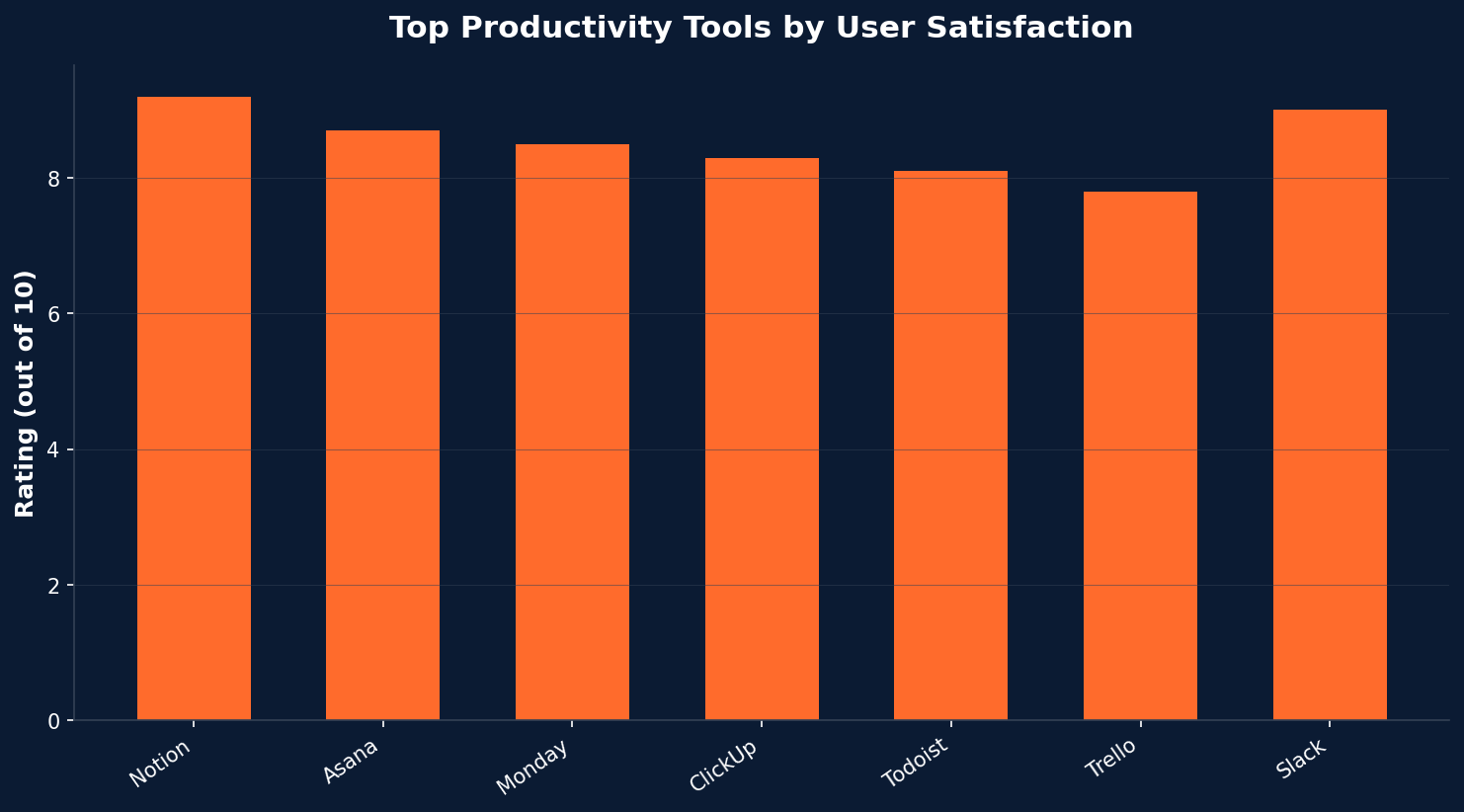
| Notion | All-in-one workspace | Yes (generous) | $10/user/mo billed annually | AI-powered Q&A across docs, databases, and wikis |
| Asana | Project management | Yes (up to 10 users) | $10.99/user/mo billed annually | Timeline view with dependency mapping |
| Monday.com | Project management | Yes (up to 2 seats) | $9/seat/mo billed annually | Highly visual dashboards with 200+ integrations |
| ClickUp | Project management | Yes (100MB storage) | $7/user/mo billed annually | Built-in docs, whiteboards, and goal tracking in one tool |
| Todoist | Task management | Yes (5 projects) | $5/user/mo billed annually | Natural language task creation with smart scheduling |
| Trello | Task management | Yes (10 boards) | $5/user/mo billed annually | Kanban-first design with Butler automation |
| Slack | Team collaboration | Yes (90-day history) | $8.75/user/mo billed annually | Channel-based messaging with 2,600+ app integrations |
| Toggl Track | Time tracking | Yes (up to 5 users) | $9/user/mo billed annually | One-click timer with automatic project categorization |
| Google Workspace | Productivity suite | Free personal Gmail/Docs | $7/user/mo billed annually | Seamless Google Calendar, Drive, and Meet integration |
| Microsoft 365 | Productivity suite | Free web apps only | $6/user/mo billed annually | Copilot AI across Word, Excel, PowerPoint, and Teams |
| Clockify | Time tracking | Yes (unlimited users) | $3.99/user/mo billed annually | Completely free time tracking for unlimited team members |
| Calendly | Scheduling | Yes (1 event type) | $10/seat/mo billed annually | Automated scheduling with round-robin team assignments |
AI Productivity Tools That Are Changing How Teams Work
The fastest-growing segment of the productivity tools market is AI-powered automation. Tools like Zapier's AI orchestration and Notion AI are moving beyond basic task management into territory where software handles the grunt work — drafting meeting summaries, prioritizing your inbox, generating project timelines from a single prompt, and even writing first-draft reports from structured data.
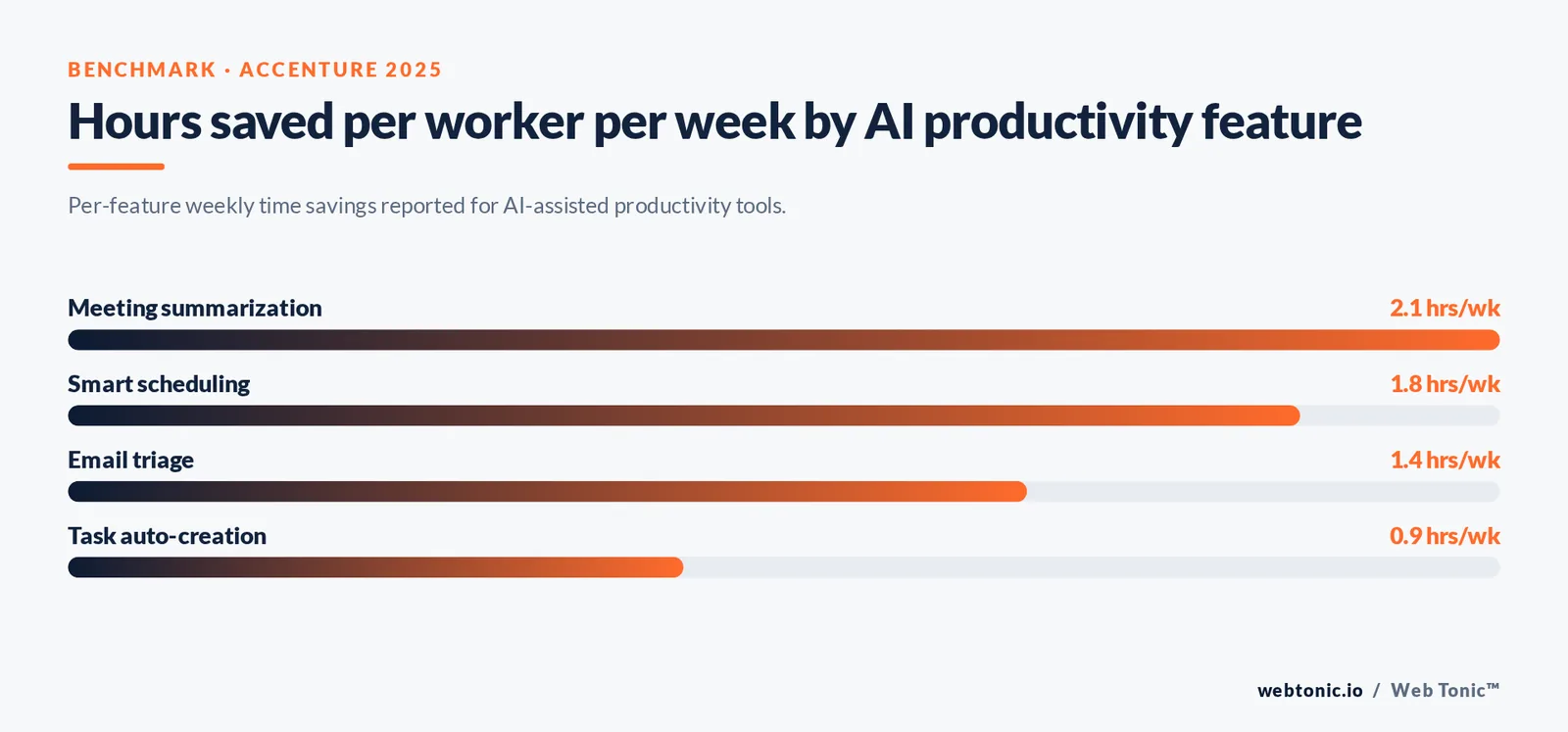
According to Accenture's 2025 Technology Trends report, generative AI productivity features can save the average knowledge worker 6.2 hours per week on routine administrative tasks. That translates to $12,480 in recovered labor value per employee per year for a company paying $50/hour fully loaded.
| AI Feature | What It Does | Tools That Offer It | Time Saved/Week |
|---|---|---|---|
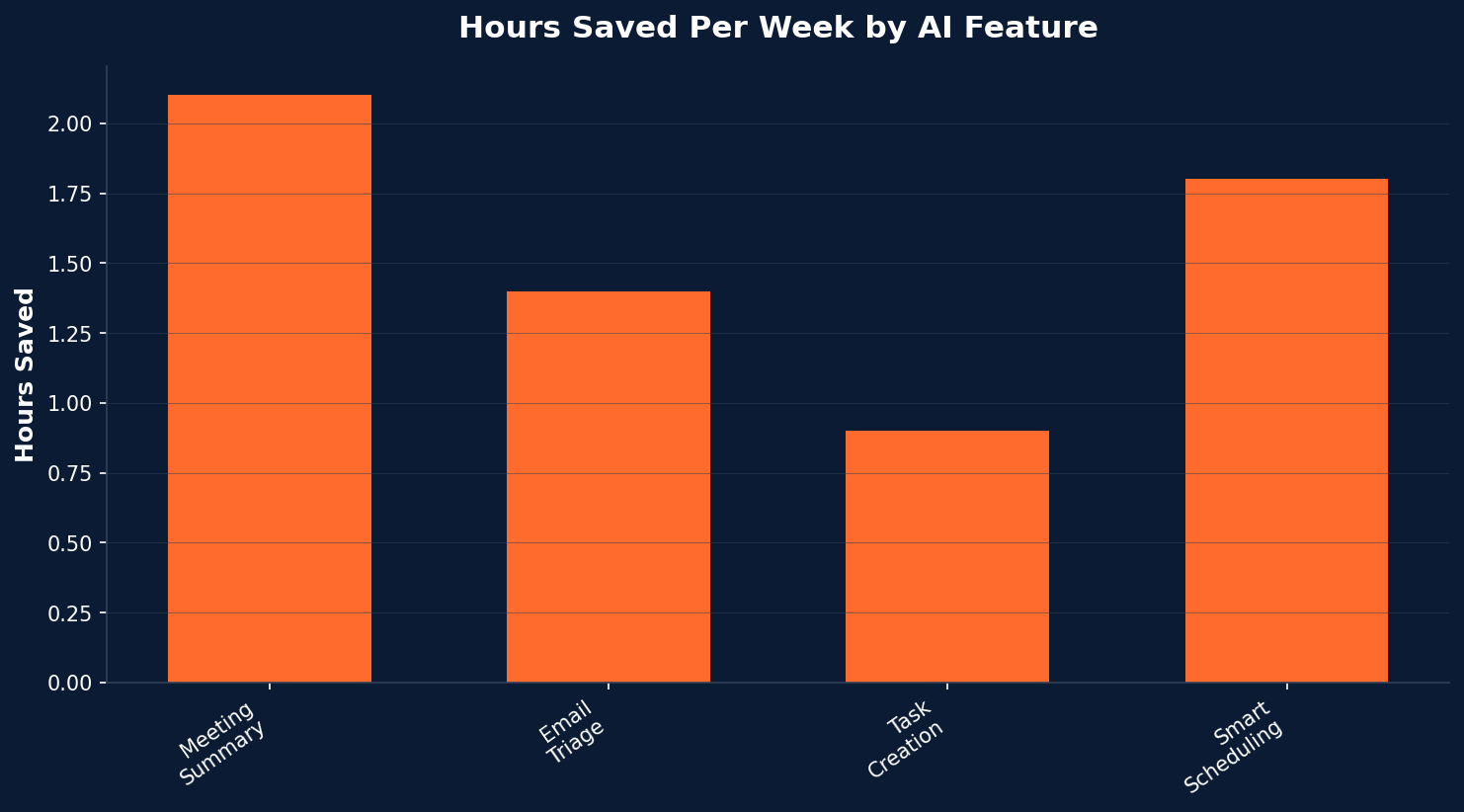
| Meeting Summarization | Transcribes calls and extracts action items automatically | Otter.ai, Fireflies, Microsoft Copilot | 2.1 hours |
| Email Triage | Categorizes, prioritizes, and drafts replies to emails | Gmail AI, Superhuman, SaneBox | 1.4 hours |
| Task Auto-Creation | Converts messages and docs into structured tasks | ClickUp AI, Notion AI, Asana Intelligence | 0.9 hours |
| Smart Scheduling | Blocks focus time and reschedules low-priority meetings | Reclaim.ai, Clockwise, Google Calendar | 1.8 hours |
The marketing takeaway: AI productivity tools are not a replacement for strategy — they are a force multiplier. A marketing team using AI-assisted project management can reallocate 6+ hours per person per week from admin to creative and analytical work, which directly improves campaign quality and speed to market. If your team needs help building a growth marketing strategy around these tools, the right agency partner can accelerate adoption and ROI.
How to Choose the Right Productivity Tool for Your Team
With dozens of options on the market, choosing the best productivity tool comes down to five decision factors that vary by team size, budget, and workflow complexity.
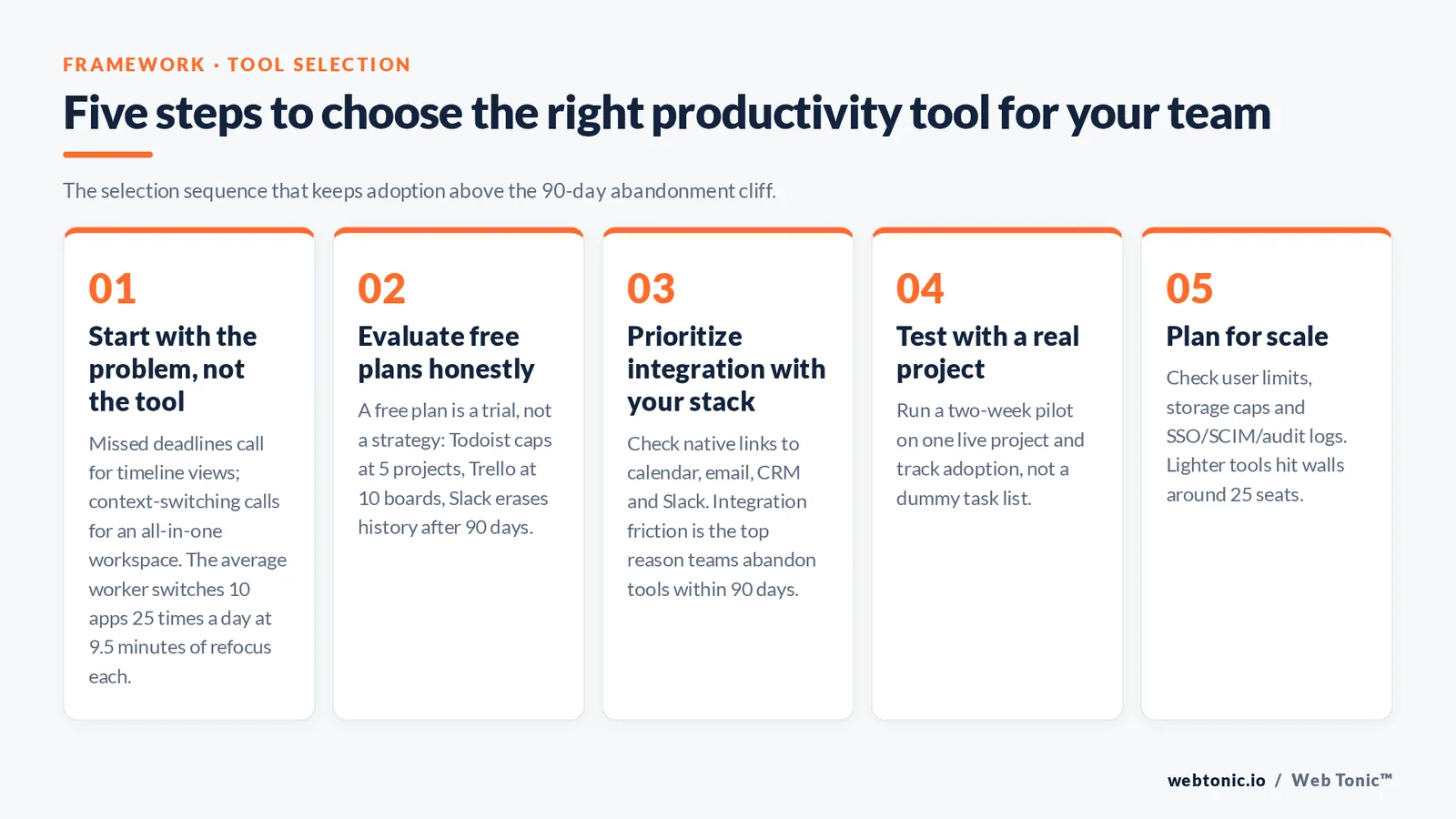
1. Start With the Problem, Not the Tool
If your team's biggest pain point is missed deadlines, a project management tool with timeline views (Asana, Monday.com) solves it faster than a note-taking app. If context-switching between apps is the bottleneck, an all-in-one workspace like Notion or ClickUp consolidates your stack. According to Atlassian's research, the average worker switches between 10 different apps 25 times per day — and each switch costs 9.5 minutes of refocus time.
2. Evaluate Free Plans Honestly
A free plan is a trial, not a strategy. Todoist's free tier caps you at 5 projects. Trello limits you to 10 boards. Slack erases messages after 90 days. For teams of 3+ people, paid plans starting at $5–$10/user/month are almost always worth the investment because they unlock automation, reporting, and admin controls.
3. Prioritize Integration With Your Existing Stack
The best productivity tool is one your team actually uses. Check whether it integrates natively with your Google Calendar, email client, CRM, and Slack workspace. Friction at the integration layer is the number-one reason teams abandon new tools within 90 days.
4. Test With a Real Project
Do not evaluate tools with a dummy task list. Run a real two-week pilot on one active project, track adoption rate, and survey the team. The tool that feels natural on day 10 is the one worth paying for.
5. Plan for Scale
A tool that works for 5 people may collapse under 50. Check user limits, storage caps, and whether the vendor offers enterprise-grade security (SSO, SCIM, audit logs). Monday.com and Asana both scale well into the hundreds, while some lighter tools hit walls around 25 seats.
Productivity Methods That Pair Well With These Tools
A tool is only as effective as the system behind it. The most productive teams combine the right software with a proven productivity method that gives structure to how work flows through the tool.
| Method | How It Works | Best Tool Pairing | Ideal For |
|---|---|---|---|
| Getting Things Done (GTD) | Capture everything, clarify next actions, organize by context, review weekly | Todoist, Notion | Knowledge workers with high email volume |
| Time Blocking | Assign every hour a specific task or category on your calendar | Google Calendar, Reclaim.ai | Managers and creatives who need focus time |
| Kanban | Visualize work in columns (To Do → In Progress → Done) with WIP limits | Trello, ClickUp | Agile teams and marketing sprints |
| Pomodoro Technique | Work in 25-minute focused intervals with 5-minute breaks | Toggl Track, Focus@Will | Individuals battling procrastination |
| Eat the Frog | Tackle the hardest task first each day | Any task manager with priority flags | Solo founders and freelancers |
Common Mistakes Teams Make With Productivity Software
Even the best productivity tools fail when teams fall into predictable traps. Here are the five most common ones — and how to avoid them.
1. Tool overload: Using 6+ apps simultaneously creates more friction than it solves. Consolidate to 2–3 core tools maximum. A project management hub, a communication channel, and a document layer is all most teams need.
2. Ignoring onboarding: Rolling out a new tool without training means 40% of your team will default back to email within two weeks. Invest in a one-hour structured walkthrough and appoint a tool champion per department.
3. Over-engineering workflows: Building a 15-step automation for a process that three people use once a month is a net negative. Start simple. Automate only when a manual task takes more than 30 minutes per week.
4. Not reviewing usage data: Most project management tools offer adoption dashboards. If 60% of your team has not logged in this week, the tool is not the problem — the process is. A data intelligence framework can surface these adoption gaps before they become costly.
5. Skipping the calendar layer: Tasks without time blocks drift. Syncing your task manager with Google Calendar or Outlook ensures work gets scheduled, not just listed. For more insights on optimizing your marketing workflows, explore the Web Tonic blog or get in touch with our team.
Frequently Asked Questions About Productivity Tools
What are the best free productivity tools in 2026?
The strongest free productivity tools include Todoist (5 projects, natural-language input), Trello (10 boards with Kanban), Clockify (unlimited free time tracking), Notion (generous personal plan), and Google Workspace (Docs, Sheets, Calendar). Each free plan has limits — typically on storage, user count, or history — but they cover the essentials for individuals and very small teams.
How do AI productivity tools improve work efficiency?
AI productivity tools automate repetitive tasks like meeting summarization, email triage, and task creation. They use natural language processing to extract action items from conversations and machine learning to predict deadlines, suggest priorities, and optimize schedules. The result is 6+ hours saved per worker per week on average, according to Accenture research.
Which productivity tool is best for project management?
Asana and Monday.com lead for structured project management with timeline views, dependency tracking, and portfolio dashboards. ClickUp offers the most features per dollar with paid plans starting at $7/user/month. For small teams that prefer simplicity, Trello's Kanban boards remain a favorite.
How many productivity tools should a team use?
Research consistently shows that 2–3 core tools is the sweet spot. A typical effective stack includes a project/task management tool (Asana, Monday.com, ClickUp), a communication tool (Slack or Microsoft Teams), and a documentation layer (Notion or Google Docs). Beyond three tools, context-switching costs start to outweigh the benefits.
Is it worth paying for productivity tools when free versions exist?
For solo users with simple task lists, free plans are often sufficient. For teams of 3+ people, paid plans — typically $5–$10/user/month billed annually — unlock collaboration features, automation, admin controls, and reporting that free tiers restrict. The ROI is measurable: $4,100 in annual savings per employee from reduced time waste alone makes the subscription cost trivial by comparison.
Sources: Gallup State of the Global Workplace · Zapier AI Productivity Tools · Asana Anatomy of Work · Slack Productivity Blog · Todoist Productivity Methods · Monday.com Project Management · Atlassian Productivity Blog · Accenture Tech Trends · Notion Product · PCMag Best Productivity Apps · Toggl Productivity Tools · HubSpot Marketing Statistics

