



Table of contents

A PPC audit is a systematic review of every setting, keyword, ad, and bid in your paid search account to find wasted spend and missed opportunities. Below is a complete PPC audit checklist covering account structure, conversion tracking, bidding strategy, search terms, ad copy, and landing pages—built from real-world data.
Key Takeaways
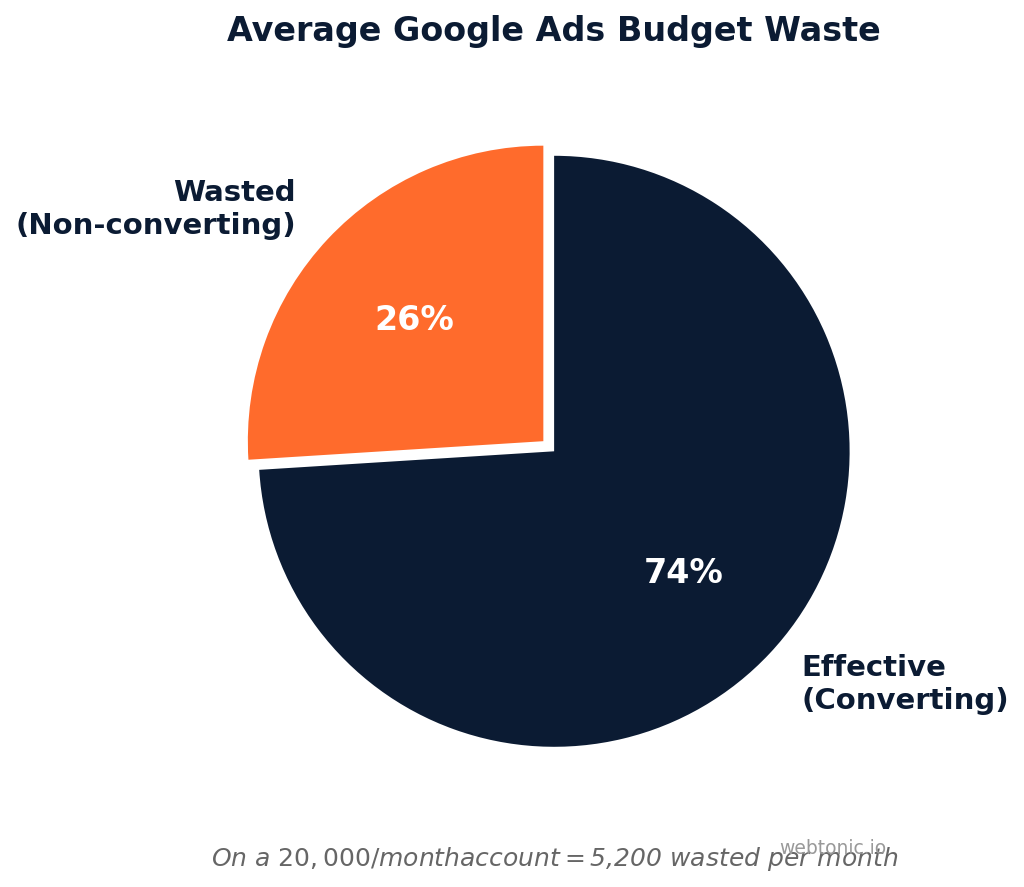
- The average Google Ads account wastes 26% of its budget on traffic that never converts (NorthCountry Growth, 2026).
- A thorough PPC audit covers 8 core areas: account structure, campaign settings, keywords, ad copy, bidding, conversion tracking, audiences, and landing pages.
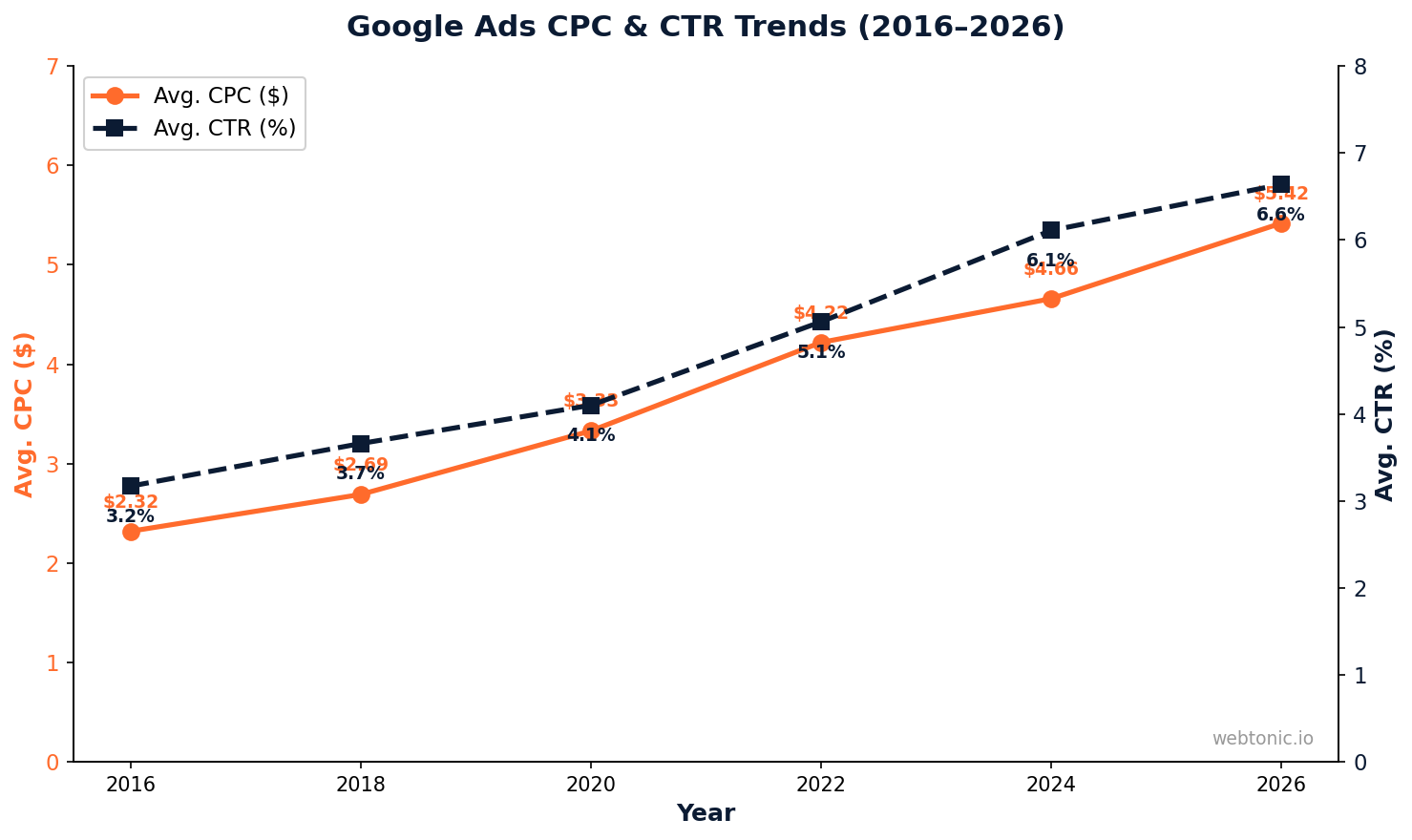
- Average click-through rate in Google Ads is 6.64% in 2026, up from 6.11% in 2024 (WordStream).
- Average cost per click has more than doubled over the past decade—from $2.32 in 2016 to $5.42 in 2026.
- Search Partners typically deliver 20–40% lower conversion rates than Google Search alone.
- Broken conversion tracking is the single most catastrophic finding in PPC audits—it feeds garbage data to Smart Bidding.
- Negative keyword gaps routinely account for $1,000–$10,000/month in recoverable wasted spend.
- Quality Score directly impacts CPC—a score of 10 can reduce your cost per click by up to 50% vs. the average.
What Is a PPC Audit?
A PPC audit is a structured examination of your pay-per-click advertising campaigns—primarily Google Ads and Microsoft Ads—to identify inefficiencies, misconfigurations, and growth opportunities. It is not a casual glance at top-level metrics. A real audit digs into account structure, keyword coverage, conversion tracking integrity, bidding logic, ad creative quality, and landing page alignment.
Companies run PPC audits when performance degrades, when onboarding a new agency, or on a regular cadence (quarterly is the minimum recommended frequency). The goal is simple: stop paying for clicks that will never convert and redirect that budget to what works.
Why Every PPC Account Needs Regular Audits
Paid search accounts drift. Campaigns that performed well six months ago accumulate irrelevant search terms, outdated ad copy, and bidding strategies that no longer match the account's data volume. Here is what the data shows:
- 26% of average Google Ads budgets go to non-converting traffic—on a $20,000/month account, that is $5,200 disappearing every month (NorthCountry Growth).
- Cost per lead has increased 13% over the past decade, from $59.18 in 2016 to $66.69 in 2026 (WordStream).
- Performance Max campaigns require separate audit protocols because their search term data is limited and channel distribution is opaque.
- Accounts spending $50,000+/month have been found optimizing toward conversion actions that fire on page load rather than form submission—the algorithm thinks it is winning, but no real leads arrive.
The 8-Part PPC Audit Checklist
A comprehensive PPC audit methodology covers eight areas in the order they should be reviewed. Starting with structure ensures that everything downstream—keywords, ads, bids—is built on a solid foundation.
1. Account Structure
Campaign and ad group organization determines how effectively you can control budgets, match types, and bidding. Check for:
- Campaign segmentation — Are branded, non-branded, competitor, and remarketing campaigns separated?
- Ad group granularity — Each ad group should target a tight keyword theme (5–15 keywords max).
- Naming conventions — Consistent naming (e.g.,
Brand | Search | US | EN) makes reporting and optimization scalable.
2. Campaign Settings
Misconfigured settings silently waste budget. The most common culprits:
| Setting | Recommended Config | Why It Matters |
|---|---|---|
| Network | Search only (disable Search Partners) | Search Partners deliver 20–40% lower conversion rates |
| Location Targeting | "Presence" only | "Presence or interest" shows ads to users merely researching your city |
| Language | Match your audience language | Mismatched language settings waste impressions |
| Ad Rotation | "Optimize" for most campaigns | Ensures best-performing ads get more impressions |
| Enhanced CPC | Review if still active | Often left on accidentally when switching to Smart Bidding |
3. Keyword Strategy
Keywords are the foundation of search PPC. Your audit should assess:
- Match type distribution — Heavy broad match reliance without negative keywords drains budget.
- Search term reports — Review the last 90 days of search term data for irrelevant queries.
- Negative keyword coverage — Gaps in negatives routinely account for $1,000–$10,000/month in wasted spend.
- Keyword–ad group alignment — Each ad group's keywords should share a single intent.
- Quality Score audit — Keywords with QS below 5 need attention; a QS of 10 can cut CPC by up to 50%.
4. Ad Copy and Extensions
Responsive Search Ads (RSAs) now dominate Google Ads. Check:

- Asset variety — Provide 15 headlines and 4 descriptions per RSA. Avoid repetition.
- Pin strategy — Only pin when absolutely necessary (e.g., legal disclaimers). Over-pinning reduces Google's optimization ability.
- Ad strength — Target "Good" or "Excellent." Anything below "Average" needs revision.
- Extensions — Sitelinks, callouts, structured snippets, and call extensions should be active on every campaign. They increase CTR by 10–15% on average.
5. Bidding and Budget
Bidding strategy mismatches are among the most expensive audit findings:
- Strategy-data fit — Target CPA and Target ROAS need at least 30 conversions/month per campaign to optimize effectively.
- Learning period issues — Campaigns stuck in "Learning" or "Learning (limited)" for more than 2 weeks need intervention.
- Budget-limited campaigns — If your best-performing campaigns show "Limited by budget," you are leaving conversions on the table.
- Target aggressiveness — A tCPA set 30% below historical CPA will throttle volume dramatically.
6. Conversion Tracking
This is the most critical section of any PPC audit. Every Smart Bidding strategy relies on accurate conversion data. If tracking is broken, the algorithm optimizes toward garbage.
- Primary vs. secondary actions — Only true business outcomes (form submissions, purchases, calls) should be set as "Primary."
- Tag firing verification — Use Google Tag Assistant to confirm tags fire on the correct events, not on page loads.
- Enhanced conversions — Enable enhanced conversion tracking to recover data lost to cookie restrictions.
- Attribution model — Data-driven attribution is now the default and recommended model for most accounts.
7. Audience and Remarketing
Audience strategy amplifies or undermines keyword targeting:
- Remarketing lists — Ensure lists are populated (minimum 1,000 users for Search, 100 for Display).
- Audience exclusions — Exclude existing customers from acquisition campaigns unless running upsell strategies.
- Observation vs. targeting — Use "Observation" to collect data without restricting reach; switch to "Targeting" only with sufficient data.
8. Landing Pages
The ad click is not the conversion. The landing page is:
- Message match — The landing page headline should mirror the ad headline and search intent.
- Page speed — Pages loading in over 3 seconds lose 53% of mobile visitors (Google).
- Form simplicity — Reducing form fields from 11 to 4 can increase conversions by up to 120%.
- Mobile experience — Over 60% of Google Ads clicks come from mobile devices. Test every page on mobile.
PPC Audit Metrics and Benchmarks
Use these 2026 benchmarks from WordStream's analysis of 13,000+ campaigns across 23 industries as reference points during your audit:
| Metric | 2026 Average | 2016 Average | Change |
|---|---|---|---|
| Click-Through Rate (CTR) | 6.64% | 3.17% | +109% |
| Cost Per Click (CPC) | $5.42 | $2.32 | +134% |
| Conversion Rate | 7.04% | 3.75% | +88% |
| Cost Per Lead (CPL) | $66.69 | $59.18 | +13% |
Common PPC Audit Red Flags by Spend Level
The issues you find during a PPC audit shift depending on account size and maturity. Here is what to watch for at each level:
| Monthly Spend | Most Common Issues | Audit Priority |
|---|---|---|
| Under $5,000 | Missing negatives, no conversion tracking, broad match overuse | Tracking setup and keyword cleanup |
| $5,000–$25,000 | Poor campaign structure, stale ad copy, bid strategy mismatch | Structure rebuild and Smart Bidding alignment |
| $25,000–$100,000 | PMax cannibalization, attribution gaps, budget-limited winners | Channel analysis and budget reallocation |
| $100,000+ | Cross-campaign interference, offline conversion gaps, audience overlap | Full-funnel attribution and audience strategy |
How to Conduct a Performance Max Audit
Performance Max campaigns need specific PPC audit steps because they operate across 8 Google channels (Search, Shopping, Display, YouTube, Gmail, Discover, Maps, and Partners) with limited transparency.

- Channel distribution — Check where your budget is actually going. Heavy Display or YouTube allocation often signals low-quality traffic.
- Search term coverage — Use third-party tools like Adalysis to surface PMax search terms that cannibalize your Search campaigns.
- Asset group quality — Each asset group needs a minimum of 20 text assets, 5 images, and 1 video for full optimization.
- Audience signals — Set strong audience signals; without them, PMax defaults to broad prospecting that may not match your ideal customer.
- Negative keywords — Account-level negative keywords now apply to PMax. Use them to block branded and irrelevant search terms.
PPC Audit Frequency and Scheduling
The right audit cadence depends on spend level, campaign complexity, and how actively the account is managed. Here is a recommended schedule:
- Weekly mini-checks: Review search term reports, check for disapproved ads, monitor conversion tracking status, and verify budget pacing.
- Monthly deep dives: Analyze Quality Score trends, review bidding strategy performance, assess ad copy effectiveness, and check audience list health.
- Quarterly full audits: Run the complete 8-part checklist above. Document findings, create action plans, and benchmark results against the previous quarter.
- Annual strategic reviews: Evaluate account structure against business goals, reassess campaign type mix (Search vs. PMax vs. Demand Gen), and recalculate target KPIs based on updated business data.
PPC Audit Tools Worth Using
The right tools accelerate your audit and surface issues manual checks miss:
- Google Ads Editor — Bulk editing, offline review, and quick exports for keyword and ad analysis.
- Google Tag Assistant — Verify conversion tracking tag implementation without developer support.
- Adalysis — Automated PPC audits with PMax-specific tools for search terms, placements, and asset analysis.
- Google Analytics 4 — Cross-reference PPC conversions with GA4 data to catch tracking discrepancies.
- Microsoft Clarity — Free session replay and heatmaps to evaluate landing page experience.
Related reading
- PPC Optimization: The Complete Guide to Lowering CPC and Boosting ROAS
- What Is PPC? Pay-Per-Click Advertising Explained
- Local PPC: The Complete Guide to Pay-Per-Click for Local Businesses
- Paid Search services at Web Tonic
FAQ
How often should I run a PPC audit?
Run a comprehensive PPC audit at least once per quarter. High-spend accounts ($50,000+/month) benefit from monthly mini-audits focused on search terms, negative keywords, and conversion tracking. Any time you experience a sudden CPA spike or volume drop, an immediate audit is warranted.
What is the most common issue found in PPC audits?
Broken or misconfigured conversion tracking is consistently the most damaging finding. When Smart Bidding optimizes toward incorrect conversion data, every downstream decision—budget allocation, keyword expansion, bid targets—is compromised. The second most common issue is negative keyword gaps causing wasted spend on irrelevant searches.
Can I audit my PPC account myself or do I need an agency?
A basic audit using the checklist above is achievable in-house. However, agencies bring cross-account benchmarking data and experience identifying subtle issues (like attribution model misconfigurations) that internal teams often miss. For accounts spending over $10,000/month, a professional audit typically pays for itself within the first month.
What should I do after completing a PPC audit?
Prioritize fixes by impact. Start with conversion tracking errors (highest impact), then address negative keyword gaps, then campaign settings, then ad copy refreshes. Create a 30/60/90-day action plan and re-audit at each milestone to measure improvement.
How long does a thorough PPC audit take?
A comprehensive PPC audit of a single Google Ads account with 10–20 campaigns typically takes 4–8 hours for an experienced auditor. Larger accounts with 50+ campaigns and multiple PMax campaigns may require 2–3 full days. Automated tools can reduce initial data gathering to under an hour.
Sources
ScaleGrowth Digital — Google Ads Audit Checklist
NorthCountry Growth — Google Ads Account Audit Checklist
WordStream — Google Ads Benchmarks 2026
Adalysis — PMax Tools for Google Ads
HubSpot — PPC Best Practices


