



Table of contents

Instagram ad targeting is now a two-part job: pick the audience signals Meta cannot infer on its own, then feed the algorithm enough conversion events to find the rest. Everything below is the option list, the size rules and the order to test them in.
Key Takeaways
- Instagram carries roughly 2 billion monthly users (Sprout Social), about 35.3% of the world's 5.66 billion internet users, at an average 33.9 minutes per day — reach is never the constraint, relevance is.
- Targeting lives in 4 layers: core demographics, detailed targeting, custom audiences and lookalikes. Only two of them are still real levers in 2026.
- Lookalikes run from 1% to 10% of a country's population; seeds need 100+ people minimum and behave best at 1,000–5,000 high-quality members.
- Website custom audiences retain up to 180 days; engagement-based audiences up to 365 days.
- An ad set needs about 50 optimisation events in 7 days to exit the learning phase — that single number decides how narrow your targeting can be.
- Organic Instagram engagement fell to 0.48% (−24% year over year) in Socialinsider's 35-million-post study, so paid targeting now carries most brand reach.
- Special Ad Categories (housing, employment, credit, social issues) strip age, gender and detailed targeting and force a 15-mile minimum radius in the US.
The four layers of Instagram ad targeting
Every Instagram audience is assembled from the same four layers inside Meta Ads Manager, and the surfaces they can appear on are listed on Instagram's own business hub. Knowing which layer a control belongs to tells you whether it is a hard filter (the ad can never be shown outside it) or a hint (the algorithm may expand past it).
| Layer | What it controls | Hard filter or hint? | Still worth tuning? |
|---|---|---|---|
| Core targeting | Location, age, gender, language | Hard filter | Yes — location and language always |
| Detailed targeting | Interests, behaviours, demographic segments | Hint once expansion is on | Only on small budgets or niche offers |
| Custom audiences | Your own data: pixel, CRM, video, engagement | Hard filter (include) / hard exclude | Yes — the highest-leverage layer |
| Lookalikes | Modelled users similar to a seed audience | Hard filter | Yes, as a seed-quality exercise |

Advantage+ audience vs manual targeting: pick with a table, not a hunch
Platform releases tracked by PPC Land have steadily pushed automation forward, and Meta's default is now Advantage+ audience, where your inputs become audience suggestions and delivery is free to look wider. Manual targeting still exists as "original audience options". The choice is mostly a function of data volume.
| Your situation | Choose | Why | Guardrail |
|---|---|---|---|
| Pixel firing, 50+ conversions/week | Advantage+ audience | Enough signal for the model to beat your interest list | Keep customer exclusions on |
| New account, under 10 conversions/week | Manual, one broad interest cluster | Model has nothing to learn from yet | Optimise for a mid-funnel event first |
| Local service business | Manual with tight radius | Geography is the offer's real constraint | Radius 5–15 miles, exclude non-service ZIPs |
| B2B with a job-title-shaped buyer | Manual + CRM custom audience | Instagram has no reliable firmographic layer | Feed the pixel qualified-lead events only |
| Special Ad Category advertiser | Restricted flow (no choice) | Age, gender and detailed targeting are removed | Plan creative to do the qualifying |
Core targeting: location, age, gender, language
This layer is boring and decisive. Most wasted Instagram spend we audit is a geography or language mistake, not a bad interest.
| Option | Granularity | Common mistake | Fix |
|---|---|---|---|
| Location | Country, region, city, postal code, radius, address pin | Leaving "people travelling in this location" on for a local offer | Switch to "people living in this location" |
| Age | 18–65+ in one-year steps | Copying the buyer persona's age exactly | Widen by ±10 years and let delivery sort it |
| Gender | All, men, women | Splitting gender into separate ad sets and starving both | Keep one ad set; read gender in the breakdown report |
| Language | App/interface language | Ignoring it in bilingual markets | Set it when your creative is language-specific |
| Exclusions | Any location or audience | No customer exclusion on prospecting | Exclude purchasers for 30–90 days |
Detailed targeting: interests, behaviours and demographics
Detailed targeting is the layer that has shrunk the most — Buffer's Instagram ads guide and Metricool's ads study both describe the same drift toward automated audiences. Treat the clusters below as seed hints for a cold ad set, not as a precision instrument — and never stack five narrow interests together, which is how you build an audience too small to leave the learning phase.
| Cluster | Example signals | Best use on Instagram | When it fails |
|---|---|---|---|
| Interests | Pages liked, topics engaged with, adjacent content | Cold prospecting for visual, impulse-friendly products | Broad interests like "marketing" — millions wide, zero intent |
| Behaviours | Purchase behaviour, device, travel, anniversaries | Device-dependent offers (apps, mobile checkout) | Categories vary by market and quietly deprecate |
| Demographics | Education, relationship status, life events, parents | Life-event offers: moving, weddings, new parents | Any Special Ad Category campaign — it is blocked |
| Broad (no detail) | Location + age only | Accounts with a healthy conversion feed | Sub-$20/day budgets with weak creative |
Custom audiences: the eight sources that actually move performance
Instagram sits inside a market where eMarketer tracks billions in annual ad revenue, so custom audiences — your first-party data —, and they are the only targeting layer competitors cannot copy. Build them before you spend a second on interest research.
| Source | Max retention | Best job | Practical note |
|---|---|---|---|
| Website (pixel) | 180 days | Retargeting, lookalike seeds, exclusions | Split by URL and by time-on-site percentile |
| Customer list (CRM) | No expiry (re-upload to refresh) | Exclusions, win-back, value-based lookalikes | Hash upload; include lifetime value column |
| App activity | 180 days | Re-engagement, in-app purchase seeds | Requires SDK or CAPI events |
| Offline activity | 180 days | Store visits, phone-booked jobs | Upload weekly for local businesses |
| Instagram account engagement | 365 days | Warm retargeting without a pixel | Includes profile visits, saves, DMs, ad taps |
| Video viewers | 365 days | Sequenced funnels from Reels | Use ThruPlay or 50%+ views, not 3-second |
| Lead form openers | 90 days | Chasing partial submissions | Separate "opened" from "submitted" |
| Shopping / catalogue | 180 days | Dynamic product retargeting | Needs a healthy feed and view-content events |
Lookalike audiences: seed quality beats percentage tinkering
A lookalike is a model of your seed, and seeds built on real buying behaviour beat anything inferred from the broad usage patterns in the Pew Research Center social media fact sheet. A 1% lookalike of a bad seed is worse than a 5% lookalike of a great one, so spend your effort upstream.
| Seed | Recommended size % | Expected behaviour | Use when |
|---|---|---|---|
| Top 10% of customers by value | 1–2% | Highest AOV, smallest reach | You have 500+ high-value buyers |
| All purchasers, 180 days | 2–3% | Reliable workhorse for scale | Steady weekly sales volume |
| Add-to-cart, 90 days | 3–5% | More reach, softer intent | Purchase volume is thin |
| Instagram engagers, 365 days | 5–10% | Cheap reach, weakest quality | Pre-launch or no pixel history |
| Qualified leads only (CRM) | 1–3% | Best lead-gen outcome | Sales team can label lead quality |

The retargeting ladder: one audience per funnel stage
Instagram punishes over-segmentation, so build the shortest ladder that still separates intent. Three rungs is plenty for most accounts.
| Rung | Audience | Window | Message | Budget share |
|---|---|---|---|---|
| Rung 1 — cold | Broad or lookalike, purchasers excluded | n/a | Problem + proof | 60–70% |
| Rung 2 — engaged | Video 50%+, profile engagers, page views | 30 days | Comparison, objection handling | 20–25% |
| Rung 3 — high intent | Add-to-cart / lead-form openers, no purchase | 7–14 days | Offer, urgency, risk reversal | 10–15% |
| Rung 4 — existing customers | CRM buyers | 90–365 days | Cross-sell, replenishment | Separate campaign |
Targeting by business type
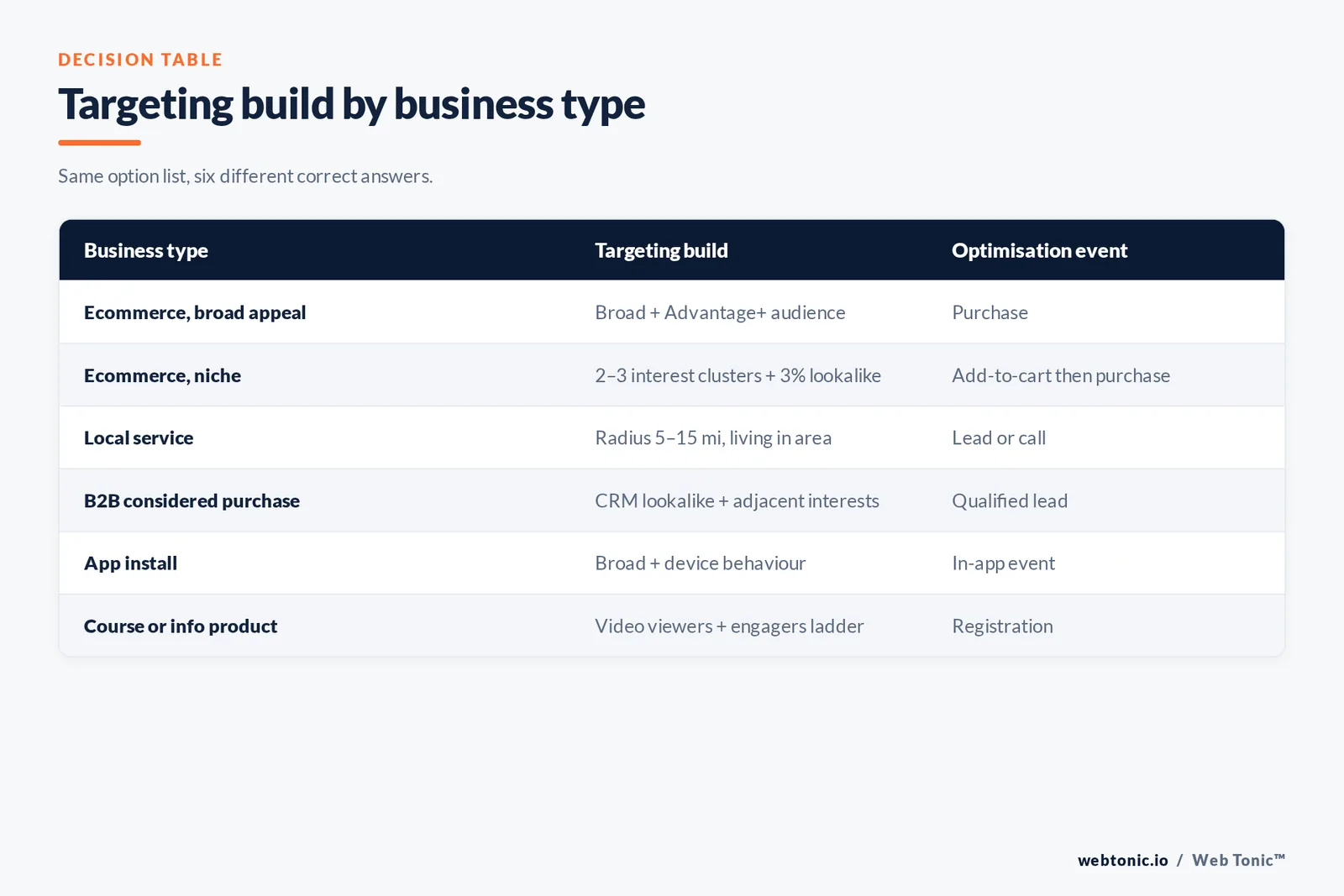
The same option list produces different builds depending on what you sell. This is the fastest way to shortcut a strategy debate.
| Business type | Primary targeting build | Optimisation event | Signal to fix first |
|---|---|---|---|
| Ecommerce (broad appeal) | Broad + Advantage+ audience, buyers excluded | Purchase | Catalogue + CAPI purchase events |
| Ecommerce (niche) | 2–3 interest clusters + 3% lookalike | Add-to-cart, then purchase | Event volume per ad set |
| Local service | Radius 5–15 mi, living-in, age widened | Lead or call | Offline conversion uploads |
| B2B / considered purchase | CRM lookalike + job-adjacent interests | Qualified lead | Lead-quality feedback loop |
| App install | Broad + device behaviour | App event (not install) | SDK event mapping |
| Course / info product | Video viewers + engagers ladder | Registration | ThruPlay-based seeds |
Placement targeting: where on Instagram the ad actually appears
Audience and placement interact, and placement-level results diverge sharply in Socialinsider's Instagram ads benchmarks. A Stories-first audience needs vertical creative, and Explore behaves differently from Feed because the user arrived in discovery mode.
| Placement | Format | User mindset | Best-fit objective |
|---|---|---|---|
| Feed | 1:1 or 4:5 image, carousel, video | Browsing known accounts | Conversions, traffic |
| Stories | 9:16 full screen, up to 60s | Fast, tap-forward | Offers, app installs |
| Reels | 9:16 sound-on video | Entertainment, discovery | Reach, video-seeded funnels |
| Explore | Feed-style, appears after a tap | Actively looking for new things | Prospecting |
| Profile feed & search | Feed-style | Navigational | Incremental cheap reach |
Ad Types and How Each One Changes Your Setup
The ad format you choose changes which audience signals matter. A Reels clip builds viewer lists you can target later; a Collection ad with an Instant Experience storefront needs a catalogue before targeting can get clever.
| Ad type | What the user sees | Audience it creates for later | Targeting note |
|---|---|---|---|
| Photo creative | Single image in Feed or Explore | Page views, link clicks | Cheapest to test 5 interest clusters |
| Video creative | In-feed clip, sound optional | Video viewers up to 365 days | Best seed builder for cold campaigns |
| Carousel creative | Up to 10 swipeable cards | Engagement, product views | Highest organic-style engagement format |
| Stories creative | Full-screen 9:16 with stickers, text and GIFs | Story engagers | Pair with a swipe-up style call to action button |
| Reels placements | Sound-on vertical video between Reels | ThruPlay viewers | Widest cheap reach for cold prospecting |
| Explore placement | Feed-style unit after a user taps a post | Discovery engagers | Explore ads do not sit in the Explore grid itself |
| Collection / Instant Experience | Storefront that opens inside the app | Catalogue product viewers | Enables dynamic product targeting |
| Shopping units | Tagged products from the catalogue | Add-to-cart, product-set viewers | Needs a clean feed to target by product set |
How to Build an Audience in Ads Manager, Step by Step
Each one is built in the same place. These are the eight screens you will pass through, in order, when you create a campaign and choose its targeting.
| Step | Screen | What to choose | Most common error |
|---|---|---|---|
| Step 1 | Choose objective | Sales, leads, engagement, traffic, awareness or app promotion | Picking engagement when you want sales |
| Step 2 | Declare special categories | Housing, employment, credit, social issues if applicable | Declaring late and losing the audience build |
| Step 3 | Conversion location | Website, app, calls, Instagram profile or messaging | Sending high-intent users to a profile |
| Step 4 | Set budget and schedule | Daily budget or lifetime budget, plus start date | Lifetime budget on an always-on campaign |
| Step 5 | Create custom audience | Website, customer list, app, Instagram account or video source | Building one giant all-visitors audience |
| Step 6 | Audience controls | Location, minimum age, exclusions | Leaving purchasers inside the prospecting audience |
| Step 7 | Placements | Advantage+ placements, or Instagram-only manual selection | Instagram-only with square-only creative |
| Step 8 | Ad level | Creative, primary text, call to action button, tracking | One creative per audience |
What Targeting Does to Your Media Cost
Targeting is a price lever before it is a relevance lever: the narrower the audience, the fewer people Meta can choose between, and the higher the CPM it must pay to reach them.
| Audience choice | Typical effect on CPM | Typical effect on CPA | When it is still correct |
|---|---|---|---|
| Broad, country-wide | Lowest | Lowest with 50+ weekly events | Mass-appeal products |
| Single interest cluster | Slightly higher | Neutral | Niche products, small budgets |
| Three stacked interests | Materially higher | Worse — learning limited | Almost never |
| 1% lookalike | Higher | Better if the seed is clean | 500+ high-value buyers |
| Warm remarketing | Highest | Lowest of all | Always, capped at 15–25% of budget |
| Instagram-only placements | Higher than Advantage+ placements | Depends on creative fit | Brand needs Instagram-native context |
The learning phase decides how narrow you may go
Targeting maths is really budget maths. Divide your weekly budget by your target cost per action; if the result is under about 50, your audience is too small or your optimisation event is too deep.
| Weekly ad set budget | Target CPA | Weekly events | Verdict |
|---|---|---|---|
| $350 | $7 | 50 | Exits learning — narrow targeting is safe |
| $350 | $35 | 10 | Optimise for a shallower event |
| $1,400 | $70 | 20 | Consolidate ad sets, go broad |
| $140 | $14 | 10 | One ad set only, one audience |
Seven Instagram targeting traps
- Trap 1 — audience overlap. Two ad sets bidding for the same users inflates CPMs; keep overlap under 20% or merge them.
- Trap 2 — stacked narrow interests. Three narrow interests ANDed together can cut a reachable audience by 90% and trap the ad set in learning.
- Trap 3 — no purchaser exclusion. Prospecting budget quietly re-sells to people who already bought within 30 days.
- Trap 4 — 3-second video seeds. A scroll-past is not interest; seed from 50% views or ThruPlay.
- Trap 5 — stale CRM lists. Uploaded lists degrade; refresh at least every 90 days.
- Trap 6 — targeting change mid-flight. Editing the audience restarts learning; wait 7 days or duplicate instead.
- Trap 7 — one creative per audience. With engagement down 24% year over year, fatigue arrives before your audience is exhausted — a pattern documented across networks in Hootsuite's Social Trends research; ship 3–5 creatives per ad set.
What to review every week
| Check | Where | Healthy signal | Action if it fails |
|---|---|---|---|
| Frequency | Ad set breakdown, 7 days | Under 2.5 for cold audiences | Widen audience or refresh creative |
| Audience overlap | Audience overlap tool | Under 20% | Consolidate ad sets |
| Event match quality | Events Manager | 6.0+ on purchase events | Add CAPI parameters |
| Placement split | Placement breakdown | No placement above target CPA by 2x | Add placement-native creative |
| Learning status | Delivery column | Active, not "learning limited" | Merge ad sets or raise budget |

A 5-step build order
- Step 1 — Fix measurement first, and check any claim or endorsement in the creative against FTC disclosure guidance: pixel plus Conversions API: one clean purchase or qualified-lead event.
- Step 2 — Build the custom audience library: website 180-day tiers, CRM buyers, Instagram engagers 365 days, video 50% viewers.
- Step 3 — Launch one cold ad set (broad or a 2–3% lookalike) with buyers excluded and 3–5 creatives.
- Step 4 — Add a single retargeting ad set at 15–25% of budget, capped at 30 days.
- Step 5 — Review the five weekly checks above, then change one variable per week.
If you want the audience architecture, measurement and creative handled together, that is exactly what our performance creative and data intelligence teams build; the wider approach is on our services page, and more paid-social breakdowns sit on the blog.
FAQ
Can I target Instagram separately from Facebook?
Yes. In Ads Manager choose manual placements and select only the Instagram surfaces you want — Feed, Stories, Reels, Explore, profile feed and search. Costs usually rise slightly because you removed cheaper inventory, so compare cost per result, not CPM.
What is the minimum audience size for Instagram ads?
Meta will run an ad set at very small sizes, but delivery gets expensive fast. For cold prospecting aim for at least a few hundred thousand reachable users; for lookalike seeds you need 100 people from one country minimum, with 1,000–5,000 quality members working far better.
Is broad targeting really better than interests now?
It is better once your account produces roughly 50 optimisation events a week, because the delivery model then has enough feedback to outperform a manual list. Below that threshold, a small number of relevant interest clusters still gives the algorithm a useful starting point.
How often should I refresh audiences?
Rebuild lookalikes every 30–60 days so the seed reflects recent buyers, re-upload CRM lists at least quarterly, and leave pixel-based audiences alone — they refresh themselves inside their retention window.
Why did my Instagram ad targeting options disappear?
Two common reasons: the campaign was declared a Special Ad Category, which removes age, gender and detailed targeting and enforces a 15-mile minimum radius in the US, or the ad set is using Advantage+ audience, where your inputs move into a suggestions field.
Sources: Instagram for Business (advertising surfaces and formats); Sprout Social Instagram statistics; Socialinsider 2026 Instagram and Instagram ads benchmark studies; Buffer Instagram ads guide; eMarketer Instagram advertising statistics; Metricool Instagram ads study; Pew Research Center social media fact sheet; Hootsuite Social Trends research; PPC Land platform reporting; FTC business guidance on advertising disclosures.


