



Table of contents

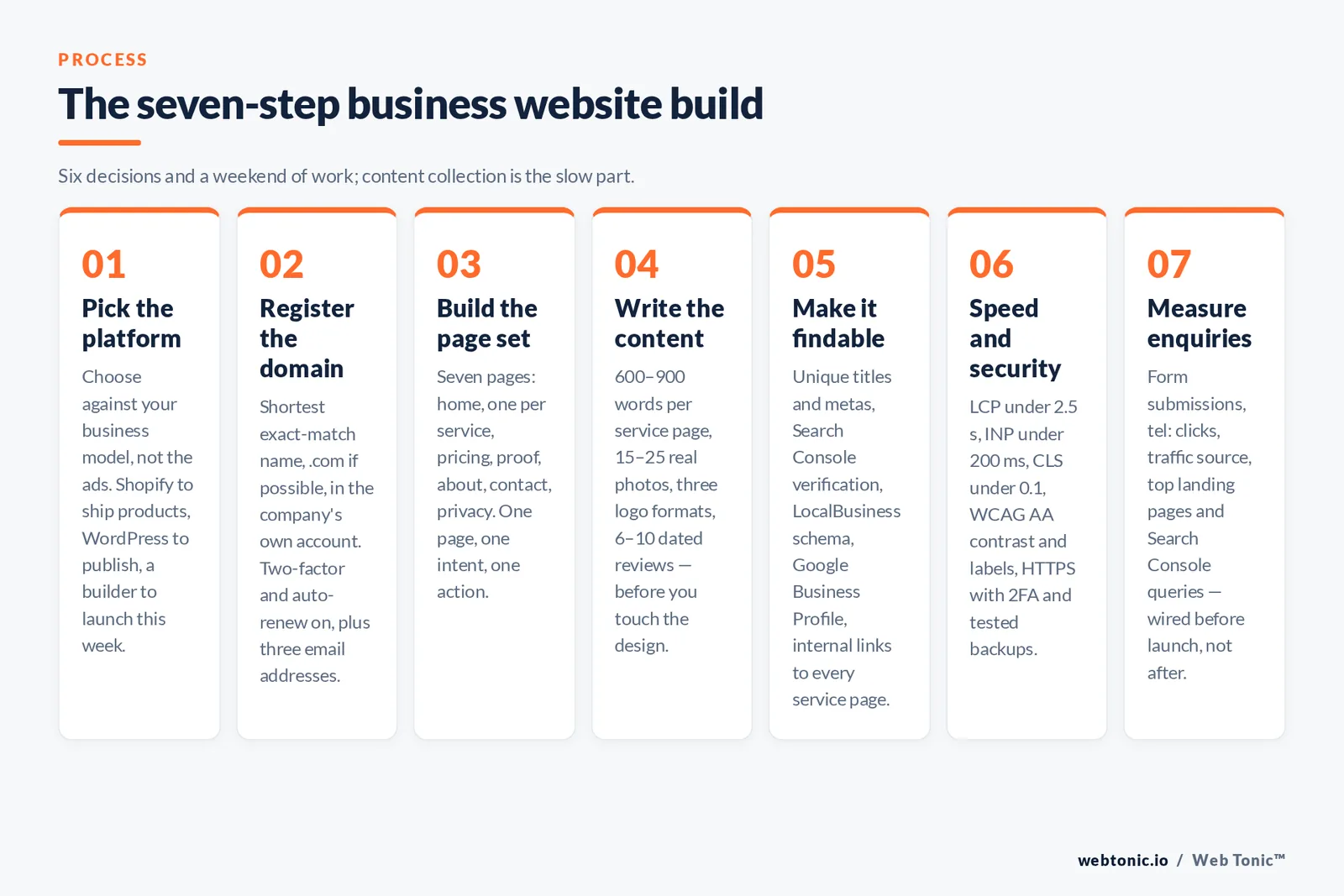
Making a business website takes six decisions and about a weekend of work: platform, domain, page set, content, trust signals, and how you will measure enquiries. Everything else is optional.
This guide walks the whole build in order, with the real platform costs, the page set that actually converts, and the launch checks most first sites skip.
Key Takeaways
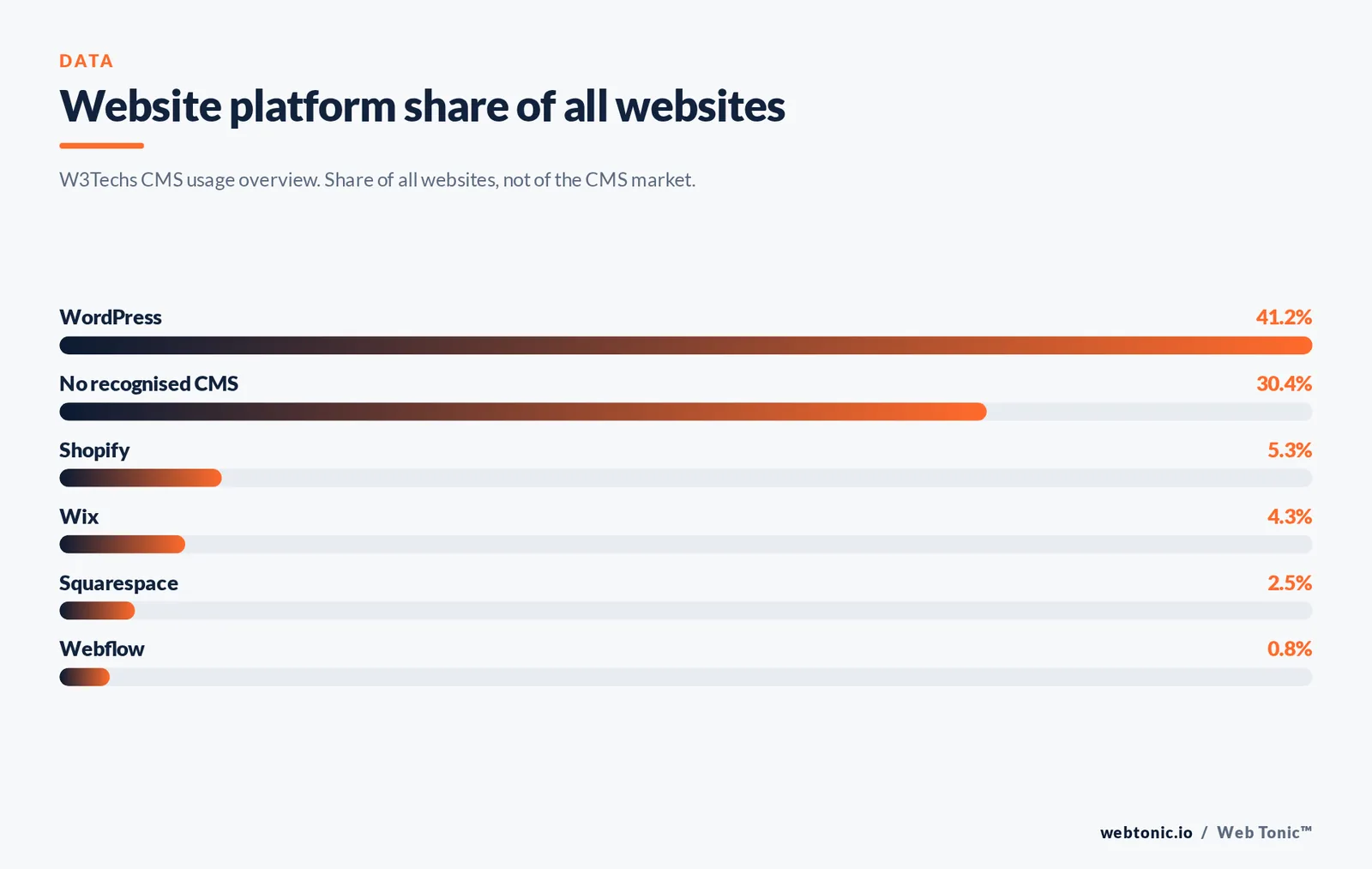
- WordPress powers 41.2% of all websites and 59.1% of the CMS market; Shopify sits at 5.3%, Wix 4.3%, Squarespace 2.5% and Webflow 0.8% — platform choice is not a coin flip, it is a business-model decision.
- About 30.4% of sites run no recognised CMS at all, which is why hand-coded and headless builds still make sense for some businesses.
- Mobile accounts for roughly 52.6% of web traffic against 45.9% desktop, so the phone layout is the primary design, not the fallback.
- Builder plans start low: Wix publishes tiers at $17, $29, $39 and $159 per month on annual billing, while Shopify lists $39, $79 and $299 per month with card rates from 2.9% + 30¢.
- Google's own performance target is a Largest Contentful Paint under 2.5 seconds, with interaction latency under 200 ms and layout shift under 0.1.
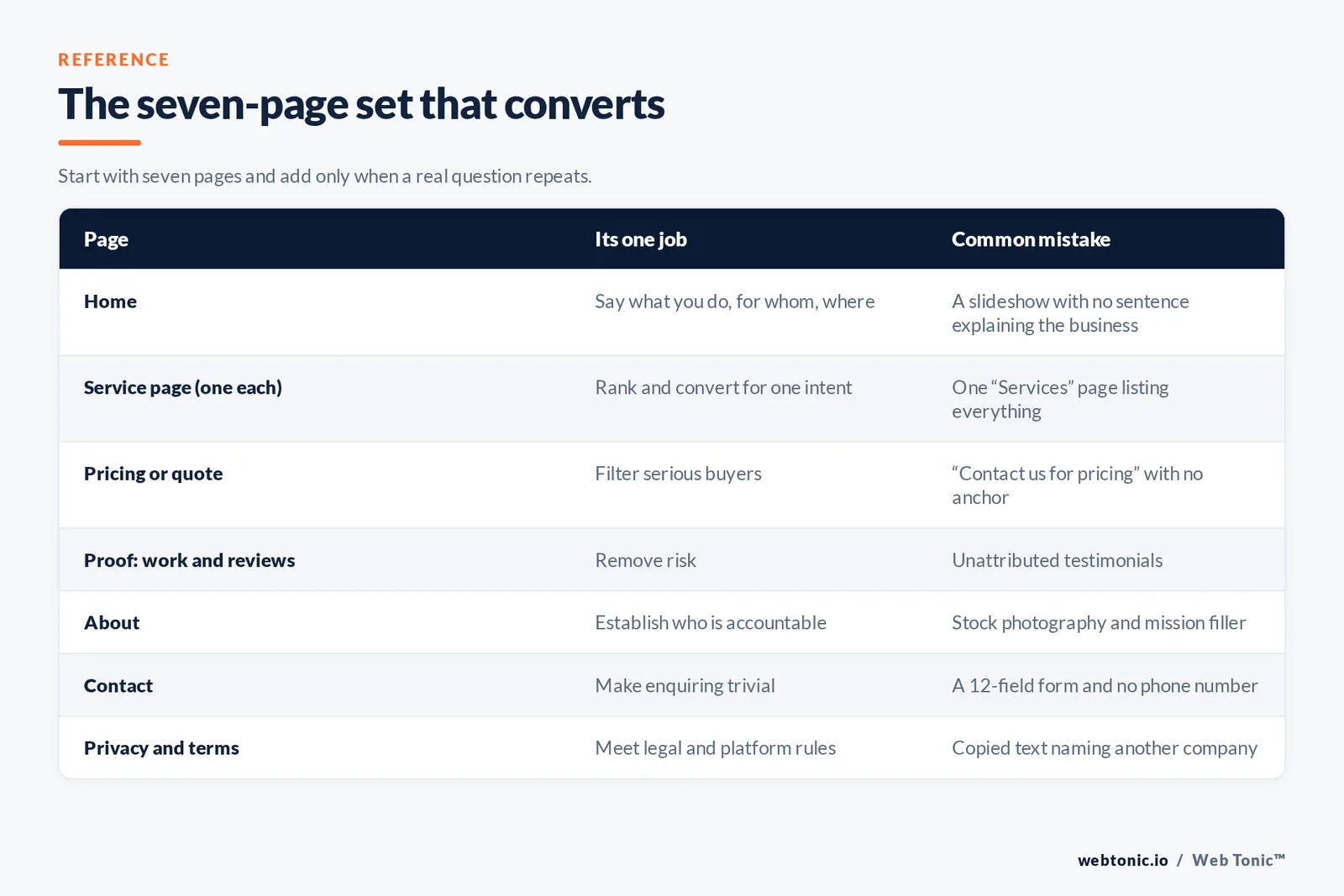
- A business site needs a minimum of 7 pages: home, one page per core service, about, contact, pricing or quote, proof, and privacy.
- Accessibility is a legal exposure, not a nice-to-have: WCAG is the referenced standard in US federal web guidance and in Section 508 procurement rules.
- Local businesses get more first-week traffic from a complete Google Business Profile than from the website itself — build both in the same sprint.
Step 1 — Pick the platform against your business model, not the ads
Every platform can produce a decent five-page site. They differ on what happens in year two: who can edit it, what it costs to extend, and whether you can leave.
| Platform | Market share of all sites | Best fit | Weakness | Who maintains it |
|---|---|---|---|---|
| WordPress | 41.2% | Content-heavy sites, blogs, service businesses that will publish | You own updates, backups and security | You or a retained developer |
| Shopify | 5.3% | Selling physical products online or in person | Monthly plan plus card rates plus apps | Platform handles hosting |
| Wix | 4.3% | Owner-built small business sites, fast launch | Harder to migrate away later | Platform, drag and drop editor |
| Squarespace | 2.5% | Design-led portfolios, studios, hospitality | Less flexible templates and integrations | Platform |
| Webflow | 0.8% | Marketing sites needing custom design plus a CMS | Steeper learning curve for non-designers | Designer or agency |
| Custom / headless | part of the 30.4% with no CMS | Product-led companies, complex integrations | Highest build cost and dependency on developers | Engineering team |
Share figures come from the W3Techs CMS usage overview. Compare current plan pricing directly at Wix, Shopify, Webflow and Squarespace, and note that self-hosted WordPress software is free while hosting is not.
| If this is true of your business | Choose | Because |
|---|---|---|
| You sell physical products and ship them | Shopify | Checkout, tax, inventory and payments are solved out of the box |
| You sell services locally and want to publish articles | WordPress | Cheapest long-run content publishing with full SEO control |
| You need a site live this week with no help | Wix or Squarespace | Templates plus hosting plus domain in one subscription |
| Design is your differentiator and a team will edit copy | Webflow | Custom visual design with a structured CMS behind it |
| The site is part of a software product | Custom build | Authentication, data and app routes need real engineering |
Step 2 — Register the domain and lock down the basics
Buy the shortest exact-match version of your trading name you can get, at a .com if possible. Two checks before you pay: confirm the name is not an existing trademark using the USPTO trademark search, and follow the naming guidance in the SBA's business-name guide so the domain, the legal entity and the signage match.
Rule 1 — register the domain in the company's own account, never a contractor's. Use an ICANN-accredited registrar, enable two-factor authentication and turn on auto-renew. Domain loss is the single most expensive avoidable website incident.
Limit 2 — plan for 3 email addresses from day one (info, accounts, your own name) on your own domain. A business site with a free webmail address in the footer loses enquiries.
Step 3 — Build the page set that converts
Most first websites have too many pages and too little proof. Start with seven and add only when a real question repeats.
| Page | Its one job | Must contain | Common mistake |
|---|---|---|---|
| Home | Say what you do, for whom, where | Headline, primary action, proof strip, service links | A slideshow with no sentence explaining the business |
| Service page (one per service) | Rank and convert for one intent | Scope, process, price signal, FAQ, action | One "Services" page listing everything |
| Pricing or quote | Filter serious buyers | Ranges, what drives cost, what is excluded | "Contact us for pricing" with no anchor at all |
| Proof (work, reviews, case studies) | Remove risk | Named results, photos, dated reviews | Unattributed testimonials |
| About | Establish who is accountable | Real people, credentials, location, history | Stock photography and mission-statement filler |
| Contact | Make enquiring trivial | Phone, email, address, hours, short form, map | A 12-field form and no phone number |
| Privacy and terms | Meet legal and platform requirements | Data use, cookies, contact for requests | Copied text naming another company |
Rule 2 — one page, one intent, one action. If a page has to serve two searches, it becomes two pages.
Step 4 — Write and shoot the content before you touch the design
Design decisions made around placeholder text produce layouts that cannot hold real content. Write first.
| Asset | Minimum quantity | Spec | Cheapest credible source |
|---|---|---|---|
| Service page copy | 600–900 words per service | Answer-first, scannable headings, one FAQ block | Your own sales calls, transcribed |
| Photography of the real business | 15–25 images | Long edge 1600–2000 px, compressed, descriptive alt text | A half-day local photographer or a good phone in daylight |
| Logo files | 3 formats | SVG, transparent PNG, square favicon at 512 x 512 | Designer once, reused everywhere |
| Reviews and testimonials | 6–10 | Name, role or location, date, verifiable source | Existing customers, asked directly |
| Short intro video | 1 (optional) | Under 60 seconds, captioned, vertical crop available | Phone plus a lapel mic |
Trap 1 — never launch with stock photos of a different business. A single genuine photo of your premises, van or team outperforms a set of polished stock images, because it is checkable.
Step 5 — Make it findable
Getting indexed is mechanical. Work through it in order rather than buying tools.
Step 5.1 — set unique title tags and meta descriptions on all 7 pages. Google's SEO starter guide is the canonical reference for the basics and takes under an hour to apply.
Step 5.2 — submit the site in Search Console and confirm indexing; the Search Console help documentation covers verification and sitemap submission.
Step 5.3 — add LocalBusiness structured data with your name, address, phone and hours, matching your listings exactly.
Step 5.4 — complete your Google Business Profile, including photos, which for local businesses usually delivers enquiries before organic rankings do.
Step 5.5 — build 2 internal links from the home page to every service page, and one from each service page back to contact.
Step 6 — Speed, accessibility and security before launch
These three are where amateur sites are separated from professional ones, and all three are testable in an afternoon.
| Check | Target | How to test | Most common fix |
|---|---|---|---|
| Largest Contentful Paint | under 2.5 s | PageSpeed Insights on your top 3 pages | Compress and correctly size the hero image |
| Interaction to Next Paint | under 200 ms | PageSpeed Insights field data | Remove unused scripts and chat widgets |
| Cumulative Layout Shift | under 0.1 | PageSpeed Insights lab data | Set explicit width and height on images |
| Mobile layout | no horizontal scroll at 375 px | Browser device emulation plus a real phone | Fluid images and a single-column stack |
| Accessibility | WCAG AA contrast, labels, keyboard nav | Keyboard-only pass plus an automated checker | Contrast, form labels and alt text |
| Security | HTTPS, 2FA, patched plugins, backups | Admin audit and a restore test | Turn on automatic updates and offsite backups |
Use PageSpeed Insights for the measurements and web.dev's Core Web Vitals reference for the thresholds. For accessibility, the WCAG standard is what US federal web accessibility guidance and Section 508 procurement rules point to. For security hygiene, CISA's Secure Our World guidance covers the basics that stop most small-business compromises.
Trap 2 — mobile is the default view. With roughly 52.6% of traffic on phones, a layout that only looks right on a 27-inch monitor is broken for the majority of visitors.
What a business website actually costs
Two honest budgets: the owner-built route and the professionally built route. Neither includes advertising.
| Cost line | Owner-built | Professionally built | Notes |
|---|---|---|---|
| Domain | Annual registration fee | Same, in your account | Never let an agency hold it |
| Platform or hosting | From about $17/mo on a builder plan | Builder plan or managed hosting | Ecommerce plans start around $39/mo |
| Design and build | Your time: 20–40 hours | Project fee scaled to page count | Page count and integrations drive the quote |
| Copywriting | Your time: 8–16 hours | Per-page fee | Cheapest place to raise conversion rate |
| Photography | Phone plus daylight | Half-day local shoot | Highest-trust asset per dollar |
| Ongoing maintenance | 1–2 hours/month | Retainer or per-request | Updates, backups, small edits |
| Payments | Card rates from 2.9% + 30¢ | Same rails | Only if you sell online |
Trap 3 — a cheap build with no measurement is the most expensive option. A site that takes enquiries you cannot attribute makes every later marketing decision a guess.
Step 7 — Measure enquiries from day one
Install analytics before launch, not after the first busy week.
| What to track | Why | Where it comes from |
|---|---|---|
| Form submissions | Primary conversion for service businesses | Analytics event on the thank-you state |
| Phone clicks | On mobile, often the majority of enquiries | Click event on tel: links |
| Traffic source | Tells you which channel to fund | Analytics acquisition report plus UTMs |
| Top landing pages | Shows which service pages earn attention | Analytics landing-page report |
| Search queries | Reveals the words customers actually use | Search Console performance report |
| Core Web Vitals field data | Catches speed regressions after edits | Search Console and PageSpeed Insights |
If you would rather hand the build over, our web development team builds and measures business sites, our data intelligence team wires the tracking, and growth marketing takes it from launch to demand. More practical guides sit on the blog, or you can get in touch with your page list and we will tell you what it needs.
The four-week launch plan
Phase 1 — week 1: decide. Platform, domain, page list, one competitor site to beat. Register the domain and set up email.
Phase 2 — week 2: content. Write all 7 pages, shoot 15+ photos, collect 6 reviews, prepare logo files.
Phase 3 — week 3: build. Template, mobile-first layout, forms with real notifications, analytics, structured data.
Phase 4 — week 4: test and launch. Speed, accessibility and security checks, Search Console verification, Google Business Profile completion, then go live and publish the URL everywhere your business is listed.

FAQ
How long does it take to make a business website?
A focused owner can build a credible seven-page site in about 20 to 40 hours of work, usually spread over three or four weeks because content collection is the slow part. Writing the copy and gathering photos and reviews typically takes longer than assembling the pages. Professional builds run three to eight weeks, and the timeline is almost always set by how fast the business supplies content and approvals, not by the developer.
Can I make a business website for free?
You can build one on a free builder tier, but it will carry platform branding and usually cannot use your own domain, which undermines the credibility the site exists to create. The minimum realistic spend is a domain plus a paid builder plan — Wix's entry tier is published at $17 per month on annual billing, and self-hosted WordPress software is free but still needs paid hosting. Treat the domain and a professional email address as non-negotiable line items.
Do I need a website if I have social media and a Google Business Profile?
Yes, because you do not control the other two. A Google Business Profile is often the first source of enquiries for a local business and should be completed in the same sprint as the site, but it cannot host your pricing, your service detail, your case studies or your forms, and its rules can change without notice. The website is the asset you own; the profiles are distribution.
Which is better for a small business: WordPress or a website builder?
Choose a builder such as Wix or Squarespace if you want a site live quickly, will maintain it yourself and do not expect to publish much. Choose WordPress if you plan to publish content regularly, want full control of SEO and structure, and either have a developer or are comfortable managing updates, backups and security. WordPress's 59.1% CMS market share means abundant help and plugins; the trade-off is that maintenance is genuinely your responsibility.
How many pages should a new business website have?
Seven is the working minimum: home, one page per core service, pricing or quote, proof, about, contact, and privacy. One page per service matters more than total page count, because each service page targets a distinct search intent and can be measured on its own. Add pages only when a question comes up repeatedly in sales conversations — a large site full of thin pages performs worse than a small site of complete ones.
Sources
W3Techs content management system usage overview · Statcounter platform market share · Wix, Shopify, Webflow and Squarespace published pricing pages · WordPress.org · Google Search Central SEO starter guide, Search Console help and LocalBusiness structured data documentation · Google Business Profile help · PageSpeed Insights and web.dev Core Web Vitals · W3C WCAG · ADA.gov web accessibility guidance and Section508.gov · CISA Secure Our World · USPTO trademark search · SBA business-name guidance · ICANN accredited registrar list. Pricing and share figures current as of publication; verify plan pricing for your region before budgeting.


