



Table of contents
Ask in person or by a short message within 24 hours of a good experience, then hand the customer a direct review link so leaving the review takes one tap. That single habit, repeated, is what separates businesses with 200 reviews from businesses with nine.
Key Takeaways
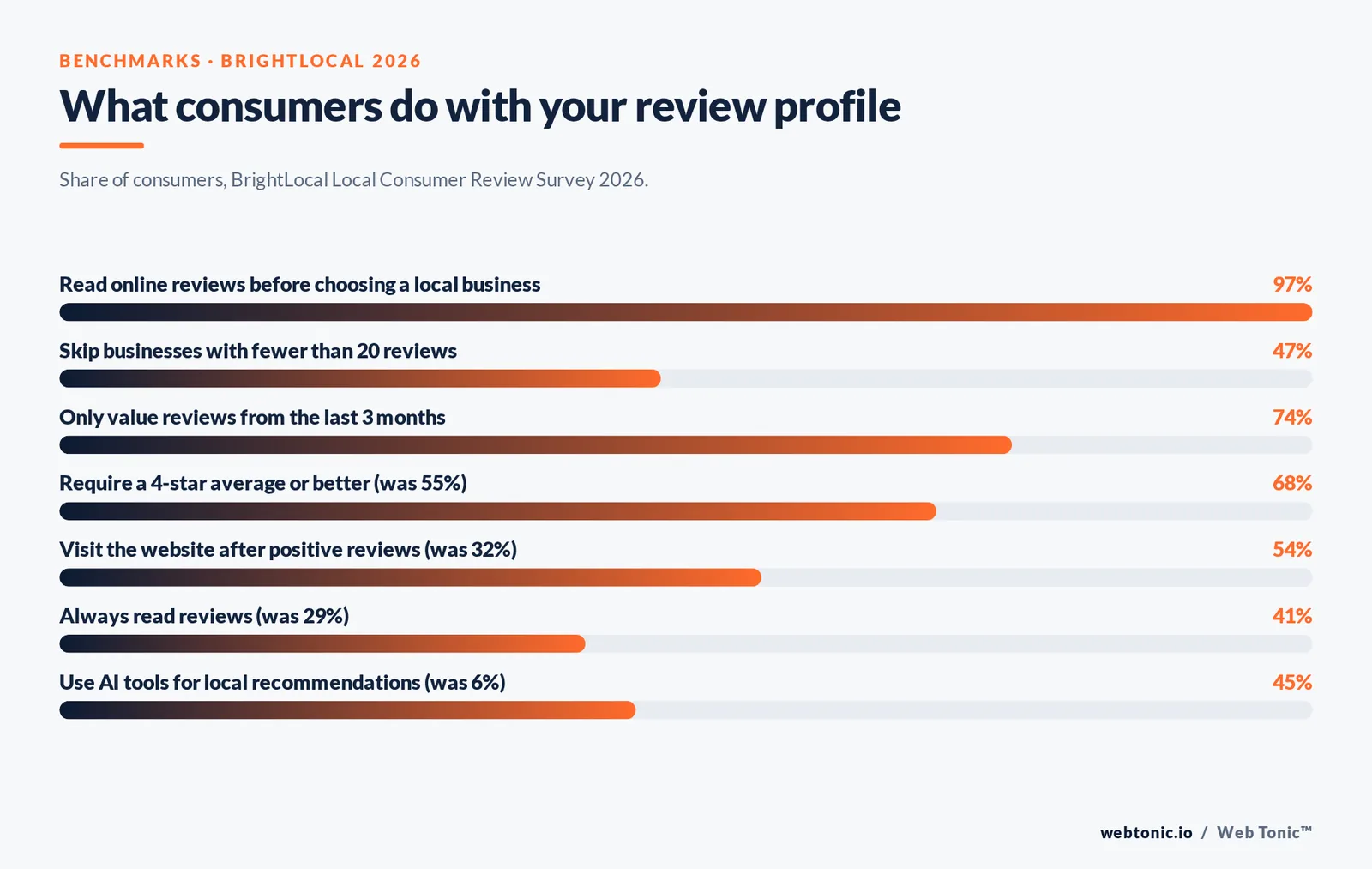
- 97% of consumers read online reviews before choosing a local business, and 41% now say they always read them, up from 29% a year earlier (BrightLocal 2026).
- 47% of consumers will not use a business with fewer than 20 reviews, so volume is a gate before quality even gets considered.
- 74% only value reviews from the last 3 months — a review programme is a recurring habit, not a one-off campaign.
- Rule 1: never gate, filter or pay for reviews. The FTC's rule on fake reviews carries civil penalties, and Google removes incentivised content.
- 68% of consumers require a 4-star average or better, up from 55% the previous year, which makes replying to negative reviews part of the asking system.
Why review requests work better than review hope
Most businesses have a review problem that is really an asking problem. Happy customers do not think about writing anything; unhappy ones do. Left alone, the sample skews negative and thin. A deliberate review request puts the ask in front of the whole population of satisfied customers instead of only the vocal minority, and that changes both the star average and the volume that consumers use as a trust gate.
The commercial case is not vague. BrightLocal's 2026 Local Consumer Review Survey found 85% of consumers are more likely to use a business after reading positive reviews and 77% are less likely after negative ones, while 54% now click through to the website after positive reviews, against 32% in 2019. Reviews are no longer only a reputation asset; they are a click driver. Salesforce's connected customer research tracks the same expectation shift on the experience side.
Where consumers look has also moved. Google remains dominant as a review source but slipped from 83% to 71% in a single year, Apple Maps climbed from 14% to 27%, and generative AI tools jumped from 6% to 45% as a local recommendation source. Since AI answers summarise the review text they can reach, the wording customers use in reviews now feeds discovery as well as decisions.
| Consumer behaviour | Figure | What it forces you to do |
|---|---|---|
| Read reviews before choosing | 97% | Treat the review profile as a landing page |
| Always read reviews | 41% (was 29%) | Assume every prospect sees your worst review |
| Skip businesses under 20 reviews | 47% | Hit 20 reviews per location as a floor |
| Only value reviews under 3 months old | 74% | Ask continuously, not in bursts |
| Require a 4+ star average | 68% (was 55%) | Fix service issues before scaling requests |
| Visit the website after positive reviews | 54% (was 32%) | Count reviews as a traffic channel |
| Use AI tools for local recommendations | 45% (was 6%) | Encourage descriptive, specific review text |
The rules before the tactics
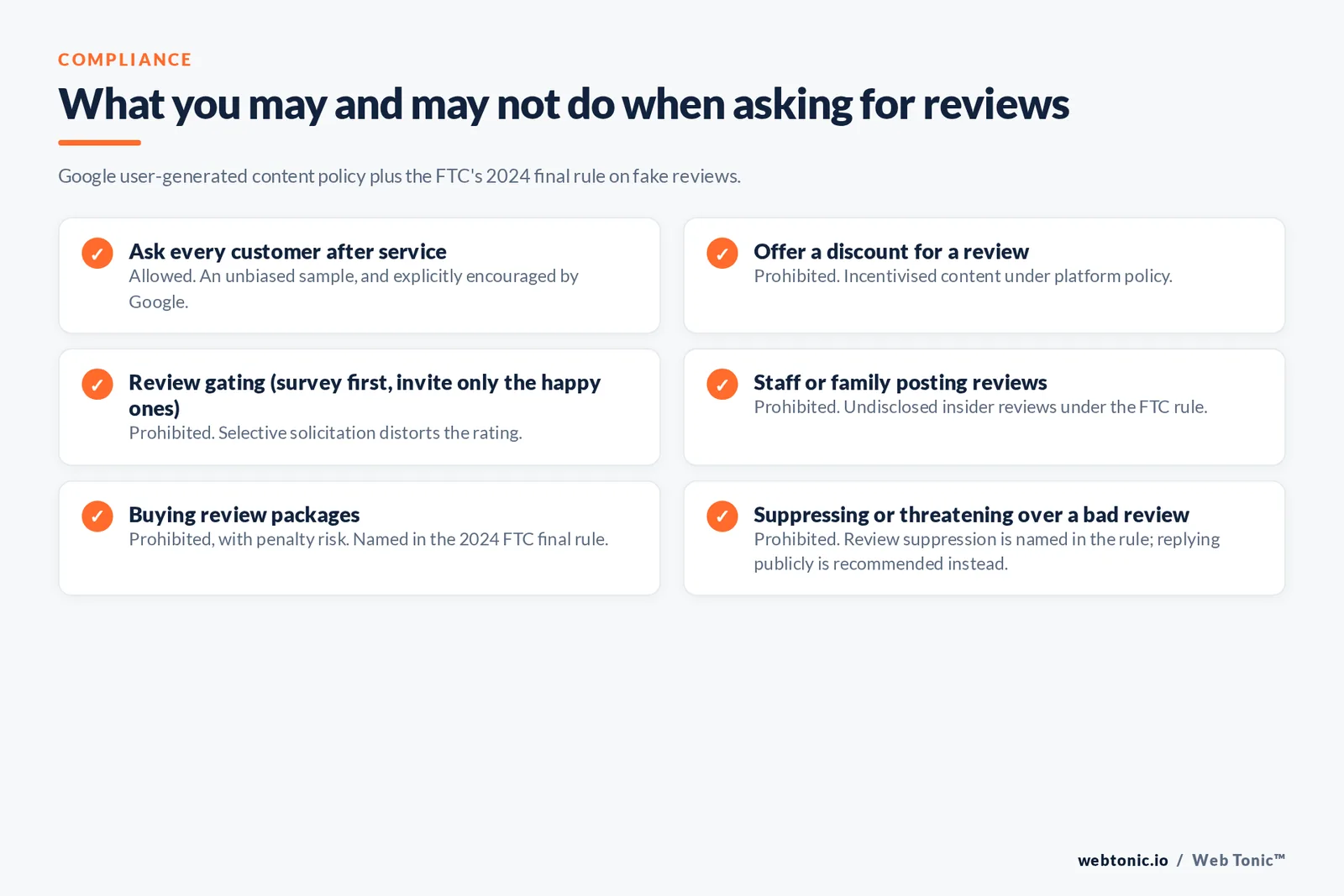
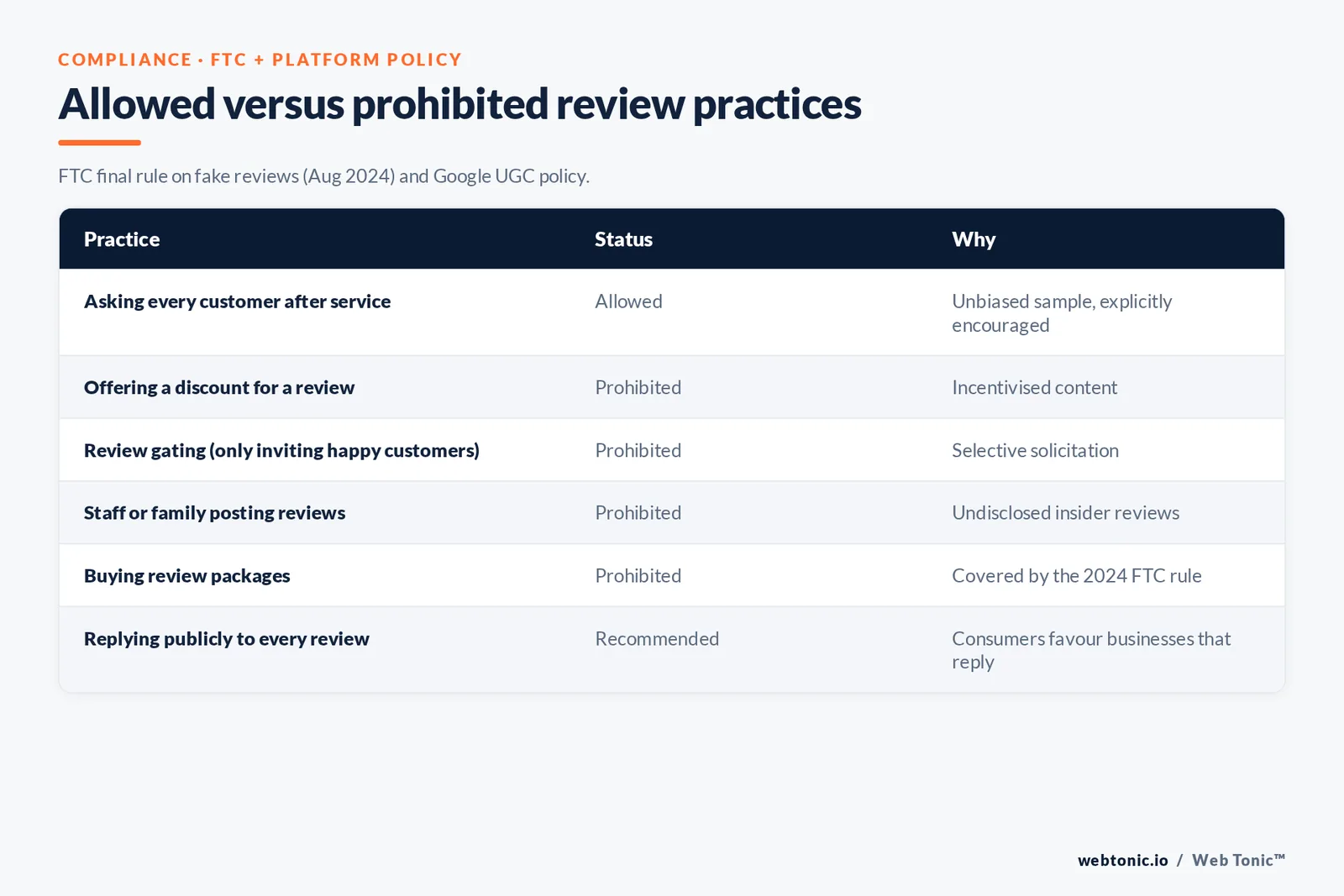
Review generation has hard compliance limits, and they are cheaper to learn now than after a penalty. In August 2024 the FTC announced a final rule banning fake reviews and testimonials, covering bought reviews, insider reviews that hide the relationship, and review suppression. The FTC endorsement guides FAQ spells out the disclosure expectations when any material connection exists.
Platform policy is separate and stricter in places. Google's prohibited and restricted content policy for user-generated content bans incentivised and solicited-in-exchange content, and Google's official tips to get more reviews confirm the sanctioned approach: ask all customers, do not offer anything in return, and never buy reviews. Trustpilot's guidelines apply the same logic to invitations, which must go to every customer rather than a hand-picked list.
| Practice | Status | Why |
|---|---|---|
| Asking every customer after service | Allowed | Unbiased sample, explicitly encouraged by Google |
| Offering a discount for a review | Prohibited | Incentivised content under platform policy |
| Review gating (surveying first, only inviting happy customers) | Prohibited | Selective solicitation distorts the rating |
| Staff or family posting reviews | Prohibited | Undisclosed insider reviews under the FTC rule |
| Buying review packages | Prohibited, penalty risk | Directly covered by the 2024 FTC final rule |
| Suppressing or threatening over a bad review | Prohibited | Review suppression is named in the rule |
| Replying publicly to every review | Recommended | Consumers favour businesses that reply |
Step 1 — Pick the review platform that actually matters to you
Review platform choice is a business-model question, not a preference. A local service business lives on the Google Business Profile; a hotel or restaurant cannot ignore Tripadvisor; a B2B SaaS company needs reviews where buyers shortlist software. Spreading thin across six platforms produces six anaemic profiles. Limit 2: pick a primary platform and one secondary, and only add a third once the primary passes 50 reviews.
| Business type | Primary platform | Secondary | First milestone |
|---|---|---|---|
| Local service (roofing, dental, legal) | Google Business Profile | Industry directory or BBB | 25 Google reviews per location |
| Restaurant or cafe | Google Maps | Tripadvisor | 50 reviews, 4.4+ average |
| Hotel and travel | Tripadvisor | 100 reviews, recent 90 days | |
| Ecommerce brand | On-site product reviews | Trustpilot | 10 reviews on the top 20 SKUs |
| B2B services | Google Business Profile | LinkedIn recommendations | 20 reviews naming the service |
| SaaS product | Software marketplace | 30 reviews with role detail |
Step 2 — Build the review link so it takes one tap
The single biggest conversion lever is the link. Google generates a short review link inside the Business Profile that opens the review box directly; Google's guidance on managing customer reviews covers where to find it and how replies work. Put that link everywhere a customer already is: the invoice footer, the confirmation email, the SMS, the receipt QR code, the email signature of every person who touches customers.
Trap 1: sending customers to a homepage or a Maps listing and expecting them to find the review button. Every extra tap costs a double-digit share of completions. Trap 2: hiding the link behind a login-gated portal.
| Placement | Effort to add | Best for | Notes |
|---|---|---|---|
| Post-service SMS | Low | Home services, clinics | Highest completion rate of any channel |
| Transactional email footer | Low | Ecommerce, subscriptions | Zero incremental send cost |
| QR code on receipt or table card | Low | Restaurants, retail | Works while the experience is fresh |
| Invoice or quote PDF | Medium | B2B, trades | Pair with the payment confirmation |
| Email signature | Low | Any team with client email | One line: "Happy with our work? Review us" |
| Thank-you page | Medium | Ecommerce | Better for on-site reviews than Google |
| In-person card handed over | Low | Field service | Ask verbally first, then hand the card |
Step 3 — Ask at the moment of proven satisfaction
The best time to request a review is the point where the customer has just felt the value and has not yet moved on. For most service businesses that window is 0 to 24 hours after completion; for products it is 3 to 14 days after delivery, once the item has actually been used. Asking too early produces thin reviews, asking too late produces silence.
Anchor the trigger to an event in your system rather than a calendar. A closed job, a delivered shipment, a completed appointment, a resolved support ticket: each is an objective satisfaction signal. If you already measure experience with a survey score, NPS methodology and CSAT measurement tell you which cohorts are worth a public ask — but remember that using the score to filter who gets invited is gating, and gating is prohibited.
| Trigger event | Ask timing | Channel | Expected response |
|---|---|---|---|
| Job marked complete | Same day, within 4 hours | SMS with review link | Highest, experience is vivid |
| Appointment finished | Verbal at checkout, SMS 2 hours later | In person, then SMS | Strong when staff asks first |
| Product delivered | Day 7 to 14 | Moderate, higher detail | |
| Support ticket resolved | Within 24 hours | Email reply thread | Moderate |
| Renewal or repeat purchase | Immediately after | High intent, loyal cohort | |
| Milestone reached (90 days, 1 year) | On the anniversary | Email or call | Best for B2B detail |
Step 4 — Use wording that matches your brand voice
A review request should be short, specific and free of pressure. Name the person, name the job, ask one question, give the link. Avoid "5-star review" phrasing: it signals you want a rating rather than an honest account, and it edges toward solicitation of a specific outcome.
| Scenario | Template | Why it works |
|---|---|---|
| SMS after a service call | "Hi Maria, thanks for having us out today. Would you mind leaving a quick review about how the repair went? It takes 30 seconds: [link] — Dan, Ridgeline Plumbing" | Named tech, named job, effort framed |
| Email after delivery | "Your order landed a week ago. If you've had a chance to use it, we'd love to hear what you think — one paragraph is plenty: [link]" | Waits for actual use, low bar |
| In person at checkout | "Glad that worked out. Reviews are how most people find us — would you be open to leaving one? I'll text you the link." | Verbal commitment before the link |
| B2B after a project phase | "Now that phase one is live, would you be willing to write a short review covering the results and how the team worked? Happy to send a few prompts." | Prompts raise specificity |
| Second reminder | "Just closing the loop on this one — if now isn't a good time, no problem at all: [link]" | Gives permission to decline |
| Long-term client | "You've been with us three years, which says more than anything we could write ourselves. Would you share that in a review?" | Tenure becomes the story |
Rule 2: one reminder, never two. Rule 3: ask a question ("how did the repair go?") rather than requesting a rating, because questions produce the descriptive text that AI summaries and human readers both use.
Step 5 — Automate the request without automating the relationship
Manual asking works until roughly 50 customers a month, after which it quietly stops happening. Set an automated review request that fires off your CRM, booking system or ecommerce platform, and keep a human exception path for sensitive accounts. Costs are small: transactional email starts near $0 to $10 per month at low volume on tools like MailerLite or Klaviyo, and US SMS runs around $0.0079 per message on Twilio's published pricing — under $8 per 1,000 requests.
Compliance follows the channel. Email requests to customers fall under CAN-SPAM requirements for accurate headers and a working opt-out; SMS needs prior express consent, so collect it at booking.
| Monthly customers | Approach | Tooling | Realistic monthly cost |
|---|---|---|---|
| Under 30 | Manual SMS from the tech's phone | Saved text snippet | $0 |
| 30 to 150 | Automated email plus manual SMS | ESP automation on order or job status | $0 to $30 |
| 150 to 500 | Automated SMS plus email fallback | CRM workflow with SMS API | $30 to $120 |
| 500 to 2,000 | Full review management platform | Dedicated reputation tool, multi-location | $150 to $500 |
| Multi-location, 2,000+ | Centralised programme with location scorecards | Enterprise reputation management suite | $500 to $3,000 |
Step 6 — Reply, and treat negative reviews as part of the system
Replies are the cheapest reputation work available and BrightLocal's data shows consumers favour businesses that respond to all reviews. Reply to positives in one or two sentences that repeat the service and city, which is useful context for both readers and search engines. For negatives, answer publicly once, acknowledge the specific failure, and move the detail to a private channel.
Where a review breaks policy — spam, conflict of interest, off-topic content — report it rather than argue. Google's prohibited and restricted content policy defines what is removable, and Google's Maps product blog publishes changes to how contributions are moderated.
| Review type | Reply within | Response shape | Trap to avoid |
|---|---|---|---|
| 5-star with detail | 3 days | Thank, name the service, invite return | Copy-pasting the same reply 40 times |
| 4-star with a small gripe | 2 days | Thank, address the gripe concretely | Ignoring the gripe entirely |
| 3-star, mixed | 1 day | Acknowledge, offer a fix, give a contact | Defensive explanation |
| 1-2 star, legitimate | 24 hours | Own it, apologise, state the change made | Blaming the customer publicly |
| 1 star, no detail | 24 hours | Ask for the order or job reference | Assuming it is fake |
| Policy-violating or fake | Same day | Short factual reply, then report it | Public accusations |
Step 7 — Put the reviews to work on your own properties
Reviews earned on a platform should not stay there. Pull them into service pages, quote documents and ad creative, and mark up on-site reviews so they can be understood by search engines. Google's review snippet documentation sets out where review markup is eligible, and the product structured data guide covers aggregate ratings for ecommerce. Speed still matters when you embed widgets, so watch the effect on Core Web Vitals.
This is where a review programme joins the rest of the marketing stack — our growth marketing and data intelligence teams treat review volume and recency as tracked metrics rather than a nice-to-have, and the web development side handles the on-page implementation. More on adjacent tactics in the Web Tonic blog.
| Where to use reviews | Format | Measurable effect |
|---|---|---|
| Service page above the fold | Star average plus 3 quotes | Form conversion rate |
| Proposals and quotes | Two quotes matched to the job type | Quote acceptance rate |
| Paid search ad assets | Rating and count in callouts | Click-through rate |
| Product pages | On-site reviews with markup | Add-to-cart rate |
| Local landing pages | Reviews naming the city | Map pack engagement |
| Sales follow-up email | One review link, one quote | Reply rate |
Measuring the programme
Track four numbers monthly per location: requests sent, reviews received, completion rate, and share of reviews from the last 90 days. A healthy service business converts roughly 5% to 15% of SMS requests and 1% to 5% of email requests into published reviews, so 200 requests a month is a realistic route to 10 to 25 new reviews. If completion sits under 2% across both channels, the problem is the link or the timing, not the customers.
| Metric | Healthy range | If it is low |
|---|---|---|
| Requests sent per 100 customers | 90 to 100 | The trigger is not firing on every job |
| SMS completion rate | 5% to 15% | Link depth or wording |
| Email completion rate | 1% to 5% | Subject line or send timing |
| Reviews in the last 90 days | 40%+ of total | Programme has become a campaign |
| Average rating | 4.4 to 4.9 | Service issue, not a marketing issue |
| Reply rate | 100% | Assign an owner and a daily check |

Seven traps that quietly kill review programmes
| Trap | What it looks like | Fix |
|---|---|---|
| Trap 3: gating | Survey first, invite only 9s and 10s | Invite everyone, use the survey internally |
| Trap 4: batching | 300 requests in one week, then nothing | Steady weekly cadence, recency matters |
| Trap 5: asking the wrong contact | Billing contact instead of the user | Route the ask to whoever felt the service |
| Trap 6: no owner | Everyone assumes someone replies | One named owner, weekly 15-minute check |
| Trap 7: incentives | "$10 off for a review" | Remove entirely, it risks removal and penalties |
| Trap 8: single platform blindness | 200 Google reviews, zero anywhere else | Add one secondary platform after 50 |
| Trap 9: ignoring old negatives | A 2-year-old 1-star with no reply | Reply now, dated replies still read well |
FAQ
What is the best way to ask a customer for a review?
Ask verbally at the moment the customer expresses satisfaction, then immediately send a short SMS or email containing a direct review link. The verbal commitment lifts completion, and the link removes the friction of finding your listing. Keep the message under 30 words, name the person and the job, and never mention a star rating.
Is it legal to offer a discount for a review?
No, not without significant risk. Google's user-generated content policy prohibits incentivised reviews, and the FTC's 2024 final rule on fake reviews and testimonials targets undisclosed material connections and bought reviews, with civil penalties available. Incentivised reviews can be removed and can expose the business to enforcement.
How many reviews does a small business need?
Twenty per location is the practical floor, because 47% of consumers say they will not use a business with fewer than 20 reviews. Fifty makes the average stable against a single bad review, and beyond that recency matters more than total volume, since 74% of consumers only value reviews from the last three months.
How often should I send review requests?
Continuously, tied to a completed-job or delivered-order trigger, rather than in campaign bursts. One reminder after five to seven days is acceptable; a second reminder annoys customers for very little additional yield. A steady weekly flow keeps a high share of your reviews inside the 90-day window consumers trust.
What should I do about a negative review?
Reply publicly within 24 hours, acknowledge the specific problem without blaming the customer, state what changed, and offer a direct contact to continue privately. Only report a review if it breaks platform policy — spam, conflict of interest, or off-topic content. Never attempt to suppress it, which is explicitly covered by the FTC rule.
Sources: BrightLocal Local Consumer Review Survey 2026 · Google Business Profile Help (tips to get more reviews, manage customer reviews, prohibited and restricted content) · Google Maps User Generated Content Policy · FTC press release, final rule banning fake reviews and testimonials (August 2024) · FTC endorsement guides FAQ · FTC CAN-SPAM compliance guide · Trustpilot Help Center guidelines · Qualtrics NPS and CSAT methodology · Salesforce State of the Connected Customer · Twilio US SMS pricing · MailerLite and Klaviyo pricing pages · Google Search Central review snippet and product structured data documentation · web.dev Core Web Vitals · Google Maps product blog. Figures checked August 2026.


