



Table of contents

Advertising on Facebook means running paid campaigns through Meta Ads Manager across Facebook, Instagram, Messenger and the Audience Network. This guide walks the full setup in 8 steps, then covers budgets, objectives, targeting, creative and the mistakes that waste a first month.
No agency jargon and no invented numbers — just the sequence a working media buyer follows.
Key Takeaways
- Everything runs through 3 levels: campaign (objective and budget), ad set (audience, placements, optimisation) and ad (creative). Get the level wrong and nothing else you do works.
- Your campaign objective tells Meta which outcome to buy. Choosing sales when you have no tracking, or traffic when you want purchases, is the single most common structural error.
- The Meta Pixel plus the Conversions API is not optional. Without server-side event data, the auction optimises on a partial picture of who converted.
- Every ad set enters a learning phase and exits it after roughly 50 optimisation events per week. Edits restart it, which is why constant tinkering costs money.
- Minimum daily budgets are small — roughly $1–$5 per ad set depending on what you optimise for — but a testing budget below $20–$30/day rarely produces readable data.
- Broad targeting with strong creative now beats narrow interest stacking on most accounts; Advantage+ audience treats your inputs as a suggestion, not a fence.
- Plan for 3–5 creative concepts per launch, each in 9:16 and 4:5, because creative is the biggest remaining performance lever.
- Judge results on cost per result and blended efficiency, not on in-platform ROAS alone, and give any change 7 days before you read it.
What Facebook advertising actually buys you
Facebook ads are an auction-based system that sells attention across Meta's surfaces. You do not buy a placement; you tell the system what outcome you want, who is eligible to see the creative, and how much you are willing to spend per day. The auction then decides which ad shows to each person based on bid, estimated action rate and ad quality.
Scale is the reason it stays on the plan. Meta's investor relations reporting and Statista's advertising revenue series both show a business built almost entirely on advertising, and Sprout Social's Facebook statistics put monthly usage above 3 billion people. eMarketer's digital advertising coverage is the useful counterweight: the channel is mature, so cheap reach is not the advantage it was five years ago. Creative quality and measurement are.
The practical implication for a new advertiser: you are not competing on targeting cleverness. You are competing on how well your offer, creative and tracking work together.
| Level | What you set here | Common mistake |
|---|---|---|
| Campaign | Objective, budget strategy, special ad category declaration | Picking an objective that does not match the business outcome |
| Ad set | Audience, placements, optimisation event, schedule, bid controls | Splitting one small audience across many ad sets, starving each of data |
| Ad | Creative, copy, headline, call to action, destination, tracking | One image ad per ad set, so there is nothing for the system to learn from |
How to advertise on Facebook in 8 steps
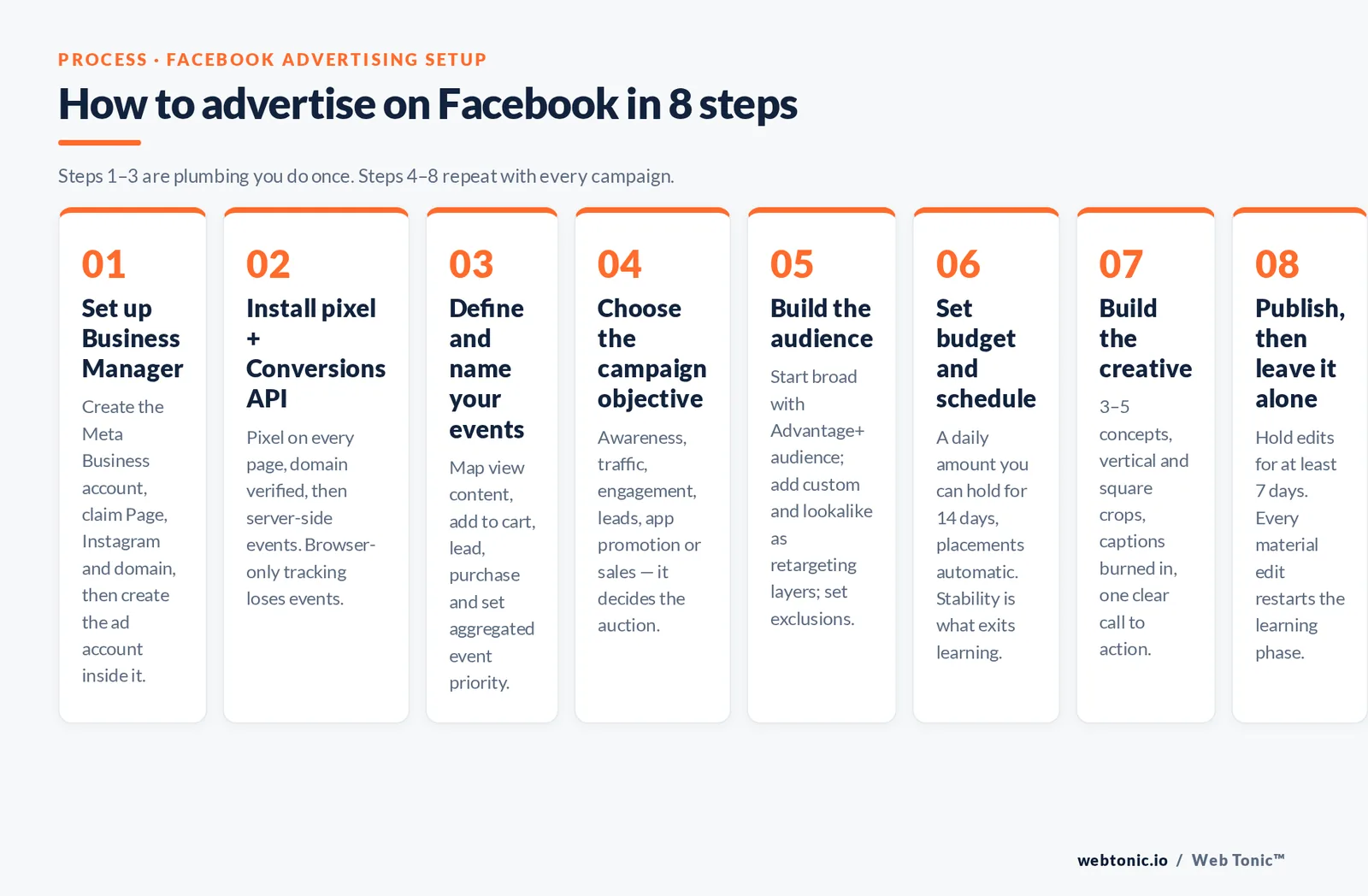
Work these in order. Steps 1–3 are plumbing you do once; steps 4–8 repeat with every campaign.
| Step | What to do | Why it matters |
|---|---|---|
| 1. Set up Business Manager | Create a Meta Business account, claim your Page, Instagram account and domain, then create the ad account inside it | Assets owned by a business account survive staff changes and can be shared with an agency cleanly |
| 2. Install the pixel and Conversions API | Add the Meta Pixel to every page, verify your domain, then send server-side events for key actions | Browser-only tracking loses events; server events restore signal the auction needs to optimise |
| 3. Define and name your events | Map standard events (view content, add to cart, lead, purchase) and set aggregated event priority | The optimisation event you choose later can only be one you already send reliably |
| 4. Choose the campaign objective | Pick from awareness, traffic, engagement, leads, app promotion or sales | The objective determines which auction you enter and which people Meta looks for |
| 5. Build the audience | Start broad with Advantage+ audience, add custom and lookalike audiences as retargeting layers, set exclusions | Overlapping audiences bid against themselves and inflate your own costs |
| 6. Set budget and schedule | Choose campaign or ad-set budget, set a daily amount you can hold for 14 days, leave placements automatic | Budget stability is what lets an ad set exit the learning phase |
| 7. Build the creative | Upload 3–5 concepts, each with vertical and square crops, captions burned in, one clear call to action | Creative variety is the input the delivery system uses to find pockets of demand |
| 8. Publish, then leave it alone | Review the pre-launch checklist, publish, and hold edits for at least 7 days | Every meaningful edit resets learning and throws away the data you just paid for |
Two details in step 2 catch most beginners. Domain verification is required before you can control event priority, and event deduplication between pixel and server events needs a shared event ID — get that wrong and your reported conversions double. Setup walkthroughs from Buffer and Social Media Examiner are worth reading before you touch the code.
Choosing the right campaign objective
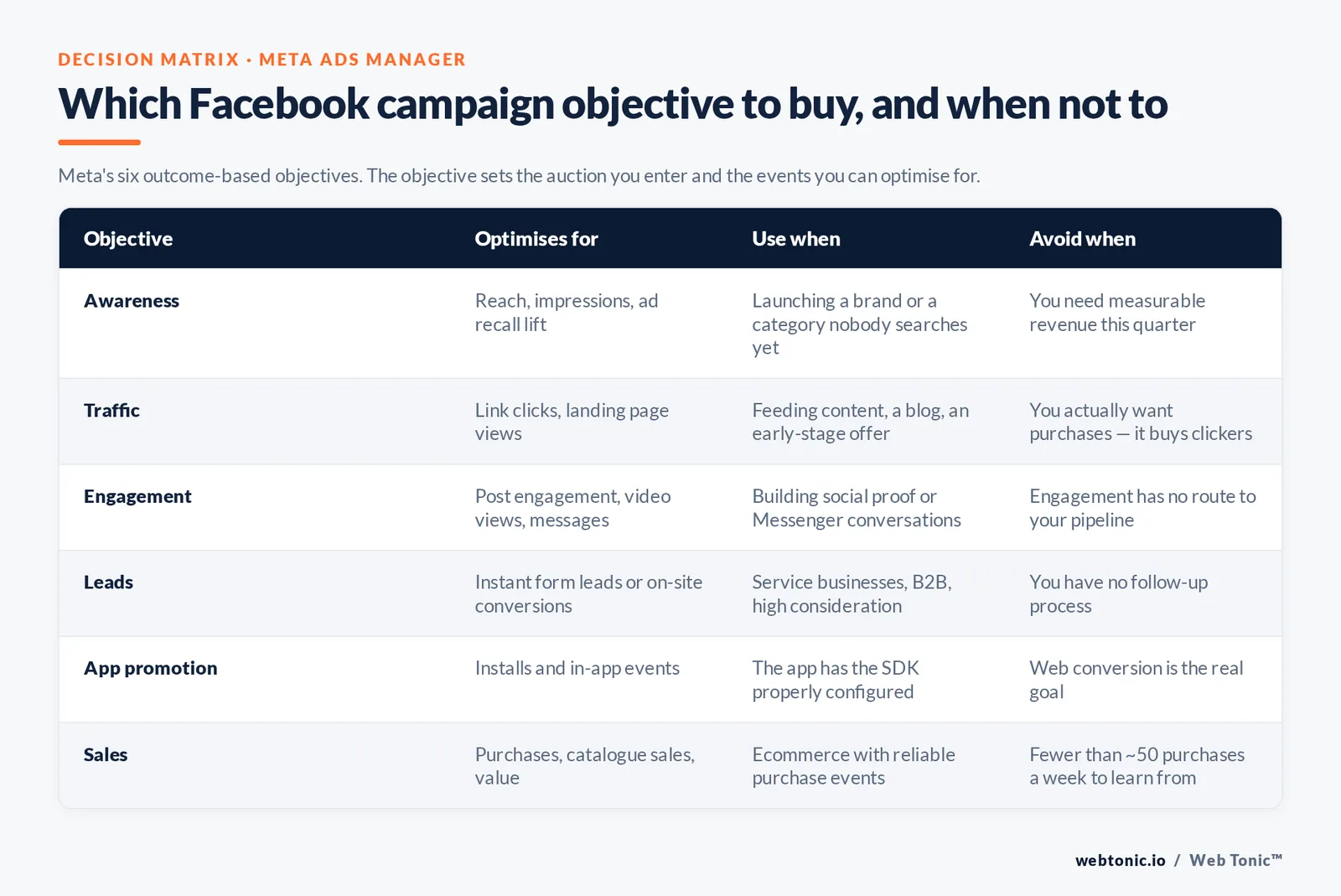
Meta consolidated its objectives into six outcome-based options. The choice is not cosmetic: it changes the bid landscape, the available optimisation events and the reporting you get.
| Objective | Optimise for | Use when | Avoid when |
|---|---|---|---|
| Awareness | Reach, impressions, ad recall lift | Launching a brand or a category nobody searches for yet | You need measurable revenue this quarter |
| Traffic | Link clicks or landing page views | Feeding content, a blog or an early-stage offer | You actually want purchases — it buys clickers, not buyers |
| Engagement | Post engagement, video views, messages | Building social proof or running Messenger conversations | Engagement has no route to your pipeline |
| Leads | Instant form leads or on-site conversions | Service businesses, B2B, high-consideration purchases | You have no follow-up process — instant-form leads go cold in hours |
| App promotion | Installs and in-app events | You have an app with the SDK properly configured | Web conversion is the real goal |
| Sales | Purchases, catalogue sales, value | Ecommerce with reliable purchase events flowing | Fewer than about 50 purchases a week exist to learn from |
The 50-events-per-week threshold is the practical hinge. Below it, an ad set optimising for purchases never leaves the learning phase and delivery stays erratic. The fix is to optimise one step up the funnel — add to cart, lead, or a qualified micro-conversion — until purchase volume supports the objective you want.
Targeting: broad, custom and lookalike audiences
Audience strategy has inverted over the last few years. Signal loss made narrow interest stacking less reliable, while Meta's machine learning got better at finding buyers when you give it room. In most accounts that means broad plus creative variety outperforms a hand-built interest cluster.
Structure it in three layers:
- Layer 1 — broad prospecting. Advantage+ audience with minimal inputs, country-level location, wide age range. This carries the majority of spend on most accounts.
- Layer 2 — custom audiences. Site visitors, video viewers, engagers, customer lists uploaded as hashed files. These are for retargeting, not for scale.
- Layer 3 — lookalike audiences. Built from your highest-value seed lists at 1–3% similarity. Useful when your customer list is large and clean; redundant when it is not.
Two guardrails matter more than the layers. First, exclusions: exclude existing customers from prospecting and exclude recent purchasers from retargeting, or you pay to reach people who already bought. Second, overlap: multiple ad sets chasing the same people bid against each other, and the only visible symptom is a rising cost per result. Consolidate before you diagnose creative.
If you advertise credit, employment, housing, or social and political issues, you must declare a special ad category, which restricts age, gender and detailed targeting. Skipping the declaration risks disapproval and account restrictions — and the general truth-in-advertising rules in the FTC's advertising FAQ for small business apply to your ad copy regardless of platform policy.
Budgets, bidding and what Facebook ads cost
There is no single price. Cost per click and cost per thousand impressions move with your industry, country, season, audience and creative quality — an insurance advertiser in the United States and a local bakery are in different auctions entirely. Treat published averages as orientation only, and build your own baseline from your first 30 days.
What you can plan around is structure:
| Decision | Option | When to choose it |
|---|---|---|
| Budget level | Campaign budget (Advantage campaign budget) | Several ad sets and you want Meta to move money to the winner |
| Budget level | Ad set budget | You need guaranteed spend on a specific audience or a clean test |
| Bid strategy | Highest volume (lowest cost) | Default; you want maximum results for the budget |
| Bid strategy | Cost per result goal | You have a hard CPA ceiling and enough volume to hold it |
| Bid strategy | ROAS goal | Ecommerce with reliable purchase values flowing server-side |
| Bid strategy | Bid cap | Rarely — expert use with strict marginal cost limits |
| Schedule | Run continuously | Almost always; dayparting fragments learning |
Three budgeting rules save more money than any bid tweak. Hold a daily budget for at least 14 days before judging it. Change budgets by no more than about 20–30% at a time so you do not reset learning. And keep prospecting and retargeting in separate campaigns so a cheap retargeting CPA cannot flatter a mediocre prospecting result. Cost benchmarks published by WordStream and engagement benchmarks from Socialinsider are the fairest external reference points, but your own trailing 30-day numbers are the only benchmark that governs decisions.
Ad formats and creative that hold up
Creative is where most of the remaining performance difference lives. The format is a container; the hook in the first two seconds and the clarity of the offer do the work.
| Format | Best for | Production note |
|---|---|---|
| Single image | Simple offers, testing messages cheaply | Text on image should be readable at thumbnail size |
| Single video | Demonstration, storytelling, cold prospecting | Hook in 2 seconds, captions burned in, 9:16 and 4:5 crops |
| Carousel | Multiple products, step-by-step explanation, objection handling | Card 1 must stand alone; not everyone swipes |
| Collection / Instant Experience | Catalogue browsing without leaving the app | Needs a clean product feed to be worth building |
| Reels and Stories placements | Vertical-native video and creator-style content | Keep type inside safe margins; sound-off first |
| Messenger and click-to-message | High-touch services, markets where chat is the norm | Only works with staffed, fast replies |
Launch with 3–5 distinct concepts rather than five colour variations of one, and refresh whatever is fatiguing before performance visibly drops. Vertical-first production is not optional now that Reels and Stories inventory carries so much delivery — the same discipline we apply in performance creative work. Format guidance from Sprout Social and Metricool is current and specific enough to build a spec sheet from.
Where your Facebook ads actually appear
One Facebook advertising campaign can reach people across four properties: Facebook itself, Instagram, Messenger and the Meta Audience Network. Leaving placements automatic lets the auction buy whichever impression is cheapest for your objective, which is almost always the right call — but you should know what you are buying.
| Placement | What the ad looks like | Notes for advertisers |
|---|---|---|
| Facebook Feed | In-line image, video or carousel among friends' posts | Highest-intent social placement; 4:5 creative uses the most screen |
| Facebook Reels and Stories | Full-screen vertical video between organic clips | Needs 9:16 video with captions; cheap reach, shorter attention |
| Instagram Feed, Reels and Stories | The same creative served to an Instagram audience | Connect the Instagram account in Meta Business Suite or you lose the inventory |
| Facebook Marketplace | Listings-style placement inside a shopping context | Works well for local businesses and considered purchases |
| Messenger ads | Inbox placements and click-to-message campaigns | Only worth running if someone replies within minutes |
| Meta Audience Network | Your creative in third-party apps and mobile sites | Cheapest CPM, lowest quality; watch cost per result, not clicks |
Placement mix also shapes what you should create. Feed and Marketplace reward a clear image ad with a strong offer; Reels and Stories reward native-feeling video; Instant Experience and Collection ads reward a real product catalogue. Immersive formats like augmented reality ads exist, but they are a brand play, not a first campaign.
Reporting is where this becomes actionable. Break your campaign results down by platform and placement after the first 2 weeks: if Audience Network is producing 40% of your clicks and almost none of your conversions, the click metric is lying to you. Compare cost per result — not CPC or CPM — across placements before you exclude anything, because excluding inventory raises the price of everything that remains. Marketing teams that treat placement data as creative feedback rather than a blocklist tend to keep scaling; the ones that prune inventory every week tend to stall.
Measuring results and the mistakes to avoid
Read three numbers per campaign: cost per result, the volume of results, and the blended efficiency of your whole marketing spend against revenue. In-platform ROAS alone overstates paid social's contribution because it counts assisted conversions generously; a blended view is harder to argue with and is where data intelligence work earns its keep. Attribution settings, click and view windows, and modelled conversions all change the number you are looking at, so compare like with like.
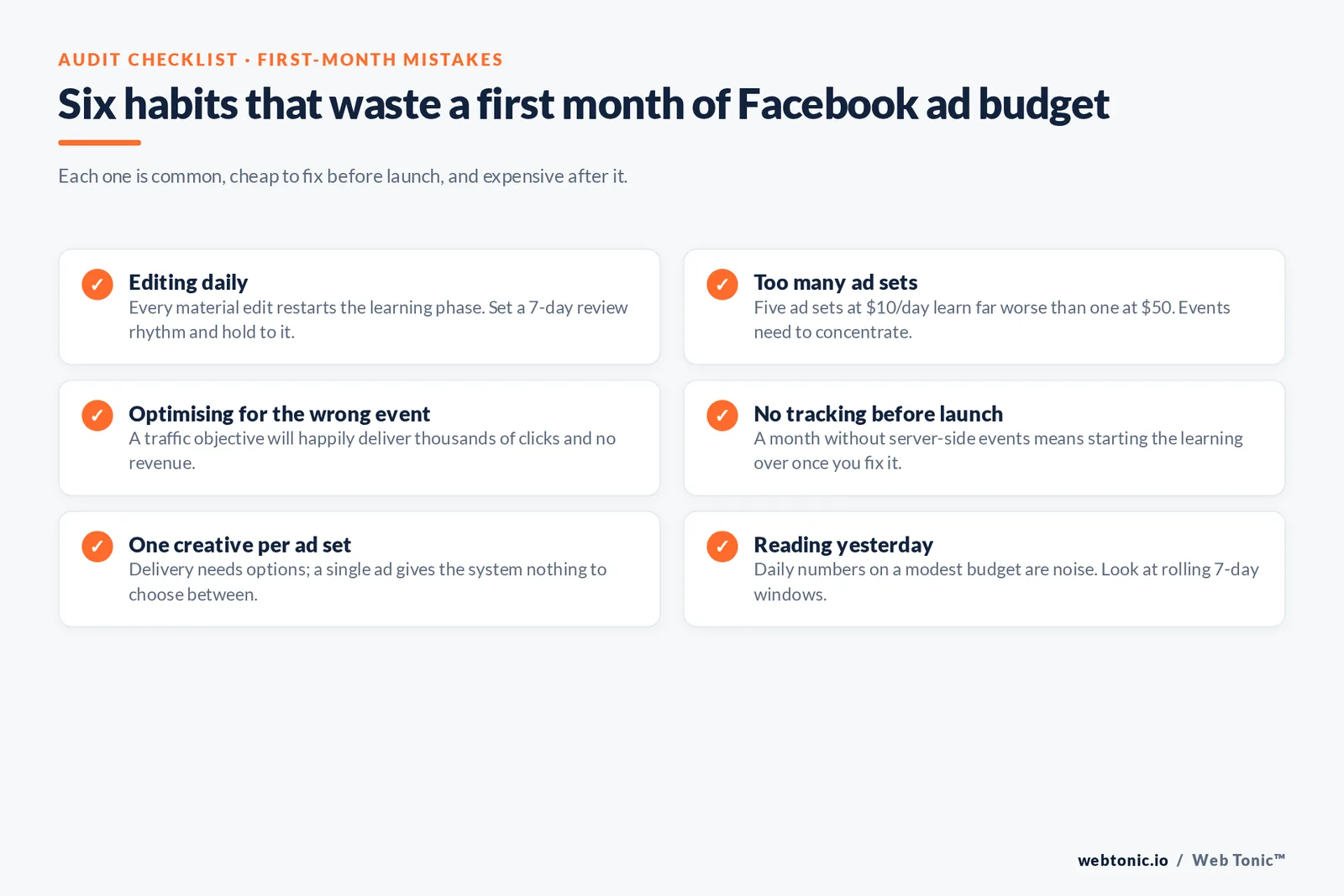
- Editing daily. Every material edit restarts the learning phase. Set a 7-day review rhythm and hold to it.
- Too many ad sets. Five ad sets at $10/day each learn far worse than one at $50.
- Optimising for the wrong event. Traffic objectives will happily deliver thousands of clicks and no revenue.
- No tracking before launch. Spending a month without server-side events means starting the learning over once you fix it.
- Sending traffic to a slow page. A fast, matched landing page often beats every in-platform change available to you; that is a web development problem, not a media one.
- One creative per ad set. Delivery needs options; a single ad gives the system nothing to choose between.
- Ignoring frequency. Rising frequency with falling results on a small audience means it is time to broaden, not to bid harder.
- Reading yesterday. Daily numbers on a modest budget are noise; look at rolling 7-day windows.

FAQ
How much does it cost to advertise on Facebook?
You can start with a daily budget in the low single digits — Meta's minimums sit around $1–$5 per ad set depending on the optimisation event — but a meaningful test usually needs $20–$30 a day for at least two weeks so the ad set can gather enough events to stabilise. Actual cost per click and cost per acquisition vary enormously by industry, country and creative quality, so build your baseline from your own first 30 days rather than a published average.
Do I need a Facebook Page to run ads?
Yes. Ads run from a Page identity, and you claim that Page inside a Meta Business account so ownership sits with the business rather than a personal profile. Connect your Instagram account in the same place if you want your creative eligible for Instagram placements, which most campaigns should be.
What is the learning phase and how do I get out of it?
The learning phase is the period where Meta's delivery system is still working out who responds to your ad set. It typically ends after roughly 50 optimisation events in a 7-day window. To exit it, consolidate ad sets so events concentrate, keep budgets and audiences stable, and optimise for an event you generate often enough to reach that threshold.
Is broad targeting really better than detailed interests?
On most accounts today, yes. Signal loss weakened interest-based precision while Meta's models improved at finding buyers from creative response. Start broad, let Advantage+ audience expand, and keep custom and lookalike audiences for retargeting layers. Narrow targeting still makes sense for genuinely small, well-defined markets.
How long before Facebook ads start working?
Expect 2–4 weeks before you have decision-grade data: about a week to exit the learning phase, then a full window of stable delivery to read. Judge the account on the trend across creative iterations rather than on any single week, and resist changing budgets and audiences mid-test.
If you would rather have this built and managed properly, see our services and growth marketing work, read more breakdowns on the Web Tonic blog, or get in touch.
Sources: Meta Investor Relations · Statista Facebook advertising revenue · Sprout Social (Facebook statistics, Facebook advertising guide) · eMarketer digital advertising insights · Buffer Facebook ads resources · Social Media Examiner Facebook ads coverage · WordStream Facebook advertising · Socialinsider Facebook benchmarks · Metricool Facebook ads guide · FTC advertising FAQ for small business. Platform mechanics verified against the cited pages in 2026.


