



Table of contents
Geotargeting delivers ads to users based on their physical location — country, state, city, zip code, or even a radius around a specific address. It is the mechanism that lets a plumber in Denver show ads only to homeowners within a 15-mile radius, or lets a national retailer adjust bids by metro area based on local demand.
Key Takeaways
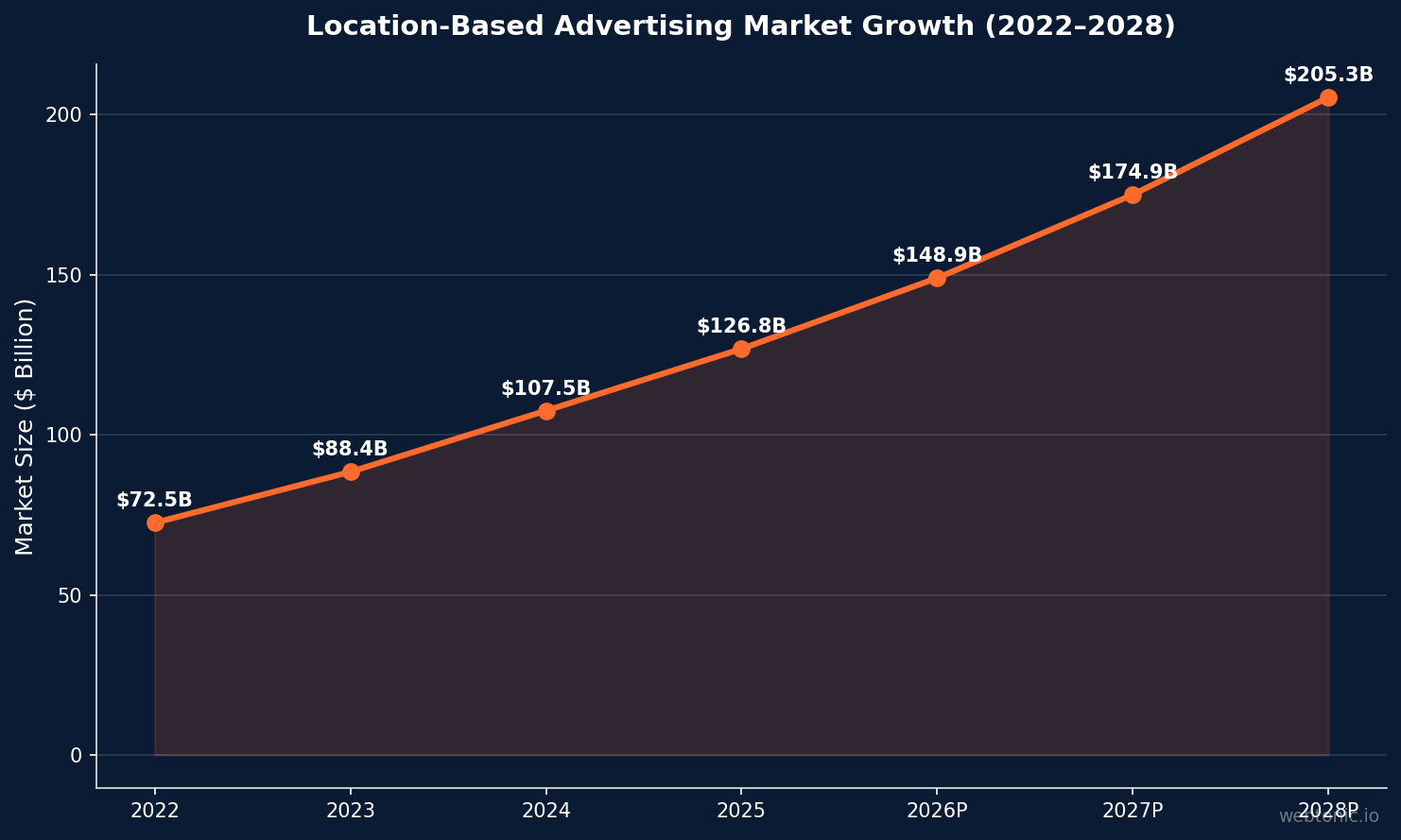
- The global location-based advertising market reached $126.8 billion in 2025 and is projected to grow at 17.4 % CAGR through 2030.
- Retailers using location-based targeting have improved marketing efficiency by 20 % compared to non-geo-targeted campaigns (Deloitte).
- 71 % of consumers expect personalized experiences based on their location, making geotargeting a baseline expectation rather than a premium feature.
- Geo-targeted Google Ads campaigns produce up to 200 % higher click-through rates than campaigns targeting entire countries.
- Mobile geofencing campaigns achieve an average 53 % conversion rate for users who enter a defined perimeter.
What Is Geotargeting?
Geotargeting is a digital advertising technique that uses a user's geographic location — determined by IP address, GPS data, Wi-Fi signals, or device settings — to deliver ads relevant to their area. Unlike broad demographic targeting, geotargeting ensures that ad spend reaches people who can actually visit your store, use your local service, or buy in your delivery zone.
The technology powers multiple advertising strategies:
- Geotargeting — Serving ads to users in a defined geographic area (city, state, DMA, zip code).
- Geofencing — Creating a virtual perimeter around a physical location (a store, event venue, or competitor) and triggering ads when users enter or leave that zone.
- Geo-conquesting — Targeting users who are near or visiting a competitor's location, offering them an alternative in real time.
- Beaconing — Using Bluetooth beacons inside stores to deliver hyper-local push notifications within a few meters of a display or product aisle.
Each strategy serves a different use case. A national brand optimizing media spend across 210 U.S. DMAs uses geotargeting at the metro level. A local restaurant promoting a lunch special uses geofencing around a 1-mile radius.
Geotargeting in Google Ads
Google Ads offers the most granular location targeting in the industry. You can target at the country, state, city, zip code, radius, or even congressional district level. Here is how to set it up and optimize it.
Location Targeting Options
| Target Type | Best For | Granularity | Example |
|---|---|---|---|
| Country | National campaigns, e-commerce | Broad | United States, Canada |
| State / Province | Regional service areas | Medium | California, Ontario |
| City / Metro (DMA) | Local businesses, franchises | High | Denver metro, New York DMA |
| Zip / Postal Code | Hyperlocal targeting | Very high | 90210, M5V 1J2 |
| Radius | Brick-and-mortar, service areas | Custom | 15 miles around store |
| Location Groups | Targeting by demographics or POI | Variable | Airports, universities |
Presence vs. Interest Targeting
Google Ads distinguishes between two location signals — and the default setting trips up many advertisers:
- "People in or regularly in your targeted locations" (Presence) — Shows ads only to users physically located in or frequently visiting your target area. This is the setting most local businesses should use.
- "People in, regularly in, or who've shown interest in your targeted locations" (Presence + Interest) — The default setting, which also shows ads to users anywhere in the world who have searched for or shown interest in your targeted location. A Denver plumber using this setting might pay for clicks from someone in Miami researching "Denver plumbing" for a vacation rental.
Action step: Check your campaign settings immediately. Switch to "Presence: People in or regularly in" unless you specifically need interest-based reach (e.g., tourism, real estate for relocating buyers). This single change can cut wasted spend by 10–30 % for local advertisers.
Location Bid Adjustments
Once your campaigns accumulate geographic performance data, apply bid adjustments by location to allocate budget toward your highest-performing areas. The process:
- Run the Locations report in Google Ads (use the "Matched locations" view for the most accurate data).
- Identify cities or zip codes with above-average conversion rates or ROAS.
- Apply positive bid adjustments (+10 % to +30 %) to high-performing locations.
- Apply negative bid adjustments (−20 % to −50 %) or exclude locations with consistently poor performance.
- Review monthly — seasonal demand shifts can change which locations perform best.
Geotargeting on Meta, TikTok, and Other Platforms
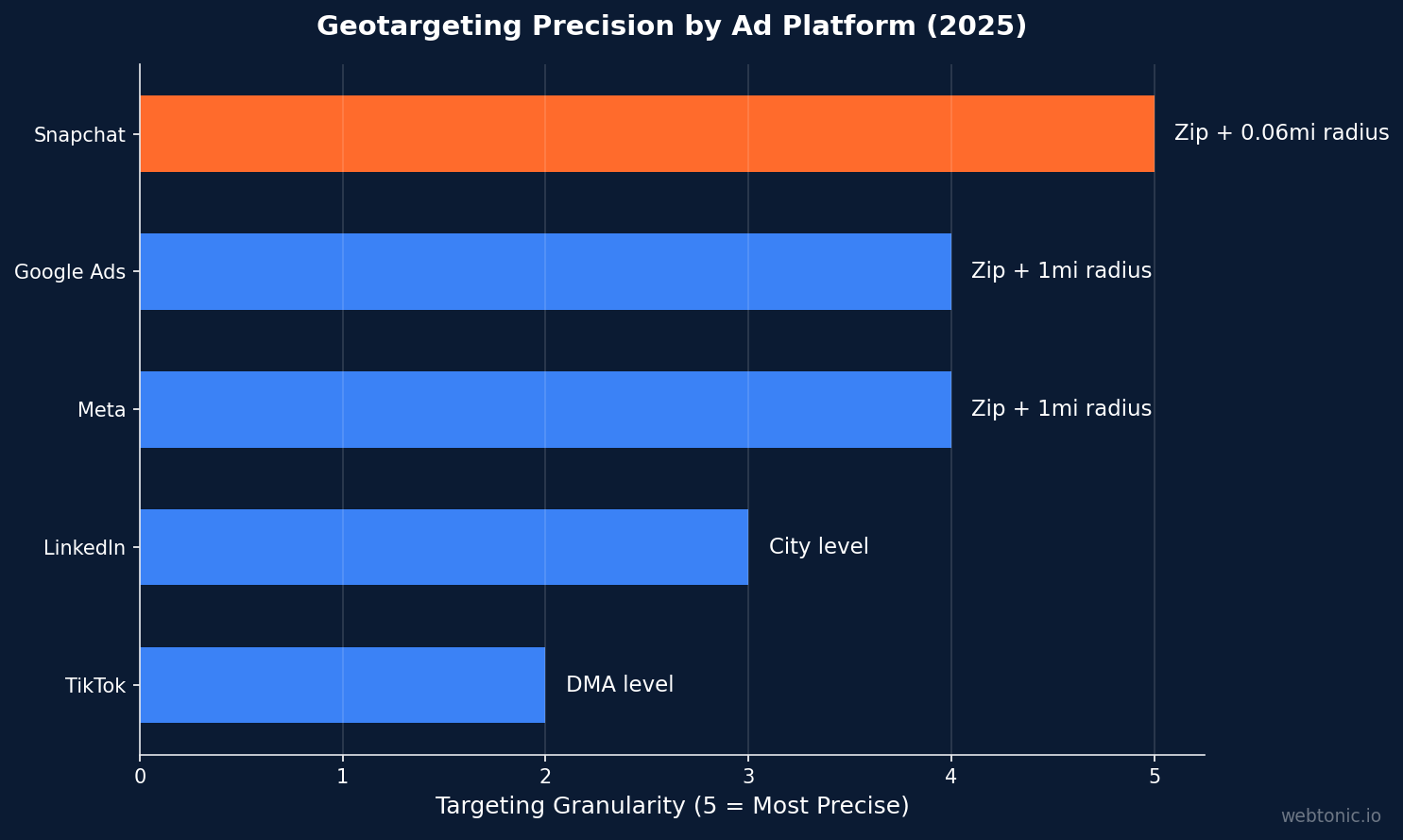
Every major ad platform supports geotargeting, but the implementation and precision vary significantly.
| Platform | Min. Radius | Targeting Options | Key Strength |
|---|---|---|---|
| Google Ads | 1 mile | Country, state, city, zip, radius, DMA, POI | Intent + location combined |
| Meta (Facebook/Instagram) | 1 mile | Country, state, city, zip, radius | Demographic + location layering |
| TikTok Ads | DMA level | Country, state, DMA | Young audience reach by region |
| LinkedIn Ads | City level | Country, state, city, metro area | B2B professional targeting by region |
| Snapchat Ads | 0.06 miles | Country, state, city, zip, radius | Most precise radius targeting |
On Meta, combine geotargeting with Custom Audiences for powerful local campaigns. For example, target users within 10 miles of your store who have visited your website in the past 30 days — this creates a high-intent, geographically qualified retargeting audience.

Geofencing vs. Geotargeting
These terms are often used interchangeably, but they describe different strategies with different implementation requirements:
- Geotargeting uses IP addresses and broad location signals to serve ads to users in a defined geographic area. It works across all devices and does not require GPS or app permissions. Accuracy is typically at the city or zip code level.
- Geofencing creates a virtual boundary using GPS coordinates and triggers actions (ads, push notifications, app messages) when a user crosses that boundary. It requires location services to be enabled on the user's device and works at meter-level precision.
Use geotargeting when you need broad regional reach — targeting all of Los Angeles for a citywide promotion. Use geofencing when you need proximity precision — targeting users within 500 feet of your store entrance during business hours. The most effective local advertising programs use both: geotargeting for awareness and geofencing for in-the-moment conversion.
Geotargeting Best Practices
These principles apply regardless of platform, vertical, or budget level:

- Start broad, then narrow — Launch with city-level targeting and let 2–4 weeks of performance data guide you toward the zip codes and neighborhoods that convert best. Starting at the zip code level with no data risks missing high-performing areas you did not expect.
- Create location-specific ad copy — Ads that mention the city or neighborhood name outperform generic copy by 15–25 % in click-through rate. "Denver's Trusted Roofer Since 2004" beats "Quality Roofing Services" every time.
- Align landing pages with targeting — If your ad targets Washington, D.C., the landing page should reference D.C.-specific information — local regulations, service areas, and testimonials from D.C. customers. This improves both Quality Score (Google Ads) and post-click conversion rate.
- Exclude irrelevant locations — Negative location targeting is as important as positive targeting. Exclude areas you do not serve, locations with consistently negative ROI, and competitor zip codes where you cannot compete on delivery time or pricing.
- Layer time with location — A restaurant should not run the same bids at 2 PM and 6 PM. Combine geotargeting with ad scheduling to increase bids during peak hours in your best-performing locations.
- Monitor the "Other" location bucket — Google Ads may show your ads in locations outside your targeting under certain conditions. Check the Matched Locations report monthly for unexpected geography, and adjust your settings or add exclusions as needed.
Location-Based Advertising Industry Data
The location intelligence market is growing rapidly as mobile-first advertising becomes the default. Key industry figures:
- The global location-based advertising market grew from $107.5 billion in 2024 to $126.8 billion in 2025, a year-over-year increase of 17.9 %.
- Geotargeting, geofencing, beaconing, mobile targeting, and geo-conquesting are the five primary types of location-based advertising used across retail, hospitality, healthcare, BFSI, and education verticals.
- Retailers using location intelligence report 20 % improvement in marketing efficiency (Deloitte), while 31 % of retailers still struggle to align e-commerce and in-store touchpoints.
- The CTV (Connected TV) advertising market is adopting geotargeting aggressively — programmatic CTV ad spend now supports DMA-level and zip-code-level geographic targeting, enabling local businesses to run TV ads with the precision of digital.
- European GDPR and U.S. state privacy laws (California, Washington, Europe) are reshaping how location data is collected. First-party location data and consented GPS signals are increasingly the only legally compliant sources for geotargeting.
Mobile Geotargeting and Privacy Considerations
Mobile devices generate the most precise location signals — GPS, Wi-Fi triangulation, and Bluetooth beaconing all contribute to sub-meter accuracy. According to Statista, mobile ad spending now exceeds $400 billion globally, with location-targeted campaigns representing a growing share of that budget.
However, privacy regulations are tightening the rules around location data collection. Both Apple's App Tracking Transparency (ATT) framework and Android's evolving privacy sandbox limit how apps share location signals with advertisers. The practical impact: first-party location data (collected with explicit user consent through your own app or website) is becoming the most reliable and legally compliant foundation for geotargeting campaigns. Third-party location data providers face increasing scrutiny, and campaigns built exclusively on purchased location segments carry higher compliance risk in jurisdictions like the EU, California, and Canada.
For advertisers, this means investing in first-party data collection strategies — loyalty apps, store check-in features, and consented location sharing — rather than relying solely on platform-level geotargeting signals that may degrade as privacy rules evolve.
FAQ
What is the difference between geotargeting and geofencing?
Geotargeting serves ads based on a user's general geographic area (city, zip code, DMA) using IP addresses and broad signals. Geofencing creates a GPS-defined virtual boundary around a specific physical location and triggers ads or notifications when users cross that perimeter. Geotargeting is broader; geofencing is more precise but requires location services on the user's device.
How accurate is geotargeting in Google Ads?
Google Ads location targeting is based on a combination of IP address, device settings, Wi-Fi, and user behavior signals. Google states that 100 % accuracy is not guaranteed. In practice, city-level targeting is reliable, while zip-code-level targeting may include some bleed from adjacent areas. Always use the "Presence only" setting for the highest geographic accuracy.
Should I use radius targeting or zip code targeting?
It depends on your business model. Radius targeting is best when your service area is defined by distance from a central location (e.g., a 15-mile radius around your store). Zip code targeting works better when you serve specific communities that do not align with a clean radius — for example, targeting affluent neighborhoods on both sides of a city while excluding the center.
How do I prevent my geo-targeted ads from showing to the wrong audience?
Switch your Google Ads location option from the default "Presence or interest" to "Presence: People in or regularly in your targeted locations." This prevents your ads from showing to users outside your area who merely searched for your city name. Also add negative location exclusions for areas you explicitly do not serve.
Is geotargeting effective for e-commerce businesses?
Yes, but the strategy differs from local services. E-commerce businesses use geotargeting to adjust bids by region based on demand density, to run location-specific promotions (free shipping to certain states), and to comply with regional pricing or tax regulations. National e-commerce brands also use geo data to allocate budget toward DMAs with the highest customer lifetime value.
Sources
https://blog.mediasmart.io/location-intelligence-stats
https://support.google.com/google-ads/answer/1722043
https://support.google.com/google-ads/answer/2453994?hl=en
https://www.giiresearch.com/report/tbrc1811099-location-based-advertising-global-market-report.html
https://www.webtonic.io/services/growth-marketing


