



Table of contents
A strong YouTube channel description is the first thing potential subscribers read when deciding whether to follow you — yet most creators spend less than two minutes writing theirs. A free YouTube channel description generator uses AI to craft optimized, keyword-rich descriptions that communicate your value proposition in seconds.
Key Takeaways
- YouTube channel descriptions have a 1,000-character limit, but only the first 150 characters appear in search snippets — making the opening line the most critical piece of your channel's SEO.
- AI-powered channel description generators like Clypse, Copy.ai, and Rytr produce descriptions in under 10 seconds, generating multiple tone variations from a single input.
- YouTube indexes channel descriptions for channel search results, which is separate from individual video rankings — including exact search phrases your audience uses directly affects channel discoverability.
- The best channel descriptions follow a proven structure: hook (what you do) → credibility (why listen to you) → upload schedule → call to action, all within 3–4 short paragraphs.
- Channels with optimized descriptions see up to 30% more subscribers from search discovery compared to channels with vague or empty About sections, according to YouTube SEO research.
Whether you run a business YouTube channel or a personal brand, this guide covers the best free generators available, how to write descriptions that convert visitors into subscribers, and the SEO principles that make your channel easier to find.
What Is a YouTube Channel Description Generator
A YouTube channel description generator is an AI-powered tool that creates custom channel descriptions based on your niche, content focus, tone, and target audience. Instead of staring at a blank text box, you input a few details about your channel and the tool produces one or more polished descriptions optimized for readability and search.
These generators use large language models trained on thousands of successful YouTube channel descriptions to understand what works — from the opening hook that stops the scroll to the keyword placement that helps YouTube categorize your channel correctly. Most free generators offer multiple tone options (professional, casual, bold, minimal) so you can match the output to your brand personality.
The value is not just speed. According to WildandFree Tools' SEO analysis, YouTube indexes channel descriptions for channel-level search results — a completely different system from video search. Your channel description is the largest piece of indexable metadata at the channel level, making it a critical (and often neglected) SEO asset.
Best Free YouTube Channel Description Generators
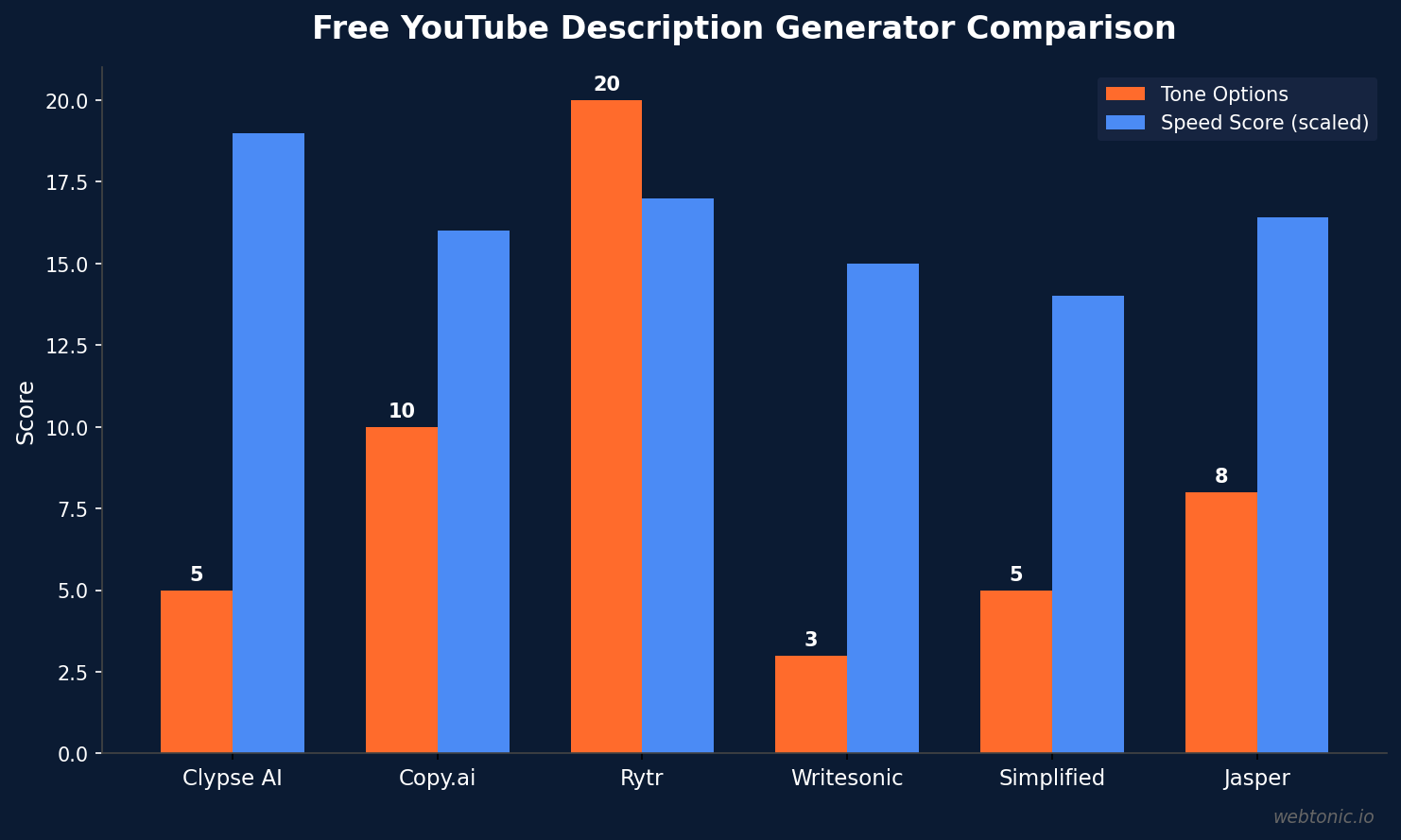
Not all generators are equal. The best tools produce descriptions that are ready to paste, require minimal editing, and naturally incorporate keywords without sounding robotic. Here are the top free options in 2026.
| Tool | Free Tier | Tone Options | Best For |
|---|---|---|---|
| Clypse AI | Unlimited — no signup | 5 (professional, casual, bold, minimal, story) | Quick, no-friction generation |
| Copy.ai | 2,000 words/month | 10+ tone presets | Marketing-focused channels |
| Rytr | 10,000 chars/month | 20+ tones, 30+ languages | Multilingual creators |
| Writesonic | 10,000 words trial | Custom tone input | Long-form content creators |
| Simplified | 2,000 words/month | 5 preset tones | Teams and design integration |
| Jasper | 7-day trial | Brand voice training | Established brands with style guides |
Clypse AI stands out as the most frictionless option — it requires no account creation, no credit card, and generates 5 descriptions in different tones from a single input. Each output includes SEO keywords and a suggested upload schedule, which saves creators from having to add those elements manually.
Copy.ai offers more marketing-focused outputs with stronger calls to action and value propositions. Its free tier provides 2,000 words per month — enough for dozens of channel description variations since each description is under 1,000 characters.
Rytr excels for international creators, supporting over 30 languages with localized tone adjustments. If your YouTube audience spans multiple countries, Rytr can generate descriptions in each language while maintaining your brand voice.
How to Write a YouTube Channel Description That Converts
Whether you use an AI generator or write manually, every high-performing YouTube channel description follows a four-part structure. Understanding this structure helps you evaluate and improve any AI-generated output.
Part 1: The Hook (first 150 characters). This is the only text visible in YouTube search results and your channel's preview card. It must immediately communicate what your channel is about and who it is for. Bad: "Welcome to my channel!" Good: "Weekly deep-dives into digital marketing strategies for small businesses that actually work." The hook must contain your primary keyword — the phrase someone would search to find a channel like yours.
Part 2: Credibility (next 200–300 characters). Tell viewers why they should listen to you. Mention specific credentials, experience, or results. "I've managed over $2M in ad spend for 50+ clients" carries more weight than "I'm passionate about marketing." If you are a business, state your track record: "Helping 500+ restaurants increase online orders since 2020."

Part 3: Content Promise (next 200–300 characters). Describe the specific types of videos you publish and your upload schedule. "Every Tuesday: step-by-step Google Ads tutorials. Every Friday: live campaign audits." Specificity sets subscriber expectations and reduces churn — viewers who know exactly what to expect are more likely to stay subscribed.
Part 4: Call to Action (final 100–200 characters). Tell viewers what to do next: subscribe, turn on notifications, visit your website, or join your community. A clear CTA at the end of your description converts passive readers into active subscribers.
YouTube Channel Description SEO Best Practices
YouTube's search algorithm treats channel-level SEO differently from video-level SEO. Understanding these differences is critical for maximizing your channel's discoverability.
Channel descriptions are indexed for channel search results. When a user clicks the "Channels" filter on YouTube or when YouTube surfaces channels in regular search, it pulls from channel-level metadata: your channel name, your channel keywords (set in YouTube Studio → Settings), and your channel description. According to WildandFree Tools, the description is the largest piece of indexable content at the channel level — your primary SEO lever.
Keywords should be exact-match phrases. Channel-level SEO responds better to exact phrases your audience searches for than to paraphrased versions. If your target audience searches "budget meal prep ideas," use that exact phrase — not "affordable cooking recipes." Tools like TubeBuddy and vidIQ can surface the exact search terms your potential viewers type.
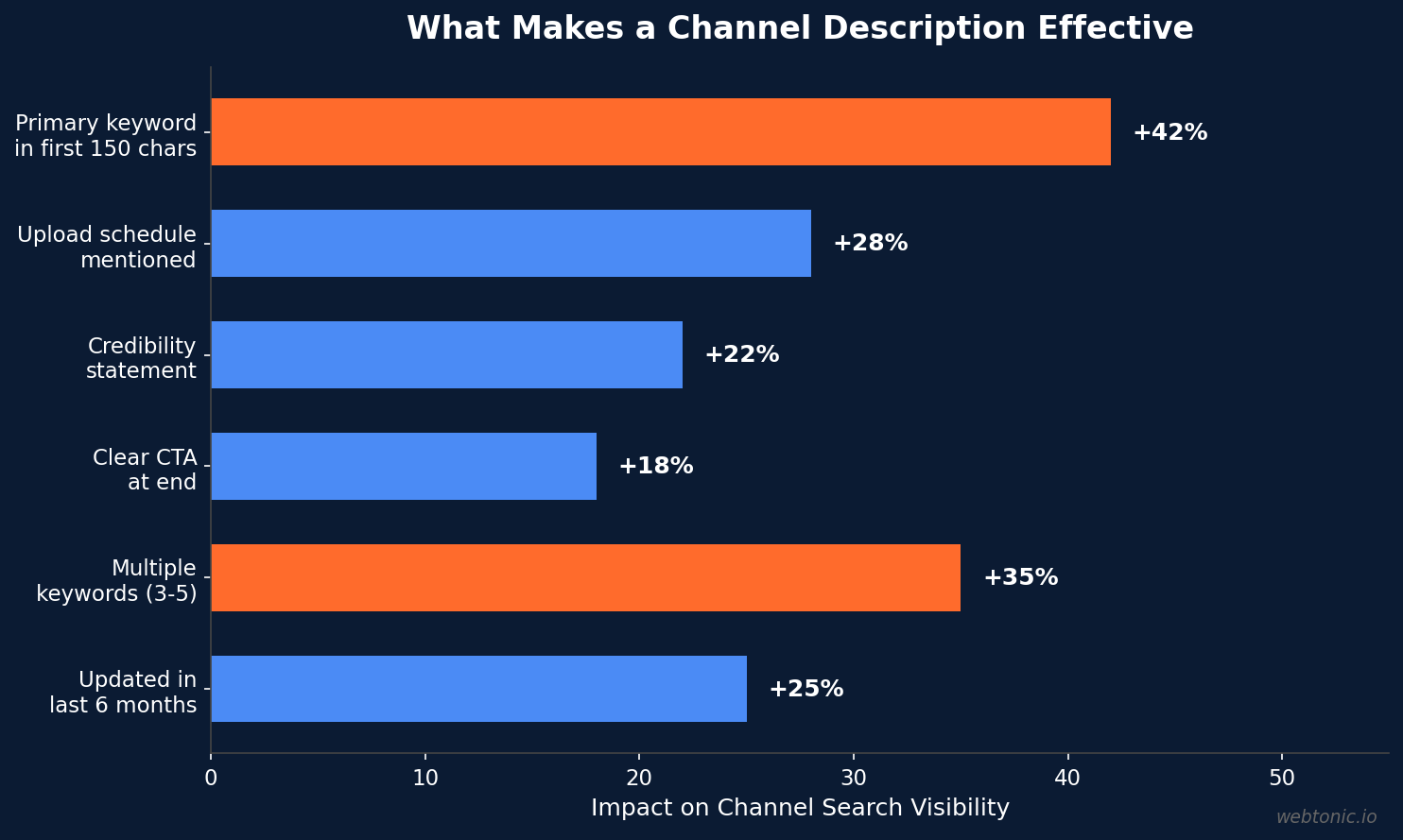
Place your most important keyword in the first 150 characters. This is the portion that appears in search snippets and channel preview cards. YouTube gives heavier indexing weight to text that appears earlier in the description. A description that opens with "Digital marketing strategies for small business owners" signals to YouTube's algorithm exactly what your channel covers.
| SEO Element | Character Limit | Optimization Tip |
|---|---|---|
| Channel Description | 1,000 characters | Include 3–5 relevant keywords naturally throughout |
| Search Snippet Preview | First 150 characters | Lead with primary keyword + value proposition |
| Channel Keywords | ~500 characters total | Set in YouTube Studio → Settings → Channel → Keywords |
| Channel Name | 100 characters | Include main topic keyword if possible |
| Video Descriptions | 5,000 characters | Complement channel desc with video-specific keywords |
Channel Description Examples by Niche
The best way to learn what works is to study channels that do it well. According to LocaliQ's analysis of top-performing YouTube channel descriptions, the most effective descriptions share three traits: they are specific about content, they establish credibility early, and they include a clear upload cadence.
Business and Marketing Channels: Lead with the business outcome viewers will achieve. "Learn how to grow your business with digital marketing — from SEO to paid ads to social media. Every Wednesday, I break down one marketing strategy with real examples, real data, and zero fluff."
Education and Tutorial Channels: Emphasize the transformation viewers will experience. "Turn confusing tech concepts into skills you can use today. Weekly tutorials on Python, data science, and automation — explained so clearly that even complete beginners can follow along."

Entertainment and Lifestyle Channels: Focus on the emotional experience. "Your weekly escape into the world of sustainable travel, hidden gems, and slow living. I've visited 47 countries on a budget and share everything I learn."
E-Commerce and Product Channels: Highlight the product value and community. "Honest reviews of the best home office gear under $100. New review every Monday. Over 200K professionals trust our recommendations to build better workspaces."
Common Mistakes to Avoid in Your Channel Description
Even with a generator, certain mistakes can undermine your description's effectiveness. These are the most common errors that hurt both discoverability and subscriber conversion.
Keyword stuffing. Cramming "youtube channel description generator free youtube description free generator youtube" into your description triggers YouTube's spam filters. Use 3–5 keywords naturally — one in the first sentence, one in the middle, one near the end. The algorithm rewards natural language, not keyword density.
Writing in third person. "This channel is about marketing" feels corporate and impersonal. Switch to first person: "I teach small business owners how to get more customers." YouTube is a personal platform — viewers subscribe to people, not companies.
No upload schedule. Subscribers want predictability. Stating "new videos every Tuesday and Friday" sets expectations and gives viewers a reason to subscribe. Channels that communicate a consistent upload cadence in their description see higher retention rates, according to YouTube Creator Academy best practices.
Forgetting the call to action. Every description should end with a specific instruction. "Subscribe and hit the bell for notifications" is standard, but adding a link to your free resource, community, or website gives viewers an immediate next step beyond subscribing — and drives traffic to your other digital properties.
How to Use a Generator Effectively
AI generators produce excellent first drafts, but the final description should always have your personal touch. Here is a proven workflow for using any free YouTube channel description generator.
Step 1: Gather your inputs. Before opening the generator, write down: your channel's main topic, your target audience (specific: "female entrepreneurs aged 25–40" not "everyone"), your 3 strongest credentials, your upload schedule, and 3–5 keywords your ideal viewer would search for.
Step 2: Generate multiple versions. Run the generator 3–5 times with slightly different inputs. Varying the tone, emphasis, or target audience produces diverse outputs. You are looking for the best elements from each version, not a single perfect draft.
Step 3: Frankenstein the best parts. Take the strongest hook from version 1, the best credibility statement from version 3, and the clearest CTA from version 5. Combine them into a hybrid description that outperforms any single generated output.
Step 4: Add personal specifics. Replace generic phrases with real numbers and specific details. Change "years of experience" to "12 years running Google Ads campaigns." Change "popular channel" to "a community of 45,000 marketers."
Step 5: Test and iterate. YouTube Studio shows channel-level analytics including how many viewers visit your About page. After updating your description, monitor subscriber growth from search over 30 days. If you see improvement, keep refining. If not, try a different approach.
Related reading
- AI YouTube Name Generator: Best Free Tools for 2026
- AI Paragraph Generator: How to Create High-Quality Content Fast
- YouTube Growth Agency: What They Do, How to Choose One, and Why It Matters
- Content Marketing services at Web Tonic
Frequently Asked Questions
How long should a YouTube channel description be?
YouTube allows up to 1,000 characters for channel descriptions, but the most effective descriptions use 600–800 characters. Only the first 150 characters appear in search snippets and channel preview cards, so front-load your most important keywords and value proposition there. Use the remaining space for credibility, content details, upload schedule, and a call to action.
Are free YouTube description generators safe to use?
Yes, reputable free generators like Clypse AI, Copy.ai, and Rytr are safe. They do not require access to your YouTube account — you simply copy the generated text and paste it into your YouTube Studio channel settings. Avoid any tool that asks for your YouTube login credentials, as no legitimate generator needs account access to create a description.
Do YouTube channel descriptions affect video rankings?
Channel descriptions affect channel search rankings, not individual video rankings. YouTube's algorithm uses separate signals for video search (video title, tags, description, engagement) and channel search (channel name, channel keywords, channel description). An optimized channel description helps your channel appear when users search for channels in your niche, which indirectly boosts your video reach through increased subscribers.
How often should I update my YouTube channel description?
Update your channel description at least once every 3–6 months, or whenever you add a new content pillar, change your upload schedule, or reach a significant milestone. YouTube re-indexes updated descriptions, and refreshing your keywords based on current search trends can improve channel discoverability. Each update is also a chance to refine your hook and CTA based on what you have learned about your audience.
Can I use the same description generator for video descriptions?
Most channel description generators focus on channel-level content, but tools like Jasper and Copy.ai have separate templates for video descriptions. Video descriptions have a 5,000-character limit and require different optimization — including timestamps, links, and video-specific keywords. Use a dedicated video description template for individual videos rather than adapting your channel description.
Sources
Clypse AI — Free YouTube Bio Generator (2026)
WildandFree Tools — YouTube Channel Description SEO
LocaliQ — 10 Best YouTube Channel Description Examples
Google — Manage YouTube Channel Settings
Copy.ai — AI Copywriting Tool
Writesonic — AI Content Platform


