



Table of contents
A follow-up email is a short, purposeful message sent after an earlier email, meeting, interview or call to move a specific decision forward. The ones that work share three traits: they arrive on a predictable schedule, they carry a single ask, and they add something new instead of repeating the first message.
Key Takeaways
- Across all industries the average email open rate is 39.64% and the average click-through rate is 3.25%, so a first message being ignored is the normal case, not the exception.
- North America posts the strongest engagement of any continent — open rate 45.30%, click-through 4.77%, click-to-open 10.53% — which sets a realistic bar for US follow-up sequences.
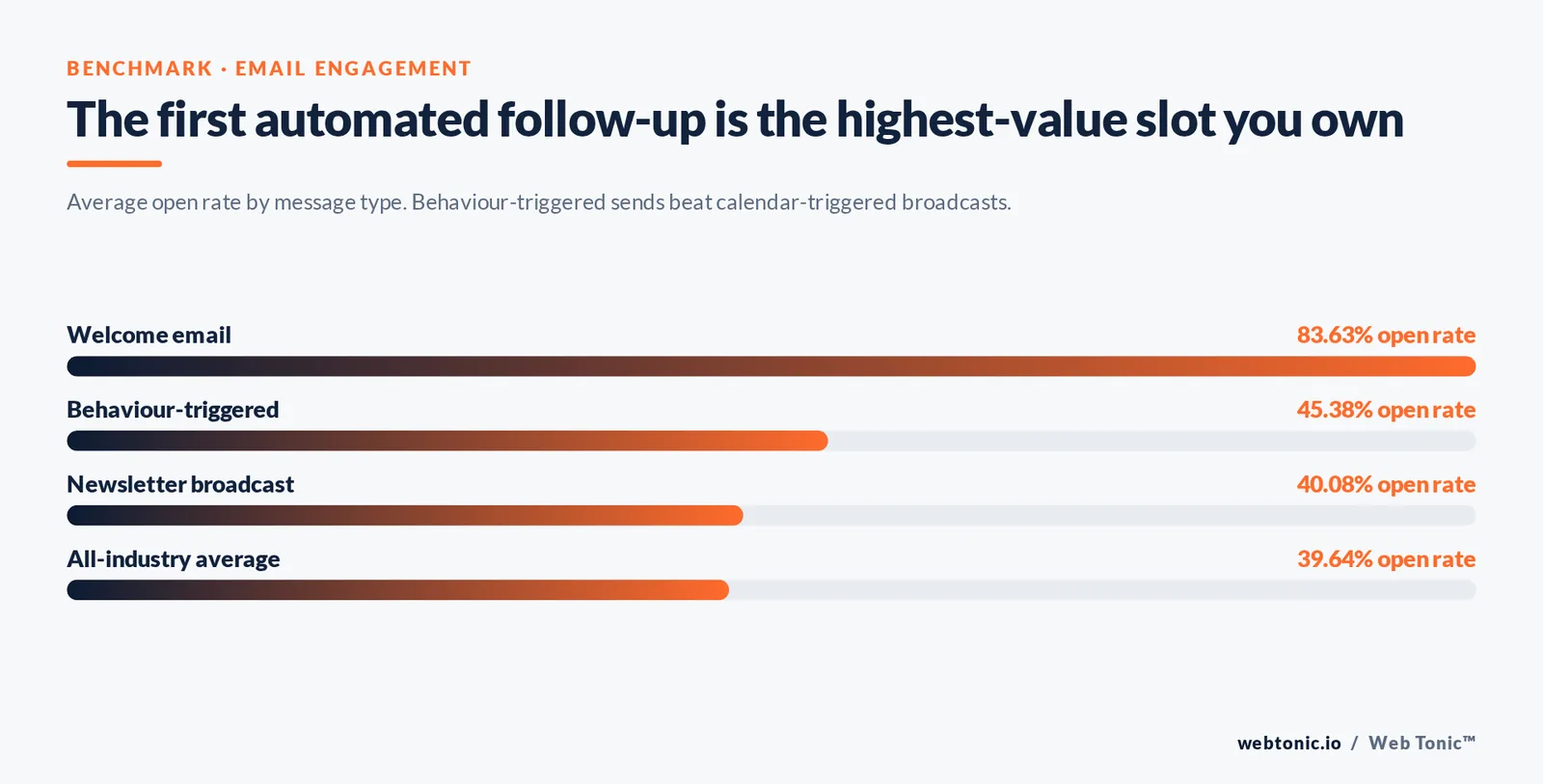
- Triggered, behaviour-based emails outperform broadcasts: open rate 45.38% vs 40.08% for newsletters, and click-through 5.02% vs 3.84%.
- Welcome emails — the first automated follow-up almost every business sends — average an 83.63% open rate, by far the highest-value slot in any sequence.
- Segmented sending beats blanket sending in a study of roughly 2,000 senders, 11,000 campaigns and about 9 million recipients: clicks +100.95%, opens +14.31%, unsubscribes −9.37%, abuse reports −3.90%.
- Keep sequences short and clean: the all-industry unsubscribe rate is only 0.15% and spam complaints sit below 0.01%, so a spike in either is a sequencing problem, not bad luck.
- Average bounce rate is 2.33% — clean the list before you add follow-up volume, because bounces compound across every step.
- 2 business days is the standard wait after an interview or a meeting, and 3 to 4 business days after a cold or sales email; 3 to 5 total touches is the practical ceiling for most B2B contexts.
What a follow-up email actually is (and what it is not)
A follow-up email is a second (or third, or fourth) message in the same thread, sent because a decision is still open. It is not a reminder that you exist. The distinction matters because inboxes punish the second version: a message that only says "just checking in" gives the recipient nothing to act on, so it gets deferred, and deferred mail rarely gets read twice.
Three things separate a follow-up from a nudge:
- A named next step. One ask — a reply, a signature, a 20-minute call — never two.
- New value. A relevant case study, a revised number, an answer to an objection raised on the call, a deadline the recipient did not know about.
- Context in the first two lines. Assume the reader has forgotten the original message and is skimming on a handset.
Google's own guidance on Gmail's behaviour is a useful sanity check here: replies in an existing thread inherit that thread's engagement history, which is one reason replying inside the original conversation usually beats starting a fresh one. Benchmark data from email platforms consistently shows the same thing across categories — engagement follows relevance, not frequency.
| Situation | What the follow-up must do | Common mistake |
|---|---|---|
| After a job interview | Thank, restate one relevant strength, confirm timeline | Generic gratitude with no reference to what was discussed |
| After a sales call | Summarise agreed points, attach what you promised, propose a date | Sending a recap with no ask |
| After a cold email | Add a new angle or proof point, keep it under 90 words | Forwarding the same pitch with "bumping this up" |
| After a proposal | Remove a specific blocker (price, scope, timing) | Asking "any thoughts?" and leaving the work to the buyer |
| After a networking event | Reference the conversation, offer something useful, no pitch | Waiting more than a week, when recall has gone |
| After an invoice or contract | State the outstanding action and the date it is due | Apologising so much the request disappears |
Timing: when to send each follow-up email
Timing is the single easiest variable to fix, and the one most people get wrong in both directions — same-day panic follow-ups after an interview, or a two-week gap that lets a sales conversation die. The schedule below is the version we use on client outreach at Web Tonic and it holds up across most B2B and recruitment contexts.
| Context | First follow-up | Second | Third | Stop after |
|---|---|---|---|---|
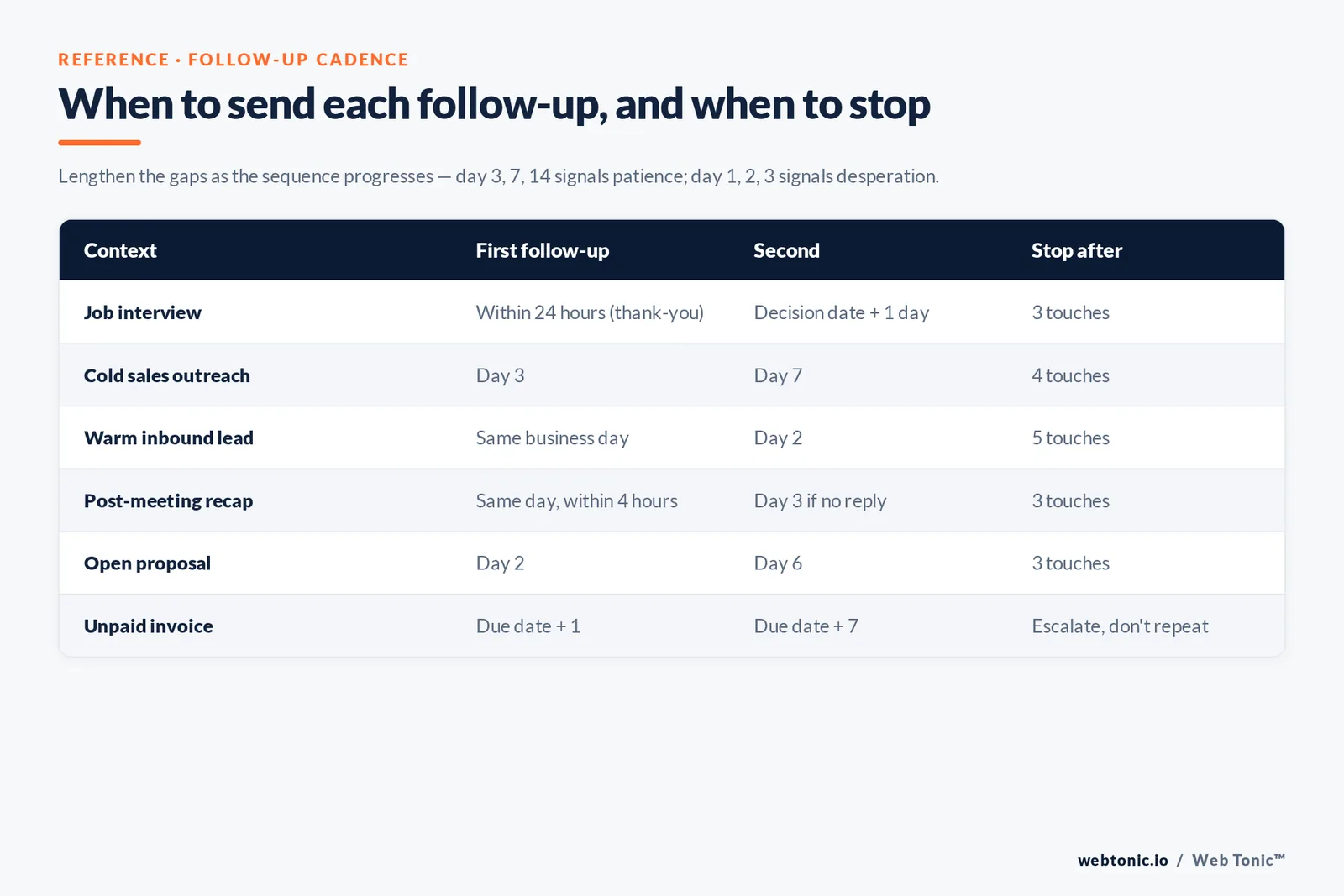
| Job interview | Within 24 hours (thank-you) | At the stated decision date + 1 day | 1 week later | 3 touches |
| Cold sales outreach | Day 3 | Day 7 | Day 14 | 4 touches |
| Warm inbound lead | Same business day | Day 2 | Day 5 | 5 touches |
| Post-meeting recap | Same day, within 4 hours | Day 3 if no reply | Day 8 | 3 touches |
| Open proposal | Day 2 | Day 6 | Day 12 (close the loop) | 3 touches |
| Networking contact | Within 48 hours | Day 10 | — | 2 touches |
| Unpaid invoice | Due date + 1 | Due date + 7 | Due date + 14 (formal) | Escalate, don't repeat |
Two timing rules matter more than the exact day count. First, lengthen the gaps as the sequence progresses — day 3, day 7, day 14 signals patience, while day 1, day 2, day 3 signals desperation. Second, send inside working hours in the recipient's timezone. Automated sequences that fire at 03:00 local time land at the bottom of the morning pile. Platform benchmark reports put average continental engagement between 28.04% (Asia) and 55.66% (Oceania) open rate, so a single global send time is nearly always leaving reads on the table. GetResponse's benchmark study of 4.4 billion messages is the clearest public source for that spread.
Subject lines for follow-up emails
The subject line has one job in a follow-up: make the thread recognisable in half a second. That is why replying inside the original thread — keeping Re: and the original subject — outperforms clever new lines in most tests. When you do need a fresh subject, specificity wins over curiosity.
| Type | Example | Why it works |
|---|---|---|
| Thread reply | Re: Q3 onboarding scope | Inherits recognition and thread history; zero cognitive cost |
| Named reference | Following up on Tuesday's call, Priya | Anchors a real shared event, not a generic ping |
| Value-first | The CPA breakdown you asked for | Promises a deliverable rather than requesting attention |
| Deadline | Proposal pricing holds until 14 March | Introduces a real, non-manufactured constraint |
| Question | Still the right time for this? | Easy to answer in one word; works well as a final touch |
| Close-the-loop | Closing your file unless I hear back | Highest-reply final message in most sequences; no pressure, clear consequence |
Avoid three things: all-caps urgency, fake reply prefixes on a first contact, and merge fields that break (Hi {FirstName} in a live send is unrecoverable). Keep the line under about 45 characters so it survives truncation on mobile clients, and never let the subject and preview text repeat each other word for word.
Follow-up email templates you can adapt
Templates are a starting structure, not a script. Everything in square brackets must be replaced with something only you could know about that recipient — otherwise you are sending a form letter with extra steps.
1. After a job interview
Subject: Re: [Role] interview — thank you
Hi [Name],
Thanks for the time today. The part about [specific challenge they raised] stuck with me — at [previous employer] I handled a similar problem by [one-sentence example with a number]. Happy to share the detail if it's useful. You mentioned decisions land by [date]; I'll look out for your note then.
Best, [You]
2. Sales follow-up after no response
Subject: Re: [original subject]
Hi [Name],
Short version: teams like [comparable company] were losing [specific measurable thing] until they changed [one lever]. If that is on your list this quarter, I can walk you through what it took in 15 minutes. If it isn't, tell me and I'll stop here.
[You]
3. Post-meeting recap
Subject: Recap + next step — [project]
Hi [Name],
Summary of today: (1) [decision], (2) [decision], (3) [open question owned by whom]. I've attached [the promised item]. Next step is [action] by [date] — does that still work on your side?
[You]
4. Proposal chase
Subject: [Project] — anything blocking sign-off?
Hi [Name],
Guessing the scope document raised a question rather than an objection. The two things clients usually ask at this point are [X] and [Y] — answers to both below. If it's budget timing instead, we can phase the work across [period].
[You]
5. Final touch (close the loop)
Subject: Closing the file on this
Hi [Name],
I don't want to keep landing in your inbox, so this is my last note on [topic]. If it becomes relevant later, reply to this thread any time and I'll pick it straight back up.
[You]
For longer sequences and the writing mechanics behind them, Grammarly's follow-up guide and Close's sales follow-up breakdown are both solid references, and WordStream's follow-up email post covers the marketing-side variations.
How many follow-up emails should you send?
The honest answer is: as many as you can send while still adding something. In practice that is 3 to 5 touches for cold outreach, 2 to 3 for interviews and networking, and an escalation path — not more email — for invoices and contracts.
Two guardrails keep the volume honest. The first is the unsubscribe and complaint rate. With all-industry unsubscribes averaging 0.15% and spam complaints below 0.01%, any sequence pushing those numbers into the tenths of a percent is over-mailing a list that never asked for it. The second is deliverability: average bounce rates of 2.33% are tolerable, but each extra touch multiplies bounces against the same bad addresses, and mailbox providers read that pattern as a sending-reputation signal.
If your follow-ups are commercial rather than one-to-one, the legal floor matters too. The FTC's CAN-SPAM compliance guide requires accurate header information, a non-deceptive subject line, a valid physical address and a working opt-out honoured within 10 business days. Sequenced outreach does not get an exemption.
| Metric (all industries) | Benchmark | What it means for follow-ups |
|---|---|---|
| Open rate | 39.64% | Roughly 6 in 10 never open step one — follow-ups are mandatory, not optional |
| Click-through rate | 3.25% | One clear link beats three competing CTAs |
| Click-to-open rate | 8.62% | Body copy is the weak link far more often than the subject line |
| Unsubscribe rate | 0.15% | Your ceiling; above it, shorten the sequence |
| Bounce rate | 2.33% | Verify addresses before adding steps |
| Triggered email open rate | 45.38% | Behaviour-triggered beats calendar-triggered |
| Welcome email open rate | 83.63% | Put your most important ask in the first automated message |
Personalisation and segmentation: the multiplier
The difference between a sequence that works and one that irritates is usually segmentation, not wording. In a study covering roughly 2,000 senders, 11,000 campaigns and around 9 million recipients, segmented campaigns beat unsegmented ones on every axis: unique opens +10.64%, total opens +14.31%, clicks +100.95%, while unsubscribes fell 9.37%, bounces 4.65% and abuse reports 3.90%.
A doubling of clicks from segmentation alone dwarfs anything a rewritten subject line will deliver. Practically, that means splitting follow-up sequences by:
- Behaviour — opened but didn't click, clicked but didn't convert, visited pricing twice.
- Stage — cold, engaged, proposal sent, dormant for 90 days.
- Role — the follow-up a finance lead needs is not the one a practitioner needs.
- Source — inbound demo requests deserve a same-day reply; scraped lists deserve fewer touches, not more.
Triggered sends are where this pays off, and the benchmark gap proves it: 45.38% open and 5.02% click for triggered messages against 40.08% and 3.84% for newsletters. If your CRM can fire a follow-up on a real action rather than a fixed day count, use it. Our growth marketing team builds these sequences alongside paid acquisition, because a lead that arrives from an ad and then waits three days for a human reply is a wasted click — something we cover in more depth on our data intelligence page.
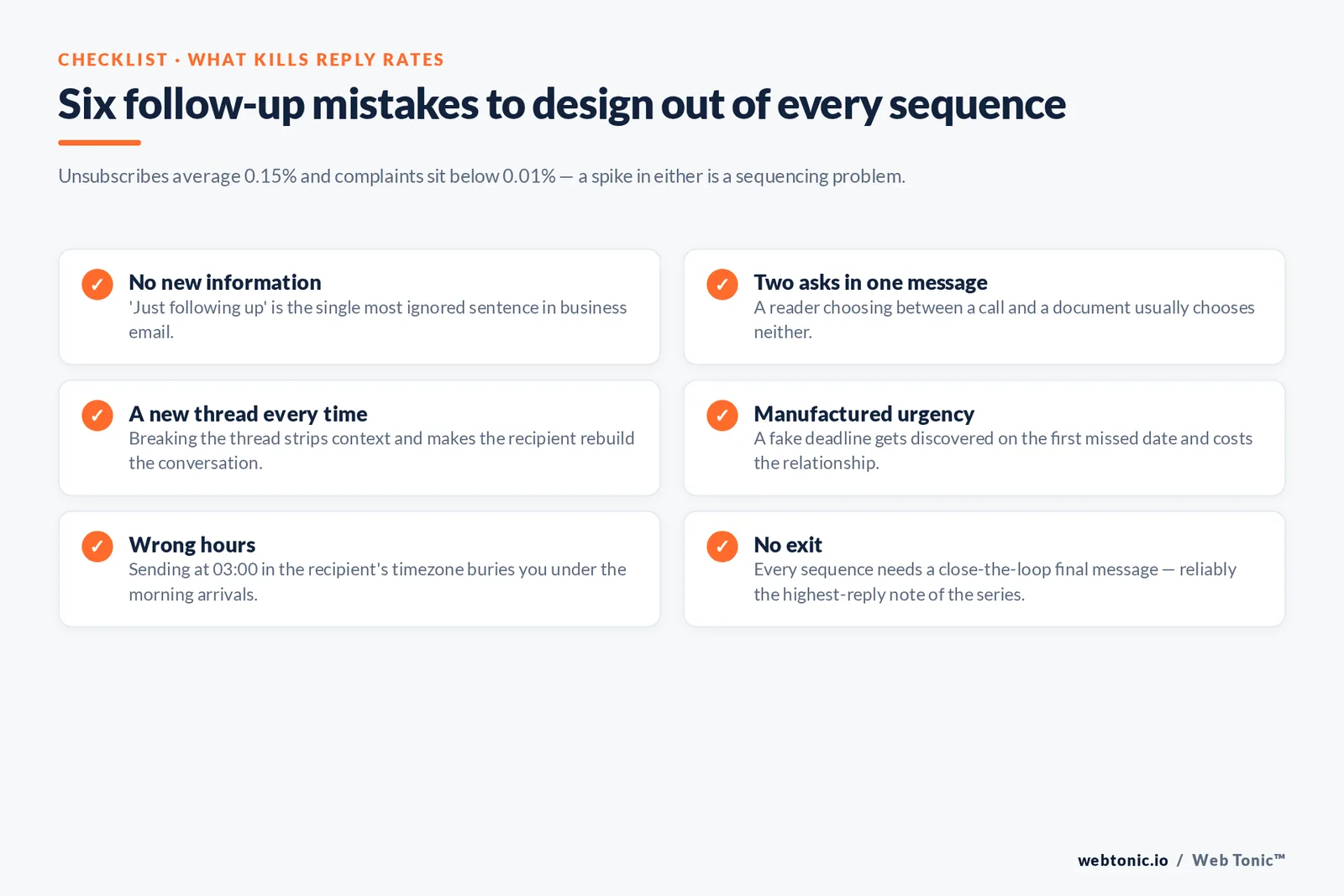
Nine mistakes that kill follow-up reply rates
- No new information. "Just following up" is the single most ignored sentence in business email.
- Two asks in one message. A reader who must choose between a call and a document usually chooses neither.
- New thread every time. Breaking the thread strips context and forces the recipient to reconstruct the conversation.
- Guilt framing. "I've emailed three times" makes the recipient's inaction the topic instead of your value.
- Manufactured urgency. A fake deadline gets discovered on the first missed date and costs you the relationship.
- Too long. Follow-ups over about 120 words get deferred; deferred means unread.
- Attachments too early. A 4 MB deck in a second cold email hurts both deliverability and goodwill.
- Wrong hours. Sending at 03:00 in the recipient's timezone buries you under the morning arrivals.
- No exit. Every sequence needs a final message that closes the loop politely; it reliably produces the highest reply rate of the whole series.
A tenth, quieter mistake: not measuring at the sequence level. If you only look at campaign-level opens you will never learn that touch three earns 40% of your replies while touch four earns almost none. Litmus's work on email ROI and the American Marketing Association's email resources are both good grounding on measurement discipline; eMarketer's email statistics hub is useful for tracking how those benchmarks move year to year.
A simple follow-up system you can run this week
You do not need new software to fix follow-ups. You need a written schedule, a place to log the next touch, and a rule about stopping.
- Define your contexts. Most teams have four or five: inbound lead, cold outreach, post-meeting, proposal, dormant. Write the cadence for each once.
- Pre-write the value asset per step. Step two gets a case study, step three gets a benchmark, step four gets the close-the-loop note. Deciding this in advance is what prevents "just checking in".
- Log the next action, not the last one. A CRM field with a date beats an inbox flag every time.
- Set a hard stop and honour it. Three to five touches, then the contact moves to a quarterly newsletter or out of the list entirely.
- Review monthly by step. Reply rate per touch, not per campaign. Cut the step that earns nothing and reinvest the time in the one that does.
- Check compliance once a quarter. Opt-out working, physical address present, suppression list actually suppressing.
Run that for a quarter and the follow-up problem stops being a writing problem. If you would rather have it built and measured for you, talk to our team — sequence design sits inside the same programme as our full service stack and the reporting we run for retained clients. More marketing playbooks live on the Web Tonic blog.
Follow-up email tips for sales prospects and leads
Sales follow-up emails are a different craft from a post-interview thank-you. A prospect is comparing you against three other vendors and their own inertia, so each email has to earn its place. The tips below are the ones that move response rates most for our clients, and every one of them is a process you can write down and repeat.
- Give each template a job. Keep a small library — 5 or 6 templates, not 30 — where each template maps to a stage: new lead, no response, post-demo, proposal open, dormant prospect. A template library that mirrors your pipeline is a process; a folder of clever examples is not.
- Lead with an offer, not a question. "I can send the client benchmark for your category" outperforms "any thoughts?" because it offers the recipient something for free. That single change lifts engagement on almost every sequence we audit.
- Pair email with the phone. A short call the day after email two, then a follow-up email that references the call, works better than either channel alone. Mention the phone attempt in one clear line: "Tried you on the phone earlier — here's the short version."
- Write to one company, not a market. Name the company, the market they compete in, and one number from their own site. Prospects forward emails internally when the email reads as though it was written for them; that internal forward is often what closes the loop.
- Keep every message under 120 words. Short emails get replies because they are easy to answer on a phone between meetings. Long emails get a "will read later" that never arrives.
- Answer the questions they didn't ask. The three questions behind most silence are price, effort and risk. An additional line pre-empting each removes the reason to defer.
- Ask a quick, closed question at the end. "Is this a Q3 or a Q4 problem?" is easier to answer than "would you like to talk?", and either answer helps you qualify the lead.
- Log every response. Positive, negative or "not now" — all three are data. Leads that reply "not now" convert well when the next conversation is scheduled instead of improvised.
| Pipeline stage | Template to use | Offer inside the email | Typical goal |
|---|---|---|---|
| New inbound lead | Same-day reply template | Relevant case example from their category | Book a 15-minute call |
| Cold prospect, no response | New-angle template | One benchmark number for their market | Earn a first reply |
| Post-demo | Recap and next-step template | Written summary plus the promised asset | Confirm the decision process |
| Proposal open | Blocker-removal template | Answers to the two most common questions | Sign-off or a clear no |
| Dormant client or prospect | Re-engagement template | Something new that changed since you last spoke | Restart the conversation |
| Final touch | Close-the-loop template | An open door with no pressure | Free reply or a clean exit |
A repeatable writing process (with examples)
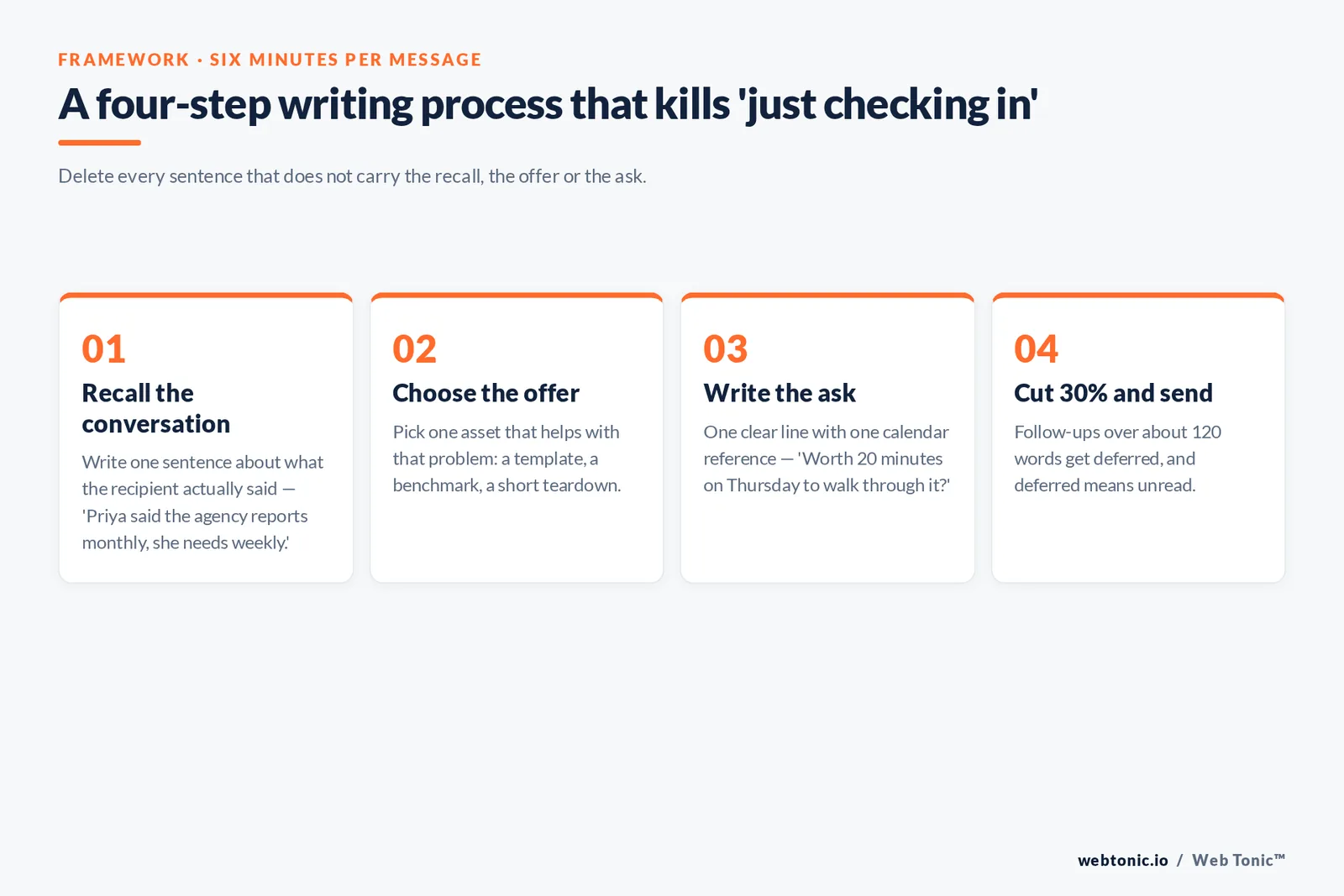
Most people write a follow-up email from a blank screen, which is why the words come out as "just checking in". A four-step writing process fixes that in about six minutes per message, and it is easy enough to teach to a new hire in their first week.
- Step 1 — recall the conversation. Open the last email or call notes and write one sentence about what the recipient actually said. Example: "Priya said the current agency reports monthly, and she needs weekly."
- Step 2 — choose the offer. Pick one asset that helps with that specific problem: a template, a benchmark, a short teardown of their landing page. Example: "Send the weekly reporting template we use for a client in the same market."
- Step 3 — write the ask. One clear line, one calendar reference. Example: "Worth 20 minutes on Thursday to walk through it?"
- Step 4 — cut 30% and send. Delete every sentence that does not carry the recall, the offer or the ask. What is left is a great follow-up email.
Two worked examples of the same process, so you can see how far the tone can travel while the structure holds:
Sales example. "Hi Priya — you mentioned monthly reporting isn't fast enough to act on. Attached is the weekly template we run for a client in your market; it takes about 20 minutes a week to keep current. Want me to walk you through it on Thursday?"
Service and support example. "Hi Tom — following up on the migration questions from our call. I've answered all three below and added one additional note on timing. If the answers are clear, I'll book the work in for the week of the 14th."
Both messages do the same four things: they keep the conversation where it was, they help before they ask, they are clear about the next step, and they leave the recipient a quick way to reply. Teams that learn this process stop debating subject lines and start seeing engagement climb across the whole sequence, because the emails finally carry information the recipient wants to forward.
If you want the tips turned into a working system — templates, timing, CRM fields, reporting — that is the kind of programme our performance creative and lifecycle team builds for retained clients.
FAQ
How long should I wait before sending a follow-up email?
Two business days after an interview or a meeting, three to four business days after a cold email, and the same business day for an inbound enquiry. Lengthen each subsequent gap — day 3, day 7, day 14 — rather than keeping a fixed interval, which reads as automated pressure.
How many follow-up emails should I send before giving up?
Three to five touches for cold outreach and two to three for interviews or networking. With all-industry unsubscribe rates averaging 0.15% and complaints below 0.01%, any sequence that pushes those numbers higher is over-mailing. Always finish with a close-the-loop message rather than simply going silent.
What is the best subject line for a follow-up email?
In most cases, the original one — reply inside the existing thread so the subject reads "Re: [original]" and inherits recognition. When a fresh subject is needed, be specific and under about 45 characters: "The CPA breakdown you asked for" beats "Quick question".
Should a follow-up email be a new message or a reply?
A reply, almost always. Threading keeps the original context one scroll away, preserves any attachments and avoids the recipient having to remember who you are. Start a new thread only when the topic has genuinely changed.
Do follow-up emails actually improve response rates?
Yes, mainly because the first message is so often unseen: average open rates sit at 39.64%, so roughly six in ten recipients never opened step one. Behaviour-triggered follow-ups do best, averaging a 45.38% open rate and a 5.02% click-through rate against 40.08% and 3.84% for standard broadcasts.
Sources: GetResponse Email Marketing Benchmarks (4.4 billion messages analysed) · Mailchimp email marketing benchmarks and segmentation research · FTC CAN-SPAM Act Compliance Guide for Business · Litmus email marketing ROI research · eMarketer email marketing statistics · American Marketing Association email marketing resources · WordStream, Close and Grammarly follow-up email guides. All figures verified at time of publication.


