



Table of contents

Facebook ads sell events well when they run as a sequence, not a single burst. The accounts that fill rooms start six weeks out and change the ask every fortnight.
Key Takeaways
- 4 phases — announce, convert cold, retarget, close — do the work; a one-shot campaign in the final week almost always overpays.
- 3.07 billion monthly users on Facebook mean even a niche local event has a reachable audience inside a 25-mile radius.
- 6 weeks before doors is the practical start for a paid ticket push; free registrations can compress to 3 weeks.
- 50 purchases per week is the ad set volume Meta's optimisation prefers; below that, optimise for an earlier event such as add-to-cart or registration start.
- 1 landing page per event, with the date, city and price above the fold, out-earns sending traffic to a Facebook event page.
Decide what the ads are actually buying
An event campaign fails at the objective step more often than at the creative step. Meta optimises toward the event you nominate, so nominating "engagement" when you need paid tickets produces cheap responses from people who will never buy. Interest in social platforms remains enormous — Pew Research Center's social media fact sheet still shows around two-thirds of US adults using Facebook — but reach is not the constraint. Signal quality is.
| Event goal | Objective | Optimisation event | Realistic success metric |
|---|---|---|---|
| Paid ticket sales | Sales | Purchase, pixel plus Conversions API | Cost per ticket under gross margin |
| Free registration | Leads | Complete registration | Cost per registration and show-up rate |
| Webinar seats | Leads | Instant form submit | Cost per attendee, not per signup |
| Local footfall | Awareness or Traffic | Reach with radius targeting | Cost per 1,000 local reach |
| Warm audience build | Engagement | Video views or event responses | Size of the 75% video-viewer pool |
| Sponsor or exhibitor leads | Leads | Lead form with qualifying questions | Cost per qualified enquiry |
Rule 1 — 1 primary conversion per campaign. Trap 1 — 0 purchase events firing on your ticket confirmation page means Meta is optimising blind, and no amount of creative iteration fixes that. If tickets are sold through a third party such as Eventbrite, confirm the pixel or server-side event fires on their confirmation step before you spend anything.
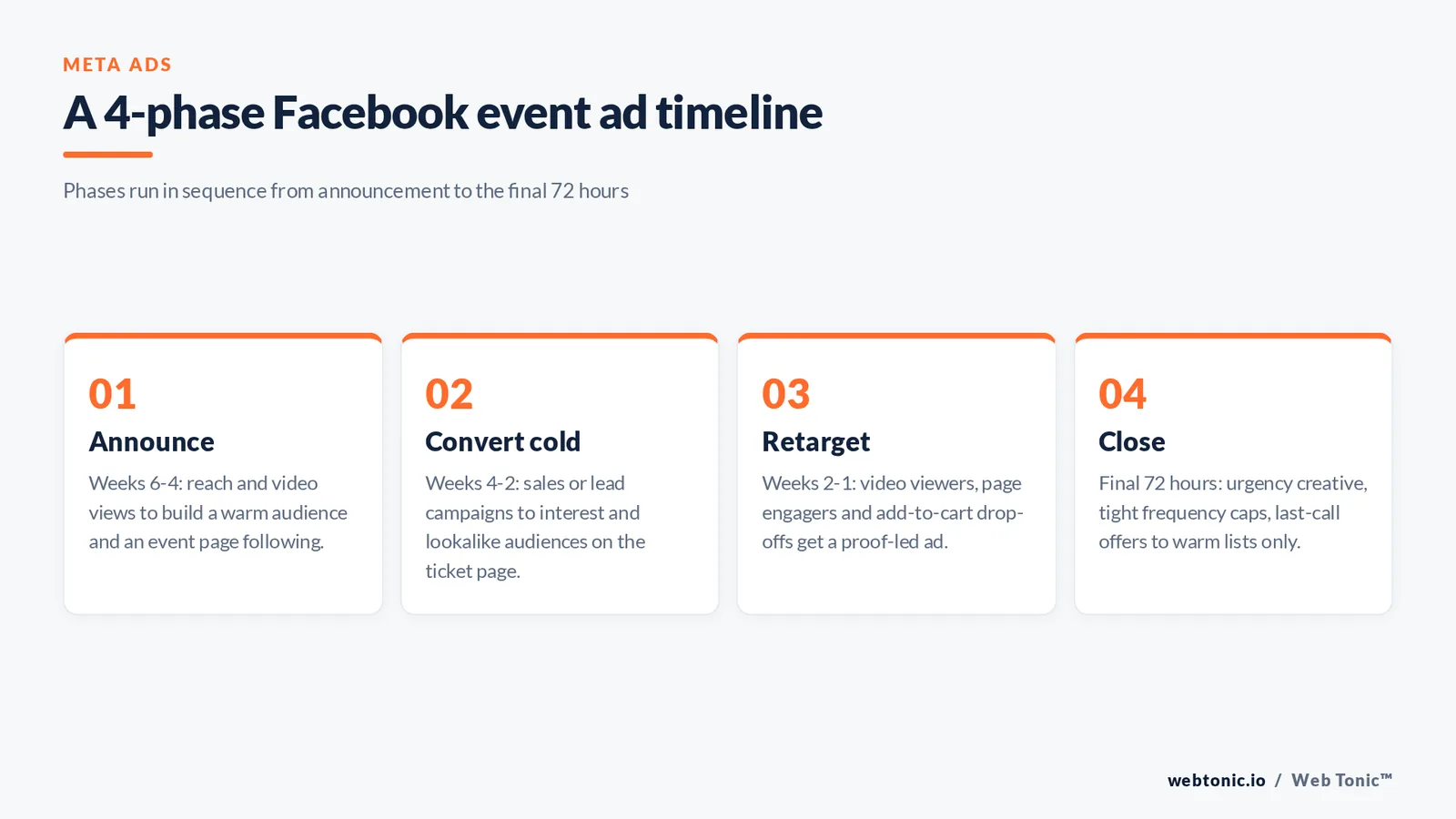
Phase 1: announce (weeks 6 to 4)
The announcement phase exists to manufacture the audiences that later phases will sell to. Run video views and reach against a broad local or interest audience, and treat every viewer as an asset. A 20-second event trailer at $8 per day for two weeks routinely builds a retargeting pool of several thousand people for less than the cost of a single week of purchase-optimised prospecting.
Rule 2 — 15 to 30 seconds is the sweet spot for an announcement video: long enough for line-up and venue, short enough to hold a feed. Rule 3 — 3 audiences maximum in this phase, because each additional ad set divides the learning signal. Publish a Facebook event alongside the ads so responses accumulate somewhere durable — event marketing guidance from Mailchimp makes the same point about giving people a low-commitment first action.
| Phase | Timing | Objective | Audience | Share of budget |
|---|---|---|---|---|
| Announce | Weeks 6-4 | Video views, reach | Broad local plus 2 interests | 20% |
| Convert cold | Weeks 4-2 | Sales or Leads | Lookalikes, interest stacks | 40% |
| Retarget | Weeks 2-1 | Sales | Video viewers, page engagers, cart drop-offs | 25% |
| Close | Final 72 hours | Sales | Warm lists only | 15% |
Phase 2: convert cold traffic (weeks 4 to 2)
This is where the ticket money is made or lost. Send cold audiences to a purpose-built landing page rather than the Facebook event page: you control the proof, the pricing table and the tracking. Build lookalikes from past attendees where you have them, since a 1% lookalike of buyers beats any interest stack you can assemble by hand.
Rule 4 — 2 to 3 creative variants per ad set, differing in hook rather than in colour. Rule 5 — 4 audience layers is the maximum worth testing at once for a single event: past attendees, 1% buyer lookalike, one interest stack, one broad radius. Trap 2 — 25% of budget spent on audiences smaller than 50,000 people burns cash on frequency instead of reach.
| Audience | How to build it | Best phase | Watch out for |
|---|---|---|---|
| Past attendees | Customer list upload from the ticketing platform | All phases | Small lists match poorly under 1,000 records |
| 1% buyer lookalike | Seeded from purchasers, not all site visitors | Convert cold | Needs 1,000+ seed records to be stable |
| Video viewers 75% | Engagement custom audience, 30-day window | Retarget | Expires quickly; refresh the source video |
| Event responders | People who responded Going or Interested | Retarget and close | Interested rarely equals buying intent |
| Checkout abandoners | Initiate-checkout minus purchase, 14 days | Retarget and close | Exclude buyers or you pay to annoy them |
| Broad radius | Location plus age only, no interests | Announce and convert | Only viable with clean purchase tracking |

Phase 3 and 4: retarget, then close
Warm audiences convert at a multiple of cold traffic, and in the final week they should carry most of the delivery. Swap the message from discovery to reassurance and then to urgency: what people get, who else is going, and how long they have left.
Rule 6 — 72 hours is the right length for the closing window; urgency stretched over two weeks stops reading as urgency. Rule 7 — 3 to 4 frequency per warm audience per week is a sensible cap before fatigue costs you goodwill. Trap 3 — 1 identical ad shown to buyers and non-buyers alike is the most common closing-week error, and exclusion lists fix it in two minutes. Benchmarks compiled by Socialinsider and cost data tracked by Hootsuite are useful sanity checks, but your own cost per ticket from the last comparable event is the only benchmark that really governs the bid.
Creative that fills seats
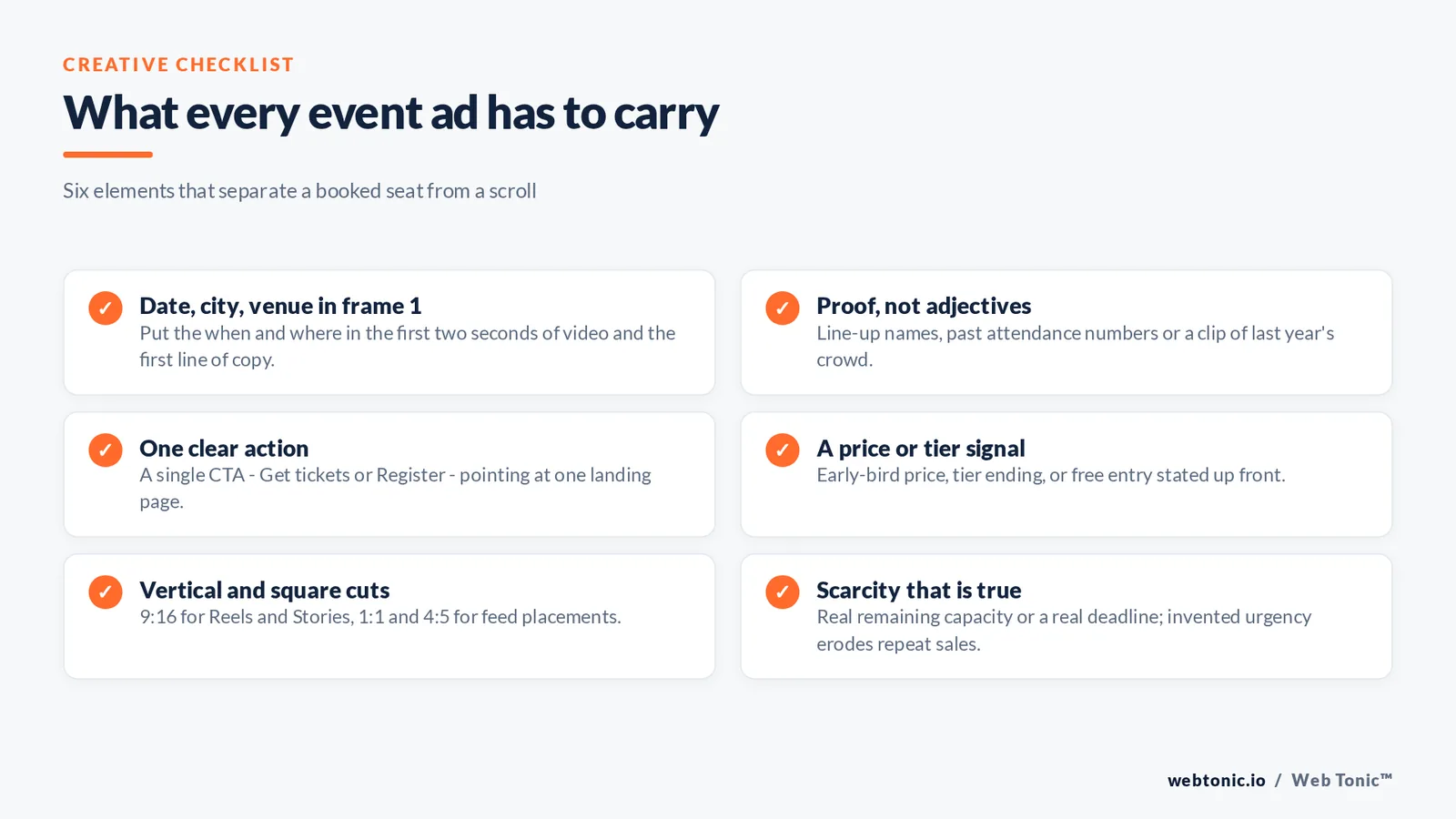
Event creative has an unusual job: it must answer what, when, where and how much inside two seconds, then give a reason to care. Motion outperforms static in almost every event test we run, and vertical cuts are non-negotiable now that Reels and Stories take so much of the impression volume. Usability research from the Nielsen Norman Group is blunt about video: viewers decide in the first seconds whether the content concerns them.
| Creative angle | Format | Best phase | Why it works |
|---|---|---|---|
| Line-up or speaker reveal | 15s vertical video | Announce | Borrowed authority from named people |
| Last year's crowd | 9:16 clip with captions | Announce, convert | Social proof beats promises |
| Ticket tier table | 1:1 static graphic | Convert | Price transparency filters tyre-kickers |
| What you will leave with | Carousel, 4 cards | Convert, retarget | Turns a date into an outcome |
| Attendee testimonial | 20s talking head | Retarget | Handles the is-it-worth-it objection |
| Real scarcity | 4:5 static with countdown | Close | A true deadline compresses decisions |
| Logistics reassurance | Static map or agenda card | Close | Removes travel and timing friction |
Rule 8 — 20% or less of the frame given to text overlay keeps mobile legibility intact. Rule 9 — 2 seconds to show date and city; everything else can wait. User-generated clips from previous attendees are the highest-value asset in the library, which is why our performance creative team treats every event as a content shoot as well as a campaign. If you use a paid partnership or creator content, the FTC endorsement guides set the disclosure standard.
Budget: what an event push actually costs
Budget follows the ticket price and the room size, not the other way round. Work out the maximum acceptable cost per ticket first — typically 15% to 25% of face value for a healthy event — then multiply by the seats you need paid media to fill, and add the announcement layer on top.
| Event size | Seats paid media must fill | Indicative total budget | Minimum run time |
|---|---|---|---|
| Local workshop, 40 seats | 25 | $400-$900 | 3 weeks |
| Community event, 200 seats | 120 | $1,500-$3,500 | 4 weeks |
| Paid conference, 500 seats | 300 | $9,000-$25,000 | 6-8 weeks |
| Free webinar, 1,000 signups | 700 | $2,000-$6,000 | 3 weeks |
| Festival, 5,000 tickets | 3,000 | $45,000+ | 10-12 weeks |
Rule 10 — 20% of face value is a defensible cost-per-ticket ceiling for most paid events. Trap 4 — 100% of budget loaded into the final week means you pay premium rates to reach people who have never heard of the event. Rule 11 — 10% reserve held back for the last 72 hours gives you room to buy the final seats when demand data is clearest.
Measurement and the after-party
Ticket platforms, the Meta pixel and your own analytics will disagree. Decide in advance which system is the source of truth for revenue, and reconcile the others against it weekly rather than arguing after the event. Show-up rate matters as much as sales for free events: a registration that never attends has negative value once you have catered for it.
| Metric | Where to read it | Healthy signal | What a bad number means |
|---|---|---|---|
| Cost per ticket | Ticketing platform, reconciled | Under 20% of face value | Audience or offer mismatch |
| Landing page conversion rate | Site analytics | Above 4% from cold traffic | Page, not ads, is the bottleneck |
| Frequency, warm audiences | Ads Manager | 3-4 per week | Fatigue; rotate creative |
| Show-up rate, free events | Check-in data | Above 45% | Reminder sequence is too thin |
| Repeat attendance | CRM year over year | Above 25% | The event, not the media, needs work |
Post-event, the audience you built is the real asset: attendee lists, video viewers and checkout abandoners all seed the next cycle at a lower cost. That compounding is the part most organisers skip, and it is the part our growth marketing and data intelligence teams spend most of their time protecting. Social usage trends published in DataReportal's global statshot and Sprout Social's statistics roundup are worth checking each year, because placement mix shifts faster than most event playbooks are updated.
Boosting a post versus running event ads in Ads Manager
Most organisers meet Facebook event promotion through the Boost button, and for a small local event that can be a reasonable first step. It stops being reasonable the moment you need to promote tickets to custom audiences, exclude buyers, or report cost per attendee. Meta Ads Manager exposes the objective, the optimisation event and the audience layers that make an event campaign efficient; the boost flow hides all three.
| Capability | Boosted post | Meta Ads Manager | Why it matters for events |
|---|---|---|---|
| Objective control | Engagement or clicks only | All 6 objectives | Ticket sales need purchase optimisation |
| Custom audiences | Limited | Full custom and lookalike audiences | Past attendees are your best buyers |
| Exclusions | None | Unlimited exclusion lists | Stops you paying to reach ticket holders |
| Placement control | Automatic | Feed, Reels, Stories, Instagram selectable | Vertical video needs its own creative |
| Reporting depth | Reach and engagement | Cost per ticket, ROAS, frequency | You cannot improve what you cannot read |
| Best used for | Awareness for a free local event | Any event with a revenue target | Effort should follow the money at stake |
Rule 12 — 1 boosted post is fine as a test; anything above roughly $200 of event promotion belongs in Ads Manager. Trap 5 — 0 exclusions is the structural weakness of every boost, and it is why boosted event posts tend to look effective on engagement and weak on tickets.
Where organic posts and Instagram fit
Paid delivery is only part of promoting events on Facebook and Instagram. Organic content warms the same people at zero media cost, and it gives the ad account creative to work with — a Reel that performs organically is the safest thing to put budget behind. Share the event page, post behind-the-scenes content from the venue, and let attendees do the promotion for you with user-generated content you can license into ads.
| Channel | Content type | Cadence before the event | Job it does |
|---|---|---|---|
| Facebook event page | Updates, agenda drops, host replies | 2 posts per week | Keeps responders engaged and reminded |
| Facebook feed | Speaker announcements, ticket tiers | 3 posts per week | Reaches existing brand followers |
| Instagram Reels | 15s teasers, last-year clips | 2-3 Reels per week | Cheapest new reach on Meta surfaces |
| Instagram Stories | Countdown sticker, link sticker | Daily in the final 2 weeks | Direct clicks from a warm audience |
| Attendee UGC | Reshared clips and photos | Whenever it appears | Third-party proof at no production cost |
| Email and SMS | Tier reminders, agenda, logistics | 4-6 sends total | Converts the people already sold on you |
Rule 13 — 30% of ad creative should come from organic winners rather than from a studio brief, because the feed has already voted on it. Rule 14 — 1 link destination across organic and paid keeps your website analytics readable.
A step-by-step event promotion checklist
Use this sequence for any event with a revenue target. Each step is a prerequisite for the next, and skipping the tracking steps is what makes people conclude that Facebook ads do not work for events.
| Step | Action | When | Done when |
|---|---|---|---|
| Step 1 | Confirm pixel and Conversions API fire on ticket purchase | Week 7 | A test purchase appears in Events Manager |
| Step 2 | Build the landing page with date, city, price above the fold | Week 7 | Page converts a test visitor end to end |
| Step 3 | Create the Facebook event and upload past-attendee lists | Week 6 | Custom audiences show a match rate above 40% |
| Step 4 | Launch the announcement video campaign | Week 6 | Video-viewer audience passes 2,000 people |
| Step 5 | Launch cold sales campaign to lookalikes and interests | Week 4 | First 10 tickets are attributed |
| Step 6 | Add retargeting ad sets with buyer exclusions | Week 2 | Frequency stays under 4 per week |
| Step 7 | Run the 72-hour closing push on warm lists | Final 3 days | Reserve budget is spent or seats are gone |
| Step 8 | Export attendees, reconcile revenue, seed the next event | Week after | Attendee audience is live in Ads Manager |
FAQ
How far in advance should I start Facebook ads for an event?
Six weeks is the standard start for a paid ticketed event, and eight to twelve weeks for anything with travel or accommodation attached. Free local events and webinars can compress to about three weeks. The reason to start early is not extra impressions — it is that the announcement phase builds the video-viewer and engagement audiences that make the final two weeks cheap.
Should I send ads to a Facebook event page or my own landing page?
Use your own landing page whenever you are selling tickets or capturing registrations, because you control tracking, pricing presentation and proof. A Facebook event page is a useful secondary destination in the announcement phase, since responding is a low-commitment action that creates a retargetable audience, but it is a weak place to close a sale.
Which objective works best for selling tickets?
The Sales objective optimised for the purchase event, provided the purchase is tracked reliably through the pixel and a server-side Conversions API connection. If you cannot reach roughly 50 purchases a week, optimise for an earlier event such as initiate-checkout or a registration start, then move up to purchase once volume supports it.
How much should I spend on Facebook ads for an event?
Set a maximum acceptable cost per ticket at 15% to 25% of face value, multiply it by the number of seats paid media has to fill, then add roughly 20% for the announcement phase. A 200-seat community event where ads need to fill 120 places typically lands between $1,500 and $3,500 in total spend across four weeks.
How do I stop ads reaching people who already bought?
Build a purchasers custom audience from the pixel purchase event or a customer list upload, and add it as an exclusion on every prospecting and retargeting ad set. Refresh the list daily in the final week. This one exclusion typically cuts wasted closing-week spend noticeably and removes the most common complaint organisers hear about their own ads.
Sources
Pew Research Center — Social Media Fact Sheet. DataReportal — Digital 2025 April Global Statshot (5.66bn social identities; Facebook approximately 3.07bn monthly users). Sprout Social — Social media statistics. Socialinsider — Facebook benchmarks. Hootsuite — Facebook ads cost. Eventbrite — sell tickets resources. Mailchimp — event marketing resources. Nielsen Norman Group — video usability. Federal Trade Commission — Endorsement Guides FAQ. All sources accessed August 2026.More paid social breakdowns sit on the Web Tonic blog, or talk to our team about a campaign plan for your next event.


