



Table of contents

Facebook's recommended ad size is 1080 × 1080 pixels for square placements and 1080 × 1920 pixels for Stories and Reels, with JPG or PNG images and MP4 or MOV video.
Below is every placement, aspect ratio, file type and text limit in one place, plus the export settings that stop Meta from re-compressing your creative into mush.
Key Takeaways
- Design at 1080 px on the short edge. Meta's stated minimum width is 600 px, but anything under 1080 shows compression artefacts on modern phones.
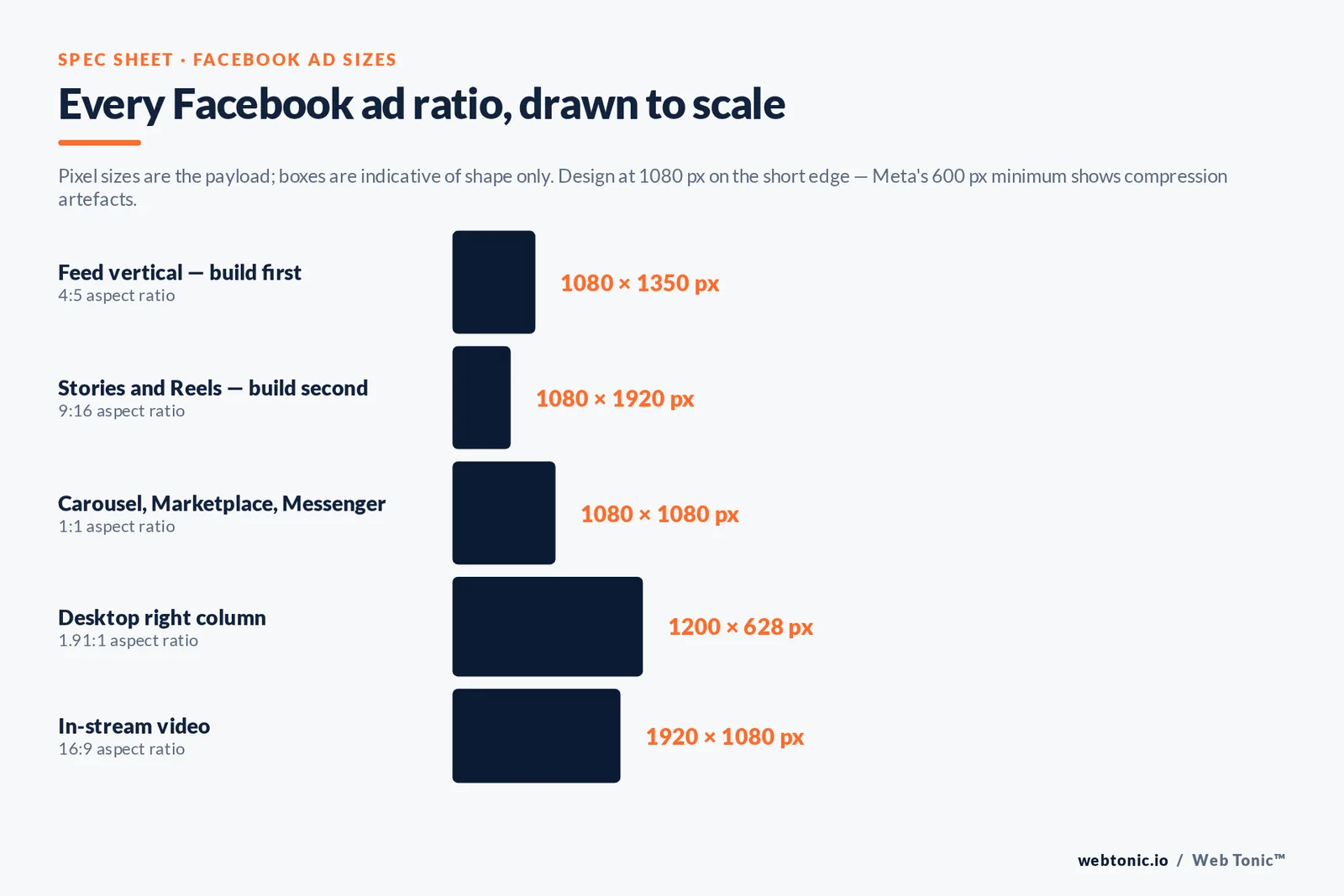
- Three crops cover everything: 1:1 (1080 × 1080), 4:5 (1080 × 1350) and 9:16 (1080 × 1920). Build those and you are eligible for almost all placements.
- Image ads accept JPG and PNG with a maximum file size of about 30 MB. Video accepts MP4, MOV and GIF up to roughly 4 GB.
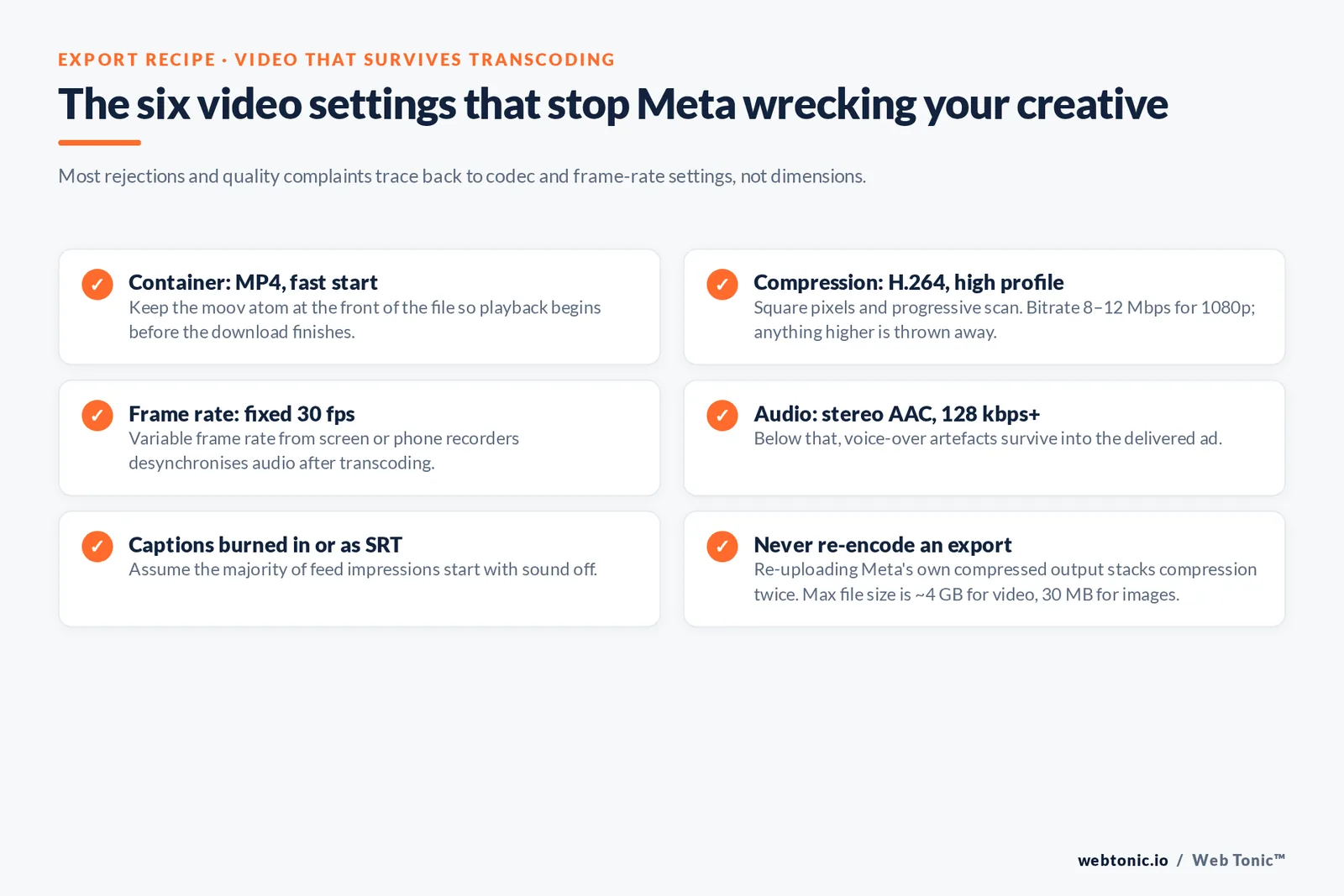
- Video settings that survive transcoding: H.264 compression, high profile, square pixels, fixed frame rate, progressive scan and stereo AAC audio at 128 kbps+.
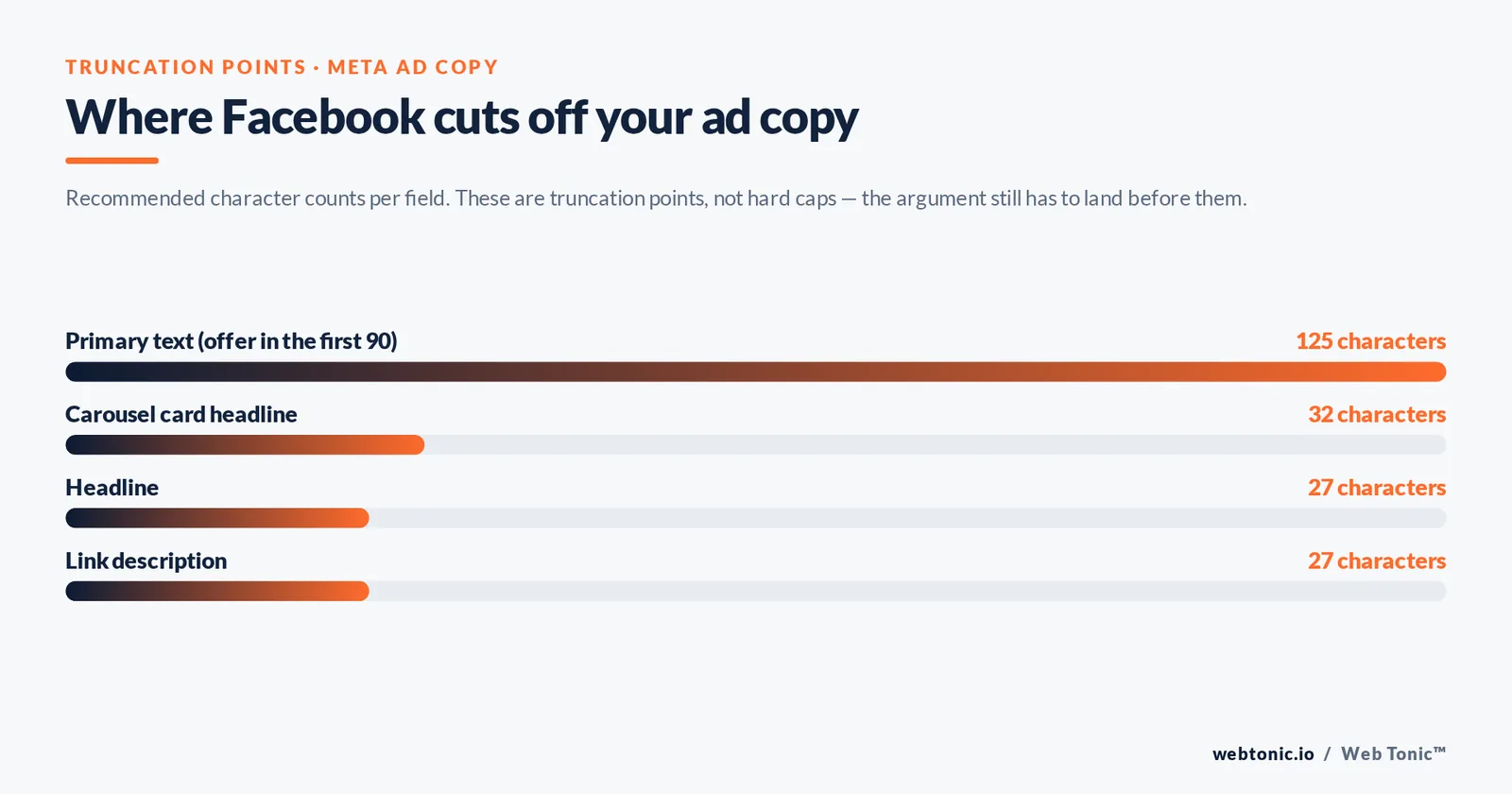
- Text limits are truncation points, not hard caps: 125 characters of primary text, 27 characters of headline, 27 characters of link description.
- Feed video can run up to 241 minutes, but performance collapses after roughly 15 to 30 seconds for direct-response objectives.
- Carousel ads take 2 to 10 cards, all at the same aspect ratio — mixing square and vertical cards breaks the sequence.
The three aspect ratios that matter
Meta's placement list is long, but the underlying geometry is short. Everything in the ecosystem is a variation on square, vertical-tall or full-screen vertical.
- 1:1 square (1080 × 1080) — the safe default. Renders in Facebook Feed, Marketplace, Messenger inbox, search results, Audience Network and carousel cards.
- 4:5 vertical (1080 × 1350) — takes about 25% more feed height than square without being cropped in feed. This is the highest-value single crop for feed-first campaigns.
- 9:16 full-screen (1080 × 1920) — Stories and Reels. Keep the top and bottom 14% of the frame clear of text so the profile name and call-to-action button do not cover it.
A fourth ratio, 1.91:1 (1200 × 628), still exists for right-column and some link placements, but designing for it first is a mistake — mobile is where the impressions are, and Sprout Social's platform data shows discovery behaviour concentrated in vertical, mobile-first surfaces.
Facebook image ad sizes by placement
Recommended resolution is what you should export. Minimum is what Meta will accept before rejecting or upscaling the asset.
| Placement | Recommended size (pixels) | Aspect ratio | File type | Max file size |
|---|---|---|---|---|
| Facebook Feed | 1080 × 1080 or 1080 × 1350 | 1:1 or 4:5 | JPG, PNG | 30 MB |
| Facebook Stories | 1080 × 1920 | 9:16 | JPG, PNG | 30 MB |
| Facebook Reels | 1080 × 1920 | 9:16 | JPG, PNG | 30 MB |
| Marketplace | 1080 × 1080 | 1:1 | JPG, PNG | 30 MB |
| Right column (desktop) | 1200 × 628 | 1.91:1 | JPG, PNG | 30 MB |
| Search results | 1080 × 1080 | 1:1 | JPG, PNG | 30 MB |
| Messenger inbox | 1080 × 1080 | 1:1 | JPG, PNG | 30 MB |
| Carousel card | 1080 × 1080 | 1:1 (uniform across cards) | JPG, PNG | 30 MB per card |
| Collection / Instant Experience | 1080 × 1080 | 1:1 | JPG, PNG | 30 MB |
| Audience Network native | 1080 × 1080 | 1:1 to 1.91:1 | JPG, PNG | 30 MB |
PNG is the better choice for flat colour, logos and screenshots because it avoids the blocking that JPG compression produces on hard edges; JPG wins on photographs. MDN's image format reference explains the trade-off in detail. Meta re-encodes whatever you upload, so give it clean input: no pre-sharpening, no double compression, and export at 100% quality and let the platform do the reduction. If you also use the same creative on your own site, Google's WebP documentation is worth reading for the web version, since image weight feeds directly into the Core Web Vitals thresholds that govern landing page speed — a hero image over 200 KB is usually the first thing to fix.
Facebook video ad sizes and settings
Video is where specs actually get broken, because most rejections and quality complaints trace back to codec and frame-rate settings rather than dimensions.
| Placement | Recommended size (pixels) | Aspect ratio | File type | Video length |
|---|---|---|---|---|
| Feed video | 1080 × 1080 or 1080 × 1350 | 1:1 or 4:5 | MP4, MOV, GIF | 1 second to 241 minutes |
| Stories video | 1080 × 1920 | 9:16 | MP4, MOV, GIF | Up to 60 seconds per card |
| Reels video | 1080 × 1920 | 9:16 | MP4, MOV, GIF | Up to 90 seconds recommended |
| In-stream video | 1080 × 1080 minimum | 16:9 to 1:1 | MP4, MOV | 5 seconds to 10 minutes |
| Marketplace video | 1080 × 1080 | 1:1 or 4:5 | MP4, MOV, GIF | 1 second to 241 minutes |
| Audience Network video | 1080 × 1080 | 9:16 to 16:9 | MP4, MOV | Up to 4 minutes |
| Carousel video card | 1080 × 1080 | 1:1 | MP4, MOV, GIF | Up to 240 minutes |
The export recipe that holds up across every placement:
- Container: MP4 with the moov atom at the front (fast start).
- Compression: H.264, high profile, square pixels, fixed frame rate, progressive scan.
- Frame rate: 30 fps is the safe default; variable frame rate from screen recorders causes audio drift after transcoding.
- Audio: stereo AAC audio compression at 128 kbps or higher.
- Bitrate: 8 to 12 Mbps for 1080p is plenty; higher just gets thrown away.
- Maximum file size: around 4 GB, which you will never approach at these settings.
- Captions: burned in or uploaded as an SRT. Assume the majority of feed impressions start with sound off, and follow W3C accessibility guidance on text alternatives.
Facebook ad specs cheat sheet
One table, every format, in the order Ads Manager presents them: recommended size in pixels, ratio, file type, maximum file size and maximum video length.
| Ad format | Recommended size (pixels) | Ratio | File type | Maximum file size | Video length |
|---|---|---|---|---|---|
| Single image, Facebook Feed | 1080 × 1350 | 4:5 | PNG, JPG | 30 MB | — |
| Single video, Facebook Feed | 1080 × 1350 | 4:5 | MOV, GIF, MP4 | 4 GB | Up to 241 minutes |
| Facebook Stories image | 1080 × 1920 | 9:16 | PNG, JPG | 30 MB | — |
| Facebook Stories video | 1080 × 1920 | 9:16 | MOV, GIF, MP4 | 4 GB | Up to 60 seconds per card |
| Facebook Reels image | 1080 × 1920 | 9:16 | PNG, JPG | 30 MB | — |
| Facebook Reels video | 1080 × 1920 | 9:16 | MOV, GIF, MP4 | 4 GB | Up to 90 seconds recommended |
| Carousel | 1080 × 1080 | 1:1 | PNG, JPG, MOV, GIF, MP4 | 30 MB image / 4 GB video | Up to 240 minutes |
| Marketplace | 1080 × 1080 | 1:1 | PNG, JPG, MOV, GIF, MP4 | 30 MB image / 4 GB video | Up to 241 minutes |
| In-stream video | 1920 × 1080 | 16:9 | MOV, MP4 | 4 GB | 5 seconds to 10 minutes |
| Right column | 1200 × 628 | 1.91:1 | PNG, JPG | 30 MB | — |
| Messenger inbox | 1080 × 1080 | 1:1 | PNG, JPG | 30 MB | — |
| Audience Network | 1080 × 1080 | 9:16 to 16:9 | PNG, JPG, MOV, MP4 | 30 MB image / 4 GB video | Up to 4 minutes |
Two details in that table cause most of the confusion. First, the maximum file size differs by an order of magnitude between image and video — 30 MB versus 4 GB — so a video that fails to upload is almost never a size problem and almost always a codec problem. Second, GIF is accepted as a video file type rather than an image file type, which means a GIF inherits the video length and video settings rules, including the requirement for a fixed frame rate.
Recommended resolution is also not the same as minimum resolution. Meta's stated minimum width is 600 pixels, and it will accept assets at that size, but the recommended 1080 pixels on the short edge is what modern displays need. If your source file cannot reach 1080, reshoot rather than upscale — upscaling adds no detail and the transcoder will exaggerate every artefact.
Text limits: primary text, headline and description
Sizing is not only pixels. Meta truncates copy differently per placement, and the truncation point is where most ads lose their argument.
| Field | Recommended characters | What happens past the limit | Practical rule |
|---|---|---|---|
| Primary text | 125 | Collapses behind "See more" | Put the offer in the first 90 characters |
| Headline | 27 | Truncated with an ellipsis on mobile | One benefit, no brand name |
| Link description | 27 | Hidden entirely in several placements | Treat as optional reassurance |
| Carousel card headline | 32 | Truncated per card | Keep card headlines parallel |
| Stories and Reels overlay | Minimal on-frame text | Covered by UI chrome | Keep the top and bottom 14% clear |
| Call to action | Fixed picklist | Not editable | Match the CTA to the objective |
The old 20% text rule for images no longer causes rejections, but dense on-image text still hurts delivery in practice because it reads as an advertisement and drives thumb-stop rates down. WordStream's Facebook advertising resource and Socialinsider's Facebook benchmarks both show creative-led differences far larger than any targeting tweak.
How specs differ across Facebook, Instagram and Reels
Because Meta delivers a single ad across Facebook, Instagram, Messenger and Audience Network, one upload has to survive multiple crops. Two rules prevent the usual damage.
First, upload placement-specific assets rather than letting Meta auto-crop. In Ads Manager this is the "customise per placement" option: give it one 4:5 file for feed and one 9:16 file for Stories and Reels. Auto-crop will centre-crop your 4:5 into 9:16 and cut off the product, the price or the logo.
Second, design in a safe zone. On a 1080 × 1920 frame that means keeping every essential element inside roughly 1080 × 1420 in the middle of the canvas. Instagram and Facebook place their UI in slightly different positions, so the intersection is what you can rely on. Cross-platform sizing charts such as Hootsuite's social image sizes guide and Sprout Social's image sizes guide are useful when the same creative also has to run on LinkedIn or X.
Scale matters here: Facebook remains one of the largest ad surfaces on earth, with audience and revenue figures tracked in Statista's Facebook data hub, so a systematic crop workflow compounds across a very large number of impressions.
Which ratio unlocks which placements
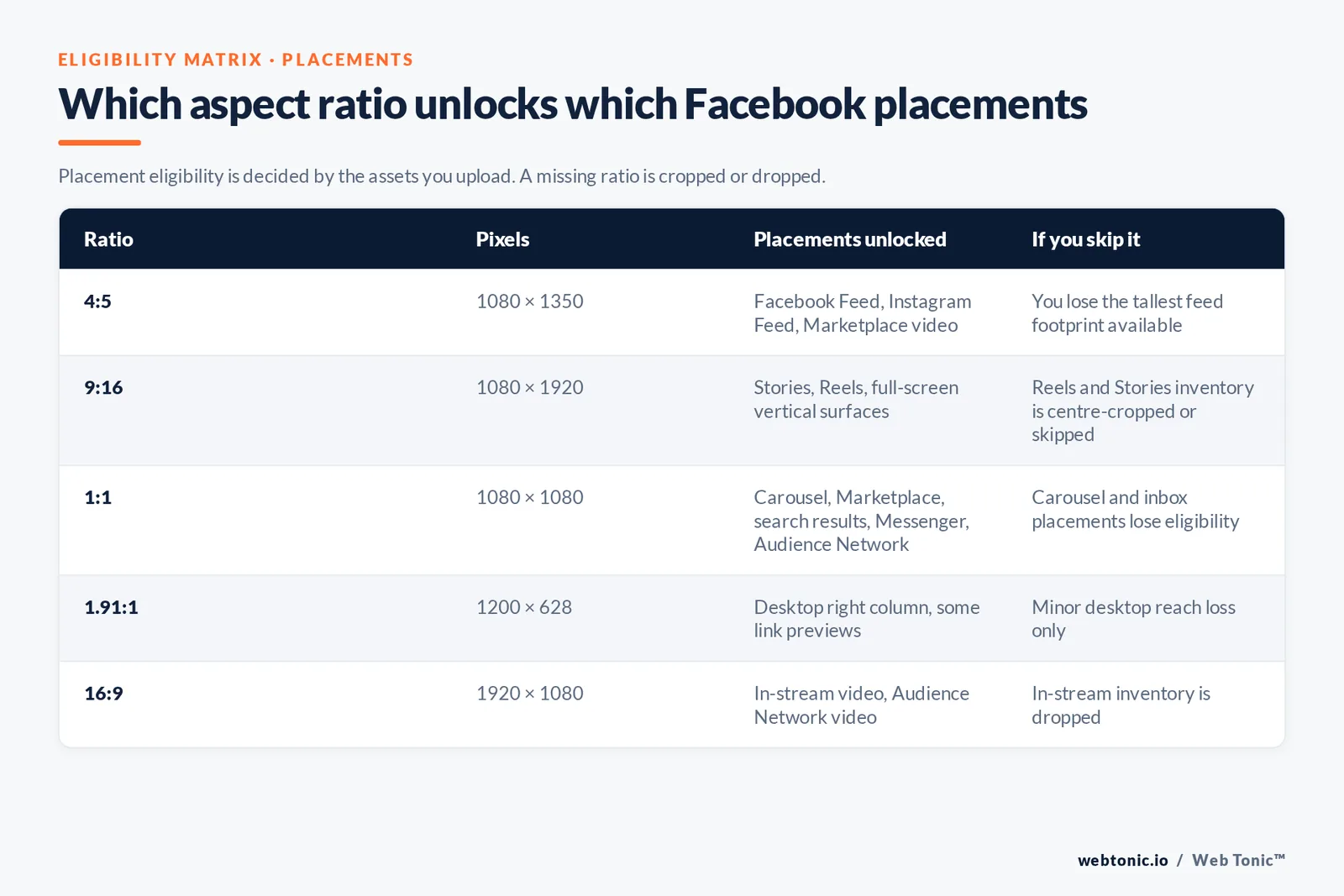
Placement eligibility is decided by the assets you upload, not by the placement settings alone. If a required ratio is missing, Meta either crops your file or drops the placement — and dropped placements shrink the auction pool you compete in.
| Aspect ratio | Pixel size | Placements unlocked | Priority | If you skip it |
|---|---|---|---|---|
| 4:5 | 1080 × 1350 | Facebook Feed, Instagram Feed, Marketplace video | Build first | You lose the tallest feed footprint available |
| 9:16 | 1080 × 1920 | Stories, Reels, full-screen vertical surfaces | Build second | Reels and Stories inventory is centre-cropped or skipped |
| 1:1 | 1080 × 1080 | Carousel, Marketplace, search results, Messenger, Audience Network | Build third | Carousel and inbox placements lose eligibility |
| 1.91:1 | 1200 × 628 | Desktop right column, some link previews | Optional | Minor desktop reach loss only |
| 16:9 | 1920 × 1080 | In-stream video, Audience Network video | Only for video-heavy plans | In-stream inventory is dropped |
A three-file set — one 4:5, one 9:16, one 1:1 — covers the overwhelming majority of delivery. Adding the fourth and fifth rows is a diminishing return unless you are buying video reach at scale. In practice the 3-file rule is the single cheapest way to widen delivery without touching targeting or budget.
How sizing affects cost and performance
Ad size is a performance lever, not just a compliance checkbox, and it works through three routes.
Screen share. A 4:5 asset occupies noticeably more vertical feed space than a 1:1 asset at the same scroll position, which raises the chance of a stop. On full-screen surfaces the asset owns 100% of the display, which is why Reels and Stories creative needs a distinct edit rather than a resized feed file.
Auction breadth. More eligible placements means more auctions entered, which usually lowers effective cost per result even at identical bids. Restricting placements manually is one of the most common self-inflicted cost increases in Meta buying.
Perceived quality. Upscaled, over-compressed or letterboxed creative reads as amateur, and that shows up in lower click-through and higher cost per click. Exporting at 1080 px minimum with clean H.264 settings costs nothing and removes the problem entirely.
Testing note: change one variable at a time. If you are comparing a 4:5 file against a 1:1 file, keep primary text, headline, call to action and audience identical, and give each variant at least 50 conversions before reading the result.
A production workflow that keeps every placement eligible
- Master at 4:5. Build the design at 1080 × 1350 with the key message in the central square. Everything else derives from it.
- Extend to 9:16. Add background above and below to reach 1080 × 1920, never scale the subject up.
- Crop to 1:1. Export the centre 1080 × 1080 and check nothing important sat in the removed strips.
- Add the 1.91:1 variant only if desktop right column is in your placement plan.
- Export video once per ratio with the H.264 recipe above; do not re-encode an already-compressed export.
- Preview in Ads Manager across all placements before publishing, and check the Reels and Stories previews specifically for UI overlap.
- Name files by ratio — for example
offer-a_1080x1350.jpg— so a media buyer can never upload the wrong crop.
Meta changes recommended specs several times a year, usually when a placement or format is added, and updates land in the Ads Guide inside Ads Manager first. Platform announcements are published on Meta's newsroom. Our performance creative team maintains ratio templates per client, growth marketing maps placements to funnel stage, and our web development team handles the landing-page side of the same creative. More guides sit on the Web Tonic blog, or you can get in touch.
Mistakes that quietly waste budget
- Uploading a single 1:1 asset for all placements. It renders as a small letterboxed square in Stories, wasting 40%+ of the screen.
- Exporting below 1080 px. Meta upscales, and the artefacts read as low quality.
- Variable frame rate from screen or phone recordings, which desynchronises audio after transcoding.
- Headlines over 27 characters that truncate mid-word on mobile.
- Text in the bottom 14% of a vertical frame, hidden behind the call-to-action button.
- Mixed aspect ratios inside one carousel, which breaks the visual sequence between cards.
- No captions on video, which loses the majority of muted impressions.
- Re-uploading Meta's own compressed output as a new ad, stacking compression twice.
FAQ: Facebook ad sizes
What is the best Facebook ad size in 2026?
For feed placements, 1080 × 1350 pixels at a 4:5 aspect ratio takes the most screen space without cropping. For Stories and Reels, use 1080 × 1920 at 9:16. If you only produce one asset, 1080 × 1080 at 1:1 is the safest because it is eligible for the widest set of placements.
What file types and file sizes does Facebook accept?
Images should be JPG or PNG with a maximum file size of about 30 MB. Video should be MP4, MOV or GIF up to roughly 4 GB, encoded with H.264 compression, square pixels, a fixed frame rate, progressive scan and stereo AAC audio at 128 kbps or higher.
How long can a Facebook video ad be?
Feed video technically supports up to 241 minutes, Stories cards run up to 60 seconds each, Reels are best kept within 90 seconds, and in-stream placements accept 5 seconds to 10 minutes. For direct response, most performance sits in the first 15 to 30 seconds regardless of the maximum.
Do Facebook and Instagram ads use the same sizes?
Largely yes — 1:1, 4:5 and 9:16 cover both — but the interface elements sit in different places, so a safe zone that works on one can be partly covered on the other. Upload placement-specific assets instead of relying on automatic cropping.
Is the 20% text rule still in effect?
No, Meta no longer rejects image ads for exceeding 20% text coverage. Heavy on-image text still tends to reduce engagement because it signals an advertisement, so keep overlay copy short and let the headline and primary text carry the message.
Sources: Meta Ads Guide specifications as surfaced in Ads Manager · Meta newsroom · Sprout Social social media statistics and image sizes guide · Hootsuite social media image sizes guide · WordStream Facebook advertising resource · Socialinsider Facebook benchmarks · MDN image format reference · Google WebP documentation · W3C WAI images tutorial · Wikipedia H.264 and AAC references · Statista Facebook data hub. Meta updates recommended specs periodically — verify in the Ads Guide before a large production run.


