



Table of contents

Bespoke build work means creating a site from purpose-written code and a purpose-built content model instead of adapting a ready-made theme. You get exactly the structure, integrations and performance profile your business needs — and you pay for every one of them.
Key Takeaways
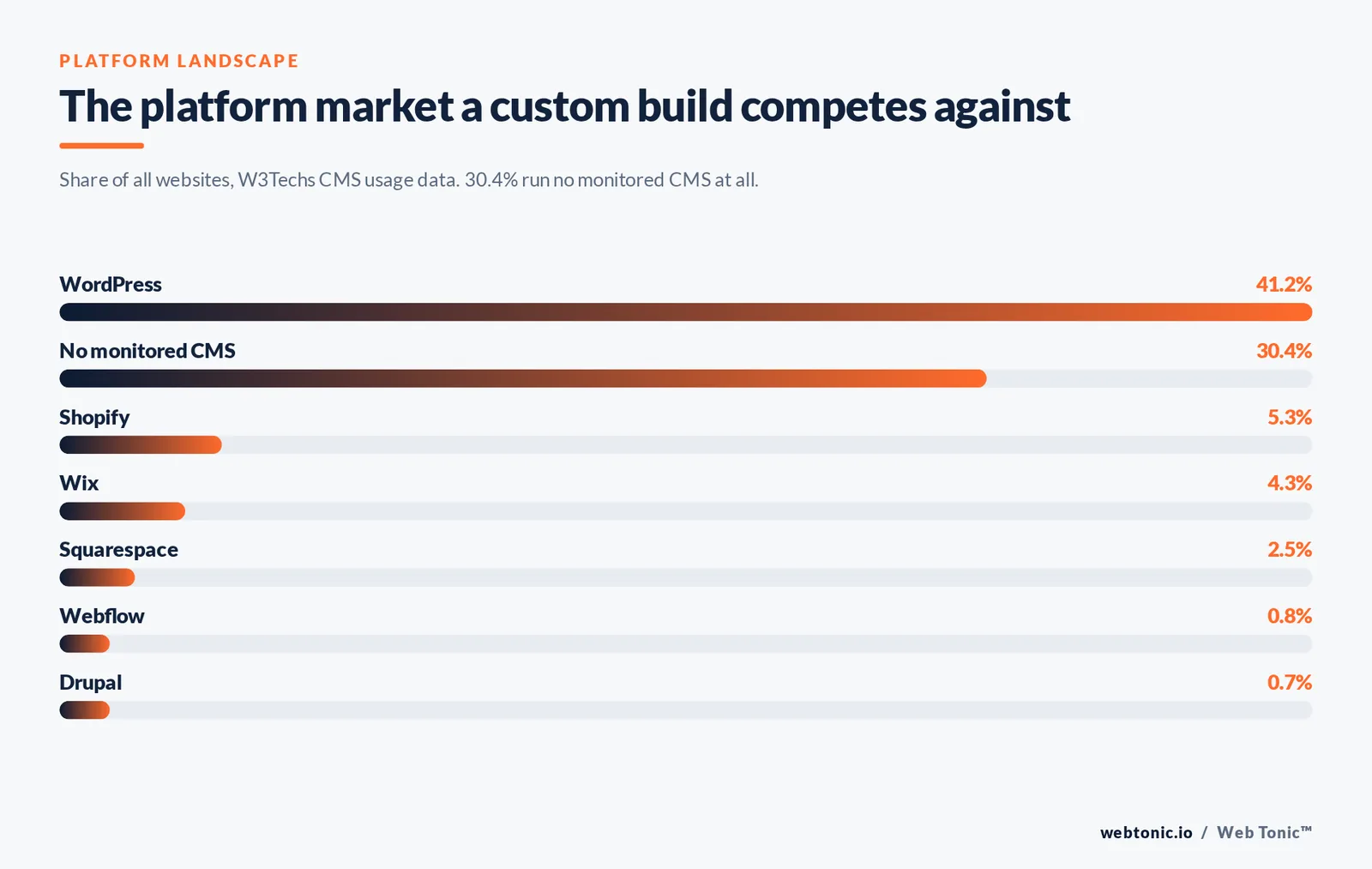
- 41.2% of all websites run on WordPress, a 59.1% share of the CMS market, while 30.4% of sites use no monitored CMS at all — so "custom" rarely means "no platform".
- Templates lose on constraints, not looks: the moment you need a non-standard content type, a live pricing calculator or a two-way CRM sync, a theme starts costing more than custom code.
- Custom work only pays back when it is held to measurable targets: LCP under 2.5 s, CLS under 0.1, INP under 200 ms and WCAG 2.2 conformance.
- Roughly 33% of sites pass all three Core Web Vitals thresholds, and 52.57% of global traffic is mobile — mobile performance is the single biggest quality gap in custom builds.
- Budget the scope, not the page count. Integrations, editorial workflow and migration consume more hours than visual design on almost every project.
What this approach actually covers
The phrase gets used for everything from a heavily modified theme to a bespoke application. It is more useful to think in layers: any project can be custom at one layer and off-the-shelf at another, and the mix is what drives cost. A brochure site with a custom design system on a standard CMS is a very different job from a quoting tool with its own database.
The industry term for the underlying idea is simply custom software — software specified for one organisation rather than a general market. Web development inherits that definition and adds a browser, a content team and a search engine as permanent stakeholders.
| Layer | Off-the-shelf version | Custom version | When custom is worth it |
|---|---|---|---|
| Design system | Purchased theme, fixed components | Component library built to brand rules | Brand is a real asset, or 20+ page types |
| Content model | Posts and pages | Purpose-built collections and relationships | Structured data (locations, products, staff) |
| Front end | Theme templates, plugin scripts | Hand-written templates, controlled JS budget | Performance or accessibility is contractual |
| Integrations | Plugin connectors, form-to-email | API sync with CRM, ERP, booking, billing | Data must move both ways, reliably |
| Editorial workflow | Generic admin screens | Role-scoped editors, guarded fields | Non-technical team publishes weekly |
| Hosting and delivery | Shared plan, vendor defaults | CDN, caching rules, staging, CI deploys | Traffic spikes or compliance requirements |
Bespoke, template, builder or headless: the four routes
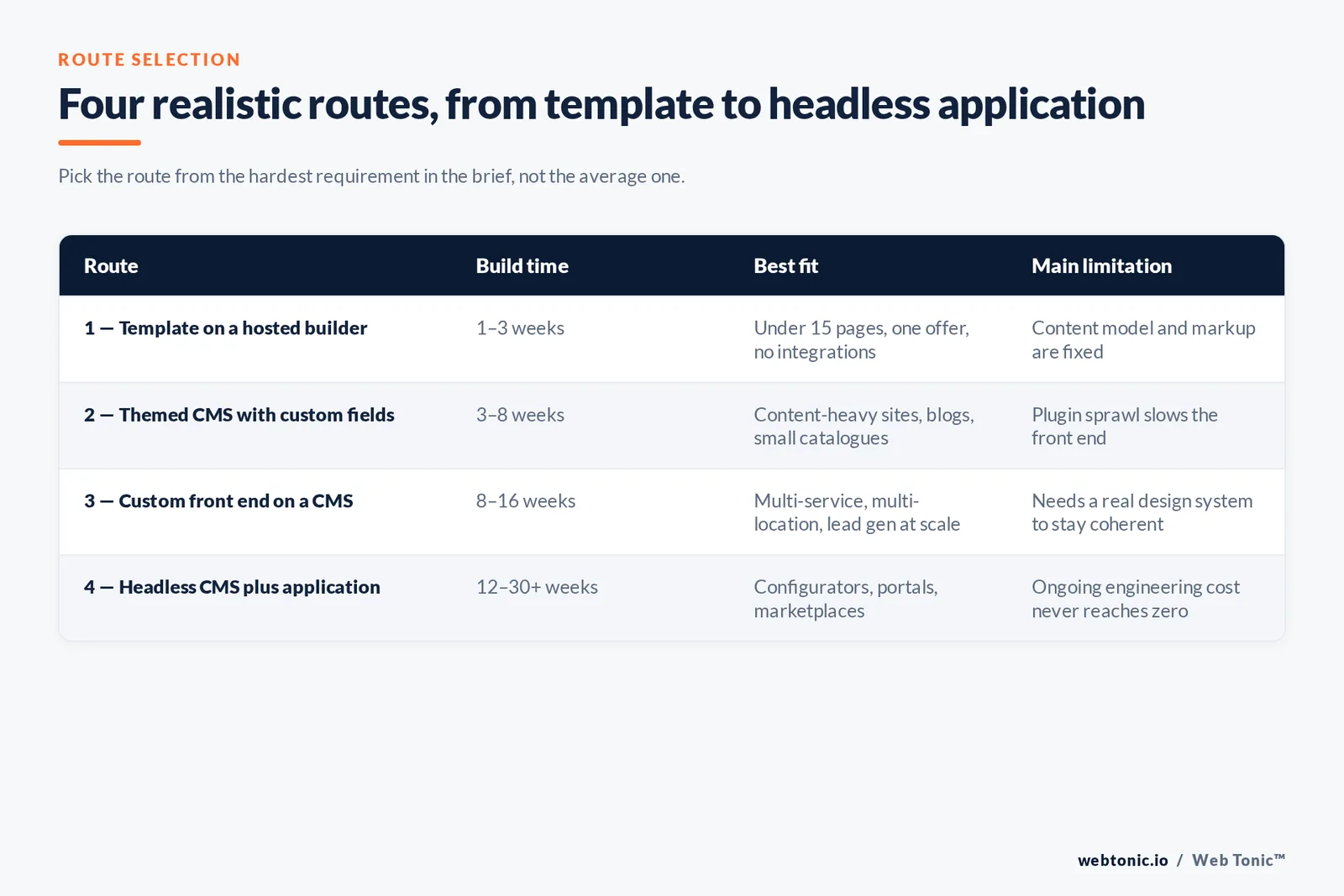
Most decisions collapse into four realistic routes. Route 1 is fastest and cheapest to start; route 4 is the most flexible and the most expensive to maintain. The trap is choosing route 1 for a business whose requirements already sit in route 3.
| Route | Typical build time | Best fit | Main limitation |
|---|---|---|---|
| Route 1 — Template on a hosted builder | 1–3 weeks | Under 15 pages, one offer, no integrations | Content model and markup are fixed |
| Route 2 — Themed CMS with custom fields | 3–8 weeks | Content-heavy sites, blogs, small catalogues | Plugin sprawl slows the front end |
| Route 3 — Custom front end on a visual or classic CMS | 8–16 weeks | Multi-service, multi-location, lead-gen at scale | Needs a real design system to stay coherent |
| Route 4 — Headless CMS plus custom application | 12–30+ weeks | Product configurators, portals, marketplaces | Ongoing engineering cost never goes to zero |
Rule 1 — pick the route from the hardest requirement in the brief, not the average one. Rule 2 — if two requirements need custom code, the whole front end is cheaper built custom than patched. Rule 3 — the CMS choice is reversible for years; the content model is not.
The platform landscape you are choosing against
None of this happens in a vacuum. Current CMS usage data from W3Techs shows how concentrated the market is, and that concentration is exactly why a well-built custom site can look different from everything else in its category.
| Platform | Share of all websites | Share of CMS market | Practical reality |
|---|---|---|---|
| WordPress | 41.2% | 59.1% | Deepest talent pool; custom themes are routine |
| Shopify | 5.3% | 7.6% | Custom theme yes, custom checkout mostly no |
| Wix | 4.3% | 6.1% | Template route; limited markup control |
| Squarespace | 2.5% | 3.5% | Template route; code injection only |
| Webflow | 0.8% | 1.2% | Custom markup and CMS collections, hosted |
| Drupal | 0.7% | 1.0% | Strong for complex permissions and taxonomies |
| No monitored CMS | 30.4% | — | Static, framework-rendered or bespoke stacks |
Two numbers matter for planning. First, 30.4% of sites run without a monitored CMS, which is where framework-rendered and static custom builds live. Second, the developer market that supports these choices is enormous but uneven: the 2025 Stack Overflow Developer Survey collected over 49,000 responses from 177 countries, and 35% of respondents had been coding for fewer than ten years. Seniority is scarcer than headcount.
What the work actually costs
Nobody can quote a website from a page count. Cost is hours, and hours come from scope drivers. The table below turns the usual brief into ranges you can sanity-check a proposal against; multiply by the blended rate you are being charged. Independent developers commonly bill in the $50–$100 per hour band and agencies in the $100–$200 band, so the same scope can differ by 2–3x on price alone.
| Scope driver | Typical hours | What inflates it | What you can cut |
|---|---|---|---|
| Discovery and content model | 15–50 | Many stakeholders, unclear offers | Nothing — cutting here costs more later |
| Design system and key templates | 40–140 | Number of distinct page types | Ship 6 templates, add the rest in phase 2 |
| Front-end build | 60–250 | Animation, interactive components | Motion polish, non-essential interactivity |
| CMS configuration | 20–90 | Complex relationships, multilingual | Editor conveniences, bulk tools |
| Integrations per system | 15–80 each | Two-way sync, legacy APIs, auth | Start one-way, add write-back later |
| Content migration | 10–120 | Volume, messy legacy markup, redirects | Archive low-traffic pages instead of porting |
| QA, accessibility and launch | 20–70 | Device matrix, compliance evidence | Nothing — this is where quality is proven |
Limit 1: if integrations are more than a third of the hours, you are buying software, not a website — staff it that way. Limit 2: migration is routinely underestimated by 50% or more. Limit 3: a build with no line item for accessibility testing is not a custom build, it is a template with extra steps. Our own web development service pages break down how we sequence these phases.
The six-phase process, and who signs off what
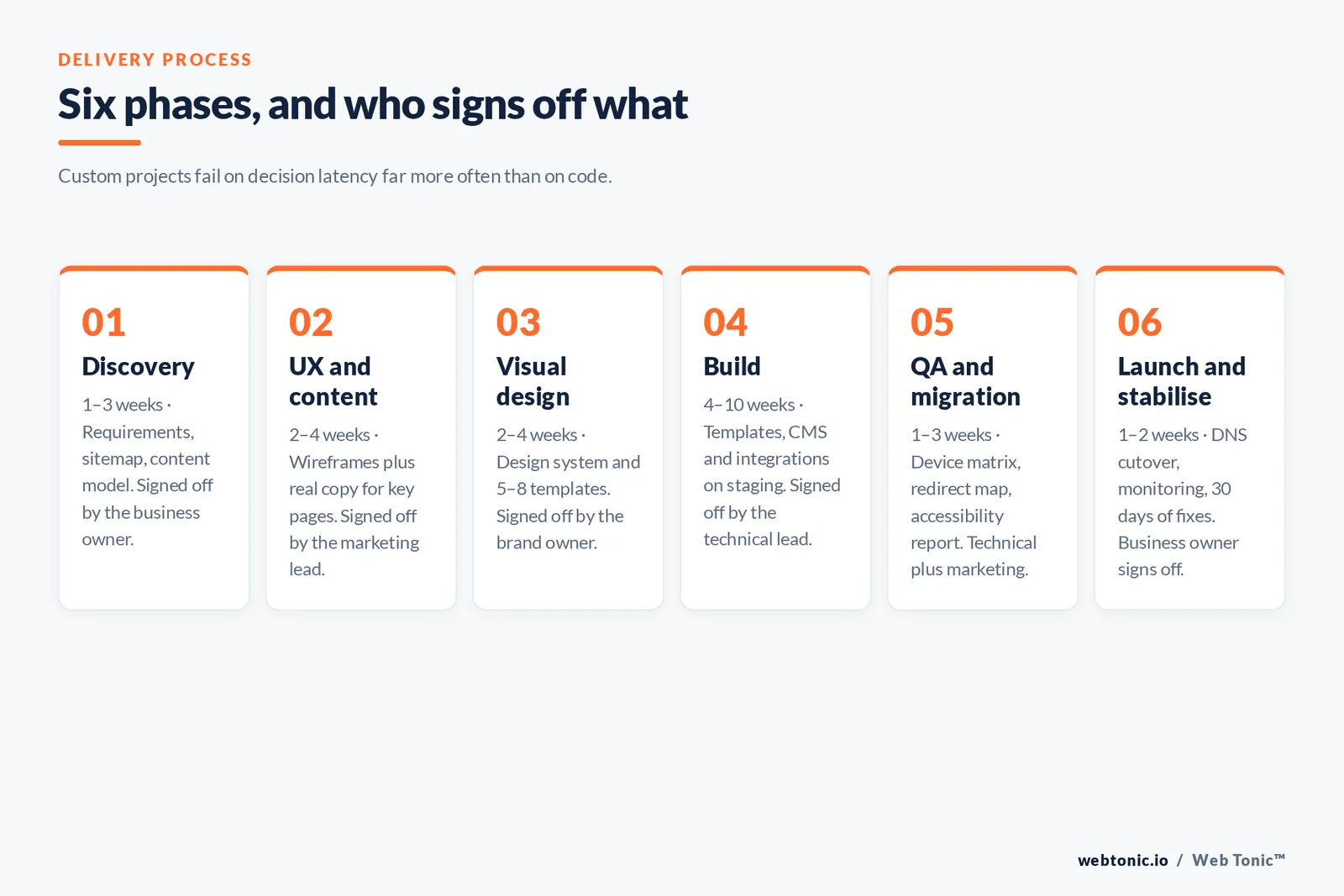
A custom project fails on decision latency far more often than on code. Fixing the sign-off owner per phase is the cheapest schedule insurance available.
| Phase | Deliverable | Typical duration | Who signs off |
|---|---|---|---|
| Phase 1 — Discovery | Requirements, sitemap, content model | 1–3 weeks | Business owner |
| Phase 2 — UX and content | Wireframes plus real copy for key pages | 2–4 weeks | Marketing lead |
| Phase 3 — Visual design | Design system and 5–8 templates | 2–4 weeks | Brand owner |
| Phase 4 — Build | Templates, CMS, integrations on staging | 4–10 weeks | Technical lead |
| Phase 5 — QA and migration | Device matrix, redirect map, a11y report | 1–3 weeks | Technical lead plus marketing |
| Phase 6 — Launch and stabilise | DNS cutover, monitoring, 30-day fixes | 1–2 weeks | Business owner |
Step 1 of every phase is a written acceptance criterion. Step 2 is a named approver. Step 3 is a deadline after which the default decision applies. Projects that skip step 3 slip, without exception.
Quality targets with no excuse to miss
The advantage of writing your own front end is that performance and accessibility become controllable rather than inherited. That advantage is only real if it is measured. Google publishes the Core Web Vitals thresholds and a free field-data testing tool; the W3C WCAG standards define the accessibility bar, and the US Department of Justice web guidance explains why it is a legal question and not a nice-to-have.
| Target | Threshold | How to verify | Common custom-build failure |
|---|---|---|---|
| Largest Contentful Paint | Under 2.5 s at the 75th percentile | Field data in PageSpeed Insights | Uncompressed hero imagery |
| Cumulative Layout Shift | Under 0.1 | Lab and field runs on key templates | Images without width and height |
| Interaction to Next Paint | Under 200 ms | Real-user monitoring after launch | Heavy third-party tag load |
| Reflow | Usable at 320 CSS px width | Manual resize plus device matrix | Fixed-width tables and embeds |
| Target size | Minimum 24 x 24 px | Component-level design review | Icon-only buttons in tight navigation |
| Crawlability of JS content | Key content in server-rendered HTML | URL inspection and rendered-HTML checks | Client-only rendering of body copy |
Only about 33% of sites currently pass all three Core Web Vitals thresholds, and 52.57% of global page views come from mobile against 45.93% from desktop — so the mobile number is the number. The MDN web performance documentation is the practical reference for the budgeting techniques, and Google's JavaScript SEO basics covers the rendering trade-offs that bite custom front ends hardest. Aggregate trend data on page weight and third-party load is published openly by the HTTP Archive.
Two more non-negotiables. Security: review the build against the OWASP Top 10 before launch, especially anywhere you accept input. Usability: run the templates against Nielsen Norman Group's 10 usability heuristics — a 30-minute review that consistently catches errors design QA misses.
When this is the wrong answer
Custom is a commitment to ongoing engineering. If nobody will own that, a template site maintained well beats a custom site maintained badly. This is the honest split by business situation.
| Business situation | Recommended route | Why |
|---|---|---|
| Pre-revenue, testing an offer | Route 1, template | Learning speed beats craft; expect to rebuild |
| Local service business, 5–20 pages | Route 2, themed CMS | Conversion copy and local SEO matter more |
| Multi-location or multi-service at scale | Route 3, custom front end | Programmatic page types need a real content model |
| Ecommerce under 200 SKUs | Route 2 on a hosted platform | Checkout risk is not worth owning |
| Ecommerce with complex pricing or B2B rules | Route 3 or 4 | Pricing logic is business logic |
| Portal, quoting tool, member area | Route 4, headless plus application | It is software with a marketing surface attached |
| Regulated industry with audit needs | Route 3 or 4 | Evidence, permissions and logging are requirements |
Vetting a build partner
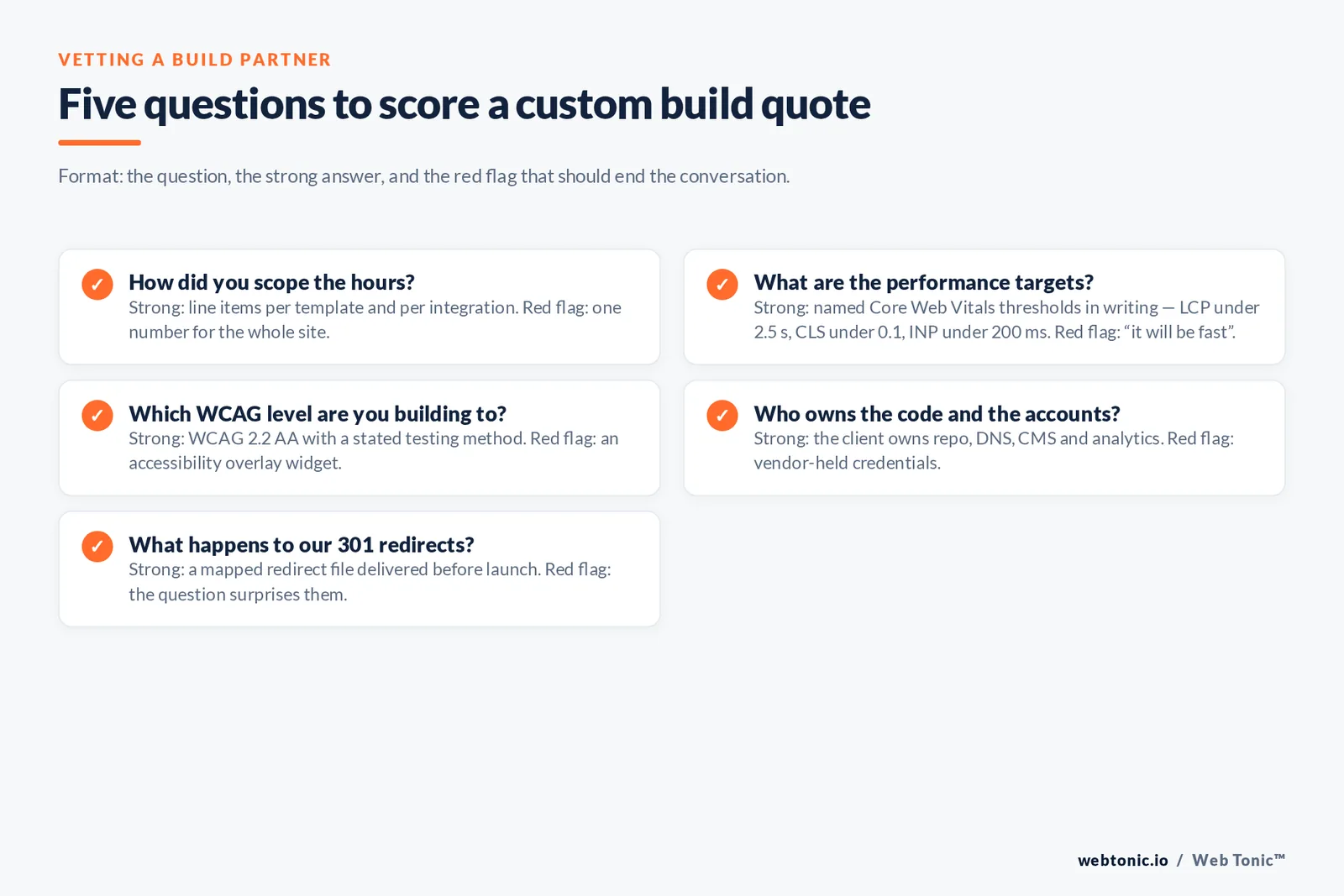
The proposal tells you less than the questions the vendor asks you. Use this as a scorecard when you compare quotes — and pair it with a look at how each candidate structures their own service offering.
| Question to ask | Strong answer | Red flag |
|---|---|---|
| How did you scope the hours? | Line items per template and integration | One number for the whole site |
| What are the performance targets? | Named Core Web Vitals thresholds in writing | "It will be fast" |
| Which WCAG level are you building to? | 2.2 AA with a testing method | An accessibility overlay widget |
| Who owns the code and the accounts? | Client owns repo, DNS, CMS, analytics | Vendor-held credentials |
| What happens to our 301 redirects? | A mapped redirect file before launch | The question surprises them |
| What does month 13 cost? | A named maintenance and update scope | No answer; support is ad hoc |
Trap 1 is buying design and calling it development. Trap 2 is paying for a build with no analytics or conversion tracking plan, which makes the investment unmeasurable from day one. Trap 3 is launching without a 30-day stabilisation window, when roughly the first month of real traffic surfaces the bugs QA never reproduced.
Measuring the return
The finished site is a capital expense with an operating payback. Score it on five things at 30, 90 and 180 days after launch, and compare against the pre-launch baseline you captured before cutover.
| Metric | Baseline to capture | Target at 90 days | What it proves |
|---|---|---|---|
| Mobile LCP on top 5 templates | Pre-launch field data | Under 2.5 s | The build is genuinely engineered |
| Organic sessions to key pages | Trailing 90 days | Recovered to baseline or better | Migration and redirects were handled |
| Lead or purchase conversion rate | Trailing 90 days | Measured, with one test live | The site is a system, not an artefact |
| Publishing throughput | Pages shipped per month | Higher, without developer help | The content model actually works |
| Engineering hours per month | Pre-launch support load | Declining after month two | The build is stable, not fragile |
If you want a second opinion on scope before you sign anything, our team is happy to review a proposal — get in touch, or browse more build and growth breakdowns on the Web Tonic blog.
FAQ
What is the difference between custom web development and web design?
Design decides what the site looks like and how it is structured; development builds it in code. It means the templates, content model and integrations are written for your business rather than inherited from a purchased theme, and it normally includes design as an earlier phase.
How long does a custom website take to build?
A custom front end on an existing CMS typically runs 8 to 16 weeks, while headless builds with an application layer run 12 to 30 weeks or more. Discovery and content are usually the schedule risk, not the code: phases 1 to 3 account for roughly a third of elapsed time on most projects.
Is custom web development better for SEO than a template?
Only if it is built to the same standards you would demand from any site. Custom code makes it possible to control markup, server-rendered content and Core Web Vitals, which templates limit — but a poorly built custom site can be slower than a good theme. Verify server-rendered content and mobile LCP under 2.5 seconds before crediting SEO gains.
Can I move a custom site to another developer later?
Yes, if you own the repository, hosting, DNS, CMS and analytics accounts from day one and the build uses mainstream, documented technology. Insist on written handover documentation and a code repository in your organisation's account before final payment.
Do I need a bespoke build for a small business site?
Usually not. Under about 20 pages with no integrations, a well-configured CMS theme wins on cost and speed to launch. A bespoke build becomes the right call when you need structured content types, real system integrations, or performance and accessibility guarantees you can put in a contract.
Sources: W3Techs content management usage statistics; Stack Overflow Developer Survey 2025; web.dev Core Web Vitals; PageSpeed Insights; W3C Web Accessibility Initiative WCAG; US Department of Justice ADA web guidance; MDN web performance documentation; Google Search Central JavaScript SEO basics; HTTP Archive State of the Web; OWASP Top 10; Nielsen Norman Group usability heuristics.


