



Table of contents

Conversion value in Google Ads is the number you attach to a conversion action so the platform can bid for money instead of for events. Get that number wrong and every Smart Bidding decision inherits the error.
Key Takeaways
- Assigning money to each conversion is the only way to let Google Ads optimise for revenue rather than raw conversion counts.
- Values can be set 4 ways: a fixed amount per conversion action, a dynamic order-specific one, an offline or imported figure, or a value rule.
- Return on ad spend (ROAS) = credited revenue / cost, so a 400% return equals a 4.0 value-per-dollar goal.
- Lead-gen accounts should back values out of close rates: a 20% close rate on a $2,500 job = a $500 lead value.
- Search leads average a $66.69 cost per lead at an 8.18% conversion rate, which is the floor your model has to clear.
What conversion value means in Google Ads
A conversion value is a monetary figure recorded alongside each conversion for a given conversion action. Conversions count how many times something happened; the money column describes what those conversions were worth. Google Ads exposes both, and Smart Bidding reads whichever one the bid strategy is built around.
The distinction matters because two campaigns can report identical conversions and completely different revenue credit. In the Google Ads conversion tracking documentation, the money field is optional at setup, which is exactly why so many accounts run revenue-blind for years.
| Metric | What it answers | Where it comes from | Used by |
|---|---|---|---|
| Conversions | How many actions happened | Conversion action counting rules | Conversion-count strategies |
| Conv. value | Total money assigned to those actions | Set on the conversion action or sent per event | Value-based strategies |
| Value / conv. | Average worth of one conversion | Conv. value divided by conversions | Model sanity checks |
| Conv. value / cost | Revenue produced per dollar spent | Conv. value divided by cost | ROAS reporting and goals |
| Revenue in your CRM | Money actually collected | Billing or CRM system | The truth these figures approximate |
The four places this number can be set
Before you argue about which bid strategy to use, decide how the number arrives. Every method below writes into the same money column, but they differ in accuracy, effort and how quickly a mistake spreads across the account.
| Method | How it is set | Best for | Main risk |
|---|---|---|---|
| Fixed amount per conversion action | One static number entered on the conversion action | Lead forms, phone calls, bookings | Every lead looks equally valuable |
| Order-specific amount | The tag sends an amount with each event | Ecommerce checkouts and subscriptions | Tax, shipping and discounts inflate values |
| Offline or imported figure | Closed-won amounts uploaded later, often through the Google Ads API | Long sales cycles and phone-heavy funnels | Upload latency starves the bid strategy |
| Conversion value rules | Adjusted at auction time by condition | Segments that are genuinely worth more | Rules stacked until the model is unreadable |
Method 2 of 4 is the default for ecommerce: dynamic amounts are the cleanest option when a transaction amount exists at the moment of conversion. For everything else, a static figure per conversion action is not a compromise, it is a modelling decision, and it needs to be documented so nobody quietly changes it mid-quarter.
How to price a lead for Google Ads
Lead-gen accounts have no revenue at the point of conversion, so the amount is derived. The formula is simple: average deal size multiplied by the close rate for that lead type. Build the table once, review it quarterly, and give every conversion action its own number.
| Lead type | Average deal | Close rate | Assigned amount |
|---|---|---|---|
| Demo request | $4,000 | 25% | $1,000 |
| Quote form | $2,500 | 20% | $500 |
| Inbound phone calls over 60 seconds | $2,500 | 30% | $750 |
| Live chat conversation | $2,500 | 12% | $300 |
| Newsletter signup | $2,500 | 2% | $50 |
| Pricing page PDF download | $2,500 | 4% | $100 |
Rule 1 of 2: only primary actions should carry money. Two rules keep this honest. First, only one conversion action per stage should be marked primary, or the same user inflates the credited revenue twice. Second, keep the ratios defensible: if a demo is worth 20x a newsletter signup, the auction will behave accordingly, and that is the point. Google documents the difference between primary and secondary actions in its conversion goals guidance.
Ecommerce amounts: revenue or profit
Ecommerce accounts start with an obvious number, order revenue, and it is usually the wrong one. Revenue treats a 60% margin product identically to a 12% margin product. Feeding profit into that column changes which products Smart Bidding chases.
| Basis | What you send | Effect on delivery | When to choose it |
|---|---|---|---|
| Gross revenue | Order total including margin-blind items | Chases order size | Single-margin catalogues |
| Revenue minus tax and shipping | Net product revenue | Removes fake inflation | Almost every store |
| Gross profit | Revenue times product margin | Chases profitable mix | Mixed-margin catalogues |
| Profit after returns | Profit adjusted by category return rate | Suppresses high-return categories | Apparel and furniture |
| First-order contribution | Profit minus fulfilment and payment fees | Protects contribution margin | Thin-margin retail |
| Lifetime worth proxy | First-order profit times repeat multiple | Pays more for new customers | Subscription and consumables |
If you switch bases, do it once and annotate the date. A mid-flight change looks like a market shock to the algorithm, and efficiency goal will spend the next two weeks recalibrating. Google recommends treating any change of at least 20% in reported value as a re-learning event.
Conversion value rules explained
Rules of this kind adjust a reported amount at auction time based on who converted, not what they bought. They are the right tool when a segment is reliably worth more and your tag cannot know that. They apply to three conditions and can be combined.
| Condition | Typical adjustment | Worked example | Watch out for |
|---|---|---|---|
| Audience | Multiply or set an amount | New customers valued at 1.4x returning ones | Small audiences produce noisy signals |
| Location | Multiply by service-area margin | Metro jobs at 1.2x, fringe territory at 0.7x | Location of interest versus presence |
| Device | Multiply by observed close rate | Phone calls from mobile at 1.3x | Cross-device journeys get miscredited |
| Combined conditions | Stacked multipliers | Mobile plus metro plus new customer | Compounding rules distort the model |
| Set instead of multiply | Hard override | All in-store pickups fixed at $80 | Overrides hide genuine variance |
Limit 3: never stack more than 3 value rules on one conversion action. Two operational notes. They change the revenue used for the bid strategy and reporting, so historical comparisons break at the activation date, and Smart Bidding will need a fresh learning period. Google Ads shows both the original and the adjusted totals so you can audit the delta.
Which bid strategies actually use conversion value
Only 2 of the 6 bid strategies below read that column. Choosing Maximize conversion value while half your conversion actions carry no revenue data is the single most common way accounts waste budget.
| Bid strategy | Optimises for | Needs money data | Volume comfort zone |
|---|---|---|---|
| Maximize conversion value | Total credited revenue at the given budget | Yes, on every primary action | At least 15 conversions in 30 days |
| Maximize conversion value with efficiency goal | Revenue at a set return on ad spend | Yes, with a stable distribution | 30 or more conversions in 30 days |
| Maximize conversions | Conversion count | No | Works from 10 to 15 conversions |
| Maximize conversions with cost ceiling | Conversions at a cost ceiling | No | 15 or more conversions in 30 days |
| Manual CPC | Clicks you price yourself | No | Any volume, including new accounts |
| Impression share | Visibility on the search page | No | Brand defence and launches |
The Google Ads Help centre describes Maximize conversions bidding and efficiency goal bidding separately for this reason. A practical migration path is documented in the WordStream Smart Bidding guide: prove the model, then hand over the goal.
Reading the money columns in your reports
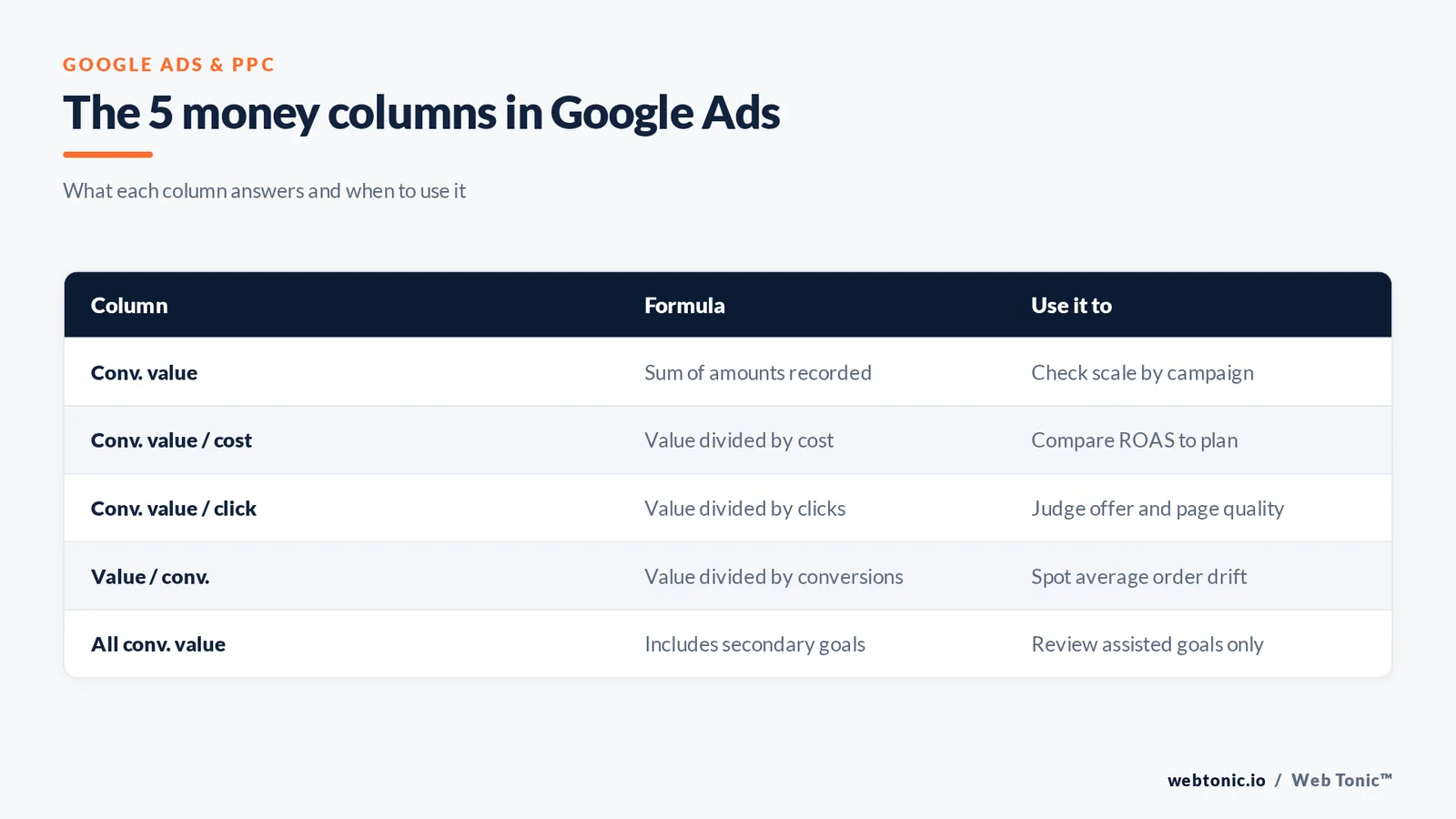
The metrics conversions value family is confusing because 5 columns describe the same money in different denominators. Add all four to your saved report and the diagnosis usually writes itself.
| Column | Formula | Reads as | Diagnostic use |
|---|---|---|---|
| Conv. value | Sum of values recorded | Total money credited | Scale check by campaign |
| Conv. value / cost | Conv. value divided by cost | Return as a ratio | Efficiency versus goal |
| Conv. value / click | Conv. value divided by clicks | Money earned per click | Landing page and offer quality |
| Value / conv. | Conv. value divided by conversions | Average order or lead worth | Average order drift alarm |
| All conv. value | Includes secondary actions | Total credited across all goals | Assisted-goal review only |
Convert between formats deliberately: a ROAS of 4.0 is a 400% goal, and a efficiency goal field expects the percentage. A 25% gap between Conv. value and All conv. value usually means secondary conversion actions are carrying value they should not.
Setting a efficiency goal from real margins
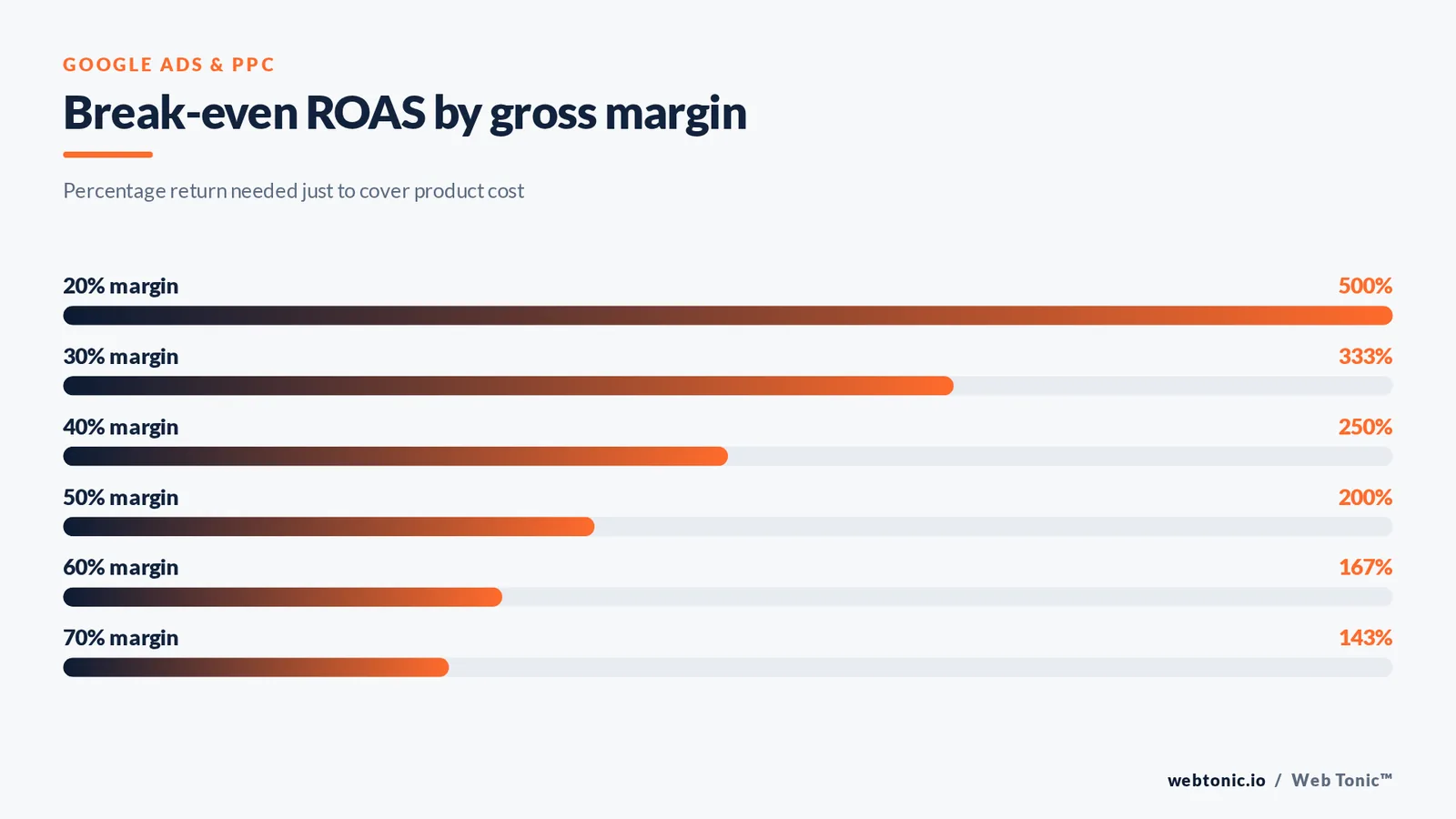
A target ROAS pulled out of the air is just an expensive guess. Work backwards from gross margin, then subtract the contribution you need. The table below shows break-even and profitable goals across common margin profiles.
| Gross margin | Break-even ratio | Goal for 10% contribution | Money per dollar |
|---|---|---|---|
| 20% | 500% | 1000% | $10.00 |
| 30% | 333% | 500% | $5.00 |
| 40% | 250% | 333% | $3.33 |
| 50% | 200% | 250% | $2.50 |
| 60% | 167% | 200% | $2.00 |
| 70% | 143% | 167% | $1.67 |
Move goals in steps of no more than 10% to 15% per change and wait at least one conversion window before judging the result. Google explains the delay between click and credited value in its conversion window documentation, and the Google Ads API conversion upload reference shows how offline values arrive with their own timestamps.
Seven mistakes that corrupt this data
Almost every broken value-based account fails on 1 of these 7 mistakes. Fix them in order before touching a bid strategy.
| Mistake | Symptom in reports | Fix |
|---|---|---|
| Missing transaction ID | Duplicate values on refreshed thank-you pages | Send a unique order ID with every purchase event |
| Tax and shipping included | Value per conv. drifts above real order value | Send net product revenue only |
| Every lead valued the same | Bidding buys the cheapest form fill | Assign values by close rate per conversion action |
| Secondary actions marked primary | Conv. value double counts one user | One primary conversion action per stage |
| Currency mismatch | Sudden multiples of 1.1 to 1.4 in value | Declare the currency in the tag and account |
| Value rules stacked on value rules | Adjusted value far above raw value | Cap total adjustment and document each rule |
| Consent loss unaccounted | Value drops with no traffic change | Enable consent mode and enhanced conversions |
The duplicate-value problem is the expensive one: a single missing transaction ID can overstate credited revenue by 15% to 40% on stores where customers reload the receipt page. Google covers the mechanism in its transaction ID guidance, and Analytics session handling explains why the reload happens.
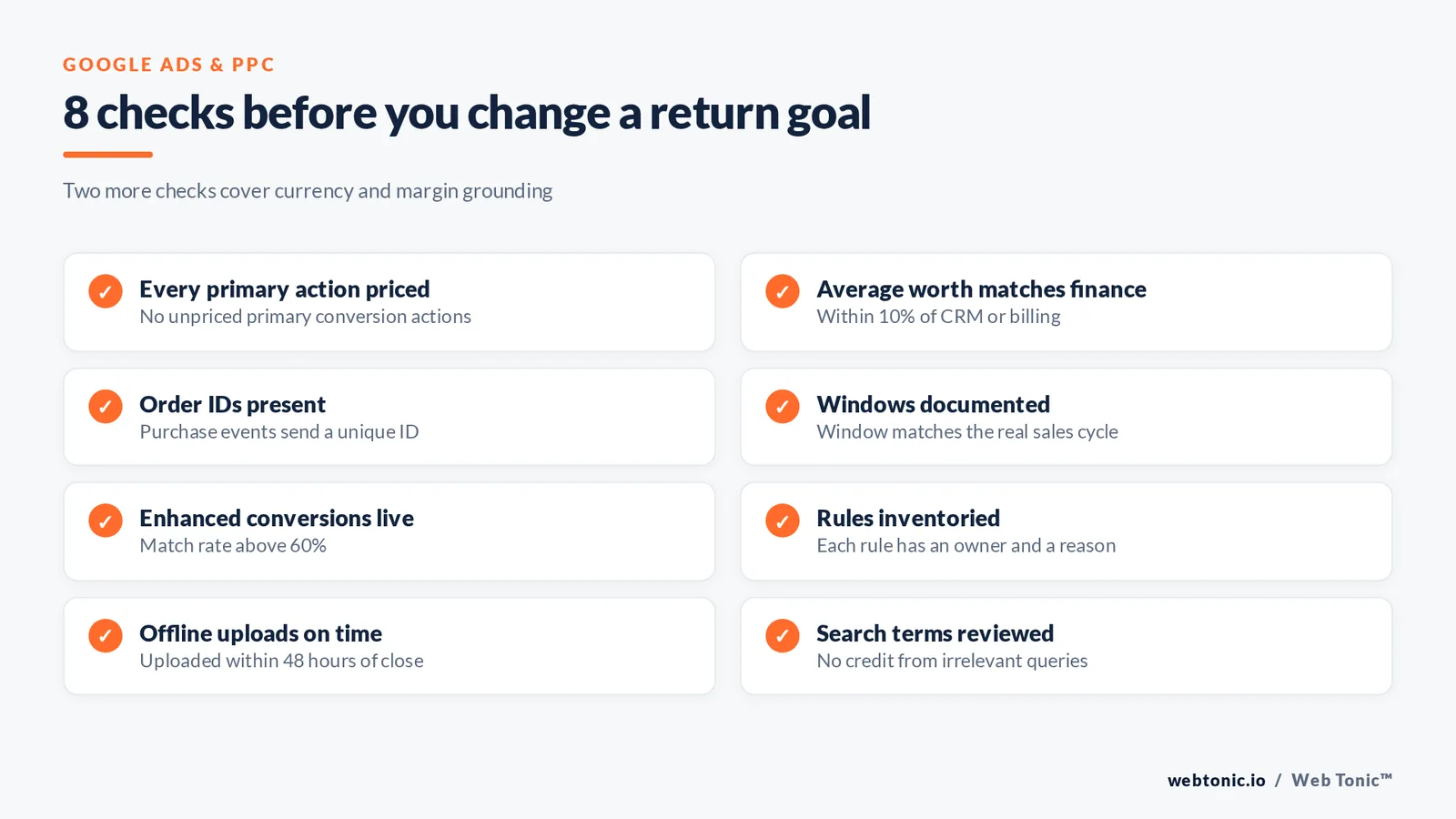
A 10-point measurement audit
All 10 checks must pass before every goal change. Nine of ten passes is not good enough when Smart Bidding is spending against the output.
| Check | Pass condition | Where to look |
|---|---|---|
| Every primary action carries an amount | No unpriced primary conversion actions | Goals and conversions table |
| Average worth matches finance | Within 10% of CRM or billing | Value / conv. column |
| Order IDs present | Purchase events include a unique ID | Tag diagnostics |
| Conversion windows documented | Window matches the real sales cycle | Conversion action settings |
| Enhanced conversions live | Match rate above 60% | Conversion action diagnostics |
| Value rules inventoried | Each rule has an owner and a reason | Value rules page |
| Offline uploads on schedule | Uploaded within 48 hours of close | Google Ads API upload logs |
| Search terms not buying junk value | No high-value credit from irrelevant queries | Search terms report |
| Currency and time zone aligned | One currency, one reporting time zone | Account settings |
| Efficiency goal grounded in margin | Derived from a margin table | Bid strategy settings |
For the search-terms leg of the audit, the search terms report documentation shows which queries earned the credit, and the IAB research library sets the industry baseline for what counts as a measurable event. Benchmarks from the LocaliQ search advertising study give you the outside view: an all-industry cost per lead of $66.69 and an average cost per click of $5.42. If your assigned lead value is below your actual CPL, no bid strategy can save the account.
Turning the numbers into weekly decisions
Revenue data earns its keep in the weekly review, not in the setup. 5 review cadences and three habits do most of the work.
| Cadence | What you review | Action threshold |
|---|---|---|
| Weekly | Conv. value / cost by campaign | Shift budget when a campaign beats plan by 20% |
| Weekly | Value / conv. trend | Investigate any 15% week-on-week move |
| Every 14 days | Efficiency goal versus achieved return | Adjust the goal by 10% maximum |
| Monthly | Value model versus closed revenue | Re-derive lead values if the gap exceeds 10% |
| Quarterly | Rules and conversion actions | Retire any rule with under 100 conversions |
Web Tonic runs this loop for client accounts inside our growth marketing and data intelligence engagements, and the measurement build usually lands before any bidding change. More paid media breakdowns live on the Web Tonic blog, and you can talk to our team if the value model is the part that keeps stalling.
Related reading
- Rehab & Addiction Treatment Google Ads Trends: Data-Driven Insights for 2026
- What 49+ Data Points Reveal About Google Ads for Roofing (2026)
- Solar Energy Google Ads Statistics: 2026 CPC, CPA & Conversion Benchmarks
- Paid Search services at Web Tonic
FAQ
What is conversion value in Google Ads?
It is the monetary amount recorded with a conversion so that Google Ads can optimise for money rather than for conversion count. It can be a fixed number on the conversion action, a dynamic value sent by the tag, or a value uploaded later from your CRM.
How is conversion value different from conversions?
Conversions count events. Conversion value totals the money assigned to those events. Two campaigns with 50 conversions each can report $5,000 and $25,000 in conversion value, which is why value-based bidding often reallocates budget the moment it is switched on.
Should I use Maximize conversion value or Maximize conversions?
Use Maximize conversion value when your values are accurate and genuinely vary between conversions. Use Maximize conversions when every conversion is worth roughly the same, or when your value data is not trustworthy yet.
What are conversion value rules?
They adjust the value of a conversion at auction time based on audience, location or device, either by multiplying the reported value or setting a fixed one. They are best used sparingly, with each rule documented and reviewed quarterly.
How do I set conversion values for phone calls?
Derive the value from the close rate on qualified calls. If calls over 60 seconds close at 30% on an average job of $2,500, the call is worth $750. Track call length as its own conversion action so the value reflects quality, not ring volume.

Sources: Google Ads Help (conversion tracking, conversion goals, Maximize conversions, target ROAS, conversion windows, transaction IDs, search terms report), Google Ads API conversion upload documentation, Google Analytics Help, LocaliQ search advertising benchmarks, WordStream Smart Bidding guide.


