Table of contents
How we vet every listicle
Every agency featured on Web Tonic passes our 84-point editorial review before a single listicle goes live. This is how we vet each pick:
Verified client outcomes: We require real case studies with measurable KPIs — revenue, ROAS, CPA, retention — tied to the exact category being ranked. No cherry-picked wins, no unverifiable numbers.
Independent reputation: We cross-check Clutch, Google, G2, and Trustpilot ratings, and screen for review-bombing or suspicious patterns. Only operators with a consistent, verifiable track record make the cut.
Beyond that, every listing goes through a quarterly re-audit. We check 84 criteria across 6 pillars to make sure it still holds up — here are some of the checks we run:
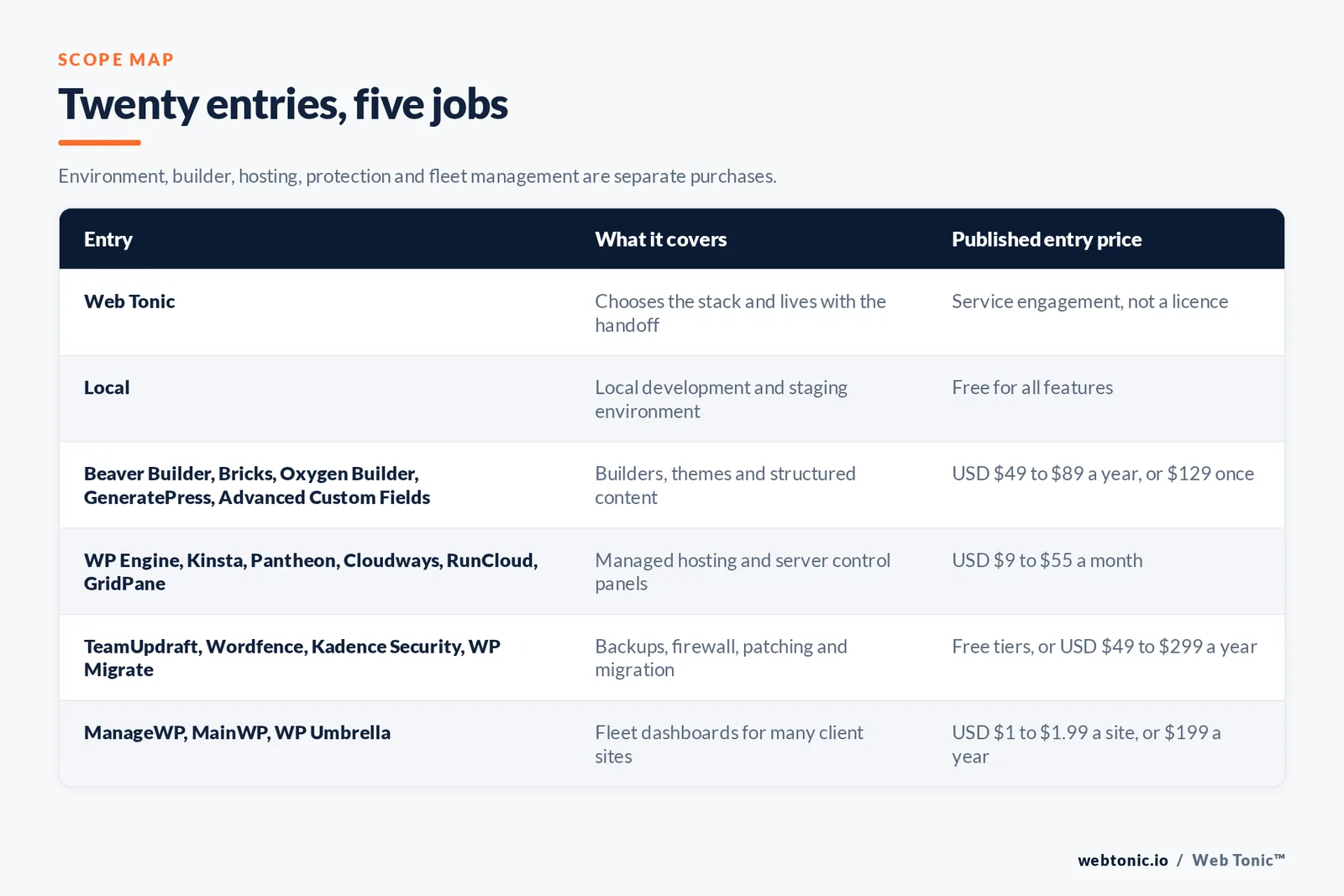
A WordPress development tool is software you add around WordPress core to build, host and keep a site alive professionally. The category splits into five jobs: local and staging environments where changes are tested safely, builders and field plugins that construct and model the pages, managed hosting and deployment platforms, backup and security layers that protect what is live, and fleet dashboards that let one operator run dozens of client installs. WordPress core supplies almost none of this.

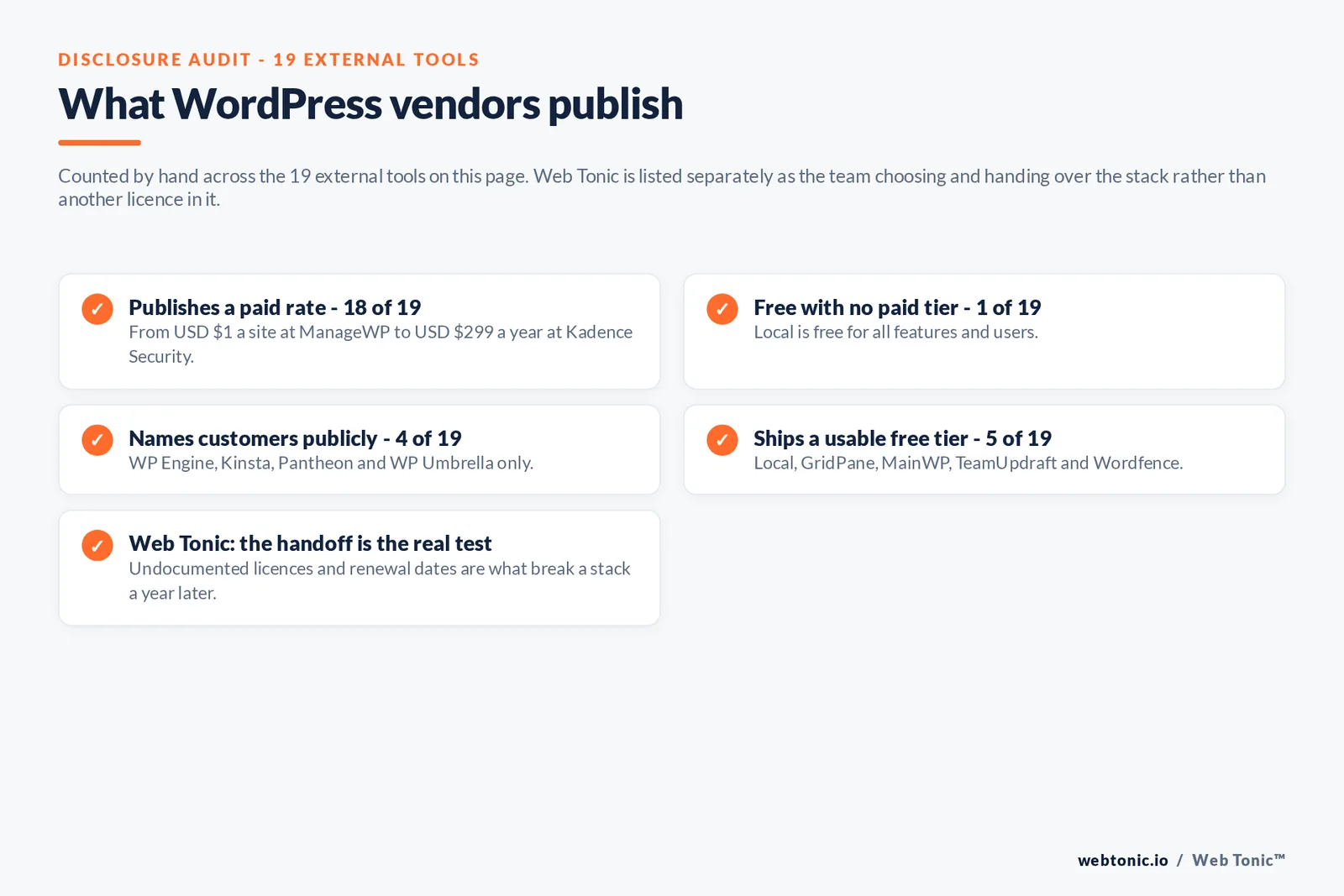
We compared 20 entries on published pricing and verified capability. Eighteen of the 19 external tools publish a paid rate, Local is free outright, and only four name a customer publicly.
Which WordPress tools does a professional build actually need?
Four, at minimum. A local environment such as Local, a builder or field layer like Bricks, Beaver Builder or Advanced Custom Fields, managed hosting from WP Engine, Kinsta or Cloudways, and a backup plus security pair such as TeamUpdraft and Wordfence.
1. Local

About: Local, made by WP Engine, is a free desktop application for spinning up a full WordPress stack on a developer's own machine for offline building and testing before anything goes live. It puts it in the local-development-environment segment of this category through one-click site creation, built-in SSL, and Connect features that push finished work straight to WP Engine or Flywheel hosting. The product dropped all paid tiers in 2024, making the entire feature set free for every user rather than gated behind a Local Pro subscription.
Key Services: One-click local WordPress site creation, Built-in SSL for local testing, Live Link temporary public preview URLs, Database and file management tools, Push and pull deployment to WP Engine or Flywheel, Blueprints for pre-configured starter sites
Industries Served: Freelance WordPress developers, Web design and development agencies, In-house marketing web teams, WordPress theme and plugin builders, Web hosting resellers
Notable Clients: Not publicly named — logos are not published
Locations: Austin, United States
Pricing: Free for all features and users
Great For: Freelance developers, Small dev shops, Agencies standardizing local workflow
Website: Local
2. Web Tonic

About: Web Tonic is not a plugin or a host, it is the team that decides which WordPress stack a site should be built on and then lives with that decision. We pick the builder, the hosting tier and the maintenance layer against how often the site changes and who edits it, rather than against a feature comparison, so the handoff does not quietly become somebody's weekend problem. The same team runs the build, the organic programme it has to rank in and the measurement behind it.
Key Services: Growth Marketing, Paid Social, PPC, Meta Ads, SEO, Google Ads, Snapchat Ads, Amazon Ads, Reddit Ads, TikTok Ads, TikTok Shop, GEO-AEO, Webflow Design, Shopify Design, WordPress Design, UGC, Social Media Management, Pay Per Click Management, Marketing Analytics, Analytics Implementation & CDPs, Performance Branding, Performance 360° Audit, Programmatic Ads, OOH Ads, HR Marketing
Industries Served: eCommerce, SaaS, B2B, Construction Professionals, Home Services, SMEs, Health Spa & Wellness, Retail, Legal & Judicial Services, Food & Beverages, Pets, Fitness, Family & Children, Finance & Insurance, Travel, Non-Profits & Organizations, Furniture & Decoration
Notable Clients: WorldRemit, Jack & Jones, Ardene, L'Oréal, Sendwave, Nestlé, Airbnb. Serve Fortune 500 companies and smaller fast-paced startups.
Locations: Local US office, with the main HQ in San Francisco and notable offices in New York, Chicago, Miami, Toronto, Montreal, Dubai, Singapore, Sydney and more. Offices on five continents.
Pricing: Starting at USD $3,000 per month. Flexible and scalable plans at any time according to your enterprise needs. Book a call to learn more.
Great For: Mid-market to enterprise-level businesses requiring ongoing, on-tap growth and performance marketing services.
Website: Web Tonic
3. WP Umbrella

About: WP Umbrella is a WordPress maintenance and monitoring platform built for agencies and freelancers running client-handoff workflows across many sites at once. It sits in this category through automated core, theme and plugin updates, uptime and performance monitoring, one-click backups, and white-labeled client reports generated from a single dashboard. Pricing is transparently published on a pay-as-you-go, per-site basis starting near two dollars a month, and agencies such as Numos have published named case studies describing how they use it to centralize maintenance across their client portfolios.
Key Services: Automated WordPress core, plugin and theme updates, Uptime and performance monitoring, One-click and scheduled backups, White-labeled client reporting, Security scanning add-on, Centralized multi-site dashboard for agencies
Industries Served: WordPress maintenance agencies, Freelance WordPress developers, Managed hosting providers, Digital marketing agencies with WordPress clients, White-label web care resellers
Notable Clients: Numos
Locations: Paris, France
Pricing: From USD $1.99/site/month, pay-as-you-go
Great For: Maintenance-focused agencies, Freelancers managing many client sites, Hosting providers offering care plans
Website: WP Umbrella
4. WP Engine

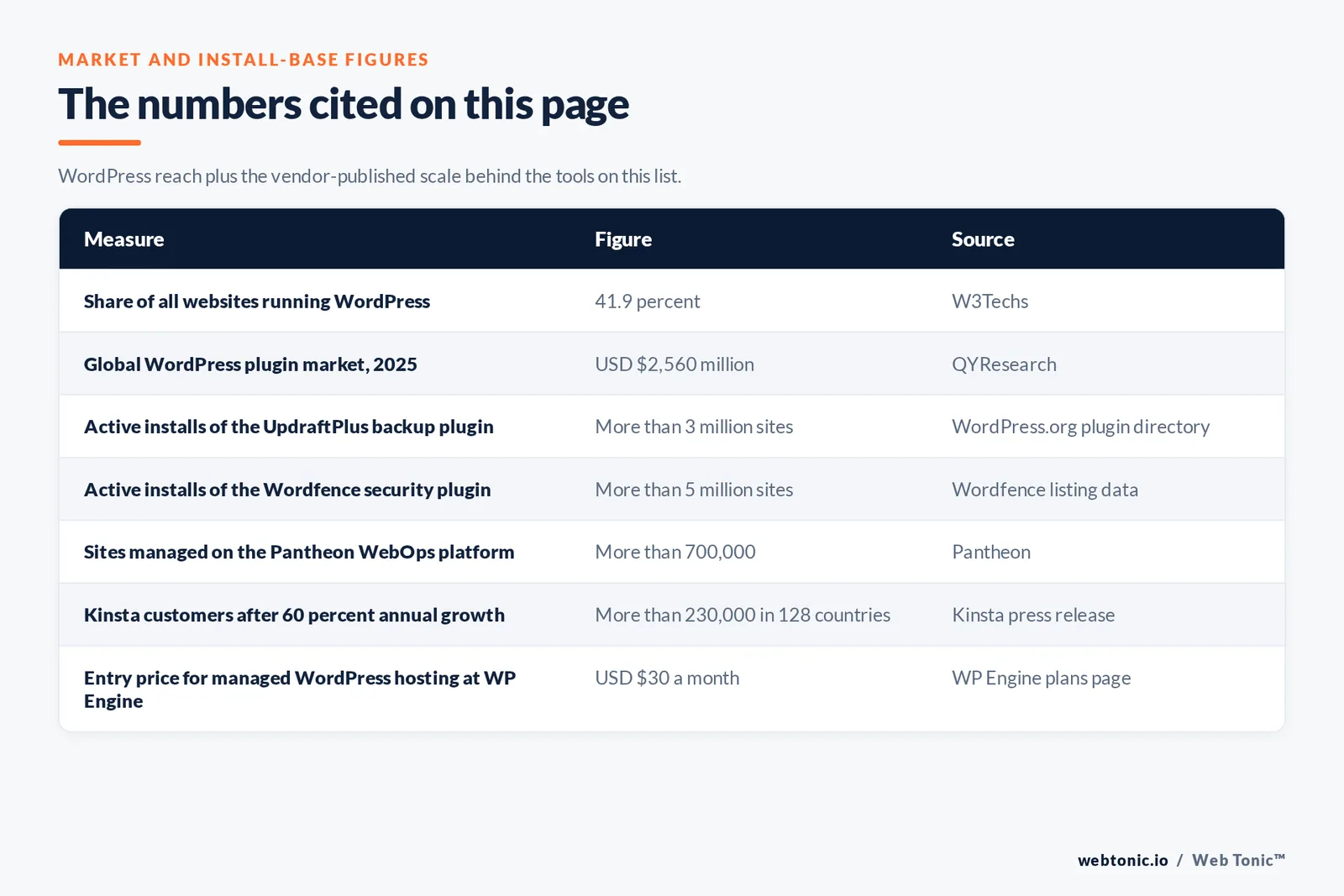
About: WP Engine is a managed WordPress hosting platform built specifically for developers and agencies deploying and running production WordPress sites at scale. It qualifies as a category leader through git-based staging environments, automated core updates, built-in CDN and caching, and its ownership of developer tools such as Local and Advanced Custom Fields. WP Engine reports more than 185,000 customers worldwide and publishes named case studies including B&G Foods, which the company says cut hosting costs by 48% while managing over 40 branded domains on its platform.
Key Services: Git-based staging and deployment workflows, Automated core updates and daily backups, Built-in CDN, object caching and edge security, One-click site migrations, Multisite network hosting, EverCache performance layer
Industries Served: Web design and development agencies, Enterprise marketing teams, eCommerce brands on WooCommerce, Media and publishing companies, Higher education institutions
Notable Clients: B&G Foods, McGuireWoods, Olson Kundig, Earth Day Network, EBQ
Locations: Austin, United States, Limerick, Ireland, London, United Kingdom
Pricing: From USD $30/month, Startup tier
Great For: Agencies hosting client sites, Enterprise marketing teams, eCommerce brands needing uptime
Website: WP Engine
5. Kinsta

About: Kinsta is a managed WordPress and application hosting platform running on Google Cloud infrastructure, aimed at developers who need staging environments, edge caching and git deployment out of the box. It earns a place here through its free DevKinsta local development tool, unlimited free staging environments, and automated malware scanning bundled into every plan. Kinsta reports over 230,000 customers across 128 countries after 60% year-over-year growth, with published customers including Barnes & Noble's LoudCloud, the Jane Goodall Institute, McDonald's and TripAdvisor.
Key Services: Free DevKinsta local development app, Unlimited free staging environments, Git-based deployment, Automatic daily backups and malware scanning, Google Cloud C2 machine hosting, Built-in application performance monitoring
Industries Served: Digital agencies and freelancers, Ecommerce brands on WooCommerce, SaaS and application developers, Media and publishing sites, Nonprofits and educational institutions
Notable Clients: Barnes & Noble (LoudCloud), The Jane Goodall Institute, McDonald's, TripAdvisor, ClickUp
Locations: West Hollywood, United States, Los Angeles, United States
Pricing: From USD $35/month, Single site plan
Great For: Agencies needing free staging, WooCommerce brands, Application developers on WordPress
Website: Kinsta
6. Pantheon

About: Pantheon is a WebOps platform purpose-built for WordPress and Drupal that gives development teams git-based version control, automated test and live environments, and a shared dashboard so developers, marketers and IT can work from a single login. It leads this category through its Multidev feature for spinning up unlimited feature-branch environments and its enterprise-grade global CDN. Pantheon powers over 700,000 websites and 17 billion monthly pageviews, with publicly named customers including DocuSign, Lyft, Clorox, Home Depot and Yale University.
Key Services: Git-based dev, test and live environment workflow, Multidev feature-branch environments, Global CDN with edge security, Automated visual regression testing, One-click backups and rollbacks, Team permissions and single-login WebOps dashboard
Industries Served: Higher education institutions, Enterprise marketing teams, Government and nonprofit organizations, Web development agencies, Media companies
Notable Clients: DocuSign, Lyft, Clorox, Home Depot, Yale University
Locations: San Francisco, United States
Pricing: From USD $55/month, Basic site plan
Great For: Enterprise web teams, Higher education web offices, Agencies running WebOps at scale
Website: Pantheon
7. Cloudways

About: Cloudways, owned by DigitalOcean, is a managed cloud hosting platform that lets developers deploy WordPress onto a choice of cloud providers such as DigitalOcean, Vultr, Linode, AWS or Google Cloud through one managed control panel. It fits this category through built-in staging, one-click WordPress installs, automated backups and a server-level cache stack that does not require server administration skill. Cloudways served over 124,000 paying customers before its 2022 acquisition by DigitalOcean for 350 million dollars, and starts at 11 dollars a month rather than the flat per-site pricing common among competitors.
Key Services: Pay-as-you-go server provisioning across five cloud providers, One-click WordPress installation, Built-in staging environments, Automated and on-demand backups, Server-level Varnish, Redis and Memcached caching, 24/7 managed support with no server-admin required
Industries Served: Freelance developers, Small and mid-size agencies, eCommerce brands on WooCommerce, Startups needing flexible cloud hosting, SMB web teams
Notable Clients: Not publicly named — logos are not published
Locations: St. Julian's, Malta
Pricing: From USD $11/month
Great For: Freelancers wanting cloud choice, SMB agencies on a budget, Teams outgrowing shared hosting
Website: Cloudways
8. RunCloud

About: RunCloud is a server management panel that lets developers deploy and administer WordPress on their own cloud servers, such as DigitalOcean or Vultr droplets, without needing to run Linux commands directly. It belongs in the deployment segment of this category through automated server hardening, one-click SSL, git-based deployment webhooks and built-in WordPress staging. The company reports more than 10,000 customers across over 100 countries managing over 50,000 domains, with published pricing tiers starting under ten dollars a month per server.
Key Services: Server provisioning and hardening automation, One-click Let's Encrypt SSL, Git-based deployment webhooks, Built-in WordPress staging sites, Server-level caching stack management, Team collaboration and access controls
Industries Served: Freelance developers, Small hosting resellers, Agencies running their own servers, DevOps-minded WordPress shops, Startups self-hosting on cloud VPS
Notable Clients: Not publicly named — logos are not published
Locations: Cyberjaya, Malaysia
Pricing: From USD $9/month, Essentials plan
Great For: Developers self-hosting on VPS, Agencies wanting server control, Hosting resellers
Website: RunCloud
9. GridPane

About: GridPane is a server management platform built specifically for WordPress professionals and agencies who host client sites on their own cloud servers rather than a shared managed host. It qualifies through its free Core plan covering server-level page caching and a 7G web application firewall, plus paid Panel and PeakFreq tiers adding fully managed monitoring and support. GridPane says it hosts more than 120,000 WordPress websites and has customers in over 93 countries, grown almost entirely through word of mouth since its 2017 founding.
Key Services: Server-level page and Redis object caching, 7G web application firewall, One-click SSL and server hardening, Multi-server, multi-site fleet dashboard, Automated backups and snapshot integrations, White-label hosting for agencies
Industries Served: WordPress hosting resellers, Agencies self-hosting client sites, Banking and finance sites needing hardened security, eCommerce brands on WooCommerce, Freelance WordPress developers
Notable Clients: Not publicly named — logos are not published
Locations: East Lansing, United States
Pricing: Free Core plan | From USD $19/month, PeakFreq plan
Great For: Agencies self-hosting on VPS, Hosting resellers, Security-sensitive site owners
Website: GridPane
10. Beaver Builder

About: Beaver Builder is a drag-and-drop visual page builder plugin for WordPress that lets developers and non-technical clients assemble responsive layouts without writing code. It qualifies as a builder in this category through its live front-end editor, companion Beaver Themer add-on for building custom headers and archive templates, and reusable modules that speed up agency production. Built by FastLine Media in 2014, it reports around 3.5 million dollars in annual revenue and sells four published pricing tiers from 89 to 546 dollars a year, with unlimited-site licensing available at the top two tiers.
Key Services: Drag-and-drop front-end page editor, Beaver Themer for custom headers, footers and archives, Prebuilt template and module library, White-label branding for client handoff, Multisite network licensing, Row and column responsive layout controls
Industries Served: Freelance WordPress designers, Small to mid-size web agencies, Nonprofit and small business site owners, WordPress theme developers building on top of it, Marketing teams needing self-service page edits
Notable Clients: Not publicly named — logos are not published
Locations: Campbell, United States
Pricing: From USD $89/year, Starter plan
Great For: Agencies needing client-editable pages, Freelance designers, Small business site owners
Website: Beaver Builder
11. Bricks

About: Bricks is a visual site builder for WordPress designed around clean, minimal output code and speed, positioning itself as a developer-friendly alternative to heavier page builders. It sits in the builder segment of this category through its native query builder for dynamic content, nestable interactive elements, and a component system for reusable design patterns across a site. Built by Thomas Ehrig and launched in 2021, Bricks publishes yearly licensing from 79 dollars for one site up to 249 dollars for unlimited sites, plus a 599-dollar lifetime Ultimate license.
Key Services: Visual builder with lightweight, clean output, Native dynamic data and query builder, Reusable components across templates, Nestable interactive elements and popups, Global class-based styling system, Local and staging site licensing included
Industries Served: Freelance WordPress developers, Performance-focused agencies, Custom theme and template builders, WooCommerce site builders, Design-forward small studios
Notable Clients: Not publicly named — logos are not published
Locations: Paphos, Cyprus
Pricing: From USD $79/year, Starter plan
Great For: Performance-focused developers, Agencies building custom themes, Freelancers wanting clean code output
Website: Bricks
12. Oxygen Builder

About: Oxygen, made by Soflyy, is a visual site builder for WordPress aimed at developers who want full control over markup and styling rather than a fixed theme structure. It belongs in this category through its unlimited client-site licensing model, a dedicated WooCommerce visual builder mode, and its newest version's integration for building sites with an AI coding agent. Founded by Louis Reingold, Oxygen sells one-time lifetime licenses published from 129 to 199 dollars, letting agencies deploy the builder on client websites without those clients needing their own license.
Key Services: Full markup and CSS control visual builder, Dedicated WooCommerce builder mode, Composite reusable elements, AI-agent compatible building workflow, Unlimited client-site usage per license, Gutenberg block builder mode
Industries Served: Freelance WordPress developers, Agencies building for multiple clients, WooCommerce store builders, Custom theme developers, Developers wanting code-level control
Notable Clients: Not publicly named — logos are not published
Locations: Bogota, Colombia
Pricing: From USD $129, one-time lifetime license
Great For: Agencies wanting unlimited client licensing, Developers who want full markup control, WooCommerce builders
Website: Oxygen Builder
13. GeneratePress

About: GeneratePress is a lightweight WordPress theme framework paired with the GenerateBlocks plugin, giving developers a fast base theme plus a native block editor toolkit for building layouts without a separate page builder. It qualifies through its modular Premium add-ons for hooks, elements and site sections, and through GenerateBlocks Pro's global styles and pattern library that turn the block editor into a full design tool. Built by Tom Usborne under EDGE22 Studios, the product publishes yearly pricing from 59 dollars for the theme up to 149 dollars for the bundled GeneratePress One license covering up to 500 sites.
Key Services: Lightweight, performance-first theme framework, GenerateBlocks native block editor toolkit, Global styles and reusable pattern library, Modular Premium add-ons for hooks and elements, Starter site templates library, Up to 500-site bundled licensing
Industries Served: Freelance WordPress developers, Small to mid-size agencies, Performance-conscious site owners, Bloggers and content publishers, Theme customizers avoiding heavy page builders
Notable Clients: Not publicly named — logos are not published
Locations: Victoria, Canada
Pricing: From USD $59/year, GP Premium
Great For: Performance-focused freelancers, Agencies wanting a light theme base, Bloggers and small publishers
Website: GeneratePress
14. Advanced Custom Fields

About: Advanced Custom Fields, known as ACF, is the standard plugin developers use to add custom fields and structured content types to WordPress, turning the CMS into a flexible content model for any data structure. It leads the custom-fields segment of this category through repeater fields, flexible content layouts, and an options-page system that agencies use to build client-editable site settings. Now owned by WP Engine after its 2022 acquisition from Delicious Brains, ACF had an installed base of roughly 4 million users at the time of that acquisition, and it sells published PRO licensing from 49 dollars a year for one site up to 249 dollars for unlimited sites.
Key Services: Repeater and flexible content field types, Custom options pages for site-wide settings, Gutenberg block registration with custom fields, REST API and GraphQL field exposure, Conditional field logic, Unlimited-site licensing tier
Industries Served: Custom WordPress theme developers, Agencies building client content models, Headless WordPress developers, Publishers with structured content needs, eCommerce and directory site builders
Notable Clients: Not publicly named — logos are not published
Locations: Austin, United States
Pricing: From USD $49/year, single-site license
Great For: Custom theme developers, Agencies modeling structured content, Headless WordPress builders
Website: Advanced Custom Fields
15. WP Migrate

About: WP Migrate, formerly WP Migrate DB Pro, is a database and file push-pull migration plugin that developers use to sync a WordPress database and media library between local, staging and production environments. It fits the staging and migration segment of this category through find-and-replace search across serialized data, a command-line interface add-on, and active-site licensing that excludes staging URLs from counting against a plan's site limit. Now owned by WP Engine after its 2022 acquisition from Delicious Brains, the product publishes tiered pricing on its own site and estimates that saving even two and a half hours of manual migration work pays back a Plus license.
Key Services: Database push and pull between environments, Media file syncing across sites, Serialized-data-safe find and replace, Command-line interface add-on, Multisite network migration support, Staging URLs excluded from active-site limits
Industries Served: WordPress development agencies, Freelance developers managing staging workflows, Enterprise web teams with multiple environments, WooCommerce site migrators, Multisite network administrators
Notable Clients: Not publicly named — logos are not published
Locations: Austin, United States
Pricing: From USD $49/year for a single developer seat, up to USD $299/year
Great For: Agencies with staging workflows, Developers migrating client sites, Multisite network admins
Website: WP Migrate
16. ManageWP

About: ManageWP, owned by GoDaddy, is a central dashboard that lets agencies and freelancers manage updates, backups, security and client reporting across every WordPress site they run from one login. It anchors the multisite and client-handoff segment of this category through bulk update management, white-labeled client report scheduling, and full support for multisite network backups and restores. Founded by Vladimir Prelovac and acquired by GoDaddy in 2016, ManageWP publishes per-site add-on pricing starting near a dollar a site per month, with flat monthly bundles available for agencies managing over 25 websites.
Key Services: Bulk core, plugin and theme updates across all sites, White-labeled scheduled client reporting, Multisite network backup and restore, One-click cloning and site migration, Security monitoring add-on, Centralized client and site organization
Industries Served: WordPress maintenance agencies, Freelance developers managing many clients, Hosting companies offering WordPress management, Digital marketing agencies, White-label web care resellers
Notable Clients: Not publicly named — logos are not published
Locations: Belgrade, Serbia, Sunnyvale, United States
Pricing: From USD $1/site/month per add-on, bundles available for 25+ sites
Great For: Agencies managing many client sites, Freelancers offering maintenance retainers, Hosting companies white-labeling management
Website: ManageWP
17. MainWP

About: MainWP is a self-hosted WordPress management plugin that agencies and freelancers install on their own server to control updates, backups and client relationships across an unlimited number of sites without renting a third-party dashboard. It qualifies in the multisite and client-handoff segment through free client profile management, tagging and cost tracking, plus a fully self-hosted architecture that keeps site data private rather than routed through a vendor's cloud. The company says MainWP is used by over 20,000 WordPress agencies, developers and freelancers managing more than 700,000 websites, and it publishes a flat 199-dollar-a-year Pro bundle covering unlimited sites with no per-site fees.
Key Services: Self-hosted central management dashboard, Client profiles, tags and cost tracking, Bulk updates across unlimited sites, Site suspension and access controls per client, Backup and uptime monitoring add-ons, Data stays on the agency's own server
Industries Served: WordPress agencies wanting data privacy, Freelance developers managing client portfolios, Hosting resellers, Nonprofits managing multiple properties, Enterprises with in-house multisite fleets
Notable Clients: Not publicly named — logos are not published
Locations: Edmond, United States, Miami, United States
Pricing: Free core dashboard | USD $199/year, Pro bundle, unlimited sites
Great For: Agencies wanting self-hosted control, Freelancers avoiding per-site fees, Privacy-conscious client shops
Website: MainWP
18. TeamUpdraft (formerly UpdraftPlus)

About: UpdraftPlus, now under the TeamUpdraft brand, is the most widely installed WordPress backup and migration plugin, letting site owners schedule automatic backups to cloud storage and restore or clone a site in a few clicks. It anchors the backup segment of this category through remote storage support for services such as Dropbox, Amazon S3 and Google Drive, plus a UpdraftClone feature for spinning up a temporary staging copy from a backup. The plugin is actively installed on over 3 million websites according to the WordPress.org directory, and it publishes yearly premium pricing starting at 70 dollars for a single site up to 195 dollars for unlimited sites.
Key Services: Scheduled automatic backups to cloud storage, One-click restore and site cloning, UpdraftClone temporary staging environments, Multisite network backup support, Migration between hosts, Incremental backup options on premium plans
Industries Served: Freelance WordPress developers, Agencies backing up client sites, Small business site owners, Bloggers and content publishers, Hosting companies bundling backup tools
Notable Clients: Not publicly named — logos are not published
Locations: Newport, United Kingdom
Pricing: Free core plugin | From USD $70/year, Personal plan
Great For: Site owners needing simple backups, Agencies protecting client sites, Developers cloning for staging
Website: TeamUpdraft (formerly UpdraftPlus)
19. Wordfence

About: Wordfence, made by Defiant, is a WordPress firewall and malware scanning plugin that protects sites against brute-force logins, known vulnerabilities and malicious file changes in real time. It leads the vulnerability-management segment of this category through an endpoint firewall that blocks attacks before they reach WordPress, plus a threat intelligence feed drawn from Defiant's own vulnerability research team. Wordfence is the most deployed WordPress security plugin with over 5 million active installations, and it publishes yearly pricing from 149 dollars for Premium up to 1,250 dollars for its Response incident-response tier.
Key Services: Endpoint web application firewall, Real-time malware and file-change scanning, Brute-force login and two-factor protection, Threat intelligence feed from in-house researchers, Country blocking and IP blocklisting, Incident response tier for compromised sites
Industries Served: Agencies securing client sites, eCommerce sites handling sensitive data, Publishers and media sites, Enterprises managing many WordPress properties, Freelance developers offering security retainers
Notable Clients: Not publicly named — logos are not published
Locations: Seattle, United States
Pricing: Free core plugin | From USD $149/year, Premium plan
Great For: Agencies protecting client sites, eCommerce operators, High-traffic publishers
Website: Wordfence
20. Kadence Security (sold by Liquid Web)

About: Kadence Security is the WordPress hardening, login protection and vulnerability-patching product that Liquid Web folded into its unified Kadence platform in 2026 after retiring the long-running Solid Security and iThemes Security Pro brands, and the old kadencewp address now redirects into the Liquid Web software catalogue where it is sold. It sits in the vulnerability-management segment of this category through two-factor authentication, file-change detection and virtual patching for known plugin vulnerabilities, delivered as part of a bundled suite rather than a standalone plugin. Liquid Web publishes tiered pricing, with the Pro tier that includes Security, Backups, Shop Kit and Memberships starting at 299 dollars a year and an Elite agency tier at 499 dollars a year.
Key Services: Two-factor authentication and login hardening, File-change detection and integrity monitoring, Virtual patching for known plugin vulnerabilities, Bundled backup and central management tools, Brute-force attack prevention, Security dashboard reporting for client sites
Industries Served: Agencies securing client WordPress sites, Freelance developers offering security add-ons, Small business site owners, Hosting companies bundling security, Multisite network administrators
Notable Clients: Not publicly named — logos are not published
Locations: Lansing, United States, Edmond, United States
Pricing: From USD $299/year, Pro bundle including Security, Backups, Shop Kit and Memberships
Great For: Agencies wanting a bundled security suite, Former Solid Security or iThemes Security customers, Site owners needing virtual patching
Website: Kadence Security (sold by Liquid Web)
Quick Comparison Table
| Agency | Key Specialty | Starting Price | Best For |
|---|---|---|---|
| 1. Local | Free local WordPress dev environment | Free | Local WordPress development and staging |
| 2. Web Tonic | Full-Service Performance Marketing | USD $3,000/mo | Mid-market to Enterprise (local US office) |
| 3. WP Umbrella | Client-handoff maintenance and monitoring | USD $1.99/site/mo | Multi-site WordPress care and reporting |
| 4. WP Engine | Managed WordPress hosting and dev workflow | USD $30/mo | Production WordPress hosting at scale |
| 5. Kinsta | Managed WordPress and app hosting on Google Cloud | USD $35/mo | Developer-first managed WordPress hosting |
| 6. Pantheon | Git-based WebOps platform for WordPress | USD $55/mo | Enterprise WordPress dev and deployment workflow |
| 7. Cloudways | Pay-as-you-go managed cloud hosting | USD $11/mo | Flexible multi-cloud WordPress hosting |
| 8. RunCloud | Self-managed server control panel | USD $9/mo | Server-level WordPress deployment control |
| 9. GridPane | WordPress-specific server hosting panel | Free / USD $19/mo | Self-managed hosting for WordPress agencies |
| 10. Beaver Builder | Front-end drag-and-drop page builder | USD $89/yr | Visual page building for client sites |
| 11. Bricks | Performance-oriented visual site builder | USD $79/yr | Lightweight custom visual building |
| 12. Oxygen Builder | Full-control visual builder with lifetime license | USD $129 one-time | Developer-grade custom site building |
| 13. GeneratePress | Lightweight theme and block-editor toolkit | USD $59/yr | Fast, block-editor-native theme framework |
| 14. Advanced Custom Fields | Custom fields and structured content modelling | USD $49/yr | Content modelling and custom field building |
| 15. WP Migrate | Database and file migration between environments | USD $49/yr | Staging-to-production database migration |
| 16. ManageWP | Bulk multisite management dashboard | USD $1/site/mo | Central management of many client WordPress sites |
| 17. MainWP | Self-hosted unlimited-site management | Free / USD $199/yr | Self-hosted client site management at scale |
| 18. TeamUpdraft (formerly UpdraftPlus) | Backup, restore and cloning plugin | Free / USD $70/yr | Scheduled cloud backups and site cloning |
| 19. Wordfence | Firewall and malware scanning for WordPress | Free / USD $149/yr | Real-time WordPress security and vulnerability defense |
| 20. Kadence Security (sold by Liquid Web) | Bundled security suite, formerly Solid Security / iThemes Security Pro | USD $299/yr (Pro bundle) | WordPress hardening and vulnerability patching |
Frequently Asked Questions
What does a professional WordPress stack cost per month?
Less than one hosting invoice at enterprise scale, and it adds up in layers. Hosting runs from 9 dollars at RunCloud and 11 at Cloudways to 30 at WP Engine, 35 at Kinsta and 55 at Pantheon. Licences are annual rather than monthly: 49 dollars for Advanced Custom Fields, 59 for GeneratePress, 79 for Bricks, 89 for Beaver Builder, 129 once for Oxygen Builder, 70 for TeamUpdraft and 149 for Wordfence Premium. Fleet management starts at 1 dollar per site at ManageWP and WP Umbrella.
Do I need managed WordPress hosting or a server panel?
It depends on who fixes the server at 2am. WP Engine at 30 dollars, Kinsta at 35 and Pantheon at 55 include the platform, staging, caching and support, which is what most agencies are really buying. RunCloud at 9 dollars and GridPane from a free tier give you the same control over your own cloud servers at a fraction of the cost, provided somebody on the team is comfortable owning updates, backups and incidents. Cloudways at 11 dollars sits deliberately between the two.
Which builder should an agency standardise on?
Whichever one your clients can still edit in two years. Beaver Builder at 89 dollars a year is the safest front-end builder for non-technical editors, Bricks at 79 outputs the cleanest markup for performance-led builds, and Oxygen at 129 once appeals to teams that want unlimited client licensing without a renewal. Advanced Custom Fields at 49 dollars is not a builder at all but the structured-content layer serious custom themes are built on, and many shops pay for it alongside a builder.
How do I manage twenty client sites without twenty logins?
With a fleet dashboard, and the pricing model matters more than the features. ManageWP charges roughly 1 dollar per site per add-on, WP Umbrella from 1.99 dollars per site including uptime and PHP error monitoring, and MainWP gives you a self-hosted dashboard free with a 199 dollar Pro bundle for unlimited sites. Per-site pricing is cheaper below about fifty sites, and the flat self-hosted option wins clearly above that.
Are the free versions of backup and security plugins enough?
For a small site with no revenue attached, often yes. TeamUpdraft, formerly UpdraftPlus and installed on more than three million sites, backs up to cloud storage free, and Wordfence, on more than five million, scans and firewalls free with a delayed rule feed. Paying 70 or 149 dollars a year buys immediate threat rules, incremental backups and staging clones, which is a straightforward calculation once a site takes orders. Kadence Security bundles the same job at 299 dollars a year through Liquid Web.
Choosing a WordPress Stack You Can Hand Over
Pick for the editor, not the developer. A build on Bricks or Oxygen that nobody at the client can safely change becomes a support retainer, while Beaver Builder or a GeneratePress and Advanced Custom Fields pairing survives staff turnover.
Decide who owns the server. RunCloud at 9 dollars a month and GridPane undercut WP Engine and Kinsta by design, and that gap is the price of somebody on your side being responsible for uptime and patching.
Buy the boring layers first. Backups from TeamUpdraft, a firewall from Wordfence and a fleet dashboard through ManageWP, WP Umbrella or MainWP cost less than one recovery from a compromised site.
Document the stack at handoff. Licences, renewal dates and who holds them are what actually break a year later, so pair the tooling with the build and handoff and the organic work around it, and read the latest analysis before renewing everything by default.