



Table of contents
How we vet every listicle
Every agency featured on Web Tonic passes our 84-point editorial review before a single listicle goes live. This is how we vet each pick:
Verified client outcomes: We require real case studies with measurable KPIs — revenue, ROAS, CPA, retention — tied to the exact category being ranked. No cherry-picked wins, no unverifiable numbers.
Independent reputation: We cross-check Clutch, Google, G2, and Trustpilot ratings, and screen for review-bombing or suspicious patterns. Only operators with a consistent, verifiable track record make the cut.
Beyond that, every listing goes through a quarterly re-audit. We check 84 criteria across 6 pillars to make sure it still holds up — here are some of the checks we run:
The best SEO tools are the ones that answer a question you actually have: what people search, why a page is not indexed, why a competitor outranks you, and whether last month's work moved anything. Everything else is a dashboard.
Below: the free stack that covers the fundamentals, what the paid platforms cost in 2026, the specialist tools worth owning, and how to choose without buying five subscriptions.
Key Takeaways
- A serious SEO setup can start at $0: Search Console, Analytics, PageSpeed Insights, Rich Results Test and Trends cover diagnosis, measurement and speed.
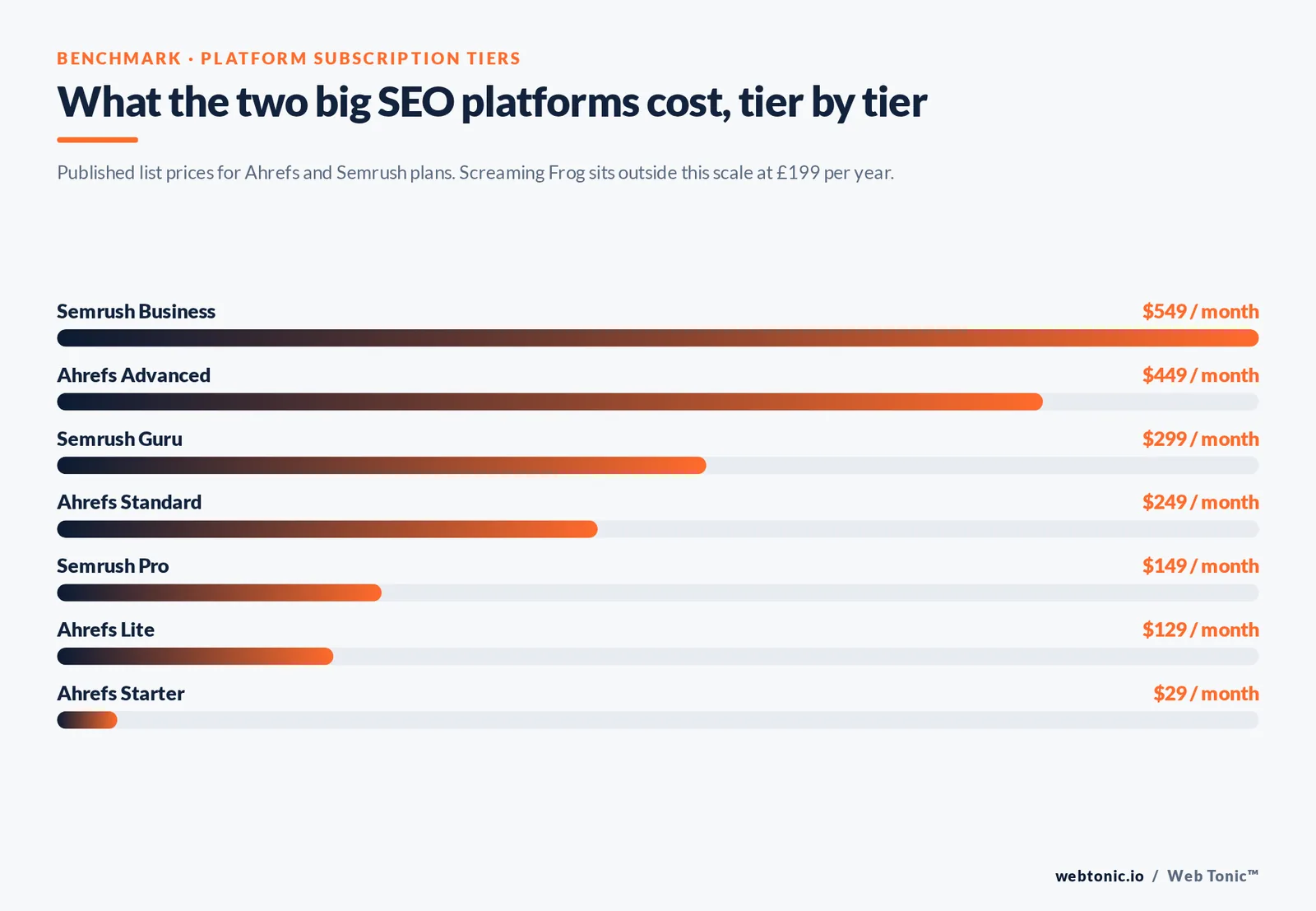
- Paid all-in-one platforms are the biggest line item: Ahrefs starts at $129/month and Semrush's Pro plan at $149/month.
- Ahrefs' upper tiers run $249 and $449/month; Semrush's Guru and Business tiers run $299 and $549/month.
- Screaming Frog's SEO Spider licence is £199/year and crawls up to 500 URLs free without one.
- Core Web Vitals thresholds are fixed and free to check: LCP under 2.5s, INP under 200ms, CLS under 0.1.
- Buy tools by job, not by brand — 5 categories cover everything: research, crawling, backlinks, tracking, content.
- Most small teams over-buy: 1 paid platform plus the free Google stack handles the majority of day-to-day SEO work.
- Every tool's data is an estimate except Search Console's, which is the only source reporting your actual impressions and clicks.
Start here: the free SEO tools that are not optional
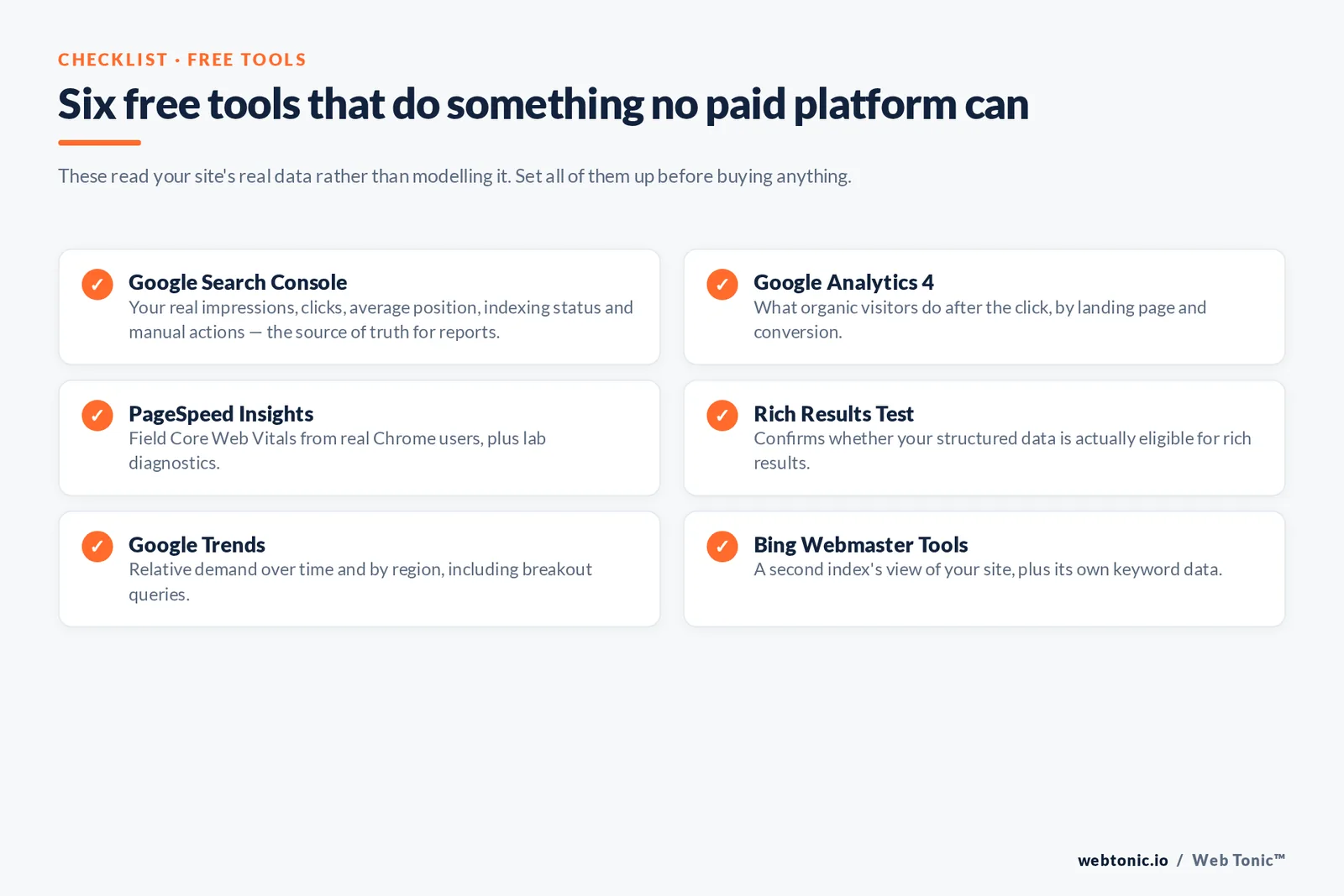
Before comparing paid platforms, note that the highest-value SEO tools cost nothing, because they come from the search engines themselves. Third-party tools model Google; these report it.
| Tool | What it does that nothing else can | Cost |
|---|---|---|
| Google Search Console | Your real impressions, clicks, average position, indexing status and manual actions | Free |
| Google Analytics 4 | What organic visitors do after the click, by landing page and conversion | Free |
| PageSpeed Insights | Field Core Web Vitals from real Chrome users plus lab diagnostics | Free |
| Rich Results Test | Confirms whether your structured data is actually eligible for rich results | Free |
| Google Trends | Relative demand over time and by region, including breakout queries | Free |
| Bing Webmaster Tools | A second index's view of your site, plus its own keyword data | Free |
| Lighthouse in Chrome | Per-page performance, accessibility and SEO audits in the browser | Free |
Search Console is the non-negotiable one. Its performance report is the only place your true query data lives, and its index coverage report explains why pages are missing — a question no paid tool can answer authoritatively. Google's own setup guide takes about ten minutes.
For speed work, PageSpeed Insights reports field data against the fixed Core Web Vitals thresholds: Largest Contentful Paint under 2.5 seconds, Interaction to Next Paint under 200 milliseconds, Cumulative Layout Shift under 0.1, each measured at the 75th percentile of page loads. And if you publish FAQ, product or article markup, validate it with the Rich Results Test rather than trusting a plugin's green tick.
What the paid SEO platforms cost in 2026
Paid tools earn their keep on two things free tools cannot give you: competitor data and backlink indexes. Here are the list prices, checked in August 2026.
| Tool | Entry price | Higher tiers | Strongest for |
|---|---|---|---|
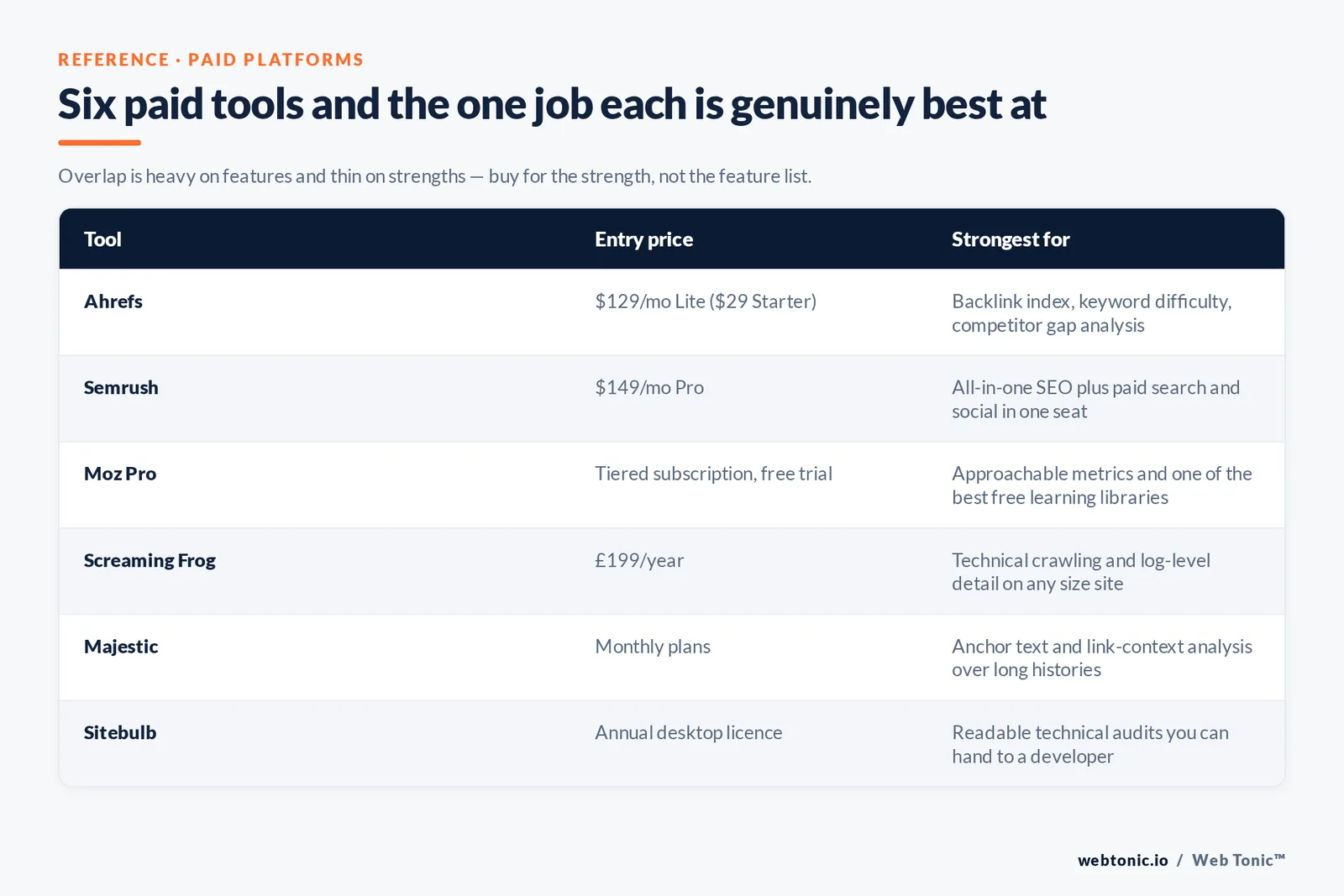
| Ahrefs | $129/mo (Lite); $29/mo Starter | $249 Standard, $449 Advanced, $1,499 Enterprise | Backlink index, keyword difficulty, competitor gap analysis |
| Semrush | $149/mo (Pro) | $299 Guru, $549 Business | All-in-one SEO plus paid search and social in one seat |
| Moz Pro | Tiered subscription, free trial | Higher tiers by keyword and crawl limits | Approachable metrics and one of the best free learning libraries |
| Screaming Frog SEO Spider | £199/year | Same licence, unlimited crawl | Technical crawling and log-level detail on any size site |
| Majestic | Monthly plans | Higher tiers by index depth | Anchor text and link-context analysis over long histories |
| Sitebulb | Annual desktop licence | Cloud plans for teams | Readable technical audits you can hand to a developer |
Two notes on that table. First, Ahrefs and Semrush both price extra seats and extra projects separately, so a three-person team rarely pays the headline number. Second, annual billing typically cuts 15 to 20% off both — check the current pricing page before budgeting, as tiers change.
If you only need the data occasionally, both vendors publish genuinely useful free utilities; Ahrefs' set of free SEO tools includes keyword and backlink checkers with daily limits, which is enough for a monthly spot check.
The five jobs, and the best tool for each
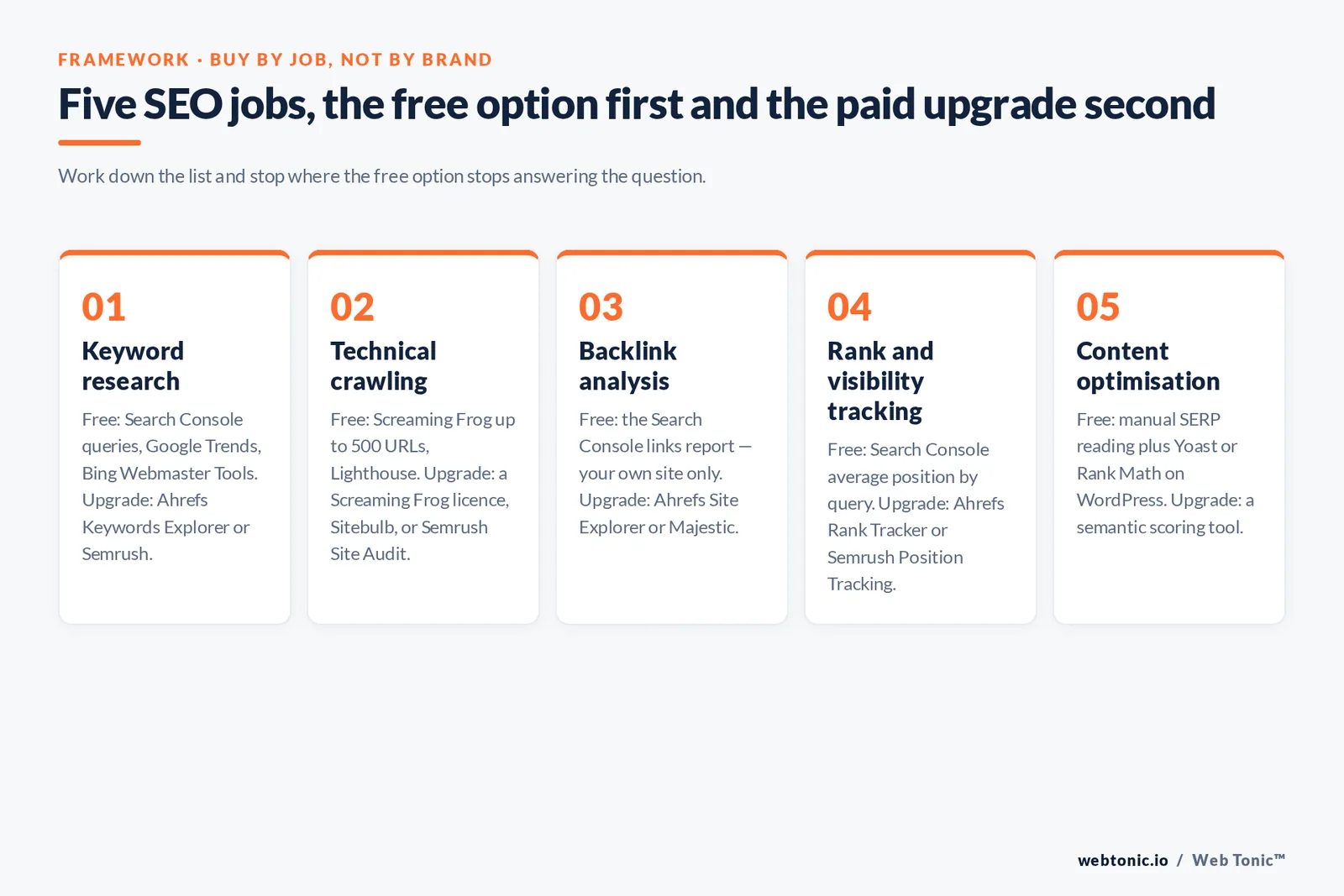
Tool sprawl comes from buying brands instead of buying jobs. There are only five recurring jobs in SEO, and a tool is worth paying for only if it is the best available answer to one of them.
| Job | Question it answers | Free option | Paid upgrade |
|---|---|---|---|
| Keyword research | What do people actually search, and how hard is it to rank? | Search Console queries, Google Trends, Bing Webmaster Tools | Ahrefs Keywords Explorer, Semrush Keyword Magic |
| Technical crawling | What is broken, duplicated, blocked or orphaned? | Screaming Frog up to 500 URLs, Lighthouse | Screaming Frog licence, Sitebulb, Semrush Site Audit |
| Backlink analysis | Who links to competitors and not to us? | Search Console links report (your own site only) | Ahrefs Site Explorer, Majestic |
| Rank and visibility tracking | Are we gaining share on the queries that matter? | Search Console average position by query | Ahrefs Rank Tracker, Semrush Position Tracking |
| Content optimisation | Does this page cover the topic as completely as the pages that beat it? | Manual SERP reading, Yoast or Rank Math on WordPress | Semantic scoring tools, Semrush Content Toolkit |
Worked example. A 40-page service site with no rankings does not need a $449 plan. It needs Search Console configured, one free Screaming Frog crawl to find the four pages returning 404s, Google's Search Essentials read once properly, and a $129 plan for one month to pull competitor keyword gaps. That is roughly a 90-day plan and a single invoice.
A 4,000-URL ecommerce catalogue is the opposite case: crawling is the constraint, so the licensed crawler and log analysis matter far more than a keyword database. Match the spend to the bottleneck. Our data intelligence team starts every audit by identifying which of the five jobs is actually blocked.
Specialist tools worth owning
Beyond the all-in-ones, a handful of narrow tools do one job better than any suite.
- Screaming Frog SEO Spider — the reference crawler. The free tier handles 500 URLs, and the licensed version at £199/year removes the cap and adds JavaScript rendering, scheduling and API connections.
- Sitebulb — produces audits with prioritised, plain-English explanations, which makes it the easiest technical output to hand to a developer who does not do SEO.
- Yoast SEO — for WordPress sites, the plugin handles titles, canonicals, sitemaps and schema output so those never depend on a theme.
- Majestic — its Trust Flow and anchor-text views remain the clearest way to inspect a link profile's quality and history.
- Google's structured data tooling — the structured data documentation plus the Rich Results Test replace guesswork about which markup Google supports.
- Moz's learning library — its Beginner's Guide to SEO is still the best free onboarding document for a new hire.
Keyword research tools in practice
Keyword research is where most people start, and where most tool budgets get wasted. Every platform sells the same underlying promise: find the keywords your website could realistically rank for, sized by traffic potential. The differences that matter are index freshness, how difficulty is calculated, and how easily you can filter thousands of keywords down to a shortlist you will actually write.
A workflow that works with any tool, free or paid:
- Harvest what you already have. Export every query from Search Console with impressions but an average position between 8 and 30. These keywords need optimization, not new pages, and they are the fastest performance win on any site.
- Find the competitor gap. Run two or three rival sites through Ahrefs or Semrush and list the keywords they rank for and you do not. This single report justifies a month of subscription on its own.
- Group by intent, not volume. Sort keywords into informational, commercial and transactional; a business page and a guide should never chase the same term.
- Sanity-check difficulty. Difficulty scores are modelled from backlinks and are directional only. Open the top 5 results and judge whether your page could genuinely compete.
- Size the prize. Multiply monthly searches by a realistic click share and your conversion rate. If the answer is under one lead a month, park it.
| Data point | How reliable it is | How to use it |
|---|---|---|
| Search volume | Estimated, rounded, often lagging | Compare keywords against each other, not as a forecast |
| Keyword difficulty | Modelled from backlinks only | Shortlist, then verify by reading the results page |
| Traffic potential | Useful — based on what the top page ranks for | Prioritise topics over single keywords |
| Clicks per search | Directional; falling as AI answers expand | Discount informational terms accordingly |
| Your own Search Console data | Actual, measured | Treat as the source of truth for reports |
Content optimization and reporting tools
Once keywords are chosen, two categories remain: tools that help you write pages that cover a topic properly, and tools that turn all of this into reports someone else will read.
For content optimization, the on-page scoring tools — Surfer, Semrush's content features, Clearscope and similar — compare your draft against the pages currently ranking and flag terms and subtopics you have missed. Used well, Surfer-style scoring is a completeness checklist, not a target: it helps a writer notice that a page about crawling never mentions log files. Used badly, it produces keyword-stuffed prose that reads as though a machine wrote it for another machine. Our own rule is that the score may never outrank the editor.
| Tool category | What it helps with | Good sign it is working |
|---|---|---|
| On-page scoring (Surfer, Clearscope) | Topic coverage and internal briefs | Editors add real substance, not term lists |
| CMS SEO plugins (Yoast, Rank Math) | Titles, canonicals, sitemaps, schema on WordPress sites | No duplicate titles across the website |
| Rank tracking | Daily movement on a fixed keyword set | Rankings and Search Console clicks agree in direction |
| Backlink monitoring | New and lost backlinks, anchor text, spam spikes | You find lost links within days, not quarters |
| Reporting and dashboards | Turning tool data into monthly marketing reports | Stakeholders ask better questions, not more |
| Review and reputation tools | Monitoring reviews that influence local visibility | Reviews answered within 48 hours |
On reporting, resist the temptation to send everything. A great monthly report is one page: clicks and impressions from Search Console, movement on the tracked keyword set, pages gained and lost, technical issues opened and closed, and the one decision you want signed off. Long automated PDFs full of vanity metrics train stakeholders to stop reading, which is how good SEO programmes lose their budget.
Finally, check the user experience of any tool before committing. If nobody on the team enjoys opening it, its data will not reach a decision. Free trials exist for that reason: spend a week finding out whether a platform helps you work, or merely helps you look busy.
AI features: what they are good at, and what they are not
Every major platform shipped AI features between 2024 and 2026 — brief generation, content scoring, internal-link suggestions, bulk meta writing, and AI-search visibility tracking. Two things are worth separating.
Genuinely useful: clustering thousands of queries into topics, drafting outlines from live SERP data, detecting internal-link opportunities across large sites, and summarising crawl output into a prioritised list. These are pattern tasks over data you already own.
Not yet reliable: AI-written pages published without editing, "optimisation scores" treated as ranking predictions, and AI-visibility metrics that estimate how often a brand appears in generative answers. The last group is improving but still directional — measure it, do not report it as revenue.
| AI feature | Time it saves | Risk if trusted blindly |
|---|---|---|
| Keyword clustering | Hours per project | Low — verify a sample of clusters |
| Content brief generation | 30 to 60 minutes per brief | Medium — briefs echo whatever ranks today |
| Bulk meta titles and descriptions | Hours on large catalogues | Medium — length limits and duplication |
| Full article generation | Apparently large | High — unverified claims and thin coverage |
| AI-search visibility tracking | Reporting time | High — sampled, volatile estimates |
Which tools suit which kind of website
The right stack depends far more on the shape of your website than on your industry. A great toolkit for a 30-page local business is a poor one for a 40,000-URL marketplace, because the constraint is different: one needs keywords and reviews, the other needs crawl capacity and log analysis.
| Site type | Primary constraint | Tools that help most | Realistic monthly cost |
|---|---|---|---|
| Local service business, under 50 pages | Local visibility and reviews | Search Console, Business Profile, review monitoring, one entry-tier platform | $0 to $129 |
| B2B site with a blog | Content coverage and links | Search Console, Ahrefs or Semrush, an on-page scoring tool | $129 to $250 |
| Ecommerce, 1,000+ URLs | Crawling, indexing, duplication | Screaming Frog licence, Sitebulb, Search Console, rank tracking | $150 to $400 |
| Publisher or large content site | Cannibalisation and decay | Search Console exports via API, keyword clustering, analytics | $250 to $600 |
| Agency managing many sites | Reporting time across clients | Multi-project platform plans, crawler, automated reports | $400 upwards |
Three mistakes recur regardless of site type. Buying two all-in-one platforms because each has one feature the other lacks — the overlap makes the second one poor value. Tracking hundreds of keywords nobody will ever act on, which turns rank tracking into decoration. And treating third-party traffic estimates as your traffic in client reports, which erodes trust the first time somebody compares them with analytics.
Spend the time you save on the work tools cannot do: earning backlinks worth having, and writing pages a human would choose to finish. Software finds the opportunity; it does not do the job.
How to choose your stack in one afternoon
- Install the free layer first. Search Console, Analytics and Bing Webmaster Tools, verified on every property and subdomain.
- Name the bottleneck. Not indexed? Crawl. No rankings on commercial terms? Research and content. Rankings but no traffic? Titles and intent. Traffic but no revenue? Analytics and CRO.
- Buy one paid platform, monthly. Start on the lowest tier for the job — $129 or $149 — and stay monthly until you have used it for 30 straight days.
- Add exactly one specialist tool. Usually the crawler. Resist the second all-in-one; the data overlaps by roughly 80%.
- Set the reporting cadence. Weekly: Search Console clicks and impressions. Monthly: rank tracking and crawl. Quarterly: backlink profile and Core Web Vitals.
- Review seats every quarter. Cancel anything nobody has opened in 60 days — unused seats are the largest silent cost in most SEO budgets.
One rule that saves arguments: never compare a third-party traffic estimate with your analytics and call the difference an error. Estimates model a sample of the web; Search Console counts your actual impressions. When they disagree, Search Console wins. We use estimates for competitor comparison only, which is also how our growth marketing reporting is structured.
FAQ
What are the best free SEO tools?
Google Search Console, Google Analytics 4, PageSpeed Insights, the Rich Results Test, Google Trends, Bing Webmaster Tools, Lighthouse in Chrome, and Screaming Frog's free tier for crawls up to 500 URLs. Together they cover indexing, measurement, speed, structured data and technical diagnosis at no cost.
Is Ahrefs or Semrush better?
Ahrefs is generally preferred for backlink data and keyword difficulty; Semrush is broader, bundling paid search, advertising research and social alongside SEO. If SEO is your only channel, Ahrefs at $129/month is the tighter fit. If one person covers SEO and PPC, Semrush's $149/month Pro plan consolidates more work into one seat.
How much should a small business spend on SEO tools?
Between $0 and roughly $180 a month for most sites under a few hundred pages: the free Google stack plus one entry-tier platform. A Screaming Frog licence at £199 a year is the usual next purchase, and after that spend should go to content and links rather than more software.
Do I still need SEO tools if I use AI writing assistants?
Yes, and arguably more than before. AI can draft quickly but cannot tell you which pages Google is failing to index, which queries you already rank for on page two, or which competitor links you are missing. Those answers come from Search Console and a backlink index, not a language model.
How many SEO tools does one person actually need?
Three: the free Google stack, one paid all-in-one platform, and one crawler. Anything beyond that should be justified by a specific recurring job rather than a feature list.
Which SEO tool is best for tracking rankings accurately?
Use Search Console for truth and a rank tracker for granularity. Search Console reports your real average position by query and country; rank trackers such as Ahrefs Rank Tracker or Semrush Position Tracking sample daily on a fixed device and location, which is better for spotting movement. Read them together rather than choosing one. If you want that setup built for you, get in touch — or browse more SEO walkthroughs on the Web Tonic blog.
Sources: Google Search Console (about + setup guide) · PageSpeed Insights · web.dev Core Web Vitals · Google Rich Results Test · Google Search Essentials · Google structured data documentation · Ahrefs pricing and free SEO tools · Semrush pricing · Screaming Frog SEO Spider · Yoast SEO · Moz Beginner's Guide to SEO. Prices checked August 2026.


