



Table of contents

How we vet every listicle
Every agency featured on Web Tonic passes our 84-point editorial review before a single listicle goes live. This is how we vet each pick:
Verified client outcomes: We require real case studies with measurable KPIs — revenue, ROAS, CPA, retention — tied to the exact category being ranked. No cherry-picked wins, no unverifiable numbers.
Independent reputation: We cross-check Clutch, Google, G2, and Trustpilot ratings, and screen for review-bombing or suspicious patterns. Only operators with a consistent, verifiable track record make the cut.
Beyond that, every listing goes through a quarterly re-audit. We check 84 criteria across 6 pillars to make sure it still holds up — here are some of the checks we run:
Mobile devices now account for 64.35% of all global web traffic and 63% of organic search visits, making mobile SEO the single most important optimization discipline for any website. Below is the complete guide to the best mobile SEO tools in 2025 — covering site speed analysis, mobile usability testing, rank tracking, and Core Web Vitals monitoring — so you can audit, fix, and track your mobile search performance with the right stack.
Key Takeaways
- Google Search Console is the most important free mobile SEO tool, providing Mobile Usability reports, mobile-specific Core Web Vitals data, and device-segmented performance reports covering every indexed URL on your site.
- Screaming Frog SEO Spider audits mobile usability at scale by integrating with the PageSpeed Insights API to check viewport configuration, tap target spacing, content sizing, and Core Web Vitals across every crawled page — the paid version handles unlimited URLs.
- Pages loading in 1–2 seconds convert 5x better than those loading in 5 seconds, and 53% of mobile visitors abandon sites taking longer than 3 seconds to load (Google, 2024).
- Mobile-first indexing is now 100% complete — Google exclusively uses the mobile version of your site for indexing and ranking, making mobile SEO tools essential rather than optional.
- Websites with superior mobile experiences rank 15–20% higher than equivalent desktop-optimized sites with poor mobile performance (Semrush, 2024).
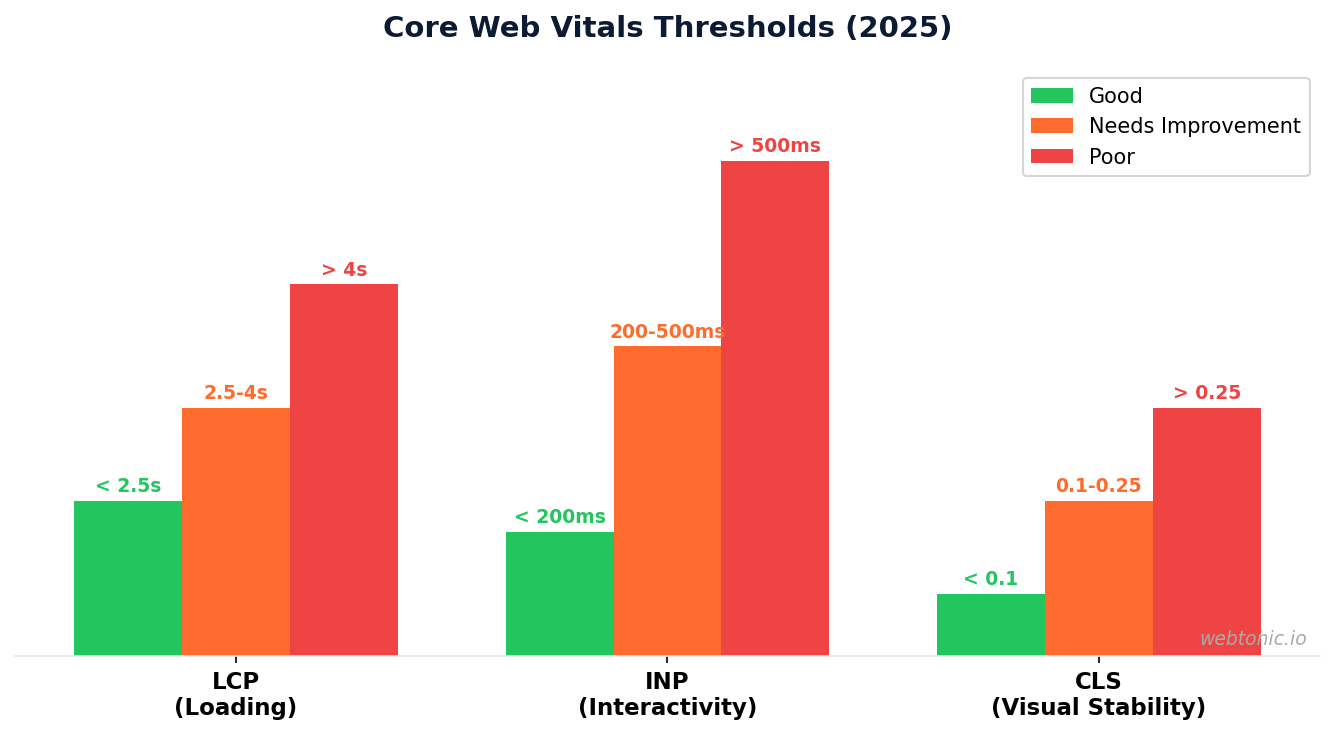
- Core Web Vitals (LCP, INP, CLS) are confirmed ranking signals that directly impact mobile search visibility, with Google recommending LCP under 2.5 seconds, INP under 200 milliseconds, and CLS below 0.1.
Why Mobile SEO Tools Matter in 2025
The shift from desktop-first to mobile-first search is not a trend — it is the permanent reality of how people find information online. According to RankTracker's 2025 mobile SEO statistics report, 62.73% of global website traffic comes from smartphones, rising to 68% for local searches and 71% for shopping-related queries. Google completed its mobile-first indexing rollout in 2021, meaning 100% of websites are now crawled and ranked based on their mobile version.
The performance stakes are equally high. SOAX's 2025 mobile traffic research shows mobile's share climbed from 0.72% in 2009 to 64.35% in Q3 2025. Meanwhile, 57% of users will not recommend a business with a poorly designed mobile site, and sites migrating to mobile-first design see average 30% organic traffic increases within 6 months according to BrightEdge data.
At Web Tonic, we use every tool on this list as part of our technical SEO audits to ensure our clients' sites deliver the mobile experience Google — and their customers — demand.
Mobile SEO optimization encompasses more than just speed — it includes mobile-friendly content formatting, tap target sizing, viewport configuration, and ensuring your site's mobile version contains the same content as desktop. Since Google's mobile indexing now controls how every page is evaluated, technical SEO audits must prioritize the mobile experience. The best SEO tools in 2025 recognize this shift: Screaming Frog SEO Spider's mobile usability tab, Semrush's mobile site audit module, and Ahrefs' mobile-specific SERP data all reflect the reality that mobile users drive the majority of search interactions.
For site owners running mobile SEO optimization campaigns, the workflow starts with identifying which mobile SEO tool addresses each specific problem. Use Google Search Console for indexing and mobile usability issues. Use PageSpeed Insights for mobile performance diagnostics. Use Screaming Frog for crawl-level mobile friendly content analysis. Use Semrush or Ahrefs for mobile keyword tracking and competitive intelligence. Each tool serves a distinct purpose in the mobile SEO optimization stack — no single tool covers everything.
Best Free Mobile SEO Tools
You do not need a large budget to audit and improve mobile SEO. The most powerful mobile SEO tools are free, built by Google, and provide data directly from the systems that determine your rankings.
| Tool | Primary Function | Best For | Cost |
|---|---|---|---|
| Google Search Console | Mobile usability reports, CWV data, device-segmented performance | Every site owner — the baseline mobile SEO tool | Free |
| Google PageSpeed Insights | Page speed analysis, Core Web Vitals, Lighthouse scoring | Per-URL speed diagnostics with actionable fix suggestions | Free |
| Google Lighthouse | Performance, accessibility, SEO, and best practices audits | Developers running audits in Chrome DevTools | Free |
| Chrome UX Report (CrUX) | Real-user performance metrics from Chrome users | Field data validation of lab test results | Free |
| Web Vitals Extension | Real-time CWV measurement in Chrome | Quick on-page checks without leaving the browser | Free |

Google Search Console is the most essential mobile SEO tool because it provides three reports that no other tool replicates: the Mobile Usability report (lists every URL with mobile-specific issues including viewport problems, tap target spacing, and content sizing), the Core Web Vitals report segmented by mobile and desktop, and the Performance report filtered by device. According to Screaming Frog's mobile audit tutorial, Search Console's mobile data should be the starting point for every mobile SEO audit because it reflects how Google actually evaluates your pages.
Google PageSpeed Insights combines lab data from Lighthouse with real-user field data from CrUX in a single test. Enter any URL and receive a mobile performance score along with specific fixes — like compressing images, removing unused JavaScript, or enabling lazy loading. The tool queries Google's pagespeedonline/v5/runPagespeed endpoint and returns both mobile and desktop data simultaneously.
Best Paid Mobile SEO Tools
Paid mobile SEO tools add scale, automation, and competitive intelligence that free tools cannot provide. The table below compares the leading paid options based on Gitnux's 2026 mobile SEO keyword rankings software comparison and Velsof's 2026 mobile SEO tools review.
| Tool | Mobile SEO Strength | Starting Price |
|---|---|---|
| Screaming Frog | Site-wide mobile usability crawling + PSI integration for 300+ SEO issues | £149/year |
| Semrush | Mobile rank tracking, site audit, keyword research, mobile SERP analysis | $119.95/month |
| Ahrefs | Mobile keyword tracking, backlink analysis, mobile SERP checker | $99/month |
| AccuRanker | Dedicated mobile rank tracking with on-demand rank updates | $129/month |
| Sistrix | Search visibility index with historical mobile ranking data | €99/month |
| Surfer SEO | AI content optimization with mobile readability scoring | $89/month |
Screaming Frog SEO Spider stands out as the most comprehensive mobile SEO audit tool because it integrates directly with the PageSpeed Insights API. When connected, it runs Lighthouse mobile usability checks on every page it crawls, producing a Mobile tab with 6 filters for common mobile issues: viewport not set, tap target size, content not sized correctly, illegible font sizes, and more. Each issue receives a Lighthouse score from 0 to 100, giving you a quantified mobile health score across your entire site. The paid licence removes the 500-URL crawl limit, making it practical for enterprise sites.
Semrush covers the broadest surface area for mobile SEO, combining mobile rank tracking (showing how your keywords rank specifically in mobile search results), a mobile site audit that identifies technical and UX issues, and keyword research tools that surface mobile search intent data. According to Nitaq's 2026 SEO tools comparison, Semrush scored highest on data accuracy and keyword research depth across 500+ websites tested over 6 months.
Core Web Vitals Testing Tools
Core Web Vitals — LCP (Largest Contentful Paint), INP (Interaction to Next Paint), and CLS (Cumulative Layout Shift) — are confirmed Google ranking signals that directly affect your mobile search visibility. The following tools help you measure, diagnose, and fix CWV issues.
- PageSpeed Insights provides both lab data (controlled Lighthouse simulation) and field data (real Chrome users via CrUX). Use lab data for diagnostics and field data for the ranking signal Google actually uses.
- Chrome DevTools Performance Panel offers the deepest dive into page rendering — use the Web Vitals track to see exactly which elements trigger LCP, CLS, and INP events, with frame-by-frame visual attribution.
- Core Web Vitals Visualizer Chrome Extension measures LCP, CLS, INP, FCP, and TTFB in real-time with color-coded overlays. It also shows 25 weeks of CrUX historical data to track whether your metrics are improving or declining.
- Web.dev Measure runs a Lighthouse audit directly from the browser and provides optimization suggestions categorized by impact — particularly useful for prioritizing fixes when multiple CWV metrics need improvement.
- Screaming Frog + PSI API scales CWV testing across your entire site by running PageSpeed Insights checks on every crawled URL. This combination identifies which pages fail CWV thresholds and which specific metrics are responsible.
Google's recommended thresholds for good mobile user experience are: LCP under 2.5 seconds, INP under 200 milliseconds, and CLS below 0.1. According to Google's Core Web Vitals documentation, a URL group's status is determined by its most poorly performing metric — so even one failing metric drags the entire page's CWV assessment to "poor."

Mobile Rank Tracking Tools
Desktop and mobile rankings diverge significantly — RankTracker's 2025 SEO statistics show the first organic listing on mobile captures only 6.74% of clicks (when SERP features are present) compared to 8.17% on desktop. Tracking mobile rankings separately is essential because your position 1 on desktop might be position 4 on mobile due to SERP feature differences, location signals, and user experience factors.
| Tool | Mobile Tracking Feature | Update Frequency |
|---|---|---|
| Semrush Position Tracking | Device-specific ranking, SERP feature tracking, competitor comparison | Daily |
| Ahrefs Rank Tracker | Mobile vs desktop comparison, visibility scoring, keyword movement alerts | Weekly |
| AccuRanker | On-demand rank refresh, region + device filtering, share of voice | On demand |
| SERPMojo (Android) | Free SERP tracking from your phone, multiple search engines | Configurable |
| Mangools SERPWatcher | Performance index, keyword difficulty integration, ranking distribution | Daily |
For agencies and consultants who need to check rankings on the go, Velsof's review recommends SERPMojo as the best free Android app for mobile rank tracking. It tracks keyword positions across multiple search engines with region-specific results — useful for monitoring local SEO campaigns without opening a laptop.
Mobile Site Speed Optimization Tools
Site speed is arguably the most impactful mobile SEO factor because it affects both rankings and revenue. According to Google's performance data, pages loading in 1–2 seconds convert 5x better than pages loading in 5 seconds, and 53% of mobile visitors leave if a page takes more than 3 seconds to load.
- Google PageSpeed Insights — The first tool to use for any speed issue. Provides a performance score (0–100) plus specific, prioritized recommendations like compressing images, deferring non-critical JavaScript, and reducing server response time. Free and unlimited.
- GTmetrix — Combines Lighthouse performance data with waterfall charts showing exactly when each resource loads. The waterfall view is invaluable for identifying which scripts or images are blocking rendering on mobile.
- WebPageTest — The most detailed speed testing tool available. Test from real devices on real networks (including 3G/4G throttling), record filmstrip views of the loading process, and compare before/after optimization results.
- Cloudflare Speed Test — Measures real-world loading performance from multiple global locations. Useful for identifying CDN issues and geographic speed variations that affect mobile users in different regions.
At Web Tonic, we combine PageSpeed Insights diagnostics with Screaming Frog crawl data to build prioritized speed optimization roadmaps — starting with the pages that receive the most mobile traffic.
How to Build a Mobile SEO Audit Workflow
Using mobile SEO tools effectively requires a structured workflow, not random tool hopping. Here is the step-by-step process used by professional SEO teams based on frameworks from Screaming Frog and web.dev's Lighthouse optimization guide.
- Start with Google Search Console. Check the Mobile Usability report for flagged pages. Review Core Web Vitals for URLs in the "Poor" or "Needs Improvement" categories. Note which specific metrics (LCP, INP, CLS) are failing.
- Run a full Screaming Frog crawl with PSI integration. Configure the crawler to check mobile usability and Core Web Vitals for every page. Export the results and sort by Lighthouse score — pages scoring below 50 need immediate attention.
- Test high-traffic pages individually in PageSpeed Insights. Focus on the top 20 pages by organic traffic — these represent the bulk of your mobile visibility. Document specific recommendations for each page.
- Check mobile rankings separately. Use Semrush or AccuRanker to compare mobile vs desktop rankings for your target keywords. Identify keywords where mobile ranks are significantly lower — these often signal mobile usability problems on the ranking page.
- Fix in priority order: CWV failures → usability issues → speed optimizations. Core Web Vitals failures directly impact rankings. Usability issues affect user engagement. Speed optimizations improve both. Work through the list systematically rather than optimizing randomly.
- Re-test and monitor. After implementing fixes, re-run Search Console and PageSpeed Insights checks. Set up weekly monitoring in your rank tracking tool to verify that mobile rankings improve as issues are resolved.
During the audit, pay special attention to mobile-friendly content parity — pages where the desktop version has more content, more internal links, or more structured data than the mobile version. Google's mobile-first indexing uses your mobile version as the canonical source, so any content missing from mobile is effectively invisible to the search engine. The Screaming Frog SEO Spider can compare mobile and desktop rendered versions of your pages to flag these discrepancies, as can the Merkle Mobile-First Index Tool which specifically highlights content and link differences between your mobile and desktop page versions.

Mobile user experience signals also feed into how Google evaluates your pages. Mobile devices account for 72.3% of Google's search traffic, and mobile users spend an average of only 17 seconds per search compared to 2 minutes 48 seconds for desktop users. This behavior pattern means your mobile-friendly site must deliver answers faster, with shorter paragraphs, larger tap targets, and clear visual hierarchy. Mobile SEO tools that combine technical auditing with user experience insights — like Semrush's mobile site audit and Google Search Console's mobile usability reporting — help you optimize for both the algorithm and the humans using your mobile site.
Mobile SEO Statistics That Drive Tool Selection
Understanding the mobile search landscape helps you choose which tools deserve your budget. The following data points, compiled from Neil Patel's mobile traffic statistics, Guangsuan's 2025 mobile vs desktop comparison, and RankTracker's mobile SEO statistics, highlight why mobile SEO tools are non-negotiable.
| Metric | Value | Source |
|---|---|---|
| Global mobile traffic share (Q3 2025) | 64.35% | SOAX |
| Mobile share of organic search visits | 63% | Google, 2024 |
| Mobile share of Google search traffic | 72.3% | Guangsuan, 2025 |
| Mobile conversion rate (1s load) | 53% higher | Guangsuan, 2025 |
| Bounce rate at 3s mobile load time | 53% abandon | Google, 2024 |
| Traffic increase from mobile-first redesign | 30% avg lift | BrightEdge, 2024 |
| Mobile-optimized sites in top rankings | 80% | RankTracker, 2025 |
The data makes the business case clear: mobile pages that load within 1 second have a 53% higher conversion rate than slower alternatives, and desktop content over 2,000 words receives 5.7x more shares than mobile content. These numbers mean your mobile SEO tools need to address both speed (for conversions) and content quality (for visibility), making a multi-tool approach essential. Read our blog for detailed tutorials on implementing each of these optimizations.
WordPress and CMS-Specific Mobile SEO Tools
If your website runs on WordPress, dedicated mobile SEO plugins can automate optimization tasks that would otherwise require manual technical work. The best WordPress mobile SEO tools handle mobile-friendly content rendering, title tags, meta descriptions, structured data, and mobile performance optimization without requiring developer intervention.
Rank Math is the most comprehensive WordPress SEO plugin for mobile optimization. It generates mobile-friendly structured data automatically, validates schema markup across your pages, and provides mobile-specific recommendations for title tags and meta descriptions. Rank Math's Content AI feature scores your content for mobile SEO optimization readiness, flagging issues like missing alt text, short meta descriptions, and unoptimized heading structures. The free version covers most mobile SEO needs — the Pro version adds advanced schema types and Google Business Profile integration.
Search Atlas offers a broader mobile SEO tool suite that integrates keyword research, content optimization, and technical SEO audits into a single platform. Its mobile-first content editor analyzes top-ranking mobile search results to recommend optimal content length, keyword density, and mobile-friendly formatting. Search Atlas also includes a mobile SERP simulator that previews how your title tags and meta descriptions appear on mobile devices before you publish — critical for ensuring your mobile search snippets are not truncated.
For structured data validation specifically, Google's Rich Results Test and the Schema Markup Validator confirm that your mobile pages deliver the structured data Google needs for rich snippets, FAQ accordions, and product listings. Mobile-friendly structured data improves click-through rates in mobile search results by providing users with actionable information directly in the SERP — star ratings, prices, FAQ answers, and event details all appear when structured data is implemented correctly.
The legacy Google Mobile-Friendly Test (now retired) evaluated whether individual pages met mobile usability standards including viewport configuration, tap target spacing, and mobile-friendly content sizing. While the standalone tool no longer exists, its evaluation logic lives inside Google Search Console's URL Inspection tool, Core Web Vitals assessments, and the Page Experience framework — meaning the same mobile-friendly checks still run on every page Google crawls. For a dedicated third-party alternative, the Merkle Mobile-First Index Tool compares your mobile and desktop page versions to identify content gaps, missing internal links, and structural differences that could hurt mobile-first indexing.
Frequently Asked Questions
What is the best free mobile SEO tool?
Google Search Console is the best free mobile SEO tool because it provides the most actionable data directly from Google's indexing and ranking systems. The Mobile Usability report flags every page with mobile issues, the Core Web Vitals report shows which URLs pass or fail Google's performance thresholds, and the Performance report filtered by device reveals your exact mobile search visibility. No paid tool replicates the authority of first-party Google data.
How do I test if my website is mobile friendly?
Use Google Search Console's Mobile Usability report for a site-wide assessment and PageSpeed Insights for individual URL testing. Search Console flags issues like viewport not set, tap targets too small, and content wider than the screen. PageSpeed Insights provides a 0–100 mobile performance score plus specific fix recommendations. For a comprehensive crawl-level audit, connect Screaming Frog to the PageSpeed Insights API and crawl your entire site — it will flag mobile issues for every URL with a Lighthouse score.
What are Core Web Vitals and why do they matter for mobile SEO?
Core Web Vitals are three Google performance metrics that measure real user experience: LCP (Largest Contentful Paint) measures loading speed, INP (Interaction to Next Paint) measures responsiveness, and CLS (Cumulative Layout Shift) measures visual stability. They matter because they are confirmed ranking signals — Google uses real-user CWV data from Chrome to influence where your pages rank in mobile search results. The recommended thresholds are LCP under 2.5 seconds, INP under 200 milliseconds, and CLS below 0.1.
Which mobile SEO tools do agencies use?
Most SEO agencies use a combination of tools: Google Search Console and PageSpeed Insights as the free foundation, Screaming Frog for technical crawling and mobile usability audits (£149/year), and either Semrush ($119.95/month) or Ahrefs ($99/month) for mobile rank tracking, keyword research, and competitive analysis. For dedicated rank tracking, AccuRanker ($129/month) offers on-demand mobile rank refreshes that larger agencies prefer for client reporting.
How often should I run a mobile SEO audit?
Run a comprehensive mobile SEO audit quarterly using Screaming Frog with PSI integration. Monitor Core Web Vitals weekly in Google Search Console. Check mobile rankings daily or weekly depending on your competitive landscape. After any major site update (redesign, CMS migration, plugin changes), run an immediate mobile audit because structural changes frequently break mobile usability without warning.
Choosing the best mobile SEO tools depends on your specific workflow and budget. Freelance SEOs and small businesses should start with the free Google mobile SEO tool stack — Google Search Console, Google PageSpeed Insights, and Lighthouse — which covers mobile usability auditing, mobile performance diagnostics, and Core Web Vitals monitoring at zero cost. Growing agencies typically add Screaming Frog SEO Spider for technical SEO crawling and one of the major keyword platforms (Semrush or Ahrefs) for mobile search rank tracking. Enterprise teams benefit from AccuRanker's on-demand mobile rank refreshes and Sistrix's historical mobile visibility data for competitive benchmarking.
The mobile SEO tools landscape continues to evolve as search engines refine how they evaluate mobile user experience. Google's integration of AI Overviews into mobile search results has made mobile SEO optimization even more complex — pages must now compete not just for traditional blue links but for AI-generated answer boxes that dominate the mobile SERP. The best SEO tools are adding generative search optimization (GSO) analytics alongside traditional mobile SEO metrics, giving digital marketers a complete view of their mobile search visibility across both classic and AI-powered result types.
Sources
ranktracker.com — Mobile SEO Statistics 2025
soax.com — Mobile Website Traffic Q3 2025
screamingfrog.co.uk — How to Audit Mobile Usability
velsof.com — Best Mobile SEO Tools 2026
gitnux.org — Mobile SEO Keyword Rankings Software 2026
nitaq.io — Best SEO Analysis Tools 2026
Google — Core Web Vitals Report Documentation
web.dev — Optimizing Web Vitals Using Lighthouse
neilpatel.com — Mobile Traffic Share Statistics
guangsuan.com — Mobile vs Desktop Search Traffic 2025


