



Table of contents
AI is not just for generating text anymore. Bing Image Creator — now officially called Image Creator from Microsoft Designer — is a free AI-powered tool that turns your written prompts into detailed images in seconds. If you have a Microsoft account, you already have access to one of the most capable visual generators available today.
Key Takeaways
- Bing Image Creator is completely free to use with any Microsoft account — no paid subscription, no credit card, and no DALL-E or OpenAI account required.
- The tool is powered by OpenAI's DALL-E 3 model, which delivers up to 95% better alignment with complex prompts compared to earlier versions, producing more accurate images from detailed descriptions.
- More than 750 million AI images had been generated with Bing Image Creator by mid-2024, making it one of the most widely used free AI image generation platforms.
- New accounts receive 15 boosts for fast image creation — once boosts run out, images are still generated but at a slower standard speed.
- The Image Creator supports multiple styles including digital art, photorealistic renders, oil paintings, sketches, and 3D renders — all controlled through your text prompt with no design software needed.
Most marketers know AI as a writing assistant. Tools like ChatGPT and Copilot have transformed how businesses create blog posts, emails, and ad copy. But AI's creative capabilities extend far beyond words. Bing Image Creator puts the power of professional-grade image generation into the hands of anyone who can describe what they want to see. At Web Tonic, we use AI-generated images for performance creative concepts, social media content, and rapid visual prototyping — and Bing Image Creator is one of the tools that makes this possible without a design team.
What Is Bing Image Creator?
Bing Image Creator is Microsoft's free AI image generation tool, integrated into Bing search, Microsoft Copilot, and the Microsoft Designer platform. It uses OpenAI's DALL-E 3 model to produce visuals from written descriptions — a process called text-to-image generation. You type a description of what you want to see, and the tool produces a set of visuals that match your description.
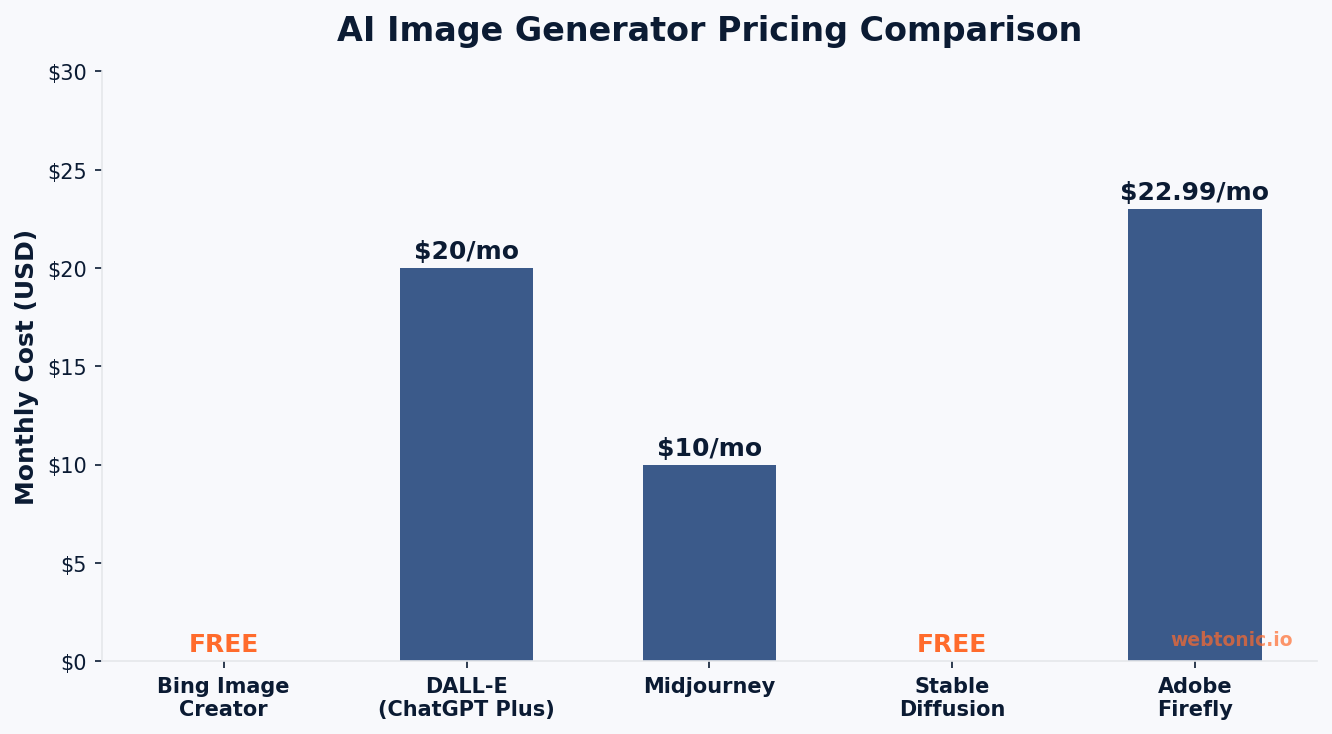
Microsoft launched Bing Image Creator in March 2023 as part of its broader AI integration strategy. Since then, it has become one of the most accessible entry points for AI image creation because it requires nothing more than a free Microsoft account. Unlike standalone platforms like Midjourney (which requires a paid subscription and Discord access) or DALL-E through OpenAI (which charges per generation), Bing Image Creator will generate images at no cost.
The tool was rebranded to Image Creator from Microsoft Designer in late 2024, but the functionality remains the same. You can access it through the Bing Image Creator website, through Copilot chat, or within the Microsoft Edge browser sidebar.
How to Use Bing Image Creator Step by Step
Getting started with Bing Image Creator takes less than two minutes. Here is the complete process:
- Sign in to your Microsoft account: Go to bing.com/images/create and click "Sign in to Create." You need a personal Microsoft login — work and school profiles (Microsoft Entra ID) are not supported.
- Write your prompt: In the text box, describe the image you want to create. Be as descriptive as possible — include the subject, style, lighting, mood, camera angle, and any specific details you want in the final image.
- Click Create: The AI will generate a set of images (typically four variations) based on your prompt. Fast creation uses your boosts and takes seconds; standard creation is free but slower.
- Download or share: Click on any generated image to view it in full resolution. You can download it, share it directly, or use it as a starting point for further editing in Microsoft Designer.
The key difference between Bing Image Creator and a generic search for stock photos is control. Instead of searching through millions of existing images hoping to find something close to your vision, you describe exactly what you need and the AI creates it. This is particularly valuable for marketers, content creators, and small business owners who need custom visuals but lack the budget for professional photography or graphic design. The tool typically generates 4 variations per prompt in a single session, giving you multiple options to choose from without any additional cost.
Understanding Boosts, Speed, and Microsoft Rewards
Bing Image Creator uses a two-tier system that determines how quickly your images are generated. Understanding this system will help you manage your daily usage effectively.
| Feature | Fast Creation (Boosts) | Standard Creation (Free) |
|---|---|---|
| Speed | Images generated in seconds | Slower, may take several minutes |
| Cost | Uses 1 boost per generation | Completely free, unlimited |
| Initial Allocation | 15 boosts per new account | Available immediately |
| Refill Method | Redeem Microsoft Rewards points | Always available |
| Image Quality | Same resolution and quality | Same resolution and quality |
When you first sign up, you receive 15 boosts. Each image generation session consumes one boost. Once your boosts run out, you can still create images using standard creation — the only difference is speed, not quality. You can also earn additional boosts by redeeming Microsoft Rewards points, which you accumulate through Bing searches, quizzes, and other Microsoft activities.
The important takeaway is that Bing Image Creator never stops being free. Boosts are a convenience feature, not a paywall. Even without boosts, you can generate unlimited images — you just wait longer for each set. This makes it fundamentally different from tools like Midjourney, which require a monthly subscription starting at $10 per month for basic access.
Writing Effective Prompts for Better AI Images
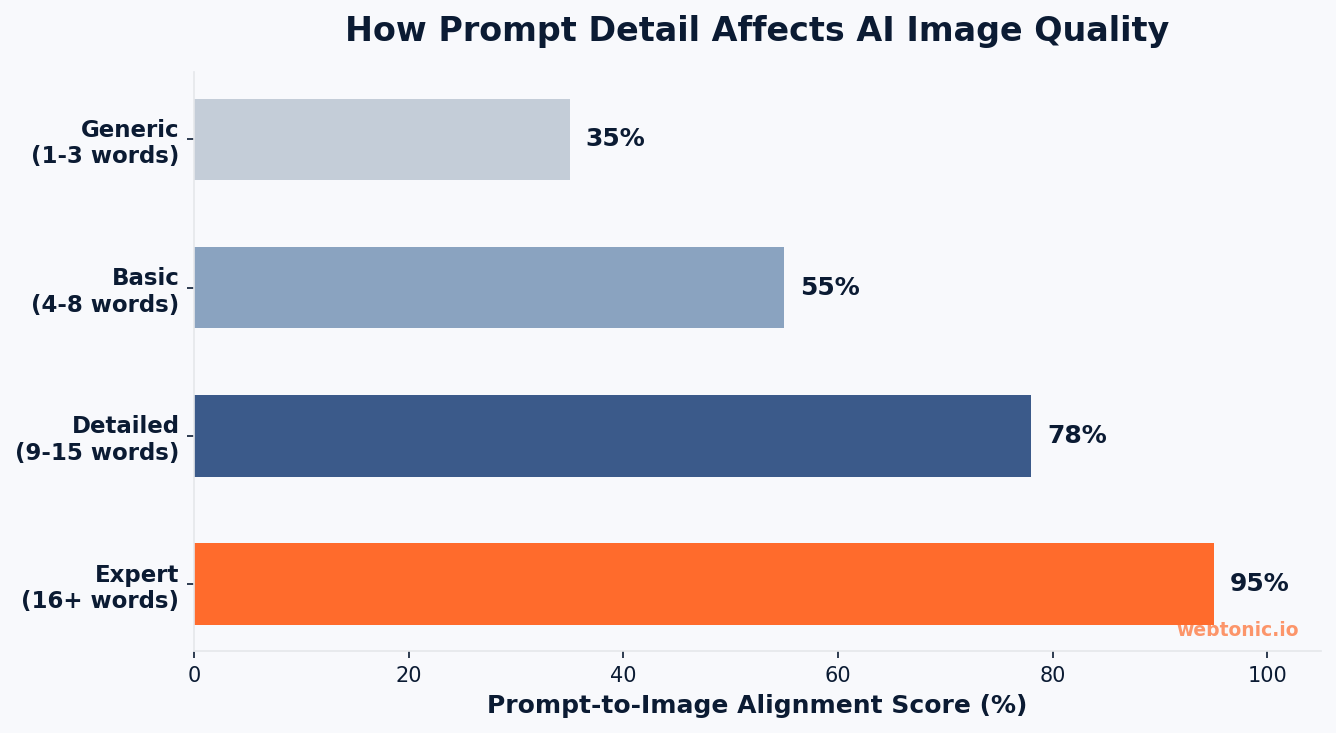
The quality of your generated images depends almost entirely on the quality of your text prompt. A descriptive prompt gives the AI specific instructions about subject, composition, style, and mood. A vague prompt forces the model to fill in gaps on its own, which often produces generic or off-target results.
Here is a framework for writing prompts that consistently produce high-quality images:
| Prompt Element | Example | Why It Matters |
|---|---|---|
| Subject | A golden retriever sitting on a park bench | Tells the AI exactly what to depict |
| Art Style | Watercolor painting, digital art, photorealistic | Controls the visual medium and aesthetic |
| Lighting | Soft golden hour sunlight, dramatic studio lighting | Sets the mood and depth of the image |
| Camera/Angle | Close-up macro shot, wide-angle aerial view | Determines perspective and framing |
| Color Palette | Muted earth tones, vibrant neon colors | Guides the overall color scheme |
| Background | Minimalist white studio, dense autumn forest | Provides context and composition |
According to ZDNet's guide on Microsoft Image Creator, the more specific and layered your prompt, the better alignment you will achieve between your vision and the output. DALL-E 3 delivers up to 95% better prompt alignment compared to earlier models, which means detailed prompts actually make a meaningful difference in output quality.
Here are prompt examples organized by common use case:
- Social media content: "A flat-lay photograph of a minimalist workspace with a laptop, coffee cup, and succulent plant, soft natural window light, white marble surface, Instagram-ready composition"
- Blog illustration: "An isometric 3D illustration of a digital marketing funnel with colorful stages, clean vector style on a dark navy background, modern tech aesthetic"
- Product mockup: "A photorealistic image of a white coffee mug with a custom logo on a wooden table, soft bokeh background, professional product photography lighting"
- Ad creative concept: "A vibrant split-screen design showing before and after results, bold typography, energetic orange and deep navy color scheme, modern advertising layout"
Bing Image Creator vs. Other AI Image Generators
The AI image generation space is crowded, and each tool has distinct strengths. Here is how Bing Image Creator compares to the most popular alternatives:
- Bing Image Creator vs. Midjourney: Midjourney produces arguably the most aesthetically refined images, particularly for artistic and stylized content. However, it requires a paid subscription (starting at $10/month) and operates through Discord, which adds friction. Bing Image Creator is free, accessible through any browser, and uses the same underlying DALL-E 3 model that powers ChatGPT's image features.
- Bing Image Creator vs. DALL-E (OpenAI): DALL-E through ChatGPT requires a Plus subscription ($20/month) for full access. Bing Image Creator uses the same DALL-E 3 model but provides it for free through Microsoft's partnership with OpenAI. If you only need visual generation and not ChatGPT's conversation capabilities, Bing Image Creator delivers the same core technology at zero cost.
- Bing Image Creator vs. Stable Diffusion: Stable Diffusion is open-source and highly customizable, but it requires significant technical knowledge to run locally. Bing Image Creator is the opposite — zero setup, browser-based, and designed for non-technical users who want results without learning model weights and sampling parameters.
- Bing Image Creator vs. Adobe Firefly: Adobe Firefly integrates into the Creative Cloud ecosystem and is trained exclusively on licensed content, which makes it safer for commercial use. Bing Image Creator is better for quick ideation and free usage, while Firefly suits professionals already invested in the Adobe workflow.
Content Policy and Responsible Use
Microsoft applies strict content policy guidelines to Bing Image Creator to prevent misuse. Understanding these guardrails will help you avoid rejected prompts and use the tool effectively within its boundaries.
The Image Creator will automatically reject prompts that attempt to generate:
- Images of real public figures (politicians, celebrities, identifiable individuals)
- Violent, hateful, or sexually explicit content
- Content that promotes self-harm or dangerous activities
- Copyrighted characters or trademarked imagery (though style references are generally accepted)
Every image generated by Bing Image Creator includes an invisible digital watermark identifying it as AI-generated. This aligns with Microsoft's commitment to responsible AI and helps ensure transparency in how AI-generated visuals are used across the web. According to AI Image Detector, this watermarking system is part of a broader industry trend toward AI content labeling.
For businesses using Bing Image Creator for marketing content, it is important to review Microsoft's Services Agreement and understand the licensing terms. While generated images can be used for personal and commercial purposes, AI-generated content should be clearly disclosed when used in advertising or social media, particularly as regulations around AI content continue to evolve.
Practical Applications for Marketers and Content Creators
This tool is not a toy — it is a practical production tool that can accelerate your content creation workflow. Here are the most valuable use cases we see at Web Tonic across our web development and performance creative projects:
- Blog and article illustrations: Generate custom featured images, section illustrations, and infographic concepts instead of relying on generic stock photography. Use descriptive prompts that match your brand's visual identity.
- Social media visuals: Create eye-catching post graphics tailored to specific campaigns, holidays, or product launches. The fast turnaround means you can produce 10–20 visual options in under 5 minutes for A/B testing.
- Ad creative prototyping: Produce concept mockups for paid media campaigns before investing in professional photography or design. Test visual directions with AI-generated images, then produce final assets with your design team.
- Presentation and pitch decks: Replace cliché stock photos in your presentations with custom visuals that actually match the content you are presenting.
- Product concept visualization: Quickly mock up visual representations of product ideas, color variations, or packaging concepts during the brainstorming phase.
The key advantage for businesses is speed. What used to require a design brief, a designer's time, and multiple revision rounds can now be iterated in minutes. That does not replace professional design — it accelerates the ideation phase and reduces the cost of visual assets for channels where perfect brand consistency is less critical, like blog content and organic social media.
FAQ
Is Bing Image Creator really free?
Yes. Bing Image Creator is completely free with any personal Microsoft account. You do not need a paid subscription, a credit card, or a separate OpenAI account. New users receive 15 boosts for fast image creation, and after those are used, you can still generate unlimited images at standard speed. The only cost is time — standard creation is slower than boosted creation, but the image quality is identical.
What AI model does Bing Image Creator use?
Bing Image Creator is powered by OpenAI's DALL-E 3, the same model behind image generation in ChatGPT Plus. Microsoft gained access to DALL-E through its partnership with OpenAI and made it available for free through the Bing and Copilot platforms. DALL-E 3 represents a significant improvement over earlier versions, with up to 95% better alignment between text prompts and generated images.
Can I use Bing Image Creator images for commercial purposes?
Generally yes, but with caveats. Microsoft's terms of service allow you to use generated images for personal and commercial purposes. However, you should review the Microsoft Services Agreement for specific licensing details. AI-generated images should be disclosed as such when used in advertising, especially as regulations around AI content labeling continue to develop.
How do I get more boosts in Bing Image Creator?
You can earn additional boosts by redeeming Microsoft Rewards points. You accumulate Rewards points through Bing searches, completing quizzes, and engaging with daily challenges. Each redemption restores your accelerated generation capability. Alternatively, you can simply use standard creation, which is free and unlimited but takes longer to generate each image set.
What makes a good AI image prompt?
A good prompt is specific and layered. Include the subject (what you want depicted), the art style (photorealistic, watercolor, 3D render), the lighting (natural, dramatic, soft), the composition (close-up, wide-angle), and the mood or color palette you want. The more detail you provide, the better the AI can align the generated image with your vision. DALL-E 3 excels at interpreting complex, multi-layered prompts — so do not hold back on specifics.
Sources
Microsoft — Bing Image Creator Help
ZDNet — How to Use Microsoft Image Creator for Free
AI Image Detector — Bing AI Art: Master Creation and Verification
Bing Image Creator — Official Tool
SlashGear — 5 Bing Image Creator Tips for Better Results
Microsoft — Services Agreement
Android Police — What Is Bing Image Creator


