



Table of contents

Quick answer: Webflow caps CMS items per site (plan-dependent), collections per site, 100 fields and 20 reference fields per collection. Hitting a limit blocks new items or fields rather than breaking the live site. Merge collections, retire dead items, or split across sites.
Last verified: 2026-08-21
The limits that actually bite
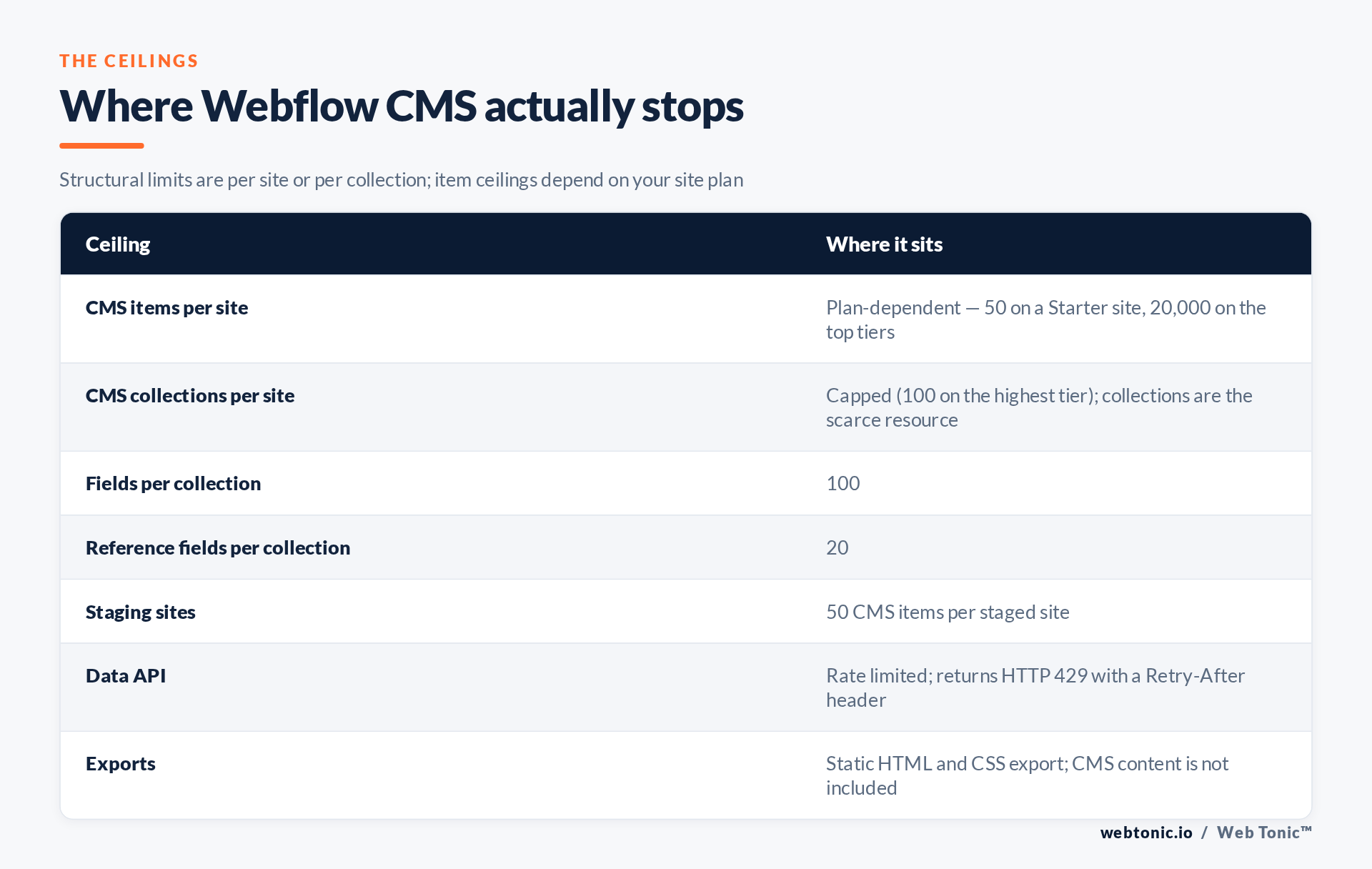
Webflow's CMS has several ceilings, and teams usually discover the wrong one first. The one everybody watches is CMS items per site, which is set by your site plan: a Starter site allows a handful, while the top hosting tiers reach 20,000, with additional capacity available for a fee on the highest plan. The current numbers for each tier live on the Webflow pricing page, and they change often enough that you should read them rather than trust a blog post — including this one.
The ceiling that actually stops most projects is collections per site. Collections are capped (100 on the highest tier), and every content type you invent — authors, categories, tags, testimonials, FAQ entries, service areas — eats one. A programmatic SEO build with a dozen satellite collections per template will run out of collections long before it runs out of items.
Then there are the per-collection structural limits: 100 fields and 20 reference fields in a single collection. Reference fields are the scarcer of the two by a wide margin, because they are how you join content together, and twenty joins disappear quickly on a page type that pulls in related services, locations, industries and case studies.
What actually happens when you hit one
The good news, and it is genuinely good news: a limit blocks a write, it does not break your published site. Existing pages keep serving, existing items keep rendering, and your SEO does not fall over. What you lose is the ability to add the next thing.
Practically, you see one of four failures. In the Designer, the option to add another collection or another field is simply unavailable. In the editor, creating a new item fails with a plan-limit message. Through the Data API, a write is rejected — and worth separating from a throttle, because the Webflow Data API rate limits return HTTP 429 Too Many Requests with a Retry-After header, which is a temporary condition rather than a ceiling. Fourth and most annoying: a bulk import silently completes part way, leaving a collection half-populated.
That last one is why any scripted CMS build should reconcile after writing — list the collection and compare the count against what you intended to create, rather than assuming a 200 response means the whole batch landed. We treat that reconciliation step as mandatory in our own Webflow work.
Diagnosing which ceiling you are against
- Count, do not estimate. Pull item counts per collection and a total collection count from the Data API, documented in the Webflow Data API introduction. Teams are routinely out by thousands because drafted and archived items are easy to forget.
- Check whether drafts count. Unpublished items still occupy the item allowance on typical plans, so a graveyard of abandoned drafts is real capacity.
- Inventory reference fields per collection. If a template collection is near twenty references, that is your true constraint, not items.
- Confirm the plan on the site, not the workspace. Hosting limits attach to the site plan; workspace seats are a separate axis entirely.
- Separate a 429 from a limit. Retry with backoff first. If the write succeeds later, you were throttled, not capped.
| Symptom | Likely ceiling | First move |
|---|---|---|
| Cannot create a new collection | Collections per site | Merge thin collections behind a type field |
| Cannot add a new item | CMS items per site plan | Delete dead drafts, then price the next tier |
| Cannot add a reference field | 20 reference fields | Pre-render related content into Rich Text |
| Cannot add any field | 100 fields | Retire legacy fields left over from old designs |
| API write fails intermittently | Rate limit (429) | Honour Retry-After and back off exponentially |
| Import finished short | Items, mid-batch | Reconcile counts and re-run the remainder |
The fixes, cheapest first
Merge collections before you upgrade anything
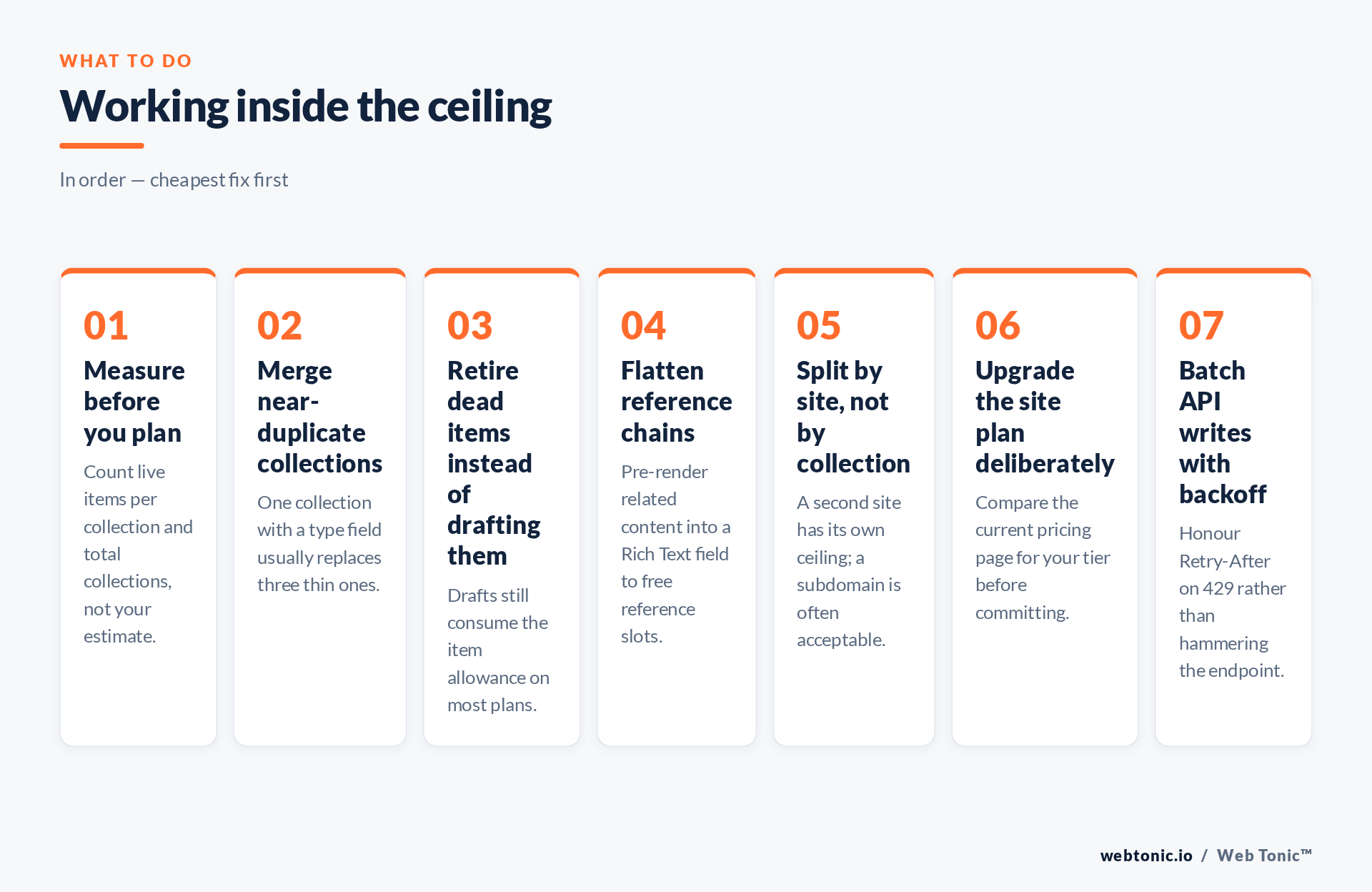
Most sites carry three or four collections that exist only to hold a label. Collapse them into one collection with a type field and filter in the Designer. On a large content site we merged thirteen satellite collections into pre-rendered Rich Text on four parent collections, which freed both collection slots and reference slots at once and made the API writes simpler.
Pre-render instead of referencing
Reference fields are elegant and expensive. If a block of related content changes rarely, build the HTML once and store it in a Rich Text field. You lose live joins and gain reference capacity plus faster page composition. Keep the generator script so the blob can be rebuilt.
Split across sites, not across collections
When a content programme genuinely needs more items than one site allows, a second site with its own plan is cleaner than contorting the schema. Serve it on a subdirectory via reverse proxy where SEO consolidation matters, or a subdomain where it does not, and keep the internal linking deliberate — the same discipline Google describes for sitemap structure at scale.
Plan the upgrade with numbers
Upgrading is a legitimate answer once the schema is clean — just do it with a count in hand and a projection of the next twelve months, not in the middle of a launch. Note also that Webflow's static export does not include CMS content, so "we will just export it" is not an exit route from a CMS ceiling. This is one of the trade-offs any content management system imposes, as covered generally in the CMS overview.
Designing so you never meet the ceiling
Before a programmatic build starts, write down the projected item count, collection count and reference count at full scale, then compare all three against your plan. Ninety per cent of Webflow CMS emergencies are a planning gap, not a platform problem. Give every collection an owner and a reason to exist, and delete the ones that fail that test annually.
Then keep the pipeline reconciling: after each scripted publish, list the collection, compare counts, and log the delta. That is exactly how we run large content programmes in our web development work, and it is what keeps SEO from discovering a half-published template three weeks later. Our blog covers the wider content-operations side.
Related reading
- Webflow for Allergy & Immunology Sites: 55+ Stats & Benchmarks (2026)
- Automotive Webflow Statistics 2026
- Beauty & Skincare Webflow Statistics
- Custom Web Development services at Web Tonic
Frequently Asked Questions
Do draft items count toward the CMS item limit?
On typical plans, yes — unpublished items still occupy the allowance. Clearing abandoned drafts is often the fastest capacity win available.
Does hitting a limit take my site offline?
No. Published pages keep serving normally. What is blocked is creating the next item, collection or field.
Can I raise the collection limit without changing plans?
Not directly. The practical route is schema consolidation — merging collections behind a type field — or moving part of the content programme to a second site.
Is a 429 error the same as hitting a limit?
No. A 429 is a temporary rate limit and includes a Retry-After header. Back off and retry; if the write then succeeds, you were never at a ceiling.
Can I export the CMS if I outgrow Webflow?
Static HTML and CSS export exists, but CMS content is not included in it. Plan any migration around the Data API instead.
Sources: Webflow pricing and plan limits; Webflow Data API; Webflow API rate limits; Google Search Central — sitemaps; content management systems. Webflow Help Center articles are cited by name only, because that domain blocks automated link verification. Last verified 2026-08-21.


