



Table of contents

Quick answer: Most Merchant Center disapprovals are data mismatches — price, availability, identifiers or images — not policy bans. Fix the value at its source in the store, let Google recrawl the landing page, and resist manual resubmission loops.
Last verified: 2026-08-21
Read the disapproval as a data problem first
The language Merchant Center uses makes every issue sound like an accusation. In practice the overwhelming majority of blocked products are failing an automated comparison between the feed and the landing page, and the fix is mechanical. Google's product data specification is the reference document for what each attribute must contain; nearly everything in the list below is a deviation from it.
Prioritise by impact rather than by count. A catalogue with 1,200 disapproved variants sounds like a crisis and may represent almost no lost revenue, while five disapproved best sellers is an emergency. Sort by the clicks or revenue the blocked items were producing before you decide how much of the week this deserves.
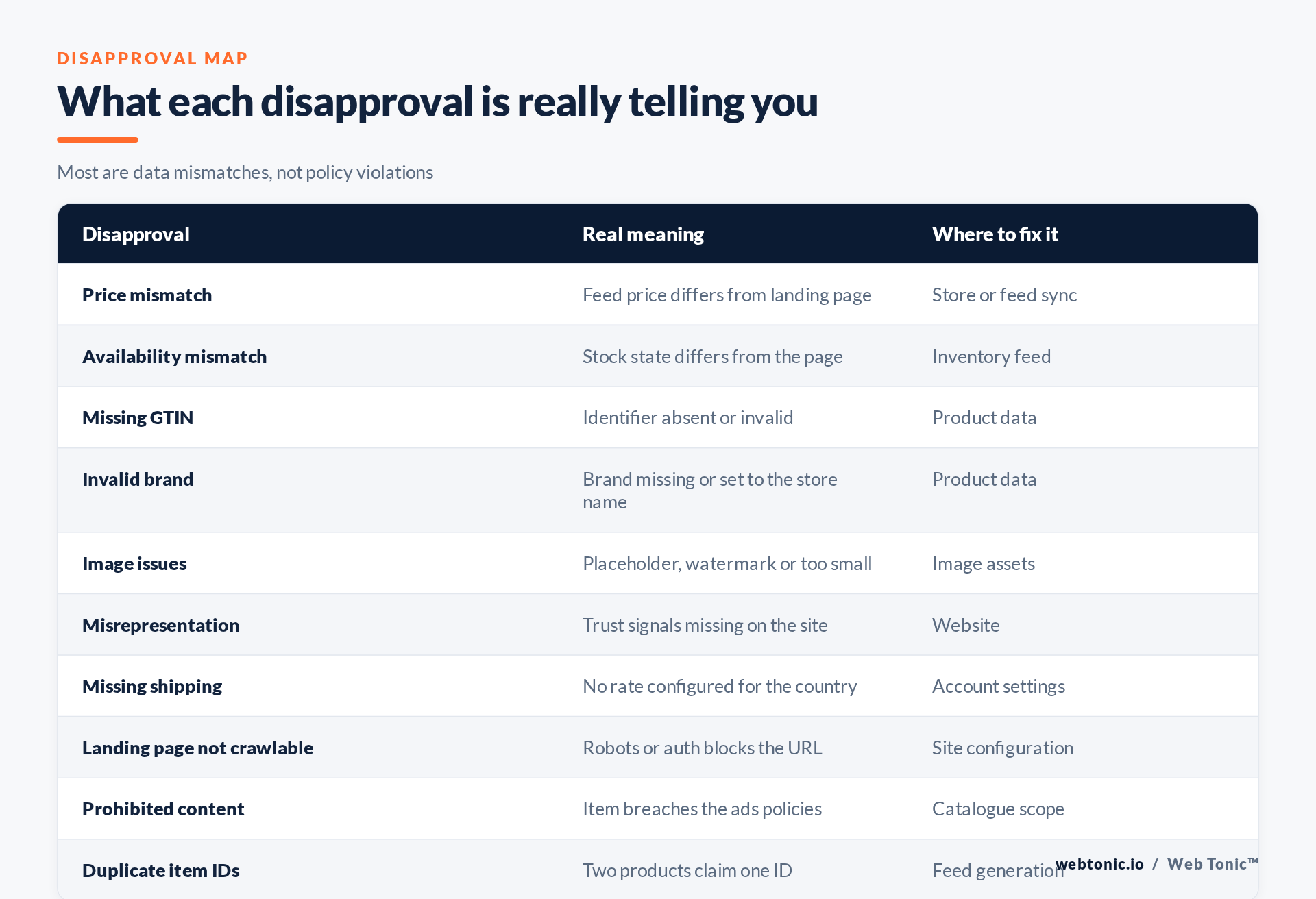
The mismatch family
Price and availability mismatches
These two are the most common by a wide margin. Google crawls the landing page, compares it to the submitted value, and blocks the item when they disagree. Causes are almost always structural: a currency or tax difference, a sale price rendered only after JavaScript runs, a geo-priced storefront, or a feed that refreshes daily against stock that changes hourly. Fix the sync frequency and the rendering, not the individual product.
Missing or invalid identifiers
The GTIN attribute and brand attribute are how Google matches your item to a known product. Setting brand to the retailer's own name for third-party goods is a frequent and quietly damaging error. Background on the identifier standard itself is at GTIN, and structured product markup follows the same shape as schema.org Product.
Duplicate or unstable item IDs
The id attribute must be unique and stable for the life of the product. Feeds that regenerate IDs on every export destroy performance history and produce duplicate-ID errors, which is why ID generation belongs in the store's data model rather than in an export template.
| Disapproval | Typical trigger | Durable fix |
|---|---|---|
| Price mismatch | Tax, currency or JS-rendered sale price | Server-render the price, match tax basis |
| Availability mismatch | Feed refreshes slower than stock moves | Frequent inventory updates |
| Missing GTIN | Supplier data not captured | Make it required at product creation |
| Image issues | Placeholder, watermark or overlay text | Clean primary image, extras as additional |
| Misrepresentation | Thin policy and contact pages | Complete returns, contact, payment info |
| Missing shipping | New target country added | Account-level shipping per country |
The policy family
Misrepresentation
This one frightens people because it sounds like fraud. Usually it means the site lacks the trust signals Google expects: a real contact route, clear returns and refund terms, transparent pricing including any surcharge, and secure checkout. Google's misrepresentation policy and the broader Shopping ads policies set the expectations, and the FTC's advertising guidance covers much of the same ground for US merchants. Fix the website; the disapproval follows.
Prohibited or restricted content
Some categories simply cannot run, and others need certification. Arguing is not a strategy here — either remove the items from the feed or complete the required process. A catalogue-level exclusion rule is cleaner than fighting the same disapproval every month.
Account-level warnings
Item disapprovals are recoverable; account-level suspension is a different order of problem, and Google's guidance on keeping an account approved is worth reading before you need it. Repeated unresolved item issues are one route into that state, which is the practical argument for weekly monitoring.
Missing shipping configuration
Adding a target country without a matching rate blocks the whole market instantly. The setup is documented in account shipping settings, and it is the first thing to check whenever a market goes dark overnight.
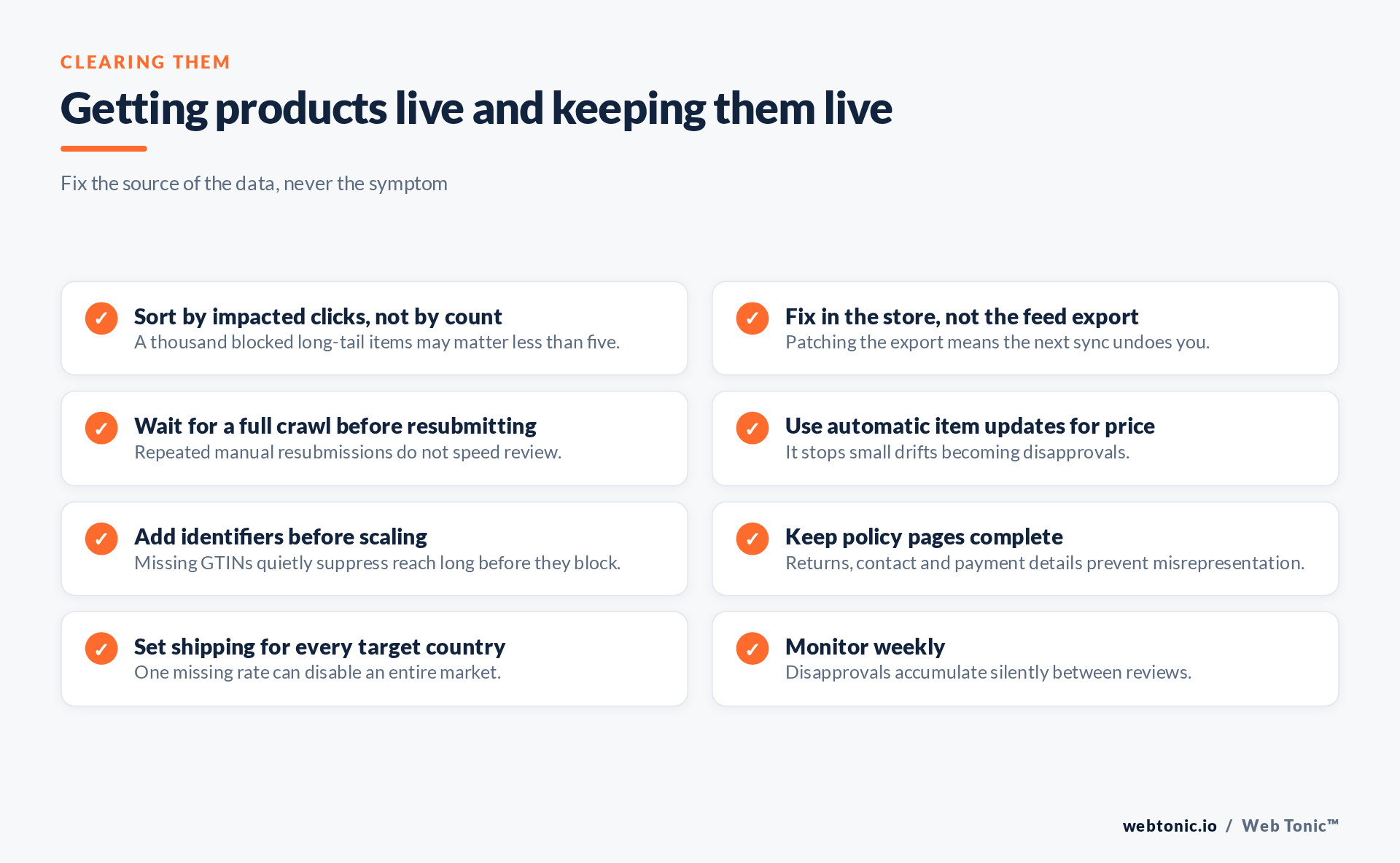
Clearing them without a resubmission loop
After a genuine fix, Google needs to recrawl the landing page and reprocess the feed. Hammering the resubmit control does not accelerate that and it wastes an afternoon. Make the change at the source, confirm the page now renders the corrected value to a crawler rather than only to a browser, and check back after the next scheduled fetch.
Then close the loop operationally. Set a weekly review of the diagnostics view, treat any new disapproval class as a data-quality incident rather than an inbox item, and keep the identifier and image standards enforced at product creation so the same issues stop being reintroduced. This is exactly the maintenance layer that our data intelligence work formalises, and it depends on reliable conversion tracking to know which blocked products actually cost money. If linking is also in scope, see the Merchant Center and Google Ads linking checklist, and for wider site fixes our SEO team usually owns the landing page side.
Frequently Asked Questions
How long does a disapproval take to clear?
It depends on the next crawl and feed fetch rather than on how many times you resubmit. Fix the source, then check after the following scheduled update.
Can I run products without a GTIN?
Sometimes, for genuinely unbranded or custom goods, but reach is usually suppressed. Treat a missing identifier as a performance problem even when it is not a hard block.
Why does a price mismatch appear when the price looks right?
Usually tax basis, currency, or a sale price only visible after JavaScript executes. Compare what a crawler sees with what a browser shows.
Is misrepresentation an accusation of fraud?
Not usually. In most cases it flags missing trust signals — contact details, returns terms, transparent pricing — rather than deliberate deception.
Should disapproved items be removed from the feed?
Only if they are genuinely ineligible. Removing fixable items hides the problem and loses the history when they return.
Sources: Google — product data specification; GTIN; brand; id; misrepresentation; Shopping ads policies; account approval; shipping settings; schema.org Product; GTIN standard; FTC advertising guidance. Last verified 2026-08-21.


