



Table of contents
Quick answer: In Merchant Center open Linked accounts, enter the 10-digit Google Ads customer ID and send the request. Then approve it inside Google Ads — the link stays pending until someone does. Claim your website and fix feed errors first, or Shopping will serve nothing.
Last verified: 2026-08-21
The link is two clicks in two places
Almost every "the link is not working" ticket is the same thing: the request was sent from Merchant Center and nobody ever approved it in Google Ads. The link is deliberately two-sided so that an agency cannot attach itself to a merchant account unilaterally, and Google documents the flow in its Merchant Center Help and mirrors it in the Google Ads Help article.
What determines whether Shopping actually works is everything you do before the link. A link between a healthy feed and a properly configured Ads account takes five minutes. A link on top of an unclaimed domain and a feed full of disapprovals takes two weeks and feels like a platform bug the whole way through.
Do these eight checks first
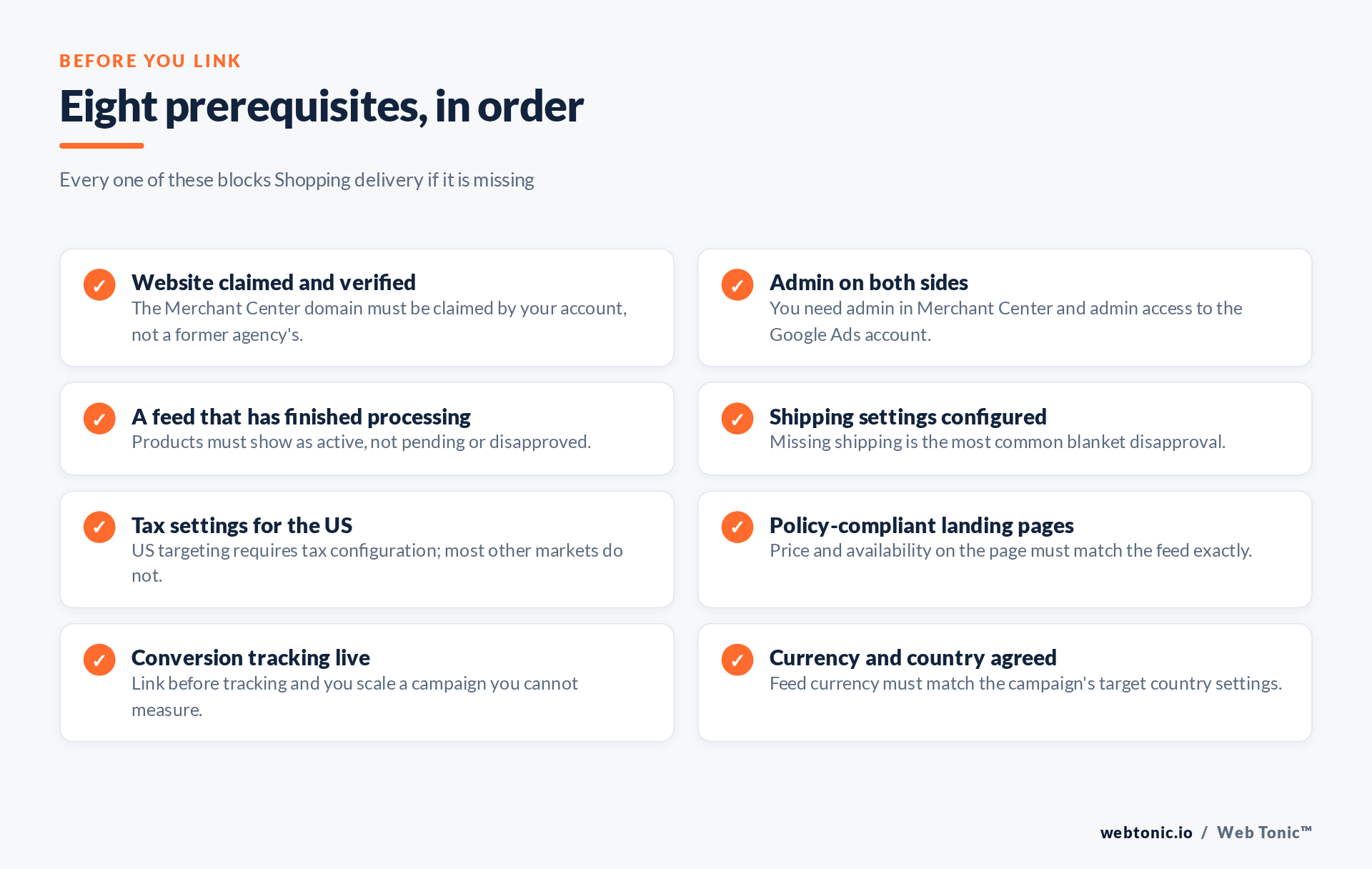
Claim and verify the website. The domain in Merchant Center must be verified and claimed by your account. If a previous agency claimed it, you cannot claim it again until they release it — settle that before anything else. Confirm you are admin on both sides, because a standard user can neither send nor approve the link. Let the feed finish processing; a feed uploaded ten minutes ago is not a feed. Configure shipping, which is the single most common cause of account-wide disapproval, and tax if you target the United States, per the tax setup documentation. Check landing pages: price and availability on the page must match the feed values, and a mismatch is an automatic disapproval. Install conversion tracking before you link, not after, so the first day of spend is measurable. Match currency and country between feed and campaign settings.
Linking, step by step
- Collect the Google Ads customer ID. It is the 10-digit number at the top right of the Ads account, formatted
123-456-7890. Use the ID of the account that will actually run Shopping, not the manager account above it. - In Merchant Center, open Settings then Linked accounts. Select the Google Ads tab.
- Enter the customer ID and send the link request. Merchant Center will show the link as pending.
- Switch to Google Ads and open the linked accounts section under admin settings.
- Approve the pending Merchant Center request. The status changes to active on both sides, usually within seconds.
- Confirm products are visible in Ads. Create or open a Shopping or Performance Max campaign and check that the Merchant Center account appears and reports a product count above zero.
- Sanity-check delivery after 24 hours. Impressions with no clicks is a bid or competitiveness problem; zero impressions is almost always a feed or approval problem.
| Where | Who does it | Action | Result |
|---|---|---|---|
| Merchant Center | Merchant admin | Send link request to the customer ID | Status: pending |
| Google Ads | Ads admin | Approve the pending request | Status: active |
| Merchant Center | Merchant admin | Clear feed diagnostics errors | Products eligible to serve |
| Google Ads | Media buyer | Attach the account to the campaign | Product count above zero |
| Site | Developer | Fire purchase tag with value and currency | Conversions reportable |
Why Shopping still shows nothing
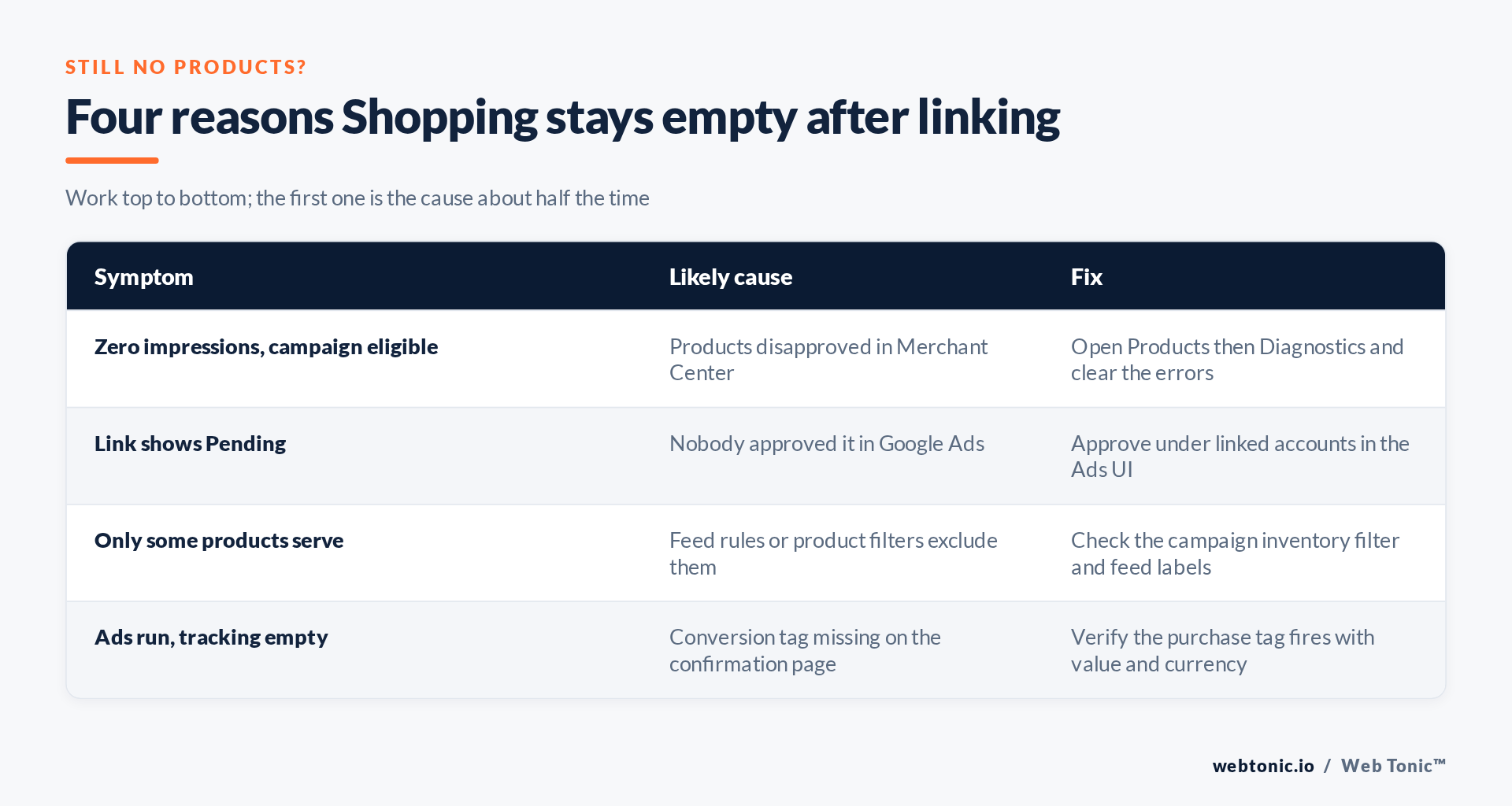
Once the link is active, the failure modes narrow to four. Disapproved products is the first and most common: open Products, then Diagnostics, and read the item-level issues rather than the summary — one missing attribute such as GTIN or shipping weight can suppress an entire category. A pending link looks identical to a broken one from the campaign side, so re-check the status on both sides rather than trusting one screen. Inventory filters quietly exclude products when a campaign is scoped to a feed label or a custom label that no product carries. And tracking gaps do not stop delivery but make the campaign unmanageable; the purchase event must send value and currency, and the rules in our conversion tracking work exist precisely because Shopping bidding is only as good as that signal.
Hygiene after the link
Keep the link, drop the people. Account links and user access are different things; removing a departed employee's user account does not break the link, and it should not. Review both user lists quarterly using the same least privilege rule you apply everywhere else, and read our MCC versus direct access guide before deciding where the Ads account should live. Automate the feed if it is large — the Content API keeps price and availability closer to real time than a scheduled file fetch, which materially reduces mismatch disapprovals and keeps the analytics layer honest. And if you sell into the EU, remember that the product data you push includes commercial terms customers rely on, so accuracy is a consumer-protection matter as much as a policy one, as the FTC and GDPR framings both underline in their own domains.
Frequently Asked Questions
Why does my Merchant Center link say pending?
Because nobody approved it in Google Ads. The request is sent from Merchant Center but only an admin on the Google Ads side can accept it.
Can one Merchant Center account link to several Google Ads accounts?
Yes. A Merchant Center account can be linked to multiple Ads accounts, which is normal for multi-market or agency setups. Each link is approved separately.
Do I need to claim my website before linking?
Yes. An unclaimed or unverified domain blocks product serving regardless of the link status, and it is the first thing to fix if a former agency still holds the claim.
Why are my products disapproved after linking?
Usually shipping or tax configuration, or a mismatch between the price and availability in the feed and what the landing page shows. Merchant Center diagnostics names the specific attribute.
Does unlinking delete my Shopping data?
Historical performance stays in Google Ads reporting, but campaigns stop serving immediately because they have no product source. Relink before you expect delivery to resume.
Sources: Merchant Center Help — link to Google Ads; Google Ads Help — Merchant Center links; tax settings; product data specification; Content API; NIST; FTC. Last verified 2026-08-21.


