



Table of contents
Quick answer: Grant an agency a manager account (MCC) link at Standard access, and keep Admin plus billing in-house. Use direct user invites only for individuals with no manager account. Never let the agency create or own the account itself.
Last verified: 2026-08-21
What a manager account actually is
A Google Ads manager account — still widely called an MCC, from "My Client Center" — is an umbrella account that can link to other Google Ads accounts and administer them without owning them. Agencies run one; so do large advertisers managing several brands or countries. Google documents the model in Google Ads Help.
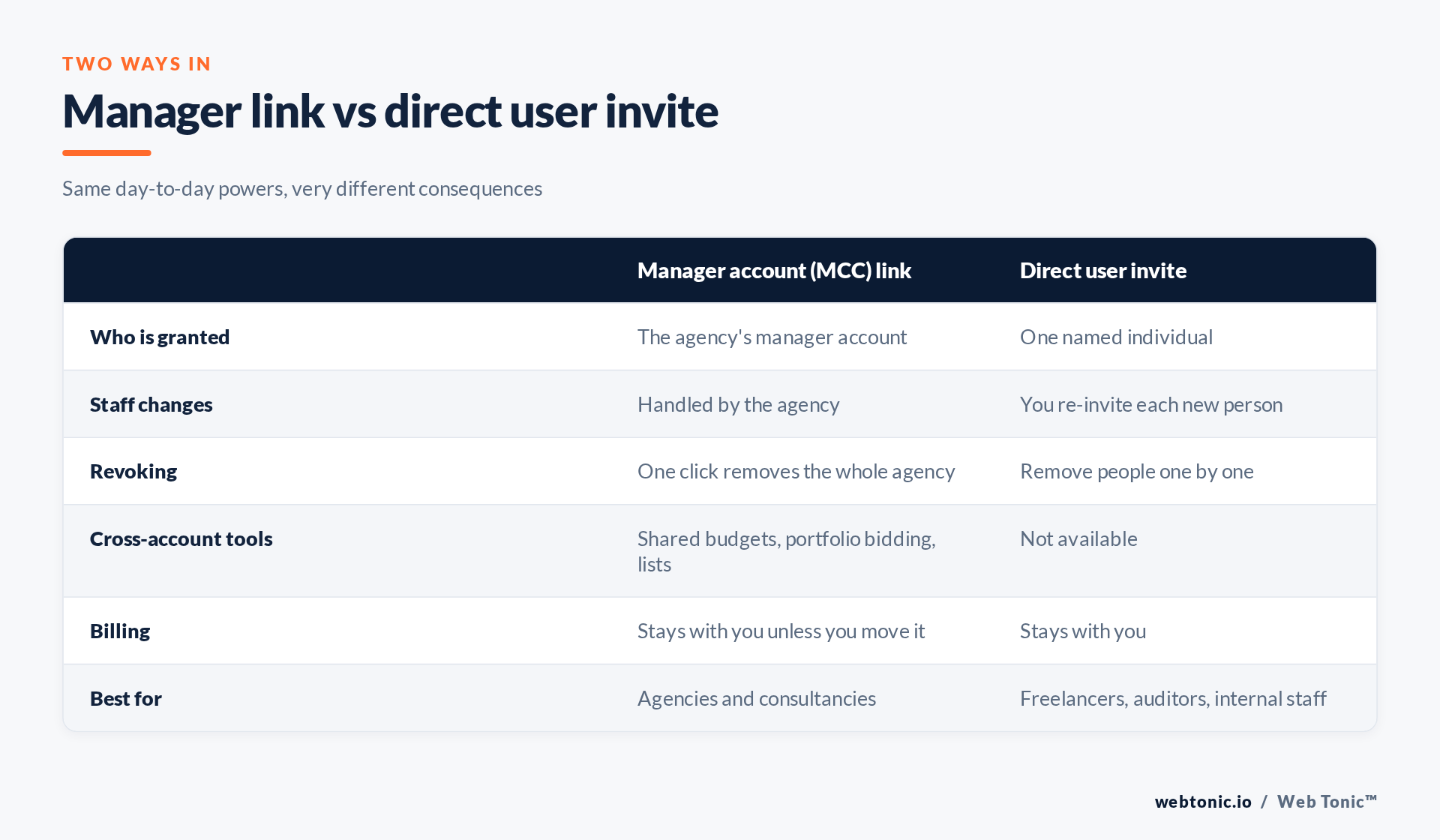
The linking flow is deliberately one-directional: the manager account sends a link request to your ten-digit customer ID, and someone with Admin access on your account approves it. You approve, so you can un-approve. That single property is why manager links beat every alternative for agency work.
Direct access: when it is still the right call
A direct user invite adds one named Google account to your Google Ads account, with an access level you choose. It is the right tool for a freelancer with no manager account, an auditor doing a one-off review, or your own staff. It is the wrong tool for an agency of any size, because every person who touches your account needs a separate invite and every departure needs a separate removal — a list that nobody maintains after month three.
Google's access levels are documented at Google Ads Help and map cleanly onto real jobs:
- Admin — everything, including adding and removing users and manager links. Keep this in-house, on at least two people.
- Standard — full campaign control and reporting, no user management. This is what a media buyer needs.
- Read only — reporting and viewing, no changes. Right for auditors and stakeholders.
- Email only — receives reports and nothing else. Rarely useful.
- Billing — payment settings without campaign access, for a finance contact.
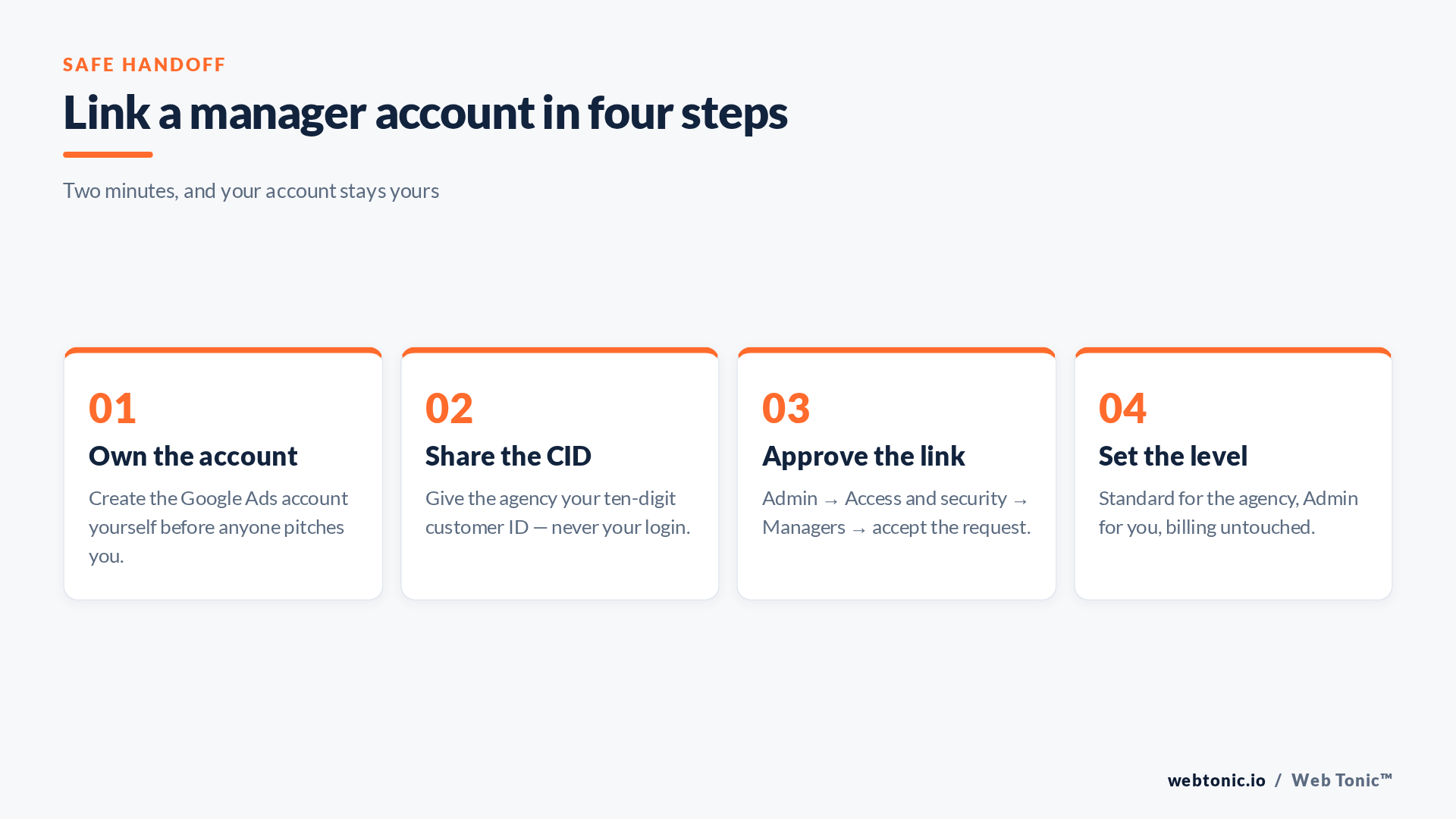
| Question | Manager link | Direct invite |
|---|---|---|
| Who holds the access? | A company | A person |
| Setup time | About 2 minutes | 1 minute per person |
| Offboarding | Remove one manager | Audit and remove each user |
| Shared budgets and lists | Yes, across linked accounts | No |
| Consolidated billing | Possible — usually decline | Not applicable |
| Risk if it goes wrong | Low, if you own the account | Orphaned users nobody removes |
The ownership trap
The genuinely costly mistake is not the access level — it is who created the account. If the agency spun up your Google Ads account inside their manager account, that account is theirs. On paper you can ask for it to be moved; in practice you are negotiating from a weak position at exactly the moment the relationship has soured.
What you lose with the account is not just campaign structure. You lose the conversion history that Smart Bidding models are trained on, your Quality Score history, your remarketing lists, and the change log that tells you what was done in your name. Rebuilding from zero typically means weeks back in learning, at full price.
Create the account yourself, at your own email domain, and link the agency's manager account to it. If an agency resists that, ask why. The good ones will already have proposed it.
Billing, and the "we'll handle spend" offer
Linking a manager account does not move billing. Consolidated billing is a separate, deliberate change where invoices go to the manager account. Some agencies offer it as a convenience, and for a small number of businesses — many small accounts, one purchase order — it genuinely is one.
Understand the trade. With consolidated billing you no longer see Google's own invoices, you cannot verify the media spend against the management fee independently, and you cannot pause spending yourself in a dispute. For most advertisers the right answer is to keep your own payment profile and give the agency Standard access, which cannot change payment settings at all. If you do accept consolidated billing, ask for the raw platform invoices monthly and write that into the contract.
Two configuration details worth knowing
Manager links stack. An account can be linked to more than one manager — your agency and, say, a separate analytics partner. Each link is independent, and the account owner sees all of them under Access and security. If you find a manager link you cannot identify, that is worth a conversation before you remove it, because it may be carrying shared conversion actions or budgets.
Conversion actions can live at manager level. A manager account can define cross-account conversion actions used by all its linked accounts — efficient, but another thing that leaves with the agency. Ask where your conversion actions are defined; if the answer is "in our MCC", plan for that in your exit. How we set that up sits inside our conversion tracking and analytics work, with API-level detail on account access in Google's Ads API documentation.
Whatever you grant, write it down and re-read the list quarterly. Documented, least-privilege access is the same baseline the FTC recommends for any business, and the least privilege principle applies as much to ad spend as to customer data. The full multi-platform handoff, including Meta and GA4, is in our agency access guide.
Frequently Asked Questions
Does linking a manager account give the agency my billing details?
No. A manager link does not move billing or expose your payment profile. Consolidated billing is a separate change you would have to approve.
Can I be linked to two agencies at once?
Yes. Multiple manager accounts can link to the same Google Ads account, which is how a transition period between agencies is normally run.
What is a customer ID and is it safe to share?
It is the ten-digit number identifying your Google Ads account, shown at the top of the interface. It is safe to share — it lets an agency request a link, which you still have to approve.
The agency created our account. Can we get it back?
You can ask them to unlink it and transfer administrative access to an email you control. There is no unilateral mechanism, which is exactly why you should create the account yourself from the start.
Standard or Admin for the agency?
Standard. It allows every campaign change they need while blocking user management and billing changes. Admin should stay with people who work for you.
Sources: Google Ads Help — manager accounts; Google Ads Help — access levels; Google Ads Help — billing and payments; Google Ads API — access and OAuth; NIST — least privilege; FTC. Last verified 2026-08-21.


