



Table of contents
Quick answer: A vertical one-day drop in GA4 with unchanged revenue and server logs is a measurement loss, not a traffic loss. The banner is blocking tags before consent. Implement consent mode signals, check the default consent state, and rebaseline your reporting.
Last verified: 2026-08-21
First, decide which problem you have
There are only two possibilities and they demand completely different responses. Either fewer people visited the site, or the same people visited and you stopped counting some of them. Confusing the two burns a week: teams launch recovery campaigns for traffic that never left, or shrug off a genuine collapse as "just the cookie banner".
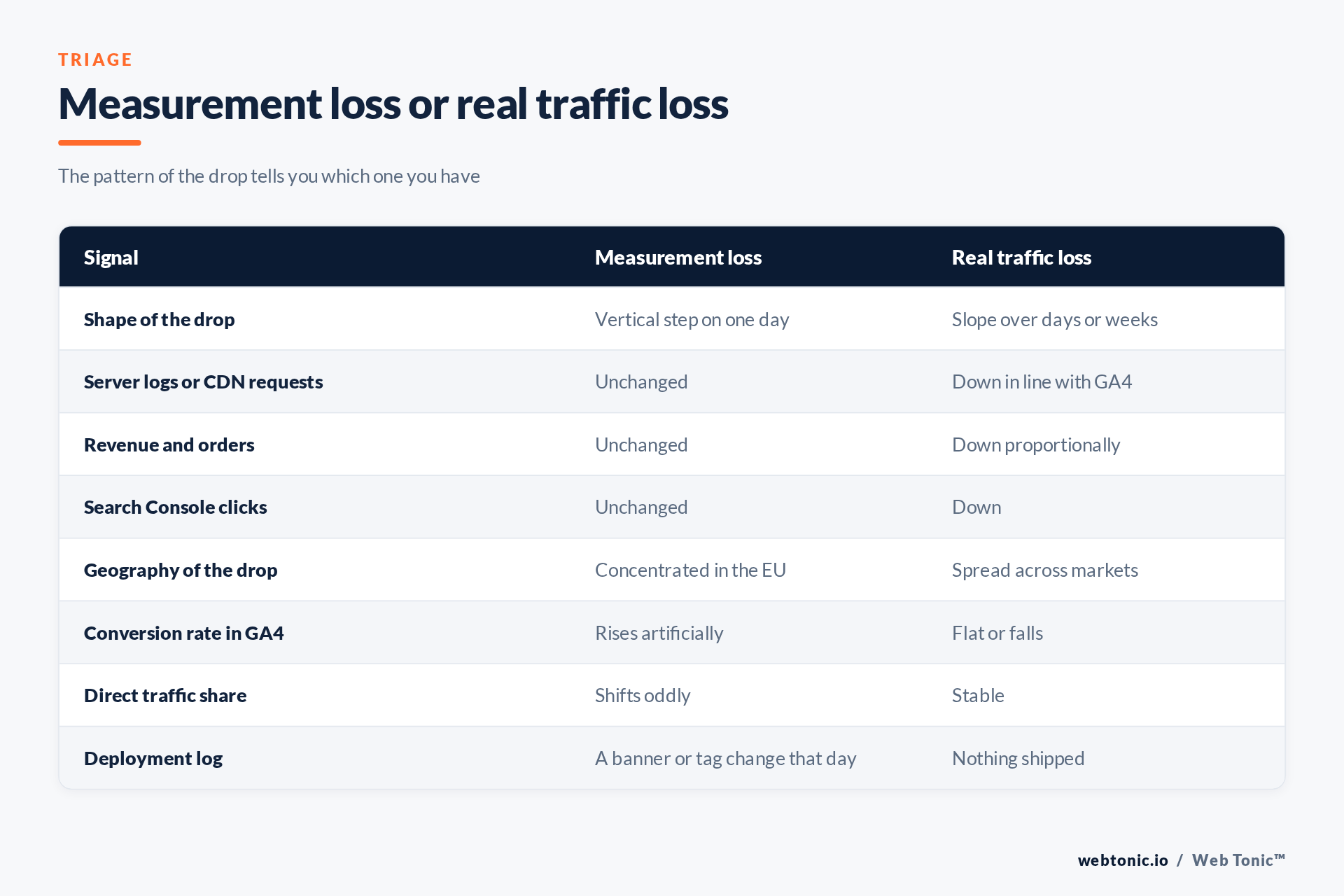
The tell is the shape of the drop. Real traffic losses have slope — an algorithm update, a seasonal shift or a paused campaign bleeds out over days. Measurement losses are vertical: a normal Tuesday, then a 40% lower Wednesday, then a flat new plateau. If your low day lines up with a deployment timestamp, you have your answer before you open a single report.
Corroborate it with anything outside GA4. Server or CDN request logs, order counts in the commerce platform, and clicks in Search Console are all measured independently of your cookie banner. If those are flat while GA4 halved, nobody stopped visiting.
Why a banner removes traffic from GA4
Tags blocked before a choice is made
Most consent platforms can be configured to hold all non-essential tags until the visitor accepts. Under that configuration, everyone who ignores the dialogue, scrolls past it, or leaves the page becomes invisible — and a large share of visitors do exactly that. This is the single most common cause and it is a configuration decision rather than a bug.
Consent mode not implemented
Google's consent mode exists precisely for this situation: tags stay loaded but adjust their behaviour according to consent state, sending cookieless pings when storage is denied so that some measurement survives. The implementation steps are documented in setting up consent mode on websites, and Analytics' own view of the behaviour is described in consent mode on websites and apps. Without it, denial means silence.
A wrong default consent state
A default of denied is correct for European visitors and catastrophic if applied globally by accident. Equally, a banner that never updates consent after acceptance leaves everyone in the denied state forever. Both faults look identical in the reports and both are found by testing the page rather than reading the dashboard.
Tag Manager configuration
Where Tag Manager sits in the middle, its own consent settings must agree with the banner. Google documents this in Tag Manager consent mode support; a mismatch between a tag's required consent and the signal the banner sends produces exactly the same silent loss.
| Check | How to test it | What good looks like |
|---|---|---|
| Default consent state | Load the page fresh, inspect the data layer | Denied in the EU, granted elsewhere if lawful |
| Cookieless pings | Watch network requests before accepting | Requests still sent, without identifiers |
| Post-acceptance update | Accept, then watch for an update event | Consent updates and full tags fire |
| Geographic scoping | Test from an EU and a non-EU IP | Rules apply only where required |
| Tag Manager alignment | Review consent settings per tag | Every tag declares its requirements |
| Annotation | Record the change date somewhere durable | Future comparisons account for the break |
What you can and cannot recover
Be honest with yourself and the client here. You are not recovering all the traffic — you are recovering the portion you are legally permitted to measure. If a visitor refuses cookies, you do not get their session back, and no configuration trick should try. The European Data Protection Board's guidance and the plain-language explainer at gdpr.eu on cookies are the boundary; consent mode operates inside it, and a "fix" that ignores it is a liability rather than a win.
What consent mode does buy you is a modelled and cookieless signal instead of nothing, plus continuity in the metrics that drive spend decisions. In practice a well-implemented setup recovers a meaningful share of the lost visibility while leaving the compliance posture intact.
The second recovery lever is the banner itself. Acceptance rates vary enormously with placement, wording and how obstructive the dialogue is. That is a design and legal conversation rather than a tagging one, but it moves the number far more than any tag edit will.
Reporting across the break
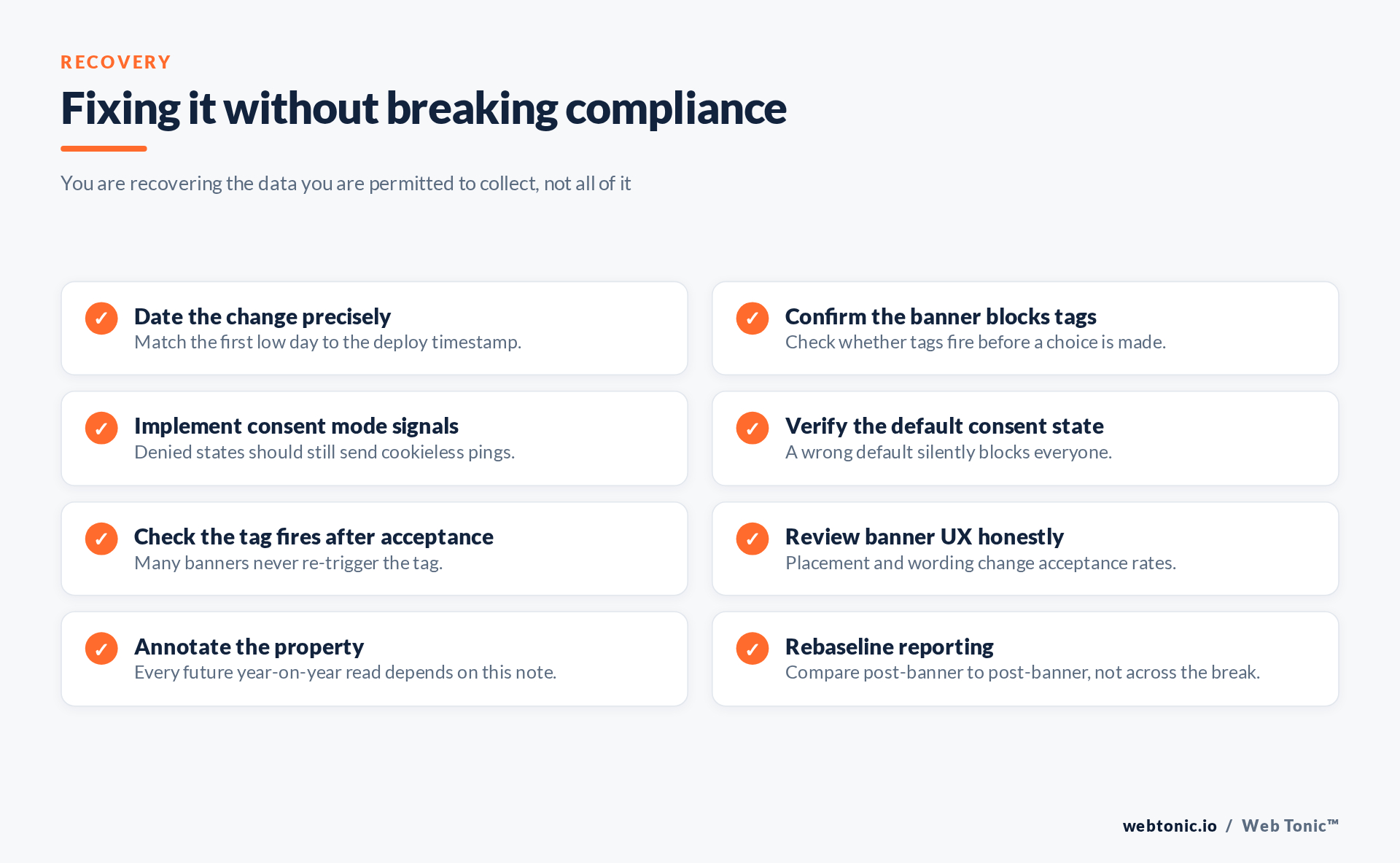
Once the cause is confirmed, annotate it and change how you report. Year-on-year comparisons that straddle the banner launch are meaningless and will be quoted back at you for years. Rebaseline: compare post-banner periods to post-banner periods, and where a longer trend is genuinely needed, use a source unaffected by consent — orders, revenue, or Search Console clicks.
Also review your filters while you are in there. Google's documentation on data filters is worth a read, because an internal-traffic or developer filter added in the same release window is an easy second cause to miss when everyone has already blamed the banner.
Structurally, this is the moment to consider moving measurement server-side. It does not bypass consent — nothing legitimate does — but it makes what you are permitted to collect far more robust, which is why we treat it as core server-side tracking work alongside the wider conversion tracking and analytics setup. If ad platform numbers moved on the same day, read why Google Ads and Shopify disagree next.
Frequently Asked Questions
How much GA4 traffic should a consent banner cost?
There is no reliable universal figure — it swings with geography, audience and banner design. Measure your own before-and-after rather than trusting a benchmark.
Does consent mode make the data complete again?
No. It preserves a cookieless and modelled signal where storage is denied. It restores continuity and directional accuracy, not per-user completeness.
Can I just apply the banner to EU visitors?
Geographic scoping is common, but which rules apply where is a legal question for the client's counsel, not a tagging preference.
Why did conversion rate go up after the banner?
Because sessions were lost but purchases were still recorded server-side or post-consent. An inflated rate on a shrunken denominator is a classic symptom.
Should I restate historical reports?
Do not rewrite history. Annotate the break, explain it once in the report, and compare like with like from then on.
Sources: Google — consent mode overview; consent mode setup; Analytics consent mode; Tag Manager consent support; GA4 data filters; GDPR and cookies; European Data Protection Board. Last verified 2026-08-21.


