



Table of contents
Quick answer: An Event Match Quality drop is nearly always fewer or worse customer parameters reaching Meta — a consent banner change, a field that stopped being sent, or a hashing bug after a release. Diff the drop date against your deploys first, then check per-parameter coverage before touching campaigns.
Last verified: 2026-08-21
What the score is actually telling you
Event Match Quality measures how well the customer information you send with an event can be matched to a person on Meta's side. It is a rolling, dataset-level score per event, and it moves for exactly two reasons: the coverage of your customer parameters changed, or the quality of those parameters changed. Everything in this page is a special case of one of those two.
The score matters because matching feeds attribution and optimisation. When matching degrades, reported conversions fall before real conversions do, the bidding system learns from a thinner signal, and CPAs rise for reasons that look like an auction problem and are not. That distinction is the whole point of diagnosing properly rather than reacting in the ads manager.
Meta's own Business Help Center and the Conversions API developer documentation are the authority on parameter definitions and hashing requirements; read them alongside this page. We reference them by name deliberately — their pages block automated verification, so we will not link to them from a page whose promise is that every link works.
1. A consent banner or CMP change
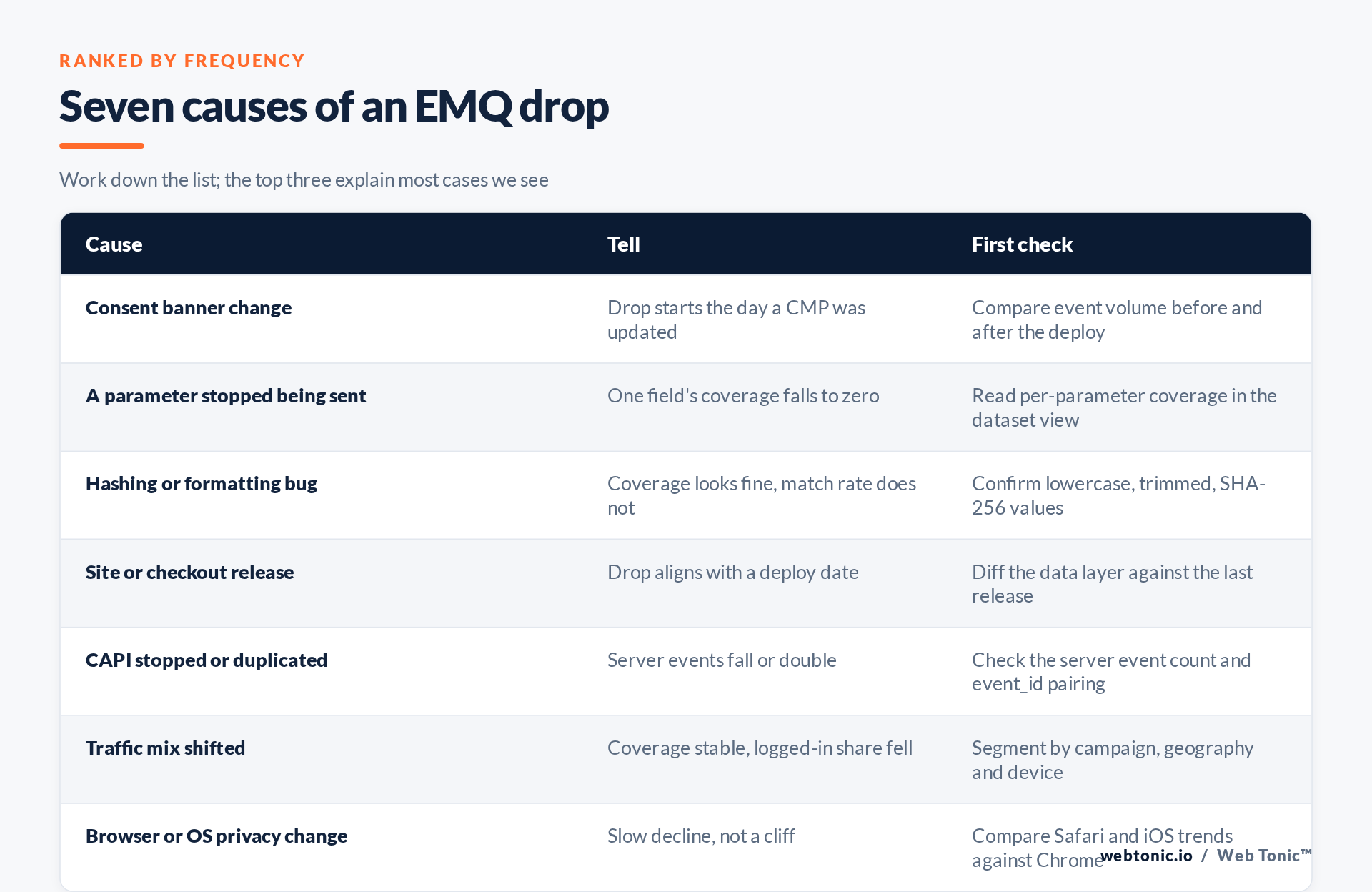
The most common cause, and the easiest to miss because it is usually someone else's project. A new consent management platform, a stricter default, a repositioned button or a change from implied to explicit consent all reduce the share of visitors whose data you may send. Coverage falls across every parameter at once, starting on a specific day.
Check: ask when the CMP or banner last changed and compare total event volume either side of that date. Fix: this is often correct behaviour, not a bug — you are honouring consent obligations of the sort described in the GDPR. Recover signal legitimately by improving consent rates and by sending richer parameters for the users who did consent.
2. A parameter silently stopped being sent
A form change, a checkout redesign or a tag manager variable pointing at a renamed field, and suddenly email is absent from half your purchase events. The dataset view shows per-parameter coverage; one field collapsing while the rest hold steady is the signature.
Check: per-parameter coverage over the last 30 days. Fix: restore the mapping, and add a monitoring alert so the next occurrence is caught in a day rather than a quarter.
3. Hashing or normalisation is wrong
Customer data must be normalised before hashing — lowercase, whitespace trimmed, phone numbers reduced to digits with a country code, then hashed with SHA-256. Send [email protected] unnormalised and the hash is a different value from the one Meta computes, so coverage looks perfect and matching quietly fails.
Check: hash a known test address by hand and compare it with what your integration sends. Fix: normalise in one place server-side rather than in every tag, and never double-hash an already-hashed value — a hash function gives no clue that its input was already a digest.
| Parameter | Matching weight | Common failure |
|---|---|---|
| Highest | Missing on guest checkout, not lowercased | |
| Phone | High | No country code, formatting characters kept |
| Click ID (fbc) | High | Lost on redirect, never persisted server-side |
| Browser ID (fbp) | Medium-high | Cookie blocked or not read by the server |
| External ID | Medium | Inconsistent between web and server events |
| IP and user agent | Medium | Proxy IP sent instead of the visitor's |
4. A site or checkout release
Deploys break tracking more often than platforms do. A new checkout, a single-page-app router change, a cookie policy tweak or a CDN in front of the site can all drop parameters. Check: put the drop date next to the deploy calendar. Fix: make a tracking smoke test part of the release checklist — this is exactly what our conversion tracking and server-side tracking work is designed to prevent.
5. The Conversions API stopped, or started duplicating
Server events carry parameters the browser cannot, so a stalled CAPI integration takes the score down with it: an expired access token, a failed deploy, a rate-limited endpoint. The mirror image is duplication — the same conversion arriving twice because event_id and event_name no longer match between browser and server, which corrupts both counts and matching.
Check: server event volume as a share of total, and the deduplication rate. Fix: restore the integration and verify pairing; the detail lives in our Conversions API work.
6. The traffic mix moved
Nothing broke; you simply bought different traffic. A push into a new country, a shift from retargeting to broad prospecting, or a campaign sending users to a page that collects no identifiers will lower the blended score. Check: segment the trend by campaign, geography and device. Fix: often none — but decide consciously, and capture identifiers earlier in the journey where you can.
7. Browser and platform privacy changes
Cookie lifetime limits, tracking prevention and OS-level opt-outs produce a slow erosion rather than a cliff. Check: compare Safari and iOS against Chrome over 90 days. Fix: move identification server-side and lean on first-party data, the same direction of travel that the FTC's privacy guidance and the wider regulatory picture imply.
How to judge whether your fix worked
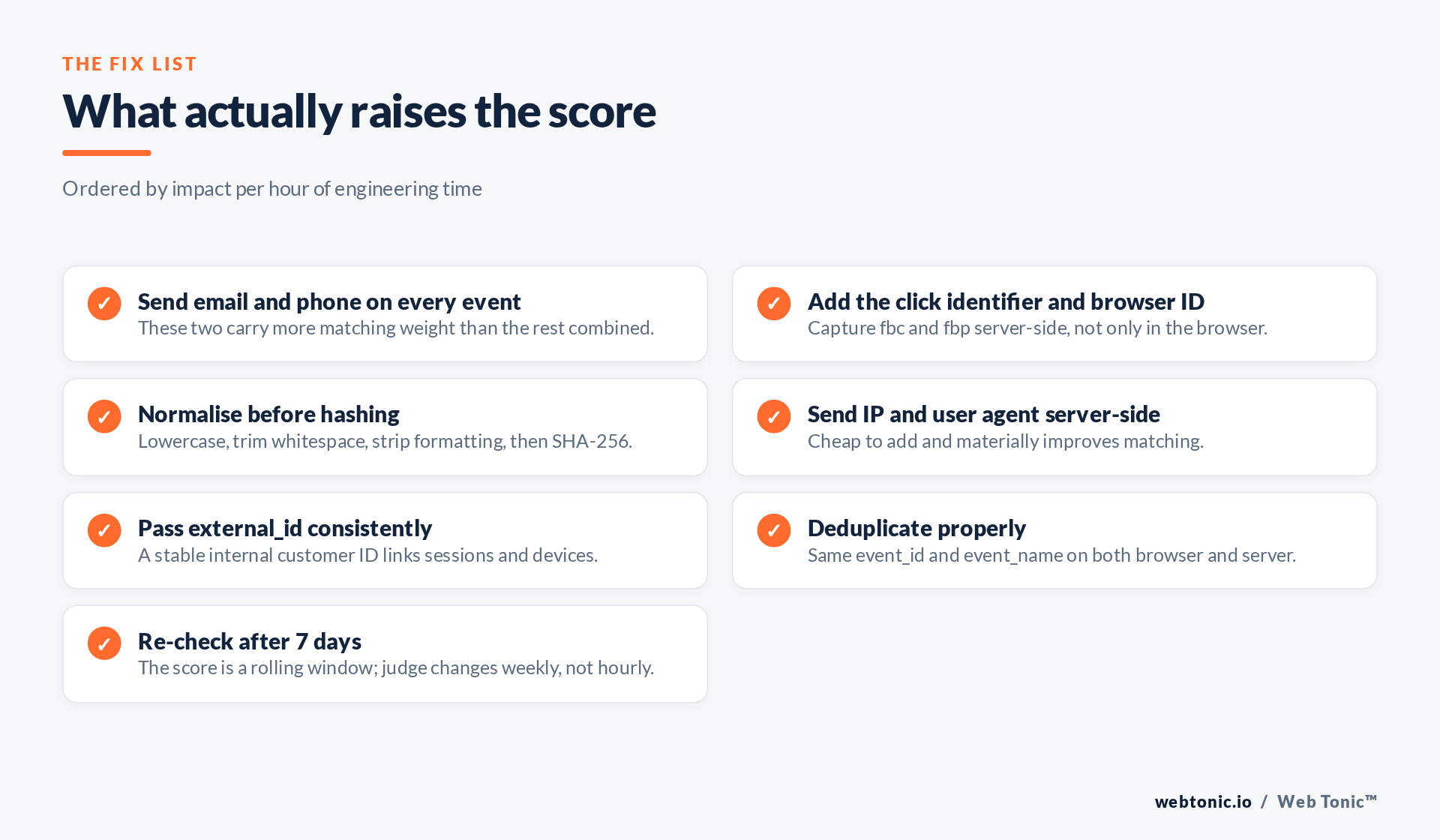
The score is a rolling average, so a change deployed this morning will not show up this afternoon. Give it seven days, then compare like with like. Judge the fix on per-parameter coverage — which responds immediately and is unambiguous — rather than on the headline number, and keep an eye on reported conversion volume, which is the outcome you actually care about. If you also run Google properties, apply the same discipline there, where enhanced conversions depends on the identical normalise-then-hash pipeline, and check consent settings in analytics at the same time.
Frequently Asked Questions
What is a good Event Match Quality score?
Treat it as relative, not absolute: your own trend matters more than a target. Sending email, phone, click ID and browser ID consistently puts most e-commerce datasets in a healthy range.
How quickly does the score update after a fix?
It is a rolling window, so allow roughly seven days. Per-parameter coverage moves faster and is the better short-term confirmation that a fix landed.
Does the Conversions API automatically improve match quality?
Only if it sends parameters the browser could not, correctly normalised and hashed, and deduplicated against browser events. A poorly configured CAPI can lower the score.
Can a consent banner lower Event Match Quality?
Yes, and it is the most common cause. Fewer consented users means fewer parameters. That is compliant behaviour, so recover signal through consent rate and richer consented data.
Should I pause campaigns while match quality is low?
No. Pausing resets learning and hides the problem. Fix the data layer while campaigns run, and expect reported performance to recover before you change any bids.
Sources: Meta Business Help Center (Event Match Quality) and Meta Conversions API developer documentation, cited by name because those domains block automated link verification; SHA-256; NIST — hash function; Google enhanced conversions; Analytics consent settings; GDPR; FTC. Last verified 2026-08-21.


